


Deezer is a fantastic music platform, offering high-quality 320kbps streams and HiFi 1411kbps FLAC lossless audio, which makes it a solid choice for audiophiles. However, some users may want to take things a step further by exporting music files from Deezer.
In this article, we will take a closer look at some of the best Deezer downloaders out there. Some are perfect for getting Deezer music in MP3 format, and others are better for even downloading Deezer's FLAC lossless music in HiFi quality.

Snapshot: Best Deezer to MP3 Downloaders
| Downloader | Key Feature Snapshot | Formats | Free | Rate |
|---|---|---|---|---|
| Sidify Deezer Music Converter | Lossless Deezer Playlist Downloader; original high-quality. | MP3, AAC, WAV, FLAC, AIFF, ALAC | ❌ | ⭐⭐⭐⭐⭐ |
| DeeMix | Free Deezer Music to MP3 Downloader | MP3, FLAC | ✔️ | ⭐⭐ |
| Allavsoft | Deezer Songs to MP3 Downloader | MP4, MP3, etc. | ❌ | ⭐⭐ |
| Acethinker | Download songs via YouTube using Deezer links | MP3 | ❌ | ⭐⭐ |
| ReFreezer | Best Android Deezer MP3 Music Downloader | MP3 | ✔️ | ⭐⭐⭐⭐ |
| AIDS Downloader | Download and convert Deezer to MP3 music on Android | MP3, FLAC | ✔️ | ⭐⭐⭐ |
| Telegram Bots | Deezer Music Bot Downloader for Android and iOS | MP3, AAC, FLAC | ✔️❌ | ⭐⭐⭐ |
| Murglar | Deezer Music Downloader on Desktop | MP3, FLAC | ❌ | ⭐⭐ |
1. Sidify Deezer Music Converter 🏆🏆🏆
Sidify Deezer Music Converter is a professional music downloader for the Deezer music library. This desktop program allows you to download original music from Deezer in both MP3, FLAC, and other audio file formats (AAC, ALAC, AIFF, WAV). The Deezer music downloads will be saved as real music files in your preferred path. The program outputs the same quality level as you listen on the Deezer player, either 320kbps or 1411+kbps. Most importantly, ID3 tags or lyrics are well kept along with the Deezer downloads.
Sidify Deezer Music Converter
- Download Deezer Music with Free and Premium accounts.
- Download Deezer podcasts, music, albums, playlists, and audiobooks.
- Convert Deezer Music to MP3/AAC/WAV/FLAC/AIFF/ALAC.
- 10X faster conversion speed is supported.
- Preserve original Deezer HiFi quality and keep ID3 tags.
- No need to install the Deezer Music app.

| Feature | Sidify Deezer Music Converter |
|---|---|
| OS | Windows and Mac |
| Download Type | Songs, Playlists, Albums, Radio, Podcast |
| Format | MP3, AAC, FLAC, WAV, ALAC or AIFF |
| Quality | 320kbps, 1411+kbps |
| Metadata | Title, Artist, Track Number, and Album |
| Batch Conversion | ✅ |
| Speed | 10× |
|
|
- Simple interface, one-click music add operation, and personal download settings.
- Preserve original audio quality (up to 320kbps / HiFi FLAC lossless).
- Download multiple Deezer playlists simultaneously at fast speed.
- Safely back up downloaded Deezer music forever on local end.
- The free trial version limits each song to 1 minute.
How to Download Deezer Songs and Playlists to MP3s?
Step 1 Run Sidify Deezer Music Converter. From the pop-up windows, log into with a Deezer account to visit the Deezer music library.
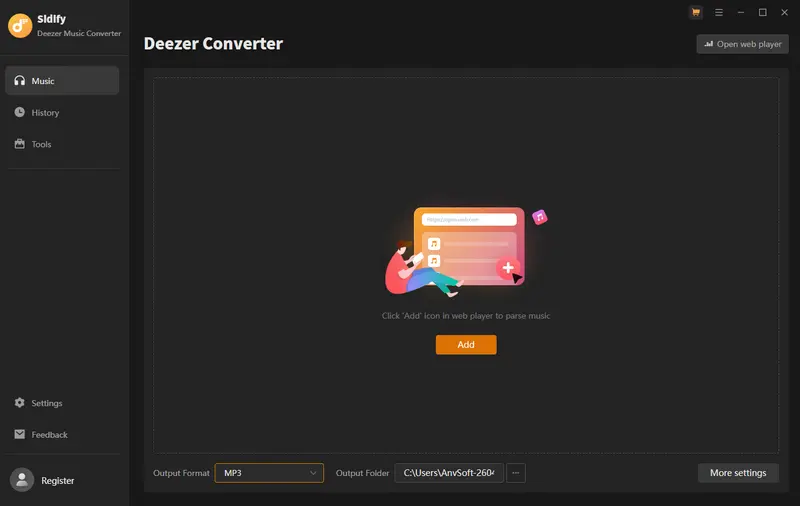
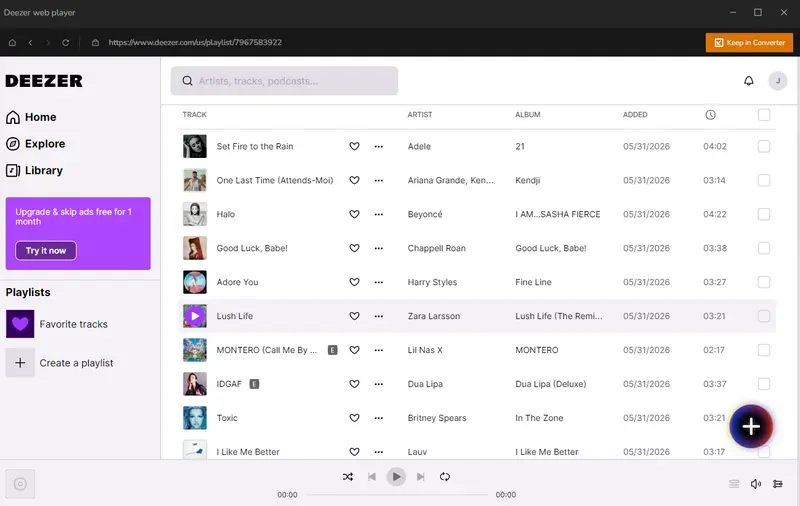
Step 2 Open the playlist in your Deezer web library and click "Click to Add" to load all songs into the conversion panel. You can then select songs one by one to convert.
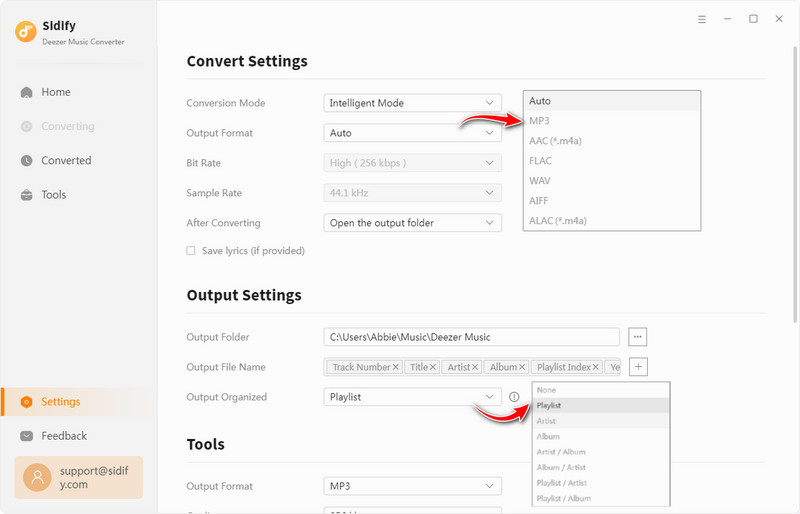
Step 3 Open the "Settings" menu in the converter. Here, you can customize the Deezer music output format (e.g., MP3), set the output quality, and choose the folder where the downloaded Deezer tracks will be saved locally.
Step 4 Hit "Convert" to download Deezer music in MP3 format. The converter works up to 10× faster than normal playback.
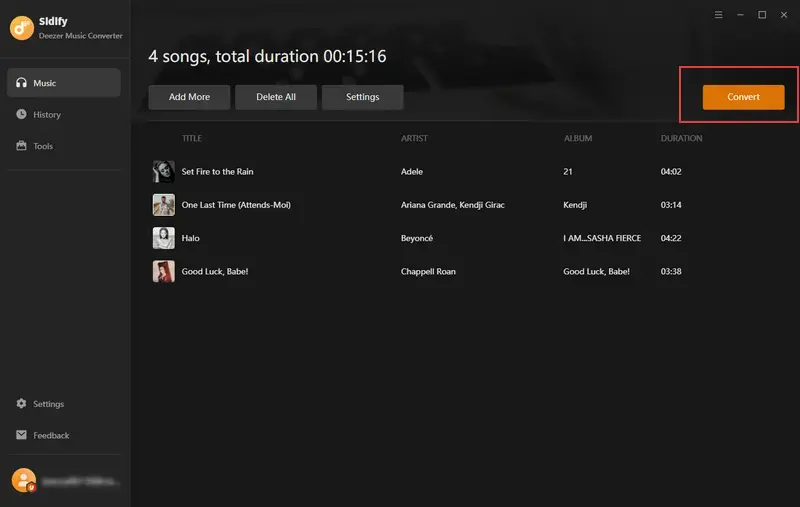
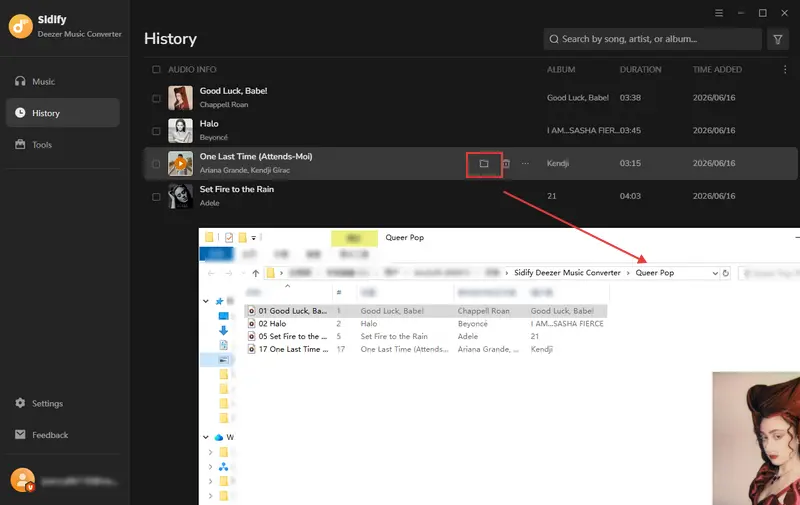
Step 5 After downloading all Deezer tracks, open the Converted section to find them. Tap the folder icon next to a song to see its local backup on your computer. You can now enjoy Deezer music even without a Premium subscription, and on any device.
Video Tutorial: How to Download Music from Deezer to MP3, FLAC, & WAV On PC
2. DeeMix - Free Tool to Download Deezer Music in MP3 Format
DeeMix is an open-source music downloader that allows users to download songs, albums, and playlists directly from Deezer service. It can convert Deezer music to MP3 (128 kbps to 320 kbps) or FLAC (1411 kbps) and supports downloading entire Deezer playlists. It offers customizable settings, including language, appearance, download path, file naming, folder structure, cover saving, and keeping tags. Deemix runs on Android, iOS and requires a login token from the streaming service to access Deezer music library.
| Feature | DeeMix |
|---|---|
| OS | Windows, Mac, Linux, Android, and iOS |
| Download Type | Songs, Albums, Playlists |
| Format | MP3, FLAC |
| Quality | 128kbps, 320kbps, 1411+kbps |
| Metadata | Title, Artist, and Album |
| Batch Conversion | ✅ |
| Speed | Fast |
|
|
- Complete free way to download Deezer MP3 and FLAC format files.
- Simple UI to browse Deezer library and put songs download in one click.
- Provide listed charts (top 100 songs from different countries).
- Webpage banner ads.
- Often login fail or connection errors.
- Can't access to personal created playlists.
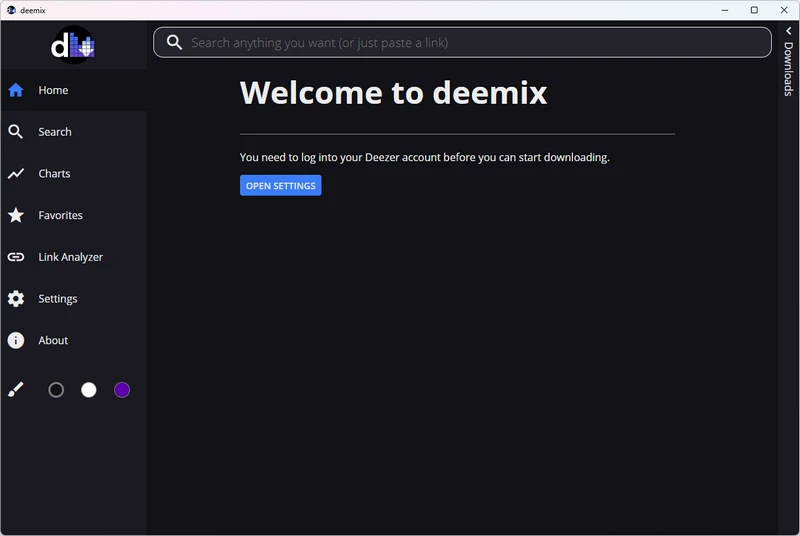
Step 1 Open the Deemix program that is embeded with Deezer music library. Follow the on-screen tip to log in your Deezer account.
Step 2 Tap settings on the left panel, customize the deezer download preference like the download path and format as well as the quality you like.
Step 3 Hover over the playlist and click the one-click download option, or open the playlist to download songs individually.
Step 4 When the download is done, you can find the Deezer music downloads inside the download location that you set before.
3. Allavsoft - Deezer Music MP3 Downloader
Allavsoft is an all-in-one video and music downloader that supports 1,000+ platforms, including Deezer. The desktop version is not completely free. It allows up to 5 video downloads or 5 minutes of conversion for free. A license is required to unlock the full download features. In addition to Deezer, it also supports downloading music from Spotify, YouTube, Qobuz, SoundCloud, and Napster in MP3 and FLAC formats.
| Feature | Allavsoft |
|---|---|
| OS | Windows, MacOS |
| Download Type | Videos & Music |
| Format | MP3, FLAC, AIFF, etc. |
| Quality | 128kbps ~ 320kbps |
| Metadata | Title |
| Batch Conversion | ✅ |
| Speed | Fast |
|
|
- Simple Deezer music to MP3 and FLAC downloader.
- Except Deezer, music and videos can be downloaded from over 1000+ sites.
- Output Deezer music in varios audio formats.
- Not true Deezer-native quality.
- Not completely free to convert Deezer music.
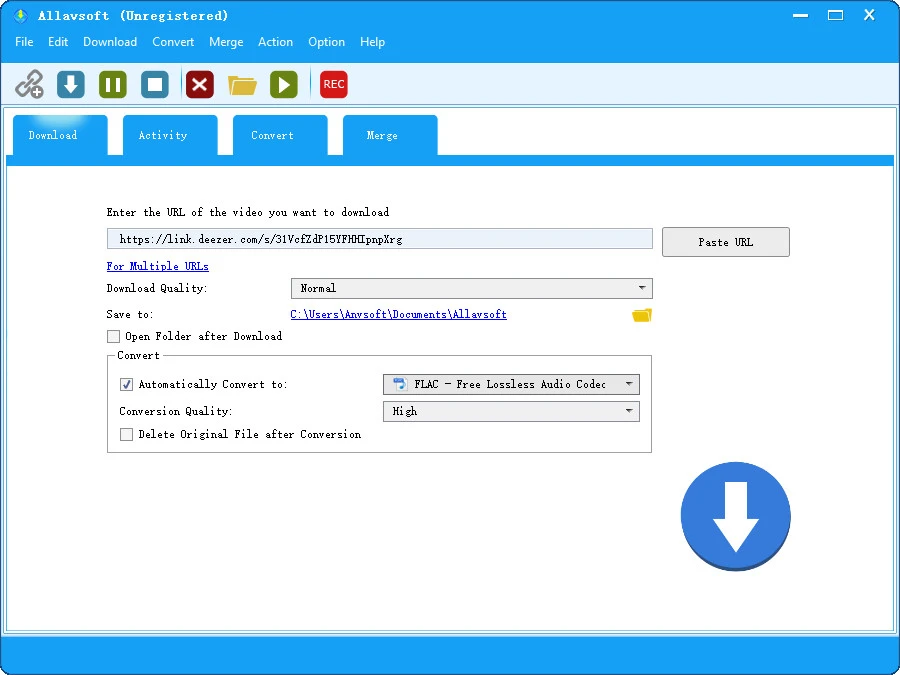
Step 1 Copy and paste the Deezer music or playlist link to Allavsoft.
Step 2 Set the Deezer music format to MP3 via the General Audio drop-down menu.
Step 3 Click the big round Download button to start and finish downloading Deezer music to MP3 conversion.
4. Acethinker - Get Downloadable Deezer MP3 Music
AceThinker is an online music downloader tool that can convert and download music from streaming links, including Deezer, into MP3 or other audio and video formats. By default, the output format is MP3. Simply paste the Deezer track URL into the downloader, select your desired format and quality, and download the real audio file.
| Feature | Acethinker |
|---|---|
| OS | Windows, Mac |
| Download Type | Music, Videos |
| Format | MP3 |
| Quality | 256kbps |
| Metadata | Title, Artist |
| Batch Conversion | ❌ |
| Speed | Fast |
|
|
- Alternative Deezer Music downloading way to have music files.
- Deezer music is sourced from YouTube, not official Deezer servers.
- Free trial is limited to 10 songs. Need to upgrade to pro version for unlimited.
Step 1 Download and run the program on the computer.
Step 2 Go to the settings, set up the download format to MP3 music.
Step 3 Input the Deezer music url when the program will analyze the link information and show out the resultes from YouTube.
Step 4 Click the MP3 download option and the program will start to download the music from online to offline local path.
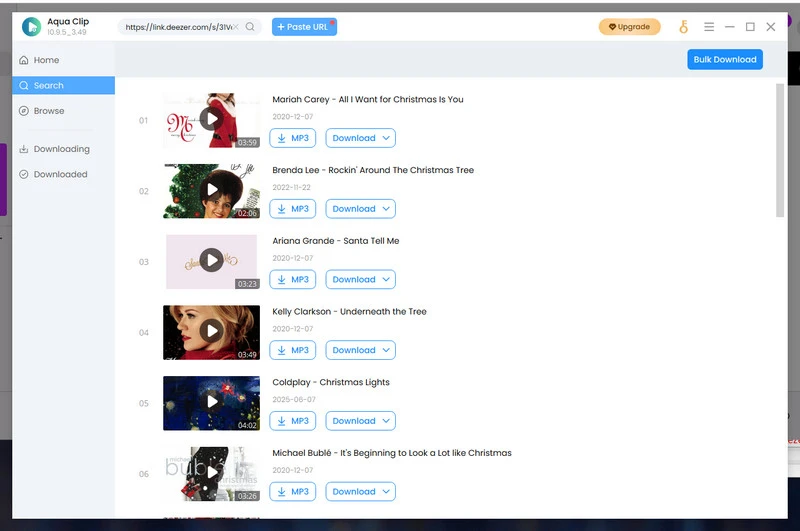
5. ReFreezer - Free Deezer Music Downloader App
ReFreezer (for Android) is a wonderful Deezer music downloader for android phones. Firstly, it is easy to uninstall without ads. As you access the Deezer music library with your account info, you can view all the songs with an additional download option which is exactly free to use! That said, you can one-click download your preferred songs on Deezer for free. Most importantly, all the downloads are directly download to the Android internal storage. You can further set the Deezer music downloads as Android ringtone if needed.
| Feature | ReFreezer |
|---|---|
| OS | Android |
| Download Type | Songs & Playlists |
| Format | MP3 |
| Quality | 128kbps ~ 320kbps |
| Metadata | Title, Artist, Cover, Lyrics and TrackNum |
| Batch Conversion | ✅ |
| Speed | Fast |
|
|
- Download Deezer playlists to MP3 without costs.
- Download playlists in bulk at fast speed.
- Export Deezer music files to Android internal storage without Premium.
- Only MP3 download Deezer format.
Step 1 Download the Freezer apk from the official website to your Android phone. Allow the permission to install on the device.
Step 2 Run the deezer music downloader and log in with your Deezer music account.
Step 3 Tap the Settings icon at the top right corner and set up the download path as well as the quality.
Step 4 Now, from the deezer music library, tap the download button next to your playlist.
Step 5 Check the music files locally saved on your phone.
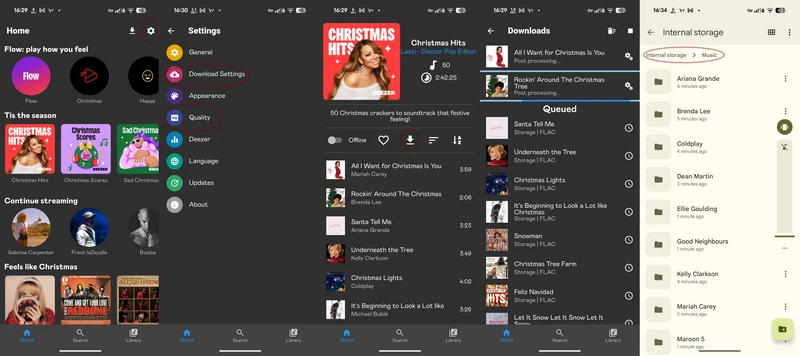
6. AIDS Deezer Downloader - Best Deezer MP3 Downloader on Android
AIDS Deezer Downloader works as a free Deezer music downloader application on Android, but stability can be an issue. Login connection errors and occasional failures are common. In daily use, searching tracks by keywords works, and most Deezer songs and playlists can still be downloaded. The downloader supports Deezer to FLAC and MP3 formats (128 kbps and 320 kbps). Downloaded music is saved directly to a local customized folder.
| Feature | AIDS Deezer Downloader |
|---|---|
| OS | Android |
| Download Type | Songs, Playlists & Albums |
| Format | MP3, FLAC |
| Quality | High Quality |
| Metadata | Title, Artist, and Album |
| Batch Conversion | ✅ |
| Speed | Fast |
|
|
- Free download music from deezer in FLAC or MP3.
- Batch download Deezer playlist songs.
- Error connection to Deezer account loggin via arl.
- Not direct deezer music access and download streamlined way.
Step 1 Download the AIDS Android from Malavida and install it on your Android phone.
Step 2 Open the application and go to the Settings tap. Enter the Deezer account ARL to log your Deezer account.
Step 3 Search via keywords, tap a result, and hit the download option for single tracks or entire albums. Decide between MP3 320kbps or FLAC format.
Step 4 At last, check the downloads by going to your local Android storage location.
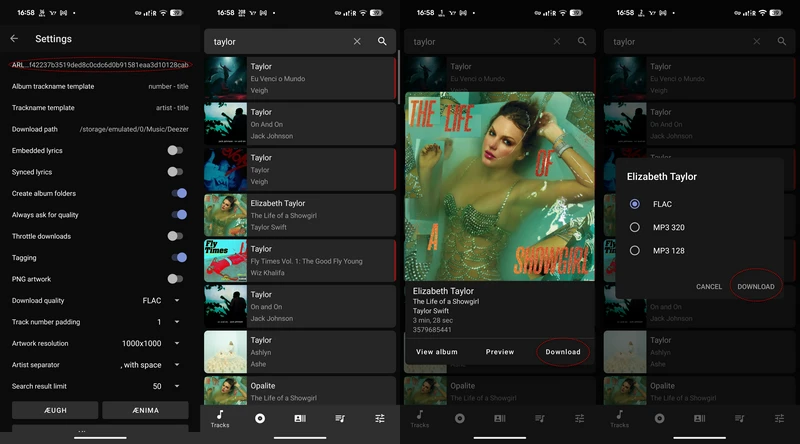
7. Telegram Bots - Deezer Music Bot Downloaders
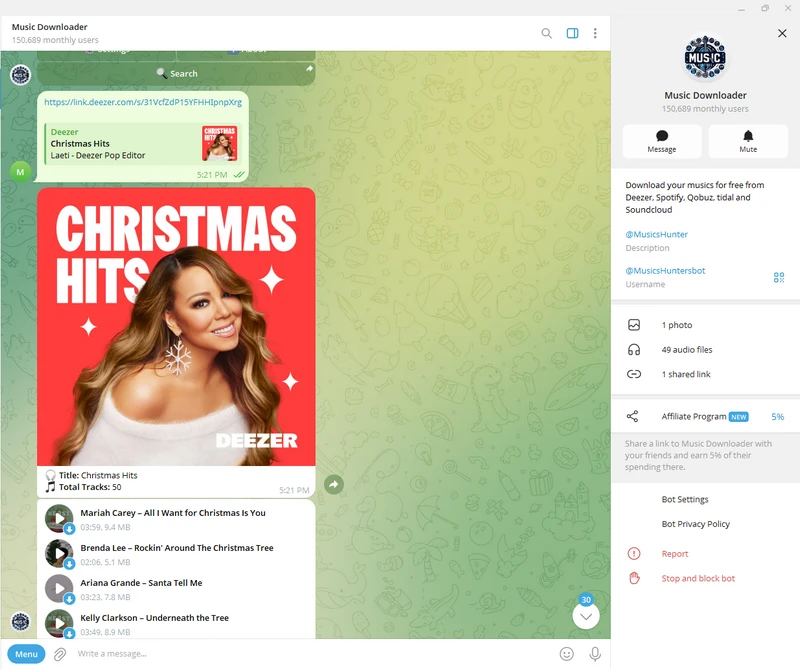
Yes, Telegram can be used as a Deezer downloader on both Android and iOS phones, due to its powerful bot downloader feature. There are some useful bots aiming to downloading songs from Deezer, Spotify, Tidal etc. Songs are downloaded through a chat-based workflow. Just send the Deezer links or keywords to the bot and it will response to you with tracks available for download.
| Feature | Telegram Bots |
|---|---|
| Compatibility | Desktop, Android, iOS |
| Download Type | Songs, Playlists, Albums |
| Format | MP3, AAC, ALAC |
| Quality | 128kbps-320kbps |
| Metadata | Title, Artist, Albums, Lyrics |
| Batch Conversion | Yes |
| Speed | Fast |
|
|
- Free to get downloadable Deezer Music files.
- No extra downloader needs to be installed.
- Song version varies.
- Fail to download the wanted songs if the bot can't match it.
- Batch downloads required donate or paid encouragement.
- Limited customized download settings like output folder or file names.
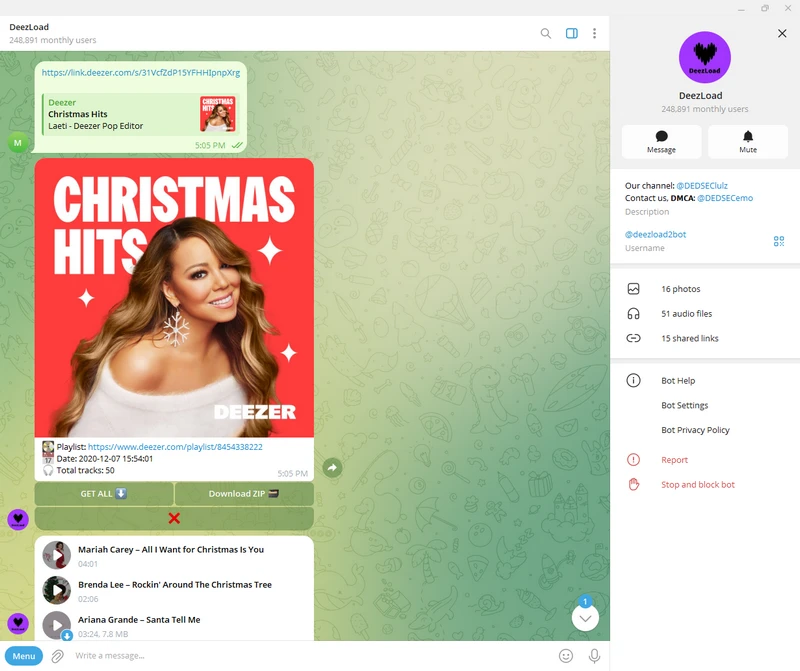
①. DeezLoad @deezload2bot
Step 1 Find the bot and get into the group.
Step 2 Send the Deezer link and get the playlist songs with a download option one by one.
Note: If to download the whole Deezer playlist, you will need to make a donate.
②. Music Downloader @MusicsHuntersbot
Step 1 Access the bot chat window and start by sending your Deezer link to the bot.
Step 2 The bot will reply with all the playlist songs, each one with a download instruction to get the Deezer music file.
8. Murglar - Deezer Music Downloader on Desktop
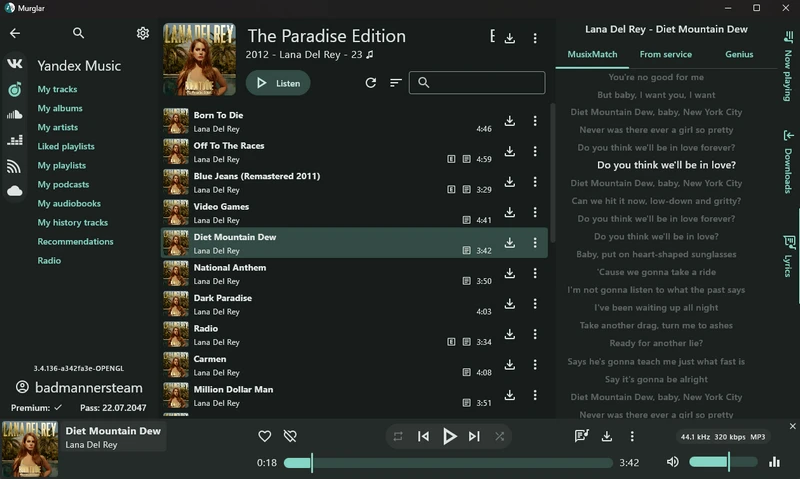
Murglar is a music player and downloader that works with VK, Yandex Music, SoundCloud, Deezer, Zvuk, and WebDAV. It lets you download tracks as real audio files with tags, artwork, and lyrics. Download locations can be customized, even to an SD card. Murglar can connect to third-party players such as Poweramp, AIMP, BubbleUPNP, and Fermata Auto, so music can be streamed without storing it locally.
| Feature | Murglar |
|---|---|
| OS | Android/Windows/Linux/Mac |
| Download Type | Songs, Playlists, Albums |
| Format | MP3 |
| Quality | 320 kbps |
| Metadata | Title, Artist, Albums |
| Batch Conversion | Yes |
| Speed | Fast |
|
|
- Alternative Deezer music player with extra free download features.
- Download Deezer music without Premium.
- Support multiple streaming services.
- Frequent failures when connecting to the web.
Step 1 Download Murglar from the official website and install it on your device.
Step 2 Open settings and connect your Deezer account. Set your preferred download options.
Step 3 Browse Deezer playlists, tap the download arrow, and save the songs to your device.
FAQs about Deezer Music and Playlist Downloader
Q1. Which Deezer downloaders allow downloading playlists?
Tools like Sidify Deezer Music Converter, Deemix, and Telegram Deezer Downloader bots can download Deezer music. Sidify is the best choice for downloading entire and bulk playlists at once, quickly and in original quality.
Q2. Do I need Premium to download Deezer music?
Both yes and no. Free accounts can download Deezer music in 128kbps MP3, but for better audio quality, a Premium account is better.
Q3. Which ones above can I download Deezer music in HiFi or lossless quality?
HiFi or lossless Deezer downloads are fully supported by Sidify Deezer Music Converter. Deemix claims HiFi support. Allavsoft, AceThinker, AIDS Deezer Downloader, Telegram Deezer Downloader Bots, and Murglar, the download quality vary and is generally limited to standard or MP3 quality.
Q4. Can I play the downloaded Deezer files on other device?
Absolutely. The downloaders above save Deezer tracks as real MP3 or FLAC music files, which can be used on any compatible device or player.
Conclusion
These top Deezer music downloaders make it easy to save your liked Deezer tracks and playlists from online to offline. If you are after high-quality MP3s or lossless FLAC files, head to the professional Sidify Deezer Music Converter without doubt. Or explore the options, try the free ones, pick the one that suits you best, and enjoy Deezer music in your ways!
 Sidify Deezer Music Converter
Download Deezer music, albums, and playlists to MP3/FLAC at 10X speed with original high quality.











