You can download SoundCloud audio as WAV. If the artist has enabled downloads and originally uploaded a WAV file, you can download the original WAV file. When no official download is available, some SoundCloud WAV downloaders can create a real WAV from SoundCloud’s compressed stream. But not all SoundCloud to WAV tools in the search results can actually do the job. Some can only download MP3 files. Some lock WAV downloads behind a paid plan. Others may simply redirect you to an ad page.
To save you time, we tested 8 SoundCloud to WAV converters and downloaders. Read on to find out which ones actually work and produce real WAV files.
Want to convert SoundCloud to WAV right now?
- Original WAV: Use SoundCloud’s official download when available.
- Playlists and batch downloads: Choose Sidify SoundCloud Downloader.
- Free online single-track conversion: Choose SCtoMP3.
- Another online PCM WAV option: Try SoundCloudRips if you accept redirects and lower output specifications.
Before reviewing the results, keep this distinction in mind: a converted PCM WAV is a valid WAV file, but it is not necessarily the uploader’s original WAV. Converting a compressed SoundCloud stream to WAV can improve compatibility with editing or DJ software, but it cannot restore audio information lost before conversion. The result is an uncompressed WAV container holding the same decoded audio, so the file becomes larger without becoming truly lossless.
- How to Download the Original WAV from SoundCloud
- How We Tested SoundCloud to WAV Converters
- SoundCloud to WAV Test Results at a Glance
- 3 Best SoundCloud to WAV Converters That Actually Work
- 4 Free Online Sites That Did Not Provide Real WAV Downloads
- Command-Line Tool That Failed Our Download Test
- FAQs about SoundCloud to WAV Converters
- Final Words
How to Download the Original WAV from SoundCloud?
The best way to get lossless WAV audio from SoundCloud is to use the official download. This works only when the artist has enabled downloads and uploaded the track as a WAV file. Here is how:
Step 1 Check If the Song Offers a Free Download
Only some tracks include a Free Download option. Find the track you want, click the three-dot menu, and look for Download file. If the uploader originally provided a WAV file, the downloaded file will be WAV.
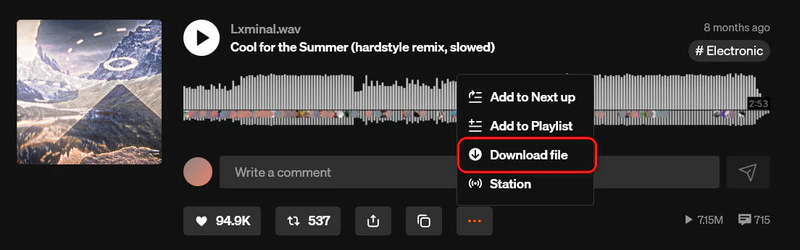
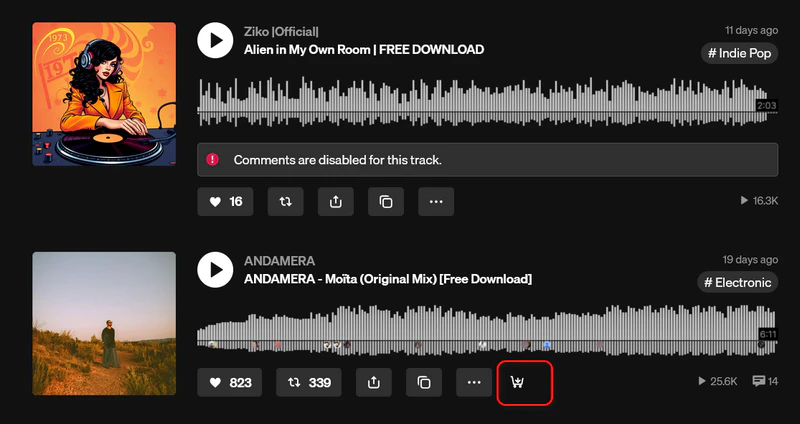
Some tracks can be downloaded only after you meet the artist’s requirements. For those tracks, click the download or cart icon below the waveform. You will be redirected to a dedicated download page.
Step 2 Complete the Artist’s Requirements
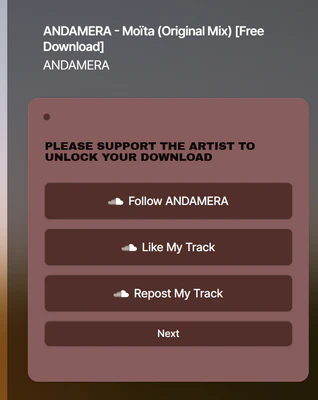
On the dedicated page, the artist may ask you to complete a few actions before unlocking the file. Requirements vary by track and artist—for example, Follow the artist, Like the track, or Repost the track. Some artists may also ask you to provide your name and email address before you can continue. Finish every required action shown on the page.
Step 3 Download SoundCloud Track to WAV File
After you finish the requirements, click Next or the equivalent button shown on the page (for example, Share email address). The page will then show a “Thank you for your support” screen with the actual Download button.
Click the real Download button to start saving the file. When the download begins, a confirmation message appears, and the file is saved to your computer—usually in your Downloads folder. If the uploader provided a WAV file, you will get a WAV download; otherwise, the file may be MP3 or another original format.
 Please Note:
- Most tracks cannot be downloaded. The Free Download option appears only when the artist enables it. If you do get a file, SoundCloud saves it in the artist’s original format—WAV, MP3, or another format.
- Converting MP3 to WAV does not improve quality. If the downloaded file is MP3, changing it to WAV later will not make it true lossless audio.
- No batch or playlist downloads. SoundCloud built-in download function works for individual tracks only. To save multiple SoundCloud songs as WAV, use a dedicated SoundCloud Playlist downloader, such as Sidify SoundCloud Downloader.
How We Tested SoundCloud to WAV Converters
We tested every tool on September 18, 2026, using Windows 11 and the same four public SoundCloud links: an uploader-enabled track, a standard public track, a long DJ set, and a public playlist.
| Type | Title | Duration | SoundCloud URL | Official Download | Original Format |
|---|---|---|---|---|---|
| Uploader-enabled download | Cool for the Summer (hardstyle remix, slowed) | 2:53 | https://soundcloud.com/lxminal-615308974/cool-for-the-summer-hardstyle-remix-slowed | Yes | 16-bit/48kHz WAV |
| Public playlist | GYM PLAYLIST | 76 tracks | https://soundcloud.com/faze-noodle/sets/gym-playlist | No | Unknown |
| Long DJ set | NOTMYTYPE at HIVE HAMBURG Edelfettwerk | 1:22:20 | https://soundcloud.com/notmytype030/notmytype-at-hive-hamburg | No | Unknown |
| Standard public track | NOTMYTYPE - Missed Me | 3:28 | https://soundcloud.com/notmytype030/notmytype-missed-me | No | Unknown |
We recorded download success, output extension, container, codec, sample rate, bit depth, file size, metadata, playlist support, and redirects. Files were inspected with MediaInfo, and selected results were also checked with Spek.
We labeled a file “original WAV” only when it came from SoundCloud’s official uploader-enabled download and the original upload was WAV. A PCM WAV created from a compressed stream was labeled “converted WAV.”
Disclosure: Sidify is our product. We tested it with the same links and file-inspection criteria used for the other tools, and we have included its trial and source-quality limitations in the results.
Test Results at a Glance: Which SoundCloud to WAV Converters Actually Work?
Of the eight third-party tools we tested, three successfully downloaded WAV files. The others returned MP3/M4A format, placed WAV behind a paywall, or failed before creating an output file. SoundCloud’s official download is listed separately because it provides the uploader’s original file rather than converting the stream.
Here's how each option performed when we checked the actual files.
| Tool | Working for WAV? | Links Recognized | What We Received | WAV Type | Playlist | Price | Verdict |
|---|---|---|---|---|---|---|---|
| SoundCloud Official | Limited | 1/1 eligible track | Uploader’s original WAV | Original uploader file | No | Free | Original WAV when available |
| Sidify | ✅ Yes | 4/4 | WAV | Original-spec PCM WAV | Yes | Free Trial/Paid | Best overall for batch Lossless WAV downloads |
| SCtoMP3 | ✅ Yes | 3/4 | WAV | Converted PCM WAV | No | Free | Best free online option |
| SoundCloudRips | ✅ Yes | 4/4 | WAV | Converted PCM WAV | No | Free | Valid WAV; lower specs and redirects |
| scdl | ❌ No | Not verified | No output file | Not verified | Not verified | Free | Download failed in our test |
| MusicVerter | ❌ No (free workflow) | 3/4 | MP3 Audio | No free WAV | Paid only | Free/Paid | Premium WAV only |
| Geekskai | ❌ No | 3/4 | M4A/AAC | Not WAV | No | Free | Returned M4A/AAC |
| SoundCloudAud | ❌ No | 4/4 | MP3 Audio | No WAV option | Yes | Free | MP3 only |
| OKmusi | ❌ No | 4/4 | MP3 Audio | No online WAV option | No | Free/Paid | MP3 only; redirects |
We marked a tool as “Working” only when it successfully processed the SoundCloud URL and delivered WAV format promised on its page. A site that opened normally but returned MP3, M4A, an empty file, or an invalid download was not counted as a working SoundCloud to WAV converter.
3 Best SoundCloud to WAV Converters That Actually Work (Verified)
Three tools successfully downloaded WAV files from SoundCloud in our tests, but they differ in features and output.
Sidify — Best Soundcloud Playlist to WAV Downloader
Online converters are fine for a single public song, but they usually can't download a playlist in batch or keep a library organized for DJ software. If you need to download SoundCloud tracks to WAV in batches while preserving original audio quality, Sidify offers a more convenient solution.
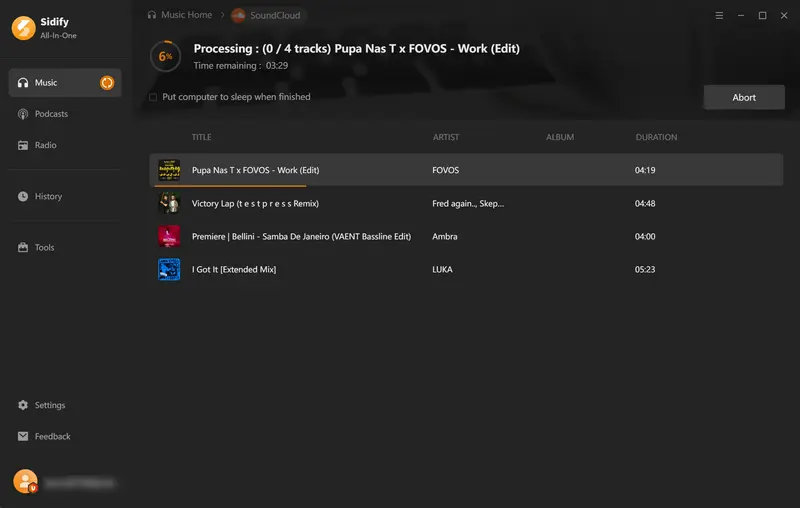
Sidify SoundCloud Downloader is a desktop SoundCloud to WAV converter for Windows and Mac. You browse SoundCloud inside the app, add songs without copying every link, and batch-download playlists or albums. Output formats include WAV, MP3, FLAC, AAC, AIFF, and ALAC. You can also select a bit depth of 16-bit or 24-bit and a sample rate ranging from 44.1kHz to 192kHz.
Sidify SoundCloud Downloader Test Results (September 2026)
Sidify completed all four tests on September 18, 2026, successfully processing both the individual tracks and the 76-track playlist. The downloaded files were real WAV files with complete durations, and the playlist test produced all 76 tracks without requiring us to paste each track URL separately.
What We Received:
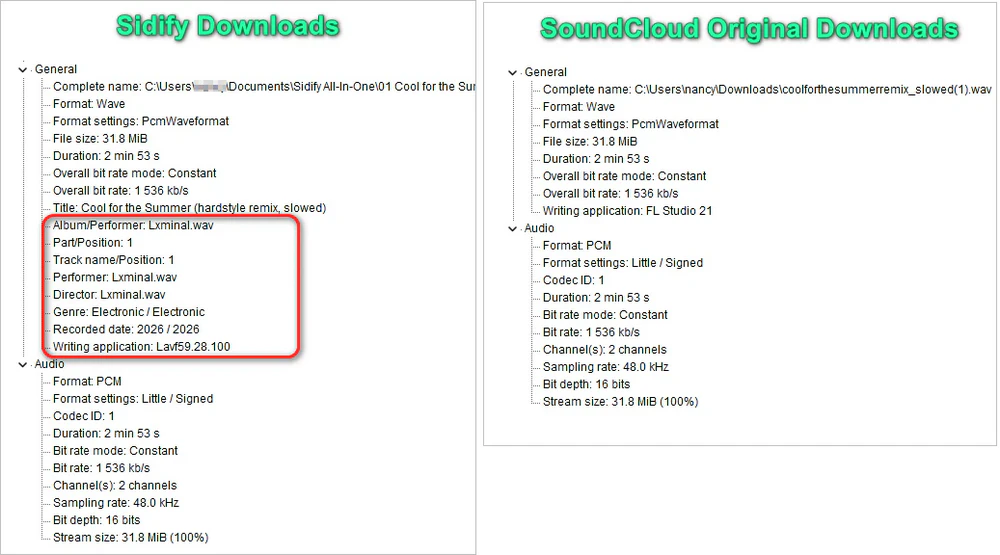
MediaInfo identified every output as a valid WAV file containing PCM audio. For the uploader-enabled track, the downloaded file matched the original sample rate, bit depth, waveform, and file size. Track titles, artist names, album information, and genre were retained, although artwork was not preserved in the WAV files. All downloaded files opened and played successfully.
Spectrum Analysis:
The Sidify output closely matched the uploader-provided original in Spek, supporting the MediaInfo result that the available source quality was preserved in this test.
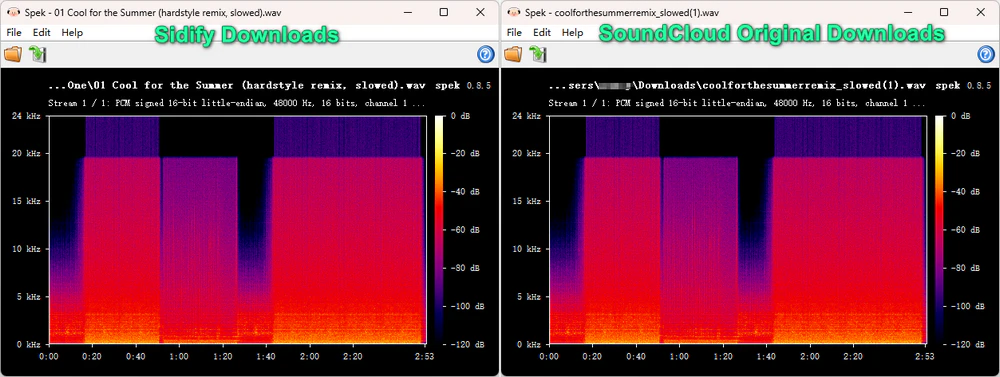
Both spectrograms showed nearly identical frequency distribution and an approximately 20kHz upper limit.
Sidify also lets users select a 16-bit or 24-bit depth and a sample rate from 44.1kHz to 192kHz. We tested its 24-bit/192kHz output setting. The resulting WAV was correctly encoded at 24-bit/192 kHz, but Spek did not show a meaningful increase in high-frequency audio content compared with the original 16-bit/48 kHz file. In other words, higher output settings do not necessarily add more audio detail.
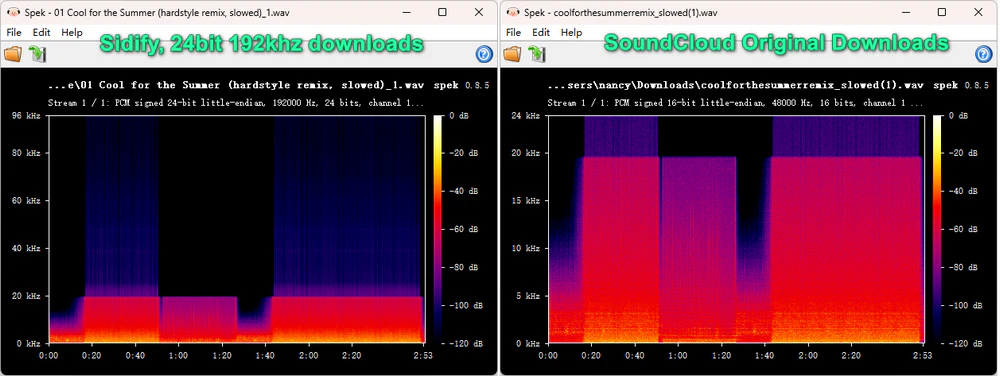
Spek comparison: The 24-bit/192kHz export increased the file specifications but did not reveal additional high-frequency detail.
Source-Quality Limitation:
For tracks whose original file is not available as WAV, Sidify’s WAV export should be understood as a PCM conversion of the available SoundCloud source. Exporting a compressed stream as WAV improves format compatibility but does not restore audio information missing from that stream.
Commercial Limitation:
Sidify is available for Windows and Mac. The free trial allows you to download up to 1 minute of each track, while full-length exports require a paid license.
Verdict:
Sidify is the most practical option in our test for users who need multiple tracks, organized metadata, and a desktop workflow without browser redirects. It is more than most users need for a single occasional download.
- Works with SoundCloud tracks, playlists, albums, and more
- Produces real WAV files, not renamed MP3 files
- Can preserve the available source quality and original file specifications
- Windows and Mac only—no mobile SoundCloud to WAV download
- Full export requires a paid license after the free trial
- Requires signing in to a SoundCloud account
Steps to Download SoundCloud Playlist to WAV on PC or Mac
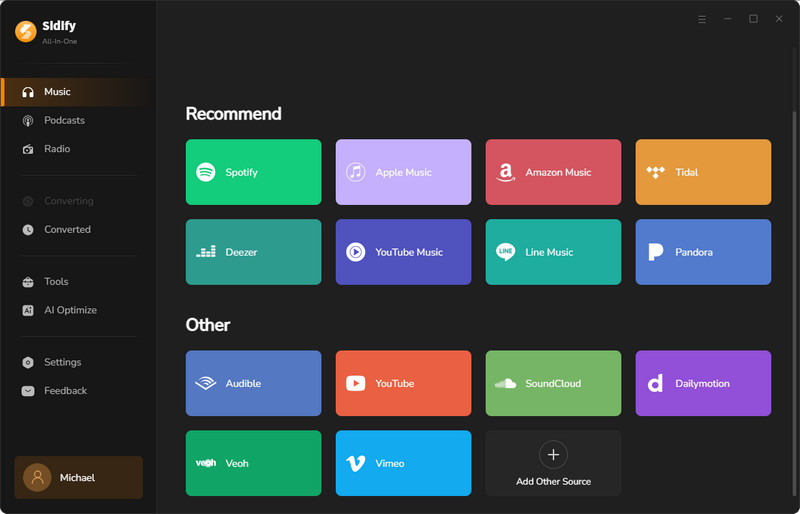
Step 1 Open Sidify and Choose SoundCloud
Download and launch it. Then from the home screen, select SoundCloud to open the built-in web player. You are required to log into your account. After that, you can browse tracks, playlists, and DJ sets you want to download without copying URLs one by one.
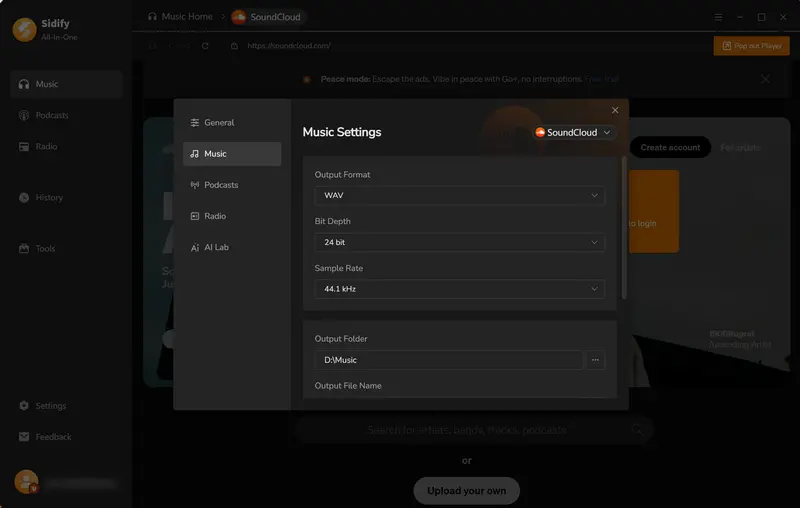
Step 2 Choose WAV as the Output Format
Click the Settings (gear) icon and set the output format to WAV. Pick a folder where your SoundCloud WAV downloads will be saved, and use Output File Name or Output Organized settings to organize files by artist or album—helpful when you are building a DJ library or importing tracks into Serato DJ Pro.
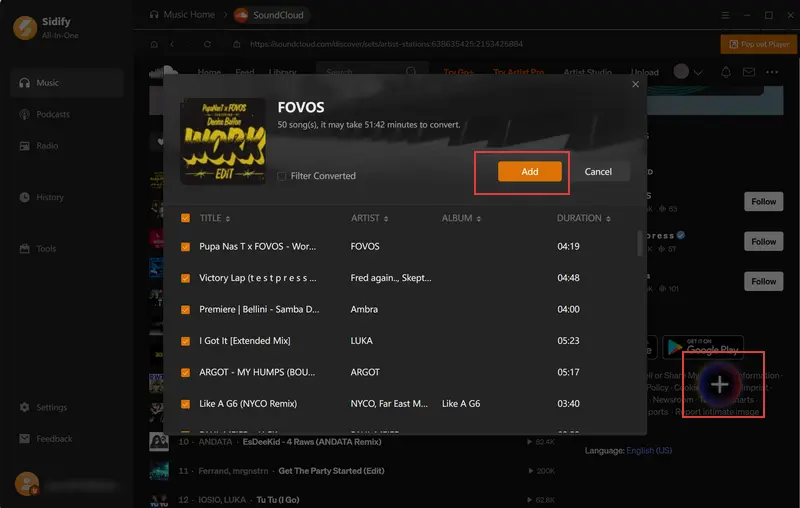
Step 3 Browse SoundCloud and Add Playlists for WAV Download
Open the song, playlist, or album you want as WAV. Click the + button to load every track into the conversion list—Sidify parses titles and metadata automatically so you can review before downloading.
Step 4 Download SoundCloud Playlist to WAV
Select the tracks you want, then click Convert. Sidify records and exports every song in your SoundCloud playlist as WAV files at up to 10x speed—much faster than saving tracks one by one through an online SoundCloud WAV converter. After downloading, the output folder will be opened automatically.
SCtoMP3 — Best Free Online SoundCloud to WAV Converter for Real WAV
SCtoMP3 is the first free online converter we tested that produced real WAV files in all three individual-track tests. It requires no installation and processes one track at a time. However, it does not support playlists, preserve complete metadata, or provide the uploader’s original lossless audio.
Website: https://www.sctomp3.org/soundcloud-to-wav/
SCtoMP3 Test Results (September 2026)
SCtoMP3 successfully downloaded all three individual tracks as real WAV files. It did not support our playlist, so we evaluated its single-track performance separately.
What We Received:
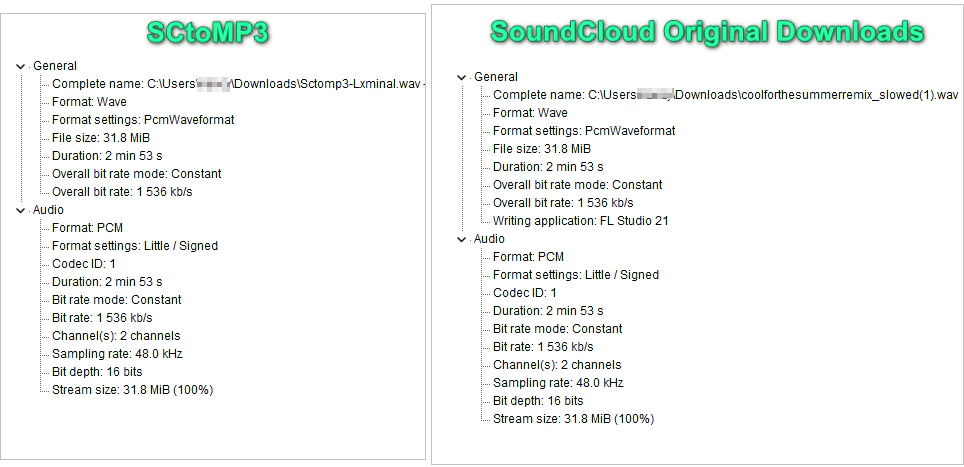
All three supported links produced playable PCM WAV files with complete durations. MediaInfo identified the files as 16-bit/48kHz PCM WAV, confirming that SCtoMP3 delivered valid WAV files rather than MP3 or AAC files with a changed extension.
Unlike Sidify SoundCloud Downloader, SCtoMP3 did not preserve the artist name, album information, or genre metadata in the files we downloaded. Users may need to add or correct this information manually before importing the tracks into a music library or DJ application.
Spectrum Analysis:
SCtoMP3 produced a valid 16-bit/48kHz PCM WAV, but Spek showed a clear cutoff at approximately 16kHz, while the uploader-provided original retained information up to around 19–20kHz. This is consistent with a WAV created from a lossy SoundCloud stream rather than the original lossless file.
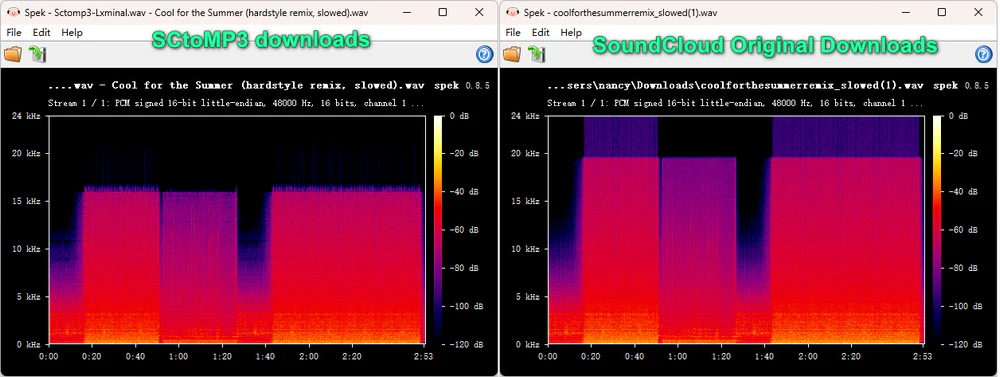
The original retained frequencies above the approximately 16kHz cutoff visible in the SCtoMP3 output.
Limitation:
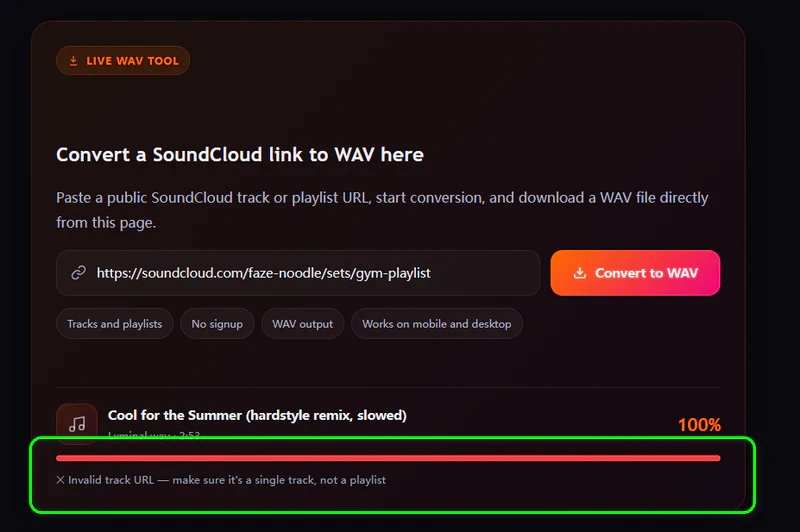
SCtoMP3 accepted individual track URLs only. When we pasted the playlist URL, the converter returned: “X Invalid track URL — make sure it’s a single track, not a playlist.” Users who want to save several songs must copy and process each track individually.
Verdict:
SCtoMP3 is best for occasional free single-track conversions; it does not support playlists or preserve complete metadata.
- Delivers genuine PCM WAV—not a renamed MP3
- Free, with no Premium paywall for WAV output
- No installation required
- Single-track only—no batch download
- Fewer metadata preservation features
- Unstable website
How to Download SoundCloud to WAV Online Free?
Step 1 Copy Link from SoundCloud
Open SoundCloud, find the track you want to convert, and copy its URL from the address bar or the Share menu.
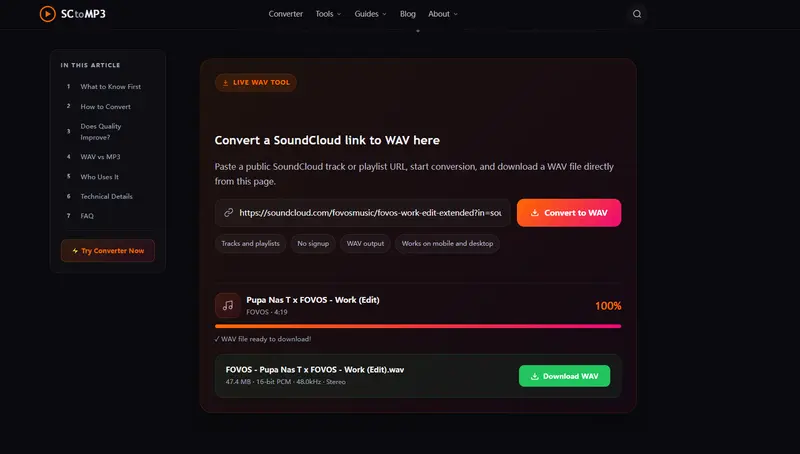
Step 2 Convert SoundCloud Track to WAV on sctomp3.org
Go to sctomp3.org, paste the link into the search box, and click “Convert to WAV.” When it's finished, click “Download WAV.” In our test, the downloaded file was a real WAV that opened correctly in audio editors and players.
SoundCloudRips — Valid WAV with Lower Output Specifications
Website: soundcloudrips.com/en9H/soundcloud-to-wav
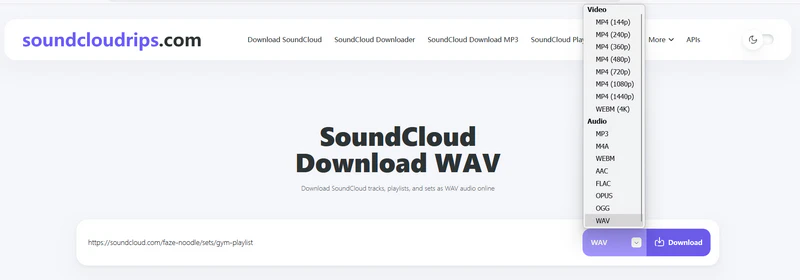
SoundCloudRips is the second free online SoundCloud to WAV converter in our test that successfully produced real WAV files. It advertises support for MP3, M4A, WebM, AAC, FLAC, OGG, Opus, and several video formats. The service works in a browser without requiring software installation or account registration.
SoundCloudRips Test Results (September 2026)
SoundCloudRips recognized all four test links and displayed WAV as an available output format. All three individual tracks were downloaded successfully with their complete durations. However, the service downloaded only the first track from our playlist.
The download process was also less straightforward than expected. Clicking the first download button opened an unrelated page. After returning to the original page, we had to scroll down and click the completed-download button. This triggered another redirect before the WAV download finally started.
What We Received:
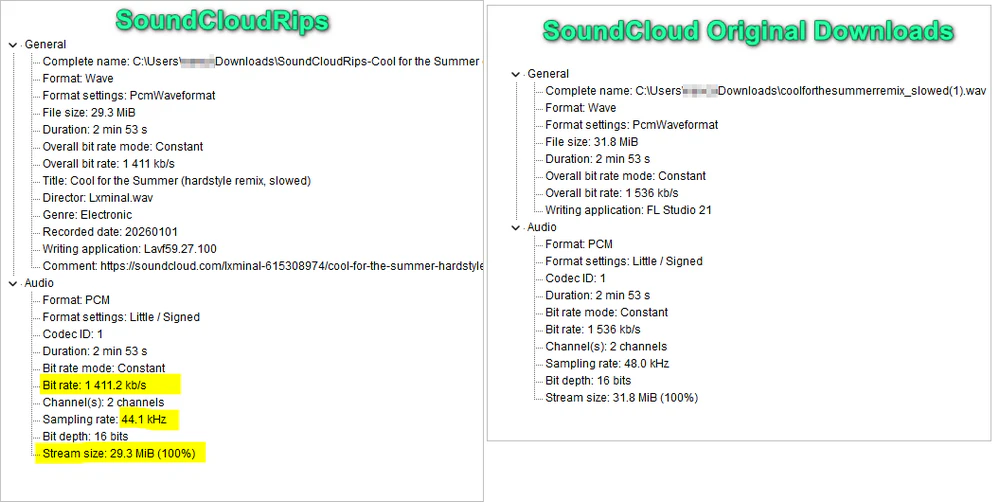
All three individual-track tests produced playable PCM WAV files. MediaInfo identified the output as 16-bit/44.1kHz PCM audio with a bitrate of approximately 1,411kbps. By comparison, the uploader-provided original WAV was 16-bit/48kHz with a PCM bitrate of approximately 1,536kbps.
The bitrate difference is expected because the SoundCloudRips file uses a lower sample rate. It does not, by itself, prove that the output is lossy. However, it confirms that SoundCloudRips did not preserve the original file specifications.
SoundCloudRips preserved the track title, genre, and recorded date in the files we tested. Its metadata preservation was better than SCtoMP3, although it did not necessarily retain every field from the uploader-provided original.
Spectrum Analysis:
In Spek, the SoundCloudRips version showed a clear frequency cutoff at approximately 16kHz, while the uploader-provided original WAV retained frequency information up to around 19–20kHz. Because 44.1kHz PCM can theoretically preserve frequencies up to approximately 22.05kHz, the 16kHz cutoff cannot be explained by the lower sample rate alone. The result is consistent with a WAV file converted from a lossy SoundCloud stream.
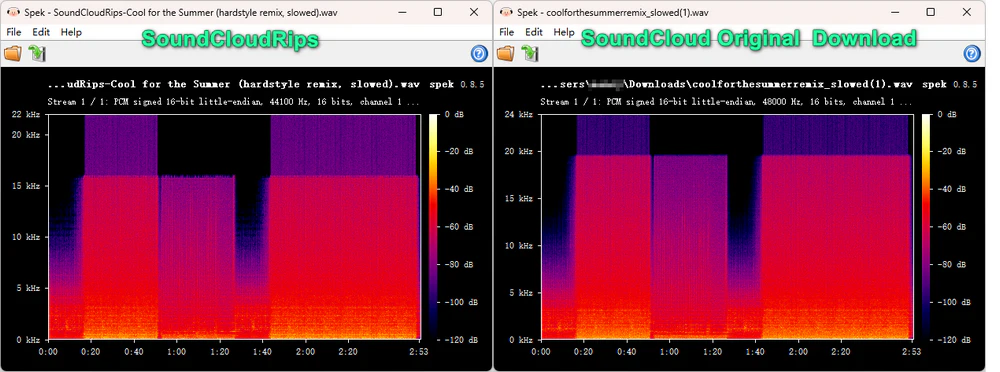
The 16kHz cutoff could not be explained by the 44.1kHz sample rate alone.
SoundCloud explains that high-frequency roll-off can be a deliberate characteristic of AAC encoding; it indicates lossy processing but does not, by itself, prove poor audible quality.
Limitations:
SoundCloudRips successfully downloaded individual tracks, but it did not download our complete playlist. It processed only the first track in the playlist. The service also opened two unrelated pages during the download workflow, which may make the correct download button difficult to find for first-time users.
Verdict: SoundCloudRips is a free online option that produces real WAV files for individual tracks, but it uses lower output specifications, does not download complete playlists, and requires multiple redirects.
- Produces real WAV files
- Free, with no installation or account required
- Preserves title, genre, and recorded date
- Reduced 48kHz audio to 44.1kHz in our test
- Downloaded only the first track from our playlist
- Opens unrelated pages during the download process
4 Free Online Sites That Did Not Provide Real WAV Downloads
The following four sites appeared in searches for free SoundCloud to WAV converters or advertised WAV support. However, none provided a free WAV file through the standard online workflow in our tests. We included these results because recognizing a SoundCloud link is not the same as delivering the WAV output users searched for.
1. Geekskai — Returned M4A Instead of WAV
Website: https://geekskai.com/tools/soundcloud-to-wav/
Geekskai presents itself as a free SoundCloud to WAV converter and includes both WAV and MP3 in its output-format selector. We tested it with our four public SoundCloud links on September 18, 2026. The three individual-track links were recognized and processed without requiring an account, but the playlist link was not supported.
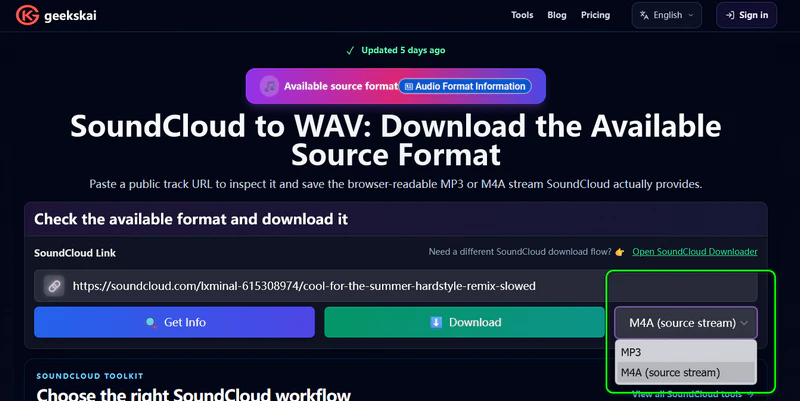
However, the downloaded files did not match the selected WAV format. Their filenames ended in .m4a, and MediaInfo identified them as MPEG-4 files containing AAC audio rather than PCM WAV files. We repeated the test four times in Firefox and received the same result.
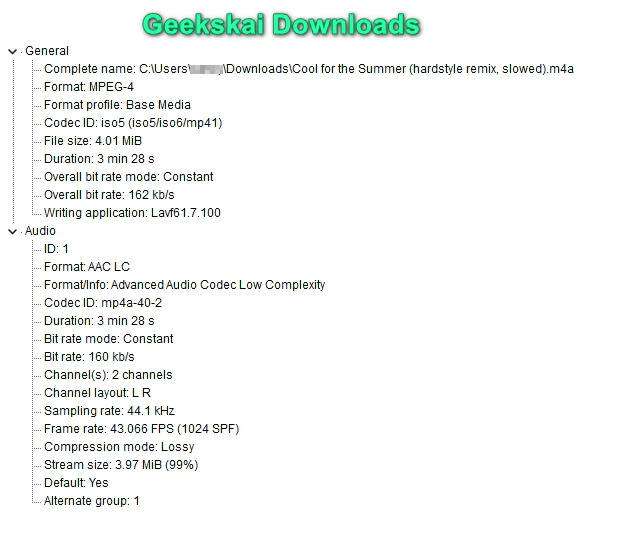
Verdict: Returned playable M4A/AAC files instead of WAV.
2. SoundCloudAud — Advertised WAV but Offered MP3 Only
Website: https://soundcloudaud.com/en81/soundcloud-to-wav
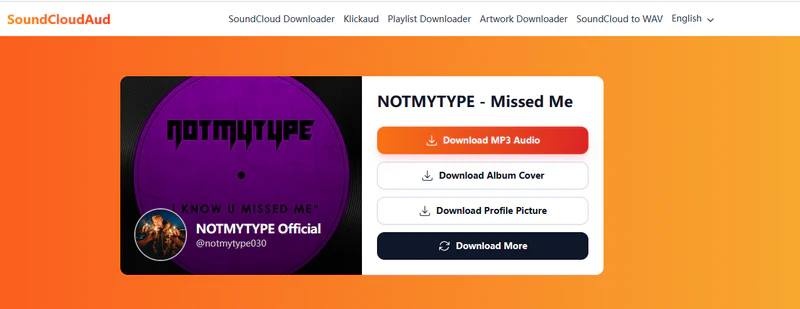
SoundCloudAud appeared in our search results for “SoundCloud to WAV” and claimed to convert SoundCloud tracks and playlists to WAV. However, all four links we tested produced the same result: the online tool offered only an MP3 download option, with no WAV output available. Its MP3 performance was impressive, however. It recognized all four links and downloaded our 76-track SoundCloud playlist as a single ZIP file.
Verdict: Useful for MP3 playlists, but it provided no WAV output.
3. OKmusi — Online Downloads Were Limited to MP3
Website: https://okmusi.com/convert-soundcloud-to-wav/
OKmusi produced a similar result. Although it appeared in searches for a free SoundCloud to WAV converter, its online tool offered only MP3 output. WAV, MP4, MOV, OGG, and AVI conversions required installing its desktop software. The download process was also confusing: each click opened an unrelated YouTube page, and users had to return to the original page and close a desktop-app pop-up before the MP3 download option appeared. We only discovered this process after more than five attempts.
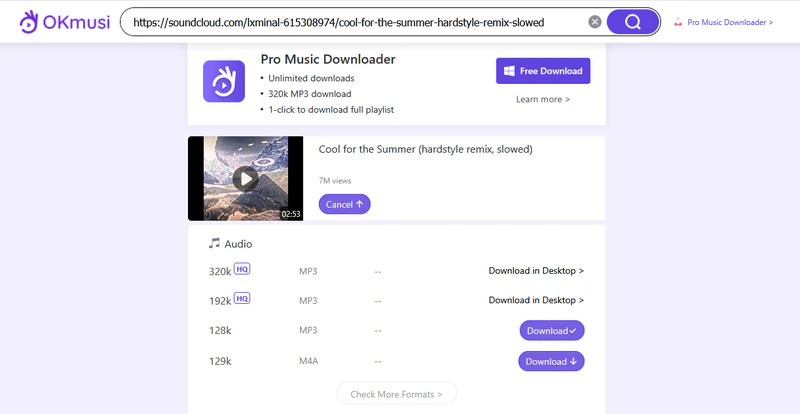
Verdict: No online WAV output and too many redirects.
4. MusicVerter — WAV Was Not Available in the Free Workflow
Website: https://www.musicverter.com/
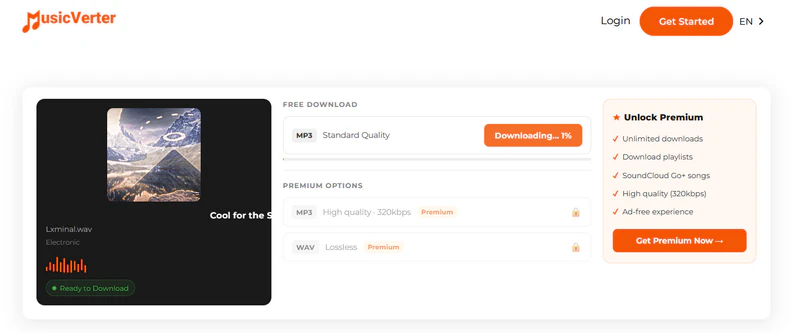
MusicVerter advertises support for downloading SoundCloud audio in WAV, MP3, AAC, and FLAC formats. We tested its free workflow on September 18, 2026, using three public tracks and one playlist. The service recognized and successfully processed all three individual track links.
However, the free download option was limited to 128kbps MP3. WAV output and playlist downloads were both Premium features. Therefore, we could not verify the quality or authenticity of its WAV output, and we could not download our playlist through the free workflow.
Verdict: Not a free SoundCloud to WAV option.
Command-Line Tool That Failed Our Download Test
scdl — Download Failed Before an Output File Was Created
Website: https://github.com/scdl-org/scdl
scdl installed successfully and the command launched in our Windows 11 test environment. However, the download failed before an output file was created. Because we received no audio file, we could not verify its WAV format, audio specifications, metadata preservation, or playlist support.
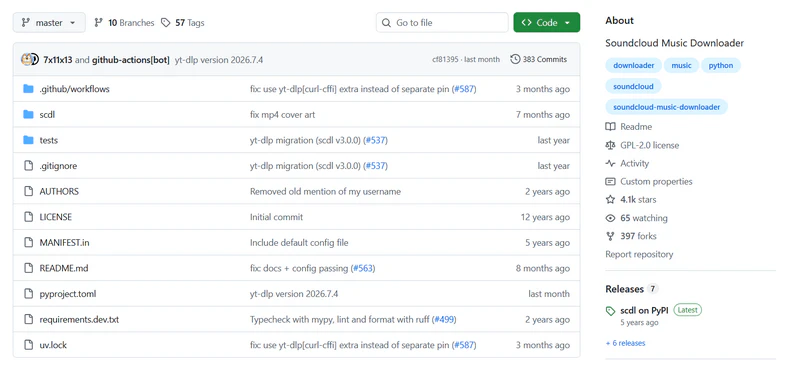
We could not confirm whether the failure was caused by the current scdl version, its dependencies, a SoundCloud access change, or our test environment. This result therefore does not prove that scdl fails for every user.
Verdict: The download failed in our test, so scdl is not included among the verified options.
FAQs about SoundCloud to WAV Converters
How do I know the WAV file is real?
Open the file in MediaInfo. A valid uncompressed WAV should show Wave as the container and PCM as the audio format. If MediaInfo identifies MPEG, MP3, or AAC instead, the file is not a PCM WAV, regardless of its extension. In our tests, Sidify SoundCloud Downloader produced real WAV files.
Is converting SoundCloud to WAV legal?
There is no simple yes or no. If the artist turned on Free Download, personal offline use is generally in clearer territory. Downloading or converting tracks you do not have permission for can still break SoundCloud’s rules and copyright law. Stick to tracks you are allowed to save, and do not share or redistribute them.
Does WAV have better audio quality than MP3?
WAV can store uncompressed audio, while MP3 uses lossy compression. However, converting a compressed SoundCloud stream to WAV does not restore lost detail or improve the source quality. WAV may still be preferable for compatibility with software such as Serato, Ableton, or Audacity, while MP3 is usually sufficient for casual listening.
Can You Download a SoundCloud Playlist to WAV?
Yes, but most online SoundCloud to WAV converters only accept individual track URLs. In our test, Sidify SoundCloud Downloader downloaded all 76 tracks from our test playlist, while SCtoMP3 rejected the playlist URL and SoundCloudRips downloaded only the first track.
Final Words
Our tests found three tools that produced real WAV files. Use SoundCloud’s official download for the uploader’s original file, Sidify SoundCloud Downloader for playlists and batch exports, or SCtoMP3 for an occasional free online conversion.
 Sidify SoundCloud Downloader
Download and convert music from all major streaming services in one place. Get MP3 or other popular formats in source audio quality, save songs offline on Windows or Mac, and enjoy up to 10X faster downloads with ID3 tags and lyrics preserved.