When you try to download songs from SoundCloud to FLAC only to find that SoundCloud does not support FLAC downloads, what would you do? Many users then search for a SoundCloud FLAC downloader to save higher-quality audio files. However, most people are really looking for a true SoundCloud lossless download experience without any quality loss.
In this guide, we will introduce three proven methods to help you download or convert SoundCloud tracks to FLAC.
You may also like 👉: MusicFab Review 2026: Is It Worth Buying? Real Test, Pros & Cons
Can You Download SoundCloud Songs as FLAC?
SoundCloud does not offer users the option to download tracks to FLAC. However, the platform supports FLAC as an upload format, allowing creators to upload lossless audio files. In some cases, if the uploader has enabled downloads and provided a high-quality source such as FLAC or WAV, users may be able to download the original file.
In most cases, SoundCloud streams are delivered in compressed formats such as MP3 or AAC, and downloads are usually limited to the original uploaded format. True lossless FLAC downloads are relatively rare. Because of this limitation, users seeking a SoundCloud FLAC downloader or lossless download option often look for alternative solutions, which we will discuss in the next section.
3 Ways to Download FLAC Music from SoundCloud
In this section, we will introduce three practical methods to help you download songs to FLAC: first, choose a desktop SoundCloud FLAC downloader, such as Sidify SoundCloud Downloader; second, use the SoundCloud to FLAC free online tool for quick, installation-free conversion; and third, convert MP3 to FLAC if you have already downloaded MP3 files. You can choose the method that best fits your needs.
Download SoundCloud to FLAC with Sidify (Best Lossless Quality)
Sidify SoundCloud Downloader is a powerful desktop tool that allows you to download and convert music from multiple major streaming platforms into six formats, including FLAC, MP3, AAC, WAV, AIFF, and ALAC. Besides, it offers batch download, allowing users to convert multiple tracks or even entire playlists at once, which greatly improves efficiency. In addition, it preserves ID3 tags, including artist, album, track title, and cover art, helping you keep your music library well-organized while maintaining high audio quality.
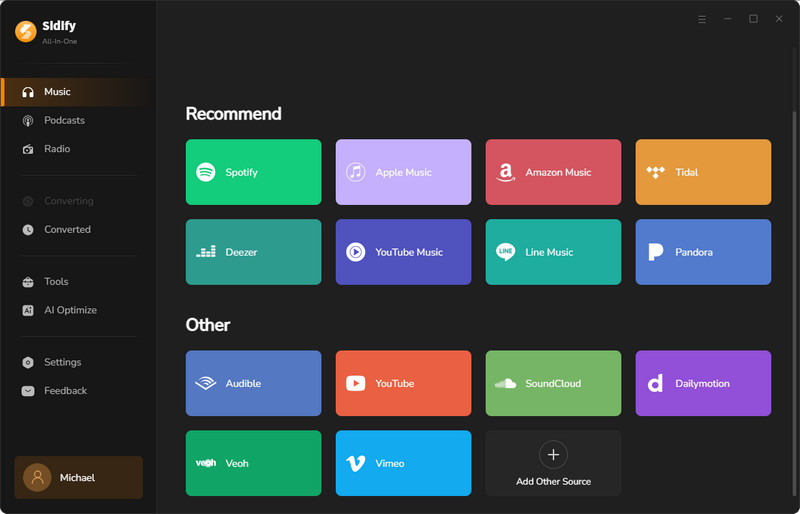
Step 1 Install the Software and Choose SoundCloud
Open the App on your computer, then select SoundCloud from the list of supported platforms.
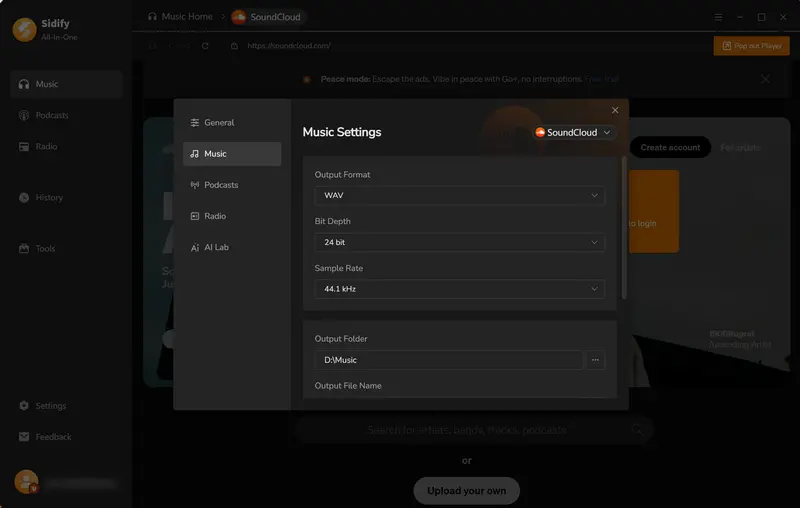
Step 2 Set Output Format and Preferences
Click “Settings” to set the output format to FLAC and choose the output folder path, and you can also customize the output file name and adjust how files are organized for easier management.
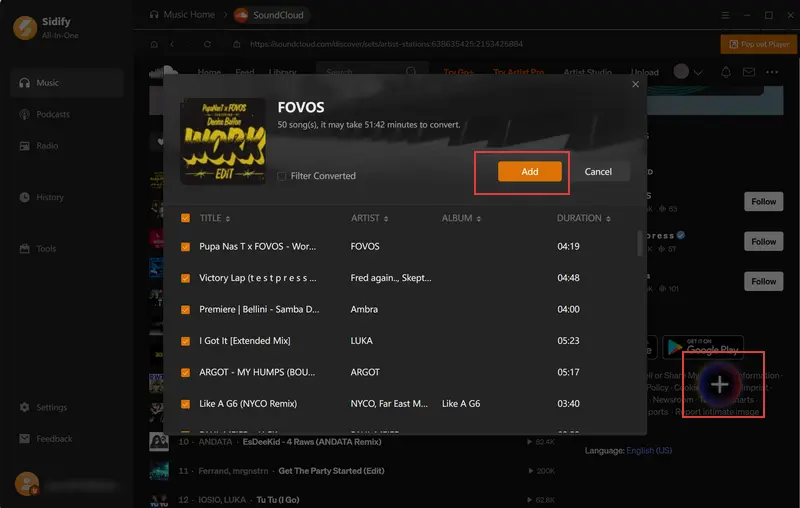
Step 3 Add Music to Sidify
Log in to your SoundCloud account. Then open your preferred playlist and click the “+” button to import songs into the conversion panel. Then tick off the songs you want to download and click “Add”.
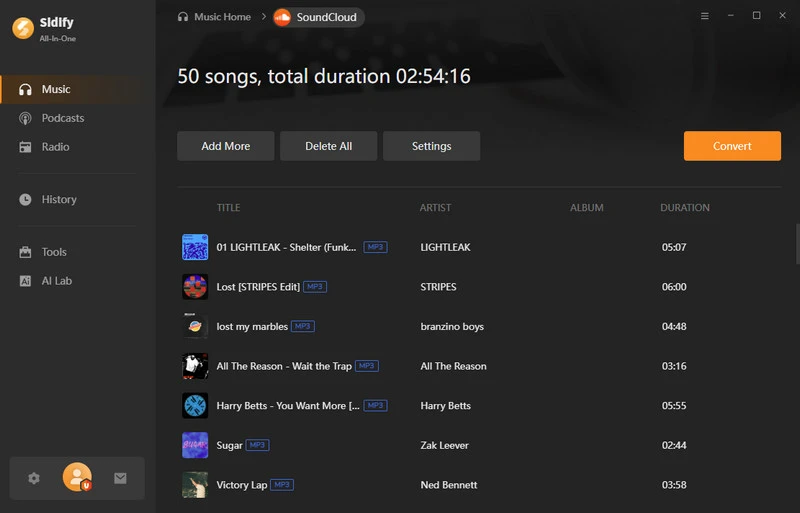
Step 4 Start Convertion
After confirming your selected songs, click the “Convert” button to begin the process. The software will start converting your SoundCloud tracks to FLAC at high speed.
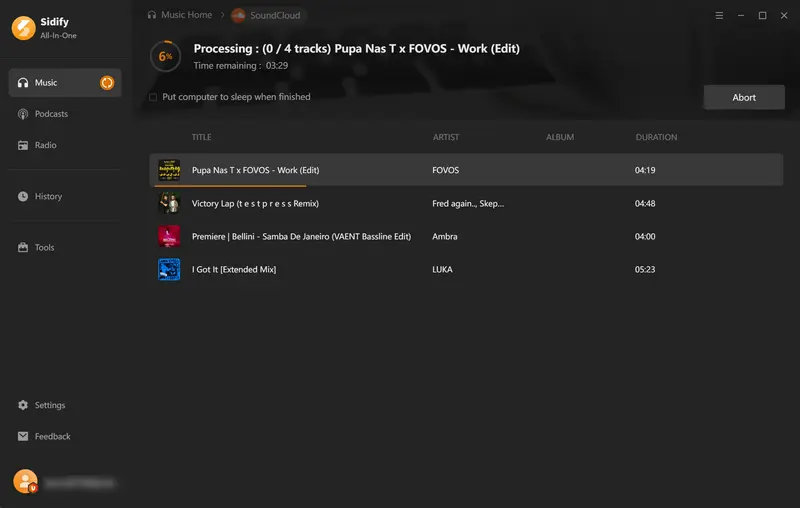
Step 5 Access Your Converted Music
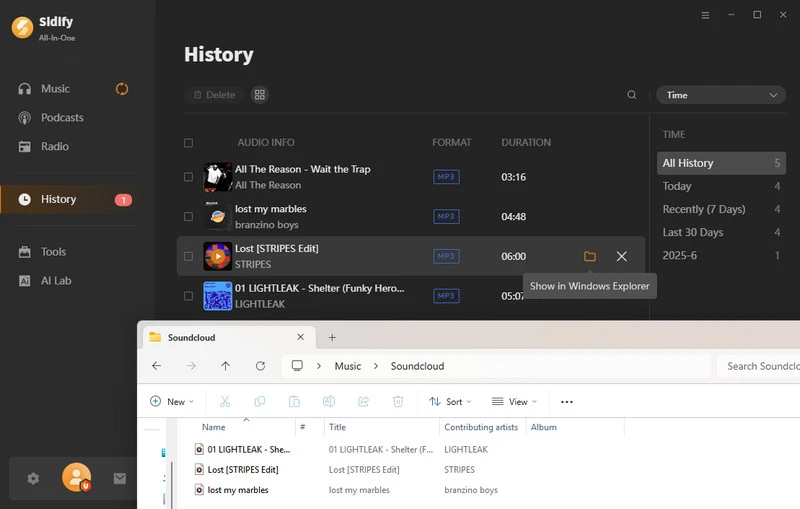
Once the conversion is complete, you can access your downloaded files by clicking the folder icon. Alternatively, you can find all converted tracks in the “History” section.
Convert SoundCloud to FLAC Online Free (No App)
If you're looking for a quick way to convert tracks from SoundCloud without installing any software, online tools can be a convenient option. Many users search for SoundCloud to FLAC online and free solutions when they want an easy, browser-based way to handle audio conversion. Tools like SoundCloudrips and CutYT are often used for this kind of task, offering a simple workflow that doesn’t require any setup. It’s a flexible approach that works directly in your browser and saves time.
SoundCloudrips
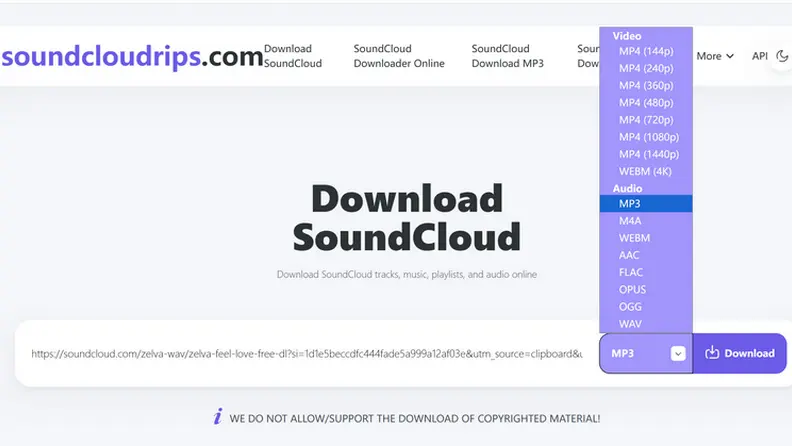
Step 1 Visit the SoundCloud website and find your preferred songs. Click on the share button and copy the URL to your clipboard.
Step 2 Go to soundcloudrips.com. In the text box on the SoundCloudrips homepage, paste the link you copied from SoundCloud.
Step 3 Choose “FLAC” from the list of available formats for your download.
Step 4 Click the “Download” button. Your FLAC file will begin downloading automatically.
This post includes 10 download sites with FLAC music library and guidance to download FLAC music from streaming platforms.
Learn More →CutYT
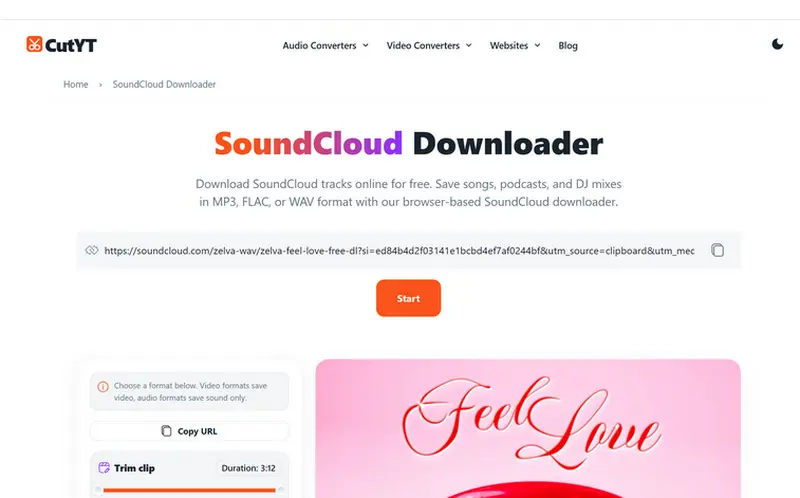
Step 1 Go to SoundCloud and find the track you want to download. Click the Share button and copy the track URL.
Step 2 Open the CutYT SoundCloud Downloader and paste the copied URL into the input box.
Step 3 After the tool analyzes the link, choose FLAC from the available output format options.
Step 4 Click the Start button, and the tool will automatically generate your FLAC file for download.
 Please Note:
Please be aware that free online converters are often unstable, may interrupt during conversion, and frequently display intrusive pop-up ads. Do not click on any suspicious links or pop-up windows to avoid security risks.
Convert SoundCloud MP3 to FLAC (Format Converter)
If you already have songs in MP3 format and want to convert them to FLAC, Sidify also offers a free format conversion tool. In the following section, we will walk you through the process step by step.
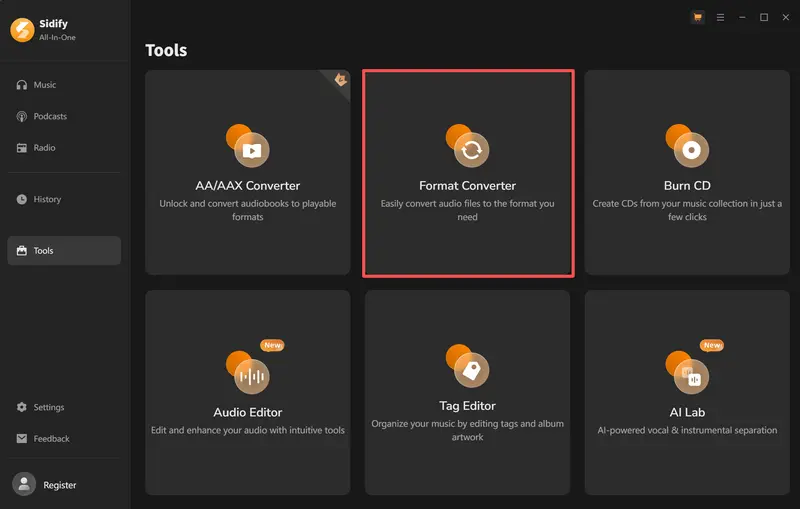
Step 1 Open the Format Converter Tool
Click on the "Tools" section on the left side and select "Format Converter".
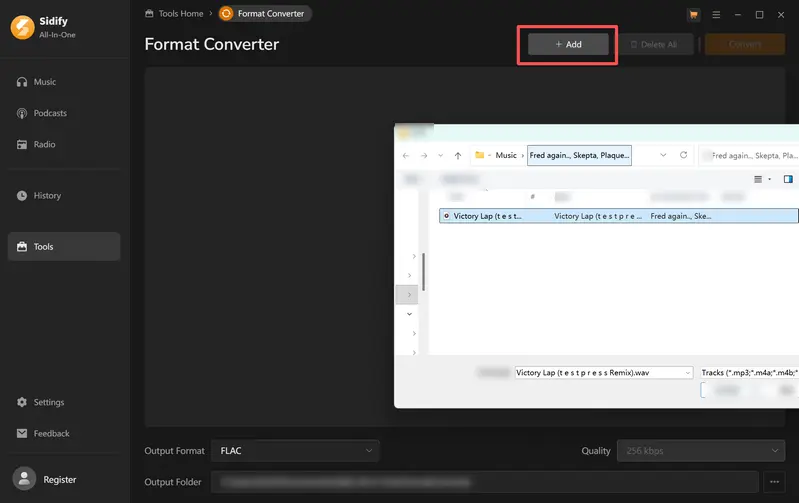
Step 2 Add Your MP3 Files
Import MP3 tracks you want to convert to FLAC.
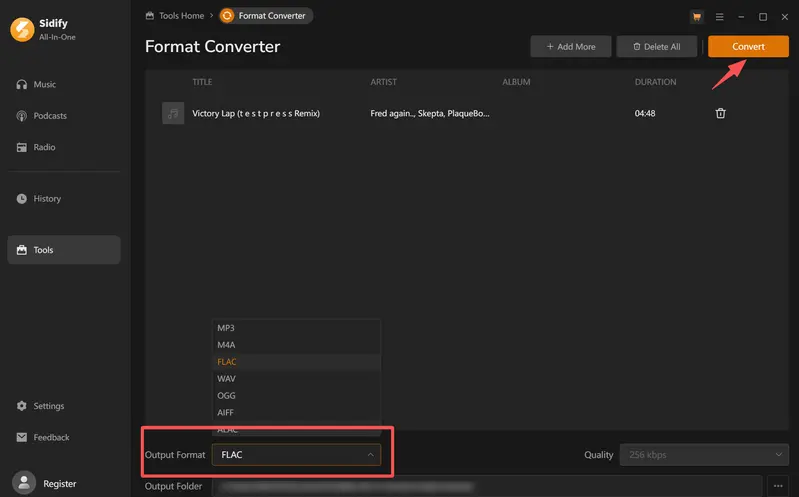
Step 3 Output Format Setting
Choose FLAC as the output format, then click the "Convert" button to start the process.
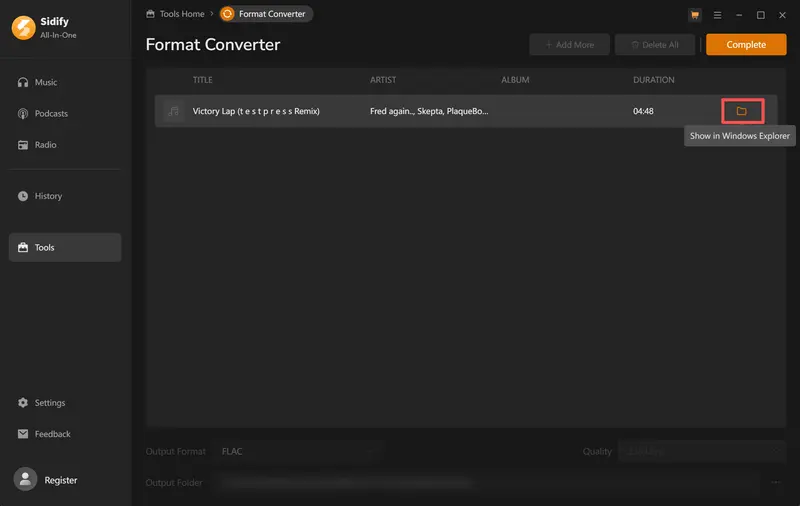
Step 4 Locate Your FLAC Files
Once the conversion is complete, click the folder icon to find your newly created FLAC audio files.
Is It Safe to Download SoundCloud as FLAC?
Downloading SoundCloud tracks as FLAC can be safe, but it largely depends on the method you choose. The safest options are typically the official SoundCloud download feature and trusted desktop applications. If the original artist has enabled downloads, you are simply receiving the file they uploaded, which is a secure way to obtain the audio.
Desktop tools from reputable developers are generally safer than unknown online converters because they let you manage and convert audio files locally without relying on unknown websites. Many users prefer this approach because it avoids unnecessary risks and delivers more stable performance.
However, online SoundCloud FLAC downloaders require extra caution. Many free online converters may include intrusive ads, pop-ups, or redirects to unverified pages, which can compromise user safety. Overall, for a safer SoundCloud lossless download experience, official downloads and trusted desktop software are recommended, while online tools should be used cautiously and only from reliable sources.
 Smooth-finish paper, easy to install
One-Stop MP3 Music Converter for all major streaming music platforms. Convert and download music from all major streaming platforms including Spotify, Apple Music, YouTube, Amazon Music, Tidal, Deezer, and more.
Conclusion
In conclusion, downloading SoundCloud tracks as FLAC is not always straightforward due to platform limitations, but several practical methods still provide a lossless experience. You can use official download options when available, try trusted desktop tools for stable conversion, or use online SoundCloud to FLAC tools for quick access. Each method offers different benefits in terms of speed, safety, and flexibility. Ultimately, the best choice depends on your specific needs and how you manage your music library. For a more reliable solution, tools like Sidify SoundCloud Downloader provide a comprehensive solution for high-quality conversion and ID3 tag preservation.
Frequently Asked Questions
Can I download SoundCloud tracks in FLAC for free?
In some cases, you can use online tools to download FLAC for free, but these options are usually less stable and may not always preserve full audio quality. On the other hand, desktop software solutions are generally more reliable for FLAC conversion and offer better features, such as higher stability and ID3 tag preservation, but they are often not completely free and may require a paid license for full functionality. Overall, free options exist, but they tend to come with limitations compared to more professional tools.
What audio quality does SoundCloud stream at?
SoundCloud streaming quality depends on your account type. Free users usually stream at around 128 kbps AAC, while SoundCloud Go+ users can get higher quality streams up to about 256 kbps AAC. Even at 256 kbps, the audio is still compressed and lossy, so some original sound detail is removed. FLAC, on the other hand, is a lossless format that keeps all original audio data, making it a better choice if you want higher-quality playback and more accurate sound.
What is the file size difference between FLAC and MP3?
The file size difference between FLAC and MP3 is quite noticeable because FLAC is a lossless format, while MP3 is compressed. A typical 320 kbps MP3 file is about 7–10 MB per song, whereas a FLAC file can range from about 20–40 MB or even larger, depending on the track length and audio complexity. This means FLAC files are usually about 2–4 times larger than MP3 files, but the trade-off is that FLAC retains full audio quality without losing any sound details.
Can I convert SoundCloud playlists to FLAC?
Yes, it is possible to convert SoundCloud playlists to FLAC using desktop or online tools that support batch processing. These tools let users import an entire playlist, convert all tracks at once, and export them in FLAC. For larger playlists, desktop tools like Sidify are usually more stable and efficient, while online tools may have limits on track counts or conversion speed.
Can I convert SoundCloud tracks to FLAC for Serato DJ?
Yes, you can convert SoundCloud tracks to FLAC for use in Serato DJ. Use a desktop tool like Sidify All-In-One or an online converter that supports batch conversion to export tracks to FLAC, then import them into Serato DJ. It’s recommended to retain or add metadata such as BPM and key so Serato can better analyze and organize your library.
Sidify All-in-one Music Converter
Download and convert music from all major streaming services in one place. Get MP3 or other popular formats in source audio quality, save songs offline on Windows or Mac, and enjoy up to 10X faster downloads with ID3 tags and lyrics preserved.