


You finished editing a vlog, uploaded it to YouTube, and woke up to a Content ID claim that wiped out your ad revenue. You are not alone.
Finding free lofi music isn't hard. Finding tracks you can download, use offline, and legally add to your videos is the difficult part. This guide covers the best places to download lofi music for free, how to save tracks for offline listening, and what to check before using them on YouTube.
Part 1. What Is Lofi Music
Lofi, short for low fidelity, is a relaxed music style known for its mellow beats, soft piano melodies, warm bass, and subtle sounds like vinyl crackle. Often influenced by jazz and hip-hop, lofi music is popular for studying, working, reading, and unwinding. Its laid-back sound makes it an easy choice for background listening.
Part 2. Where to Find Lofi Music Playlists on Streaming Platforms
Streaming services are the easiest place to discover lofi, but they are built for listening, not owning. You can save a playlist for offline playback inside the app, but the files stay locked behind a subscription and you cannot move them to another device or use them in a project.
2.1 Lofi Music Playlists on SoundCloud
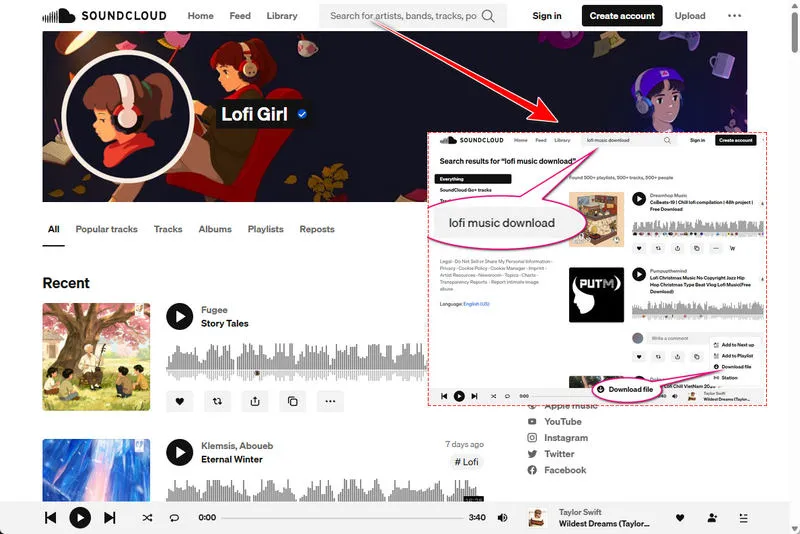
Start with lofi music playlists on SoundCloud, for example, https://soundcloud.com/lofi_girl, to explore your favorite songs. If you find a song you like, open its individual track page and look for the Download file button below the waveform. When the uploader enables downloads, you can save the original audio file without a paid subscription. Not every track has this option, though.
If you can't download a track, try searching SoundCloud for "lofi beats free download", "free lofi hip hop" or "lofi music download". These searches can help you find other artists who offer downloadable tracks. Still unable to download? Download them as MP3 files using Music Converter, without a premium account.
📍 Also Read: SoundCloud to MP3: 3 Easy Ways to Download Songs from SoundCloud
2.2 Lofi Music Playlists on Spotify
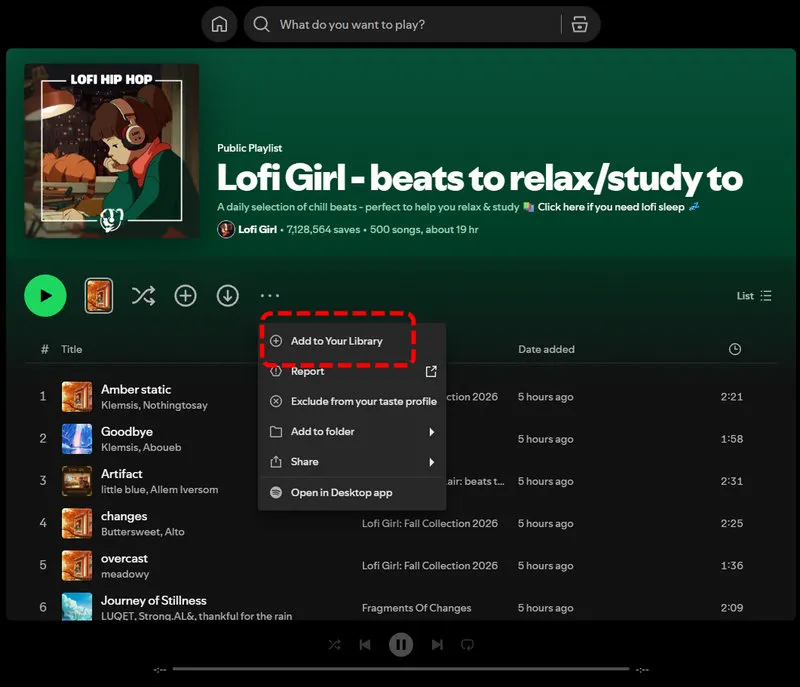
Spotify makes it easy to stream lofi music. You can try https://open.spotify.com/playlist/0vvXsWCC9xrXsKd4FyS8kM and enjoy mellow beats for studying, working, or relaxing. Save the playlist to Your Library so you can find it again.
With Spotify Premium, you can also download the playlist for offline listening in the Spotify app. However, those downloads aren't standalone MP3 files you can move to another music player or save on your computer locally.
📍 Also Read: How to Convert Spotify to MP3 in 2026: Step-by-Step Guide
2.3 How to Download Lofi Music with Sidify All-In-One Music Converter
Found a lofi playlist you love but want to save the tracks as local audio files? Sidify All-In-One Music Converter lets you process supported music from streaming platforms such as Spotify, SoundCloud, Apple Music, YouTube Music, etc., and save the tracks in formats like MP3, AAC, WAV, FLAC, AIFF, and ALAC. It also supports batch conversion and preserves full ID3 tags. Whether you have a free or premium account, Sidify helps you download lofi music as original audio files on your computer.
Sidify All-In-One Converter
- Download songs from different streaming platforms and any music sites.
- Convert music to MP3/AAC/WAV/FLAC/AIFF/ALAC
- Export music, playlists, albums, audiobooks, and podcasts to the computer.
- Preserve the original audio quality and keep the ID3 tags.
- Rip music from the music site and burn music to CD.
- Built-in free podcast and radio to MP3 downloader and vocal remover.

Lofi Music Download with Sidify
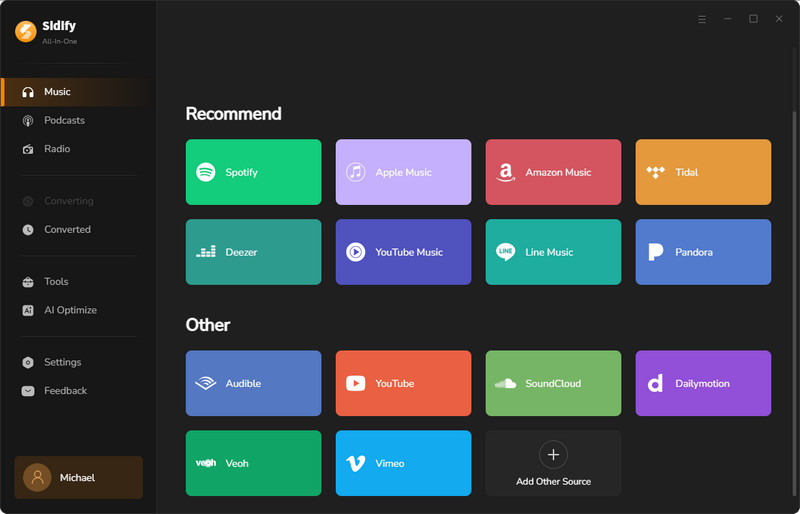
Step 1 Select Streaming Platform
Sidify supports various platforms. After starting this program, you will see the following main interface. You can select one to download lofi music as you like, for example, Spotify.
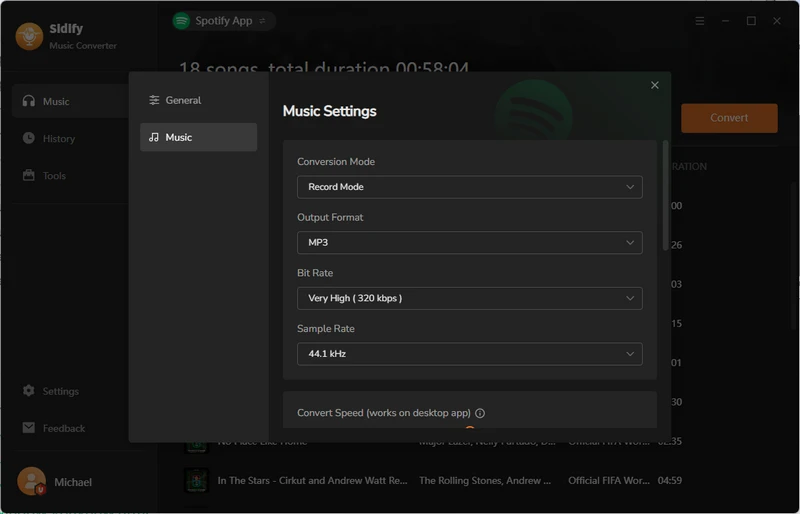
Step 2 Customize the Output Settings
When you enter this platform in Sidify, log in to your account. Then, click the "Menu" button in the upper-right corner to customize the output settings, including the output format, quality, path and more.
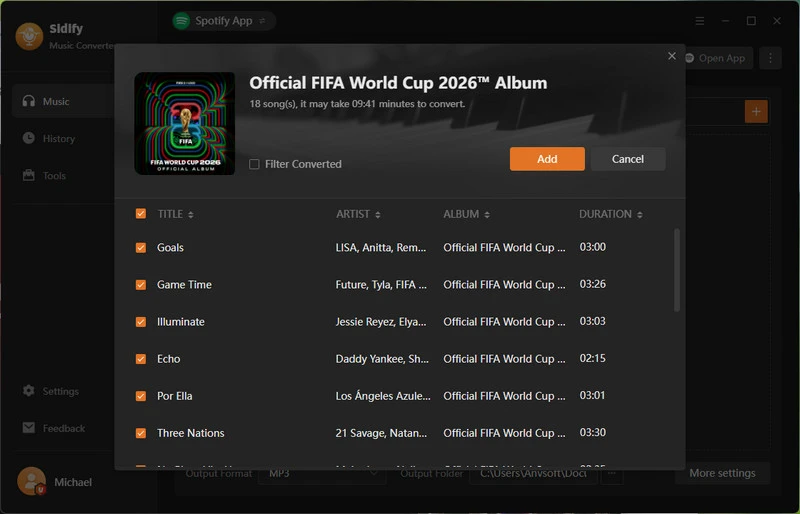
Step 3 Add Lofi Music
Find the lofi tracks or playlists you want to download, simply click the "Add" button to add them to the conversion queue. When you are ready, you can start the MP3 conversion.
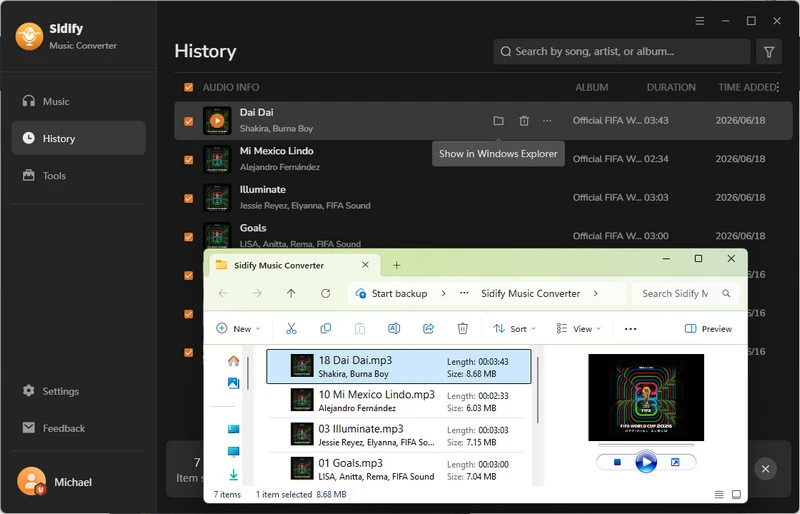
Step 4 View Downloaded Lofi Music
After the conversion is finished, you can access the converted tracks in the "History" tab. Alternatively, you can click the file folder icon to view the audio files locally on your computer.
Part 3. Best Free Websites to Download Lofi Music Directly
Here we reviewed a few free websites allowing you to download lofi music as audio files for offline listening, video editing, or background music. But note that the rules for attribution and commercial use vary.
Quick Comparison Table of Best Free Websites
| Website | Free Downloads | Account Required | Format | Audio Quality | Attribution | Ads |
|---|---|---|---|---|---|---|
| Pixabay | Yes | No | MP3 | 256 kbps | Not required | Yes |
| Free To Use | Yes | No | MP3 | 320 kbps | Required | None |
| Free Music Archive | Yes | Yes | MP3 | 320 kbps | Not required for CC0 tracks | Yes |
| Uppbeat | 3 per month | Yes | MP3 | 320 kbps | Required | None |
| TuneTank | 3 per month | Yes | MP3 | 128 kbps | Required | None |
| Bensound | Limited | No | MP3 | 192 kbps | Required | None |
Note: Free download options and usage rights vary by website and track. Check the license before using music in monetized videos or commercial projects.
1. Pixabay
Website: https://pixabay.com/music/search/lofi/
Pixabay is a good place to download free lofi music for studying, relaxing, or creating videos. Its lofi music library includes a variety of chill beats, soft piano loops, and mellow background tracks. You can browse the collection to find music that suits your mood or project.
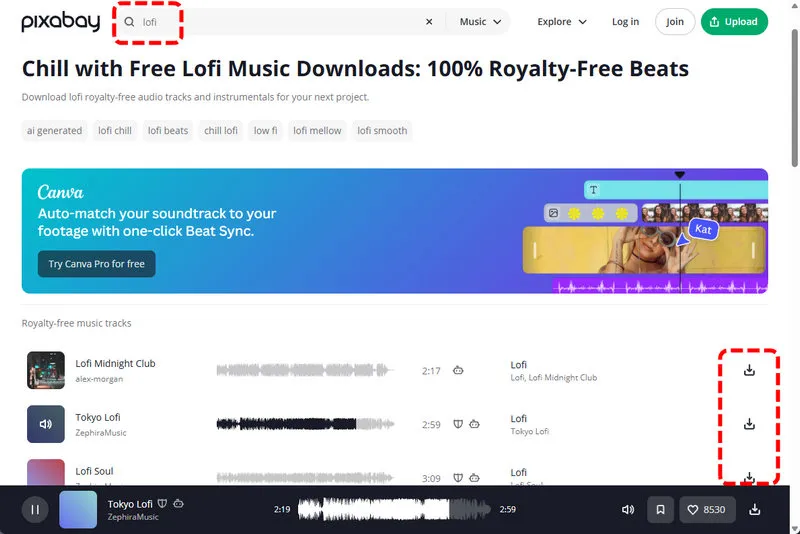
How to Download: Visit the Pixabay Lofi Music library, choose a track, and click the download button on the right side of the track page. In my test, the song downloaded directly as an MP3 file without requiring an account. The downloaded tracks were generally around 256 kbps, offering good audio quality for everyday listening.
Usage Rights: Pixabay music is free to use in many personal and commercial projects without attribution. However, you cannot resell or redistribute tracks as standalone files. Some tracks display a small shield icon indicating YouTube Content ID registration. If you plan to use these tracks in videos, check the usage terms first.
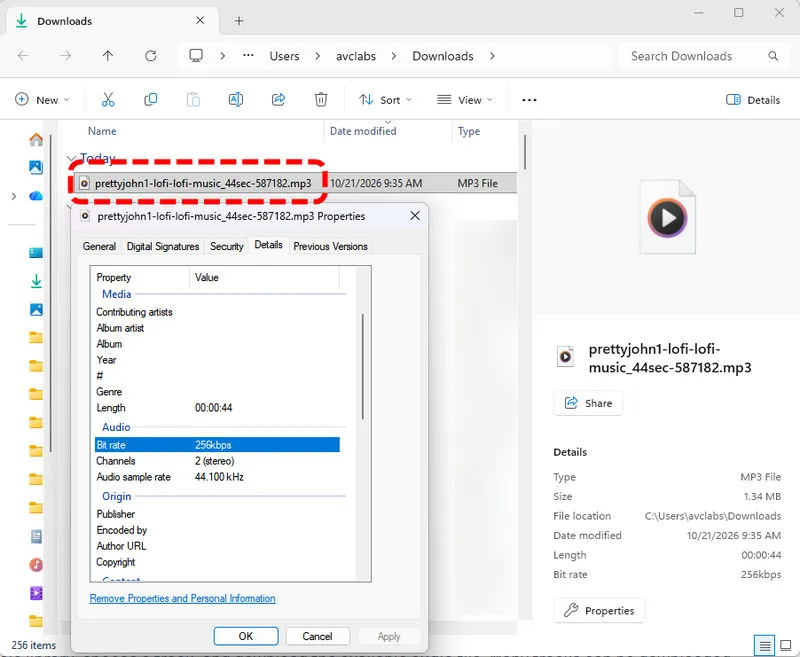
- Free MP3 downloads without requiring an account.
- Offers a variety of lofi tracks for personal listening and creative projects.
- Many tracks can be used in personal and commercial projects without attribution.
- Some tracks may trigger YouTube Content ID claims when used in videos.
2. Free To Use
Website: https://freetouse.com/music/category/lofi
Free To Use is a royalty-free music library designed for content creators. Its lofi collection features mellow hip hop beats, jazzy loops, and relaxing tracks for study videos, vlogs, and other creative projects.
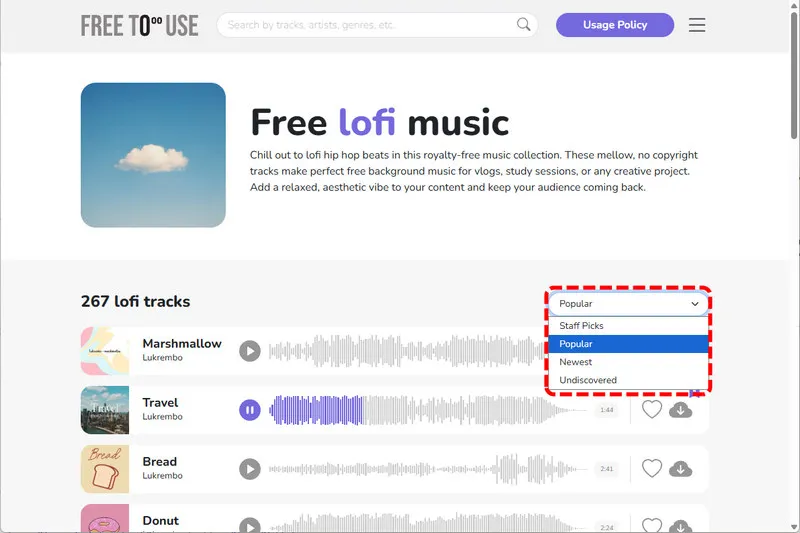
How to Download: I can download lofi music as MP3 files without signing up. The track I tested was available at 320 kbps, making it a good option for listeners who want high-quality MP3 downloads. However, not every track is necessarily free. Some songs have a star icon next to them, indicating that a subscription is required to download or use them.
Usage Rights: If you plan to use a track in a YouTube video, check the instructions displayed after downloading. Free To Use reminds you to credit the music, so copy the suggested attribution and add it to your video description.
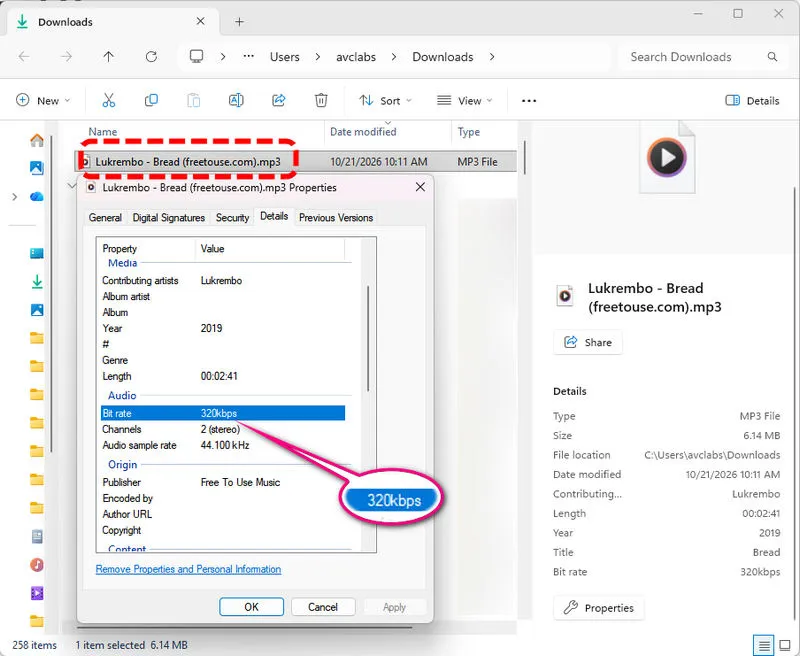
- Free MP3 downloads without requiring an account.
- The tested track was available at 320 kbps.
- Offers lofi tracks for studying, vlogs, and other projects.
- Some tracks require a subscription to download.
- You need to credit the music when using it in YouTube videos.
3. Free Music Archive (FMA)
Website: https://freemusicarchive.org/music/
Free Music Archive is a music library where you can find and download tracks under different licenses. You can browse its lofi music and use the license filters to find songs for personal listening, videos, or commercial projects.
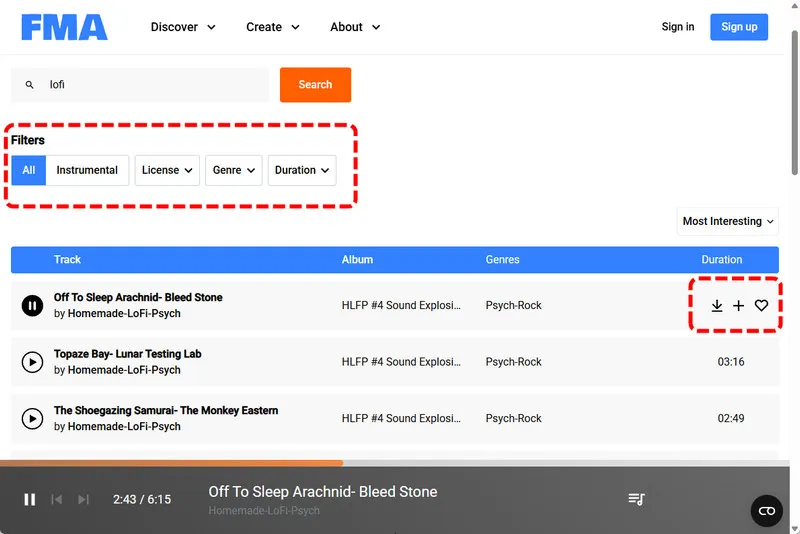
How to Download: I tested the Lo-fi and Chill album by HoliznaCC0. The downloaded track was an MP3 file at 320 kbps, but I had to create an account before downloading. The album is labeled CC0 1.0 Universal, which generally allows you to use, modify, and share the music for personal or commercial purposes without giving credit.
Usage Rights: FMA offers several license filters, including Public Domain, Commercial Use, and Use in a Remix or Video. These options help you find tracks for different purposes, but you should still check the license shown on each track's page.
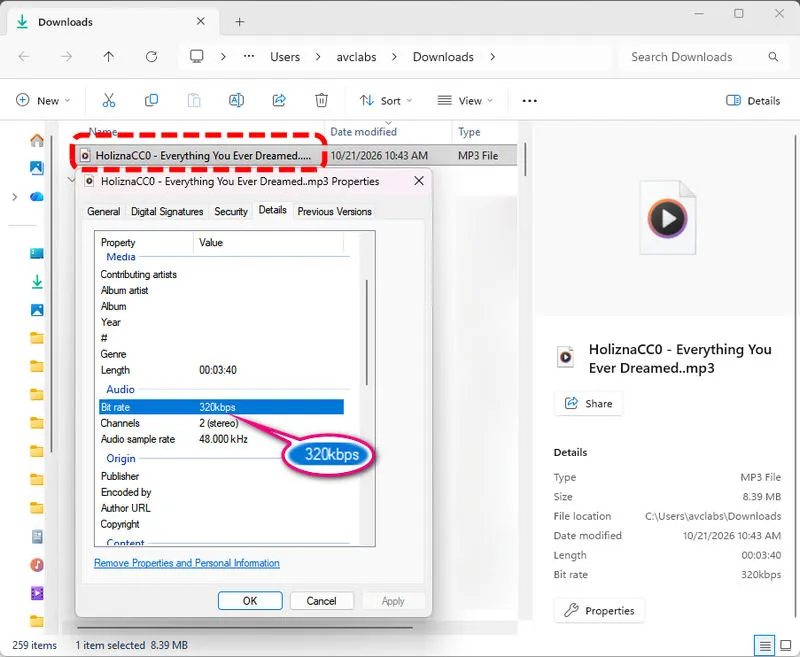
- Offers MP3 downloads, available at 320 kbps.
- License filters help you find music for personal or commercial use.
- CC0 tracks can be used without requiring attribution.
- You need to create an account to download music.
- License terms vary by track, so you need to check the usage rights before using a song.
4. Uppbeat
Website: https://uppbeat.io/music/category/lo-fi-beats
Uppbeat offers royalty-free music for content creators, including lofi love, breezy summer lofi, lazy lofi, Japanese lofi, live lofi, mellow beats, piano lofi, chill hop, and more. You can browse tracks by mood, genre, theme, and keywords.
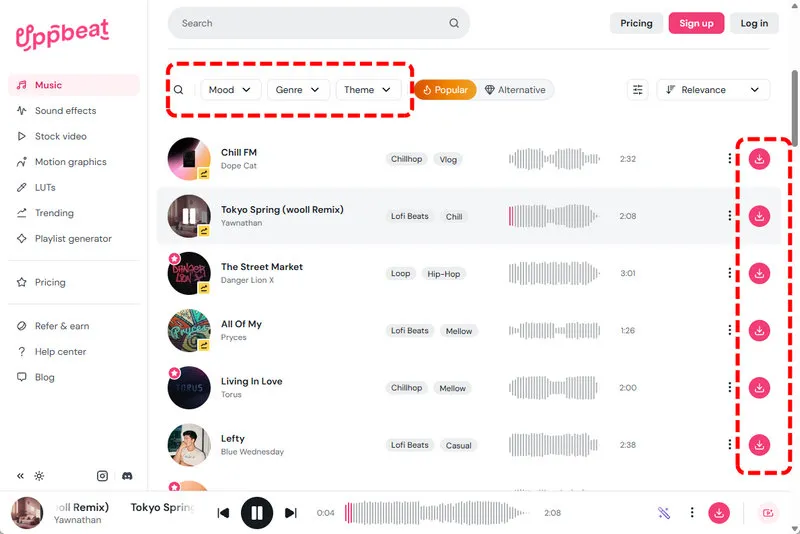
How to Download: You need to create an account to download music. Before downloading, select whether you're using the track for personal or business purposes. The free plan allows up to three downloads per month. The downloaded tracks are MP3 files at 320 kbps. Tracks marked with a star icon require a Premium subscription to download.
Usage Rights: Uppbeat requires you to credit the music when using it in videos on its free plan. Follow the attribution instructions provided by the site and add the credit to your video description.
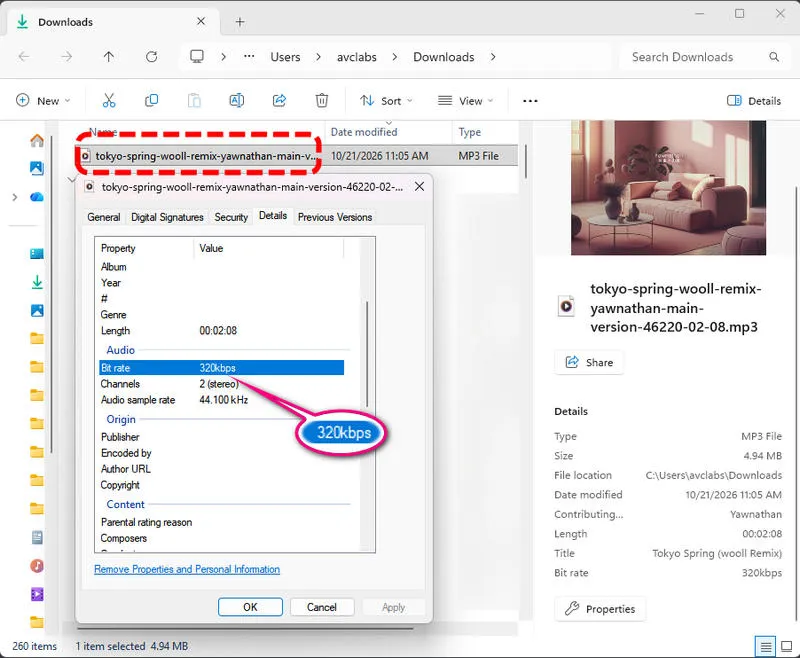
- The tested track was available as a 320 kbps MP3.
- Offers a variety of lofi tracks for videos and other creative projects.
- Lets you check usage options before downloading.
- You need an account to download music.
- Free downloads require attribution.
- The free plan allows up to three downloads per month.
- Some tracks require a Premium subscription.
5. TuneTank
Website: https://tunetank.com/discover/genres/lo-fi/
TuneTank lets you preview music before downloading it, which is useful when you're looking for a lofi beat that fits your video. However, the free plan has some limits. You need an account to download tracks, and you can get only three free downloads per month.
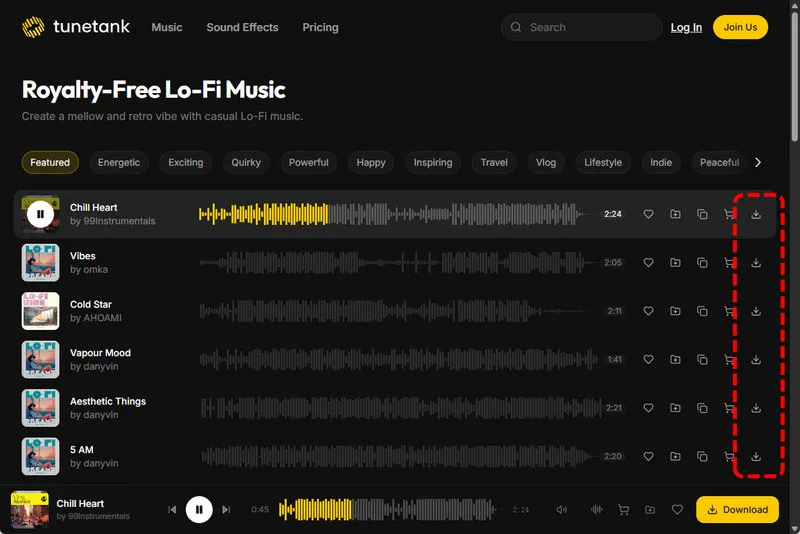
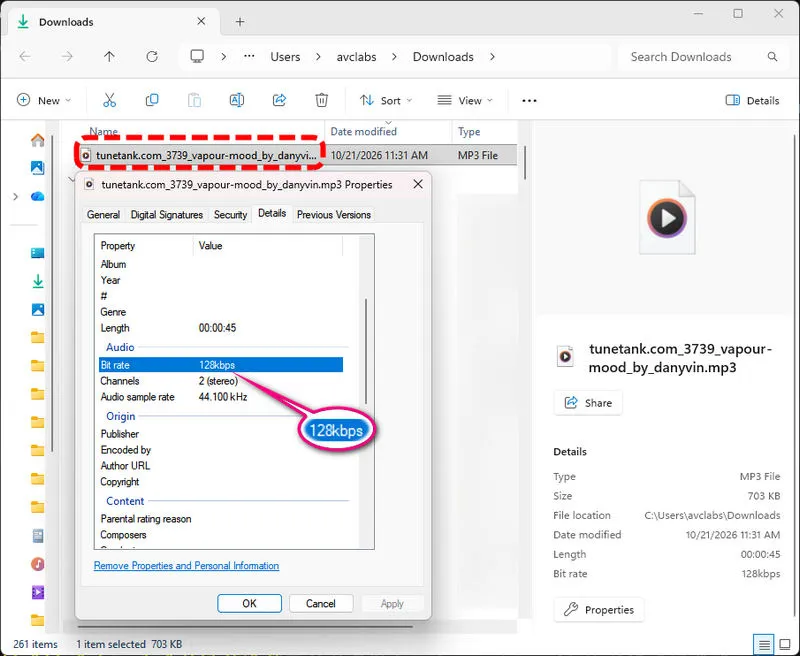
How to Download: Find a lofi track you like and download it after signing in. Free downloads are limited to 45 seconds per track. The track I downloaded was an MP3 file at 128 kbps. To get full-length tracks, higher audio quality, and unlimited downloads, you'll need a paid subscription.
Usage Rights: Free downloads require attribution. Before using a track in a video, podcast, or other project, check its license terms to make sure your intended use is allowed, especially if the content is monetized or used for commercial purposes.
- Lets you preview tracks before downloading.
- Has lofi beats for videos and other creative projects.
- Offers a free plan to try out the music.
- Requires an account and limits free downloads to three tracks per month.
- Free downloads are limited to 45 seconds and 128 kbps MP3 in the tested track.
- Full-length downloads and higher audio quality require a paid subscription.
6. Bensound
Website: https://www.bensound.com/royalty-free-music/lofi
Bensound has free and paid music for video creators, including lofi music that works well for your videos. Some tracks can be downloaded directly without creating an account, while others offer a demo download.
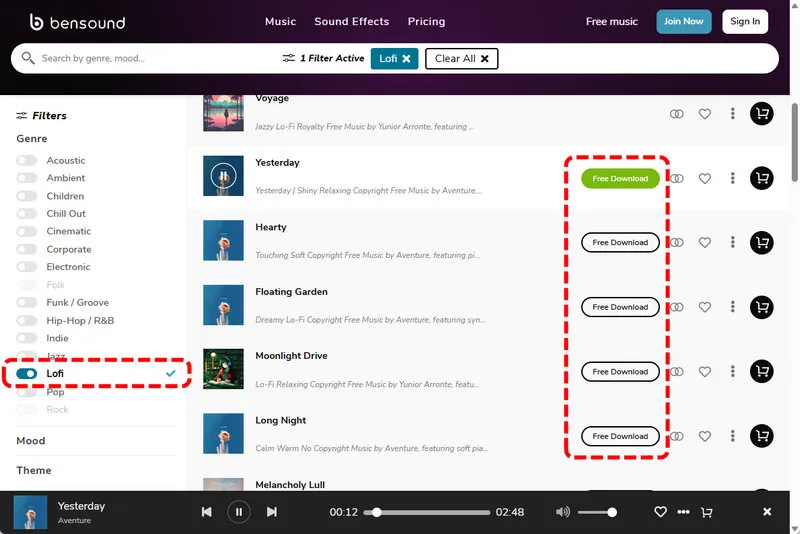
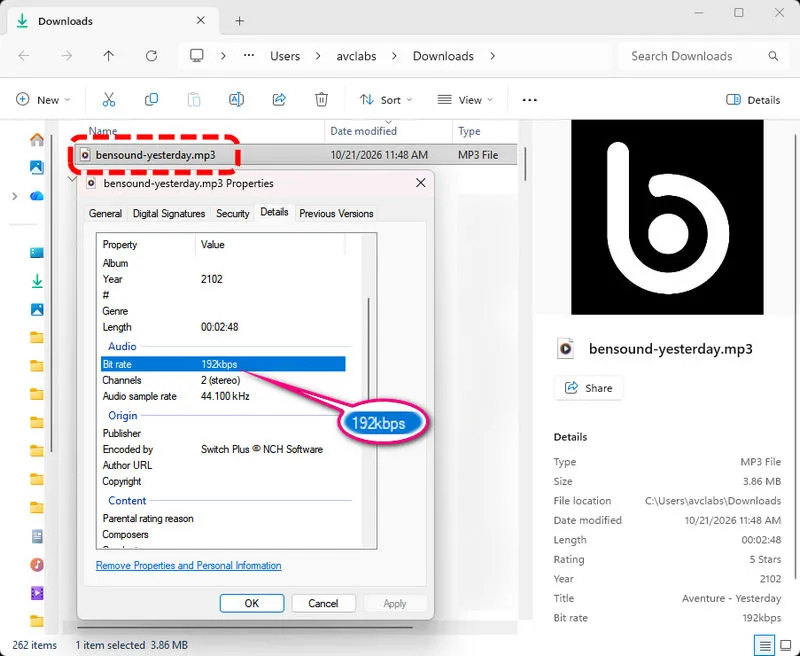
How to Download: Look for the Free Download button to download a track without signing up. The track I tested was an MP3 file at 192 kbps. If a song doesn't have a Free Download button, you can create an account and select Download Demo if the option is available.
Usage Rights: Bensound's free license allows you to use eligible tracks in videos on platforms such as YouTube, Facebook, and Instagram, as long as you include the personal attribution text provided by the site in your video description.
- Some tracks can be downloaded for free without an account.
- Provides MP3 downloads for use in eligible video projects.
- Offers video whitelisting to help avoid copyright claims.
- Free use requires attribution in your video description.
- The free license does not cover podcasts, song production, or audiobooks.
- Some tracks do not offer a direct free download.
Part 4. Can You Use Downloaded Lofi Music in YouTube Videos?
Yes, but it depends on the music's license. Downloading a song does not automatically give you permission to use it in a YouTube video.
For example, music from Spotify or SoundCloud is generally protected by copyright. Downloading it for personal listening does not mean you can upload it to your own videos. Even if you credit the artist in your description, you may still receive a copyright claim.
To reduce the risk of copyright issues, you can follow these steps.
4.1 Check the license before downloading.
Make sure it allows use in YouTube videos and covers your intended use, including monetized or commercial projects if applicable.
4.2 Follow the attribution requirements.
If the license requires credit, copy the exact text provided by the music site and add it to your video description. Remember that credit alone does not give you permission to use copyrighted music.
4.3 Keep a record of the license.
Save the track page, license details, and download information in case you need to respond to a copyright claim.
4.4 Check whether channel safelisting is available.
Some music platforms let you register your YouTube channel to help prevent claims on licensed tracks. Follow their instructions if this option is offered.
For free lofi music, Pixabay and Free Music Archive (FMA) may be the better choices. On FMA, CC0 tracks can generally be used for personal and commercial projects without credit, while other tracks may require attribution or restrict commercial use. Pixabay tracks also have lower risk for most creators.
FAQs About Lofi Music Download
1. Where can I download lofi music for free?
Pixabay and Free To Use can help you download tracks as MP3 files and save them to your computer for free. Pixabay doesn't require an account, and many tracks can be used without attribution, subject to its license terms. Free To Use also offers higher-quality MP3 downloads, and you need to credit the music before using it in a video. Alternatively, you can find CC0 releases from Free Music Archive (FMA), which generally allow you to use and adapt the music without asking for permission or giving credit. Uppbeat is another option for YouTube creators. Its channel safelisting feature can help reduce copyright claims.
2. How do I download lofi music as MP3?
If you have an album from Spotify, SoundCloud or other streaming platforms, you can use Sidify All-In-One Music Converter to download lofi music to MP3. AAC, FLAC, WAV, AIFF, or ALAC are also available. Keep in mind that downloaded files should be used for personal listening only, unless you have the necessary rights for other uses. For the free sites, you can simply find a track you like and click the download button. But the audio quality may vary and downloads are limited.
3. Is lofi music copyright-free?
No. A relaxing beat can still be protected by copyright, even if it's available for free download.
Before using a track in a YouTube video, livestream, or other project, you should check its license. Some tracks require credit, some restrict commercial use, and others may not allow you to use them in videos at all. Terms like "no copyright" and "royalty-free" aren't enough on their own to tell you what you're allowed to do.
CC0 music is generally released for use without requiring attribution, including commercial use. Neither label guarantees that you will never receive a copyright claim, so keep a copy of the license information for the track you use.
Final Words
Whether you need lofi beats for a study session or background music for your next video, there are plenty of free tracks to explore. Pick a site that fits your needs, download a few songs you like, and check the license before using them in your content. That way, you can spend less time worrying about copyright and more time enjoying the music.
 Sidify All-In-One Music Converter
Download and convert music from all major streaming services in one place. Get MP3 or other popular formats in source audio quality, save songs offline on Windows or Mac, and enjoy up to 10X faster downloads with ID3 tags and lyrics preserved.












