


Mixcloud is home to thousands of DJ mixes, radio shows and podcasts, including long-form sets that are hard to find anywhere else. You can stream as you like but you can't actually save them locally for offline listening. This guide explains every practical way to get Mixcloud audio onto your own device. If you are confused about Mixcloud to MP3, this is what you need.
Part 1. Can You Download Mixcloud to MP3
Not directly from Mixcloud. If you are looking for an MP3 file that you can save to your computer, phone, or another music player, Mixcloud does not provide a direct download option on its website.
Free accounts do not offer an official way to download shows as MP3 files. Even creators who upload their own shows cannot simply download the uploaded audio from Mixcloud.
Mixcloud Premium offers an official offline listening feature through the mobile app. However, this does not give you a standalone audio file. The saved content remains available inside the Mixcloud app, so you cannot export it as an MP3, transfer it to your computer as an audio file, or play it in another music player.
If you want real MP3 files stored locally forever, you need third-party solutions. Among these solutions, we highly recommend Sidify All-In-One Music Converter. Convert Mixcloud to MP3 at 320 kbps and other formats including WAV, FLAC, ALAC, AIFF, and AAC, with full ID3 tags preserved.
Part 2. How to Download Mixcloud to MP3
Here we will introduce methods to help you convert Mixcloud to MP3. Step-by-step instructions are provided.
| Operating System | Browser | Test File | Duration | Type | Genres |
| Windows 11 Pro | Google Chrome 153.0.8010.50 (64-bit) | Rick Lane B2B Rach – Sept 2026 Speed Garage, House and Organs Mix | 1:34:57 | B2B DJ Mix | Speed Garage, House |
Method 1. Mixcloud's Official Offline Listening
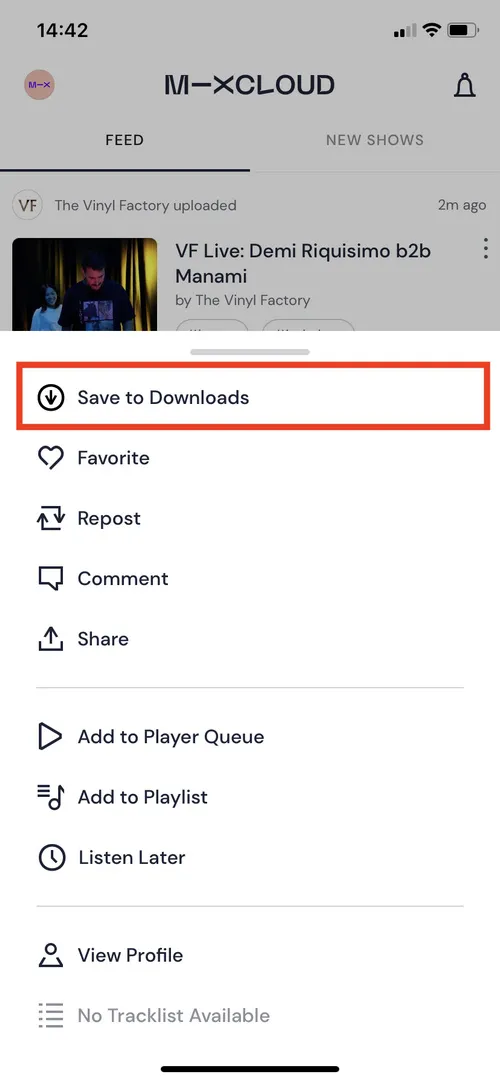
Mixcloud Premium lets you save supported shows for offline listening through the official Mixcloud mobile app. This is the simplest option if you mainly want to listen to your favorite mixes, radio shows, or podcasts when you don't have an internet connection.
Step 1 Subscribe to Mixcloud Premium through the Mixcloud website or app.
Step 2 Open the official Mixcloud app on your iPhone, iPad, or Android device and sign in.
Step 3 Find the mix, radio show, or podcast you want to save, tap the three-dot menu, and select Save to Downloads.
Step 4 Open the Downloads section in the Mixcloud app to listen to the saved audio offline.
Method 2. Sidify All-In-One Music Converter
If you want to save Mixcloud shows as actual MP3 files, Sidify All-In-One Music Converter provides a desktop solution for Windows and Mac. Sidify supports several output formats, including MP3, AAC, WAV, FLAC, AIFF, and ALAC. You can also configure the available output settings to match your listening needs. Besides, this tool retains full metadata such as the title, artist, album, cover art and more.
It also supports batch conversion, which is useful when you want to save multiple Mixcloud shows instead of processing them one by one. The converted files can then be managed as regular local audio files on your computer.
The free trial allows you to test the conversion before purchasing. Full-length conversion requires a paid license.
Sidify All-In-One Converter
- Download songs from different streaming platforms and any music sites.
- Convert music to MP3/AAC/WAV/FLAC/AIFF/ALAC
- Export music, playlists, albums, audiobooks, and podcasts to the computer.
- Preserve the original audio quality and keep the ID3 tags.
- Rip music from the music site and burn music to CD.
- Built-in free podcast and radio to mp3 downloader and vocal remover.

How to save Mixcloud audio as standalone MP3 files:
Step 1 Launch Sidify All-In-One Music Converter
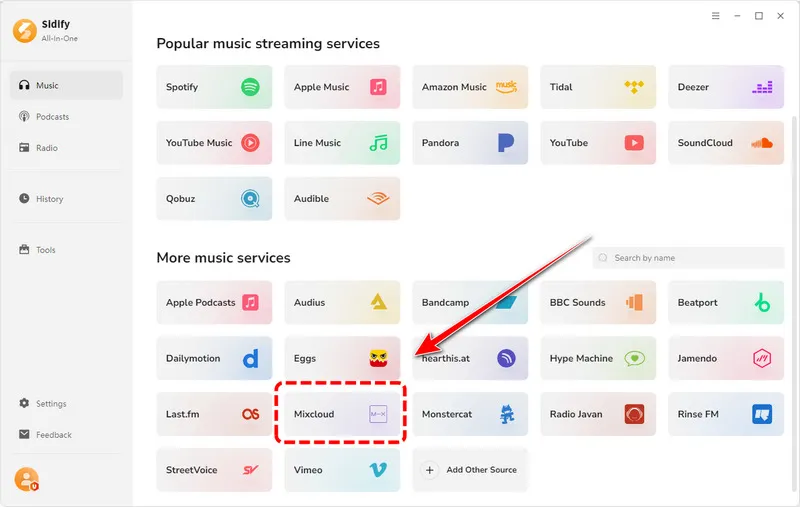
Download and install Sidify All-In-One Music Converter on your Windows PC or Mac. Launch Sidify and you will see the following main interface. It supports 30+ streaming platforms, including Spotify, Apple Music, Deezer and more. Simply select "Mixcloud" as your target site.
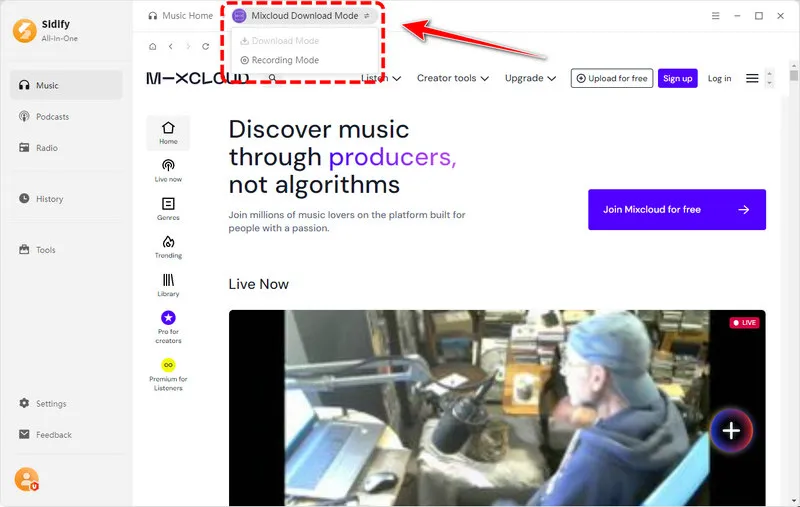
Step 2 Choose Mixcloud Download Mode
Open the Mixcloud website in Sidify. You can then choose "Download Mode" to directly download Mixcloud audio, or the "Record Mode" to capture the playing audio. Here we select the default download mode.
Step 3 Set Output Settings
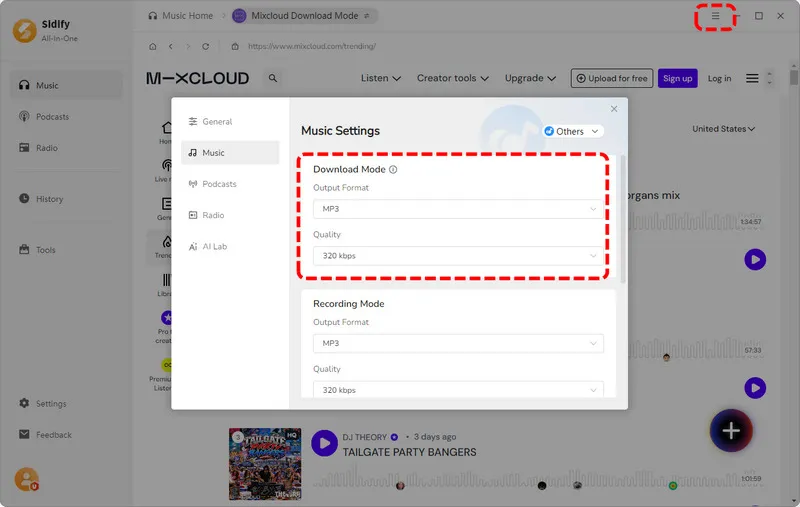
Before we convert Mixcloud to MP3, let's customize the output settings. Click the "Menu" button in the upper right corner and here you can choose the output format as MP3 320kbps. Other formats such as AAC, WAV, FLAC, AIFF, and ALAC are also available.
Step 4 Add Mixcloud Audio
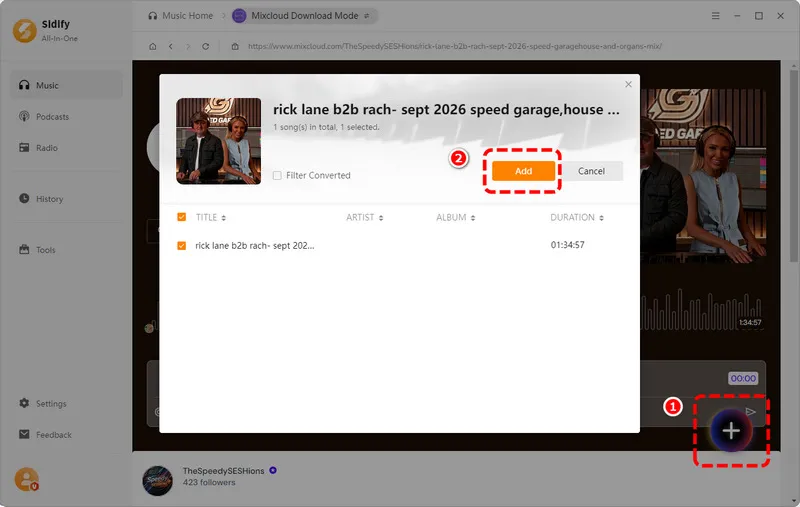
Find the Mixcloud mix, radio show, or podcast you want to save, then click the "Add" button to add it to Sidify.
Step 5 Convert Mixcloud to MP3
When you are ready, click the "Convert" button to start the conversion. You can see the progress bar and the remaining time on the screen.
Step 6 View Downloaded Music
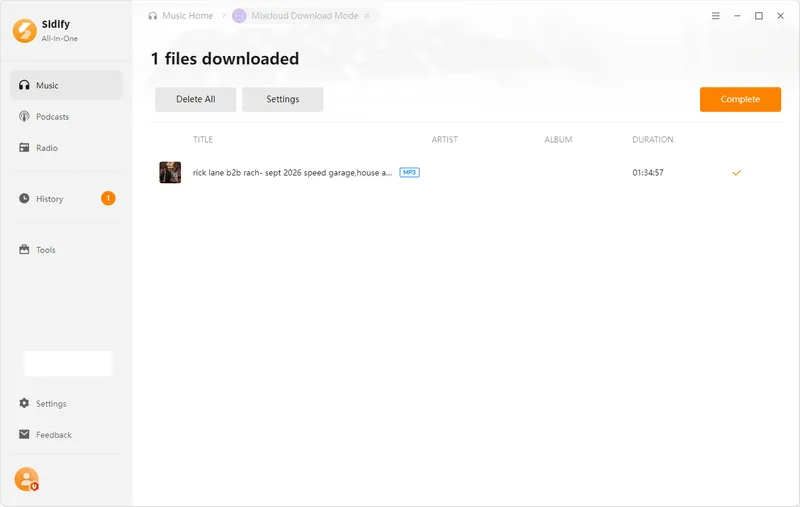
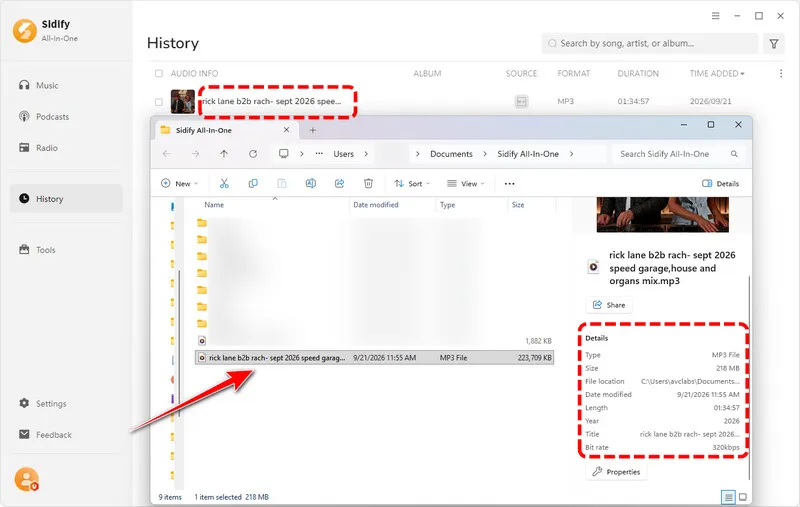
When it finishes, you can find the converted Mixcloud audio in the "History" tab and in your selected output folder. Now you can play it with a regular music player.
Method 3. Online Mixcloud to MP3 Downloader
Online Mixcloud downloaders are convenient when you only need to save a single show or mix, with no software to install. In most cases, you simply copy the Mixcloud URL, paste it into the downloader, and wait for the MP3 download to be generated. You can use them on both computers and mobile devices.
However, the experience can vary from one downloader to another. Some tools may work well for one Mixcloud link but fail with another, especially when Mixcloud changes how its content is delivered. Download speed, available audio quality, and support for different types of Mixcloud content can also vary.
- Free options are available.
- No software installation required.
- Very easy to use for occasional downloads.
- Works on desktop and mobile browsers.
- Convenient for downloading individual Mixcloud shows.
- Pop-up ads and redirects are common on some sites.
- Better suited to individual downloads than batch downloads.
- Some downloaders may stop working when Mixcloud changes its platform.
- Available audio quality may vary between downloaders.
- Support for different Mixcloud content may vary.
1. mixclouddownloader.net
Website: https://mixclouddownloader.net/
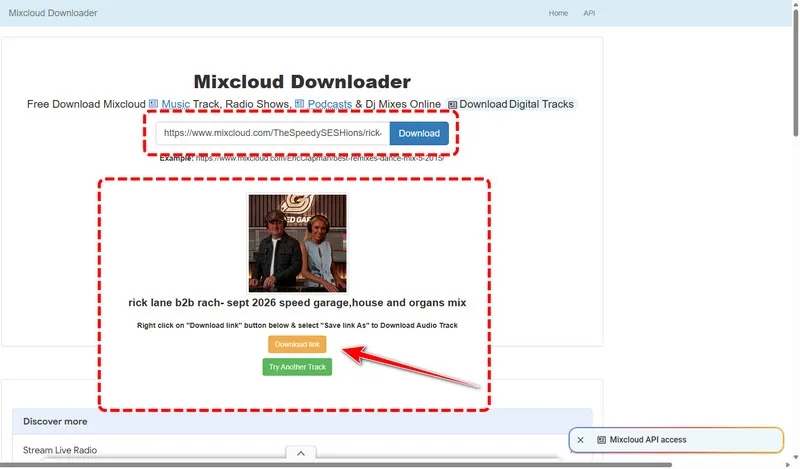
This is a free online tool for public Mixcloud tracks, radio shows, podcasts and DJ mixes. Copy the page URL, paste it into the box, click Download, then right-click the generated link on the next page and save the file as MP3 or M4A. Pop-up ads are common, and the site can break after Mixcloud updates.
2. saveLink.info
Website: https://www.savelink.info/sites/mixcloud1
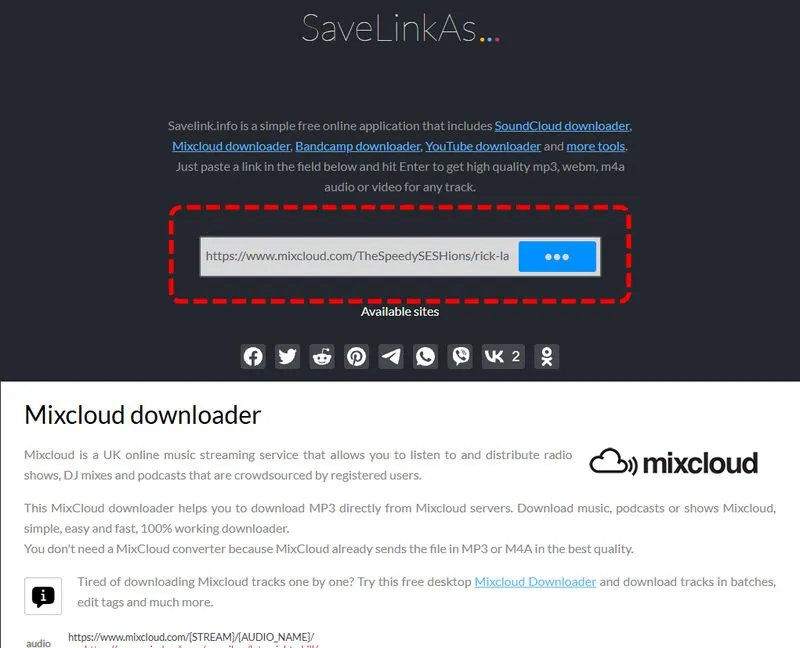
SaveLink.info provides a dedicated Mixcloud downloader that lets you save Mixcloud audio as MP3 files directly in your browser. Simply paste the Mixcloud URL into the input box, wait for the download link to be generated, and save the resulting file to your device. The tool is mainly designed for downloading one Mixcloud audio file at a time.
3. online.fliflik.com
Website: https://online.fliflik.com/mixcloud-downloader/
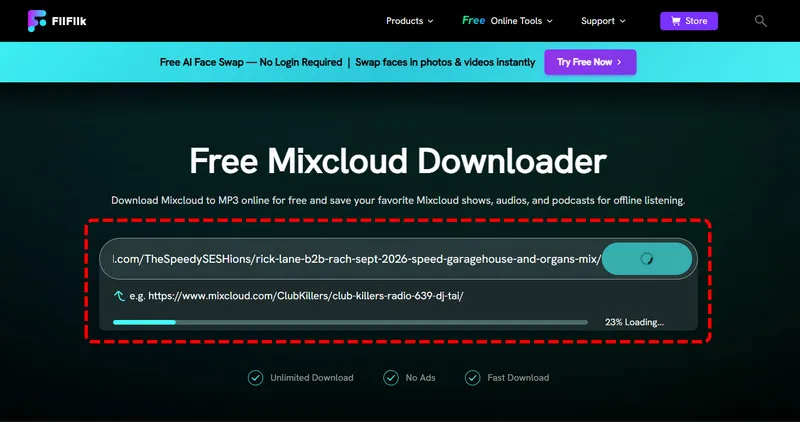
FliFlik offers a free online tool for converting Mixcloud shows, audio, and podcasts to MP3. You can use it without creating an account, and there is no stated limit on the number of downloads.
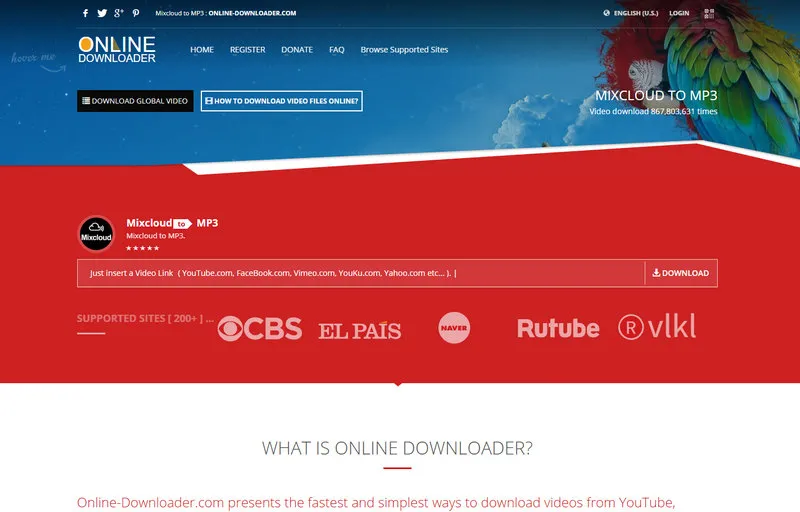
4. mixcloud.online-downloader.com
Website: https://mixcloud.online-downloader.com/Mixcloud-to-MP3
This online tool also lets you download from Mixcloud to MP3. Paste a Mixcloud URL, submit it, and choose from the available download formats. MP3 is supported along with other audio formats such as AAC, OGG, M4A, FLAC, and AIFF. However, some links may fail to download when the service cannot retrieve the original file.
5. anydownloader.com
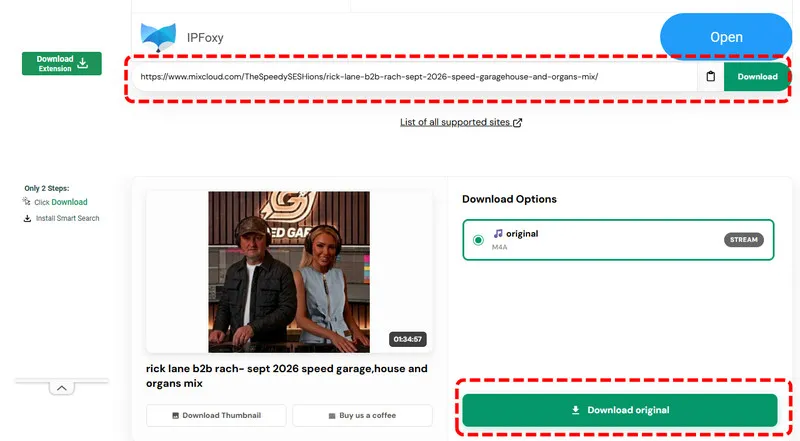
Website: https://anydownloader.com/en/mixcloud-music-downloader/
AnyDownloader is a free online Mixcloud downloader that requires no registration and works directly in Chrome, Firefox, Safari, and Edge. It also offers an option to download Mixcloud audio in its original available quality.
 Our Experience with Online Mixcloud to MP3 Downloaders:
During our testing, we found that many online Mixcloud to MP3 downloaders do not always work as advertised. Although some tools claim to support MP3 downloads and high-quality audio, the actual output options can be different. In some cases, there was no MP3 option available at all.
The user experience can also be frustrating. Many of these websites display intrusive ads, pop-ups, or redirects around the download area. We also encountered failed downloads with messages such as "The URL is broken" and "Analysis failed", meaning that the tool could not successfully process the Mixcloud link.

For occasional downloads, online tools can still be convenient because they require no software installation. However, if you want to download multiple Mixcloud files in batches, Sidify All-In-One Music Converter is a more practical option.
Method 4. Browser Extension
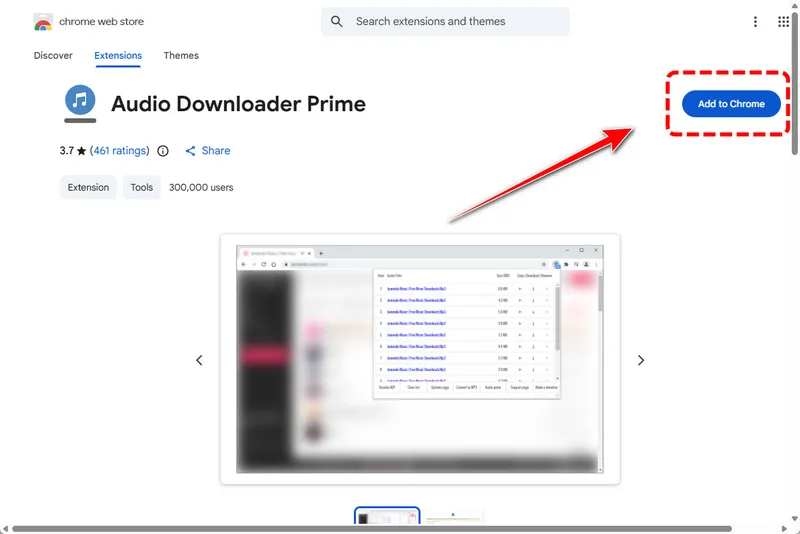
Audio Downloader Prime is a free browser extension for Chrome and Firefox that detects audio files loaded by the current webpage. When it finds available audio, the extension lists the files in its toolbar popup, where you can download them or copy their direct links.
However, Audio Downloader Prime is not specifically designed for Mixcloud, so the results can be inconsistent. The developer notes that the extension does not work with YouTube, while user reviews also report cases where audio is not detected on certain websites, including Mixcloud. It may also stop working when a website changes how it delivers audio, and the converted file size and length may be incorrect.
Another limitation is that the extension does not necessarily give you an MP3 file. The available format depends on how the website delivers the audio, so you may receive MP3, M4A, or another supported format instead. For Mixcloud, it is worth checking the detected file and its format before downloading.
Step 1 Search for and install Audio Downloader Prime from the Chrome Web Store or the Firefox add-on site.
Step 2 Open the Mixcloud page in your browser.
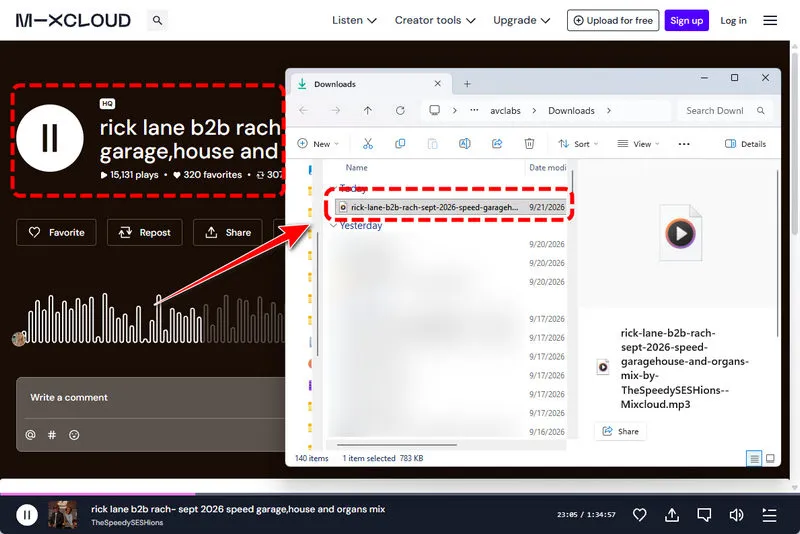
Step 3 Choose the audio you want to download as MP3. For our testing, we selected "Rick Lane B2B Rach – Sept 2026 Speed Garage, House and Organs Mix", a 1:34:57 B2B DJ mix featuring Speed Garage and House music.
Step 4 Click the extension icon in the toolbar and download the detected audio. Here you must play your audio, letting this extension detect it. Otherwise, the icon will remain gray and inactive in the toolbar.
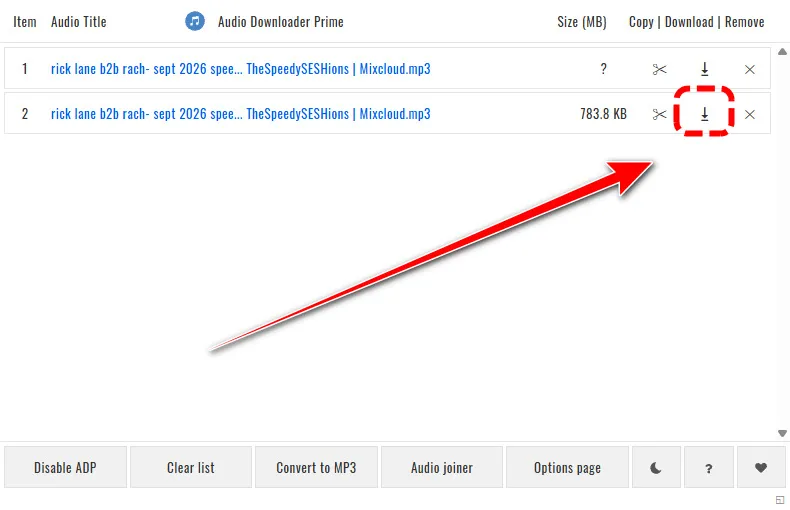
Step 5 Simply click the download button and you can see the downloaded Mixcloud MP3 file soon.
Part 3. Mixcloud to MP3 Download Methods Compared
Check the following comparison table and choose your best method to convert Mixcloud to MP3.
| Method | Real MP3 File | Cost | Ads | Batch Download | Reliability |
|---|---|---|---|---|---|
| Mixcloud Premium | No, in-app only | Subscription | No | No | High |
| Sidify All-In-One Music Converter | Yes | Paid license, free trial | No | Yes | High |
| Online Mixcloud Downloaders | format varies, incomplete length | Free | Often | No | Low |
| Audio Downloader Prime | format varies, incomplete length | Free | No | No | Low |
FAQs About Mixcloud to MP3
1. What is the best Mixcloud to MP3 converter?
There is no single best tool for everyone. For stable, real MP3 files with long DJ sets and ID3 tags, desktop software such as Sidify All-In-One Music Converter is the most dependable choice. Free online downloaders work for quick one-off downloads but often stop working after Mixcloud updates.
2. Can I download Mixcloud DJ sets?
Yes, some public Mixcloud DJ sets can be saved using Sidify, online downloaders, or browser extensions. Mixcloud Premium supports offline listening through the official app, but it does not provide DJ sets as standalone MP3 files.
3. How can I save Mixcloud audio offline?
If you only want to listen offline, Mixcloud Premium lets you save supported audio for offline playback in the official app. However, the saved content stays within the app and is not available as an MP3 file. If you want to save Mixcloud audio as a local MP3 file, Sidify All-In-One Music Converter is our top pick. In our testing, it is the only tool that converts nearly 2-hour Mixcloud tracks to a real MP3 at 320 kbps, with ID3 tags preserved and support for batch conversion. No ads.
4. Is it legal to download Mixcloud audio?
It depends on the copyright of the audio and the laws in your country. Personal use does not automatically make a download legal. Do not resell, redistribute, or publicly share downloaded audio without permission. For commercial use, get permission from the copyright holder.
Final Words
Mixcloud Premium is the only official offline option, but it locks your downloads inside the app. To get real MP3 files, you need to seek other solutions.
For a stable Mixcloud to MP3 conversion that survives Mixcloud's frequent changes, Sidify All-In-One Music Converter is the recommended method here. It saves MP3 and other formats with original quality and tags, handles long DJ sets, and its free trial lets you test it before paying. Whatever you choose, keep the files for personal listening only. Respect the work of the DJs, radio hosts and podcasters on Mixcloud.
 Sidify All-in-one Music Converter
Download and convert music from all major streaming services in one place. Get MP3 or other popular formats in source audio quality, save songs offline on Windows or Mac, and enjoy up to 10X faster downloads with ID3 tags and lyrics preserved.












