


Spotify doesn't provide an option to export songs directly as MP3 files. If you need standard MP3 files, there are several ways to do it depending on your device and whether you want to convert a single track, playlist, or album.
In this guide, we'll show you how to convert Spotify to MP3 on Windows / Mac, for free, and online, with step-by-step instructions for each method.
If you need to convert one or two particular songs from Spotify to MP3 only, a free tool will suffice. Conversely, if you are a frequent Spotify user, then a professional tool is more recommended. Without further ado, let's dive into the detailed solutions to download songs from Spotify to MP3.
Method 1: How to Convert Spotify to MP3 on Windows or Mac
To convert Spotify to MP3, a professional and reliable desktop tool is always our top choice. They are more stable and safer. We have tested this Spotify music converter and offer step-by-step tutorials to help you convert Spotify to MP3 easily.
If you want to save Spotify songs as MP3 files for offline playback, Sidify Music Converter lets you convert individual tracks, entire albums, and playlists on your Windows or Mac computer. You can add multiple songs at once, choose MP3 as the output format, and keep full ID3 tags such as titles, artists, and album names.
Sidify Music Converter
- Convert Spotify music to MP3, FLAC, WAV, AAC, ALAC or AIFF.
- Download Spotify songs, albums, playlists, podcasts, radio, audiobooks, music video, video podcast.
- Keep the 100% original audio quality of Spotify music.
- Process conversion at 10X faster speed.
- Preserve ID3 tags and metadata after conversion.

Known for its superior quality, fast speed, and reliability, Sidify has earned a reputation as one of the best Spotify downloaders available on the market. As the most established player with a rich history in the realm of music conversion, Sidify holds the record for longevity and expertise, setting the pace in the tool industry and attracting a host of competitors aiming to replicate its success.
Follow these steps to convert Spotify music to MP3 with Sidify.
Step 1 Launch Sidify Music Converter
Download and install Sidify Music Converter on your computer, then launch the program to get started.
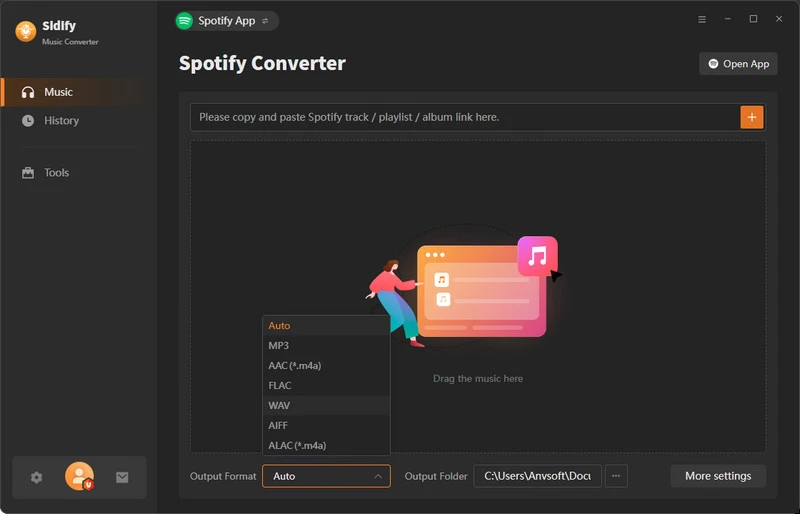
Step 2 Add Spotify Songs, Albums, or Playlists
Drag and drop the song, album, or playlist you want to convert to MP3 from Spotify to Sidify.
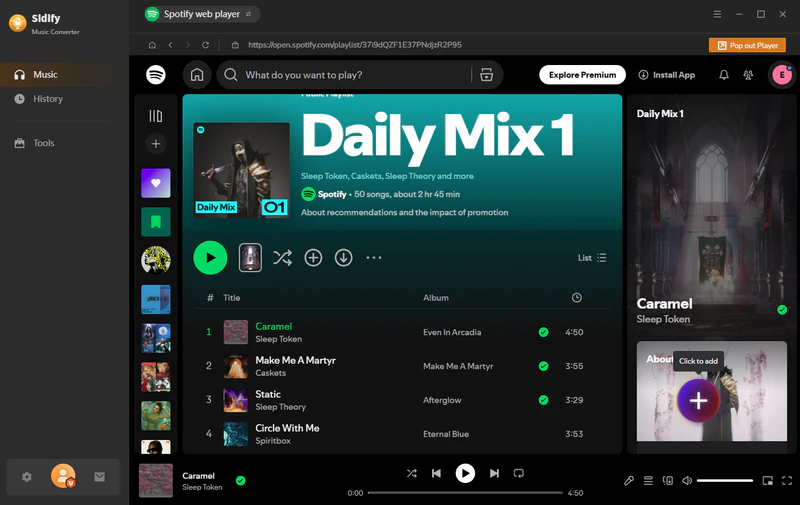
Step 3 Choose MP3 as the Output Format
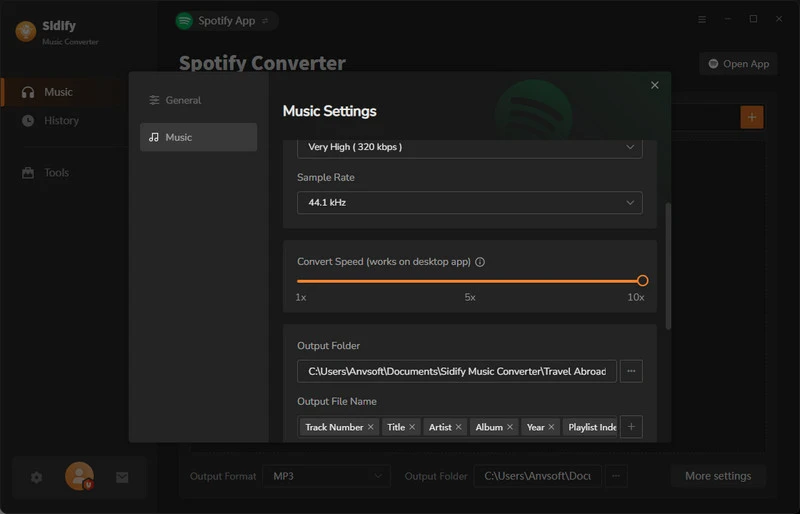
Click on the Settings icon on the left panel, select MP3 as the output format for the converted files, and specify the output folder. Besides, you can customize the skin, conversion speed, output quality, and more, according to your preferences.
Step 4 Convert Spotify Music to MP3
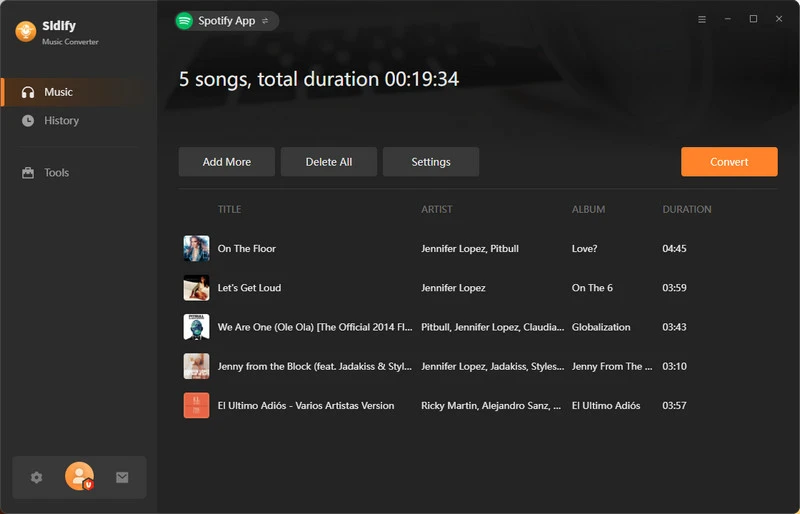
Click on the Convert button to begin the conversion process. Sidify will start converting the Spotify songs to MP3 format.
Step 5 Find Your Converted MP3 Files
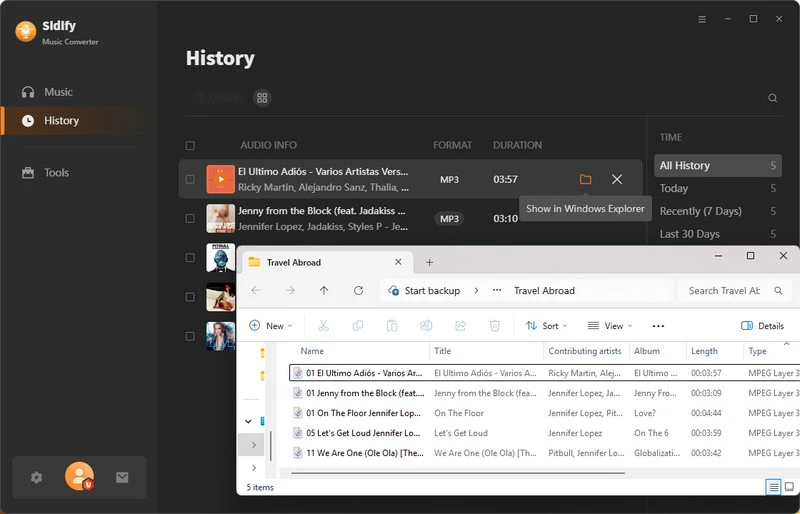
Click on the History tab on the left panel, and you can check and locate the converted MP3 files on your local computer.
 Tips:
Tips:If you want a tool to convert any streaming music (including Spotify, Apple Music, Amazon Music, Tidal, Deezer, YouTube, YouTube Music, SoundCloud, DailyMotion...) to MP3, Sidify All-In-One is the go-to choice
Method 2: How to Convert Spotify to MP3 for Free
Sidify Music Converter Free is a free tool that can convert Spotify music or playlists to MP3, AAC, WAV, or FLAC formats at a fast speed. By using this freeware, you can easily get MP3 files from Spotify at no cost. It's an ideal choice for those looking to listen to Spotify songs offline without premium.

Here are the detailed steps to convert Spotify to MP3 for free:
Step 1 Launch Sidify Music Converter Free.
Step 2 Drag and drop the songs you want to download from Spotify to Sidify.
Step 3 Click on the gear icon on the left panel, select MP3 output format for the downloaded Spotify music, and specify the output path.
Step 4 Click on the Convert button to start converting the Spotify music to MP3 for free.
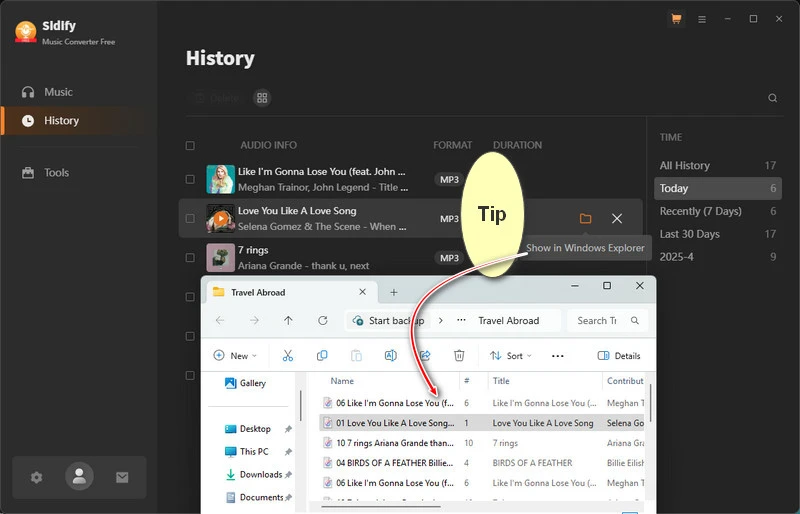
Step 5 Find the converted Spotify downloads in the specified output folder.
Now you've got Spotify tracks downloaded in MP3 format on your local drive at no cost. Want to compare more free options? See our Best Free Spotify to MP3 Converters.
Looking for more free Spotify to MP3 converters? We reviewed the 10 best tools to convert Spotify songs to MP3 in 2026 — no Premium needed. Download now for free.
Learn More →Method 3. How to Convert Spotify to MP3 Online
If you don't want to install desktop software, you can try an online Spotify downloader. These websites usually let you paste a Spotify link, process the track, and download an audio file through your browser. The process is simple, but availability, audio quality, and download limits can vary by website.
Convert Spotify to MP3 Online with SpotiDownloader
Visit: https://spotidownloader.com/en19
SpotiDownloader is an online tool designed to convert music from Spotify to MP3 for offline listening. You can use it to get MP3 files from Spotify without installing a desktop app, offering a convenient way to access Spotify content in a downloadable format.
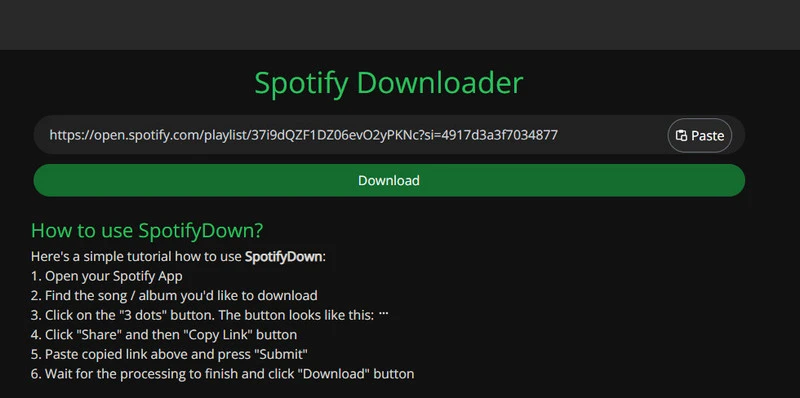
SpotifyMate is another online option that uses a similar copy-and-paste process. If SpotiDownloader is unavailable, you can try SpotifyMate by pasting the same Spotify link and checking whether an MP3 download is offered.
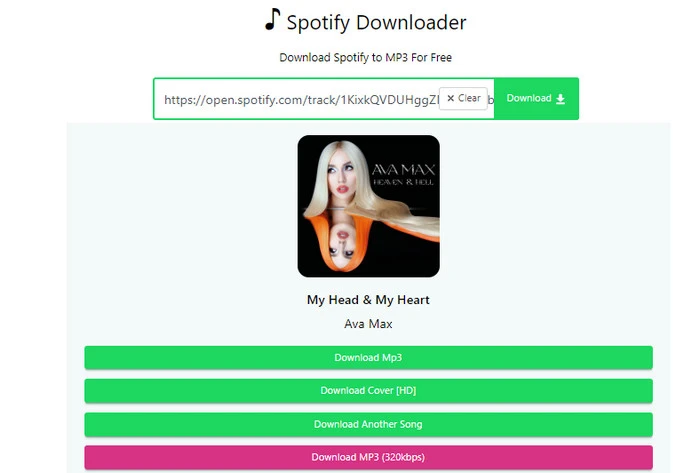
How to Convert a Spotify Link to MP3
If you have a Spotify link and want to save the music as an MP3 file, you can copy the link, add it to a tool that supports Spotify links, choose MP3 as the output format, and start the conversion. The exact steps may vary depending on the tool you use.
Step 1 Copy the Spotify Link
Open Spotify and find the song, album, or playlist you want to save. Click the three-dot menu, select Share > Copy Link.
Step 2 Add the Link to a Tool
Open your chosen tool and follow the instructions to add the Spotify link. If you're using an online downloader, paste the link into the box on the website. If you're using Sidify Music Converter, copy this link into the search box above and add the music you want to convert.
Step 3 Choose MP3 as the Output Format
If the tool lets you choose an output format, select MP3. Some tools also let you choose where to save the files. For online downloaders, check that MP3 is available before continuing.
Step 4 Convert and Check Your File
Click the convert or download button and wait for the process to finish. Then find the saved file on your computer and check that it is in MP3 format and plays properly.
Which Spotify Link Do You Want to Convert?
- Song link: Copy the link to a song if you only want to save one track.
- Album link: Copy the album link if you want to save several songs from the same album. Check whether your chosen tool can add the whole album at once.
- Playlist link: Copy the playlist link if you want to save multiple songs. Some tools support entire playlists, while others may only process individual tracks.
If you want to convert multiple tracks without adding them one by one, a desktop tool such as Sidify Music Converter that supports batch conversion may be more convenient.
Our article on free online Spotify downloaders introduces more tools and explains their features and limitations.
Want more online tools? Download Spotify songs, playlists, and albums to MP3 online for free. A more stable alternative to SpotiDownloader and SpotifyMate, works on both mobile and desktop.
Learn More →Which Spotify to MP3 Method Should You Use?
The best method depends on how you want to save your Spotify music. If you want to convert albums or playlists, a desktop converter may be more convenient. If you only need a song or two, an online tool may be enough. Here's a quick comparison to help you choose.
| Method | Suitable For | Install Needed | Batch Conversion | MP3 Quality | Cost |
|---|---|---|---|---|---|
| Desktop Converter | Saving full albums or playlists | Yes | Yes | Up to 320 kbps | Paid / Free Trial |
| Free Desktop App | Free music conversion | Yes | Limited | Up to 320 kbps | Free |
| Online Downloader | Downloading a few songs | No | Usually no | Varies | Free |
| Spotify Premium | Offline playback in Spotify | Spotify app | Yes, within Spotify | No MP3 files | Paid Subscription |
If you want to save multiple songs as MP3 files, a desktop converter that supports albums or playlists may be the most convenient option. For a quick download, an online tool may be worth trying, but its available formats and download limits can vary.
If you only need to listen offline, Spotify Premium lets you download music for playback in the Spotify app. These downloads are not separate MP3 files.
Frequently Asked Questions
1. Why can't we directly export Spotify downloads as MP3 files?
Spotify is a music streaming service offering some kind of rental service. We need to subscribe to the service continuously to access Spotify music. Once we discontinue the service, we'll lose all access to the platform. In other words, we don't own the music files.
Even though we are allowed to download music from Spotify for offline streaming, the Spotify downloads are not saved in a regular format. If we locate the Spotify downloads, we'll find that they are cache files protected in an encrypted format. The Spotify downloads are restricted to being played within the Spotify App and can't be exported for use on any other device.
2. Is the online Spotify to MP3 converter free?
Yes. Both SpotiDownloader and SpotifyMate are available for free use. We can use these online Spotify to MP3 converters for converting Spotify music to MP3 free. It is worth mentioning that while SpotifyMate has a free version, it also offers a premium one. The paid version supports downloading Spotify songs with higher audio quality.
3. Is Sidify able to download Spotify playlist to MP3?
Yes, Sidify supports downloading Spotify playlists in MP3 format. Moreover, we can use it to convert a specific song, album, podcast, or audiobook to MP3 or other popular formats.
4. Is there an MP3 player or a portable device that plays Spotify?
Spotify is primarily a streaming service that does not support direct playback of downloaded or offline songs on standalone MP3 players or portable devices. The ability to play Spotify content offline is typically limited to the Spotify App. However, some devices have integrations with Spotify for streaming purposes, such as Mighty, Samsung watches, and Pebble Core.
5. Is Spotify downloader safe to use?
When considering the use of a Spotify downloader, it's important to exercise caution and be aware of potential risks. Some downloaders can pose security risks such as malware, viruses, or unwanted software. It's recommended to use a well-received tool to ensure security and reliability. The tools we recommended in this article are all safe to use.
6. Is it legal to convert Spotify to MP3?
Though it's legal to convert Spotify to MP3 for personal use, downloading content from Spotify without proper authorization or using third-party tools may violate Spotify's terms of service.
It's recommended to use official and authorized methods within the Spotify platform to enjoy music legally and securely. Prioritizing safety and compliance with Spotify's policies is key to ensuring a positive and secure music streaming experience.
If you do need to convert Spotify to MP3 for personal purposes, avoid downloading an excessive number of songs in a single go. For example, refrain from downloading a large quantity like 5000 songs at once.
7. Can I listen to Spotify music offline without Premium?
It's known to us all that the offline listening feature is exclusively available to Spotify Premium subscribers. Yet, with the Spotify downloaders we introduced above, we can listen to Spotify music offline without Premium, anywhere, anytime, and on any device.
8. Can I listen to Spotify on the plane?
Yes, you can listen to Spotify on a plane even without an internet connection. There are two ways to achieve it.
If you have a Spotify Premium subscription, you can download your favorite songs, albums, or playlists to your device before your flight. This way, you can enjoy your music offline while in airplane mode.
The other way is to utilize any of the Spotify downloaders mentioned above to convert Spotify to MP3 and then import them to your mobile device for offline listening.
9. Can I get 320kbps lossless audio quality with the Spotify downloader?
If you're all about that good sound, go with Sidify Music Converter. It lets you keep that crisp 320kbps audio quality after converting your tunes. Just remember to kick things off in Spotify App mode to get that top-notch quality, as the web player mode only goes up to 256kbps.
10. Can I Transfer Converted Spotify Songs to USB?
Of course, you can save the downloaded files permanently, and you can transfer the downloaded Spotify files to USB, import Spotify songs to any DJ software and MP3 player, etc.
Conclusion
To conclude, when converting Spotify music to MP3, the choice between free tools and professional ones depends on your usage frequency and specific needs.
For occasional downloads, online tools can suffice. But for frequent Spotify users seeking safety, high quality, batch downloads, and more format conversion, professional tools like Sidify stand out. It also offers a free version for those who want a more cost-effective solution. As a pioneer in Spotify Music Converter, Sidify is highly recommended.
Video Tutorial: How to Download Spotify to MP3 in High Quality 320kbps
 Sidify Music Converter
Convert Spotify Music to MP3 and other popular format for offline listening on any device.












