Finding soft background music shouldn’t mean wasting hours searching or worrying about copyright claims. If you need a soft background music MP3 free download for your videos, work, or relaxing moments, these six websites can help. Compare their music options, download formats, and license rules to find the right track without unexpected fees or licensing surprises.
📍 Also Read: Lofi Music Download: How to Get Lofi Songs for Free in 2026
Which Soft Background Music Website Should You Choose
Need soft background music without spending hours searching? Use this quick guide to find a website that matches your needs.
| Free Download Site | Account Required | Music Library | MP3 Quality | Attribution | Downloaded Filename Example | Ads |
|---|---|---|---|---|---|---|
| 1. Pixabay | No | Large | 256 kbps | No | leberch-soft-589816.mp3 |
Yes |
| 2. Chosic | No | Large | 128–320 kbps | Optional | keys-of-moon-white-petals(chosic.com).mp3 |
Yes |
| 3. Mixkit | No | Limited | 256 kbps | No | mixkit-smile-1076.mp3 |
Yes |
| 4. Free To Use | No | Large | 320 kbps | Yes | Hazelwood - Coming Of Age (freetouse.com).mp3 |
No |
| 5. ElevenLabs | No | Limited | 192 kbps | No | digital-oasis.mp3 |
No |
| 6. Bensound | No | Large | 192 kbps | Yes | bensound-yesterday.mp3 |
No |
 Need Higher-Quality Soft Background Music?
Some free music websites offer MP3 files at lower bitrates, which may not meet your audio quality needs. Sidify All-In-One Music Converter lets you download original music from multiple platforms (Spotify, Apple Music, Tidal, Deezer, YouTube Music, etc.) as MP3 at 320 kbps. For niche music sites, its recording feature can capture audio at the highest quality available.
Part 1. Pixabay
Website: https://pixabay.com/music/search/soft/
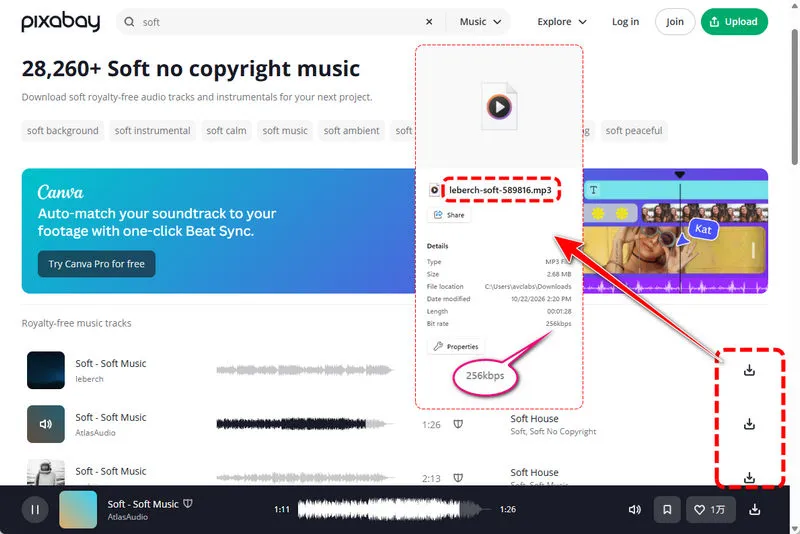
Pixabay makes it easy to find and download soft background music. You don't need to sign up for an account, just click the download button next to a track. The music covers a range of styles, so you may need to preview a few songs to find the right fit. When you open an individual track, you can also check its download count, play count, and release date. In my tests, the downloaded files were MP3s at 256 kbps, named using the creator's name, track title, and a numeric ID. Also, the shield icon next to some tracks indicates YouTube Content ID registration.
- Free MP3 downloads without requiring an account.
- Simple downloading with track previews.
- Tracks can be used in many personal and commercial projects under the Pixabay Content License.
- MP3 quality is limited to 256 kbps.
- You may need to preview several tracks to find one that matches your preferred soft music style.
Part 2. Chosic
Website: https://www.chosic.com/free-music/calm/
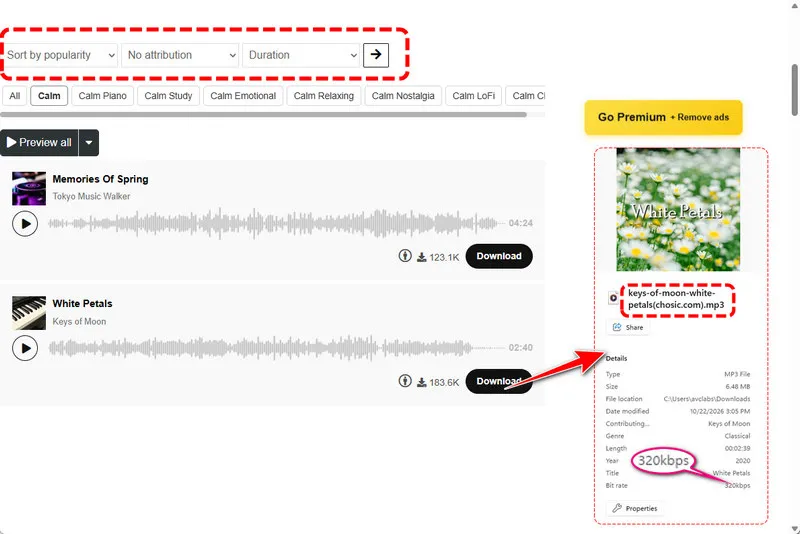
Chosic offers a soft and calm BGM section divided into categories such as Calm Piano, Calm Study, Calm Emotional, Calm Relaxing, Calm Nostalgia, and Calm Dreamy, making it easier to find music that matches your mood. You can also filter tracks by duration and license type, including options with or without attribution.
One feature I found useful is Preview All, which lets you listen to the first 5, 10, or 30 seconds of each track to narrow down your choices without opening songs one by one. Downloads are available in MP3 format, with bitrates ranging from 128 to 320 kbps. The downloaded filename follows the creator name, track title, and Chosic website letters.
- Calm music organized into useful categories.
- Detailed filters for duration and attribution requirements.
- Preview the first 5, 10, or 30 seconds of multiple tracks with Preview All.
- Audio quality varies between tracks.
Part 3. Mixkit
Website: https://mixkit.co/free-stock-music/tag/soft/
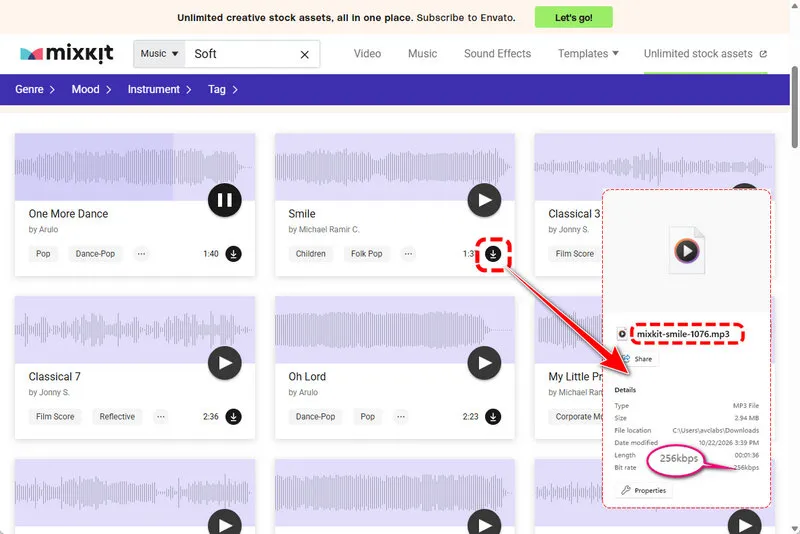
Mixkit is a simple option for you to download soft background music. You don't need to create an account or provide attribution. Just click the download button to get the track as an MP3 file. You can see that the files are 256 kbps, and the filenames follow the format mixkit-track title-number. The main drawback is the small selection of soft music.
- Free downloads with no account or attribution required.
- One-click MP3 downloads at 256 kbps.
- A relatively small selection of soft music.
Part 4. Free To Use
Website: https://freetouse.com/music/category/calm
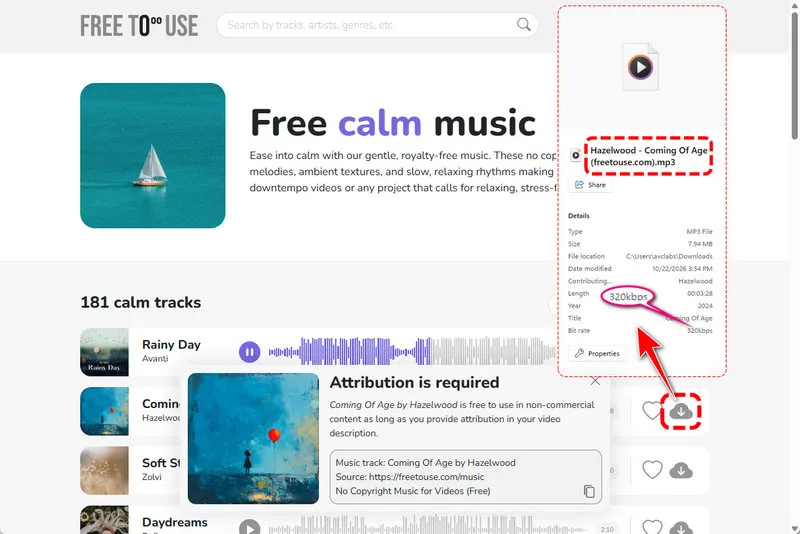
Free To Use offers music for creators who want to avoid copyright issues. You can download free tracks without creating an account by clicking the download button. The files are in MP3 format at 320 kbps, with filenames following the format creator name - track title (website name).
Free tracks require attribution when used in videos on platforms such as YouTube, Instagram, and TikTok. Free To Use provides ready-made credit text that you can copy into your video description. Look out for the star icon, which marks Premium tracks that require a paid subscription to download.
- Free MP3 downloads at 320 kbps without an account.
- Ready-made attribution text is provided with downloads.
- Music is registered with YouTube Content ID and Meta Rights Manager.
- Free tracks require attribution.
- Premium tracks require a paid subscription.
Part 5. ElevenLabs
Website: https://elevenlabs.io/music/soft
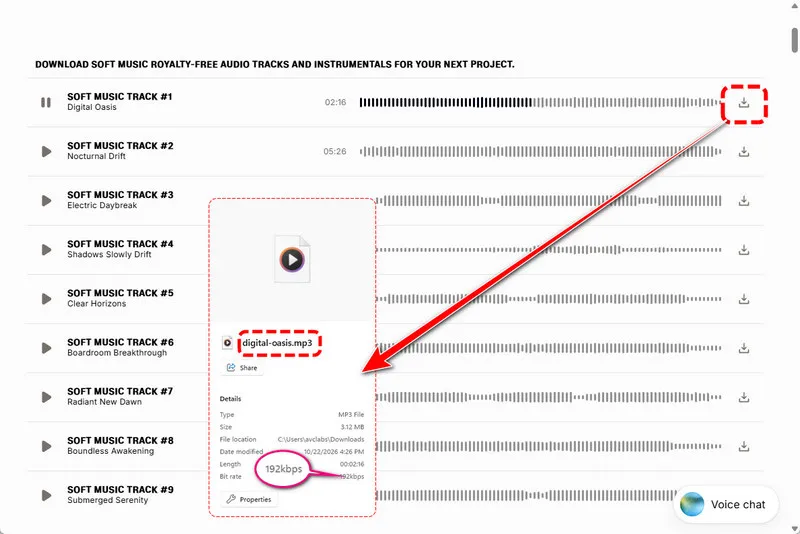
ElevenLabs offers a small selection of royalty-free soft music tracks that you can download for free without signing up. The tracks are available as MP3 files, but in my tests, the bitrate was only 192 kbps. If you can't find a track that fits your needs, ElevenLabs also has an AI music generator that lets you create music by choosing the mood, style, and length. However, the ready-made selection on its soft music page is limited.
- Free MP3 downloads with no sign-up required.
- AI music generator for creating custom tracks.
- Only a few ready-made soft music tracks are available.
- Downloaded MP3s were only 192 kbps.
Part 6. Bensound
Website: https://www.bensound.com/free-music-for-videos
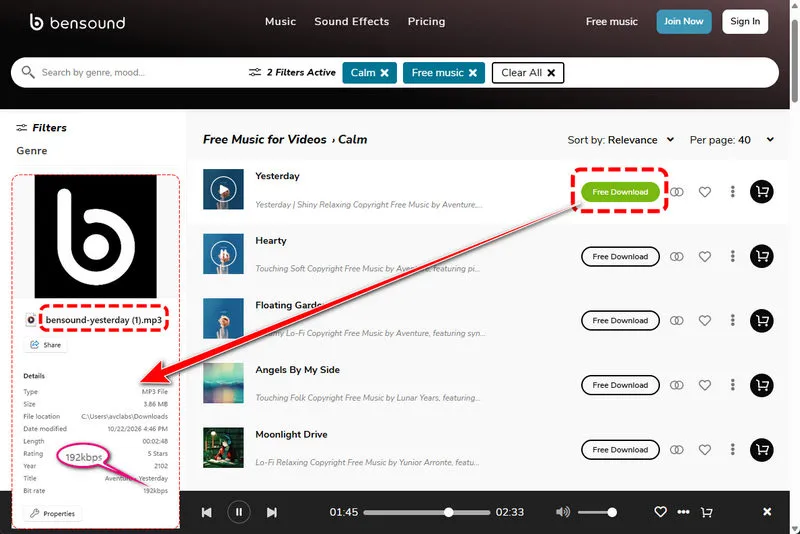
Bensound lets you download free background music without creating an account. Free tracks require you to credit Bensound.com in your video description. Besides soft music, you can use filters such as genre, mood, instrument, theme, and vocal type to find tracks that match your needs. But the audio quality is kind of low at 192 kbps.
If you want to use music without giving credit or need higher-quality files, Bensound offers paid licenses. Note that the free license does not cover audio podcasts or audiobooks, and remixing tracks into new songs is not allowed.
- Free MP3 downloads with no account required.
- Filters for genre, mood, instrument, theme, and vocal type.
- Offers paid licenses for use without attribution and higher-quality files.
- Free tracks require attribution.
- MP3 downloads were only 192 kbps.
- The free license excludes audio podcasts and audiobooks.
Part 7. Alternative to Download Soft Background Music to MP3
The free music websites above are useful for finding soft background music, but you may not always find the right track or get the audio quality you want. If you want a specific song from a streaming platform or need more control over the output format, Sidify All-In-One Music Converter is another strong choice.
Sidify supports music downloads from multiple platforms, including Spotify, Apple Music, Amazon Music, YouTube Music, Tidal, Deezer and more. It can convert your favorite BGM to MP3, AAC, WAV, FLAC, AIFF, and ALAC, with conversion speeds of up to 10x. Besides, it preserves full ID3 tags. It also has a recording feature, letting you add more music sites and save music locally to your computer forever.
Sidify All-In-One Converter
- Download songs from different streaming platforms and any music sites.
- Convert music to MP3/AAC/WAV/FLAC/AIFF/ALAC
- Export music, playlists, albums, audiobooks, and podcasts to the computer.
- Preserve the original audio quality and keep the ID3 tags.
- Rip music from the music site and burn music to CD.
- Built-in free podcast and radio to MP3 downloader and vocal remover.

Soft Background Music to MP3 with Sidify
Step 1 Choose Your Download Site
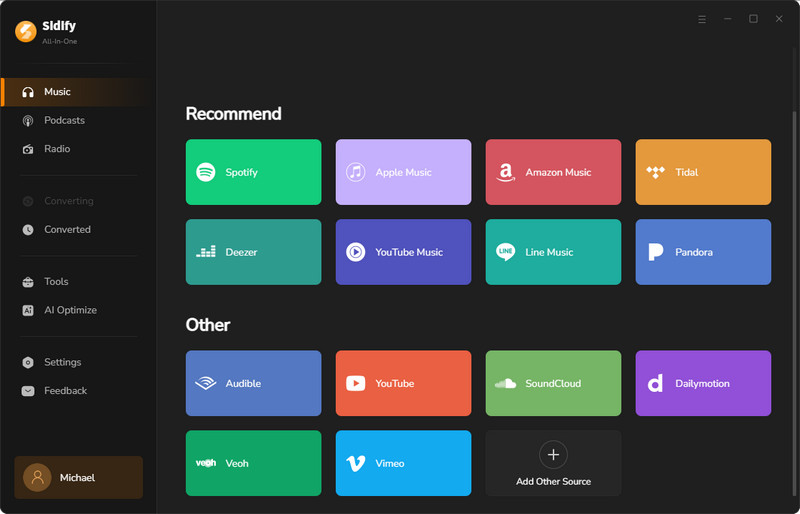
Start the Sidify program and then choose your preferred download site from the main interface. If your site isn't in the list, simply click "Add other source" and enter your website.
Step 2 Customize Output Settings
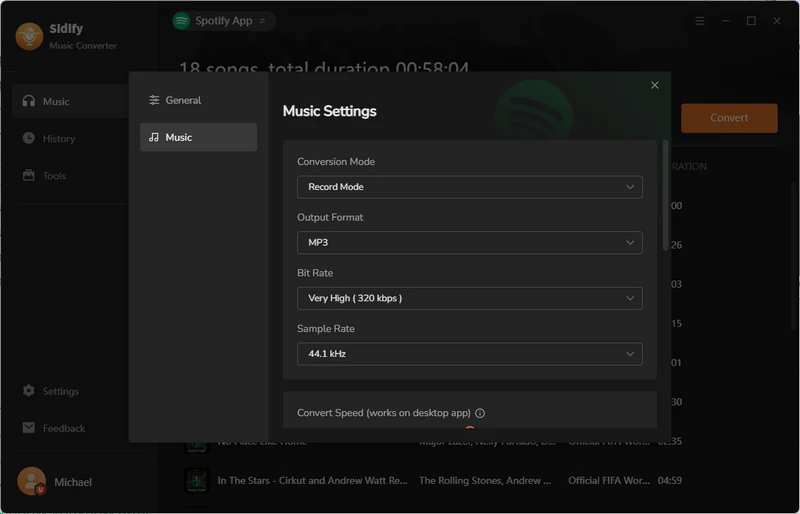
For example, if you choose the Spotify website to download your soft background music, log in to your Spotify account and then click the "Menu" button to set your output format (MP3, AAC, WAV, FLAC, AIFF, and ALAC) or path.
Step 3 Add Soft Background Music
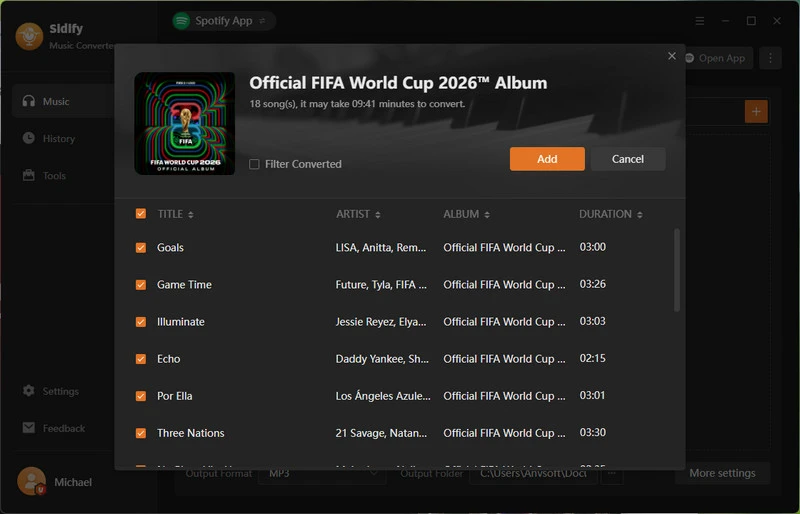
To download your favorite soft BGM to MP3, click the "Add" button to add your target music. Next, start the batch conversion.
Step 4 Check MP3 Music Files
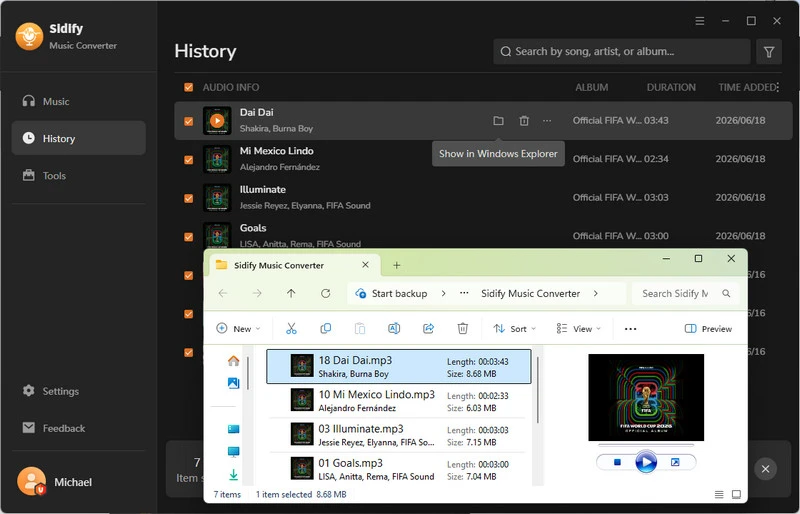
When it's done, you will see the converted files in the "History" tab. Click the file folder icon, you can view the music through Windows Explorer locally.
FAQs About Soft Background Music MP3 Free Download
1. Can I download soft background music in 320kbps MP3?
Yes. Among these six websites, Chosic and Free To Use offer MP3 downloads at up to 320 kbps. If you want a more detailed listening experience with higher-quality audio, Sidify All-in-One is another option. It lets you download Lossless audio from Spotify and Hi-Res Lossless music from Apple Music, along with music from other platforms. This can be a good choice if you want to enjoy soft background music with more audio detail.
2. Is it legal to use free soft background music on monetized YouTube videos?
Yes, you can use free soft background music in monetized YouTube videos as long as you follow the license terms for each track. Pixabay and Mixkit do not require attribution. Bensound and Free To Use allow monetized videos under their free licenses when you provide the required credit. YouTube's copyright guidance also recommends making sure you have the necessary rights to use music in your videos.
Keep a copy of the track's license details and attribution text when downloading. This can help if you receive a copyright claim later.
3. Do I need to give credit when using free soft background music?
It depends on the source. No credit is needed on Pixabay or Mixkit. Credit is required on Bensound and on the FreeToUse free tier. Chosic has both types, and the site lets you filter by license so you only see tracks that match how you plan to use them. For any track, the attribution rule is usually shown right next to the download button, so you can check it in seconds. For more attribution details, you can refer to our comparison table.
4. Can I convert soft music from Spotify to MP3?
Free libraries only carry royalty-free tracks, so you will not find mainstream songs there. If you want a specific soft song from a streaming service for personal offline use, a converter like Sidify All-in-One Music Converter can download and convert it to MP3 Lossless audio (24-bit/44.1 kHz FLAC). Keep in mind this is for your own private listening, not for redistributing or reselling music.
Final Words
With the websites in this guide, you can find and download soft background music for your videos, study sessions, or daily listening without paying.
Before downloading, take a moment to check the audio quality and license terms. A free download does not always mean you can use the track in every type of video. Download your favorite music that fits your project, sounds good, and lets you publish with greater confidence.
 Sidify All-In-One Music Converter
Download and convert music from all major streaming services in one place. Get MP3 or other popular formats in source audio quality, save songs offline on Windows or Mac, and enjoy up to 10X faster downloads with ID3 tags and lyrics preserved.