Finding a free Qobuz downloader is easy. Finding one that still works, delivers the expected audio quality, and comes without unexpected restrictions is a different story.
In this guide, we compare popular Qobuz downloaders, including free online tools, open-source GitHub projects, and Telegram bots, for Windows, Mac, Android, and iPhone. We cover their availability, audio quality, free limits, and ease of use to help you find the right tool.
All tools in this article are for personal offline use only. Unauthorized downloading or redistribution is not encouraged.
Quick Comparison: Which Qobuz Downloader Is Best?
We have rounded up free Qobuz downloaders in this guide, grouped into 4 main categories: desktop apps (free trial), free online downloaders, GitHub tools, and Telegram bots. Jump to the full comparison table of this guide to compare full features, free limits, etc.
| Type | Top Pick | Best For | Platform | 100% Free | Installation | Batch Download |
|---|---|---|---|---|---|---|
| Desktop Software | Sidify | Hi-Res audio & batch downloads | Windows, Mac | No (Free Trial) | Yes | Yes |
| Online Downloader | FLACDownloader | Quick online downloads | Web | Yes | No | No |
| Open-Source GitHub | Streamrip | Advanced users | Windows, Mac, Linux | Free software* | Yes | Yes |
| Telegram Bot | DezAlty | Mobile users | Android, iOS, Desktop | Limited Free | Telegram required | Yes |
* A paid Qobuz subscription is required.
Our Top Picks: FLACDownloader for free online FLAC downloads and Sidify for reliable Hi-Res music downloads.
We tested Sidify and five online downloaders evaluated for Qobuz support in November 2026, checking download success, audio quality, music tags, and download options. We also analyzed the downloaded audio files to verify their specifications. GitHub downloaders and Telegram bots were evaluated based on developer documentation, project updates, and user feedback.
Part 1. Best Qobuz Downloader for Windows & Mac – Sidify (Hi-Res)
Key Highlight: 100% download success rate (6/6 tracks) and verified 24-bit/192 kHz Hi-Res FLAC output in our tests.
Sidify All-In-One Music Converter is a dedicated Qobuz music downloader for Windows and Mac. With a built-in Qobuz web player, it supports both free and paid Qobuz accounts without requiring the official Qobuz app.
Why Choose Sidify Over Free Qobuz Downloaders?
- Download Qobuz music without a paid Qobuz subscription.
- Download Qobuz music to FLAC in up to 24-bit/192 kHz Hi-Res quality.
- Batch download Qobuz albums, playlists, or selected songs at up to 4X speed.
- Convert Qobuz music to MP3, FLAC, WAV, AAC, AIFF, or ALAC.
- Keep original ID3 tags and album covers.
- Customize file names and output folders.
- Get regular software updates and technical support.
- Download lossless music from Spotify, Deezer, etc.

Audio Quality Test Results:
We analyzed two Qobuz tracks downloaded with Sidify. Both were saved as 24-bit/192 kHz lossless FLAC files, with average bitrates exceeding 2,200 kbps.
| Audio Specifications | Petrushka | God Bless The Child |
|---|---|---|
| Format | FLAC (Lossless) | FLAC (Lossless) |
| Audio Quality | 24-bit/192 kHz | 24-bit/192 kHz |
| Channels | Stereo | Stereo |
| Duration | 7:36 | 6:02 |
| Average Bitrate | 2,275 kbps | 2,637 kbps |
| File Size | 129.7 MB | 119.2 MB |
Limitations
- Requires you to log in to a Qobuz account.
- The free trial only converts the first minute of each song.
- Requires software installation on Windows or Mac.
How to Download Qobuz Music with Sidify
Step 1 Download and install Sidify All-In-One Music Converter on your computer. Select Qobuz from the supported music services.
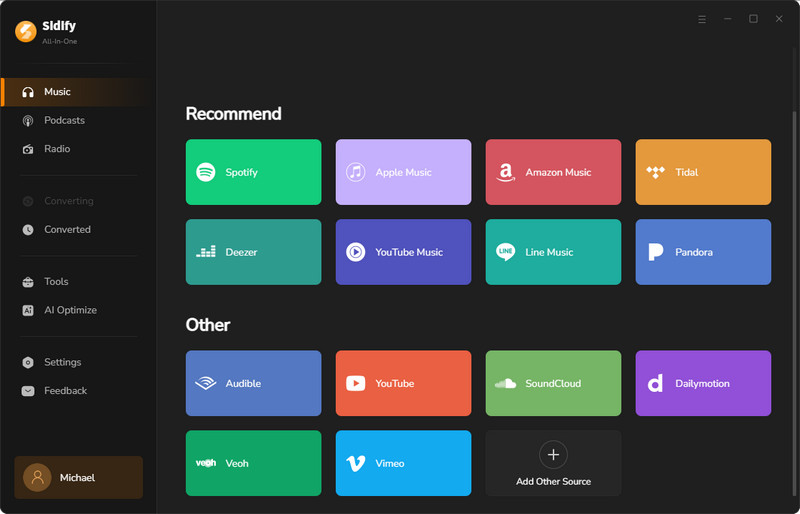
Step 2 Log in to your Qobuz account using the built-in Qobuz web player.

Step 3 Choose your preferred output format, such as FLAC or MP3, and adjust the audio quality and output folder.

Step 4 Select the songs, albums, or playlists you want to download and start the conversion.


Reading this post, you'll find a quick and simple way to download music from Qobuz to computer.
Learn More →Part 2. Best Free Online Qobuz Downloaders: Which Ones Still Work?
Free online Qobuz downloaders let you download music directly in your browser without installing any software. But do they still work? Of the five online tools we tested, FLACDownloader successfully downloaded full-length Qobuz songs in lossless FLAC format. DezAlty also successfully downloaded MP3 tracks in guest mode, although its Qobuz-specific audio quality and download source remain unverified. The other three tools failed to download Qobuz music during our tests.
1. FLACDownloader – Best Free Online Qobuz Downloader
Key Highlight: Free Qobuz to FLAC downloads with up to 24-bit/96 kHz Hi-Res audio options.
FLACDownloader is a free online Qobuz downloader that lets you search for songs by name or enter a Qobuz music link. It supports album track listings and 30-second music previews. You can use it directly in your browser without installing any software.
- Completely free to use.
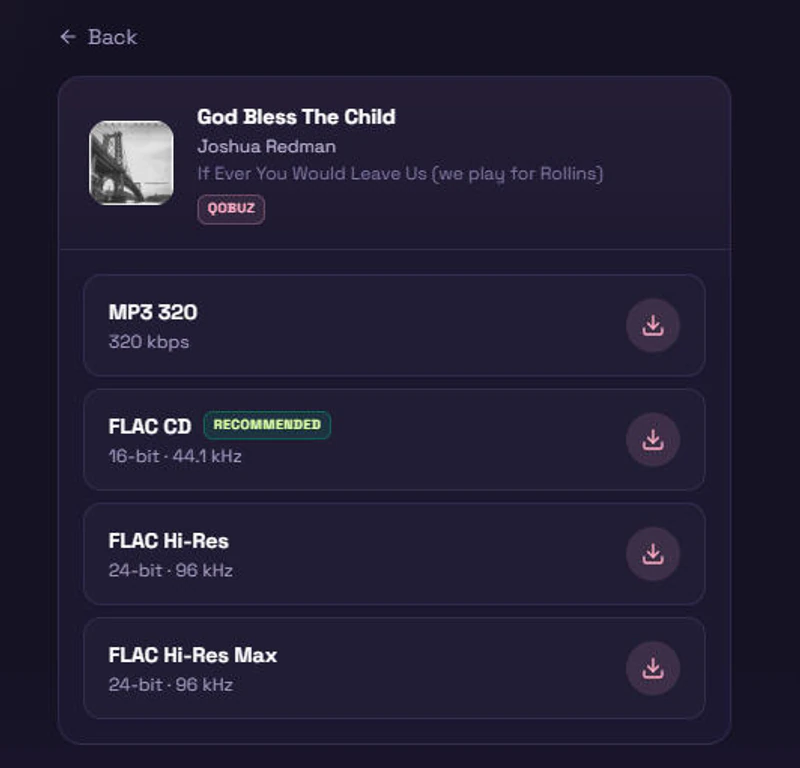
- Download Qobuz music to 320 kbps MP3 or CD-quality FLAC.
- Offers Hi-Res FLAC options up to 24-bit/96 kHz.
- Search for songs and preview tracks online.
- Keep detailed music tags and album covers.
- No Qobuz account required.
- No software installation required.
- Requires downloading album tracks one by one.
- Contains intrusive ads and potential security risks.
- No 24-bit/192 kHz Hi-Res FLAC option.
Our Test Results:
Both Qobuz tracks were successfully downloaded as full-length 16-bit/44.1 kHz lossless FLAC files in our tests. The files retained detailed music tags, including ISRC, copyright information, artist credits, and high-resolution album artwork.
How to Download Qobuz Music Online for Free with FLACDownloader
Step 1 Open FLACDownloader in your web browser.
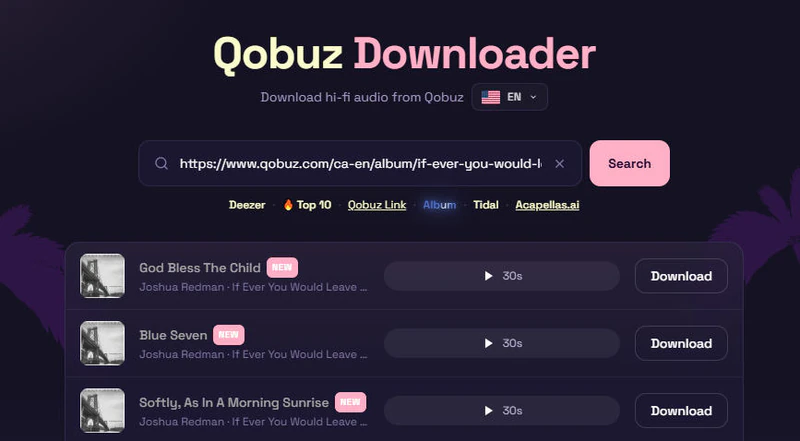
Step 2 Search for a Qobuz song or album by name, or paste its Qobuz music link into the search box.
Step 3 Select the track and your preferred audio quality, such as 320 kbps MP3, CD-quality FLAC, or an available Hi-Res FLAC option.

Step 4 Click the download button to save the music you are authorized to download to your device.
2. DezAlty – Free Online Qobuz MP3 Downloader
Key Highlight: Free MP3 downloads without registration.
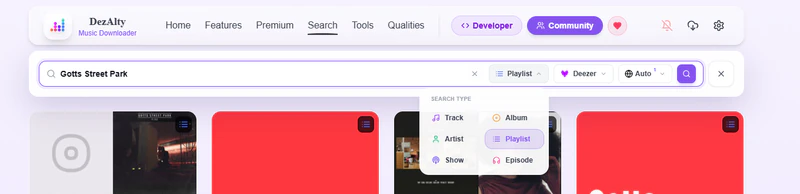
DezAlty is a web-based music downloader that also operates as a Telegram bot. It supports multiple streaming services, including Qobuz, Deezer, Spotify, Tidal, and Apple Music. You can search for songs, albums, artists, and playlists directly in your browser.
- Free to use without registration.
- Advertises 320 kbps MP3 downloads for Qobuz.
- Supports batch ZIP downloads.
- Retains detailed music tags.
- No software installation required.
- FLAC downloads up to 24-bit/192 kHz require a premium plan.
- No output format selection in our Guest mode test.
- Only one concurrent download allowed under the Guest plan.
- Daily limits on playlist ZIP downloads.
- Slow batch downloads.
- May trigger unwanted software downloads.
Our Test Results:
We successfully downloaded a 128 kbps MP3 file (44.1 kHz) in Guest mode. The file retained detailed music tags, including the title, artist, album, track number, release date, and ISRC, but lacked embedded album artwork. The Qobuz source and advertised 320 kbps quality remain unverified.
Individual track searches worked well, but neither of the two playlists we searched for could be correctly matched. Our playlist ZIP download attempt was blocked by the daily Guest plan limit.
Other Free Online Qobuz Downloaders We Tested
Free online Qobuz downloaders can be unstable, working one day and failing the next. The following three tools may still work occasionally, but none successfully downloaded Qobuz music during our tests.
Try Sidify for reliable downloads, up to 24-bit/192 kHz Hi-Res audio, and batch downloads of entire albums and playlists.
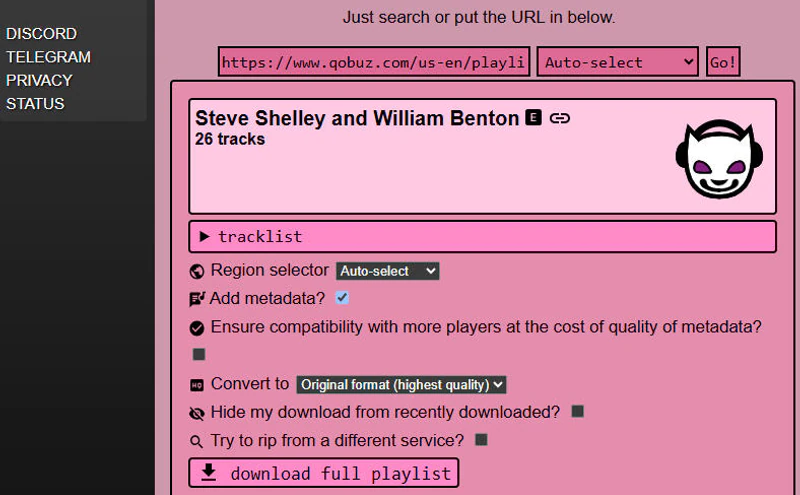
3. Lucida – Free Online Qobuz Playlist Downloader (Download Failed)
Lucida is a free online music downloader that supports Qobuz and several other music streaming services.
- Free to use.
- No software installation required.
- Supports multiple music streaming services.
- Failed to process Qobuz album links.
Our Test Results:
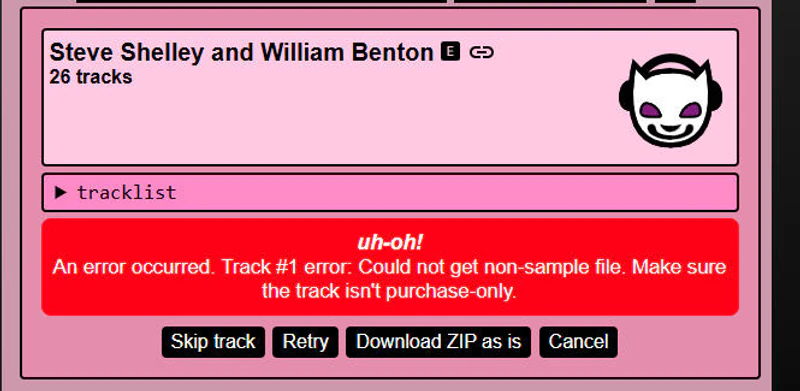
When attempting to download tracks from a Qobuz playlist, we encountered the following error:
Could not get non-sample file. Make sure the track isn't purchase-only.
User Feedback:
A Reddit user reported that Lucida's Qobuz downloads failed around 10–20% of the time.
4. DoubleDouble – Free Online Qobuz FLAC Downloader (Not Working)
DoubleDouble is a free online music downloader that supports Qobuz, Amazon Music, SoundCloud, Deezer, and Tidal. It is designed to download Qobuz songs, albums, and playlists in lossless FLAC format. It also offers ZIP downloads for albums and playlists.
- Completely free to use.
- Clean, ad-free web interface.
- Offers lossless FLAC as its Qobuz download format.
- Supports multiple music streaming services.
- Supports basic music metadata.
- No software installation required.
- No MP3, AAC, or WAV output options for Qobuz.
- Cannot select individual songs from albums or playlists.
- May require CAPTCHA verification.
- Downloads may be subject to Pixeldrain's daily transfer limits.
- Region-restricted releases may fail to download.
- Slow processing for large albums and playlists.
Our Test Results:
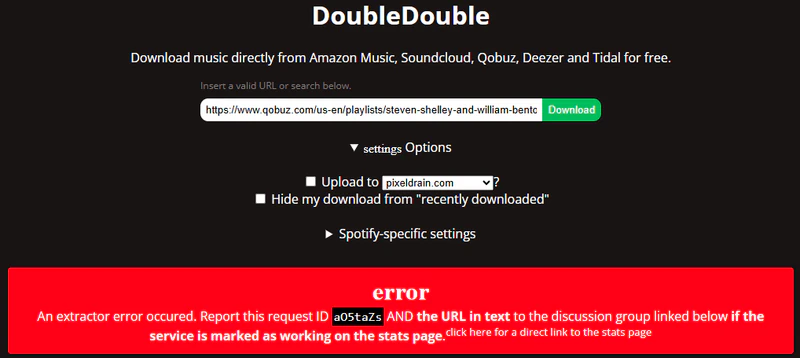
DoubleDouble displayed a “Not Working” status for Qobuz, so we could not verify its download speed or audio quality.
5. JUMO-DL – Free Qobuz Music Downloader Online (Download Failed)
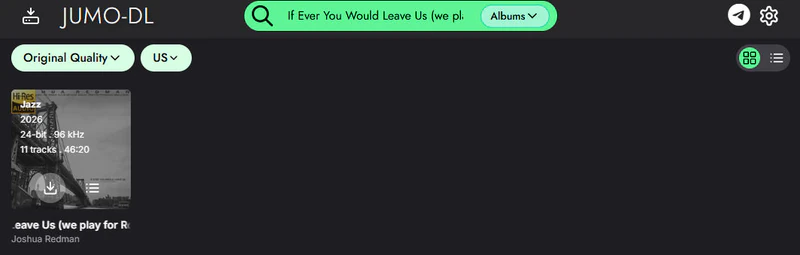
JUMO-DL is an online music downloader that claims to support Qobuz songs and albums. You can search for music by name directly in your browser without installing any software.
- Free to use.
- Search for music by song name.
- Offers song and album download options.
- No software installation required.
- Does not support direct Qobuz music links.
- Requires users to manually select the correct release from search results.
Our Test Results:
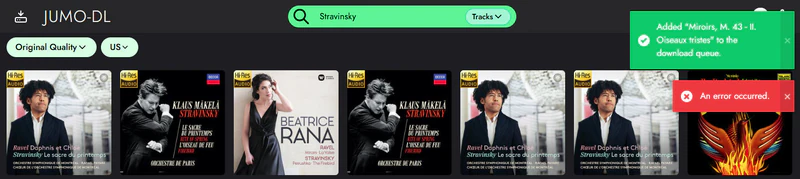
JUMO-DL returned a download error during our Qobuz test. No audio files were available to verify its output format or audio quality.
Part 3. Free Qobuz Downloaders on GitHub
If you're looking for a free, open-source Qobuz downloader, GitHub offers several options for Windows, Mac, and Linux. Some support Hi-Res FLAC and batch downloads, but keep in mind that free software does not necessarily mean a free Qobuz account is sufficient.
1. Streamrip – Open-Source Qobuz Hi-Res Downloader
Key Highlight: Free, open-source music downloader with support for up to 24-bit/192 kHz Hi-Res audio.
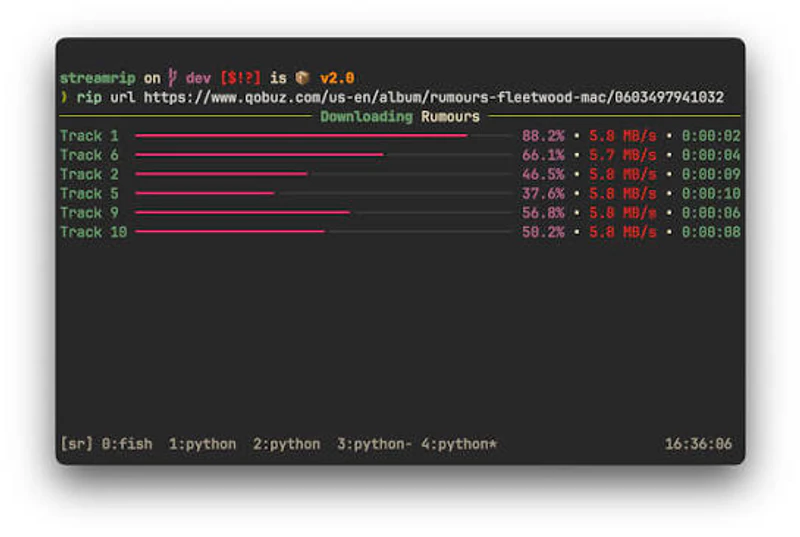
Streamrip is a command-line music downloader that supports Qobuz, Tidal, Deezer, and SoundCloud. It offers multiple audio quality options and supports downloading songs, albums, and playlists.
- Free and open-source.
- Supports Qobuz music in up to 24-bit/192 kHz Hi-Res FLAC.
- Supports batch downloads of albums and playlists.
- Supports Windows, Mac, and Linux.
- Supports multiple music streaming services.
- Requires a paid Qobuz subscription.
- No built-in graphical interface.
- Requires Python and command-line knowledge.
User Feedback:
A GitHub user reported album download errors and empty playlist results in July 2026. Whether these issues have been resolved remains unverified.
2. qobuz-dl – Free Open-Source Qobuz Downloader
Key Highlight: A dedicated Qobuz downloader on GitHub with FLAC and MP3 support.
qobuz-dl is a free, open-source music downloader designed specifically for Qobuz. It runs on Windows, Mac, and Linux through a command-line interface and offers several audio quality and download options.
- Free and open-source.
- Supports MP3 and Hi-Res FLAC downloads.
- Supports songs, albums, and playlists.
- Avoids downloading duplicate tracks.
- Requires a paid Qobuz subscription.
- Requires Python and command-line knowledge.
- The latest PyPI release dates back to March 2023.
User Feedback:
A Reddit user reported in April 2026 that qobuz-dl was no longer working.
3. QBZ-Downloader – Free Qobuz Hi-Res Downloader with GUI
Key Highlight: Supports up to 24-bit/192 kHz Hi-Res FLAC with a graphical user interface.
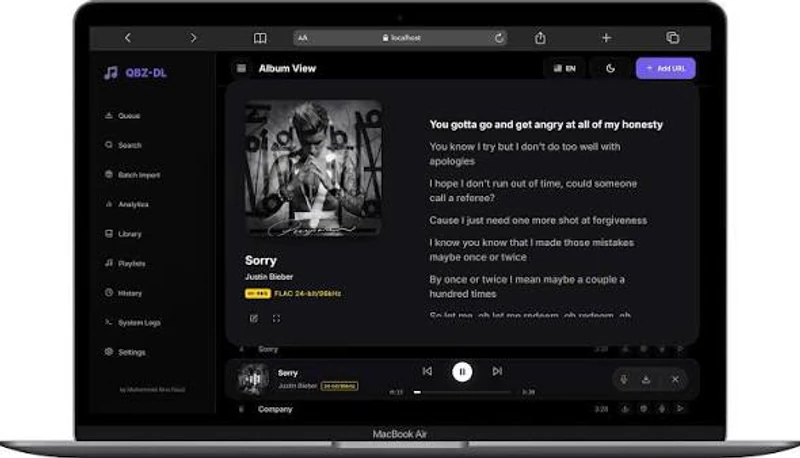
QBZ-Downloader is a free, open-source Qobuz music downloader for Windows, Mac, and Linux. Unlike command-line tools such as Streamrip and qobuz-dl, it provides a graphical interface for managing music downloads.
- Free and open-source.
- Offers up to 24-bit/192 kHz Hi-Res FLAC downloads.
- Supports batch downloads of albums and playlists.
- Supports music tags and download queues.
- Provides a graphical user interface.
- Requires an active paid Qobuz subscription.
- Requires Node.js and building the software from source.
- No ready-to-install packages were found on its GitHub Releases page
- Using the tool may put your Qobuz account at risk of suspension.
Past Issues & Fixes:
Its GitHub changelog documents fixes for file-lock errors in May 2026 and downloaded FLAC files being deleted after metadata tagging failures in July 2026.
4. QobuzDownloaderX – Free Qobuz Downloader for Windows
Key Highlight: A free Qobuz downloader with a graphical interface for Windows users.
QobuzDownloaderX is an open-source Qobuz music downloader for Windows. Unlike command-line tools, it provides a graphical user interface, making it more accessible to users without programming knowledge.
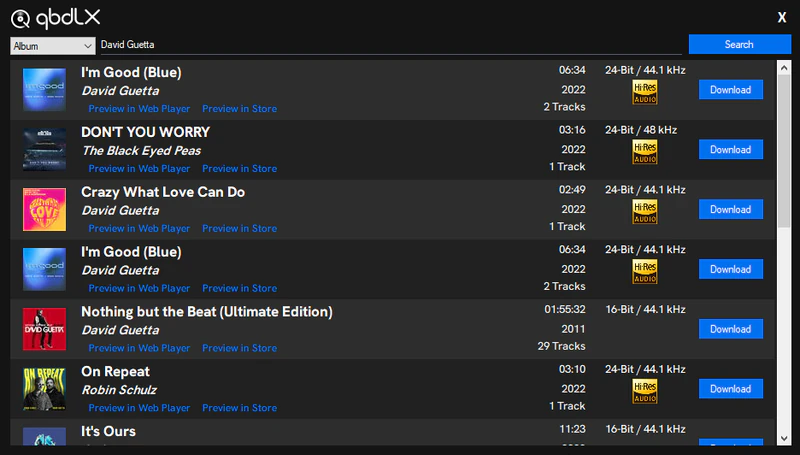
- Free and open-source.
- Graphical user interface without command-line operation.
- Supports batch downloads.
- Supports Hi-Res FLAC and MP3 downloads.
- Provides download error logs for troubleshooting.
- Requires a paid Qobuz subscription.
- Only available for Windows.
- Current download reliability remains unverified.
User Feedback:
A GitHub user reported a subscription error in February 2026 that limited downloads to 30-second previews.
Part 4. Free Qobuz Downloader Telegram Bots
Telegram bots offer another way to access Qobuz download services on Android, iPhone, and computers without installing a separate music downloader. However, audio quality, free download limits, and service availability vary from bot to bot.
1. DezAlty – Free Qobuz Downloader Telegram Bot
DezAlty also offers a Telegram bot for downloading music from Qobuz and other streaming services. It supports multiple audio formats, customizable file settings, and batch ZIP downloads, subject to plan restrictions.
For audio quality, download limits, and hands-on test results, see our DezAlty web version review.
Note: The Telegram version has not been independently tested.
2. JioDLBot – Qobuz Music Downloader for Android & iPhone
Key Highlight: Search for Qobuz songs directly within Telegram.
JioDLBot is a Telegram music downloader bot that supports Qobuz and other music streaming services. It offers built-in music search and listening features, allowing users to find songs without installing a separate music downloader.
- Search for songs directly in Telegram.
- Supports multiple music streaming services.
- Available on Android, iPhone, and computers.
- Batch downloads are reportedly not supported.
- Audio quality may vary.
- Music tags may be incomplete.
3. HiFiTideBot – Qobuz Hi-Fi Downloader on Telegram
Key Highlight: Offers Hi-Fi music downloads and album download support.
HiFiTideBot is a Telegram music downloader bot that lists Qobuz, Tidal, and Apple Music among its supported music services. It focuses on high-quality audio and reportedly supports album downloads.
- Offers Hi-Fi audio downloads.
- Supports multiple music streaming services.
- Available through Telegram on Android, iPhone, and computers.
- Frequent downtime due to maintenance.
- Full Album downloads are reportedly limited to donors.
- Maximum audio quality and free download limits remain unverified.
Part 5. Full Comparison of Qobuz Downloaders
Still not sure which Qobuz downloader to choose? Compare all 13 tools below based on their download status, supported platforms, free limits, Qobuz subscription requirements, audio quality, output formats, and batch download options.
| Qobuz Downloader | Platform | Download Status | Free to Use | Paid Qobuz Subscription Required | Max. Audio Quality | Output Formats | Batch Download |
|---|---|---|---|---|---|---|---|
| Sidify | Windows, Mac | Working | Free trial | No | 24-bit/192 kHz | MP3, FLAC, WAV, AAC, AIFF, ALAC | Yes |
| FLACDownloader | Web | Working | Yes | No | 24-bit/96 kHz* | MP3, FLAC | No |
| DezAlty | Web | Working | Yes (Guest plan) | No | 128 kbps MP3 tested; 24-bit/192 kHz FLAC advertised** | MP3; FLAC (Premium) | Limited |
| Lucida | Web | Download Failed | Yes | No | Source-dependent | FLAC, MP3, WAV, M4A, OGG | Limited |
| DoubleDouble | Web | Not Working | Yes | Not specified | Source-dependent lossless | FLAC | Yes |
| JUMO-DL | Web | Download Failed | Yes | Not specified | Source-dependent | FLAC | No |
| Streamrip | Windows, Mac, Linux | Issues Reported | Yes | Yes | 24-bit/192 kHz | FLAC, MP3 and more | Yes |
| qobuz-dl | Windows, Mac, Linux | Issues Reported | Yes | Yes | 24-bit/192 kHz | FLAC, MP3 | Yes |
| QBZ-Downloader | Windows, Mac, Linux | Actively Maintained | Yes | Yes | 24-bit/192 kHz | FLAC | Yes |
| QobuzDownloaderX | Windows | Issues Reported | Yes | Yes | 24-bit/192 kHz | FLAC, MP3 | Yes |
| DezAlty Telegram Bot | Telegram | Not Independently Tested | Limited free | Not specified | Unverified | Multiple formats advertised | ZIP downloads advertised |
| JioDLBot | Telegram | Reported Working | Free access reported | Not specified | Varies | FLAC | No |
| HiFiTideBot | Telegram | Unstable | Limited free | Not specified | Hi-Fi | FLAC | Albums |
* FLACDownloader offers a 24-bit/96 kHz Hi-Res option, but the files downloaded in our tests were 16-bit/44.1 kHz FLAC.
** Based on the developer's advertised specifications. Qobuz-specific audio quality has not been independently verified.
Note: Download status is based on our tests, user feedback, GitHub issues, third-party reviews, and official service updates. Audio quality and service availability may change over time. Active maintenance does not necessarily mean successful downloads.

You can simply download and transfer songs from Qobuz music to USB drives for backup, old mode car stereos and non-smart devices.
Learn More →Part 6. FAQs About Qobuz Downloaders
Q1. Is there a completely free Qobuz downloader?
Yes. FLACDownloader is free to use online. DezAlty also offers free guest access for MP3 downloads, although playlist downloads are restricted and its Qobuz-specific download quality remains unverified. Open-source tools like Streamrip are free software but require a paid Qobuz subscription.
Q2. Do I need a Qobuz account or subscription to download music?
It depends on the tool. Sidify requires a Qobuz account but no paid subscription, while Streamrip and qobuz-dl require an active subscription.
Q3. Can free Qobuz downloaders preserve Hi-Res audio?
Some offer Hi-Res FLAC downloads up to 24-bit/192 kHz. However, actual audio quality depends on the source track and download settings.
Q4. Which Qobuz downloaders support full albums and playlists?
Sidify, Streamrip, qobuz-dl, and QBZ-Downloader support batch downloads of Qobuz albums and playlists.
Q5. Is there a Qobuz downloader for Android or iPhone?
Yes. The official Qobuz app supports offline listening. Online downloaders and Telegram bots also work on mobile devices, subject to service availability.
Q6. Is there a free Qobuz downloader APK for Android?
Yes. Unofficial Android projects such as QobuzDownloaderX-Mobile exist, but their current reliability and security remain unverified. Avoid installing APK files from unknown sources.
Q7. Is there a Qobuz downloader Chrome extension?
We have not verified a reliable Qobuz downloader extension for Chrome. Be cautious with extensions requesting access to your account or browsing data.
Q8. Why is my Qobuz downloader not working?
Free Qobuz downloaders may stop working due to server downtime, Qobuz API changes, expired login sessions, or discontinued software updates. Online tools and Telegram bots are particularly dependent on third-party server availability. If repeated errors continue, Sidify provides a more reliable desktop option for downloading Qobuz songs, albums, and playlists.
Q9. Is the official Qobuz Downloader free?
Yes. The software is free, but you need to purchase music from the Qobuz download store to download it.
Q10. Are free Qobuz downloaders safe and legal?
Not all are safe. Some contain intrusive ads or harmful redirects. Only use trusted tools and download music you have permission to obtain.
Conclusion
Among the free online Qobuz downloaders we tested, FLACDownloader successfully downloaded full-length songs in lossless FLAC format, while DezAlty also successfully downloaded an MP3 file. Other free tools like GitHub downloaders and Telegram bots offer more options, but may come with technical requirements, download limits, or service interruptions.
Want to spend less time dealing with download errors and more time enjoying your favorite music? Sidify is a great choice for downloading Qobuz songs, full albums, and playlists in Hi-Res FLAC without a paid Qobuz subscription. Give the free trial a try and see how it works for you.
 Sidify All-In-One Music Converter
Download Qobuz songs, albums, and playlists in Hi-Res FLAC without a paid Qobuz subscription.