


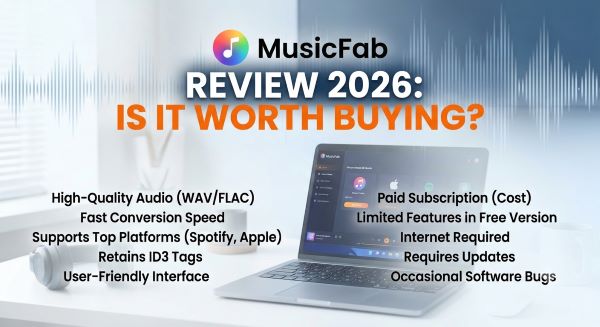
MusicFab is an all-in-one music downloader that lets users download songs, albums, and playlists from multiple streaming services such as Spotify, SoundCloud, and YouTube, with support for output formats including MP3, M4A, FLAC, WAV, and OPUS.
In this MusicFab review, I'll test MusicFab's features, audio quality, download speed, pricing, and free trial experience to help you decide whether it's worth buying.
Part 1: MusicFab Features Review
Supported Music Platforms of MusicFab
One of the biggest advantages of MusicFab is its wide compatibility with popular streaming music services. I found that the software supports 12 major music platforms, allowing users to download and convert songs from popular services including Spotify, Apple Music, Amazon Music, TIDAL, Qobuz, YouTube, Deezer, SoundCloud, Pandora, and more.
In terms of output options, MusicFab supports multiple audio formats to meet different listening needs. Users can convert downloaded music to MP3, M4A (AAC), WAV, FLAC, OPUS, and other formats. For everyday offline listening, MP3 provides a balance between file size and sound quality, while lossless formats such as FLAC and WAV are better choices for users who want to preserve higher-quality audio.
| Category | Details |
|---|---|
| Supported Platforms | Spotify, Apple Music, Amazon Music, TIDAL, Qobuz, YouTube, Deezer, SoundCloud, Pandora, etc. |
| Number of Platforms | 12+ |
| Output Formats | MP3, M4A (AAC), WAV, FLAC, OPUS |
| Lossless Formats | FLAC, WAV |
| Best For | Multi-platform music downloading and audio conversion |
Audio Quality and Download Speed Test
To evaluate MusicFab quality and check whether MusicFab can provide reliable audio output, I performed a real download test using a Windows 11 computer with a 300 Mbps internet connection.
| Test Item | Details |
|---|---|
| Operating System | Windows 11 |
| Internet Speed | 300 Mbps |
| Output Format | MP3 |
| Bitrate | 320 kbps |
| Test Song | "FASHION" by CORTIS |
| Duration | 2:55 |
I downloaded the song using MusicFab with the highest MP3 quality setting available (320 kbps). Since I was using the trial version, MusicFab displayed purchase prompts during the download process, which slightly affected the overall speed. As a result, it took around 30 seconds to complete the download of one 3-minute MP3 track. After downloading, the final MP3 file size was approximately 7.3 MB, which is within the expected range for a 320 kbps MP3 file.
MusicFab Quality Analysis with Spek Frequency Spectrum Test
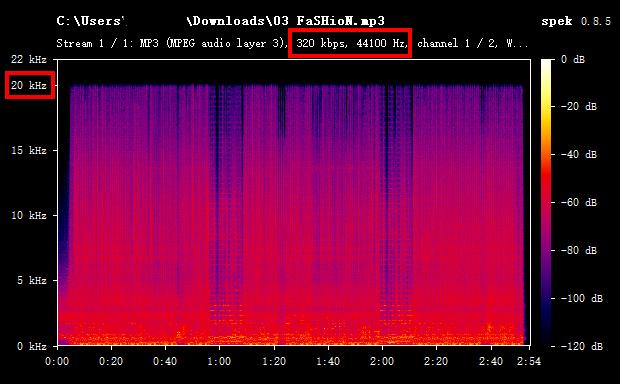
To further verify the MusicFab audio quality, I analyzed the downloaded MP3 file using Spek, a popular audio spectrum analysis tool.
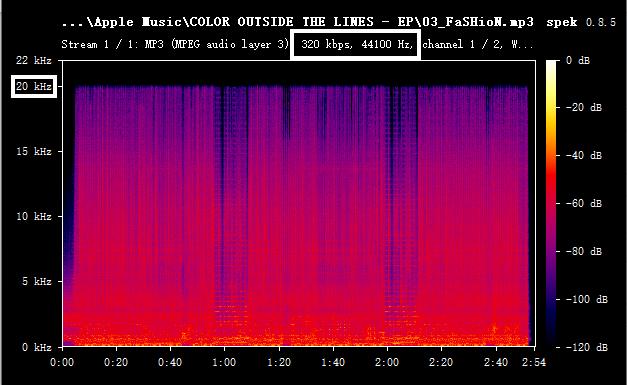
The spectrum analysis showed:
- ✅ High-frequency response remained intact
- ✅ No obvious artificial frequency cutoff was detected
- ✅ The file matched the expected characteristics of a genuine 320 kbps MP3
- ✅ No signs of low-bitrate upscaling or fake 320 kbps encoding were found
This indicates that MusicFab did not simply convert a lower-quality audio source into a larger MP3 file. Instead, the downloaded track maintained a proper 320 kbps MP3 encoding profile with stable audio performance.
 Looking for a More Flexible Music Downloader?
MusicFab delivers solid audio quality and supports multiple streaming platforms, but its higher price, promotional pop-ups, and platform compatibility concerns may not suit every user. If you're looking for a more flexible way to download music from different services, Sidify All-In-One Converter is worth considering.
It supports multiple music platforms and lets you save songs, playlists, albums, and podcasts in MP3, AAC, WAV, FLAC, AIFF, ALAC, and other formats, while preserving ID3 tags and audio quality.
Part 2: MusicFab Pros and Cons
After testing MusicFab’s features, supported platforms, audio quality, and overall user experience, the software shows several advantages as an all-in-one music downloader. However, like any streaming music converter, it also has some limitations that users should consider before purchasing.
Pros
#1 Easy Batch Download Process
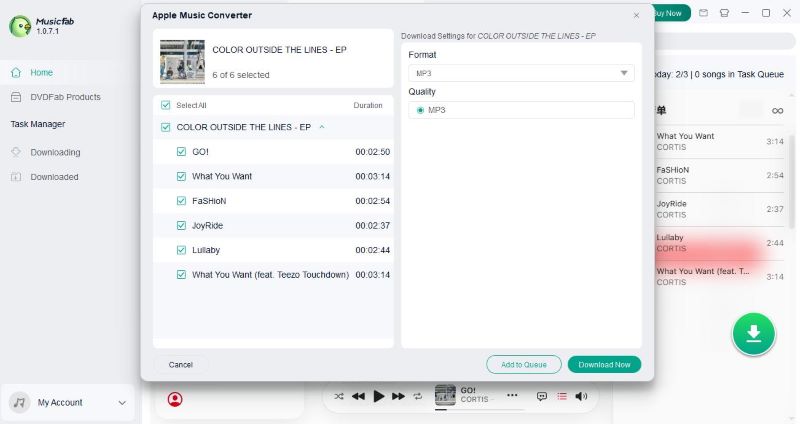
MusicFab makes batch downloading simple and convenient. Users only need to open a music album, start playback, and click the download button in the bottom-right corner. The software will automatically detect the available tracks and allow users to download the entire album at once instead of saving songs individually.
During the download process, users can also customize the output settings, including selecting their preferred audio format such as MP3, M4A (AAC), FLAC, or OPUS. This flexible workflow makes it easier to build an offline music library while keeping control over audio quality and file format.
#2 Preserves Metadata and Song Information
Another advantage of MusicFab is its ability to keep important metadata after conversion. Downloaded files can retain information such as:
- Song title
- Artist name
- Album name
- Cover artwork
- Track information
This makes the exported files easier to organize and transfer to other devices, especially for users who maintain large personal music libraries.
#3 Supports Multiple Audio Formats
MusicFab provides flexible output options for different listening needs. Users can convert music into popular formats including MP3, M4A (AAC), WAV, FLAC, and OPUS. For users who prioritize compatibility, MP3 and M4A are convenient choices because they work on most devices. Meanwhile, users looking for higher-quality audio can choose lossless formats such as FLAC or WAV when available.
Cons
#1 Lifetime License Can Be Expensive
One potential drawback of MusicFab is its pricing. Compared with single-platform music converters, MusicFab requires a higher upfront investment, especially for users who only need to download music from one specific service.
The Music Converter Combo plan, which includes at least two products, starts at around $79.99 to $144.99 for a lifetime license, while the MusicFab All-In-One version costs $199.99. Although the lifetime license can be cost-effective for users who regularly download music from multiple platforms, the price may feel expensive for casual users who only occasionally need a music converter.
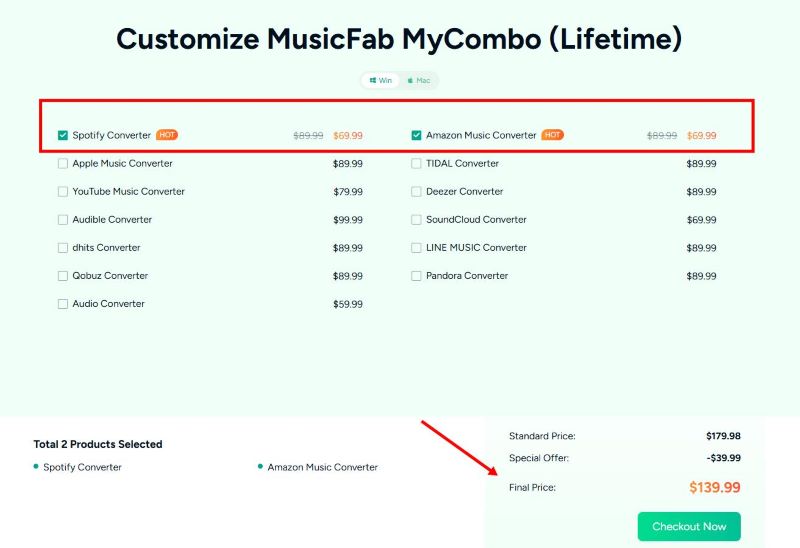
For example, users who mainly use Spotify or Apple Music may find a dedicated converter designed for a single platform more affordable. However, for users who subscribe to multiple streaming services and want one tool to manage music downloads from different platforms, the higher price can be easier to justify.
#2 Some Platforms May Experience Compatibility Issues
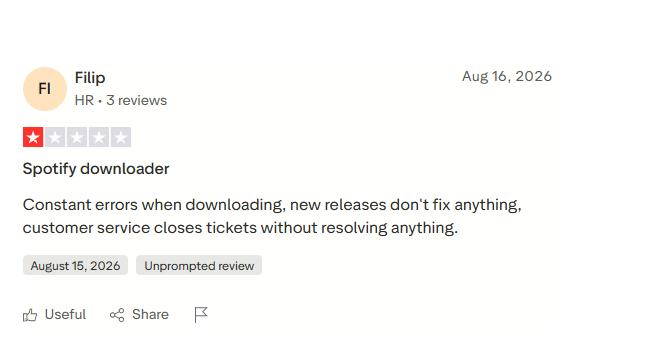
Because streaming platforms frequently update their systems and security mechanisms, third-party music downloaders may occasionally experience compatibility issues. Some users have reported that certain services may require updates before downloads work normally again. For example, discussions from online communities have mentioned occasional issues with platforms such as Spotify, Deezer and Pandora.
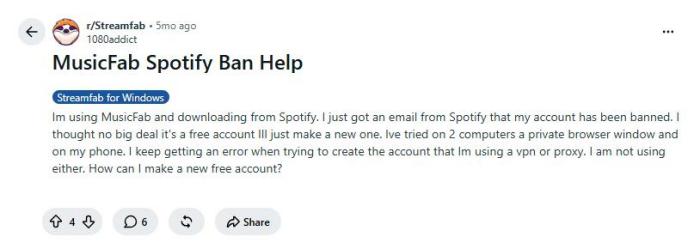
#3 Accounts Get Banned for Using MusicFab
Some users on Reddit and online communities have reported experiencing account restrictions or raised concerns about potential bans after using third-party Spotify download tools. Although I personally did not experience any account-related issues while testing MusicFab, users should still be aware of the potential risks associated with using MusicFab.
#4 Frequent Promotional Pop-Ups and Purchase Reminders
One noticeable downside of MusicFab is the number of promotional messages displayed during the user experience. When launching the program, MusicFab may automatically start with Windows and show promotional pop-ups or purchase reminders encouraging users to upgrade to the full version.
For users who are only trying the trial version before making a purchase decision, these repeated advertisements can become distracting and interrupt the testing process. During my testing, I had to spend additional time closing promotional windows before continuing with downloads, which slightly affected the overall user experience.
Part 3: MusicFab Price Review: Is It Worth the Money?
MusicFab isn't the cheapest music downloader on the market. However, considering that it supports 12 streaming platforms in a single application, its pricing may represent good value for users who subscribe to multiple music services. The key question is whether you actually need all of its supported platforms.
Price Overview
Before looking at the pricing table, there is one important detail to keep in mind. While the Music Converter Combo lets users build a custom package by selecting their preferred converters, not all products are priced the same.
Popular converters such as Spotify, Apple Music, and Amazon Music are among the more expensive options. As a result, if your Combo includes any of these products, the final price will be higher than the minimum price listed below. In other words, the advertised starting price represents the lowest-priced combinations, while the actual cost varies depending on the platforms you choose.
| Version | Includes | Lifetime Price |
|---|---|---|
| YouTube Converter | YouTube music converter | $39.99 |
| Spotify Converter | Spotify music converter | $89.99 |
| Amazon Converter | Amazon music converter | $89.99 |
| Music Converter Combo | 2 music converters | $79.99-$144.99 |
| Music Converter Combo | 3 music converters | $99.99-$159.99 |
| Music Converter Combo | 4 music converters | $119.99-$179.99 |
| All-In-One | All 12 music converters | $199.99 |
Free Trial Version Experience
During my testing, the trial version was fully functional, but it came with several limitations that are worth knowing before you start. The most significant restriction is that only 3 full songs can be downloaded from each supported streaming service. Once this limit is reached, you'll need to upgrade to the paid version to continue downloading from that platform.
In addition to the download limit, the trial version frequently displays promotional pop-ups and upgrade reminders. These messages appear when launching the software and during certain operations, requiring users to close multiple windows before continuing. While this doesn't affect the quality of the downloaded music, it can interrupt the testing process and make the overall experience feel less streamlined.
Part 4: Best MusicFab Alternative: Sidify
While MusicFab is a powerful all-in-one music downloader, it may not be the best fit for everyone. Some users look for alternatives because of its higher price, frequent promotional pop-ups, or concerns about platform compatibility. If you're one of them, Sidify is one of the strongest alternatives worth considering.
Sidify All-In-One Converter
- Download songs from different streaming platforms and any music sites.
- Convert music to MP3/AAC/WAV/FLAC/AIFF/ALAC
- Export music, playlists, albums, audiobooks, and podcasts to the computer.
- Preserve the original audio quality and keep the ID3 tags.
- Rip music from the music site and burn music to CD.
- Built-in free podcast and radio to mp3 downloader and vocal remover.

MusicFab vs Sidify
| Feature | MusicFab | Sidify |
|---|---|---|
| Supported Platforms | 12 music platforms | 34+ platforms including multiple major music platforms and music sites |
| Download Mode | Built-in music platform support | Built-in music platform support & Web Player |
| Output Formats | MP3, M4A (AAC), WAV, FLAC, OPUS | MP3, AAC, WAV, FLAC, AIFF, ALAC |
| Audio Quality | Up to 320 kbps | Lossless & Hi-Res where supported Spotify Lossless, Apple Music (Hi-Res) Lossless, Amazon Music (Ultra HD), TIDAL HiFi & Master, Deezer HiFi |
| Download Speed | ~30 seconds for a 3-minute MP3 | ~12 seconds for a 3-minute MP3 |
| Batch Download | ✅ | ✅ |
| Multiple Playlist Download | Limited | ✅ |
| Keep Original Music Order | — | ✅ |
| Metadata & ID3 Tags | ✅ | ✅ |
| Free Trial | 3 full songs per platform | First minute of each song |
| Language Support | Multiple languages | 48 languages |
| System Support | Windows & macOS | Windows, macOS & Android |
| Free Toolbox | — | ✅ |
| Pricing | $199.99/lifetime | $79.90/year, $159.90/lifetime |
| Best For | Users who want an all-in-one music downloader | Users who prioritize audio quality, speed and flexible downloading |
In my testing, Sidify delivered noticeably faster download performance than MusicFab. Downloading the same 3-minute song took only 12 seconds, significantly reducing the overall waiting time.
For audio quality, Sidify offers more than high-bitrate MP3 output. Depending on the streaming service and source quality, it supports lossless and high-resolution audio, including Spotify Lossless, Apple Music (Hi-Res) Lossless, Amazon Music (Ultra HD), TIDAL HiFi & Master, and Deezer HiFi. This gives users more flexibility to preserve higher-quality audio instead of being limited to compressed formats.
For my specific MP3 test, I also analyzed the downloaded file using Spek. The frequency spectrum confirmed that the file was a genuine 320 kbps MP3, with no signs of low-bitrate upscaling or fake encoding. Based on these results, Sidify not only offered faster download speeds but also maintained the expected audio quality for high-bitrate MP3 files.
How to Convert Music to Any Format with Sidify
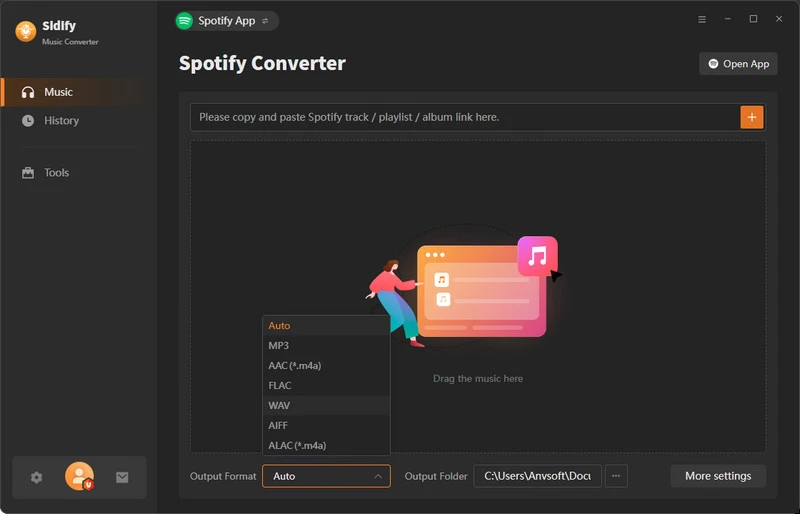
Step 1 Install Sidify All-In-One and Run
Launch Sidify Spotify Music Converter and drag the Spotify songs, albums, or playlists you want to download into the program.
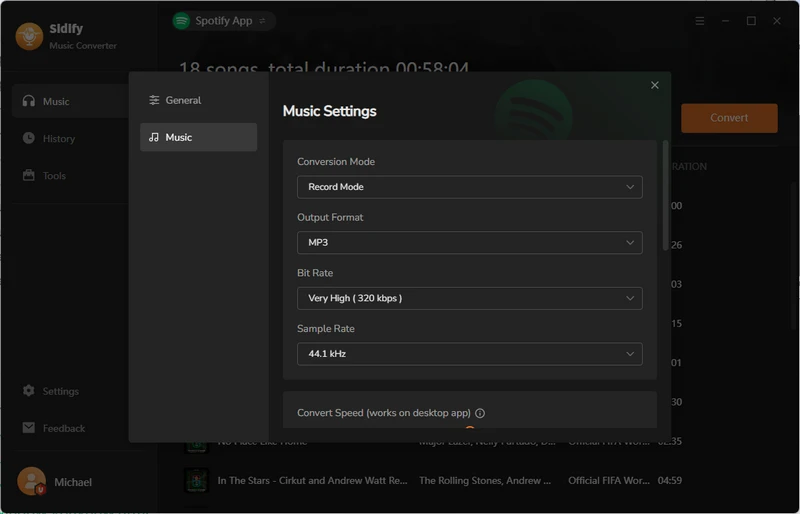
Step 2 Output Settings
Open Settings, choose MP3 or any format as the output format, and set the output quality to 320 kbps for the best balance between audio quality and file size.
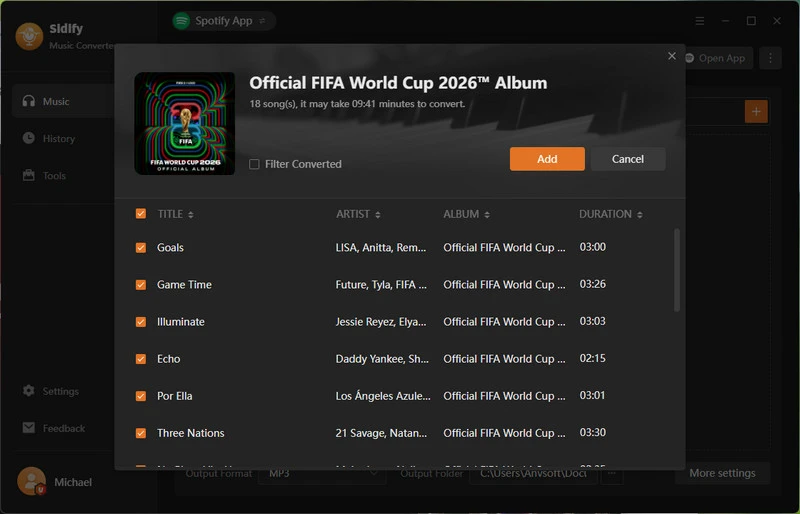
Step 3 Add songs to Sidify
Click the Convert button to begin downloading and converting the selected Spotify tracks to MP3 or any formart you want.
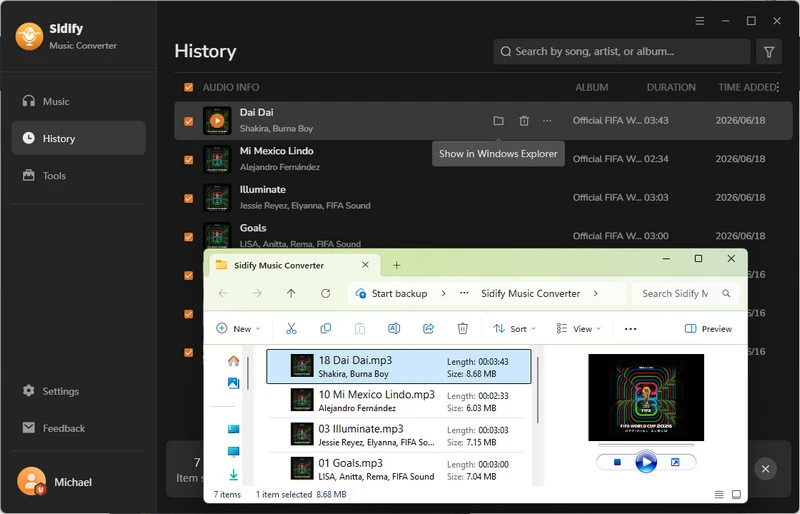
Step 4 Check Downloaded Tracks
Once the conversion is complete, go to the History tab to access your downloaded MP3 files. From there, you can play them offline or transfer them to any compatible device.
Part 5: Frequently Asked Questions
Is MusicFab free?
MusicFab does not offer a free version, but it offers a free trial, allowing users to test the software before purchasing. However, users can only download 3 full songs. During testing, the trial version also displayed frequent upgrade reminders and promotional pop-ups. To remove these limitations and enjoy unlimited downloads, users need to purchase a paid license, such as a single converter, a Music Converter Combo, or the All-In-One plan.
Is MusicFab safe?
Based on my testing, MusicFab is generally safe to install and use when downloaded from its official website. The software functioned normally without malware or suspicious behavior.
Does MusicFab download Spotify songs?
Yes. MusicFab can download songs, albums, and playlists from Spotify and save them in popular audio formats such as MP3, M4A (AAC), FLAC, WAV, and OPUS.
Does MusicFab have a lifetime license?
Yes. MusicFab offers several lifetime license options. Users can purchase an individual music converter for a specific streaming service, build a custom Music Converter Combo with multiple converters, or choose the All-In-One package, which includes all supported music converters.
What are the best MusicFab alternatives?
Sidify is one of the strongest options thanks to its broad platform support, multiple output formats, fast conversion speed, and intuitive interface. If you're looking for a more affordable alternative, Sidify is worth considering. Unlike MusicFab, Sidify offers an annual subscription plan starting at $79.90 per year, giving users access to downloads from many supported music streaming platforms.
Final Words
Overall, this MusicFab review found that MusicFab is a reliable music downloader with broad platform support, good audio quality, and flexible output formats. While its pricing, trial limitations, and frequent promotional pop-ups may not suit every user, it remains a solid option for downloading music from multiple streaming services. If you're looking for a lower-cost alternative, Sidify is also worth considering.
 Sidify All-in-one Music Converter
Download and convert music from all major streaming services in one place. Get MP3 or other popular formats in source audio quality, save songs offline on Windows or Mac, and enjoy up to 10X faster downloads with ID3 tags and lyrics preserved.












