


Having trouble converting SoundCloud to MP3 for offline use? Many users find that there’s no straightforward way to download most tracks. So, SoundCloud to MP3 downloader tools have become a popular solution for converting tracks into usable MP3 files. Whether you want single songs, full playlists, or higher-quality 320kbps audio, finding a reliable method can make a big difference.
In this guide, we’ll introduce three simple ways to help you download SoundCloud tracks quickly and easily.
Why Can’t You Download MP3 from SoundCloud?
SoundCloud hosts millions of tracks, but downloading them isn’t always straightforward. Most SoundCloud tracks can only be downloaded if the uploader has enabled the “Download” option and uploaded the file in MP3 format, but this is relatively rare. In most cases, downloads are disabled for streaming-only use, so MP3 downloads aren’t available by default.
However, that doesn’t mean you’re stuck. You can still convert SoundCloud to MP3 with conversion tools, including options for playlists and even higher-quality 320 kbps audio, which we’ll cover in the next section.
Three Ways to Convert SoundCloud to MP3
If you want to convert SoundCloud to MP3, there are several practical methods you can choose based on your needs. In this guide, we’ll walk you through three simple options: the official SoundCloud download feature, a professional desktop converter like Sidify SoundCloud Downloader for higher-quality downloads and batch conversion, and free online SoundCloud to MP3 tools for quick, no-install access. Whether you’re looking for convenience, better audio quality, or a fast one-click solution, you’ll find a method that fits your situation.
Official SoundCloud Download (Free, Limited)
SoundCloud does provide a few tracks available for free direct MP3 download, but only under specific conditions. This happens when the uploader originally uploaded the file in MP3 format and explicitly enabled the “Download” option. In these cases, users can download the track directly from the platform. Below are the simple steps to download SoundCloud tracks to MP3.
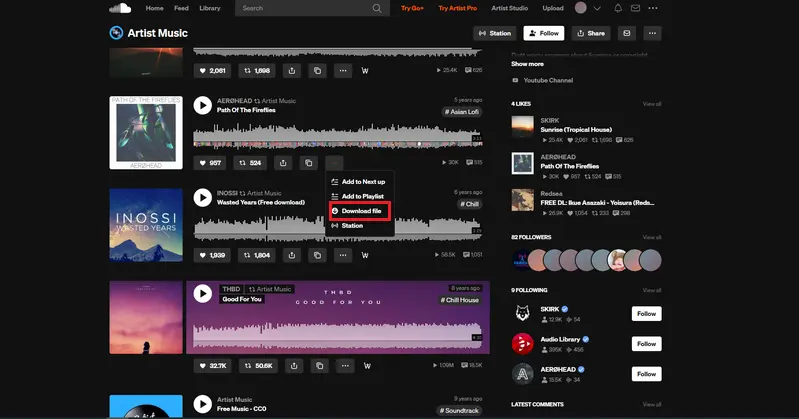
Step 1 Log in to your Soundcloud account
Step 2 Navigate to the song you want to download.
Step 3 Click on “More,” then select “Download file.”
Step 4 Follow your browser's prompts to save the song to your device.
Best Desktop SoundCloud to MP3 Converter (Lossless & Fast)
As a powerful desktop solution, Sidify SoundCloud Downloader offers a reliable way to convert SoundCloud tracks to MP3 format, while also supporting up to six output formats: MP3, WAV, FLAC, AAC, AIFF and ALAC. It also supports batch downloading and preserves original sound quality, making it ideal for users who value both efficiency and high-fidelity audio.
In addition to SoundCloud, it is compatible with multiple major streaming platforms, including Spotify, Apple Music, YouTube Music, Mixcloud and more, enabling all-in-one music downloading and management across services.
With this converter, you can easily download SoundCloud music directly to your computer and save it in various formats for offline listening, playlist creation, or high-quality archiving.
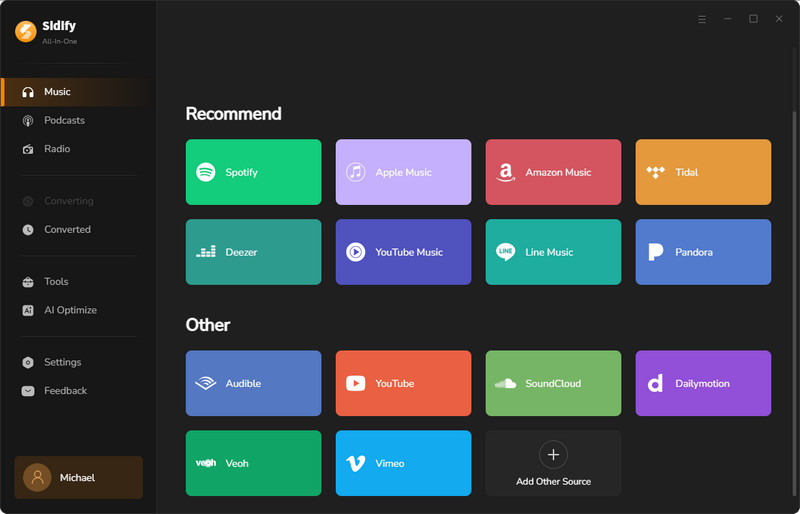
Step 1 Install and Run Sidify SoundCloud Downloader
Run the software on your computer and select SoundCloud from the list of supported streaming platforms.
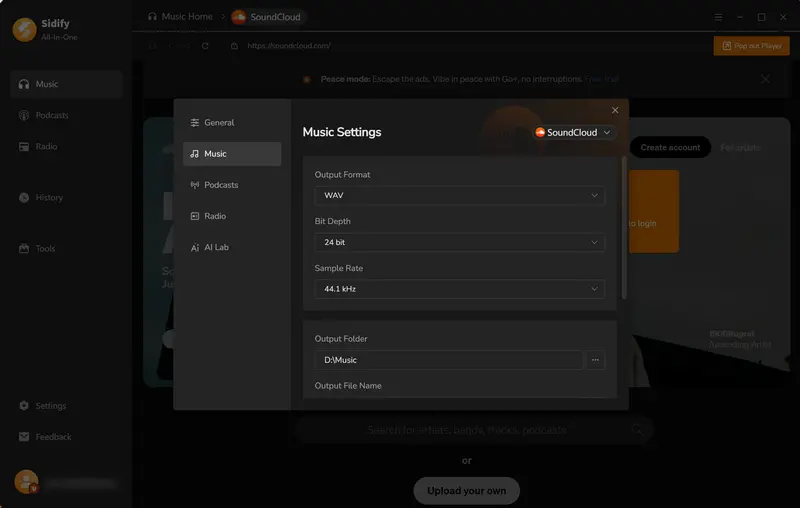
Step 2 Output Settings
Set up the output format as well as the output folder. By tapping the More Settings, you can change the output file name as well as the output organized ways.
Step 3 Add Music to Sidify
Log in to your SoundCloud account from the web player window. Choose the song you like and click the “+” button to put it on the converter panel. Then you can tick off those you like and save them for conversion later.
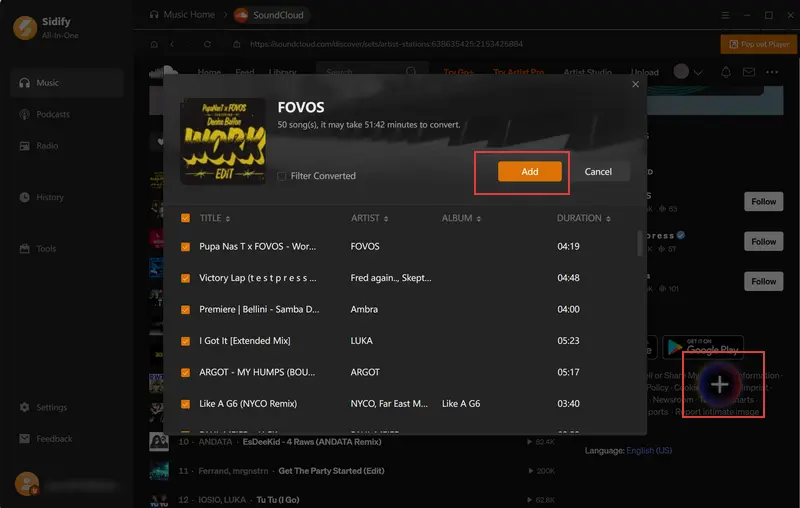
Step 4 Start Convert
If song selection is finished, now click the “Convert” button to start the process. The program will run faster than you expect.
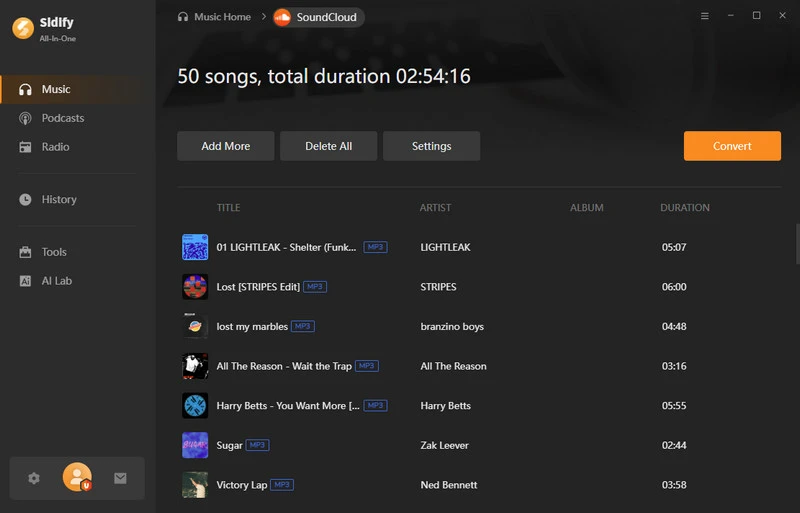
Step 5 Conversion Finished
When all songs have finished downloading, you can access them by clicking the folder icon or finding them in the “History” section of the app.
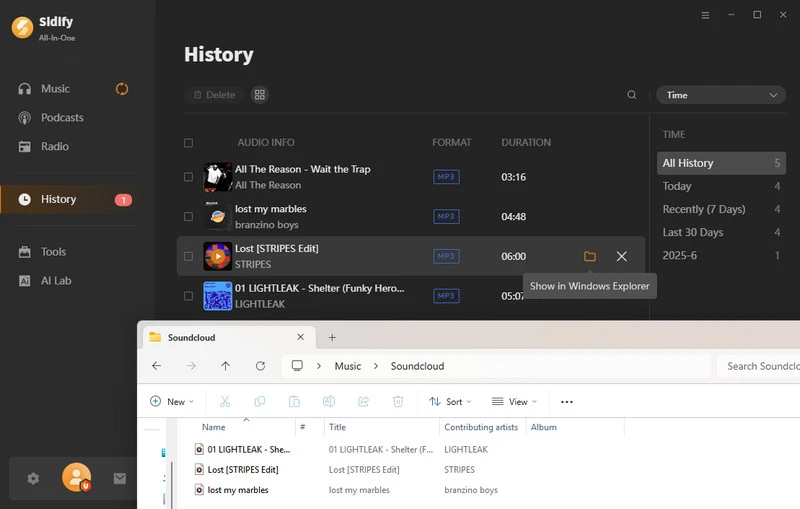
Free Online SoundCloud to MP3 Downloaders
SCtoMP3 and MusicVerter are free online tools that let users quickly convert SoundCloud tracks to MP3 without installing any software. Simply paste the track URL, and both tools generate downloadable MP3 files in seconds, making them convenient options for fast, easy conversions.
SCtoMP3
Step 1 Log in to Your SoundCloud Account
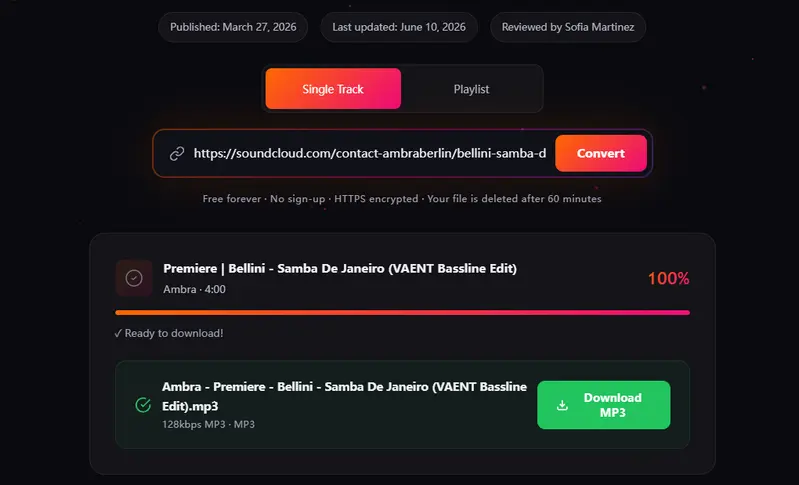
Log in to your SoundCloud account, select the songs you want to download to MP3s, copy the link, then open the SCtoMP3 website and paste the link into the search box. After that, click “Convert to MP3”.
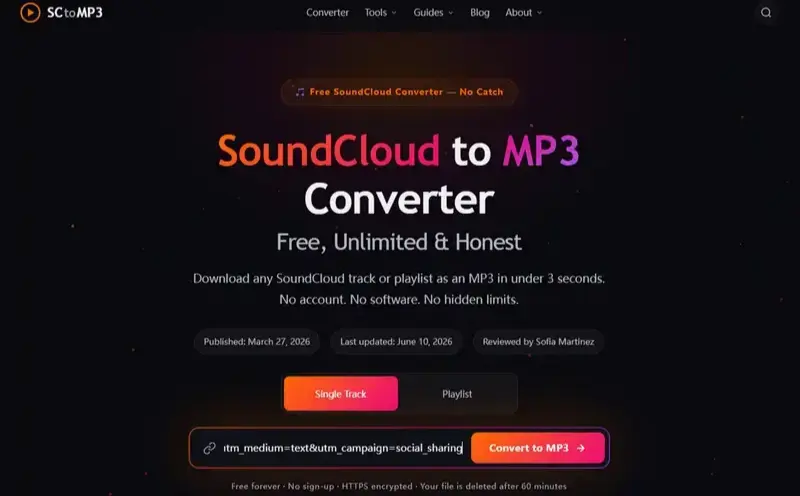
Step 2 Download the song to MP3
When the conversion is finished, click the “Download MP3” button to download the song.
Step 3 Download SoundCloud Playlist to MP3
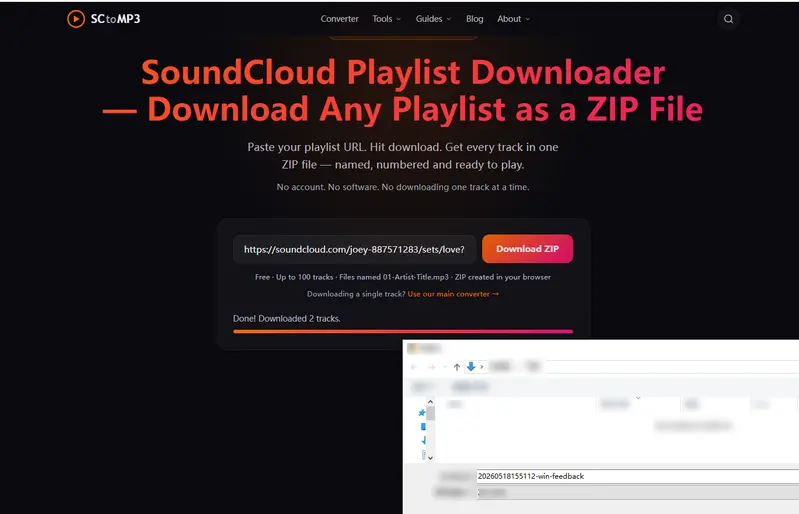
Copy the link to the entire playlist you want to download, then click “Playlist” in SCtoMP3, and paste it into the search box. Click “Download ZIP” to get the entire playlist of songs in MP3 format.
MusicVerter
Step 1 Log in to Your SoundCloud Account
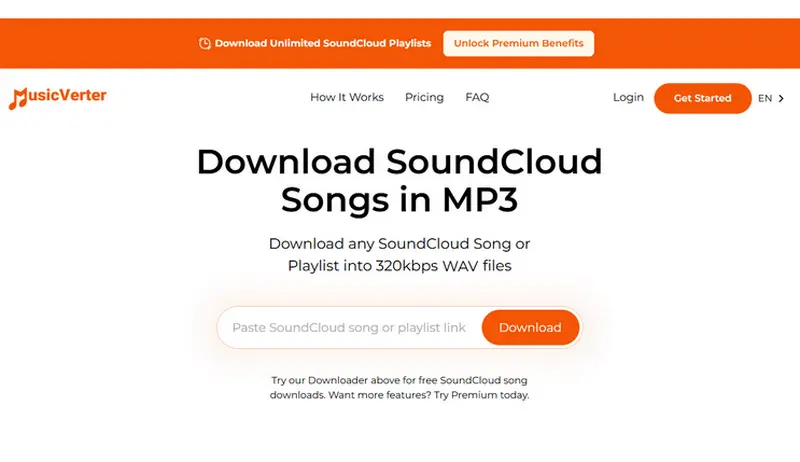
Go to SoundCloud and locate the song you want to download. Copy the track URL.Open the MusicVerter page and paste the copied link into the designated text field.
Step 2 Download MP3 Songs to Your Device.
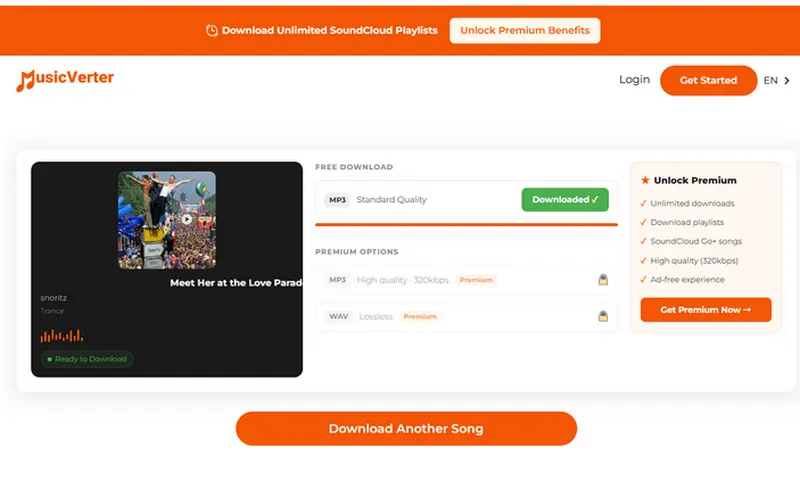
Click the “Download” button. The tool will process your request, and once the conversion is complete, you'll receive a link to download the MP3 file. Then, click on the download link to save the MP3 to your device.
 Please Note:
Please be aware that free online converters are often unstable, may interrupt during conversion, and frequently display intrusive pop-up ads. Do not click on any suspicious links or pop-up windows to avoid security risks.
Which Method Is Best to Download SoundCloud to MP3?
| Feature | SoundCloud | Sidify SoundCloud Downloader | SCtoMP3 | MusicVerter |
|---|---|---|---|---|
| Type | Desktop/Online | Desktop | Online | Online |
| Output Formats | Depend on Uploader | WAV / MP3 / FLAC / AAC / ALAC / AIFF | MP3 / WAV | MP3 / WAV |
| Audio Quality | Depend on Uploader | 320kbps | 128kbps | 128kbps |
| Playlist Download | ✘ | ✔ (No limit) | ✔ (Up to 100) | ✘ |
| ID3 Tags | Title, Artist | Title, Artist, Album, Track Number, Year | Title, Artist | Title |
| Offer Type | Free | Free Trial / Premium | Free | Free / Premium |
| Recommendation | ⭐⭐⭐ | ⭐⭐⭐⭐ | ⭐⭐ | ⭐ |
 Smooth-finish paper, easy to install
One-Stop MP3 Music Converter for all streaming music platforms. Convert and download music from all major streaming platforms including Spotify, Apple Music, YouTube, Amazon Music, Tidal, Deezer, and more.
Bonus: Download SoundCloud Playlist to MP3 with 320kbps?
If you want to quickly download an entire playlist in batch while maintaining high audio quality, this SoundCloud to MP3 Converter also supports full playlist downloading. You can convert multiple SoundCloud tracks at once and export them to MP3 at up to 320kbps without noticeable quality loss, making it a convenient option for efficiently saving entire playlists.
Step 1 Log in to Your SoundCloud Account
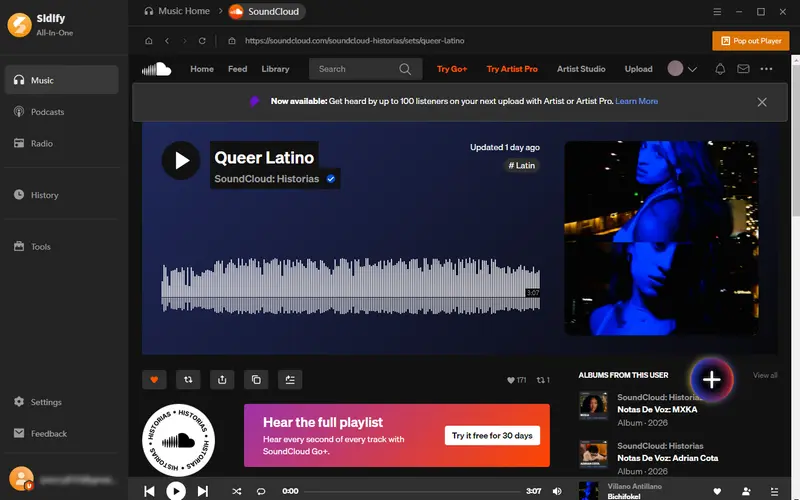
Click “Playlist”, choose the playlist you want to download. And click the “+” button, Sidify will automatically detect and analyze the tracks on the current page.
Step 2 Add Playlist Tracks to Sidify
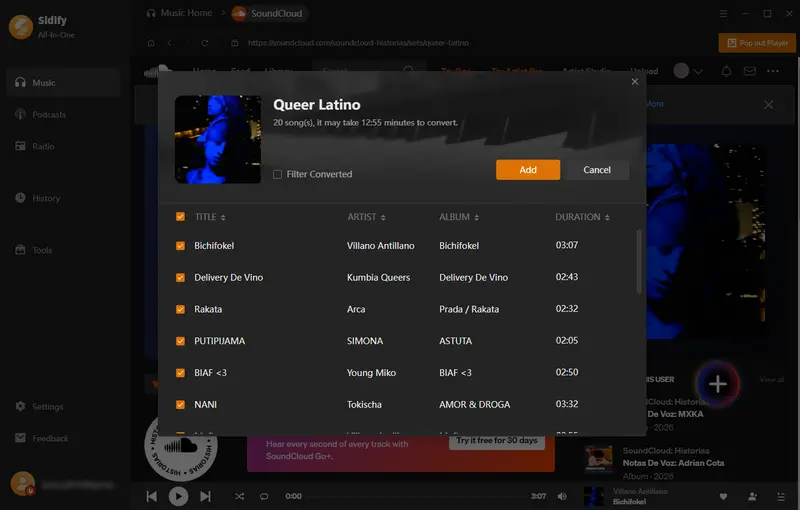
Select the songs you want to download, then click “Add” to import them.
Step 3 Convert Playlist to MP3
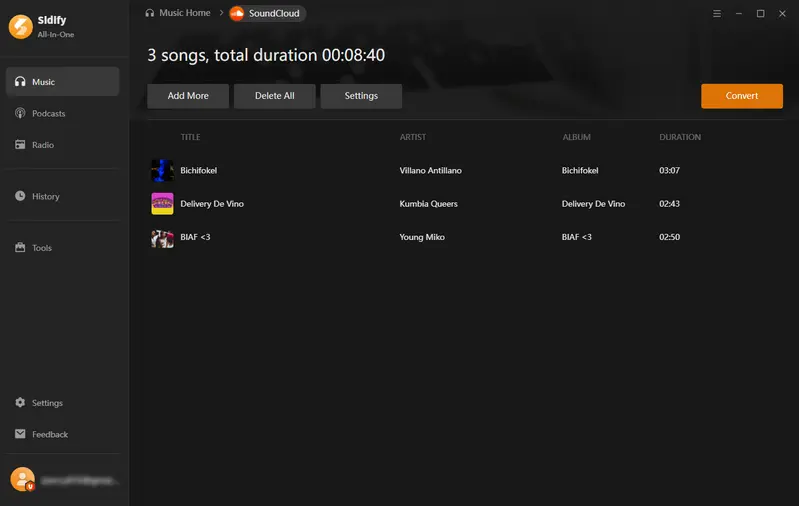
After adding all the songs, click “Convert” to start conversion.
Step 4 Check Downloaded Songs
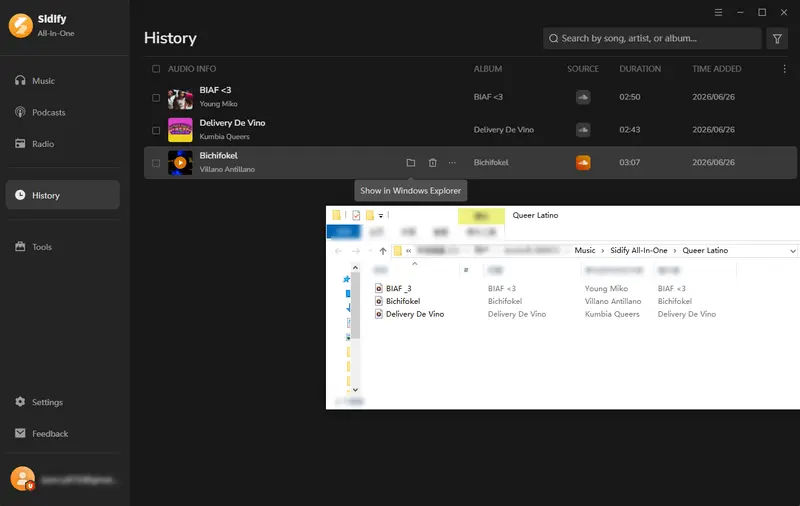
Once the conversion is finished, click “History” to check your finished MP3 files. Then click the folder icon next to the converted tracks to locate the WAV files on your computer.
Conclusion
To sum up, downloading SoundCloud to MP3s isn’t officially supported for most songs, but you have several viable options. Free online tools like SCtoMP3 and MusicVerter are great for quick, occasional single-track downloads and require no installation. However, if you need batch playlist conversion, 320kbps high-quality audio, and reliable option, Sidify SoundCloud Downloader is the most robust and professional choice. According to your needs, choose between convenience and quality and efficiency, and pick the method that fits you best.
Frequently Asked Questions
How do I get 320kbps quality from SoundCloud?
To get 320 kbps quality, the original upload must already be high-quality and available at that bitrate. SoundCloud itself does not upgrade audio quality, so any 320kbps output depends on the source file or the converter you use. If the original track is of lower quality, it cannot be improved during download.
Can I download a full SoundCloud playlist to MP3?
SoundCloud itself does not support downloading full playlists as MP3 files. To do this, you need to use third-party tools or converters, such as Sidify, which can help you batch download and convert entire playlists to MP3 for offline listening.
Why can't I download some SoundCloud tracks?
Some SoundCloud tracks cannot be downloaded because the uploader has disabled the download option or the content is set to private or restricted. In other cases, the track may be copyrighted or limited by the creator, allowing only streaming. Additionally, some third-party download tools may fail to access certain tracks due to platform restrictions or updates.
Is it safe to use SoundCloud to MP3 downloaders?
It depends on the tool you use. Some SoundCloud to MP3 downloaders are safe and widely used, but many free online converters may contain intrusive ads, trackers, or unsafe redirects. To stay safe, it’s important to choose reputable software, avoid suspicious websites, and never provide personal information or install unknown programs.
Does SoundCloud have an official download option?
Yes. SoundCloud allows artists to enable an official “Download” button when uploading tracks. If the creator turns this option on, users can download the original file directly. However, not all tracks have this feature, as it is controlled by the uploader.
Sidify All-in-one Music Converter
Download and convert music from all major streaming services in one place. Get MP3 or other popular formats in source audio quality, save songs offline on Windows or Mac, and enjoy up to 10X faster downloads with ID3 tags and lyrics preserved.












