Tired of Beatport to MP3 downloads with limits or having to make multiple purchases to listen offline? It must be frustrating for DJs and music lovers. Don't worry. Here are three ways to compare, and there must be one that meets your needs. Among them, Sidify All-in-one has been recognized as the best way to convert Beatport tracks to MP3 and is widely praised by users for its speed, high-quality output, and batch conversion capability. Whether you're looking for a free method, the official Beatport download, or an all-in-one solution, this article will show you exactly how to get your tracks efficiently and safely.
Part 1. 3 Ways to Download Beatport to MP3
Method 1: Using Sidify All-in-one to convert Beatport to MP3
One of the easiest and most reliable ways to download Beatport tracks as MP3s is to use an all-in-one tool. Whether you're a DJ, music producer, or electronic music enthusiast, it offers a fast, stable, and simple solution for converting your favorite Beatport tracks while preserving their original quality and ID3 tags. In addition, it supports both Windows and Mac, making it versatile across platforms.


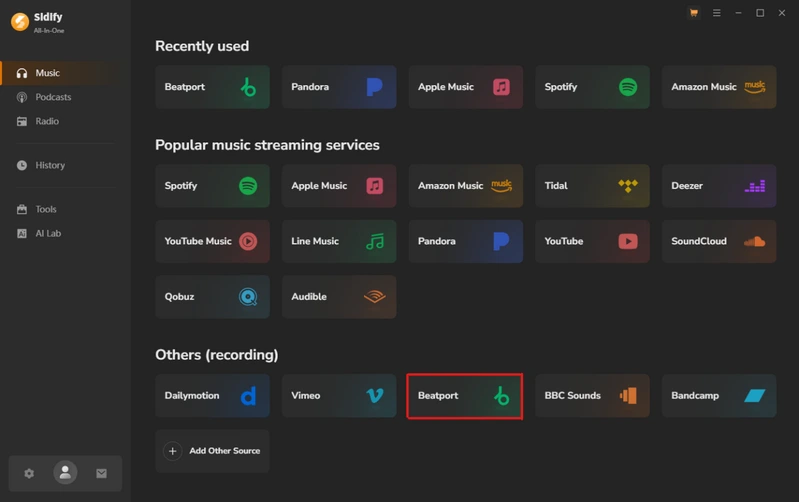
Step 1 Install and run the software on your computer, and click "Beatport" to log in to your Beatport account.
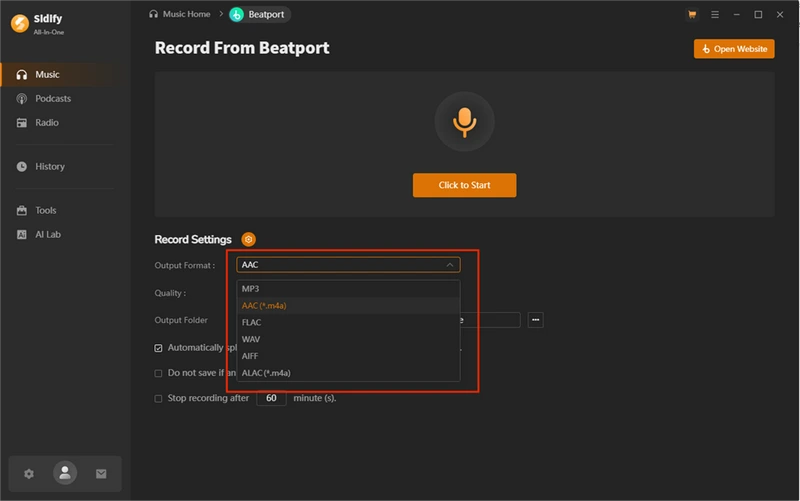
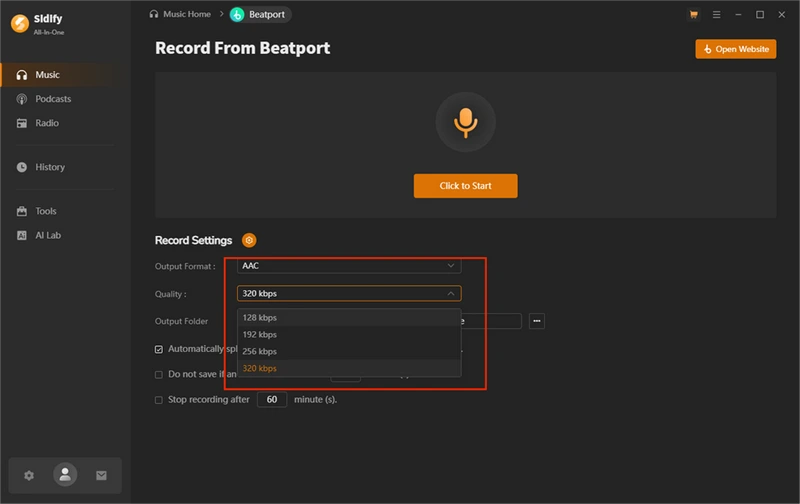
Step 2 Record Settings: choose from six output formats—MP3, AAC, FLAC, WAV, AIFF, ALAC. Customize the quality by adjusting parameters such as bitrate and sample rate to balance file size and audio fidelity. Then, select a folder for saving your converted files.
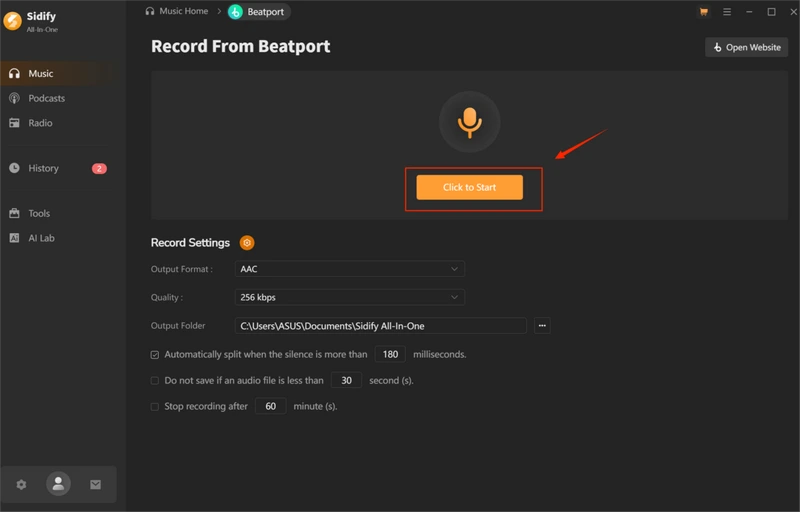
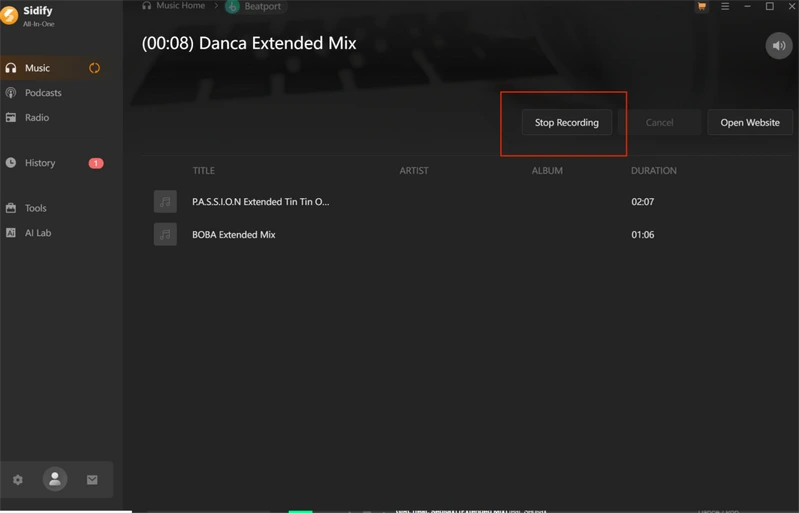
Step 3 Click the "click to start" button, and play the song you want to download.
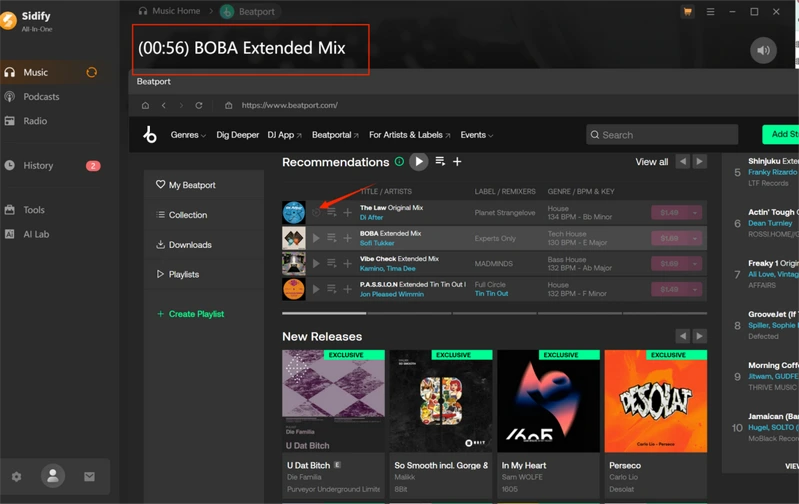
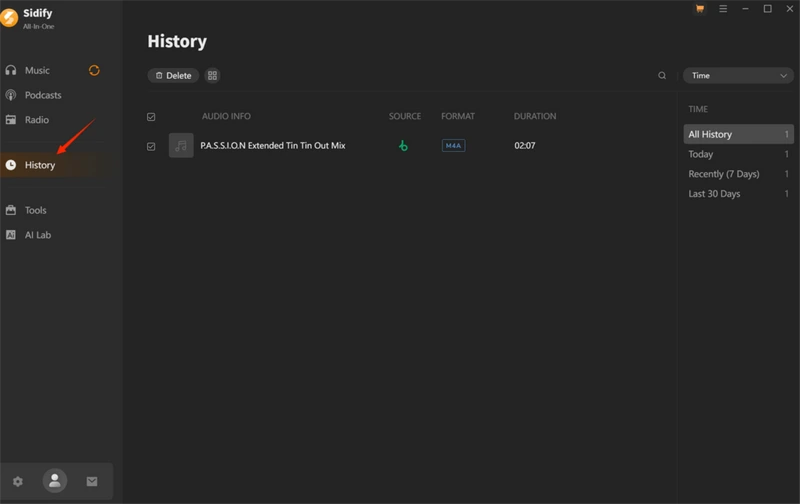
Step 4 Click the "Stop Recording" button to end the session or wait for the song to finish. Afterwards, locate your downloaded playlists in the "History" section and click the "Folder" icon to access them. Now, you can enjoy the MP3 files offline.
Method 2: Free ways to get music from Beatport
There are two free ways to convert Beatport to MP3. You can download tracks in MP3 format that are user-friendly and don't require an account login. However, some limitations still apply when you download.
 Note:
Note:⚠️ These online tools are free and convenient, but they might pose security risks. Be cautious of unfamiliar links.
Part 1: KeepVid
KeepVid is an online website that supports many platforms, including Beatport. It is easy to use. Here are the detailed steps.
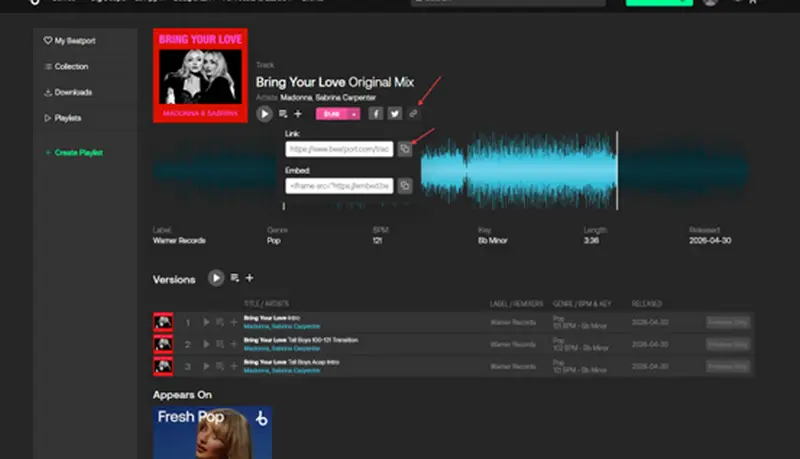
Step 1 Open the Beatport website, choose the track you want to download, and click the last button, then copy the link.
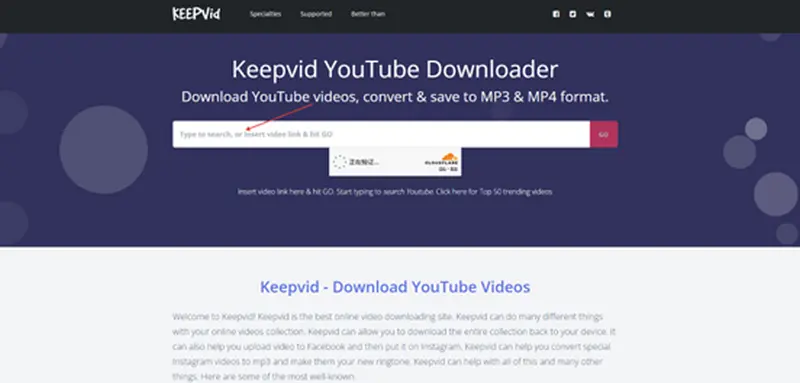
Step 2 Paste the copied URL in the search box and click "Convert" to analyze the link.
Step 3 Click the "click to start" button, and play the song you want to download.
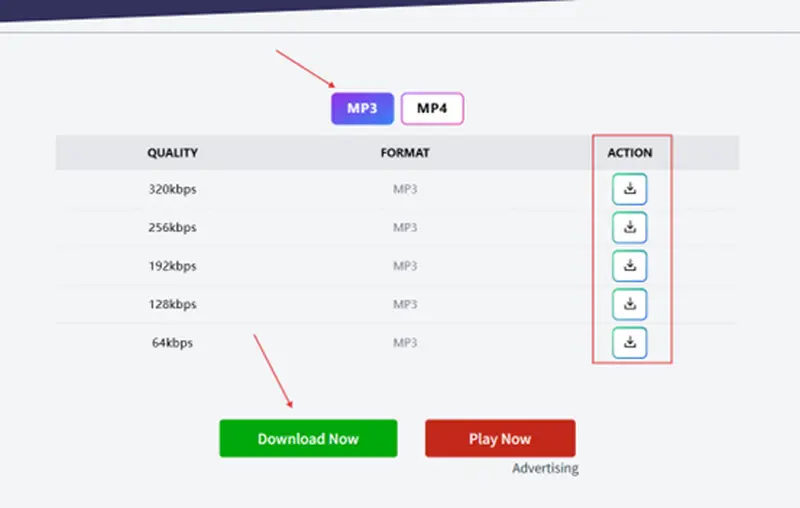
- Free to use
- Choosing the output audio quality was allowed
- Supports multiple platforms
- No batch or playlist downloads
- Frequent pop-up ads
- Cannot download lossless audio
Part 2: TubeNinja
TubeNinja is a good choice for download Beatport music easily. It's easy to use, and you don't need to download any software or register for an account. Just copy the song links, choose the output format, and the tracks will be saved to your device. It supports MP3 and other common formats. But it has many limitations, offers few quality options, and cannot download an entire playlist.
Step 1 Open the Beatport website, choose the track you want to download, and click the last button, then copy the link.
Step 2 Paste the link into the search box and click the download button. You will get the MP3 file.
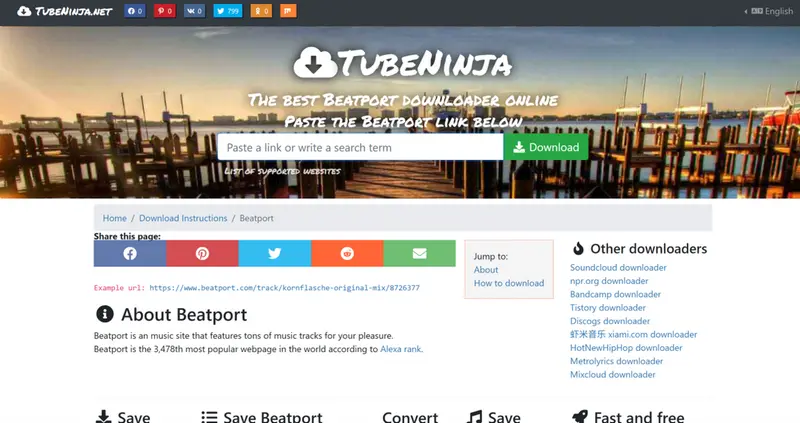
- User-friendly
- No software installation or account required
- Completely free
- Low quality
- Limited format option
- Website availability is unstable
Method 3: Official way to download Beatport to MP3
Downloading from Beatport is straightforward: log in to your account, purchase the track or album, select the MP3 format, and download the file to your device. This method delivers lossless audio quality across all your devices. The main limitations are that each track costs money. If you're seeking a reliable, legal way to build your music library without hassle, buying directly from Beatport is a great option.
Note:Purchasing music directly from Beatport is the best way to support the artists and producers you love, as it helps ensure they are fairly compensated for their work.
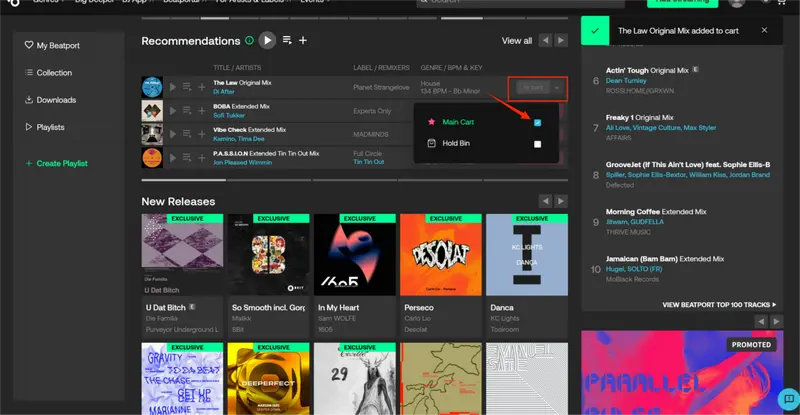
Step 1 Log in to your account, find the track you want to download, then click the pink button and select "Main Cart".
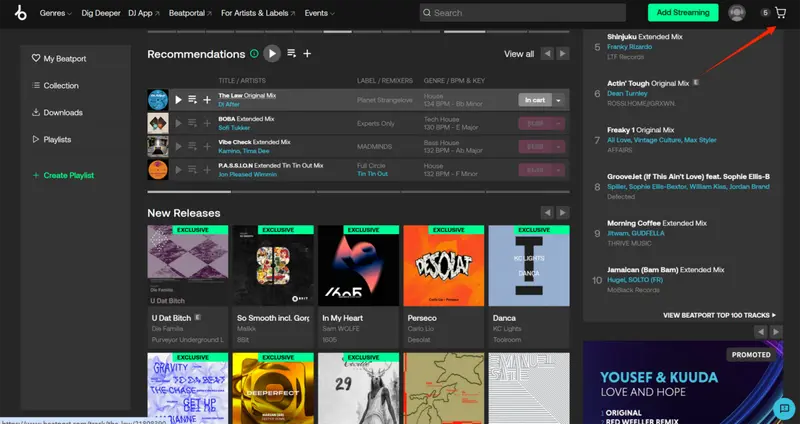
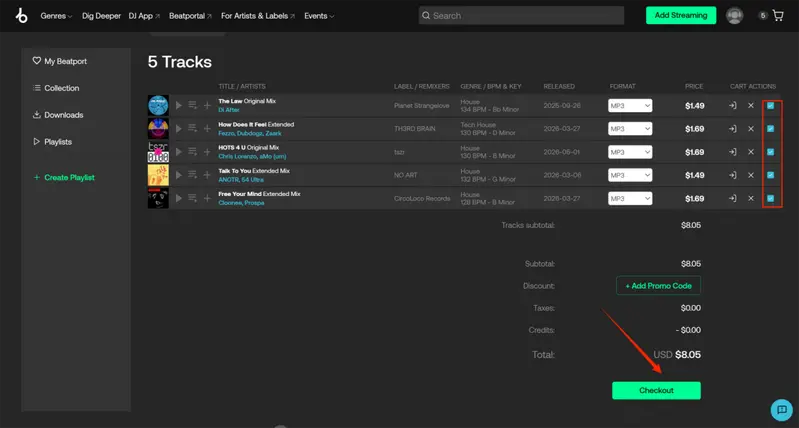
Step 2 Click the "shopping cart" icon in the top right corner, select the tracks you want to purchase, and complete the payment. After that, you will be able to download them to MP3.
Part 2. Choosing the Best Beatport to MP3 Method for You
| Downloads | Free/Paid | Type | Output Format | Download Quality | Batch Download | Conversion Speed | Recommendation |
|---|---|---|---|---|---|---|---|
| Sidify All-in-one | $6.66/Month $79.90/Year $159.9/Lifetime |
Desktop | MP3, FLAC, AAC, WAV, ALAC, AIFF | 320kbps | Yes | 10x | ⭐⭐⭐⭐ |
| Beatport | $1~$3/per track | Online | MP3, WAV, AIFF, FLAC | 320kbps | Yes | 1x | ⭐⭐⭐ |
| KeepVid | Free | Online/Desktop | MP3 | 320kbps | No | 1x | ⭐ |
| TubeNinja | Free | Online/Desktop | MP3 | 192kbps | No | 1x | ⭐ |
Sidify All-in-one stands out as the most comprehensive and professional solution. Besides Beatport, it supports several streaming platforms such as Spotify, Apple Music, YouTube Music, and all major music platforms. This desktop tool supports various output formats like MP3, FLAC, AAC, WAV, ALAC, and AIFF. It delivers high-quality 320 kbps audio, allows batch downloads, and boasts 10x faster conversion speeds. For professional DJs or those who regularly download high-quality music, Sidify remains the most dependable option.
Beatport's official download service is a solid choice for users who prefer official sources. Priced at $1–$3 per track, it supports MP3, WAV, and AIFF formats at 320 kbps. If you just want to download casually or pursue a more reliable way, Beatport's official download is a good choice.
For casual users or those looking for a free way, KeepVid and TubeNinja are worth considering. They work on desktops and online and are easy to use, though their features and audio quality are limited.
In summary, for professional or frequent users, Sidify is the first choice; for those who prefer a stable, official approach, choose Beatport; and for casual or occasional use, KeepVid or TubeNinja offers a free, simple solution.
Part 3. Is It Legal to Convert Beatport to MP3?
The legality of converting Beatport tracks to MP3 varies based on your country's copyright laws and your method of access. Since Beatport is a licensed digital music platform with copyrighted content, converting tracks for personal use is generally allowed in many regions if you have obtained the music legally.
Sharing, redistributing, or commercially using converted files could breach copyright laws and violate Beatport's terms of service. Since regulations on music conversion and digital content vary by country, users must ensure their actions adhere to local laws and respect the rights of content creators.
Tools like Sidify, which convert audio files to common formats such as MP3, can facilitate easier management and playback of purchased music across multiple devices. It's important to use these tools responsibly, following all relevant laws and platform policies.
Part 4. Conclusion
This article outlines different options for getting music from Beatport. You can choose official channels for guaranteed quality, use free online methods for quick access, or employ converter tools like Sidify All-in-one for additional features and convenience. Pick the method that best suits your needs and listening habits.
Part 5. FAQs
1. Can I download the entire Beatport collection?
No, Beatport does not provide an option to download your entire collection in one go. You can buy and download individual tracks, EPs, or albums in MP3, WAV, or AIFF formats, but each must be downloaded separately. For DJs or users with many tracks, tools like Sidify All-in-one can help download and convert multiple purchased Beatport tracks simultaneously for personal use.
2. What is the best format to download from Beatport?
MP3 is the most popular format because it delivers good audio quality, smaller file sizes, and broad device compatibility. But if you prefer higher sound quality for DJ or professional use, formats like FLAC or WAV are better choices.
3. Can I use downloaded Beatport MP3s in Serato/Rekordbox?
Yes! After downloading the tracks, you can import your MP3 files into Serato or Rekordbox's music library.
4. Can I download songs from Beatport onto a USB?
Yes, you can download songs from Beatport to a USB drive, provided you legally purchase the tracks. After purchasing, you can download the files in MP3, WAV, or AIFF and copy them to your USB drive.
5. Can I download music from Beatport for free?
No, Beatport doesn't let you download tracks for free as MP3s. You can download from a free online website or by using tools like Sidify.
 Sidify All-in-One Music Converter
Download music from Beatport and all major streaming platforms in MP3, FLAC, AAC, WAV, ALAC, or AIFF.

 Note:
Note:This article is for reference and communication purposes only; please comply with the relevant laws and policies.