


Klickaud SoundCloud Downloader is one of the most popular free online SoundCloud-to-MP3 converters in 2026. But many wonder: Is Klickaud safe to use in 2026? Is it free? Does it actually work in 2026?
To give you an honest answer, we thoroughly tested Klickaud with 20+ tracks on SoundCloud. In this review, we’ll break down Klickaud’s features, output quality, download speed, safety, pros and cons, and the best Klickaud alternatives for high-quality batch downloads. Keep reading.
You may also like 👉: KigoSoft Music One Review | SpotiSaver Tested Review 2026
Part 1: What Is Klickaud SoundCloud Downloader?
Klickaud is an online free SoundCloud Downloader, which can download SoundCloud songs, remixes, and podcasts as MP3 files saved on your local devices. It was launched in 2017 as klickaud.com, later moved to klickaud.co, and its current official website is klickaud.org. We recommend that you visit klickaud.org directly to use the service.
Key Features of Klickaud:
- Download high-quality SoundCloud music (128 & 320 kbps).
- Fast & Easy to Use: No registration or login required.
- Download SoundCloud music for free with no stated download limits.
- Works directly in your browser on desktop and mobile devices.
- Save SoundCloud tracks as MP3 files for offline listening.
Part 2: How to Use Klickaud: Tested & Reviewed
2.1 How to Use Klickaud (Step-by-Step Guide)
Step 1 Open klickaud.org in a browser on your device, such as Google Chrome or Safari.
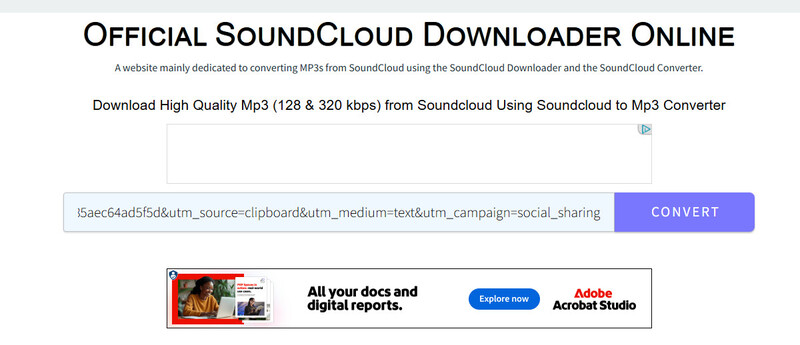
Step 2 Copy and paste the SoundCloud link into the box on Klickaud.
Step 3 Click “Convert” and wait for the website to process the track.
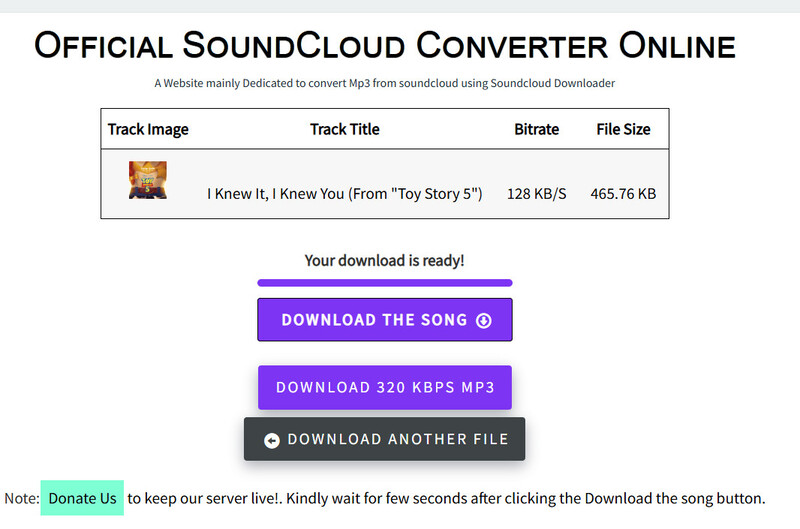
Step 4 Click the “DOWNLOAD THIS SONG” button, and you can get the SoundCloud file in 128 kbps.
 Note:
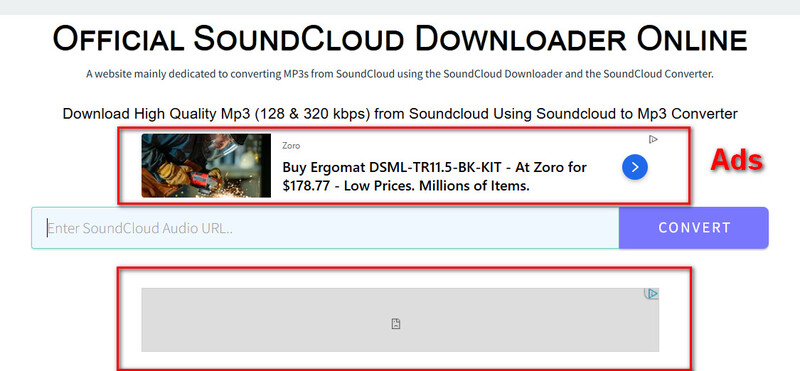
Note:Klickaud doesn’t actually offer 320 kbps audio files. The “Download 320 KBPS MP3” button redirects you to another product. If you are concerned about the security risks of redirect ads, enable an ad blocker before converting anything on this website.
2.2 Real Test Results & Performance
To verify whether Klickaud still work in 2026, we tested Klickaud with 20 public SoundCloud tracks, including regular songs, remixes, and a few long podcasts (over 1 hour), using Google on Windows 10.
Here’s part of my test results:
| Track Type | Name/Link | File Size | Actual Bitrate | Download Time | Result |
|---|---|---|---|---|---|
| Song | Frown | 3.37 MB | 128 kbps | 6s | Success |
| Song | The 4 Consuls Are Dying | 3.42 MB | 128 kbps | 8s | Success |
| Song (Go+) | I Knew It, I Knew You | 465.76KB | 128 kbps | 5s | Only 30-second preview downloaded |
| Playlist | Summer Playlist (179 songs) |
- | 128kbps | - | Success (Can only download tracks one by one) |
| Private Song | Private test track | 5.86 MB | 128 kbps | - | Failed |
| Podcast | PODCAST 006 DJ LINDÃO [ PODSEXO ] MELHOR QUE XVIDEOS ! | 47.1 MB | 128 kbps | 11s | Success |
| Podcast | Arjan Dhillon Podcast - DoubleA | 22.9MB | 128kbs | 7s | Success |
| Podcast | Persian Rap Podcast 11(With DJ NJ) | 24 MB | 128kbs | 10s | Success |
Success Rate: About 99% of public tracks and podcasts can be downloaded successfully. However, Klickaud can’t download private tracks. For Go+ tracks, it can only download a 30-second preview rather than the full track. For playlists, although it can parse individual tracks, you have to click “Convert” for each track one by one. (Check out Top 10 SoundCloud Playlist Downloaders: Proven and Tested >>)
Download Speed: Most tracks, including podcasts, can be finished very fast, within 5–12 seconds.
Audio Quality: Despite the website claiming 320 kbps quality, the actual files I tested were mostly 128 kbps MP3.
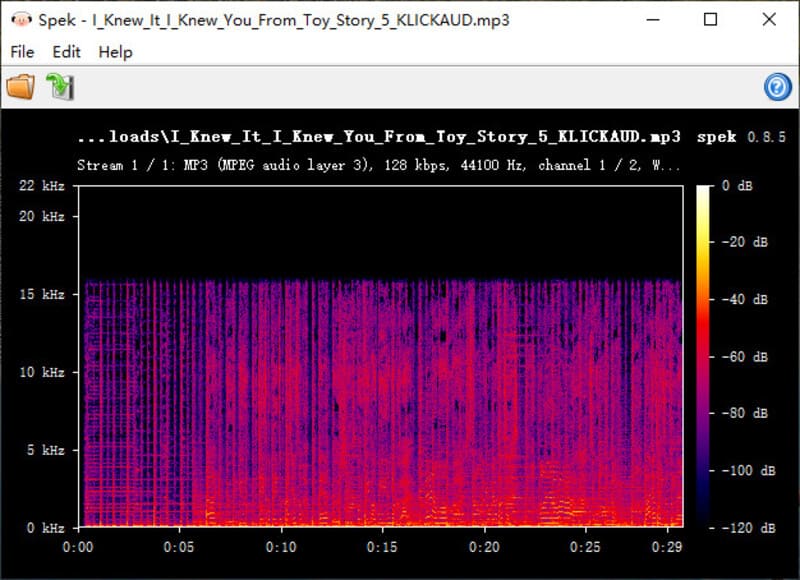
File Size & Format: Files were clean MP3s with no watermarks. A typical 3–4 minute song was around 3–5 MB at 128 kbps.
Ads & Experience: The site contains redirect ads and banner ads. We strongly recommend using an ad blocker.
2.3 Pros And Cons of Klickaud
- Completely free, no registration required.
- Very easy to use.
- Supports songs, remixes, and long podcasts.
- Works on desktop and mobile browsers.
- Fast converting speed.
- Actual audio quality is mostly 128 kbps.
- Contains redirect ads and banner ads.
- No batch download for playlists (must download tracks one by one).
- Does not support full downloads for SoundCloud Go+ tracks.
- Does not support private tracks.
Part 3: Is Klickaud SoundCloud Downloader Safe and Legal to Use?
Is Klickaud Safe to Use?
Klickaud is not an official SoundCloud downloader, so there may be certain security risks when using it. To test whether Klickaud is safe to use, we used the professional security tool VirusTotal, which can detect potential malware and phishing threats on websites. Here’s the result after we entered the Klickaud website URL, https://www.klickaud.org/, into VirusTotal.
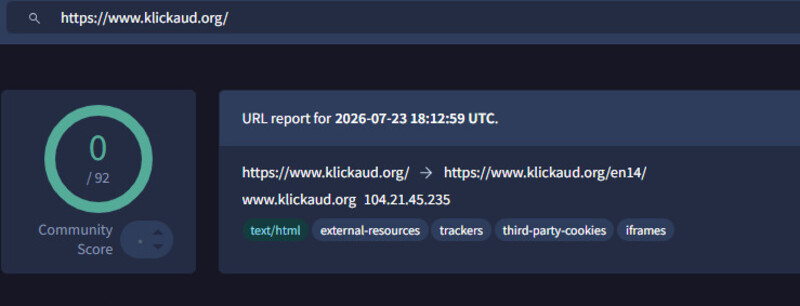
The result shows 0/92 detections, meaning no malware or phishing threats were detected in the scan. However, you should still be cautious when clicking ads or redirects on Klickaud, as some may lead to third-party websites.
Is Klickaud Legal to Use?
All songs on SoundCloud are copyright-protected, including free tracks. When converting SoundCloud music using Klickaud, please note that you should only use the converted files for personal, offline listening. However, sharing, redistributing, or using these files for commercial purposes may violate Klickaud’s terms of service or even local copyright laws.
Part 4: 6 Klickaud SoundCloud Downloader Alternatives in 2026
Not satisfied with Klickaud? Looking for a more stable, secure, and higher-quality SoundCloud downloader? We’ve tested 6 reliable Klickaud alternatives, covering both desktop and mobile options, to help you find the one that best fits your needs.
| Tool | Key Feature | Rating |
|---|---|---|
| Sidify Music One | Multiple output formats; batch downloads; lossless music | 4.9/5 |
| SoundCloudMate | Free to download SoundCloud songs and playlists; easy to use | 4.7/5 |
| DownCloudMe | Selectable bitrate (128/192/320 kbps) | 4.5/5 |
| MusicVerter | Support MP3 / WAV / AAC / FLAC | 4.4/5 |
| SCloudDownloader | Support playlist and free to use | 4.4/5 |
| Forhub.io | Multiple platforms supported | 4.3/5 |
Part 5: Best Desktop Klickaud SoundCloud Downloader Alternative in 2026
Although Klickaud is easy to use, fast, and has a high success rate, it also has some limitations that shouldn’t be overlooked, such as lower audio quality, no support for downloading paid or private tracks, and the need to download playlist tracks one by one. If you want to overcome these limitations, we recommend using a more professional tool — Sidify Music One.
Sidify Music One is an all-in-one tool that allows you to download songs, playlists, albums, and podcasts from major streaming platforms, including Spotify, Apple Music, YouTube, Amazon Music, Tidal, Deezer, SoundCloud, and more. Whether you have a free or Go+ account, you can convert any SoundCloud music to MP3, WAV, AAC, FLAC, AIFF, or ALAC format in its original quality with no loss.
With the batch download feature, you can convert multiple tracks or an entire playlist or album with one click, at 10X faster speeds. Once converted, you can listen to them offline anytime, anywhere.
Sidify SoundCloud Music Converter
- Convert SoundCloud and other platforms' Music to MP3, AAC, ALAC, AIFF, WAV, and FLAC.
- Convert MP3 songs, playlists, albums, and podcasts from SoundCloud Music.
- Download SoundCloud Music 320kbps MP3 and LOSSLESS ALAC files.
- Keep SoundCloud Music HD artworks, lyrics and ID3 tags.
- Compatible with Windows and macOS.

How to Download SoundCloud with Sidify
Step 1 Install Sidify Music One
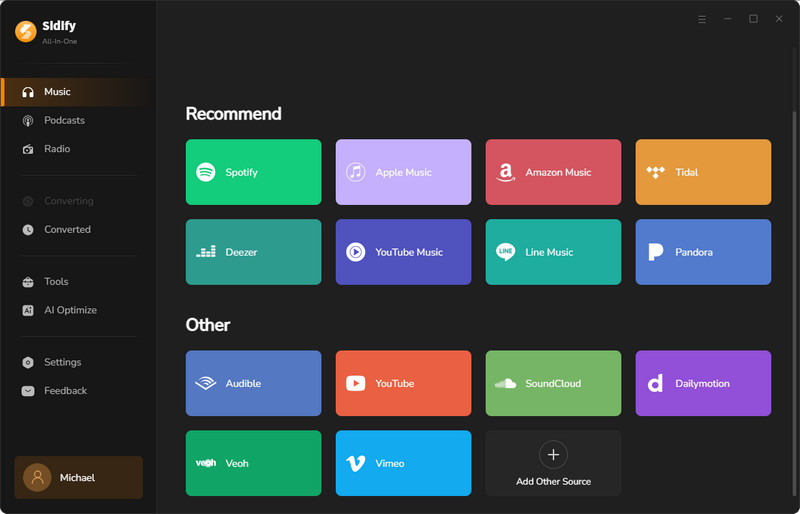
Install Sidify Music One on your computer and launch it. Next, choose SoundCloud as your website and log in with your SoundCloud account.
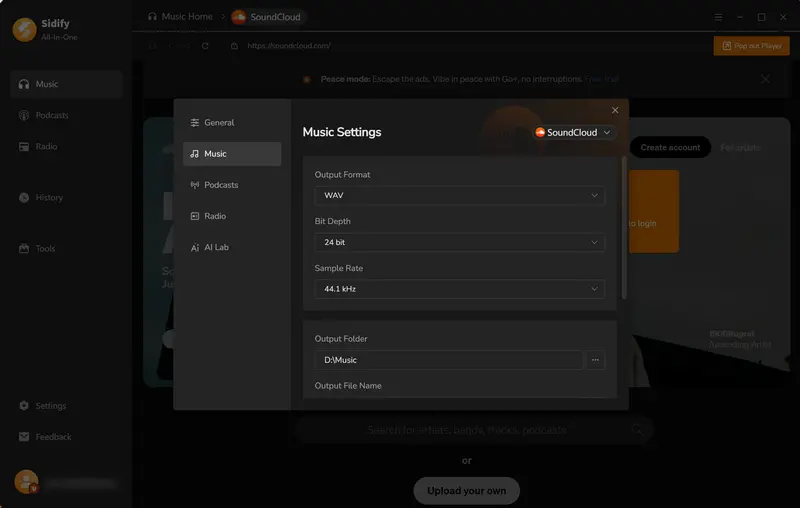
Step 2 Customize Output Format
Click Menu > Settings in the top-right corner. In the new pop-up window, you can customize the output format, quality, file name, and output folder.
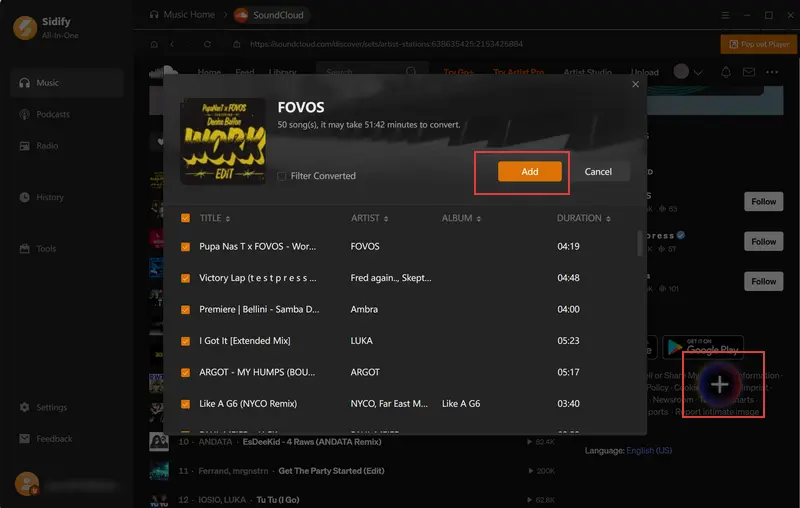
Step 3 Add Music to Sidify
Browse SoundCloud playlists or songs within the built-in browser. Once you find your preferred tracks, click on them and click the “+” button in the bottom-right corner. Then, check the songs you want to download, or simply select the whole playlist.
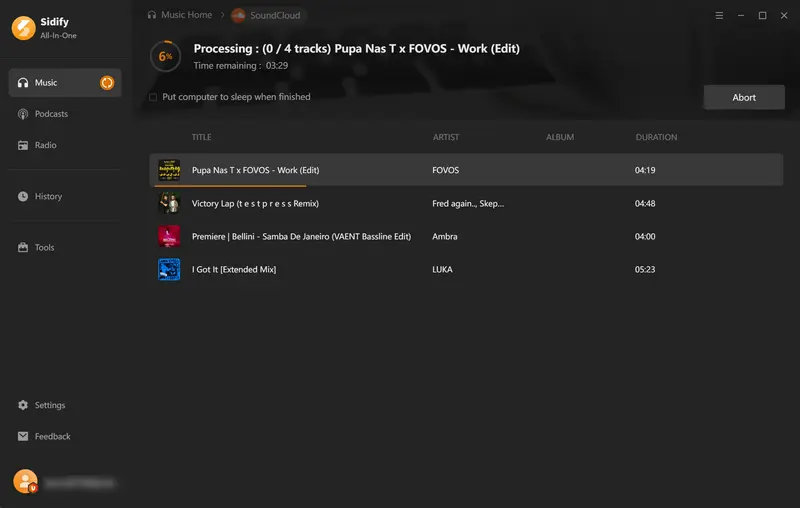
Step 4 Start Converting SoundCloud
Click the “Convert” button to start the process. Sidify will start converting them automatically at 10x faster speed.
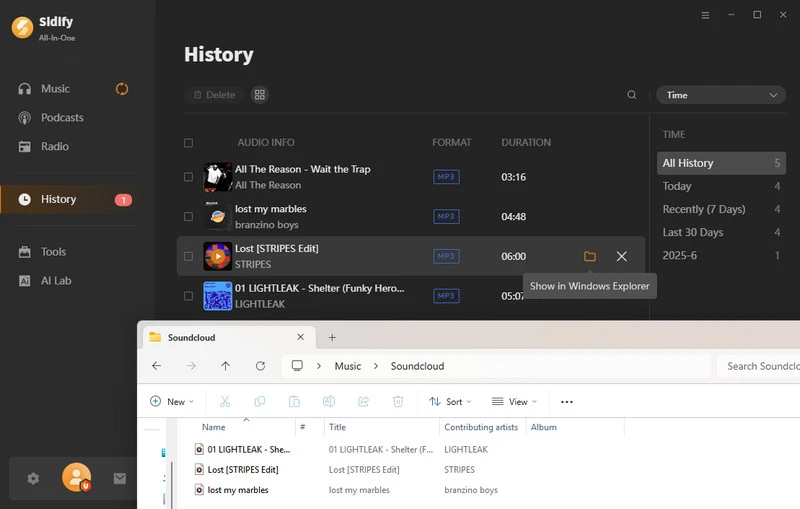
Step 5 Locate Converted SoundCloud Songs
Once finished, head to the History section to find all converted songs, or simply click the folder icon next to a song to access the folder where they are saved.
Convert SoundCloud to MP4 easily with the best tools. Learn how to download SoundCloud music and create MP4
Learn More →Part 6: Sidify vs Klickaud: Which One Is Better?
What's the best SoundCloud to MP3 converter? When deciding between Klickaud and Sidify Music One, the right choice depends on your downloading needs. To help you choose the best SoundCloud downloader for you, we compared their audio quality, price, download speed, batch download support, and stability below.
| Feature | Klickaud | Sidify Music One | Winner |
|---|---|---|---|
| Type | Online | Desktop Software | - |
| Price | Free | Free Trial + Paid | Klickaud |
| Audio Quality | Up to 128 kbps | Up to 320 kbps / Lossless (FLAC, WAV, etc.) | Sidify |
| Supported Formats | MP3 only | MP3, AAC, WAV, FLAC, AIFF, ALAC | Sidify |
| Playlist Download | × One-by-one only |
√ | Sidify |
| Download Speed | 5–12 seconds per track | Up to 10X faster | Sidify |
| Download SoundCloud Go+ | × Only 30-second preview |
√ | Sidify |
| Download Private Tracks | × | √ | Sidify |
| Podcast Support | √ | √ | Tie |
| Preserve Metadata | × Limited | √ Full ID3 tags | Sidify |
| Ad-Free | × Redirect & Banner Ads | √ No Ads | Sidify |
| Stability & Reliability | Good for public tracks | High (more stable for large downloads) | Sidify |
| Best For | Occasional single track downloads | Regular / high-quality / playlist downloads | - |
FAQs about Klickaud SoundCloud Downloader
Why can't I download a song on SoundCloud with Klickaud?
If you can’t download a SoundCloud song with Klickaud, it is usually due to the link you copied was private tracks. Klickaud doesn’t support downloads for private tracks. You can switch to other links and try it again.
Can I download SoundCloud as WAV with Klickaud?
No. Klickaud only supports one output format, and that is MP3, and most online tools only support MP3 files. If you want to download SoundCloud songs as WAV files, you can consisder use Sidify Music Converter.
Conclusion
Overall, Klickaud SoundCloud Downloader is a handy, fast, and 100% web-based tool for users who want to download SoundCloud songs, remixes, or podcasts as MP3s.
However, if you want higher-quality audio and need quick batch downloads for SoundCloud playlists or albums, I recommend Sidify Music One.
 Sidify SoundCloud Music Converter
Download and convert music from SoundCloud and other major streaming services in one place. Get MP3 or other popular formats in source audio quality, save songs offline on Windows or Mac, and enjoy up to 10X faster downloads with ID3 tags and lyrics preserved.












