


If you are looking for a simple way to download Spotify music, you might have heard of SpotiSaver. It looks easy to use and free, but how well does it actually work for downloading? Does it support different types of Spotify content? Is it safe?
To answer these questions, we conducted a hands-on test of SpotiSaver, testing its download performance, success rate, download speed, audio quality, and a desktop SpotiSaver alternative. If you want to know more, keep reading.
You may also like 👉: KigoSoft Music One Review | SpotMate Review 2026

Part 1: SpotiSaver Overview: Key Features, Free vs. Premium
SpotiSaver is an online free Spotify converter that allows you to convert Spotify playlists, albums, and single tracks into MP3 files and save them to your device, with no installation required.
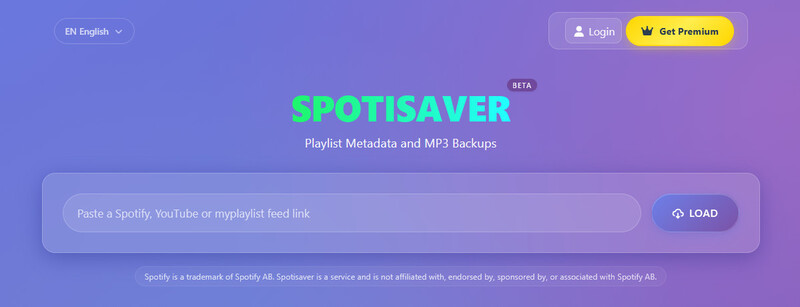
Key Features of SpotiSaver:
- Support downloading Spotify playlists, albums, and single tracks as MP3 files
- Support audio quality up to 320 kbps (when available)
- Preserve Spotify metadata such as cover art, artist, album name, etc.
- Works directly in your browser — no software installation or account required
- Free to use (with limitations)
- Export a TXT tracklist for Spotify playlists or albums
SpotiSaver Free vs. Premium: Key Differences
SpotiSaver offers a free version and a Premium version. The free plan is sufficient for occasional downloads, while Premium removes more limitations and provides additional features. The following table summarizes the key differences between the free and Premium versions of SpotiSaver.
| Feature | Free | Premium |
|---|---|---|
| Concurrent Processing | 1 playlist | Higher limit |
| Maximum Tracks per Download | 100 tracks | 1,000 tracks |
| Filename Watermark | Yes | No |
| Custom Filenames | Not supported | Supported |
| YouTube Music | Not supported | Supported |
| Download & Packaging Speed | Standard | Faster |
| Background Processing & Email Delivery | Not available | Available |
| Customer Support Priority | Standard | Priority |
Part 2: How We Tested SpotiSaver: Test Environment & Download Process
SpotiSaver Test Environment
To evaluate the real performance of SpotiSaver, we conducted a hands-on test of its download process and stability. The test was carried out on a Windows 10 laptop with a stable 100Mbps broadband connection. We selected 6 Spotify items, including albums, a public playlist, a podcast, and both paid and free audiobooks.
The testing focuses primarily on two points:
- Whether SpotiSaver can successfully download and convert Spotify tracks.
- The audio quality of the downloaded tracks.
SpotiSaver Download Process
We followed these steps during our test:
Step 1 Open SpotiSaver.net in Google Chrome on our Windows 10 laptop.
Step 2 Select the Spotify content we wanted to test, covering different types of Spotify content and including both popular and older albums.
Step 3 Copy the Spotify link and paste it into the search bar on SpotiSaver.net.
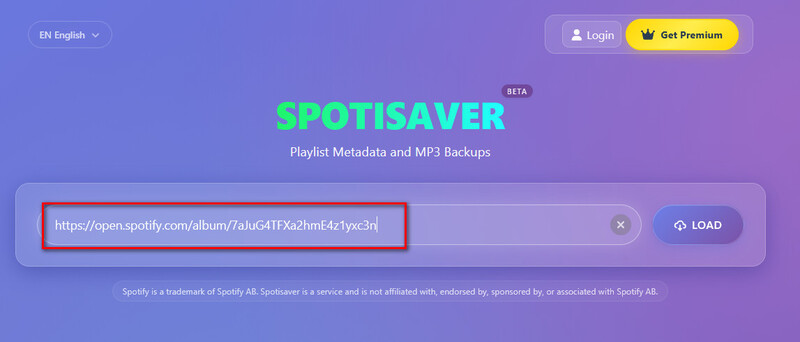
Step 4 Click "Load" and wait for SpotiSaver to process the content.
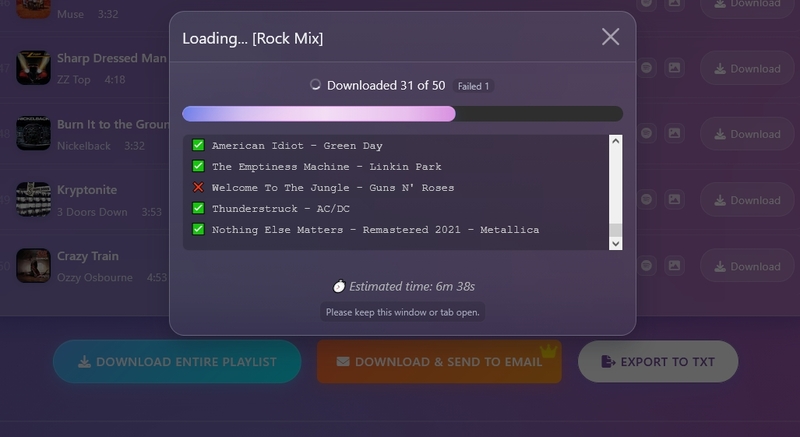
Step 5 Record the test results, including whether the content could be loaded and downloaded successfully, download time, and audio quality.
Part 3: SpotiSaver Test Results 2026: Audio Quality, Speed & More
| Track Type | Name/Link | Track Info | Actual Bitrate | Download Speed | Metadata Preserved | Success Rate |
|---|---|---|---|---|---|---|
| Album | Hit Me Hard and Soft | 2024, 10 songs, 43 min 50 sec | 320kbps | 2'20" | √ | 10/10 |
| Album | The Beatles - Abbey Road | 1969, 17 songs, 47 min 29 sec | 320kbps | 6'04" | √ | 17/17 |
| Playlist | Rock Mix | 50 songs, 3 hr 15 min | 320kbps | 17'14" | √ | 49/50 |
| Podcast | The Joe Rogan Experience | 2500+ episodes | - | - | - | 100/2549 Only in TXT list |
| Paid Audio Book | Atomic Habits | 28 Chapters | - | - | - | Load Failed |
| Free Audio Book | Wrong Girl | 30 Chapters | - | - | - | Load Failed |
Success Rate: For playlists, albums, and single tracks, the success rate is high. Almost 99% of the tracks can be downloaded, although for large playlists/albums, 1-2 tracks may fail. However, SpotiSaver doesn’t allow users to download podcasts (only in TXT list) and audiobooks.
Download Speed: According to our test, the free version of SpotiSaver downloads tracks at an average speed of around 20 seconds per song. The download speed is acceptable for a few track downloads. If the playlist/album you want to download is large, then you may have to wait for a long time.
Audio Quality: SpotiSaver keeps a good and stable audio quality when downloading. Almost every track downloaded with it is 320kbps, which can meet everyday listeners' needs.
Ads & Experience: When downloading on this website, we didn’t encounter any banner, pop-up, or redirect ads. The whole experience was clean and interruption-free.
Part 4: Is SpotiSaver Safe and Legal?
4.1 Is SpotiSaver Safe?
To objectively evaluate the safety of SpotiSaver, we conducted the inspection from two aspects: 1. observing the website's behavior during use; and 2. using VirusTotal to scan the SpotiSaver URL.
Safety During Our Test
- During the downloading process, there were no banner ads, pop-ups, or redirect ads.
- The website doesn't require users to install any software or register an account.
- We didn't find that the website asked us to provide our Spotify account or other personal information.
VirusTotal Safety Scan
To further verify the security of the SpotiSaver website, we used VirusTotal to scan the SpotiSaver URL. The scan results are shown in the image below.
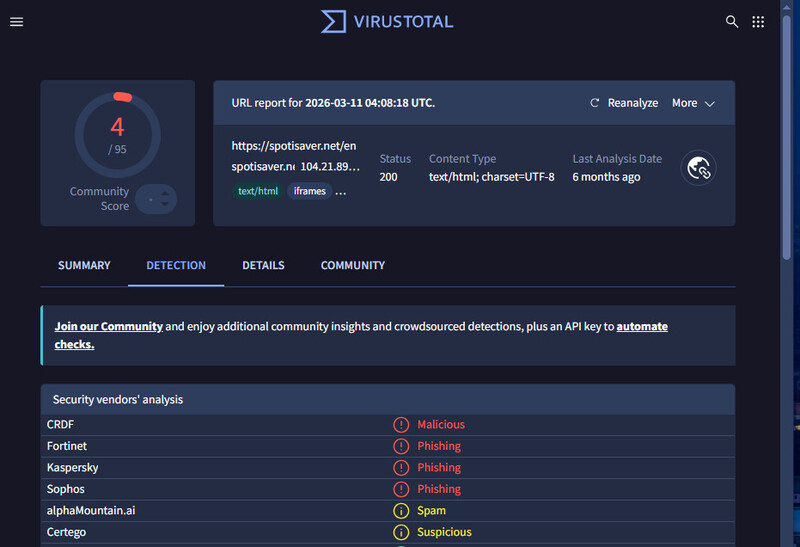
According to VirusTotal's scan results, 4 security vendors flagged the SpotiSaver website as malicious or a phishing site. 2 vendors considered it a possible spam site.
This indicates that the security of the SpotiSaver website has not been fully validated by security vendors, so users should exercise caution when using it.
4.2 Is SpotiDown Legal?
Whether downloading Spotify music with SpotiSaver is legal or not depends on your local copyright laws and what you use the downloaded files for. If you only use the downloaded files for personal offline listening, it is generally considered acceptable. However, if you redistribute or sell the downloaded content, it may constitute copyright infringement and could be illegal.
Part 5: Best SpotiSaver Alternative in 2026
Although SpotiSaver can meet the basic needs of downloading Spotify songs, we found some limitations during our test, especially with podcasts and audiobooks. If you need broader support for Spotify content downloads, a more stable download experience, or more advanced features, looking for a SpotiSaver alternative might be more suitable.
Sidify Spotify Music Converter is our top recommended SpotiSaver alternative in 2026. Compared with SpotiSaver, it allows you to download a wider range of Spotify content, including playlists, albums, tracks, podcasts, and audiobooks. It also supports multiple output formats, such as MP3, AAC, WAV, FLAC, AIFF, and ALAC.
Most importantly, even if you don't have a Spotify Premium membership, Sidify allows you to download Spotify music without ads and in lossless quality.
Sidify Spotify Music Converter
- Download and convert Spotify tracks in MP3, AAC, WAV, FLAC, AIFF, or ALAC
- Supports lossless conversion while preserving original audio quality and full metadata
- Download Spotify songs, albums, playlists, podcasts, music videos, audiobooks
- Offers fast batch conversion, allowing multiple songs to be converted at once
- Works for both Spotify Free and premium account
Check out Review of Sidify Music Converter >>

How to Download Spotify Tracks with Sidify
Step 1 Install Sidify Spotify Music Converter
Download Sidify Spotify Music Converter from the official website and install it on your laptop.
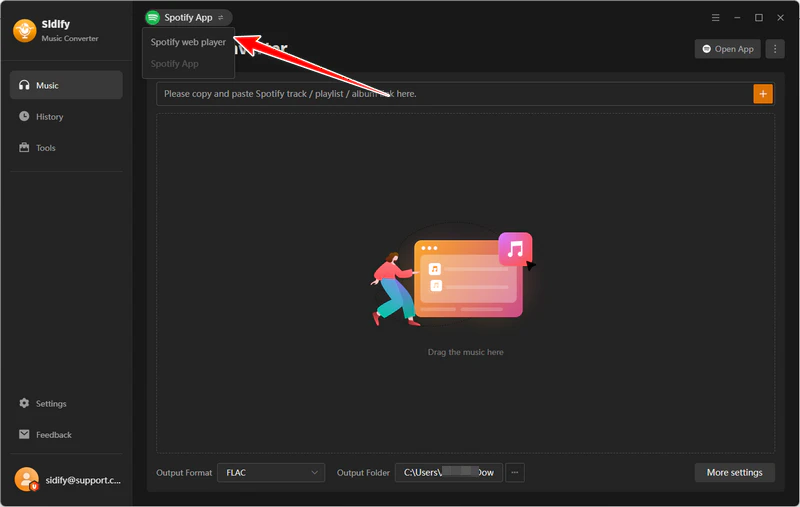
Step 2 Sign in to Spotify
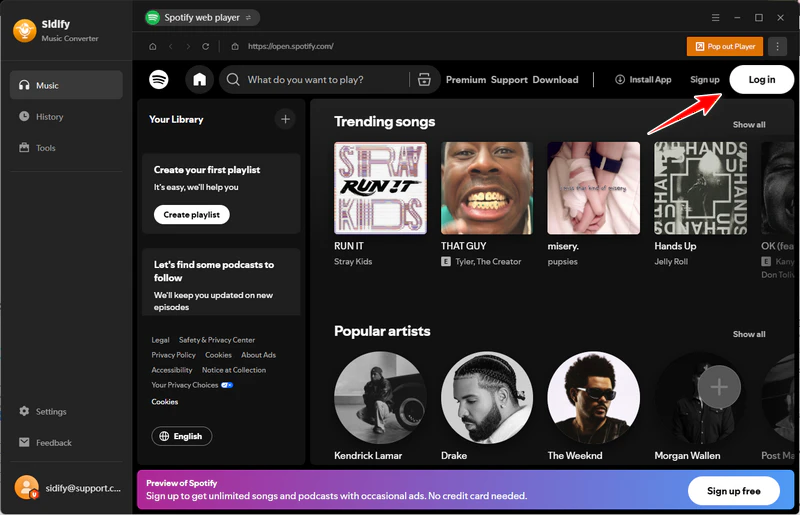
Launch the program and log in with your Spotify account. Then, browse and search for the playlists or albums you want to download within the built-in Web Player.
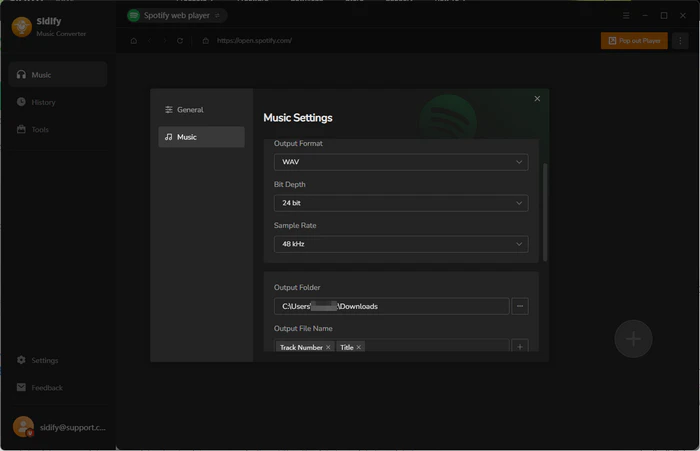
Step 3 Choose Output Format
Before downloading, you can customize your desired audio quality, output name, output path, and more. Simply click Menu > Settings in the top-right corner.
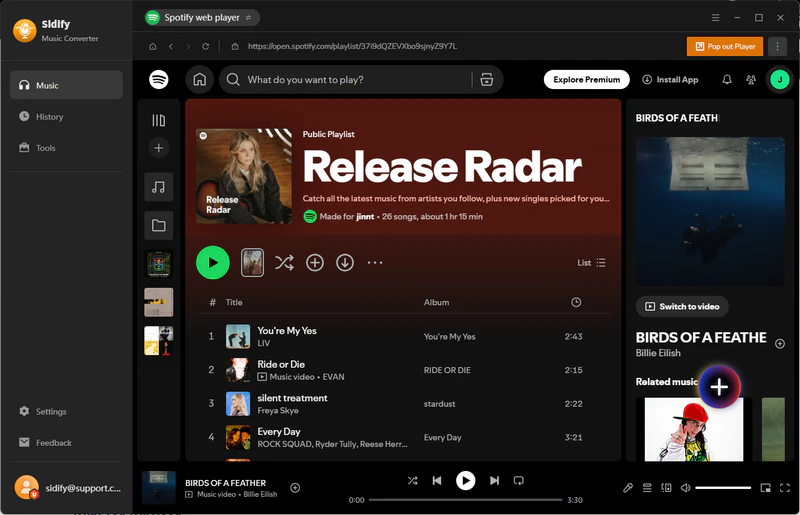
Step 4 Add Spotify Songs
Click the "+" button in the bottom-right corner. Then, you can select the tracks to add to the conversion list or select the entire playlist/album.
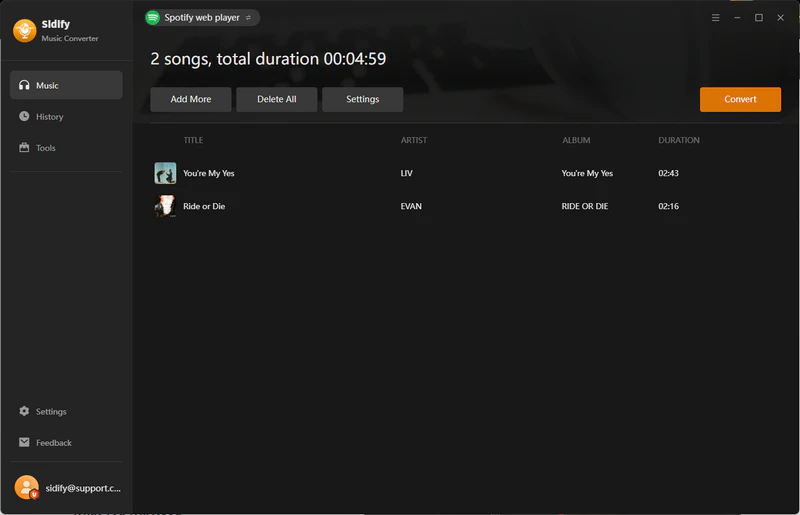
Step 5 Start Conversion
Click Convert to begin processing. You can download multiple playlists at the same time, and Sidify can finish converting them at up to 10X faster speed.
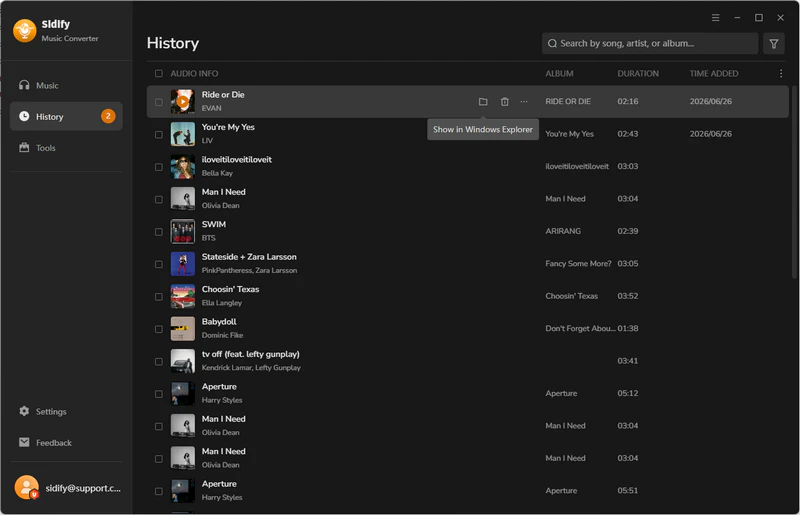
Step 6 Locate Converted Files
After all files have been downloaded, go to the History tab to find all the downloaded files. Click the output folder icon to access the folder on your local device where the converted files are saved.
Part 6: Sidify vs SpotiSaver: Which Spotify Downloader Is Better?
In the previous test, we learned about SpotiSaver's download success rate, download speed, and audio quality. To get a more complete view of SpotiSaver, we compared it with Sidify Spotify Music Converter. The table below summarizes the key differences between them.
| Feature | Sidify Spotify Music Converter | SpotiSaver |
|---|---|---|
| Type | Desktop Spotify music converter | Online Spotify converter |
| Price | Free/Premium () | Free/Premium |
| Installation | Required | None |
| Download Playlists/Albums | √ | √ |
| Download Podcasts | √ | × |
| Download Audiobooks | √ | × |
| Maximum Audio Quality | Lossless Music | Up to 320kbps |
| Output Format | MP3, AAC, FLAC, WAV, AIFF, ALAC | MP3 |
| Batch Download | √ | √ |
| Preserve Metadata | √ | √ |
| Custom Output Settings | √ | × |
| Download Speed | 4-5 seconds per song | 20 seconds per song |
| Ad-Free | √ | √ |
From the comparison, SpotiSaver is more suitable for occasional Spotify downloads and users who don't want to install software. Its advantage is that it is simple to use and allows users to convert Spotify songs directly in the browser.
However, if you need to download more types of Spotify content or want more output formats and higher audio quality, Sidify Spotify Music Converter offers more complete features.
Part 7: SpotiSaver FAQs
Why Do Some Songs Fail to Download with SpotiSaver?
Some content, such as private tracks, podcasts, and audiobooks, isn't allowed to be downloaded on SpotiSaver. If you fail to download something on SpotiSaver, check your URLs and make sure they are public playlists, albums, or tracks.
Can SpotiSaver Download Entire Spotify Playlists?
Yes! SpotiSaver can download an entire Spotify playlist or album at once. However, please note that free users can only download up to 100 tracks in a playlist or album.
Can You Use SpotiSaver on Mobile Devices?
SpotiSaver is an online Spotify converter. You can use it through a browser such as Safari or Chrome on your phone.
Is a Spotify Premium Account Required to Use SpotiSaver?
No. SpotiSaver processes the link and doesn't require a Spotify Premium or free account.
Conclusion
All in all, SpotiSaver is a simple and free online Spotify converter. It doesn't require installation or registration, and can meet most people's everyday download needs. However, its obvious limitations, such as the inability to download podcasts and audiobooks and the 100-track limit for playlists/albums, can be annoying.
If you want to download a broader range of content from Spotify and get lossless music, multiple output formats, and batch downloads, Sidify Spotify Music Converter is more worth considering.
 Sidify Spotify Music Converter
Batch download Spotify Music to multiple formats for offline listening on any device.












