

Spotify has become more than just a music app. It now hosts music videos, video podcasts, and animated visuals through Spotify Canvas. Yet none of these can be saved as real files. You can't export an MP4, and you can't play them outside Spotify, even with a Premium account.
Then is there any way to convert Spotify to MP4? Yes. In this article, we will introduce 4 easy methods to download Spotify videos as MP4 files, including Spotify music videos, video podcasts, and Spotify Canvas.
📍 Also Read: Download Spotify Podcast Videos to MP4 | Best 8+ Spotify Video Downloader
Quick Comparison: 4 Ways to Download Spotify Videos as MP4
| Method | Music Video | Video Podcast | Canvas | Actual MP4 | Premium Required | Platform | Best For |
|---|---|---|---|---|---|---|---|
| Spotify Offline | √ | √ | — | ❌ | Yes | Desktop, Web, Mobile | Offline viewing |
| Sidify Music Converter | √ | √ | — | ✅ | No | Windows, Mac | MP4 downloads |
| YouTube | √* | — | — | ✅ | No | Web, Desktop | Music videos |
| CanvasDownloader | — | — | √ | ✅ | No | Web | Canvas clips |
Note:* Only when the official music video is also available on YouTube.
Method 1. Download Spotify Videos for Offline Viewing with Spotify
Video content on Spotify varies and mainly includes three types: music videos, video podcasts, and Spotify Canvas. The Spotify download feature is for offline in-app streaming only, not for saving videos as actual MP4 files. This helps reduce data usage and ensures smooth playback when you are without an internet connection.
Spotify Video Categories
| Spotify Video Types | Music videos | Podcast videos | Spotify Canvas |
|---|---|---|---|
| What Is It | Full-length or short official videos of songs. | Video versions of podcasts | Short, looping visual clips |
| Premium Required | Yes | No | |
| Length | 3–6 minutes | 10–120+ minutes | 3–8 seconds |
| Independent Video | Yes | No | |
| Watch Offline | NO | Premium | NO |
| Update | Rarely | Updated per episode | Change without user notice |
| Access | Desktop, Web, Mobile | ||
-
⚠️ Music Video Availability
- Not every song on Spotify includes an official music video.
-
🔒 Spotify Premium Requirement
- Music videos are available only when logged in with a Spotify Premium account.
- Offline music video downloads are not supported, even for Premium users.
-
🎙️ Video Podcast Downloads
- Audio podcasts can be downloaded for offline listening with a Spotify Free account.
- Video podcast downloads for offline watching require an active Spotify Premium subscription.
-
🎨 Spotify Canvas Limitation
- Spotify Canvas or clip videos are not downloaded when saving music offline.
How to Download Spotify Video Podcasts for Offline Playback (Premium Required)
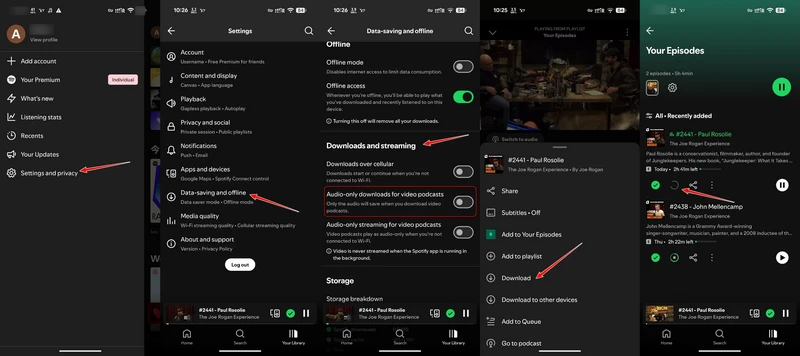
To download Spotify video podcasts for offline viewing, disable Audio-only downloads in Spotify settings and ensure sufficient storage space. If your device storage is limited, you can download the video podcasts on another device instead.
Step 1 Open the Spotify App on your mobile device or desktop.
Step 2 Search for the podcast name and open the show page. Select an episode that supports video playback.
Step 3 Spotify does not offer a separate "Download Video" option. Simply tap the Download icon next to the episode.
Step 4 Once the download is complete, go to Your Library > Your Episodes to access the podcast offline.
Method 2. Download Spotify Videos as MP4 with Sidify
Unlike Spotify Premium, which only saves videos inside the app, a real Spotify video downloader lets you actually keep the files. Sidify Music Converter supports Spotify to MP4 downloads for both music videos and video podcasts. With one tool, you can convert Spotify music videos to MP4, save Spotify video podcasts as MP4, or download Spotify music and podcast audio in MP3, AAC, WAV, FLAC, and other formats. Everything is handled in one place, without being locked to the Spotify App.
Sidify Music Converter
- Download Spotify Music and Podcasts without Premium
- Download Spotify as MP3, AAC, FLAC, WAV, ALAC, or AIFF files.
- Download Spotify MVs and video podcasts to MP4 video files.
- Keep Spotify Lossless original quality after conversion.
- Convert Spotify music 10 times faster.
- Preserve ID3 tags, Spotify lyrics, and metadata after conversion.

 Note:
Note:If you want a tool to convert any streaming music (including Spotify, Apple Music, Amazon Music, Tidal, Deezer, YouTube, YouTube Music, SoundCloud, DailyMotion …) to MP3, Sidify All-In-One is the go-to choice.
Sidify Music Converter vs. Spotify Premium Download Feature
| Feature | Sidify Music Converter | Spotify Premium Offline Mode |
| Pricing | Yearly Plan: $44.95, Lifetime Plan: $79.90 | Individual: $12.99/month, Duo: $18.99/month, Family: $21.99/month, Student: $6.99/month, Audiobooks: $9.99/month |
| Compatibility | Windows 8 ~ 11 & Mac OS 11 and above | Mobile and tablet, Desktop, Web player, TV |
| Music Download Format | MP3, AAC, FLAC, WAV, ALAC, AIFF | ❌ |
| Video Download Format | MP4 | ❌ |
| Audio Quality | Up to 320kbps, Spotify Lossless 24bit | High, Very High, Lossless |
| Speed | Up to 40x speed | 10x |
| Batch Download | ✔ | ✔ |
| Metadata Preservation | Yes ( Title, Album, Artist, Track Number, Year tags etc.) | ❌ |
| Advanced Tools | Spotify Audiobook AA/AAX Converter, Spotify lyrics downloader, Spotify Music to CD Burner, Spotify Audio Editor, Spotify Song Tag Editor, | Spotify Connect, AI DJ, etc. |
| Customer Support | support@sidify.com (24/7) | https://support.spotify.com/us/ |
| Perfect For | Actual Spotify MP3 music and Spotify MP4 video downloading | Offline access via the Spotify App |
2.1 How to Download Spotify Music Videos as MP4?
Video Tutorial: How to Download Spotify MVs (Music Video) to MP4?
How to Download Spotify Music Videos as MP4?
Step 1 Run Sidify Music Converter on the dekstop and choose the Web mode to download Spotify MVs.
Step 2 From the Spotify web player window, log into a Spotify Premium account. And open the playlist with the song you want to download.
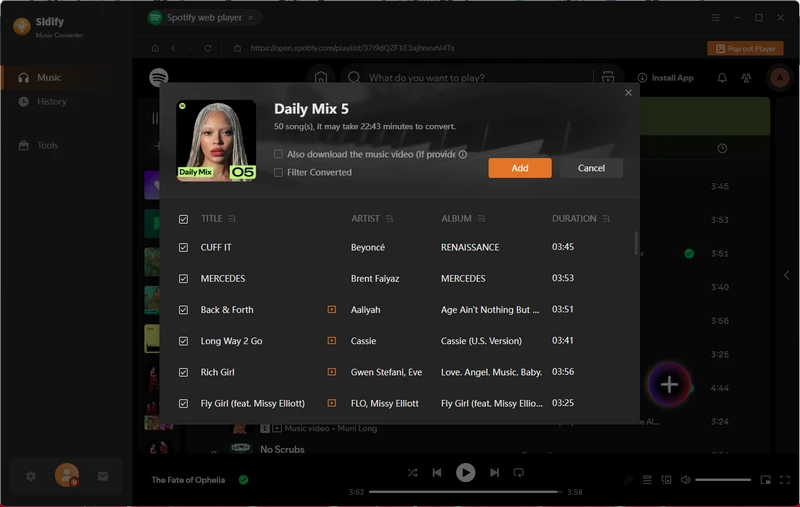
Step 3 Click the Add button at the right-hand side and select the song to add to the download queue. To download the music video, enable the option "Also download the music video (If provided)". Please make sure the selected songs include an official music video on Spotify.
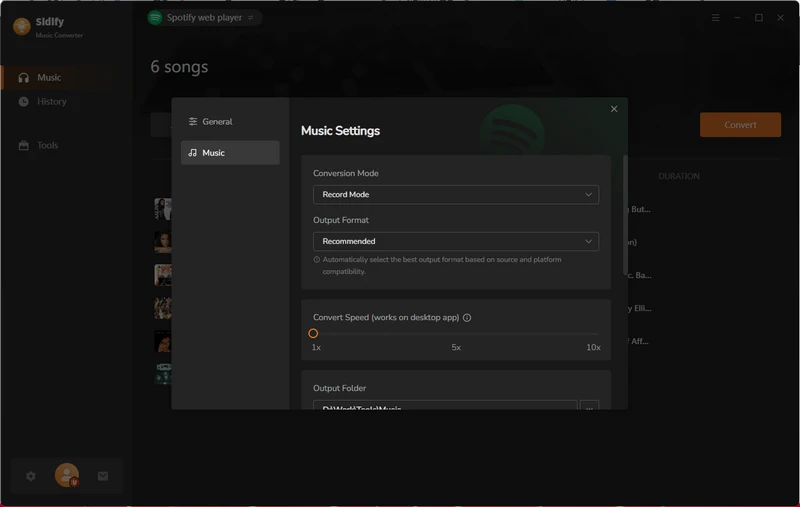
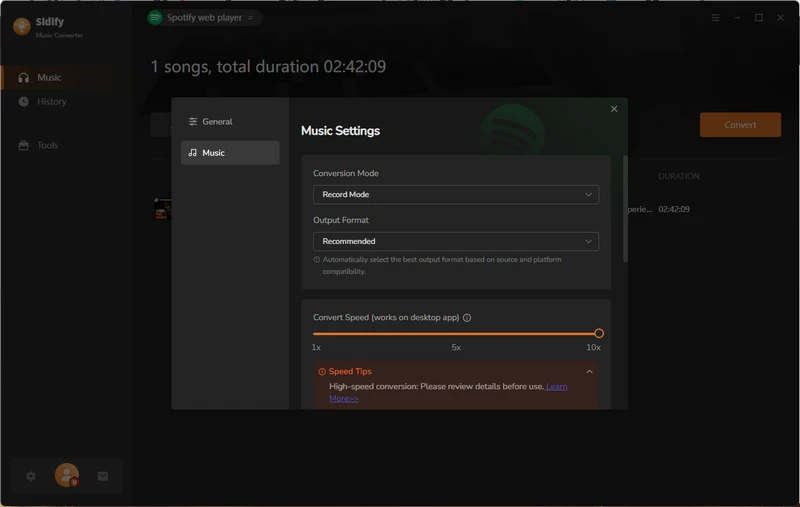
Step 4 Go to the Settings menu, set up the Conversion mode to "Record Mode". Also, set up the Spotify music output format as well as the download location.
Step 5 Tap the Convert button to start downloading the Spotify music videos. During this process, Sidify Music Converter will convert Spotify music to MP3 and music videos to MP4 respectively.
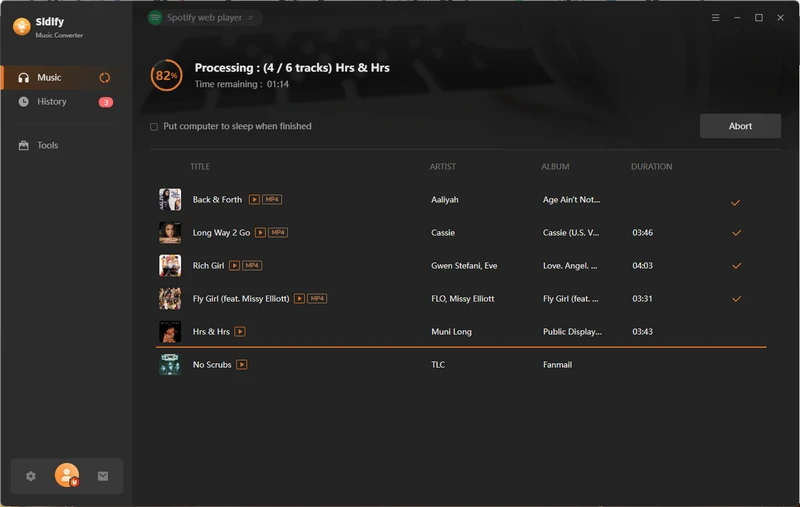
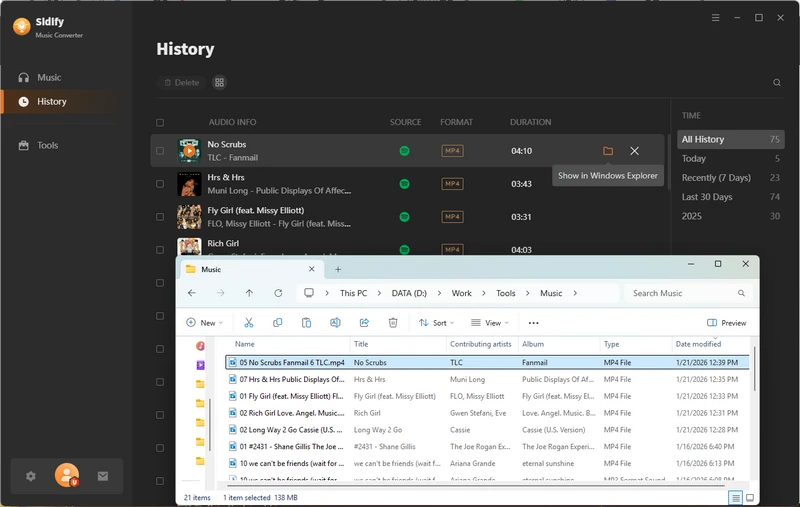
Step 6 When the task is 100% complete. Go to the History section and you can view all the Spotify video downloads offline.
2.2 How to Save Spotify Video Podcasts as MP4?
Video Tutorial: How to Download Spotify Video Podcasts as MP4 Videos?
Step 1 Launch Sidify Music Converter and access the Spotify music library via the embedded Spotify web player. Log in to your Spotify account, both Free and Premium accounts are supported, so you can totally download Spotify podcast videos without Premium.
Step 2 Go to the podcast show or video episode you want to download, then click the Add button on the right-hand side. Further, select the podcast episodes you want to download and add them to the download queue.
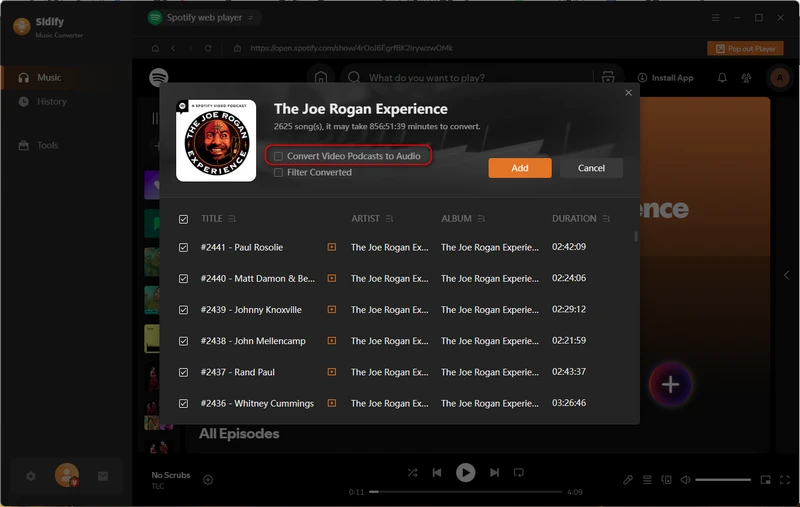
Step 3 Open the Settings menu and set the conversion mode to Record Mode. And customize a destination path to save the video downloads.
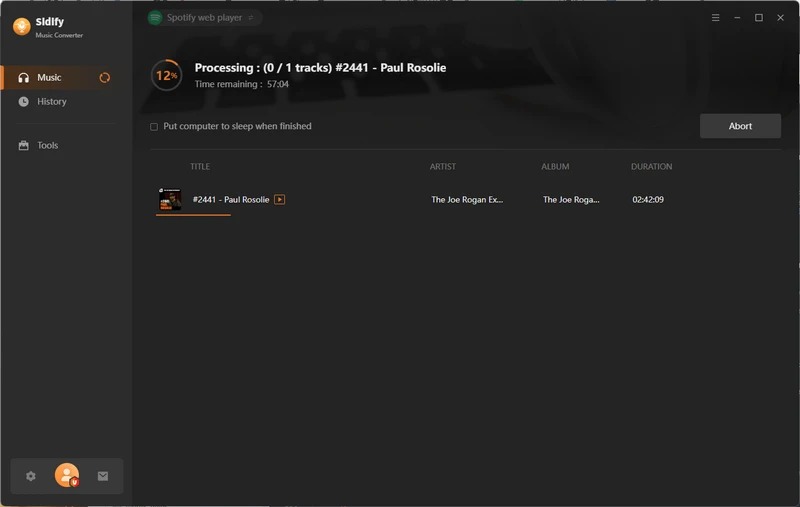
Step 4 Click the Convert button to start downloading Spotify video podcasts, which will be saved as MP4 files.
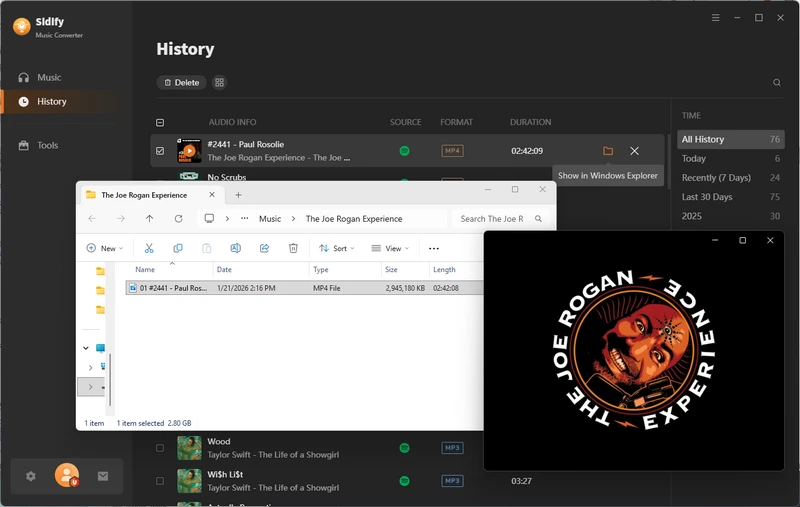
Step 5 Once the download is complete, go to the History section to view all downloaded Spotify video podcasts in MP4 format.
Method 3. Download Spotify Music Video from YouTube (Free)
At the moment, Sidify Music Converter is the only tool that can directly download Spotify music videos as real MP4 files. Spotify itself does not provide any way to export music or podcast videos, and most online Spotify downloaders only work with audio tracks. However, there is a useful workaround if the music video you want is an official release.
- Free to download offical music & podcast videos in MP4.
- No batch videos download support.
Most Spotify music videos are also published on YouTube by the artist or the record label. In that case, instead of trying to extract the video from Spotify, you can simply download the same official music video from YouTube in MP4 format. KeepMusic Video Downloader is such a free and professional YouTube video downloader that enables you to save official music videos as high-quality MP4 files.
How to Get Free MP4 Download for Music Videos and Podcast Videos
Step 1 Open the YouTube Video Converter on your Windows or Mac desktop.
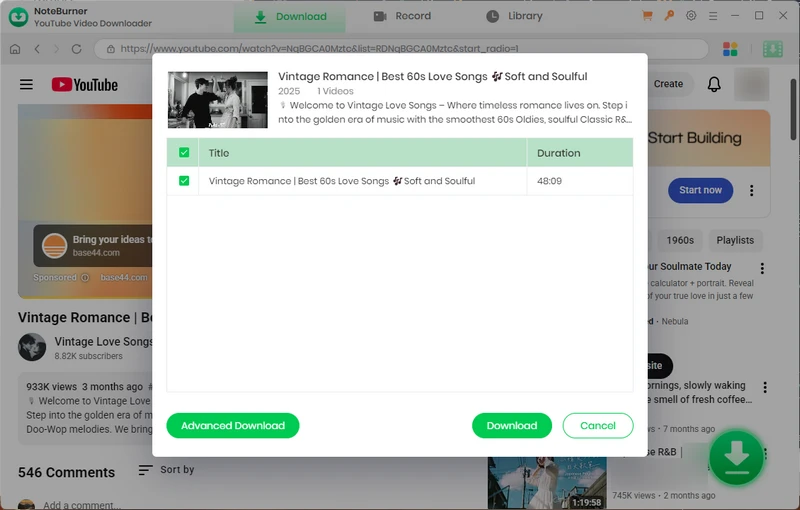
Step 2 Log in with a YouTube account, find the music or podcast video to download, and click the "Add" button.
Step 3 Select a video download format as well as the quality, and tap "Download".
Method 4. Download Spotify Canvas Videos as MP4 (Free & Online)
Spotify Canvas is a fun feature that shows short looping visuals while a song plays. But Spotify does not provide any official way to save these animations. If you want to keep your favorite Canvas visuals as real MP4 files, you need a download tool built for that purpose.
How to Download Spotify Canvas Videos in High 1080p Resolution
CanvasDownloader (https://www.canvasdownloader.com/) is a simple online tool specifically designed to extract Spotify Canvas visuals and save as 1080×1920 MP4 files. This free online Spotify Canvas downloader is fast to use and requires no software installation.
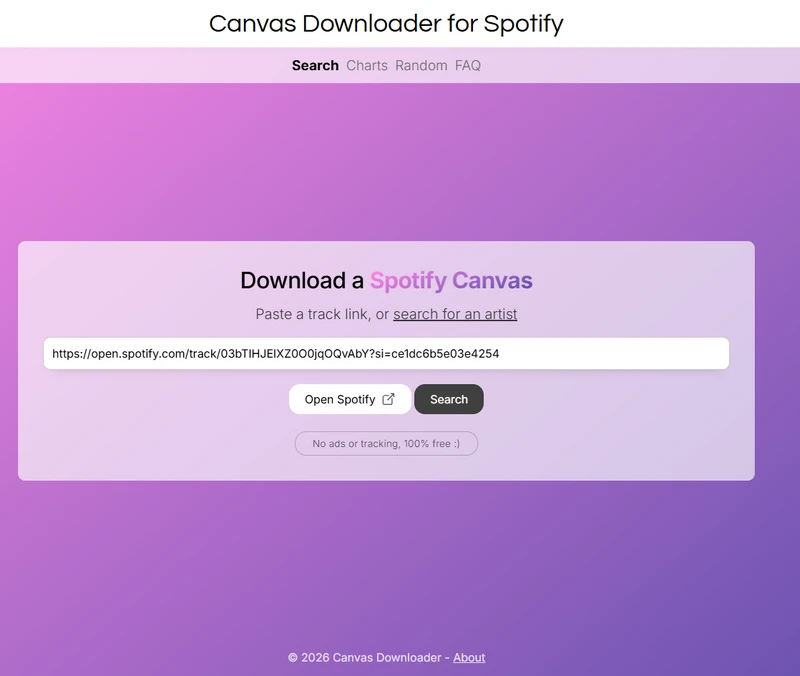
Step 1 First, copy the link to the Spotify track with canvas you want to download.
Step 2 Paste the link to the input area on CanvasDownloader site and click the pushout "Click here to get the Canvas for this link."
Step 3 Following, clik "Download this Canvas" and pick a location to store the MP4 video on your computer.
FAQs about Spotify Videos to MP4 Conversion
1. Can you Download Spotify to MP4?
Yes, you can download supported Spotify videos as MP4 files. Although Spotify itself is only designed for offline playback within the Spotify app and does not support saving videos as MP4 files, you can use Sidify Music Converter to download Spotify music videos and video podcasts.
2. Why can’t some Spotify videos be downloaded even when a converter is working normally?
Not every Spotify track includes an official music video. If a track only has audio or a Canvas visual, a full-length MP4 music video may not be available to download.
3. Will the downloaded MP4 video include the original video quality from Spotify?
The output quality depends on the source video available from Spotify. If the original video is provided at a limited resolution, the downloaded MP4 cannot exceed the quality of the source.
4. Can Spotify video downloads include subtitles or captions?
Most Spotify videos do not provide downloadable subtitle or caption tracks. As a result, converted MP4 files generally contain the video and audio without a separate subtitle track.
5. Can I transfer downloaded MP4 Spotify videos to other devices?
Yes. Once saved as standard MP4 files, Spotify videos can be transferred to phones, tablets, TVs, computers, or other media players that support MP4 playback.
6. Why does Spotify Canvas download as a short vertical video instead of full screen?
Spotify Canvas is designed as a short, looping visual rather than a full-length music video. Canvas clips are typically presented in a vertical 9:16 format, so downloading one produces a short vertical video instead of a full-screen music video.
End Words
Converting Spotify to MP4 is possible. Whether you want to download music videos, video podcasts, or Spotify Canvas clips, you will find a suitable method here. Among these methods, Sidify Music Converter is highly recommended for its strong ability to convert Spotify to MP4 and for letting you convert Spotify music to MP3, WAV, FLAC, and more.
Hope you find the best way to download Spotify videos as MP4 files based on your needs.
 Sidify Spotify Music Converter
Batch download Spotify Music to multiple formats for offline listening on any device.
Note:Sidify works for both Spotify Premium and free users. The trial version of Sidify Music Converter enables you to convert the first minute of each audio file for sample testing. You can purchase the full version to unlock the time limitation.