


School banned Spotify? For students, teachers and academic workers in campus, music can be more than just entertainment. However, schools banned streaming music services and YouTube even on Chromebooks to maintain focus and reduce distractions. The good news is that there are still a wide range of unblocked music sites that can be accessed in schools. In this article, we'll explore some of the best unblocked music sites for school wi-fi.

Top pick: How to Listen to Streaming Music at School Unblocked?
Popular among students and teachers, Sidify All-In-One MP3 Downloader works with pretty much all major streaming platforms. The program is meant to downloading playlists songs from Spotify, Apple Music, Amazon Prime Music, Amazon Music Unlimited, Tidal, Deezer, YouTube Music, Pandora, Line Music, Audible AA/AAX audiobooks, YouTube, SoundCloud, Qobuz, Dailymotion, Vimeo, and etc. directly to your portable music players, iPods, or school devices, in the offline regular MP3 audio formats as well as AAC, ALAC, AIFF, WAV and FLAC, 100% possible to listen to Spotify music at school unblocked!
Because of the fast batch downloads feature, you can save entire playlists or albums in minutes during the weekend or after class. The downloader keeps song titles, artists, album covers, and other ID3 tags, so your offline music library stays clean and organized.
Sidify All-In-One Converter
- Download songs from different streaming platforms and any music sites.
- Convert music to MP3/AAC/WAV/FLAC/AIFF/ALAC
- Export music, playlists, albums, audiobooks, and podcasts to the computer.
- Preserve the original audio quality and keep the ID3 tags.
- Rip music from the music site and burn music to CD.
- Built-in free podcast and radio to mp3 downloader and vocal remover.

Steps to Download and Play Spotify Music at School Unblocked?
Step 1 Start the Sidify All-In-One program on your computer. This software is fully compatible with both Windows and Mac operating systems.
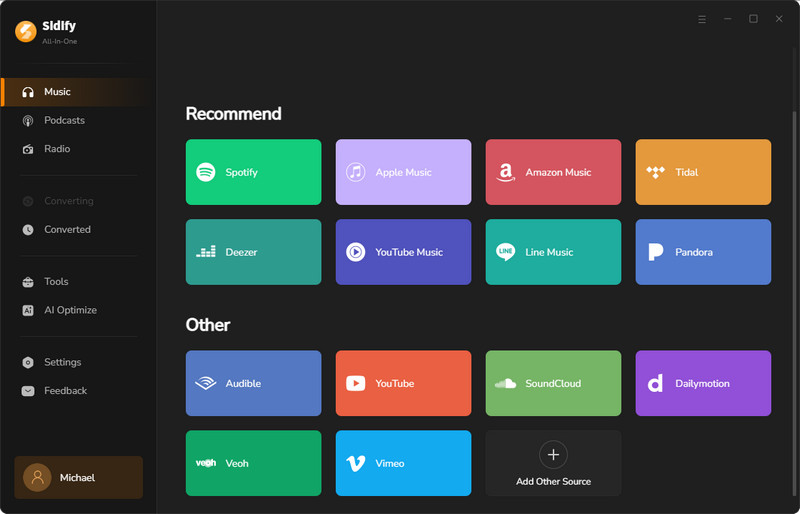
Step 2 Drag the songs from the music app (Spotify, Apple Music, Amazon Music, and Tidal Music) and drop them to Sidify All-In-One Converter. Or you can copy the playlist link and paste onto the converter.
Step 3 Open the download Settings menu, customize the Spotify download format to MP3 or others formats best compatible with your player, set up conversion speed (1x to 10x), and choose output sound quality (320kbps, 256kbps, 192kbps, 128kbps), pick the location to store the Spotify music downloads.
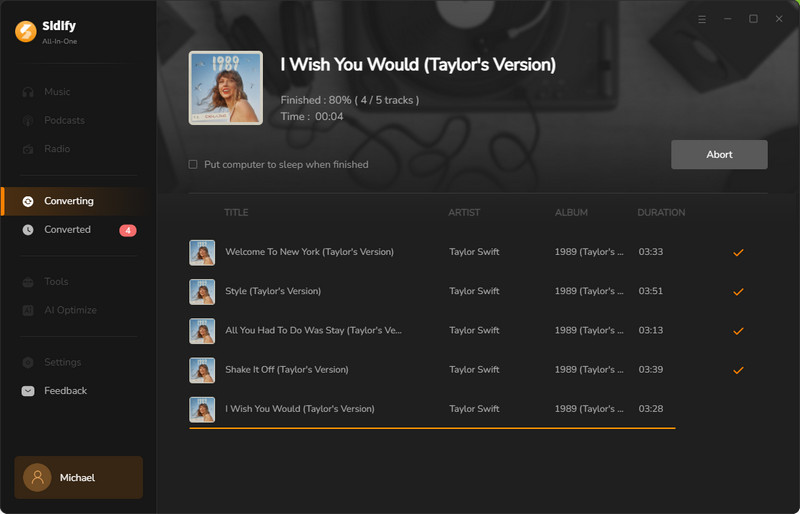
Step 4 Next, click the "Convert" button to start the Spotify music to MP3 downloading process.
Step 5 If the task is completed, go check the converted Spotify music by under "History" tab. And tap the folder icon to access the downloaded Spotify music in local path way.
Step 6 Last but not least, plug your MP3 player or mobile phone to the computer, and manually transfer the downloaded Spotify MP3 music into the device. From now on, you can listen to Spotify music at school without restrictions!
Steps to Download .MP3 from Any Music Website for School?
Besides converting streaming music to MP3, Sidify All-In-One also works as a powerful music recorder, letting you grab the songs as MP3s from any unblocked music website at school!
Step 1 From the Sidify All-In-One homepage, scroll down and find the 'Add Other Source' option under the Other Section. Enter the website URL and name it accordingly. Here, let's take TuneIn as an example. Enter the link address and click 'Add'. A new card named TuneIn will be created, and you can click it to enter the recorder interface.

Step 2 Customize the output file settings, including the output format, quality, and output folder. If needed, you can enable the option to split recordings when silence is detected and set how long the recording continues after the process starts.

At the same time, a music site window will pop up. Follow the on-screen instructions to log in and access your music library.

Step 3 Find and locate your favorite music on the website. Once everything is ready, click the 'Click to Start' button in the Sidify recording interface, then play the music you want to record and download. Sidify will automatically record the playing sound and save it as an independent audio file in your customized output format.

Step 4 After the track finishes, stop the recording. Click the folder icon to locate your downloaded songs, or check them in the 'Converted' section.

Part 2. The Unblocked Music Sites Available in School
Now, let’s take a look at the unblocked music sites that are perfect for school use or for incorporating music into your school projects. These sites either offer completely free access or have free plans available. You can choose the one that works best for your needs.
| Website | Highlight Features | Free | Offline | Quality | Ads | Rating |
|---|---|---|---|---|---|---|
| Soundzabound | Royalty-free music devoted to schools use | ✔️ | ✔️ | N/A | ❌ | ✨✨✨ |
| Musopen | Many free resources for classical music, sheet music, and educational tools | ✔️ | ✔️ | N/A | ❌ | ✨✨✨ |
| FMA | Free access and download original music, podcasts, renowned radio stations | ✔️ | ✔️ | High | ❌ | ✨✨✨✨ |
| Jamendo | Free to download independent music for personal use | ✔️ | ✔️ | High | ❌ | ✨✨✨✨ |
| Grooveshark | Spotify-like interface, unlimited skips, shuffle playback, view lyrics | ✔️ | ❌ | N/A | ❌ | ✨✨✨ |
| PlaylistSounds | Completely free, easy to navigate, lyrics, unlimited skips, shuffle playback | ✔️ | ❌ | N/A | ❌ | ✨✨✨ |
| TuneIn Radio | Interface friendly, free to stream music and different genre radios | ✔️ | ❌ | N/A | ❌ | ✨✨✨ |
| Jango | Completely free, unlimited skips, shuffle play, explicit filter, dislike unwanted songs | ✔️ | ❌ | N/A | ❌ | ✨✨✨ |
| Last.fm | Music video, tracking music data, music history analysis | ✔️ | ❌ | N/A | ✔️ | ✨✨✨ |
| AccuRadio | Completely free, freedom to skip, human-thought playlists | ✔️ | ❌ | N/A | ✔️ | ✨✨✨ |
| LiveOne | Free radio stations and music playback | ❌ | ❌ | High | ✔️ | ✨✨ |
| Bandcamp | Free to play music, promote songs, and buy digital albums for friends as gifts | ✔️ | ❌ | High | ❌ | ✨✨✨ |
| Audiomack | 30-day free trial to stream and download new tracks as well as upload your own music | ❌ | ❌ | HiFi | ✔️ | ✨✨ |
Soundzabound
https://soundzabound.com/ is accessible on school networks and boasts a royalty-free music library for educational multimedia projects. Students can usually get the username, email, and passcode from teachers or school media specialists to access the platform. Soundzabound operates on a licensed subscription model for schools, with pricing around $149 per year. The site also provides 15-second music previews before tracks are paid for and downloaded as MP3s in full length.

- Safe and school unblocked.
- Provides royalty-free music for study projects.
- Easy genre browsing.
- Less fun than mainstream music services.
- Mostly provides background music.
- Requires school account access.
Musopen
Musopen is not blocked in school environments because it is not entertainment streaming. The music site is dedicated to classical music and music education instead, featuring free access to recordings, sheet music, and textbooks. There is also a 24/7 online classical music radio, good for studying or background focus at school. But it's not perfect. The interface has ads. Free users can only download 5 tracks per day.

- Best for classic music lovers and educators.
- Offers 5 free MP3 downloads every day.
- Provides always-on classical radio and apps.
- Not suitable for pop music needs.
- Costs $55/year for unlimited downloads.
- Contains ads in the interface.
Free Music Archive (FMA)
Site URL: https://freemusicarchive.org/
Free Music Archive (FMA) is a great resource for students and teachers looking for music, video and film, podcasts, and other media. It offers instant access to a wide selection of music from independent artists, all available to play, download as MP3s, and share. Especially when teachers are working on presentations, projects, or classroom activities, FMA provides safe, free-to-use tracks that can enhance the educational experience. Plus, its music is cleared for use in media like YouTube, Facebook, and podcasts, making it a versatile tool for creative projects. You can use the music for educational or non-commercial purposes without worrying about copyright issues.

- Listen to and download music for personal projects at no cost.
- Offers music from a wide range of genres.
- Easy to browse and download music for personal use.
- Mainly features independent artists, so popular tracks are limited.
- Music quality varies, and finding the best options may require extra searching.
- Does not support playlist customization or sharing like mainstream music services.
Jamendo Music
Students in school can visit the Jamendo Music website to find and download over 600,000 tracks for free, most of which are created by independent and DIY artists. This school-unblocked music site provides a large free music library for personal use. Schools can also obtain licenses for commercial use in videos or multimedia projects. Overall, Jamendo Music is a great resource for students, teachers, and campus staff to discover new music while supporting emerging artists.

- Free to listen to and download songs.
- Provides clear metrics for song listens, favorites, and downloads.
- Allows artists to upload their own music to the platform.
- Mainly features independent music rather than popular mainstream songs.
Grooveshark
Looking for a music site that is accessible at school? Grooveshark is a free, web-based music streaming service with a clean and simple interface similar to Spotify. After signing up, users can listen to popular albums and songs online. The platform also includes a lyrics feature, although it may not work reliably for every track. However, since Grooveshark searches music metadata across different platforms like YouTube, song matches and audio quality can sometimes be inconsistent.

- Clean and user-friendly design for easy navigation.
- Supports shuffle, repeat, skip playback, and lyrics features.
- May have incorrect or mismatched track results.
- Lyrics display may fail for some songs.
PlaylistSounds
PlaylistSounds is a free music platform offering unlimited, ad-free listening. Its interface is similar to Spotify and includes a built-in lyrics feature for convenient sing-alongs. Teachers and students can enjoy unblocked playlists at school, office, or home, and create custom playlists for different occasions. The platform provides various mood-based and genre-based playlists, while the Go to Song Radio feature helps users discover similar music from their favorite artists. As an online platform, PlaylistSounds can be accessed directly through browsers on phones, tablets, smart TVs, and devices like Chromecast and Xbox One.

- Completely free to enjoy uninterrupted music without a subscription.
- Easy-to-use interface with built-in lyrics support.
- Offers unblocked playlists suitable for schools and offices.
- Does not support offline listening.
- No detailed information about audio quality is available.
TuneIn Radio
TuneIn is a live radio website with over 100,000 stations, combining music, news, sports, and talk radio in one place. It offers genre-based music radio streams including Pop, Rock, Jazz, Hip Hop, Country, Chill, Lo-fi, Classical, Latin, and Electronic music, along with curated stations such as Apple Music 1 and Que Buena. Live radio on TuneIn is free to use but includes ads, usually around 30–90 seconds. At school, users can simply navigate to the TuneIn music section, choose a preferred genre, and start streaming immediately. This makes it a secure and convenient option for quick study breaks.

- Over 100,000 radio stations covering news, sports, music, audiobooks, and podcasts.
- Offers a large selection of live music radio stations.
- Contains ad breaks during live streaming.
- Does not support song or artist skipping and searching.
Jango Radio
Site URL: https://www.jango.com/
For schools, Jango is an excellent unblocked music platform that provides personalized radio stations based on artists, genres, moods, or activities. Users can skip, like, or block songs without limits and create their own playlists. Signing up is free, and users can quickly register with a Facebook account. Both teachers and students can access Jango on desktop or mobile devices, with free apps available for iOS and Android. It is a simple and convenient way to enjoy music without interruptions. Jango also provides troubleshooting guides and email support for users who need assistance.

- Completely free to sign up and use with no subscription fees.
- Supports unlimited skips, shuffle play, and content filtering.
- Available across desktop and mobile platforms including iOS and Android.
- Provides troubleshooting guides and email support.
- Does not support offline listening.
- Does not offer advanced features such as higher-quality audio or exclusive content.
Last.fm
Last.fm is a popular music discovery platform known for detailed listening statistics, artist pages, charts, and personalized recommendations. Many artist pages include YouTube or Spotify embeds and song previews, making it easier to access music from alternative sources instead of streaming services that may be blocked at schools. Users can also share profiles, compare listening histories, and discover new artists based on their music preferences.

- Provides detailed statistics about listening habits and preferences over time.
- Recommends new artists, songs, and genres based on user tastes.
- Offers some free downloadable MP3 tracks.
- Last.fm does not provide direct music streaming itself.
- The free version includes ads.
AccuRadio
Site URL: https://www.accuradio.com/
AccuRadio is completely free and accessible without requiring registration. While the site offers over 1,000 channels across 50+ genres, it does not provide the same level of personalization as algorithm-based music platforms. With no subscription required, it is an ideal unblocked music platform for students and teachers in schools. The AccuRadio interface features clearly organized categories, including "Most Popular," "Workday Channels," "Today's Features," "Genres," and seasonal sections like "Holiday Channels." Its extensive genre selection allows users to easily find specific types of music, from Adult Contemporary to K-pop. However, offline playback and advanced customization features are limited.

- Completely free to use with no subscription or upsell.
- Offers nearly 1,000 channels across more than 50 genres.
- Human-curated playlists provide thoughtful music selections.
- Allows users to skip and ban songs freely.
- Does not support offline music playback.
- Does not provide playlist or station customization options.
- Includes occasional ads, such as promotions or charity campaigns.
LiveOne
Site URL: https://www.liveone.com/
Founded in 2006 as Slacker Radio, LiveOne provides students and teachers with access to live music events, on-demand audio, and video content across genres including music, comedy, and pop culture. The platform stands out with premium content such as live concert and festival broadcasts, as well as its unique Emotional Quotient (EQ) feature, which delivers personalized music experiences based on moods and emotions. Users who upgrade to the Plus version can enjoy an ad-free experience, unlimited skips, and improved audio quality up to 320 kbps.

- Offers live concerts, curated radio stations, podcasts, and exclusive artist content.
- Provides unique live broadcasts of concerts, festivals, and special events.
- Available on both web and mobile platforms.
- Free plan includes ads and limited skips.
- May have a learning curve for beginners.
- Higher audio quality requires a paid subscription.
Bandcamp
Site URL: https://bandcamp.com/
Bandcamp is an online record store that allows independent musicians to share and sell their music directly to listeners while focusing on high-quality audio formats. Users can stream tracks for free before purchasing. With millions of songs available, this unblocked music platform creates a supportive community where artists can interact with fans, share insights, and build connections. It is also a valuable resource for students who want to discover music that may not be available on mainstream streaming platforms.

- Offers free streaming with high-quality audio.
- Allows users to purchase music for offline listening.
- Mainly focuses on niche and independent music markets.
Audiomack - Free Streaming for the Newest Tracks
Site URL: https://audiomack.com/
Audiomack is a free music streaming platform offering a wide range of genres, including hip-hop, rap, and electronic music. It allows users to stream, upload, and discover music from both popular and emerging artists. Audiomack is an excellent unblocked music site for schools because it does not require a subscription and remains accessible in places where platforms like Spotify or YouTube may be restricted. It can be used for educational purposes, such as background music for presentations or classroom activities, as well as for personal entertainment.

- Free access to a wide range of music.
- Simple and intuitive interface that is easy to use.
- Provides good audio quality for modern music genres.
- Accessible in schools where other streaming platforms may be restricted.
- Music selection is mainly focused on hip-hop, rap, and electronic genres.
- User-uploaded content may include inappropriate material.
- Ads may interrupt the listening experience.
Conclusion
In the end, you can now access unblocked music sites at school and know how to download songs effectively to make a big difference in your daily routine. With the right tool Sidify All-In-One and unblocked music sites, you can easily enjoy your favorite tracks at school without hassle. Follow the guide to download songs from music sites or access unblocked platforms when needed.
 Sidify All-in-one Music Converter
Download and convert music from all major streaming services in one place. Get MP3 or other popular formats in source audio quality, save songs offline on Windows or Mac, and enjoy up to 10X faster downloads with ID3 tags and lyrics preserved.












