


One of the simple ways to grab SoundCloud tracks offline is browser extensions. You don't have to open additional desktop software or a risky online converter.
Still, not all extensions have stable performance and the feature set differs widely across browsers. If you are looking for a SoundCloud downloader extension for Chrome, Firefox, Edge and more, you are in the right place. This complete guide introduces 10 best SoundCloud downloader extensions, covering pros and cons to help you pick the right one.
📍 Also Read: 7 Best SoundCloud Alternatives in 2026

Part 1. What Is a SoundCloud Downloader Extension
A SoundCloud downloader extension adds the download feature directly inside your web browser while you visit soundcloud.com. Most extensions inject clickable download buttons on track and playlist pages, letting you export streamed audio into local MP3 files.
SoundCloud Downloader Extension vs Online Downloader vs Desktop Downloader
| Feature | Browser Extension | Online Downloader | Desktop Downloader |
|---|---|---|---|
| How It Works | Download directly from SoundCloud | Copy and paste a SoundCloud URL | Download through desktop software |
| Software Installation | Extension only | ❌ | ✅ |
| Single Track Download | ✅ | ✅ | ✅ |
| Playlist Download | ✅ Depends on extension | ❌ Often tracks one by one | ✅ Download playlists in batches |
| Batch Download | ✅ Depends on extension | ❌ Usually one URL at a time | ✅ Batch download multiple tracks |
| Audio Quality | 128 ‑ 320 kbps | Quality varies | Up to 320 kbps |
| Output Formats | MP3 or M4A | MP3 | MP3, AAC, WAV, FLAC, AIFF, ALAC |
| Download Speed | Depends on extension | May be restricted by the website | Up to 10X faster |
| Metadata | ✅ Depends on extension | ❌ Often not preserved | ✅ Preserve ID3 tags and album artwork |
| Ads | Usually no ads | May contain pop-ups or ads | Ad-free |
| Best For | Quick downloads of individual tracks | Occasional downloads without installing software | Playlists, batch downloads, high-quality audio |
| Cost | Free | Free with ads or restrictions | Free trial / Paid |
Quick Overview of Best SoundCloud Downloader Extensions
| Extension Name | Browser | Playlist Download | Batch Download | Format & Max Quality | ID3 Tags & Cover Art |
|---|---|---|---|---|---|
| 1. Addoncrop SoundCloud Music Downloader | Chrome, Edge, Opera, Brave, Vivaldi, Yandex | ✅ Yes | ✅ Yes | MP3 (up to 320 kbps) | ✅ Yes |
| 2. SoundCloud Track Downloader | Chrome | ✅ Yes | ✅ Yes | MP3, M4A , Opus | ❌ No |
| 3. SoundCloud Enhanced Pro | Chrome | ✅ Yes | ✅ (up to 10 tracks per batch) | MP3 (up to 128 kbps) | ✅ Yes |
| 4. CocoCut | Chrome, Edge | ❌ No | ❌ No | MP3 and more | ❌ No |
| 5. SoundCloud Downloader by NotTobi | Firefox | ✅ Yes | ✅ Yes | MP3 (up to 128 kbps) | ✅ Yes |
| 6. SoundCloud Downloader by anyo | Firefox | ❌ No | ❌ No | MP3 (up to 128 kbps) | ✅ Yes |
| 7. SoundCloud Downloader by Fun Tech | Firefox | ❌ No | ❌ No | MP3 | ✅ Yes |
| 8. SoundCloud MP3 Downloader | Opera | ❌ No | ❌ No | MP3 | ✅ Yes |
| 9. SoundCloud Downloader by SPRISE | Edge | ❌ No | ❌ No | MP3 | ❌ No |
| 10. SoundCloud DL | Edge | ❌ No | ❌ No | MP3 | ✅ Yes |
👉 Want to download up to 320kbps MP3 SoundCloud songs or playlists? Want 10x faster speed in batch downloads? Try Sidify SoundCloud Music Converter.
Part 2. Best SoundCloud Downloader Extensions for All Browsers
If you want a SoundCloud downloader extension that works on most browsers, such as Chrome, Firefox, Edge, Brave and more, this is what you need.
1. Addoncrop SoundCloud Music Downloader
Website: https://addoncrop.com/exension/soundcloud-music-downloader/
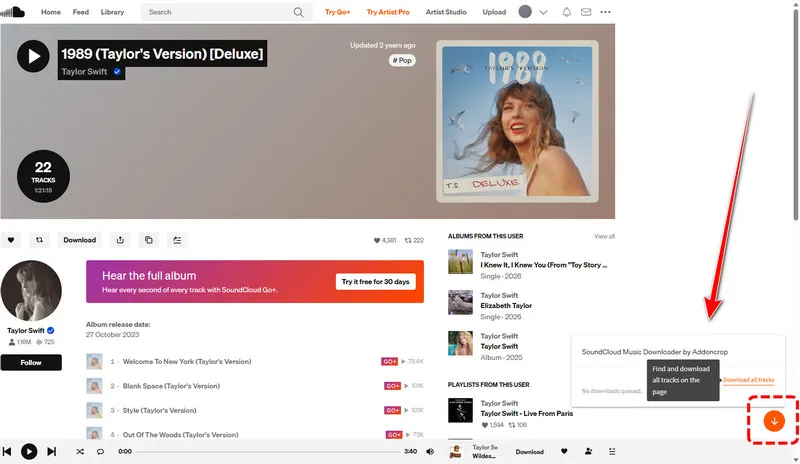
Addoncrop ranks among the best cross‑browser SoundCloud download extensions. It works with Chrome, Edge, Opera, Brave, Vivaldi and Yandex browsers. You can save single tracks, download entire playlists in bulk, and even download entire pages of tracks in one operation. Also, you can preserve complete ID3 metadata including artist names, track titles, release data and embedded cover art.
How to Use Addoncrop SoundCloud Music Downloader
Step 1 Go to the Addoncrop website and add this extension (Crosspilot) to your browser.
Step 2 Allow permissions during the installation.
Step 3 Go to the SoundCloud site and open the tracks or the playlist you want to download.
Step 4 In the bottom right corner, there is a download button provided by Addoncrop SoundCloud Music Downloader. Click the button to download SoundCloud music as MP3 files.
 Tips:
Tips:Need more than a browser extension?
Addoncrop is a convenient choice for quick SoundCloud downloads, but if you manage a large music library, Sidify SoundCloud Music Converter is more suitable. It offers 10x faster batch downloads, multiple output formats, up to 320 kbps audio quality, and full ID3 tags preservation.
- Works across nearly all major browsers.
- Supports single tracks, full playlists, and bulk downloads.
- Preserves full ID3 tags and original cover artwork.
- Includes a built-in audio trimmer for cutting segments before saving MP3 files.
- Requires the Crosspilot companion extension to install it on Chrome.
- Outputs MP3 only, with limited manual bitrate options.
- May stop working after major browser or SoundCloud updates.
Part 3. 3 Best SoundCloud Downloader Extensions for Chrome
Now here we have the 3 best Chrome-specific SoundCloud downloader extensions.
2. SoundCloud Track Downloader
Website: https://chromewebstore.google.com/detail/soundcloud-track-download/ekmbbjdpakacalghjkikfppebgdpoebb
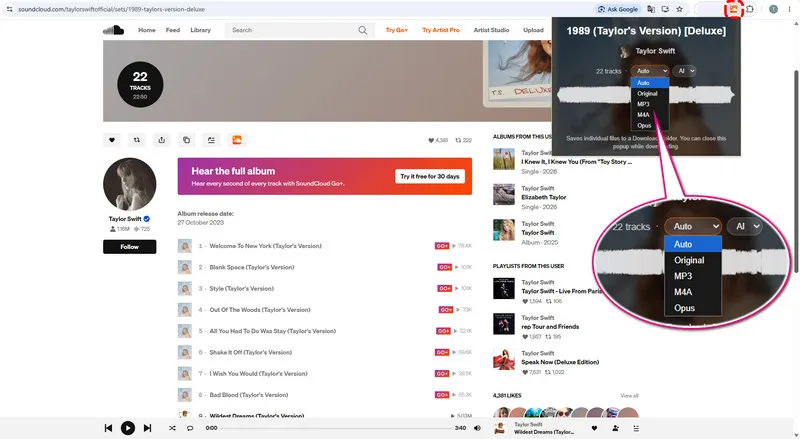
SoundCloud Track Downloader supports individual tracks, full playlists, albums, and even public user like collections. Downloads run in the background so you can close popup or switch browser tabs without terminating active jobs. Besides the basic MP3 format, it also supports M4A and Opus streams where sources allow. Login is unnecessary for most public tracks.
How to Use SoundCloud Track Downloader
Step 1 Add SoundCloud Track Downloader to your Chrome.
Step 2 Open the SoundCloud site and then find the music you want to download.
Step 3 Click this SoundCloud downloader extension.
Step 4 It will show you all the available tracks on this page.
Step 5 Set the audio format (MP3, M4A, Opus, Auto, or Original) and then click the download button.
- Downloads continue in the background even when you switch to another tab.
- Supports playlists, albums, and public liked-track pages.
- Offers multiple output format options.
- No account sign-in is required for downloading public content.
- Audio quality is limited to the stream quality provided by SoundCloud.
- Does not offer advanced controls for editing music metadata.
- May occasionally fail when downloading very large playlists with more than 200 tracks.
3. SoundCloud Enhanced Pro
Website: https://chromewebstore.google.com/detail/soundcloud-enhanced-pro/ggplcohodggmdfpopelnpplhgfjclomi
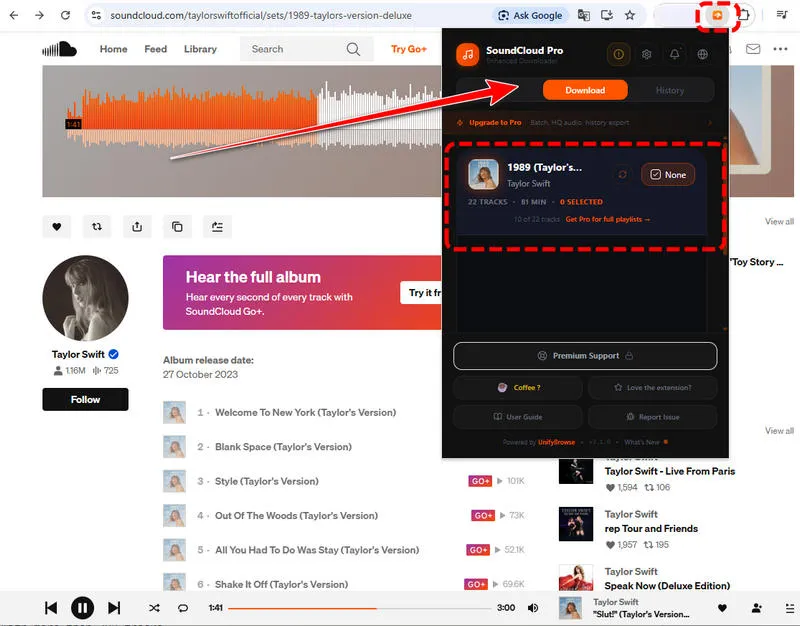
SoundCloud Enhanced Pro adds far more than simple downloading. It comes with a persistent local download history storing your last 50 saved items, an audio player, and a track statistics panel showing play counts, repost metrics and genre tags before you download. It embeds full metadata plus high‑resolution 500×500 cover art inside exported MP3 files. Batch playlist downloads cap at 10 selected tracks at a time.
How to Use SoundCloud Enhanced Pro
Step 1 Add SoundCloud Enhanced Pro to your Chrome.
Step 2 Find SoundCloud tracks that you want to save.
Step 3 Choose your preferred format and click the download button.
- Keeps a local download history with track metadata and source links.
- Provides complete ID3 tagging with embedded high-resolution cover art.
- Shows track statistics before downloading.
- Includes a mini audio player for previewing tracks before downloading.
- Batch playlist downloads are limited to 10 tracks per operation.
- Maximum output quality generally caps at 128 kbps.
- Some advanced features require a paid purchase.
- Available only for Chrome.
4. CocoCut
Website: https://cococut.net/
Both Chrome and Edge browser users can use this SoundCloud downloader extension. CocoCut is a general browser media downloader extension not built exclusively for SoundCloud, yet it reliably detects SoundCloud audio streams. It works across thousands of different websites, extracting audio streams and saving them as MP3 files. The premium upgrade unlocks batch downloading, while track downloading stays permanently free.
How to Use CocoCut
Step 1 Go to the official CocoCut site and add it to Chrome or Edge.
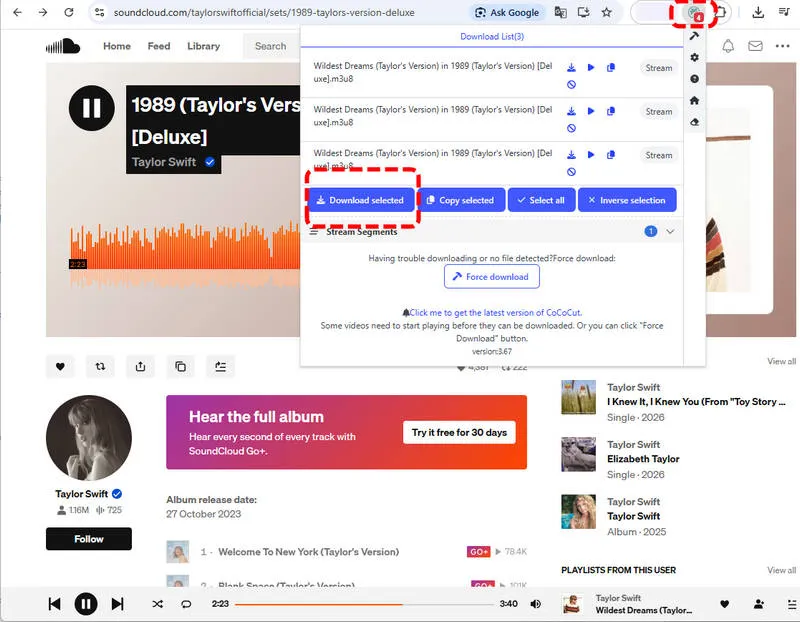
Step 2 Locate the SoundCloud songs you want to download, and click the CocoCut icon.
Step 3 It will automatically detect all available tracks. Then you can click the download button to start downloading.
- Supports both video and audio downloads across many websites.
- Core downloading features are completely free.
- No account login is required.
- The free tier limits download speeds.
- SoundCloud track metadata is often incomplete or missing.
- Batch downloading requires a premium plan.
Part 4. 3 Best SoundCloud Downloader Extensions for Firefox
If you are using Firefox, don't worry. We have also selected the best 3 SoundCloud downloader extensions for you.
5. SoundCloud Downloader by NotTobi
Website: https://addons.mozilla.org/en-US/firefox/addon/soundcloud-dl/
This Firefox add‑on taps into SoundCloud API endpoints to pull audio streams, supporting both single‑track and full‑playlist downloads. SoundCloud Go+ subscribers gain access to higher‑quality M4A streams where available. It inserts ID3 metadata including cover images and track numbers for album releases. Downloaded playlist items save as separate MP3 files rather than compressed ZIP archives, skipping extra manual extraction work.
How to Use SoundCloud Downloader by NotTobi
Step 1 Open the SoundCloud Downloader by NotTobi on Firefox Add-ons and click Add to Firefox.
Step 2 Follow the on-screen prompt to complete the installation.
Step 3 Go to SoundCloud in Firefox and find the track, album, or playlist you want to download.
Step 4 It adds a Download option directly to supported SoundCloud content. On track pages, you can simply click Download.
Step 5 The extension automatically adds available metadata such as Title, Artist, Album, and Artwork.
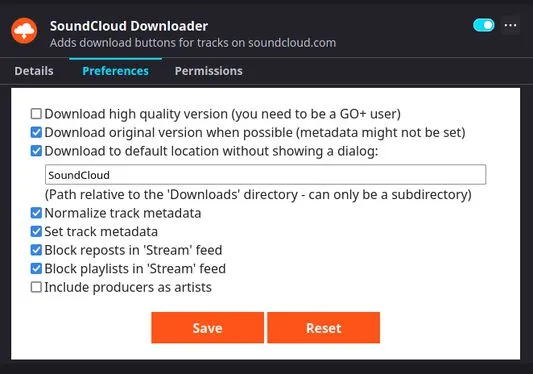
- Supports downloading full playlists and albums.
- Preserves full ID3 metadata and embeds cover artwork.
- Saves tracks as individual audio files instead of ZIP archives.
- Standard public streams are limited to a maximum of 128 kbps.
- Downloading large playlists can take longer.
- Higher-bitrate M4A downloads require a SoundCloud Go+ subscription.
6. SoundCloud Downloader by anyo
Website: https://addons.mozilla.org/en-US/firefox/addon/scdl/
SoundCloud Downloader by anyo is your another best extensions for Firefox, which can customize filename templates through extension preferences, so you can control how saved MP3 files get named. It downloads SoundCloud music in MP3 format at 128 kbps and preserves metadata including artwork, artist, title, genre, year, description and source URL.
How to Use SoundCloud Downloader by anyo
Step 1 Install SoundCloud Downloader by anyo from Firefox Add-ons. Once Firefox finishes installing the extension, open SoundCloud in the same browser.
Step 2 Find a track, playlist, or search result you want to save. The extension places download controls directly on supported SoundCloud pages.
Step 3 Select Download next to the track. The extension saves the audio as an MP3 file and adds available information such as the title, artist, genre and more to the downloaded file.
Step 4 If you want to change how files are named, open Firefox's add-on settings through about:addons, select SoundCloud Downloader, and adjust the filename template in its preferences.
One thing to keep in mind: the extension's MP3 output is limited to 128 kbps, so users looking for higher-quality or more flexible output formats may need another solution.

- Extremely lightweight and easy to use.
- Lets you customize filename formats with flexible templates.
- Supports select private tracks when you have permission to access them.
- Does not support playlist or bulk downloading.
- Output quality is limited to 128 kbps MP3.
7. SoundCloud Downloader by Fun Tech
Website: https://addons.mozilla.org/en-US/firefox/addon/soundcloud-downloader/
Compared to the earlier two SoundCloud Downloader extensions for Firefox users, this one developed by Fun Tech is less popular but delivers straightforward downloading. It embeds basic ID3 metadata on finished MP3 outputs. This add‑on targets casual listeners who mostly grab individual songs rather than large collections.
How to Use SoundCloud Downloader by Fun Tech
Step 1 Add this extension from Firefox and open SoundCloud. The extension adds a download button to SoundCloud music pages.
Step 2 When you find a track you want to save, click the Download button provided by the extension. Unlike extensions that download the audio directly, this one reads the SoundCloud music link from the clipboard and sends it to scloudtomp3downloader.com for processing.
Step 3 Once the external downloader finishes processing the link, follow its download prompt to save the resulting audio file to your computer.
Note:Different from extensions that retrieve and save SoundCloud audio directly, the extension relies on an external downloader website rather than handling the download entirely within Firefox.
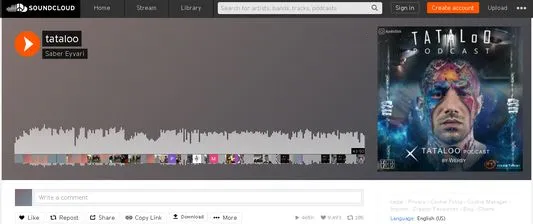
- Simple interface that is easy to use.
- Supports basic ID3 metadata for downloaded tracks.
- Does not support playlist or batch downloads.
- The download button may occasionally disappear after SoundCloud frontend updates.
- Offers few advanced configuration options.
- Rely on an external online downloader.
Part 5. 3 Best SoundCloud Downloader Extensions for Edge or Opera
In this part, we have a few SoundCloud downloader extensions for those who are using Edge or Opera.
8. SoundCloud MP3 Downloader - Opera
Website: https://addons.opera.com/en/extensions/details/soundcloud-mp3-downloader/
Built specifically for the Opera browser, this extension places a Prepare button underneath every SoundCloud track waveform. You click Prepare first to generate a downloadable MP3 link. After preparation completes, you can trigger direct saving. It also preserves basic track metadata in the resulting MP3 files.
How to Use SoundCloud MP3 Downloader
Step 1 Open the official Opera Add-ons page for SoundCloud MP3 Downloader and click Add to Opera.
Step 2 Go to SoundCloud in Opera and locate the song you want to save. Once the extension is active, you should see a Prepare button in the track controls.
Step 3 Click Prepare and wait a few seconds. The extension generates a direct MP3 download link for the selected track.
Step 4 After the MP3 link appears, click the button again to let Opera download the file.
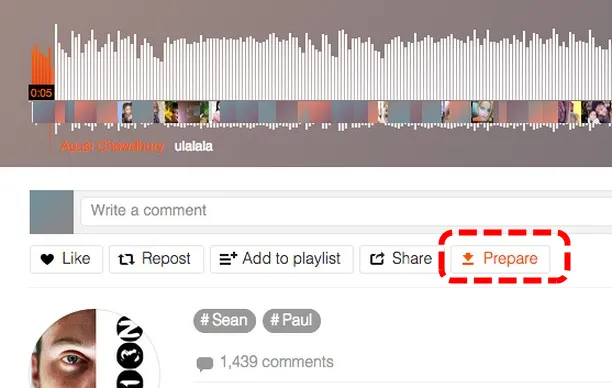
- Native Opera add-on optimized for the browser environment.
- Option to copy direct download links for other download managers.
- Basic ID3 metadata preserved.
- Simple visible download button embedded within SoundCloud pages.
- Many users report frequent failure after SoundCloud website changes.
- Requires two-step, Prepare then Download starts.
- No playlist download support.
9. SoundCloud Downloader by SPRISE - Edge
This SoundCloud downloader extension adds prominent download buttons right below each track's waveform display. It handles standard public SoundCloud tracks and exports audio as MP3 files. However, nearly all functional features lock behind a paid monthly subscription. Nothing works until you purchase and activate a license key inside the extension panel.
How to Use SoundCloud Downloader by SPRISE
Step 1 Visit the official site of the SoundCloud downloader extension and click the "Get" button to install it on your Edge toolbar.
Step 2 Go to the SoundCloud site and click this extension.
Step 3 You need to have a license to activate its download feature.
Step 4 Once activated, you can select the SoundCloud songs to be saved locally in MP3 format.
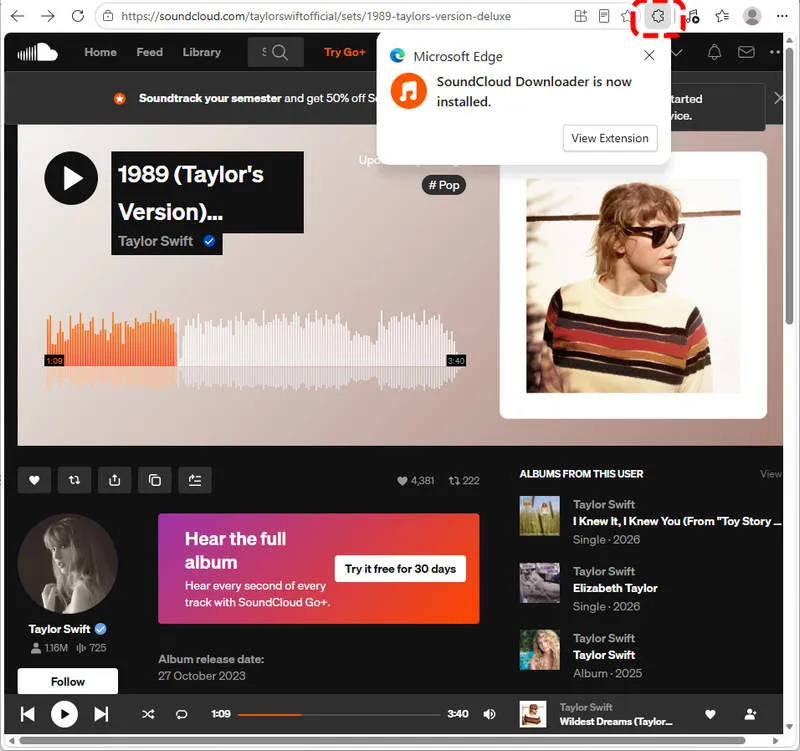
- Clean interface.
- Suitable for Microsoft Edge.
- Zero usable functionality without a monthly subscription.
- Lacks playlist batch download capability
10. SoundCloud DL - Edge
Website: https://microsoftedge.microsoft.com/addons/detail/soundcloud-dl/fpjfnijcjbdipnhmnfbdinmkenkfbfld
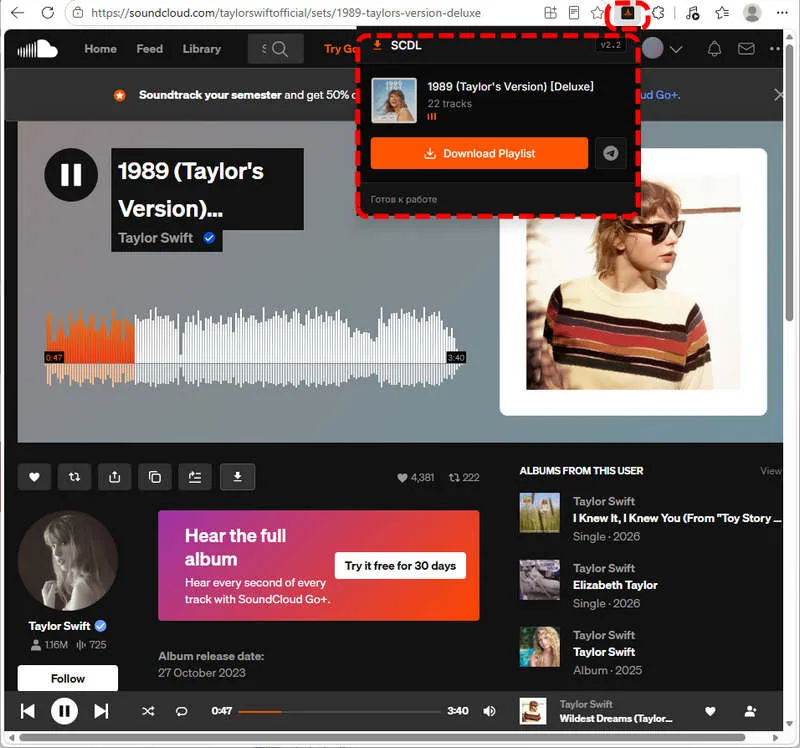
SoundCloud DL can dynamically fetch required client‑id tokens to maintain compatibility with shifting SoundCloud API requirements. It includes a built‑in keyword search popup for discovering tracks without navigating away. Download progress renders inside the extension popup interface, and local browser storage keeps your download history for later reference. It also offers quick share links for Telegram messaging platforms.
How to Use SoundCloud DL
Step 1 Get the SoundCloud downloader DL for your Edge.
Step 2 Find a track or playlist you want to download on SoundCloud, and then click the extension icon.
Step 3 It automatically shows you all the available content.
Step 4 Simply click the download button to save them on your computer.
- Dynamic credential handling improves long-term API compatibility.
- Built-in track search within extension popup.
- Local download history stored within your browser.
- Visual real-time download progress indicators.
- Quick social-media share link generation.
- Playlist download support limited and unstable.
- Occasional popup UI glitches after browser restarts.
Part 6. Why Is My SoundCloud Downloader Extension Not Working
A SoundCloud downloader extension may stop working after a while, even if it worked perfectly before. In most cases, the problem comes from changes to SoundCloud, your browser, or another extension.
Reason 1: SoundCloud Has Changed Its Website
SoundCloud regularly updates its website and how audio is delivered. When this happens, an older downloader extension may no longer recognize the page or find the audio. The Download button may disappear, or the download may fail.
Reason 2: Your Browser Has Updated
Chrome, Firefox, and Edge also update their security rules from time to time. An older extension may lose access to features it needs, especially if the developer no longer maintains it.
Reason 3: Another Extension Is Causing a Conflict
Ad blockers and privacy extensions can sometimes block the requests needed to download SoundCloud audio. Try temporarily disabling them and downloading the track again.
Reason 4: The Extension or Browser Data Is Outdated
An outdated extension, corrupted installation, or old cached data can also cause missing buttons and failed downloads. SoundCloud's dynamic pages can make this more noticeable when you move between tracks without fully refreshing the page.
Quick Fixes to Try:
- Refresh the track page and try again.
- Update the downloader extension from your browser's extension store.
- Temporarily disable ad blockers or other privacy extensions.
- Reinstall the extension if updating does not help.
- Open the track directly instead of downloading from the SoundCloud home feed.
Part 7. How to Batch Download SoundCloud Music in 320kbps MP3 Format
If your SoundCloud downloader extensions are still not working after the above steps, a professional desktop downloader may be much easier.
Sidify SoundCloud Music Converter lets you download SoundCloud tracks in MP3, AAC, WAV, FLAC, AIFF and ALAC formats. No SoundCloud Go or Go+ account needed, you can get high-quality SoundCloud songs and playlists saved locally to your computer. Additionally, it preserves comprehensive ID3 metadata including title, artist, album, track number and more.
If high‑quality up to 320kbps, multiple formats conversion and batch exports are your main priority, you can't miss this.
Sidify SoundCloud Music Converter
- Convert SoundCloud Music to MP3, AAC, ALAC, AIFF, WAV, and FLAC.
- Convert MP3 songs, playlists, albums, and podcasts from SoundCloud Music.
- Download SoundCloud Music 320kbps MP3 and LOSSLESS ALAC files.
- Keep SoundCloud Music HD artworks, lyrics and ID3 tags.
- Compatible with Windows and macOS.

How to Download SoundCloud Music
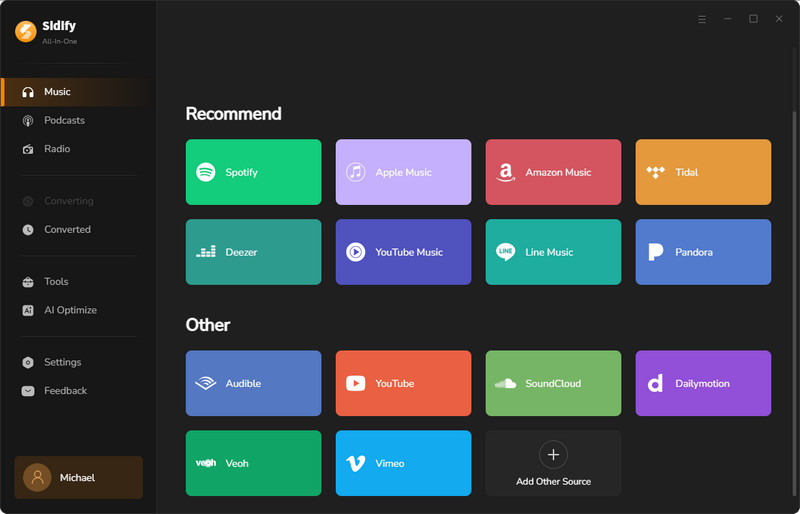
Step 1 Install Sidify SoundCloud Music Converter
To download SoundCloud songs or playlists without limitations, you need to download and install Sidify SoundCloud Music Converter. Then, select "SoundCloud" as your music streaming site.
Step 2 Customize Output Format
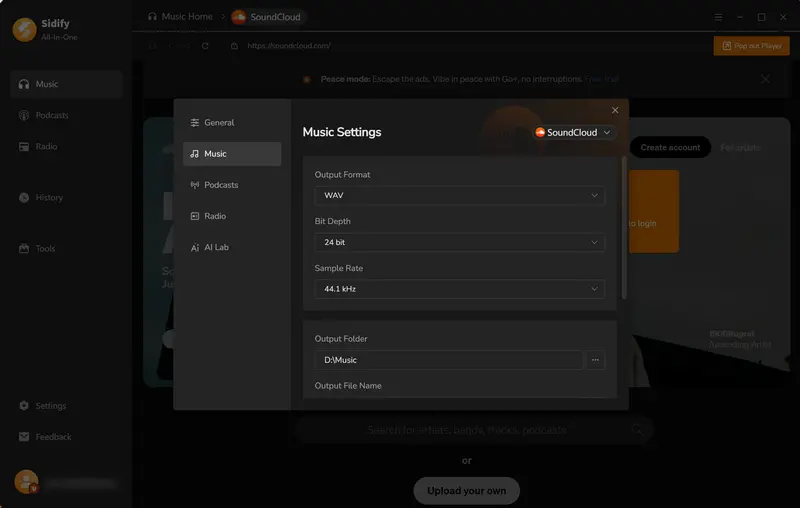
You can go to Menu > Settings to select your output format as MP3, AAC, WAV, FLAC, AIFF, or ALAC. We take the WAV format as an example.
Step 3 Select Music to Download
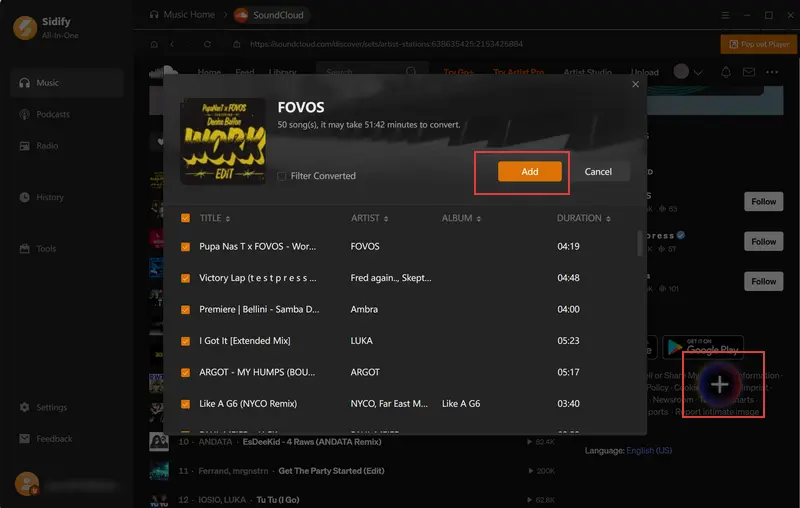
When you finish the settings, you can browse any SoundCloud songs or playlists you like inside Sidify. If you want to download it, simply click the "Add" button to ready.
Step 4 Start Downloading SoundCloud Music
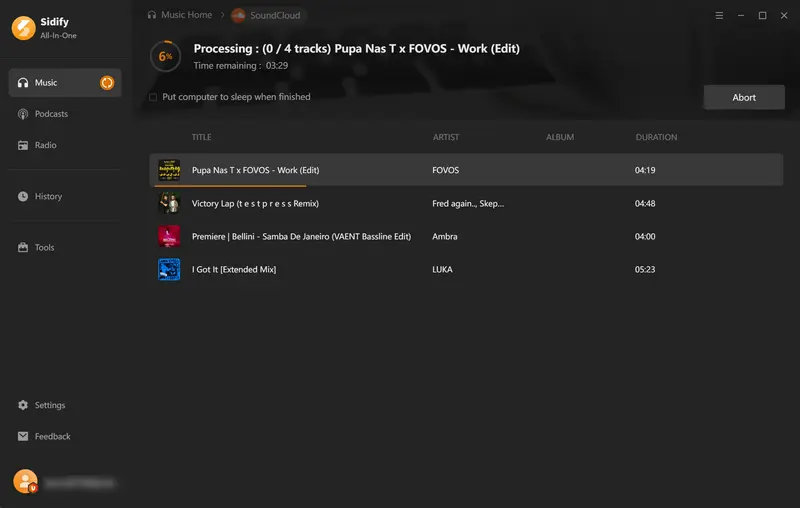
Next, click the "Convert" button to download the selected tracks in the format you just chose. 10x faster speed won't let you wait too long.
Step 5 Locate Downloaded Music Files
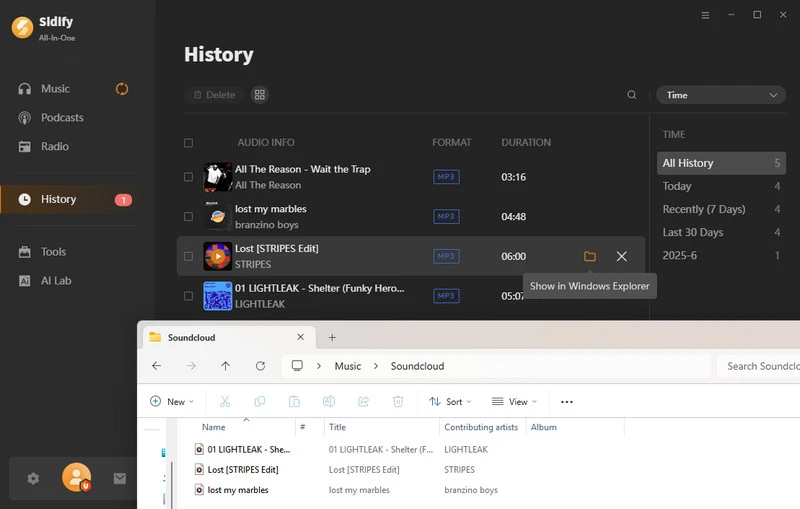
After the conversion, you can locate this SoundCloud music through the "History" tab. Alternatively, you can click the “Folder” icon to open them in Explorer.
FAQs About SoundCloud Downloader Extension
Is SoundCloud downloader illegal?
Downloading tracks you personally own and tracks where artists explicitly enable official downloads is acceptable. Downloading copyrighted streams without the rights holder's permission violates SoundCloud's Terms of Service and may conflict with local copyright law. Always remember to respect artists' work.
Is there a SoundCloud Downloader extension available for Firefox?
Yes, there are a few options that exist for Firefox. SoundCloud Downloader by NotTobi excels for playlist saving and SoundCloud Downloader by anyo is ideal for single‑track grabs. You can learn more details from: Best SoundCloud Downloader Extensions for Firefox.
Can I download SoundCloud songs to my PC?
Yes. Although the SoundCloud Go+ subscription only enables in‑app offline caching and will not export standalone MP3 files to your computer, tools like browser extensions offer one method. But if you want more stable and 320kbps high quality downloads from SoundCloud, Sidify SoundCloud Music Converter is your best choice.
How do I download songs onto a USB from SoundCloud?
It is recommended to use Sidify SoundCloud Music Converter to export MP3 files and save them to your local computer folder. After finishing downloads, plug in your USB drive and copy the finished MP3 files across manually.
How can I download a SoundCloud playlist as an MP3 file?
Select an extension that explicitly lists playlist support, such as Addoncrop, SoundCloud Track Downloader or SoundCloud Downloader by NotTobi. Navigate to the target SoundCloud playlist page and activate the playlist download button. Otherwise, use Sidify SoundCloud Music Converter to batch download SoundCloud playlists in 320kbps at 10x faster speed. Save locally forever without browser limitations.
Conclusion
Whether you use Chrome, Firefox, Edge, and Opera, you can find your best SoundCloud downloader extension here.
Remember that some extensions may experience occasional breakage after site updates. If reliability for playlists and high‑bitrate output matters most to you, consider Sidify SoundCloud Music Converter as your backup solution. Full ID3 tags, more format choices and up to 320kbps quality.
 Sidify SoundCloud Music Converter
Download and convert music from SoundCloud and other major streaming services in one place. Get MP3 or other popular formats in source audio quality, save songs offline on Windows or Mac, and enjoy up to 10X faster downloads with ID3 tags and lyrics preserved.












