


Where can I download WAV music for free? Where can I get .wav files of songs?
This guide explores the best free sites and tools for downloading high-quality WAV music files. WAV format is favored by music producers, DJs, and audio enthusiasts for its lossless quality, as it preserves more original sound detail than compressed formats
📍 Also Read: Lofi Music Download: How to Get Lofi Songs for Free in 2026
Quick Comparison of WAV Music Download Tools
| Tool | Best For | Free/Paid | Supported Sources | Output Formats |
|---|---|---|---|---|
| Sidify All-in-One | Streaming music download | Free Trial | Spotify, Apple Music, YouTube Music, Tidal, SoundCloud, etc. | WAV, MP3, FLAC |
| yt-dlp | YouTube to WAV downloads | Free | YouTube | WAV, MP3 |
| Y2WAV | Quick online YouTube conversion | Free | YouTube | WAV, MP3 |
| Pixabay Music | Free background music | Free | Music library | WAV, MP3 |
| Spotilab | Spotify music download | Free | Spotify | WAV, MP3 |
| Free Music Archive | Free WAV music sources | Free | Independent music library | WAV, MP3 |
| SoundCloudRips | SoundCloud to WAV conversion | Free | SoundCloud | WAV, MP3 |
| Beatport | DJ and electronic music | Paid | Electronic music store | WAV, AIFF |
| AudiFab Music One | Tidal music download | Free Trial | Tidal,YouTube, etc | WAV, FLAC, MP3 |
| Juno Download | High-quality music downloads | Paid | Digital music store | WAV, MP3 |
| Suno AI | AI-generated music export | Free/Paid | AI music creation | WAV, MP3 |
| Internet Archive | Free WAV audio files | Free | Audio archive | WAV, MP3 |
| Bandcamp | Lossless music purchases | Free/Paid | Independent artists | WAV, FLAC |
| Telegram WAV Music | Shared audio collections | Free | Telegram communities | WAV |
| Online Audio Converter | Audio format conversion | Free | Local audio files | WAV, MP3 |
Tips: Not every site offering "WAV downloads" provides true lossless files, so always check the source quality before downloading.
1. Sidify All-in-One - Best WAV Music Downloader for YouTube, Spotify, & More
Sidify All-in-one Music Converter
- Download music from all major music platforms (Spotify, Apple Music, etc.)
- Convert music to MP3/AAC/WAV/FLAC/AIFF/ALAC
- Losslessly download music to your computer.
- Rip music from online library and burn it to CDs.
- Built-in free podcast and radio to mp3 downloader and vocal remover.
| 1. Sidify All-in-One - Best WAV Music Downloader for YouTube, Spotify, & More | |
|---|---|
| WAV Music Download Sites: | https://www.sidify.com/all-in-one-windows.html |
| Download WAV Music from | YouTube, Spotify (Free or Premium), Apple Music, Amazon Music, YouTube Music, Tidal, SoundCloud, Deezer, Qobuz, Beatport, Bandcamp, etc. |
| Audio Quality Output | Up to 24-bit/192 kHz |
| Output Formats | WAV, MP3, FLAC, AAC (M4A), ALAC, AIFF |
| Batch Download | ✓ |
| Download Speed | Up to 40x |
| ID3 Tags | Artist Name, Track Title, Album Title, Track Number, Date, Disc Number, and more. |
| Ads- free & Safety | ✓ |
| Account Requirement | Depends on the music source |
| Supported System | Windows, Mac |
Sidify All-In-One lets you download high-quality WAV music from multiple platforms while keeping the audio details intact. It’s great for DJs, creators, and music fans. It supports WAV, MP3, FLAC, and M4A formats, works on different devices, and has a built-in free CD burner. If your music source isn’t listed, you can add it easily with the “Add Other Source” feature.
Tutorial: How to Download Any Music to Lossless WAV with Sidify
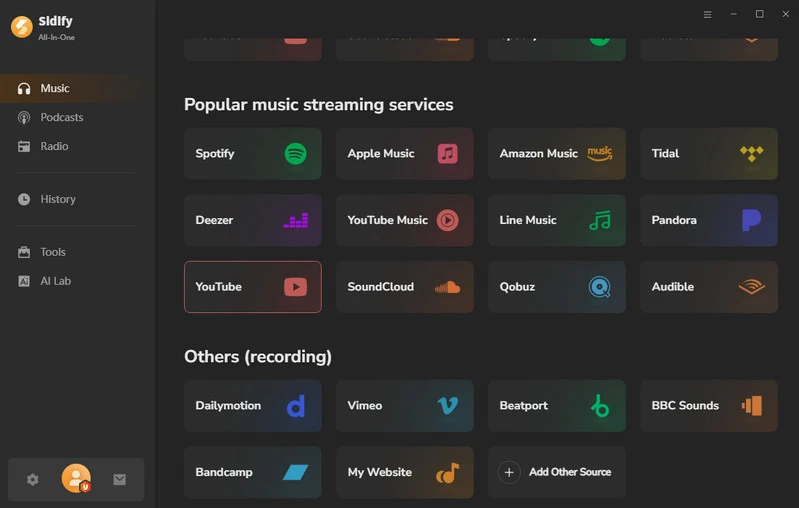
Step 1 Launch Sidify and Choose Music Source Open Sidify All-In-One on your computer. Here we select YouTube as the music source.
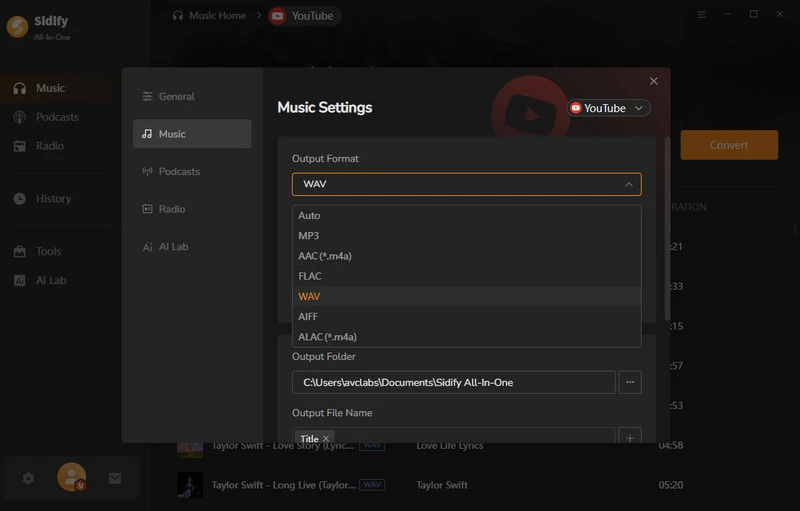
Step 2 Select WAV as the Output Format Open the Settings window and choose WAV as the output format. You can also customize the output quality, output folder, and file naming options, and enable Playlist Index to keep the original song order.
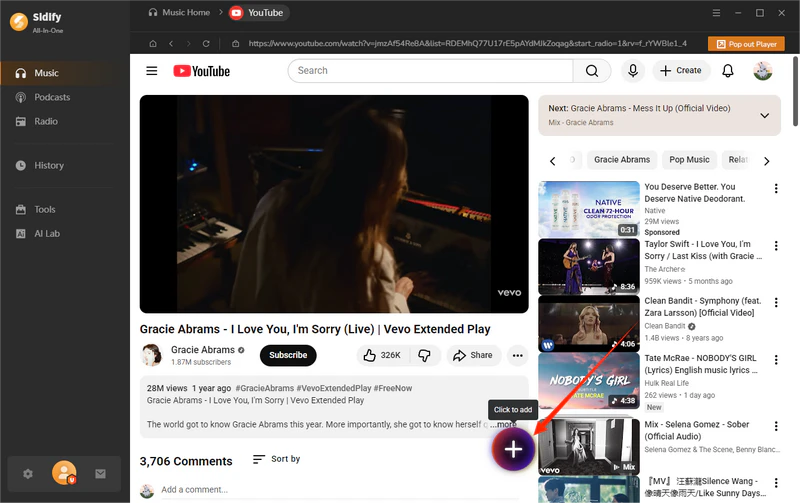
Step 3 Add YouTube Playlist to the Download List From YouTube web player window, choose a specific YouTube playlist, and click the Add button at the bottom right corner. Then select all hi-res music songs you want to download and add to the task list.
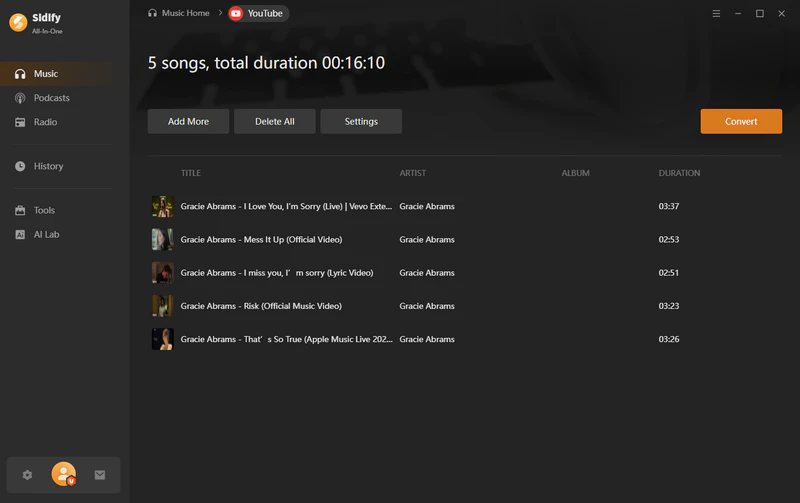
Step 4 Download YouTube Music as WAV Click the Convert button to start downloading YouTube music as high-quality WAV files. A playlist with around 10 songs can be downloaded within minutes.
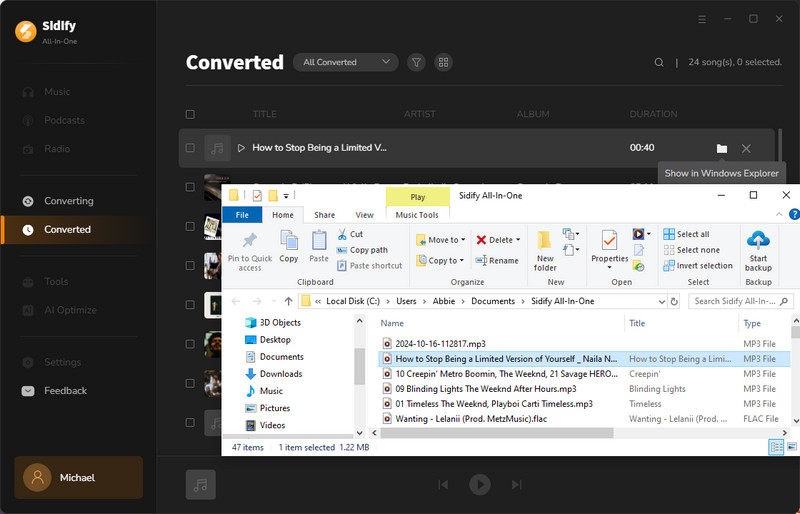
Step 5 Enjoy WAV Downloads Once the conversion is complete, go to the History section and open the output folder to find your downloaded WAV files. Now you can play them on compatible devices or use them for your own audio projects.
2. yt-dlp - Free YouTube to WAV Music Downloader
| 2. yt-dlp - Free YouTube to WAV Music Downloader | |
|---|---|
| WAV Music Download Sites: | https://github.com/yt-dlp/yt-dlp |
| Download WAV Music from | YouTube, YouTube Music, SoundCloud, Vimeo, and 1,000+ supported websites |
| Audio Quality Output | Depends on the original source quality |
| Output Formats | WAV, MP3, FLAC, AAC, M4A, OPUS, and OGG |
| Batch Download | ✓ |
| Download Speed | Depends on network and source |
| Metadata | Artist Name, Track Title, Album Title, Thumbnail, and more |
| Ad-free & Safety | ✓ (Open-source, no ads) |
| Account Requirement | Not required |
| Supported System | Windows, Mac, Linux |
yt-dlp is a free, open-source tool that lets you download WAV audio from YouTube videos. Unlike simple online converters, it supports playlist downloads, advanced audio extraction, and flexible format options. This makes it a solid choice for users who want more control over YouTube WAV music downloads.
How to Download YouTube Music as WAV with yt-dlp
Step 1 Install yt-dlp and FFmpeg on your computer to enable audio extraction and format conversion.
Step 2 Copy the link of the YouTube song, album, or playlist you want to download.
Step 3 Run the yt-dlp command to extract the audio and save it as a WAV file.
- Free and open-source
- Supports YouTube playlists and batch downloads
- Offers advanced customization options
- No ads or unnecessary software
- Requires command-line knowledge
- Setup is more complicated for beginners
- Audio quality depends on the original YouTube source
3. Y2WAV - Free Online YouTube to WAV Converter
| 3. Y2WAV - Free Online YouTube to WAV Converter | |
|---|---|
| WAV Music Download Sites: | https://y2wav.org/ |
| Download WAV Music from | YouTube |
| Audio Quality Output | Usually 256kbps |
| Output Formats | WAV, MP3 |
| Batch Download | ✗ |
| Download Speed | Fast |
| Metadata | Basic track information |
| Ad-free & Safety | Contains ads depending on usage |
| Account Requirement | Not required |
| Supported System | Web browser (Windows, Mac, Mobile) |
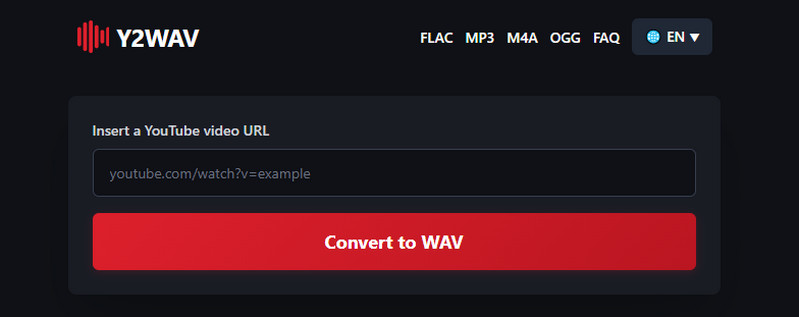
Need a quick way to convert a YouTube video into a WAV file? Y2WAV works directly in a browser, so users can extract audio without installing additional software. It is suitable for occasional downloads, although it offers fewer features than desktop-based tools.
How to Download YouTube Music as WAV with Y2WAV
Step 1 Copy the URL of the YouTube video, song, or audio you want to convert.
Step 2 Open Y2WAV in your browser, paste the YouTube URL, and select WAV as the output format.
Step 3 Click the download button and save the converted WAV file to your device.
- Free and easy to use
- No software installation required
- Works directly in a web browser
- Suitable for quick YouTube audio conversions
- Limited to YouTube sources
- No playlist batch downloads
- Output quality is lower than desktop tools
4. Pixabay Music - Free WAV Background Music Download

| 4. Pixabay Music - Free WAV Background Music Download | |
|---|---|
| WAV Music Download Sites: | https://pixabay.com/music/ |
| Download WAV Music from | Free music library |
| Audio Quality Output | High-quality audio files (depends on available track format) |
| Output Formats | WAV, MP3 |
| Batch Download | ✗ |
| Download Speed | Depends on network |
| Metadata | Artist Name, Track Title, Category, and more |
| Ad-free & Safety | ✓ (Free licensed music library) |
| Account Requirement | Not required for most downloads |
| Supported System | Web browser (Windows, Mac, Mobile) |
For creators looking for free WAV resources, Pixabay Music is one of the easiest places to start. The platform focuses on royalty-free background music and audio tracks, making it a practical choice for YouTube videos, podcasts, presentations, and other creative projects.
How to Download WAV Background Music from Pixabay
Step 1 Visit Pixabay Music and search for the type of music you need, such as background music, cinematic music, or sound effects.
Step 2 Open the track page and check the available download options. Select the WAV file if available.
Step 3 Click the download button and save the WAV music file to your computer or device.
- Free music resources for creators
- Suitable for videos, podcasts, and presentations
- Simple browser-based downloads
- Royalty-free and legal music collection
- Not designed for downloading mainstream songs
- WAV availability depends on individual tracks
- Limited music management features
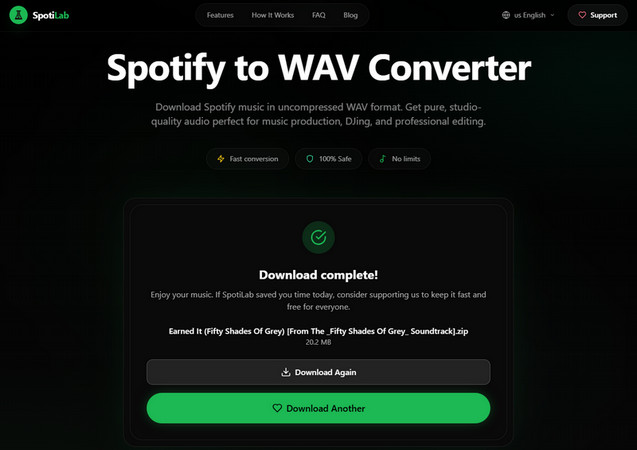
5. Spotilab - Spotify Music Downloader to WAV
| 5. Spotilab - Spotify Music Downloader to WAV | |
|---|---|
| WAV Music Download Sites: | https://spotilab.com/ |
| Download WAV Music from | Spotify |
| Audio Quality Output | Depends on the original Spotify audio quality |
| Output Formats | WAV, MP3, FLAC, and other formats |
| Batch Download | ✓ Supports playlists and multiple tracks |
| Download Speed | Depends on network and source |
| Metadata | Artist Name, Track Title, Album Title, Playlist Information, and more |
| Ad-free & Safety | Depends on usage environment |
| Account Requirement | Depends on Spotify access requirements |
| Supported System | Web browser (Windows, Mac, Mobile) |
Spotify users who want more flexibility with their music library can use Spotilab to save tracks in WAV and other formats. It provides a simple workflow for converting playlists and individual songs.
How to Download Spotify Music as WAV with Spotilab
Step 1 Open Spotify and copy the URL of the song, album, or playlist you want to download.
Step 2 Open Spotilab, paste the Spotify link, and select WAV as the output format.
Step 3 Click the download button and save the converted WAV files to your device.
- Easy way to save Spotify music
- Supports WAV and other audio formats
- Works without installing complex software
- Suitable for Spotify playlists and albums
- Mainly focused on Spotify only
- Output quality depends on the source audio
- Features may vary compared with professional desktop converters
6. Free Music Archive - Free WAV Music Downloads

| 6. Free Music Archive - Free WAV Music Downloads | |
|---|---|
| WAV Music Download Sites: | https://freemusicarchive.org/ |
| Download WAV Music from | Independent music library |
| Audio Quality Output | High-quality audio files (depends on available track format) |
| Output Formats | WAV, MP3, and other available formats |
| Batch Download | ✗ |
| Download Speed | Depends on network |
| Metadata | Artist Name, Track Title, Genre, License Information, and more |
| Ad-free & Safety | ✓ (Established free music archive) |
| Account Requirement | Not required for most downloads |
| Supported System | Web browser (Windows, Mac, Mobile) |
Free Music Archive (FMA) is a free music library that provides access to a wide range of independent music tracks. It is a good option for users looking for free WAV music downloads, especially creators who need background music, samples, and royalty-friendly audio for personal or commercial projects.
How to Download WAV Music from Free Music Archive
Step 1 Visit Free Music Archive and search for songs, genres, or audio tracks you need.
Step 2 Open a track page and check whether a WAV download option is available.
Step 3 Click the download button and save the audio file to your device.
- Large collection of free independent music
- Suitable for creators and background music projects
- Includes licensing information for tracks
- Easy browser-based downloads
- Not focused on mainstream commercial songs
- WAV availability depends on individual tracks
- Music selection varies by genre and artist
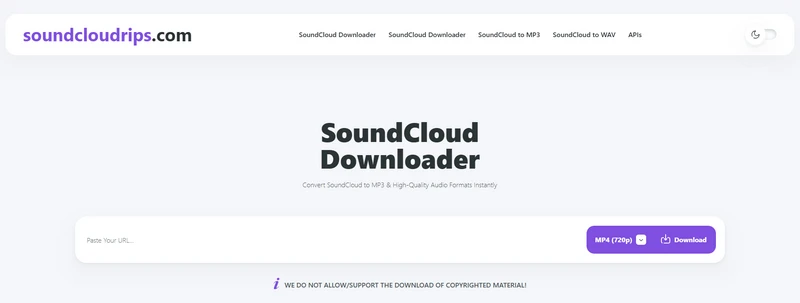
7. SoundCloudRips - SoundCloud WAV Music Downloader
| 7. SoundCloudRips - SoundCloud WAV Music Downloader | |
|---|---|
| WAV Music Download Sites: | https://soundcloudrips.com/ |
| Download WAV Music from | SoundCloud |
| Audio Quality Output | Depends on the original SoundCloud audio quality |
| Output Formats | WAV, MP3, and other formats |
| Batch Download | ✗ |
| Download Speed | Depends on network and source |
| Metadata | Track Title, Artist Name, and basic track information |
| Ad-free & Safety | Depends on website usage |
| Account Requirement | Not required |
| Supported System | Web browser (Windows, Mac, Mobile) |
SoundCloudRips helps users convert available SoundCloud tracks into WAV files for offline access, making it useful for listeners, DJs, and creators who need flexible access to audio files.
How to Download SoundCloud Music as WAV with SoundCloudRips
Step 1 Open SoundCloud and copy the URL of the track you want to download.
Step 2 Open SoundCloudRips, paste the track URL, and choose WAV as the output format.
Step 3 Click the download button and save the converted SoundCloud track to your device.
- Simple way to save SoundCloud tracks
- No software installation required
- Supports WAV output
- Works directly from a browser
- Limited to SoundCloud content
- Output quality depends on the original upload
- Features may vary compared with desktop downloaders
8. Beatport - High-Quality WAV Music Downloads for DJs
| 8. Beatport - High-Quality WAV Music Downloads for DJs | |
|---|---|
| WAV Music Download Sites: | https://www.beatport.com/ |
| Download WAV Music from | Electronic music store |
| Audio Quality Output | High-quality WAV audio |
| Output Formats | WAV, AIFF, MP3, and other formats |
| Batch Download | ✗ |
| Download Speed | Depends on network |
| Metadata | Artist Name, Track Title, Album, Genre, BPM, and more |
| Ad-free & Safety | ✓ (Official music store) |
| Account Requirement | Required for purchases |
| Supported System | Web browser (Windows, Mac, Mobile) |
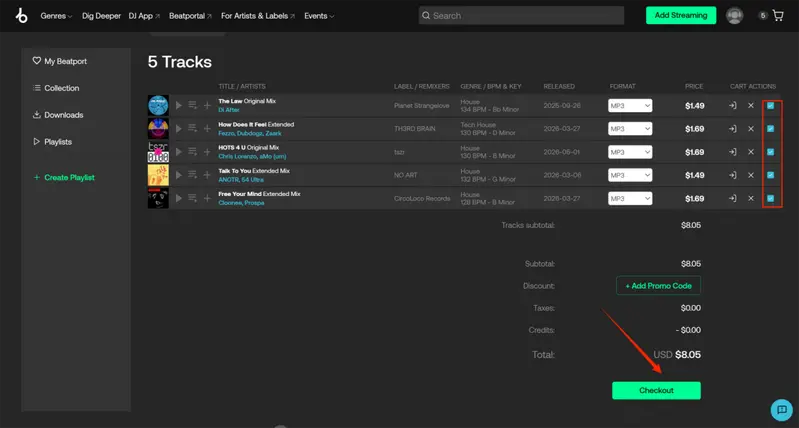
DJs and electronic music producers often choose Beatport when they need professionally released WAV tracks for mixing and live performances.
How to Download WAV Music from Beatport
Step 1 Visit Beatport and search for electronic music, DJ tracks, or albums you want to download.
Step 2 Select the WAV format option when purchasing your track.
Step 3 Complete the purchase and download your high-quality WAV music file to your device.
- Professional WAV source for DJs
- High-quality electronic music library
- Includes useful metadata such as BPM and genre
- Official and reliable music store
- Mainly focused on electronic and DJ music
- Requires purchasing tracks
- Not suitable for free WAV downloads
9. AudiFab Tidal Music Converter - Download Tidal Music to WAV
| 9. AudiFab Tidal Music Converter - Download Tidal Music to WAV | |
|---|---|
| WAV Music Download Sites: | https://www.audifab.com/best-music-converter.html |
| Download WAV Music from | Tidal, Spotify, YouTube Music, etc. |
| Audio Quality Output | High-quality audio output |
| Output Formats | WAV, MP3, FLAC, AAC, AIFF, and more |
| Batch Download | ✓ Supports songs, albums, and playlists |
| Download Speed | 10x-40x |
| Metadata | Artist Name, Track Title, Album Title, Playlist Information, and more |
| Ad-free & Safety | ✓ No ads |
| Account Requirement | Tidal account required |
| Supported System | Windows, Mac |
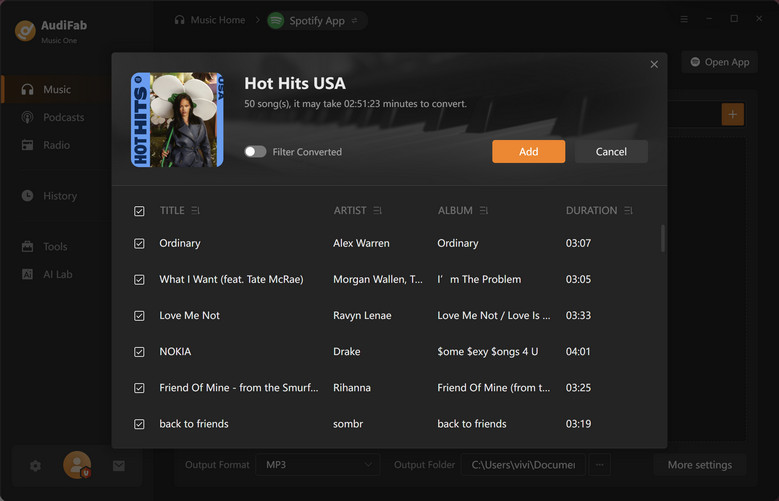
AudiFab Music One has a Tidal WAV downloader designed for users who want to save high-quality music from Tidal. With support for Tidal playlists, albums, and tracks, it allows users to convert Tidal music to WAV and other formats for offline listening, audio editing, and personal music collections.
How to Download Tidal Music as WAV with AudiFab
Step 1 Launch AudiFab and Select Tidal Open AudiFab Tidal Music Converter and choose Tidal as the music source.
Step 2 Add Tidal Songs or Playlists Search for your favorite Tidal tracks, albums, or playlists and add them to the download list.
Step 3 Choose WAV and Download Select WAV as the output format and click the convert button to save Tidal music as WAV files.
- Supports Tidal playlists and albums
- Offers high-quality WAV output
- Batch downloads multiple tracks
- Keeps music metadata
- Requires a Tidal account
- Paid software
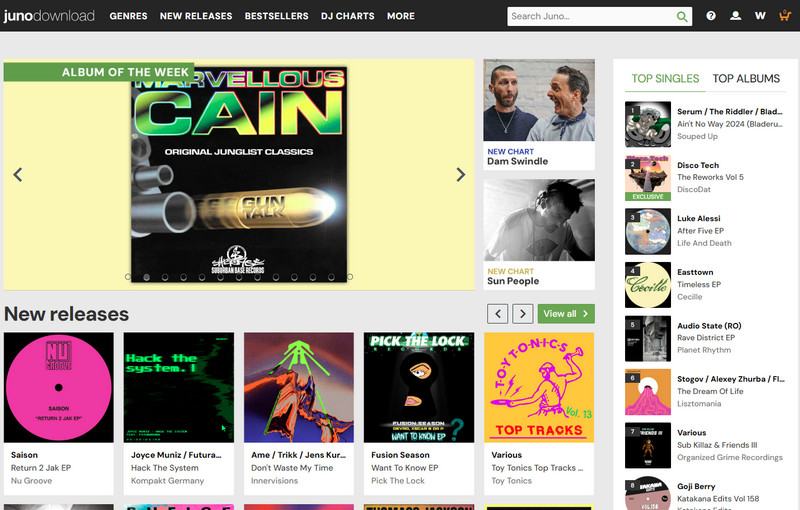
10. Juno Download - High-Quality WAV Music Downloads
| 10. Juno Download - High-Quality WAV Music Downloads | |
|---|---|
| WAV Music Download Sites: | https://www.junodownload.com/ |
| Download WAV Music from | Digital music store |
| Audio Quality Output | High-quality WAV audio |
| Output Formats | WAV, MP3, AIFF, FLAC, and more |
| Batch Download | ✗ |
| Download Speed | Depends on network |
| Metadata | Artist Name, Track Title, Album Title, Genre, and more |
| Ad-free & Safety | ✓ (Official music store) |
| Account Requirement | Required for purchases |
| Supported System | Web browser (Windows, Mac, Mobile) |
Juno Download is a digital music store that provides high-quality WAV downloads, especially for DJs, electronic music fans, and producers. It offers a large collection of dance, electronic, and club music, allowing users to purchase WAV files for professional mixing, playback, and music production.
How to Download WAV Music from Juno Download
Step 1 Visit Juno Download and search for your favorite tracks, albums, or electronic music releases.
Step 2 Select WAV as the preferred download format when purchasing the track.
Step 3 Complete the purchase and download the WAV music files to your device.
- High-quality WAV downloads for DJs and producers
- Large electronic music collection
- Official music store with reliable downloads
- Includes detailed music metadata
- Requires purchasing tracks
- Mainly focused on electronic and dance music
- Not suitable for users looking for free WAV downloads
11. Suno AI - Download AI-Generated Music as WAV
| 11. Suno AI - Download AI-Generated Music as WAV | |
|---|---|
| WAV Music Download Sites: | https://suno.com/ |
| Download WAV Music from | AI-generated music platform |
| Audio Quality Output | High-quality audio output (depends on plan and export options) |
| Output Formats | WAV, MP3 |
| Batch Download | ✗ |
| Download Speed | Depends on network |
| Metadata | Song Title, Creation Information, and more |
| Ad-free & Safety | ✓ No ads |
| Account Requirement | Required |
| Supported System | Web browser (Windows, Mac, Mobile) |
Suno AI is an AI music generation platform that allows users to create original songs from text prompts and export their creations in high-quality audio formats. It is a useful option for creators who need original WAV music for videos, podcasts, games, and other creative projects.
How to Download Suno AI Music as WAV
Step 1 Open Suno AI and generate a song using your preferred prompts, styles, or lyrics.
Step 2 Open the generated track and choose the available download or export options.
Step 3 Select WAV format if available and save the AI-generated music to your device.
- Create original WAV music with AI
- Useful for creators and content projects
- No need to search for existing music tracks
- Simple browser-based workflow
- WAV export availability depends on the plan
- Not designed for downloading existing songs
- AI-generated music may require further editing
12. Internet Archive - Free WAV Audio File Downloads
| 12. Internet Archive - Free WAV Audio File Downloads | |
|---|---|
| WAV Music Download Sites: | https://archive.org/ |
| Download WAV Music from | Digital audio archive |
| Audio Quality Output | Depends on the uploaded source files |
| Output Formats | WAV, MP3, FLAC, OGG, and more |
| Batch Download | ✓ Supports multiple file downloads |
| Download Speed | Depends on network and server availability |
| Metadata | Title, Creator, Date, Description, and more |
| Ad-free & Safety | ✓ No ads (non-profit archive) |
| Account Requirement | Not required for most downloads |
| Supported System | Web browser (Windows, Mac, Mobile) |
Internet Archive is a free digital library that provides access to millions of audio recordings, including music, live performances, podcasts, and historical audio files. It is a useful source for users looking for free WAV music downloads and public-domain or freely available audio content.
How to Download WAV Files from Internet Archive
Step 1 Visit Internet Archive and search for music, recordings, or audio collections available for download.
Step 2 Open the item page and check the download options to find WAV files.
Step 3 Select the WAV file and save it to your computer or device.
- Large collection of free audio files
- Offers WAV and other lossless formats
- Includes rare recordings and public-domain content
- No software installation required
- Not focused on mainstream commercial music
- Audio quality depends on uploaded files
- Finding specific songs may require more searching
13. Bandcamp - Download Lossless WAV Music

| 13. Bandcamp - Download Lossless WAV Music | |
|---|---|
| WAV Music Download Sites: | https://Bandcamp.com/ |
| Download WAV Music from | Independent artists and music labels |
| Audio Quality Output | Lossless WAV audio (depending on artist availability) |
| Output Formats | WAV, FLAC, ALAC, AIFF, MP3, and more |
| Batch Download | ✗ |
| Download Speed | Depends on network |
| Metadata | Artist Name, Track Title, Album Title, Artwork, Genre, and more |
| Ad-free & Safety | ✓ Official music platform |
| Account Requirement | Required for purchases |
| Supported System | Web browser (Windows, Mac, Mobile) |
If audio quality and supporting artists matter to you, Bandcamp is worth considering. Many independent artists offer their releases in lossless formats such as WAV and FLAC, allowing listeners to build a high-quality music collection while directly supporting creators.
How to Download Lossless WAV Music from Bandcamp
Step 1 Visit Bandcamp and search for albums, artists, or tracks you want to purchase.
Step 2 Select WAV as the download format when purchasing the music.
Step 3 Complete the purchase and download the lossless WAV files to your device.
- Offers lossless WAV, FLAC, ALAC, and AIFF downloads
- Directly supports independent artists
- Includes album artwork and useful metadata
- Some releases are free or name-your-price
- WAV availability and pricing depend on each artist
- Some downloads require a purchase or account
- The catalog focuses mainly on independent music
14. Telegram WAV Music Channels - Find WAV Audio Resources
| 14. Telegram WAV Music Channels - Find WAV Audio Resources | |
|---|---|
| WAV Music Download Sites: | https://telegram.org/ |
| Download WAV Music from | Music channels, creator communities, and audio groups |
| Audio Quality Output | Depends on uploaded files |
| Output Formats | WAV, FLAC, MP3, and other shared formats |
| Batch Download | ✓ |
| Download Speed | Depends on network and file source |
| Metadata | Depends on uploaded file information |
| Ad-free & Safety | Depends on individual channels |
| Account Requirement | Required |
| Supported System | Windows, Mac, Android, iOS |
Telegram provides many music-related communities where users can discover audio resources, including WAV files, royalty-free music, and creator-focused audio collections. Unlike dedicated music stores, Telegram works through channels and groups, so available files and quality depend on each community.
Examples of Telegram channels and communities to explore:
- Free Music Archive (@freemusicarchive) – Shares free music resources and independent audio content.
- Creative Commons Music communities – Focus on openly licensed music and creator-friendly audio.
- Royalty-Free Music channels – Useful for video creators looking for background music and audio assets.
Always check the channel’s licensing information before using downloaded music for commercial projects.
How to Download WAV Music from Telegram
Step 1 Search Telegram for music communities, royalty-free music channels, or WAV audio resources.
Step 2 Open shared audio files and check format, quality, and usage permissions.
Step 3 Save the WAV files directly from Telegram to your device.
- Easy access to music communities
- Supports large audio file sharing
- Available on multiple devices
- Useful for discovering niche audio resources
- File quality depends on the uploader
- Channel availability changes frequently
- Licensing information may not always be clear
15. Online Audio Converter - Convert WAV to MP3 with High Quality
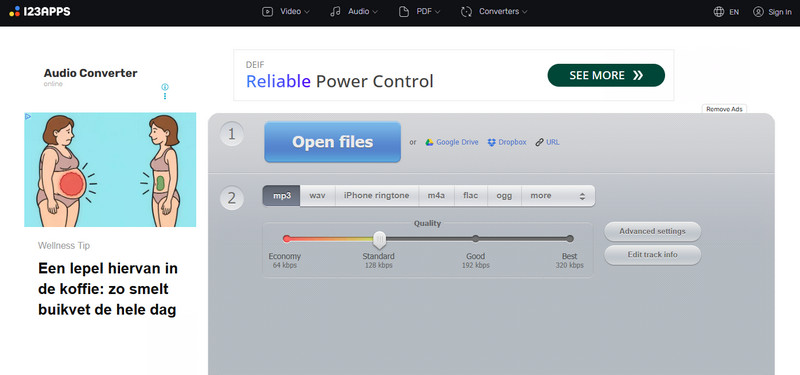
| 15. Online Audio Converter - Convert WAV to MP3 Without Losing Quality | |
|---|---|
| WAV Music Download Sites: | https://online-audio-converter.com/ |
| Convert From | WAV, FLAC, AIFF, M4A, and other audio files |
| Audio Quality Output | Adjustable bitrate and quality settings |
| Output Formats | MP3, WAV, FLAC, AAC, OGG, M4A |
| Batch Conversion | ✗ |
| Conversion Speed | Depends on file size and network |
| Metadata | Supports basic metadata preservation |
| Ad-free & Safety | Depends on website usage |
| Account Requirement | Not required |
| Supported System | Web browser (Windows, Mac, Mobile) |
Online Audio Converter is a free online tool that helps users convert WAV files to MP3 and other audio formats while keeping good audio quality. It is useful for users who want to reduce file size, improve device compatibility, or prepare WAV files for different playback devices.
How to Convert WAV to MP3 Online
Step 1 Open Online Audio Converter and upload the WAV file you want to convert.
Step 2 Choose MP3 as the target format and adjust the audio quality settings if needed.
Step 3 Click the convert button and download the converted MP3 files after processing.
- Free and easy to use
- Supports WAV to MP3 conversion
- No software installation required
- Works across different devices
- Not designed for downloading music
- Requires uploading files manually
- Large WAV files may take longer to process
FAQs About WAV Music Download
Where can I download WAV music for free?
You can download free WAV music from platforms such as Pixabay Music, Free Music Archive, and Internet Archive. These websites provide free audio resources, including background music, independent tracks, and public-domain recordings. For streaming platforms like Spotify, Apple Music, and YouTube Music, dedicated WAV music downloaders can help save songs in WAV format.
Is it better to download music in MP3, FLAC, or WAV?
It depends on your needs. WAV and FLAC provide lossless audio quality, making them better for DJs, producers, and music enthusiasts who want to preserve sound details. WAV is uncompressed and ideal for editing, while FLAC offers similar quality with smaller file sizes. MP3 is smaller and more convenient but uses lossy compression.
| WAV vs FLAC vs MP3 | |
|---|---|
| WAV | DJ, audio editing, professional use |
| FLAC | Lossless music collection |
| MP3 | Everyday listening and storage |
What is the best WAV music downloader?
The best WAV music downloader depends on your needs. For users who want to download high-quality WAV music from multiple platforms, Sidify All-In-One is a strong choice with support for Spotify, Apple Music, YouTube Music, Tidal, and more. For YouTube-only downloads, tools like yt-dlp offer a free and flexible option, while websites such as Pixabay Music and Free Music Archive are better for finding free WAV resources.
Can I convert MP3 to WAV without losing quality?
No converter can restore audio details that were removed from an MP3 file. However, converting WAV to MP3 and keeping a high-quality bitrate can help reduce quality loss. If you need WAV quality, it is better to download or obtain the original WAV file.
Conclusion
If you need to download WAV music from different platforms, Sidify All-In-One is the most convenient choice. It supports Spotify, Apple Music, YouTube Music, Tidal, and more, allowing you to save songs, playlists, and albums as WAV files in one place.
Instead of switching between different download tools, Sidify lets you manage your music library with high-quality audio, multiple output formats, and features like batch downloading and CD burning. For users who want a simple way to keep their favorite music in WAV format, Sidify is worth considering.
 Sidify All-In-One Music Converter
How to get WAV files from your favorite songs? Sidify All-in-One helps you download high-quality WAV files in a few clicks.












