



Looking for the best free way to download FLAC lossless music without compromising on quality? This guide compares 19 best FLAC downloaders, music stores, streaming services, open-source GitHub tools, and free FLAC sources, including options for 24-bit Hi-Res audio.
This post shares legal FLAC download sources. Please respect copyright laws.
Which Is the Best FLAC Music Downloader?
We have included multiple working FLAC downloaders in this guide, and they can be categorized into 5 types as below. Jump to the full comparison table near the end of this guide if you want to compare all of them.
| Category | For Example | Download as Local FLAC File | Support 24-bit Hi-Res | Batch Download | Easy to Use | Price |
|---|---|---|---|---|---|---|
| All-in-One FLAC Downloader | Sidify All-In-One 👍 | ✅ | ✅ | ✅ | ✅ | Free trial / Paid |
| Streaming Music Services | Spotify, TIDAL, Qobuz | Mostly ❌* | ✅ | ❌ | ✅ | $11.99–$14.99/mo |
| Free FLAC Download Sites | FlacMusicFinder, Internet Archive, The Pirate Bay | ✅ | Varies | ❌ | ✅ | Free |
| FLAC Music Download Stores | 7digital, HDtracks, Bandcamp, more | ✅ | Mostly ✅ | ❌ | ✅ | $0.99–$45 |
| FLAC Downloader GitHub Tools | FLACidal | ✅ | ✅ | ✅ | ❌ | Free, open-source |
*Qobuz also sells FLAC files you can download and own.
Part 1. Best Sidify FLAC Downloader App for All Music Sites
Some streaming music platforms are famous for high-quality audio, like Apple Music Lossless, Spotify Lossless, Tidal, Qobuz, Deezer, and more. But you probably know that these services only allow you to stream hi-res tracks within their own music platforms.
If you wish to download high-quality FLAC music files from all these streaming music platforms, Sidify FLAC Streaming Music Downloader is just what you need.
Sidify FLAC Lossless Music Converter
- Download FLAC music from all major streaming music platforms.
- Save 100% original quality from Spotify Lossless, Apple Music Lossless, etc.
- Batch download music playlists at up to 10X faster speed.
- Auto keep ID3 tags & sort music by playlist/artist/album.

What Music Sources Can Sidify Download in High Quality?
Sidify can now keep original sound quality from a wide range of music streaming platforms. In this part, we've tested the high-res audio sources supported by Sidify. And we verified that the output quality was perfectly preserved, with downloads saved as true FLAC music files.
| Supported Lossless Music Sources | Supported FLAC Output Quality | Batch Download | ID3 Tags Preservation |
|---|---|---|---|
| Spotify Lossless | Lossless: 24-bit/44.1 kHz | ✅ | ✅ |
|
Apple Music Lossless Apple Music Hi-Res Lossless |
Lossless: 850 Kbps, 24-bit/48 kHz Hi-Res Lossless: 24-bit/192, 3,730 Kbps |
✅ | ✅ |
|
Amazon Music HD Amazon Music Ultra HD |
HD: 16-bit/44.1 kHz, 850 kbps Ultra HD: 24-bit/192 kHz, 3,730 kbps |
✅ | ✅ |
|
Tidal High Tidal Max |
Max: HiRes up to 24-bit/192 kHz High: 16-bit/44.1 kHz |
✅ | ✅ |
| Deezer Premium | HiFi:16-bit/44.1 kHz, 1,411 kbps | ✅ | ✅ |
| Qobuz Hi-Res | Hi-Res: 24-bit/192 kHz | ✅ | ✅ |
How We Tested Sidify's FLAC Output:
We tested recent versions of Sidify (mainly the Spotify Music Converter around 4.6.x and the All-in-One around 2.6.x, using Spotify Premium, TIDAL HiFi, Qobuz, and all the plans mentioned above.
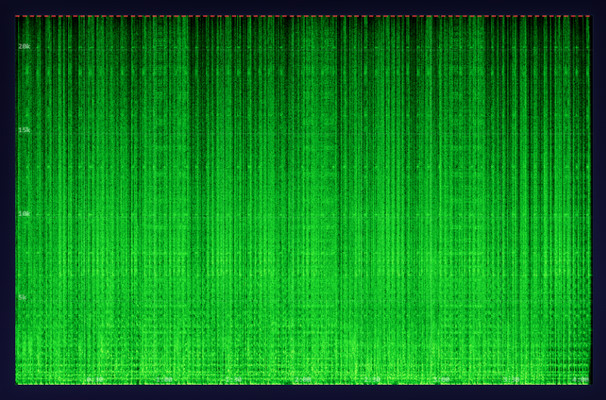
To check the audio quality, we used tools like Spek to analyze spectrograms, as well as frequency cutoffs and spot signs like frequency cutoffs that are common with lossy audio sources. Almost all downloaded FLAC music files gave us a true lossless sound quality output.
How to Use Sidify to Download Any Music to Lossless FLAC?
Step 1 Open the Sidify All-In-One program on your computer. Then let's choose the Qobuz as an example to download lossless FLAC files.
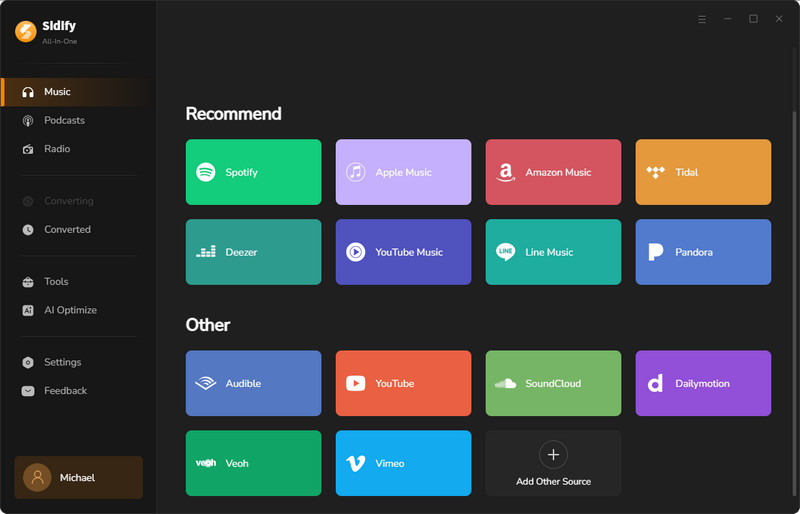
Step 2 Go to Settings window, here you will need to choose FLAC as output format, as well as the output path, output file name, and so on.

Step 3 From Qobuz web player window, choose a specific Qobuz playlist, and click the Add button at the bottom right corner. Then select all hi-res music songs you want to download and add to the task list.

Step 4 Click the 'Convert' button to start downloading FLAC lossless songs from Qobuz and save them to the computer locally.

Step 5 Once done, go to the Converted section, click the folder icon to find your downloaded FLAC songs.

Part 2. 3 Best FLAC Music Streaming Services
2.1 Spotify Premium - Lossless HiFi FLAC Quality Listening
| Spotify Lossless FLAC Music Playing | |
|---|---|
| Website | https://open.spotify.com/ |
| Genres | Pop, Rock, Hip-Hop, Electronic, R&B, Country, Jazz, Classical, Reggae, Indie, and more. |
| Quality | 24-bit/44.1 kHz FLAC, 320kbps |
| Pricing | Individual ($12.99/month), Duo ($18.99/month), Family ($21.99/month), Student ($6.99/month) |
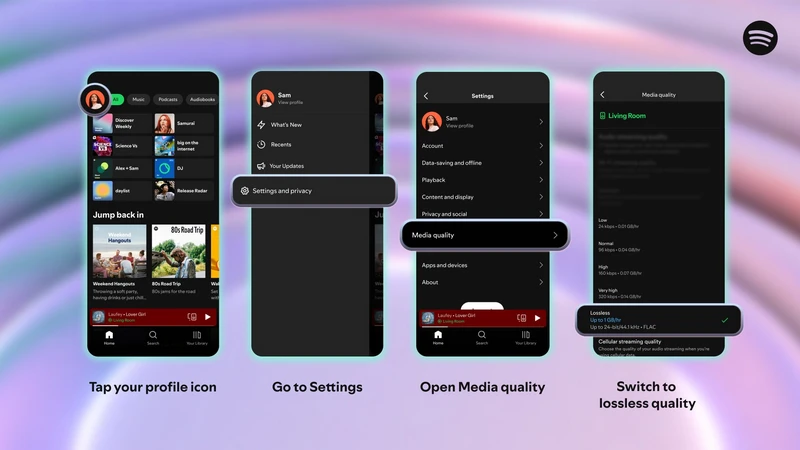
Yes! Spotify introduced FLAC lossless streaming, offering tracks in up to 24-bit and 44.1 kHz quality. This rolled out in September 2025, and now it's fully available on Individual, Duo, and Family plans. Premium subscribers do not need to pay more. They simply need to enable the option in settings to enjoy richer, high-quality sound.
 Sidify Spotify FLAC Lossless Downloader
Still, Spotify downloaded music are only temporary cache files, not true FLAC files you can fully own. To save Spotify songs as real FLAC files, you can use Sidify Music Converter, which lets you download Spotify to FLAC lossless files in local folder.
Pros and Cons of Spotify Premium Lossless FLAC
- Same price as the 320 kbps plan while offering high-fidelity audio (HiFi ≈ 2116.8 kbps).
- Free 3-month Spotify Premium trial.
- Advanced features including Spotify Wrapped, Spotify Blend, and Spotify Connect.
- Lossless does not include Music Videos, Podcasts, or Audiobooks.
- More expensive than a TIDAL subscription.
- Cannot directly download Spotify FLAC files.
- You can't get Spotify Lossless when connecting a Bluetooth speaker or headphones.
2.2 Tidal - High Fidelity Music Streaming
| Tidal FLAC Music Streaming | |
|---|---|
| Website | https://tidal.com/ |
| Genres | Blues, Classical, Country, Electronic, Folk & Americana, Hip-Hop, Jazz, Latin, Pop, R&B & Soul, Rap, Reggae & Dancehall, Rock, and World. |
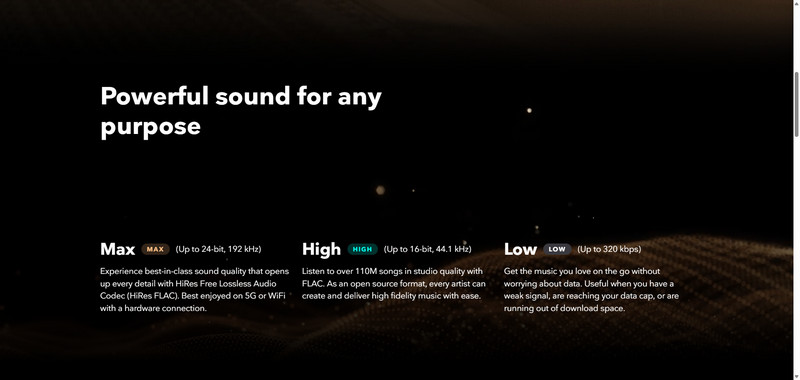
| Quality | Max Hi-Res 24-bit/192kHz, High CD-quality 16-bit/44.1kHz, Low 320kbps. |
| Pricing | Subscription: Individual ($11.99/month), Family and Student plans available, DJ Integrations (additional $9/month) |
Tidal is known for its focus on audio fidelity. And now, Tidal made a notable change, replacing its older MQA and Sony 360 Reality Audio formats with FLAC and Dolby Atmos. Its music library now includes over 180 million tracks, many of which are available in Hi-Res FLAC, offering lossless sound at up to 24-bit/192kHz.
 Sidify Tidal Music to FLAC Converter
Tidal only provides FLAC hi-res streaming. Downloaded songs are for offline use inside the Tidal app. If you want to store Tidal FLAC tracks locally for playback or backup, Sidify Tidal Music Downloader allows you to download Tidal songs while preserving their original quality.
Pros and Cons of Tidal
- FLAC lossless high-quality streaming.
- Over 180 million tracks across a wide range of genres.
- Wide device support, including hi-fi systems.
- Exclusive hi-res content and early releases.
- Higher subscription cost than standard plans.
- No direct way to export FLAC music files.
2.3 Qobuz - Stream, Buy And Download FLAC Music
| Download FLAC Music from Qobuz | |
|---|---|
| Website | https://www.qobuz.com/ |
| Genres | Classical, Jazz, Pop, Hip-Hop, Electronic, and more. |
| Quality | Hi-Res (24-bit/192kHz), CD-quality (16-bit/44.1kHz), MP3 320kbps. |
| Download Format | FLAC, AIFF, WAV, MP3 |
| Pricing |
Subscription: Studio ($10.83/month), Sublime ($14.99/month) Purchase: $15–$25 |
If you want a FLAC file from Qobuz, you need to buy it from the Qobuz store.
And now, you can join Sublime plan to save 60% off on hi-res album purchases. Once purchased, all Qobuz tracks and albums are available to be downloaded in Hi-Res FLAC (up to 24-bit/192kHz)and lossless CD quality (16-bit/44.1kHz).

Pros and Cons of Downloading FLAC on Qobuz
- Focuses on high-quality FLAC audio downloads.
- Wide variety of music genres available.
- Multiple download format options.
- Purchased music can be downloaded and kept permanently.
- Hi-Res albums are relatively expensive.
- Not all albums are available in FLAC format.
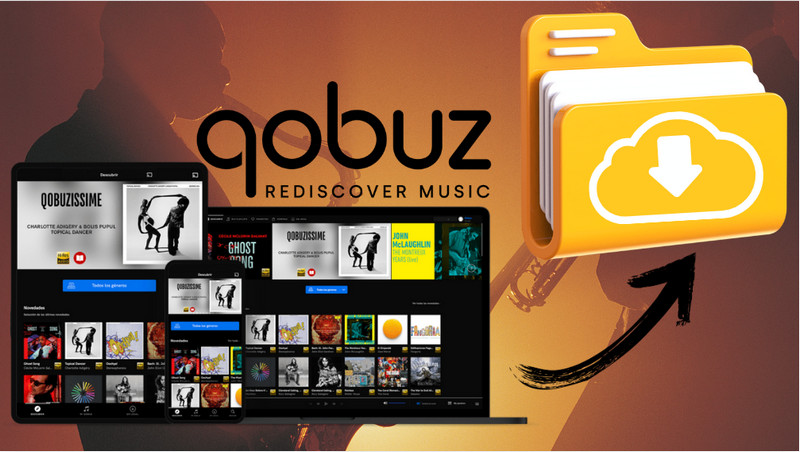
This post give the detailed ways to losslessly download songs on Qobuz. You can choose the best way for your Qobuz music downloading.
Learn More →Part 3. 3 Best Free FLAC Music Download Sites
3.1 FlacMusicFinder
| FlacMusicFinder FLAC Music Download | |
|---|---|
| Website | https://flacmusicfinder.top/ |
| Genre | N/A |
| Quality | 44100 Hz, 24 Bit. |
| Format | FLAC. |
| Pricing | Free. |
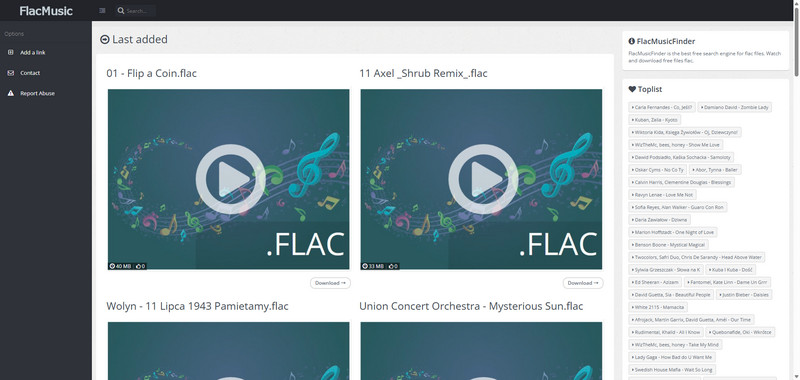
FlacMusicFinder is a basic but fully free FLAC music downloader site that offers quick access to hundreds of FLAC audio files. You can search, preview, and download songs instantly without creating an account. While it's user-friendly for fast access, it lacks features like genre filters, detailed metadata, or clear information about audio specs and licensing.
Pros and Cons of FlacMusicFinder
- Free to search and download songs in FLAC format with high-resolution quality.
- Provides toplist recommendations and recently watched playlists.
- Does not provide clear genre categories.
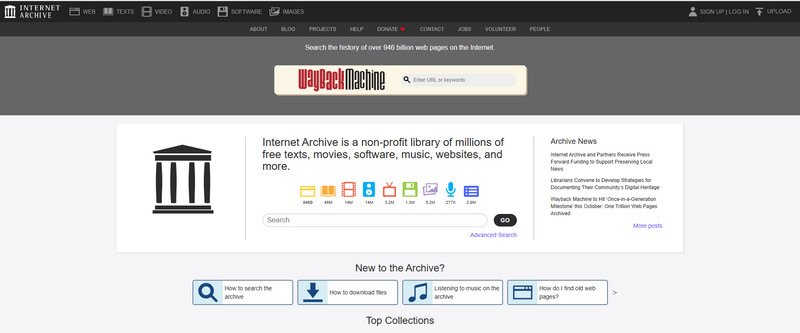
3.2 Internet Archive
| Internet Archive FLAC Music Download | |
|---|---|
| Website | https://archive.org/ |
| Genre | N/A |
| Quality | N/A |
| Format | FLAC, AIFF, WAV, MP3, OGG. |
| Pricing | Free. |
Internet Archive is a non-profit digital library that provides various high-quality FLAC files for free download. Besides, the collection includes not only recorded music but also live music archives featuring concert perfo
Pros and Cons of Internet Archive
- Free to download FLAC songs.
- The music collection mainly features styles from the 1960s and earlier.
3.3 The Pirate Bay
| The Pirate Bay FLAC Music Download | |
|---|---|
| Website | https://thepiratebay.org/ |
| Genre | N/A |
| Quality | 320kbps, 96kHz/24-bit. |
| Format | FLAC, MP3. |
| Pricing | Free. |
The Pirate Bay is a torrent-sharing website where users can search for and download music albums or collections in FLAC format. These files are usually uploaded by a global community of users and often cover a wide range of genres, release years, and high-resolution audio versions (such as 24-bit/96kHz).

Pros and Cons of The Pirate Bay
- Provides a free source for downloading music in FLAC format.
- Does not offer the latest music trends and updated download sources.
Part 4. 11 Best FLAC Music Download Stores
Quick Comparison: All 11 FLAC Music Stores
Before you pick a LAC Music Download store, compare them side by side on sample rate/bit depth, single-track price, album price, catalog size, and region restrictions. Prices shown are approximate and can change without notice.
| Store | Max Bit Depth / Sample Rate | Single Track Price | Album Price | Catalog Size | Region Restriction |
|---|---|---|---|---|---|
| 7digital | 24-bit/96kHz | $0.99+ | $5–$13 | Large, mainstream multi-genre | Global (region-specific storefronts) |
| HDtracks | 24-bit/352kHz (classical) | Rare, mostly album-only | $17–$30 | ~6,000 Hi-Res albums | Global, some titles label-restricted |
| Bandcamp | Up to 24-bit/44.1kHz (artist-dependent) | Track price set by artist | $7–$15 | Millions of independent releases | None – global |
| Bleep | 16-bit/44.1kHz (no 24-bit) | Included in album pricing | $6.99–$14.99 | Niche, Warp Records + indie labels | None – global, UK-based |
| NativeDSD | FLAC 192kHz / DSD512+ | Not sold separately | €20–€35 | 3,600+ albums, classical/jazz focus | None – global, priced in EUR |
| ProStudioMasters | 24-bit/352.8kHz + DSD | Not sold separately | $27–$45 | Major + independent labels | None – global, US-based |
| iTrax | 24-bit/96kHz | Not sold separately | $10.99–$22.98 | Small, audiophile niche | None – global, US-based |
| Presto Music | 24-bit/192kHz | Not sold separately | $10–$17.50 | 200,000+ classical/jazz albums | None – global, UK-based |
| OTOTOY | 24-bit/48kHz+ (FLAC/ALAC) | Priced in JPY per track | Priced in JPY per album | Japanese mainstream + indie, anime OST | Japan-focused catalog, JPY billing |
| Genie Music | 24-bit/192kHz | ~900 KRW (≈$0.65) | Bundled Genie Cash pricing | Major Korean/K-pop catalog | Korea-focused; needs KR phone/payment for full downloads |
| e-onkyo music | 24-bit/192kHz + DSD (JP only) | $3–$4 | $15–$20 | Hundreds of thousands of Hi-Res tracks | Japan; also US/UK/DE as "Onkyo Music" |
4.1 7digital - High-Resolution FLAC Downloads
| 7digital FLAC Music Downloader | |
|---|---|
| Website | https://us.7digital.com/ |
| Genres | Pop, Electronic, Rock, Dance, World, Jazz, Alternative, Latin, and Classical. |
| FLAC Quality | 24-bit/44.1kHz and 24-bit/96kHz. |
| Price | Albums $5–$13, featured albums $5, singles $0.99. |
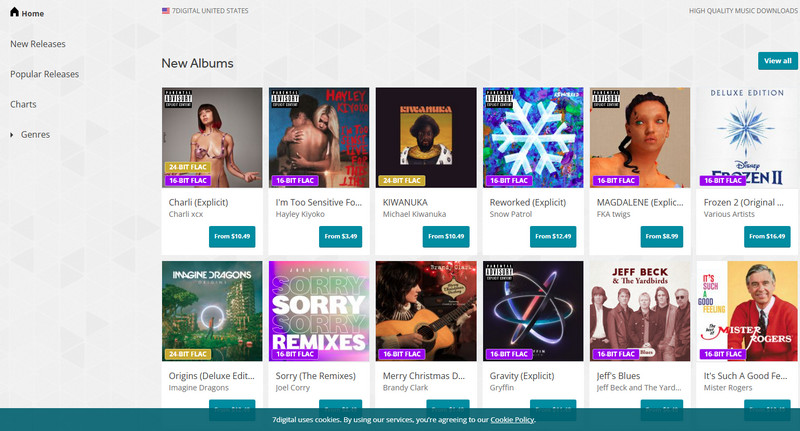
Having provided hi-res FLAC music download service for over 16 years, 7digital offers various genres beyond just traditional styles, popular and high-demand categories like Pop, Rock, Jazz, Classical, and Electronic. Audio files are available to download in FLAC formats. FLAC-supported tracks are clearly marked with a "16/24-BIT FLAC" label on the cover.
Pros and Cons of 7digital
- Focuses on high-quality FLAC audio downloads.
- Clear layout with a convenient search bar.
- Provides 30-second previews before purchase.
- Purchased music can be downloaded and kept indefinitely.
- Catalog is limited compared to major streaming services.
4.2 HDtracks - Hi-Res FLAC Downloads for Audiophiles
| HDtracks FLAC Download Website | |
|---|---|
| Website Link | https://www.hdtracks.com/ |
| Genre | DJ Tools & Remix, Funk, Soul & Jazz, Hip-Hop, Rock, Classical, Electronic, Blues, Country. |
| FLAC Quality | CD quality (16-bit/44.1kHz), 24-bit/192kHz, 24-bit/352kHz (classical recordings). |
| Download Format | FLAC, WAV, AIFF, and ALAC. |
| Costs | $17–$30 (typical album), individual tracks available in some cases. |
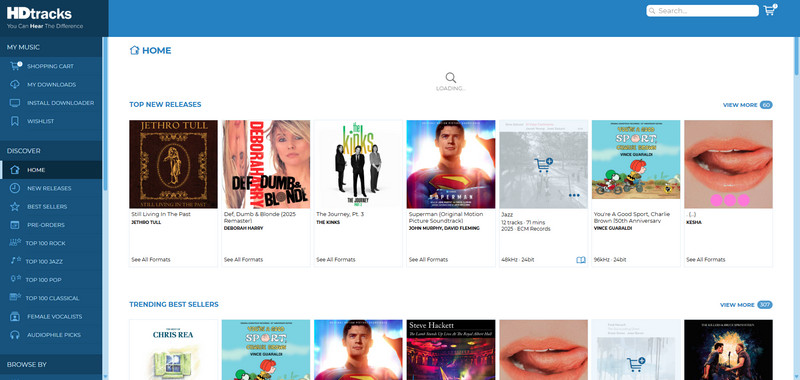
HDtracks focuses on delivering studio-quality sound, with albums available in formats like AIFF, FLAC, ALAC, and WAV. It caters mainly to mature listeners and audiophiles, offering a catalog of just over 6,000 hi-res albums—most in 24-bit/44.1kHz or 24-bit/96kHz quality, and a smaller selection reaching up to 24-bit/352kHz, mainly in classical genres.
Pros and Cons of HDtracks
- You can download high-resolution tracks up to 24-bit/192kHz, and some albums have special mastering versions you won't find anywhere else.
- The search tools are powerful—you can easily filter music by genre, label, and other categories.
- The catalog doesn't have a lot of mainstream or new pop music.
- Most albums can only be bought as a full album—you can't buy individual tracks very often.
- Once you download a file, you can't get it again if you lose it, so you'll need to back it up yourself.
4.3 Bandcamp - FLAC Downloads from Independent Artists
| Bandcamp FLAC Download Site | |
|---|---|
| Website | https://bandcamp.com/ |
| Genre | House, Electronica, Downtempo, Techno, Electro, Dubstep, and more. |
| FLAC Quality | 16-bit/44.1kHz. |
| Download Format | FLAC, ALAC, WAV, AIFF, MP3, AAC, Ogg Vorbis. |
| Costs |
Digital Downloads: $7 to $15 CDs: $12.99 to $19.99 Vinyl Records: $20 to $40 |
Fans on Bandcamp can support their favorite artists by buying digital albums. The default download is MP3, but you can also choose lossless formats like 24-bit/44.1kHz FLAC, WAV, or AIFF. Other options include ALAC (Apple Lossless), AAC, Ogg Vorbis, and more.

Pros and Cons of Bandcamp
- Supports both digital music purchases and physical formats like CDs and vinyl.
- Great platform for discovering indie artists and lesser-known bands.
- Purchased tracks are available for unlimited re-download.
- Most revenue goes directly to artists, making it a meaningful way to support musicians.
- The interface can feel less convenient when browsing for new music.
- Physical orders may take a long time to arrive.
Which Bandcamp Music downloaders are safe and fast? Check this article to download songs and albums on Bandcamp and keep music forever.
Learn More →4.4 Bleep - FLAC Downloads from Warp Records & Indie Labels
| Bleep FLAC Music Downloader | |
|---|---|
| Website | https://bleep.com/ |
| Genre | Alternative, Metal, Ambient, Experimental, Bass, Grime, Dubstep, Hip Hop, R&B, Electronic, Techno, Jazz, Soul, Folk, Soundtracks, New Age. |
| Quality | 320kbps, 24-bit WAV, 16-bit Lossless FLAC (CD quality). |
| Download Format | MP3, WAV, and FLAC. |
| Pricing |
Digital Downloads: $6.99 to $14.99 CDs: $12.99 to $19.99 Vinyl Records: $20 to $40 Special Editions: Starting at $29.99 Bleep Exclusives: $13.99 |
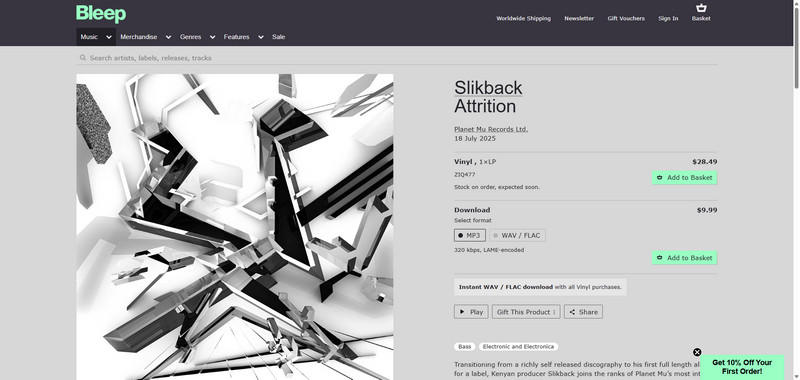
Bleep is a UK-based digital music store owned by Warp Records. You can download your purchases in FLAC (44.1kHz, 16-bit lossless), MP3 or WAV formats. Downloads never expire, and you can re-download your music as many times as you like. While Bleep doesn't offer 24-bit FLAC, it does sell physical formats like vinyl records, cassette tapes, and CDs for collectors.
Pros and Cons of Bleep
- Supports FLAC downloads with unlimited re-downloads that never expire.
- Focuses on niche genres and fresh releases, making it great for discovering hidden gems.
- Allows track previews before purchase with selective sample segments.
- Some users report receiving damaged limited-edition box sets.
- Purchased tracks may disappear from the download list and require customer support.
- Browsing is limited to categories or keywords, without combined search options.
4.5 NativeDSD - Hi-Res FLAC & DSD Music Downloads
| NativeDSD High Quality Music Download Site | |
|---|---|
| Website | https://www.nativedsd.com/ |
| Genre | Jazz, Classical, Blues, World Music, Folk, Pop, Rock, Electronic, Alternative, Americana, Gospel, Holiday Music, Film Music, Children's Music, Country, Broadway, Latin, Big Band. |
| Quality and Format | DSD 64, DSD 128, DSD 256, DSD 512, DSD 1024, DXD (352.4kHz), PCM 384kHz, PCM 192kHz, PCM 96kHz, FLAC 192kHz, FLAC 96kHz, FLAC, WAV, AIFF, ALAC. |
| Pricing | €20–€35 |
NativeDSD is a high-resolution music store specializing in DSD, offering over 3,600 albums from 100+ global labels across classical, jazz, and vocal genres. It also provides FLAC files (24bit/96kHz or 192kHz) converted from master tapes using Zephiir technology—maintaining near-original sound while enhancing compatibility.

Pros and Cons of NativeDSD
- Offers DSD64 to DSD512 and DXD high-resolution audio.
- Supports stereo and multichannel formats.
- Provides original DSD masters without PCM conversion.
- Downloads are available through NativeDSD Downloader.
- Includes reviews, interviews, and rare releases from the community.
- Catalog focuses mainly on classical and jazz, with fewer mainstream genres.
- High pricing, around €20–€35 per album.
- Some albums have limited or no preview options.
- Some download formats may not be widely compatible.
4.6 ProStudioMasters - High-Resolution FLAC Music Downloads
| ProStudioMasters FLAC Music Download | |
|---|---|
| Website | https://www.prostudiomasters.com/ |
| Genre | Blues, Classical, Country, Electronic, Hip Hop, Jazz, Pop, R&B, Rock. |
| Quality | 96kHz/24-bit, 192kHz/24-bit, 352.8kHz/24-bit, DSF 2.8224 MHz. |
| Format | AIFF, FLAC, MQA, and DSD/DSF. |
| Pricing | $27–$45 |
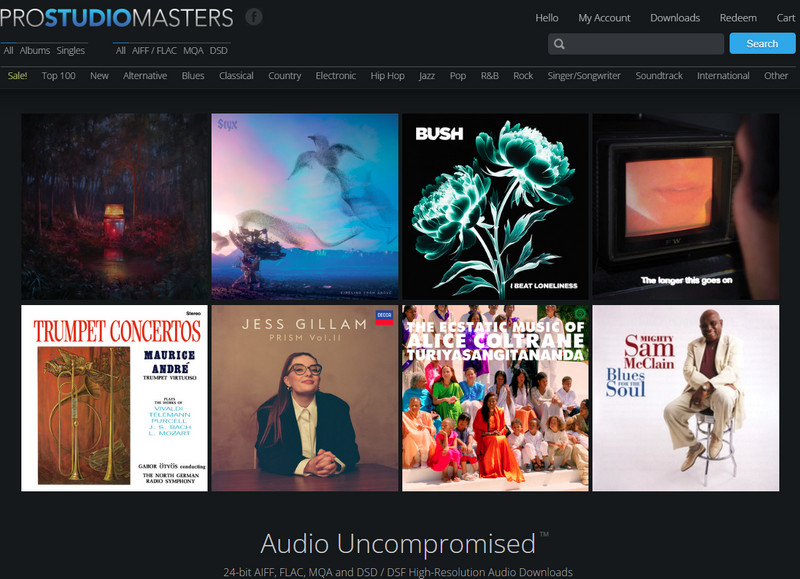
Pro Studio Masters is a great place to find high-quality music FLAC downloads. They get music straight from both major and indie labels, and the sound quality is top-notch.
Pros and Cons of ProStudioMasters
- Supports various high-resolution formats including AIFF, FLAC, MQA, and DSD/DSF.
- Offers a wide range of music genres.
- Features native 24-bit FLAC files with sample rates up to 352.8kHz.
- Provides a convenient search function with filters by download format.
- No major disadvantages reported.
4.7 iTrax - Hi-Res FLAC Downloads with Real Master Quality
| iTrax Hires FLAC Music Downloads | |
|---|---|
| Website | https://www.itrax.com/ |
| Genre | Acoustic, Acoustic Guitar, Blues, Classical, Country, Folk, Jazz, Latin, Pop, Rock, Vocal, World. |
| Quality | 96 kHz/24-bits. |
| Format | FLAC, WAV. |
| Pricing | $10.99–$22.98 |
iTrax is a site for high-resolution music downloads, perfect for those who want lossless FLAC files. It offers real high-res audio, up to 96kHz/24-bit. You can download in FLAC or WAV formats.

Pros and Cons of iTrax
- Offers multiple delivery format options, including downloads, CDs, and analog tapes.
- The music catalog is relatively limited with fewer available choices.
4.8 Presto Music - FLAC Downloads for Classical & Jazz
| Presto Music FLAC Music Download Store | |
|---|---|
| Website | https://www.prestomusic.com/ |
| Genre | Classical, Jazz. |
| Quality | Hi-Res lossless 96 kHz/24-bit, CD quality 44.1 kHz/16-bit, 320kbps. |
| Format | FLAC, ALAC, WAV, MP3. |
| Pricing | $10–$17.5 |
Presto Music is operated by dedicated music enthusiasts, specializing in classical and jazz genres. The platform offers high-resolution audio up to 24-bit/192kHz and features a catalog of over 200,000 carefully selected albums. Available download formats include hi-res lossless files at 96kHz/24-bit in FLAC, ALAC, and WAV, standard quality audio at 44.1kHz/16-bit in the same formats, as well as 320 kbps MP3 files.

Pros and Cons of Presto Music
- The platform offers over 260,000 downloads, mostly in classical and jazz.
- They also sell sheet music and music-related books.
- When you buy complete albums, singles, or individual works, they come with cover images in JPG format.
- You won't find many options in other music genres..
- The service does not support DSD.
4.9 OTOTOY - Japan's Top FLAC Store for J-Pop & Anime
| OTOTOY FLAC Music Download Store | |
|---|---|
| Website | https://ototoy.jp/ |
| Genre | J-Pop, Anime Soundtracks, Japanese Indie, Electronic, Rock. |
| Quality | 16-bit/44.1kHz to 24-bit/48kHz+ (varies by release). |
| Format | FLAC, ALAC, WAV, AAC, MP3. |
| Pricing | Priced per track/album in JPY. Hi-Res playback unlock: ¥1,340/year via the OTOTOY app. |
OTOTOY is Japan's leading download store for fans who want Japanese mainstream and indie music in real FLAC. Its catalog leans heavily into J-Pop, anime soundtracks, and electronic releases you won't easily find on Western stores. Most albums let you pick between FLAC and ALAC at checkout, and the OTOTOY app itself supports playback up to 24-bit/48kHz.
Pros and Cons of OTOTOY
- Deep catalog of Japanese mainstream, indie, and anime music in FLAC.
- Lets you choose between FLAC and ALAC for most purchases.
- Site and checkout are mostly in Japanese, and prices are billed in JPY.
- Catalog outside Japanese music is limited.
4.10 Genie Music - Korea's Hi-Res FLAC Store
| Genie Music FLAC Music Download | |
|---|---|
| Website | https://www.genie.co.kr/ |
| Genre | K-Pop, Korean Pop, R&B, Ballad, Hip-Hop. |
| Quality | Up to 24-bit/192kHz FLAC. |
| Format | FLAC, MP3. |
| Pricing | About 900 KRW (≈$0.65) per FLAC track, paid with Genie Cash. No flat subscription covers downloads. |
Genie Music is South Korea's second-largest streaming platform, and it was among the first major Korean services to add 24-bit Hi-Res FLAC support for its catalog. If you follow K-pop and want official Hi-Res FLAC straight from the source, Genie is one of the very few legal options.
Pros and Cons of Genie Music
- One of the few official sources for K-pop in 24-bit/192kHz FLAC.
- Large, up-to-date Korean pop and R&B catalog.
- Downloading FLAC files typically needs a Korean phone number and local payment.
- Interface is Korean-only, with no official English version.
4.11 e-onkyo music - Japan's Original Hi-Res FLAC Store
| e-onkyo music FLAC & DSD Download Store | |
|---|---|
| Website | https://www.e-onkyo.com/ (rebranded as "Onkyo Music" in the US, UK, and Germany) |
| Genre | Classical, Jazz, Pop, Rock, Anime, World Music. |
| Quality | PCM 44.1kHz–192kHz/24-bit; DSD 2.8MHz/5.6MHz (Japan storefront only). |
| Format | FLAC, WAV, DSF (DSD). |
| Pricing | Tracks $3–$4, albums $15–$20. |
Launched in 2005, e-onkyo music was the world's first dedicated Hi-Res download store and is still Japan's go-to source for studio-quality FLAC. Its catalog runs into hundreds of thousands of Hi-Res FLAC tracks alongside millions of CD-quality files, spanning classical, jazz, anime, and more.
Pros and Cons of e-onkyo music
- One of the largest Hi-Res FLAC catalogs anywhere, with real studio masters.
- Also reachable outside Japan via the Onkyo Music storefronts.
- DSD downloads are limited to the Japan storefront.
- Hi-Res albums cost more than standard-quality downloads elsewhere.
Part 5. Best FLAC Music Downloader on GitHub
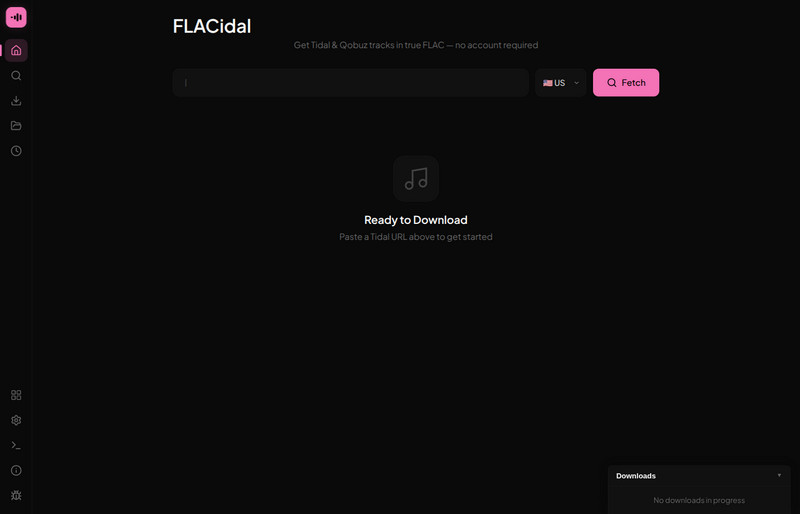
FLACidal is a free & open-source app (built with Go and Svelte) that works through a cascade of sources in order - Tidal, then Qobuz, then Amazon Music, then Bandcamp, then Soulseek P2P - and automatically picks up the new FLAC files and download.
Another option is SpotiFLAC, which uses Spotify links to find matching audio from supported providers. See our SpotiFLAC review and setup guide for version differences, download steps, and sample spectrum checks.
Video Tutorial to Download FLAC from All Music Services
Full Comparison: All 19 FLAC Downloaders, Stores & Sites
Here's the complete side-by-side comparison of FLAC downloaders by download source, local FLAC availability, 24-bit Hi-Res support, batch downloading, metadata preservation, and price.
| Tool / Site | Download Source | Local FLAC File | 24-bit Hi-Res | Batch Download | Save ID3 Tags | Price |
|---|---|---|---|---|---|---|
| Sidify All-In-One | Spotify, Apple Music, Amazon Music, TIDAL, Qobuz, Deezer & more 👍 | ✅ | ✅ | ✅ | ✅ | Free trial / Paid |
| Spotify Premium | Spotify Streaming | ❌ | ✅ | ❌ | ❌ | $12.99+/mo |
| TIDAL | TIDAL Streaming | ❌ | ✅ | ❌ | ❌ | $11.99+/mo |
| Qobuz | Qobuz Store / Streaming | ✅ | ✅ | ✅ | ✅ |
$10.83+/mo $15–$25 purchase |
| FlacMusicFinder | Online FLAC Search | ✅ | ✅ | ❌ | ❌ | Free |
| Internet Archive | Public Archive / Live Recordings | ✅ | ❌ | ❌ | ❌ | Free |
| The Pirate Bay | User-uploaded Torrents | ✅ | ❌ | ✅ | ❌ | Free |
| 7digital | 7digital Store | ✅ | ✅ | ❌ | ❌ |
$0.99+ tracks $5–$13 albums |
| HDtracks | HDtracks Store | ✅ | ✅ | ❌ | ❌ | $17–$30 / album |
| Bandcamp | Bandcamp Artists & Labels | ✅ | ❌ | ✅ | ❌ | Usually $7–$15 |
| Bleep | Bleep / Independent Labels | ✅ | ❌ | ❌ | ❌ | $6.99–$14.99 |
| NativeDSD | NativeDSD Store | ✅ | ✅ | ❌ | ❌ | €20–€35 |
| ProStudioMasters | Major & Independent Labels | ✅ | ✅ | ❌ | ❌ | $27–$45 |
| iTrax | iTrax Hi-Res Catalog | ✅ | ✅ | ❌ | ❌ | $10.99–$22.98 |
| Presto Music | Presto Classical & Jazz Catalog | ✅ | ✅ | ❌ | ❌ | $10–$17.50 |
| OTOTOY | OTOTOY Store (Japan) | ✅ | ✅ | ❌ | ❌ | Priced per track/album in JPY |
| Genie Music | Genie Music Store (Korea) | ✅ | ✅ | ❌ | ❌ | ~900 KRW/track |
| e-onkyo music | e-onkyo / Onkyo Music | ✅ | ✅ | ❌ | ❌ | $3–$4 tracks, $15–$20 albums |
| FLACidal (GitHub) | Self-hosted, Soulseek + streaming API cascade | ✅ | ✅ | ✅ | ✅ | Free, open-source |
Winner: Sidify All FLAC Downloader
If you're looking for the most flexible option, Sidify All-In-One is your best bet. It lets you download real FLAC files from a wide range of music platforms, like Spotify, Apple Music, Amazon Music, TIDAL, Qobuz, and Deezer. You can also grab entire playlists at once, keep all the track info like song titles and album art, and save music in high-resolution FLAC quality.
Is Your FLAC File REALLY Lossless? How to Verify?
A file having a .flac extension or saying "24-bit/96kHz" on the store page doesn't mean it's truly high-resolution.
Some sellers or uploaders take a regular-quality file, relabel it as Hi-Res, or put a compressed audio source inside a lossless container like FLAC. So how can you tell for sure? You can use the same spectrogram check we used earlier in this guide.
How to Check FLAC's Spectrogram Using foobar2000 + Spek
Step 1 Download and install foobar2000 (it's free and works on Windows) from its official website. This is the player you'll use to browse and preview your FLAC files.
Step 2 Download and install Spek (free for Windows, Mac, and Linux). It's a small tool designed specifically to create a spectrogram.
Step 3 Open the FLAC file you want to check directly in Spek (you can just drag and drop the file in).
Step 4 Look at the vertical axis, which shows frequency.
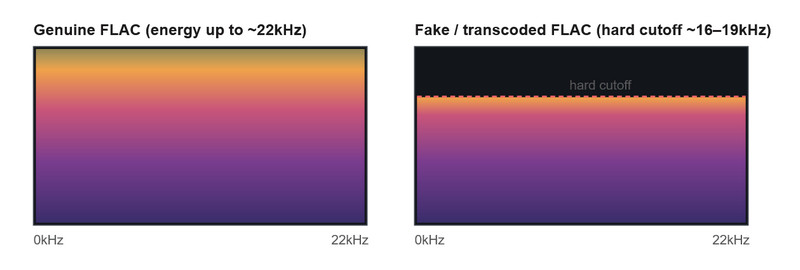
Step 5 Watch out for a sharp, flat "shelf" line—a clear horizontal cut where the audio suddenly stops, with nothing above it. That's a sign that the file was once compressed to a lossy format and then converted back to FLAC.
- Cutoff near 20.5kHz → originally a 320kbps MP3
- Cutoff near 19kHz → originally a 256kbps file
- Cutoff near 18kHz → originally a 192kbps file
- Cutoff near 16kHz → originally a 128kbps file
FAQs about FLAC Music Download
What is FLAC music?
FLAC stands for Free Lossless Audio Codec. Unlike lossy formats such as MP3 and AAC, FLAC compresses audio without permanently removing audio data. This allows FLAC files to preserve the original sound quality while using less storage space than uncompressed formats such as WAV.
How to Verify Real FLAC?
Is FLAC better than MP3?
FLAC provides better audio preservation because it uses lossless compression, while MP3 removes some audio information to reduce file size. FLAC is therefore preferred for archiving, Hi-Fi playback, and audiophile listening, while MP3 uses less storage space and may be more convenient when file size matters.
What is the difference between 16-bit and 24-bit FLAC?
16-bit/44.1kHz FLAC is commonly considered CD-quality audio, while 24-bit FLAC can provide greater dynamic range and is often used for Hi-Res music. Hi-Res stores and streaming services may offer FLAC at 24-bit/96kHz or 24-bit/192kHz, although the actual listening benefit also depends on the original recording, mastering, playback equipment, and listening environment.
Where can I download FLAC music legally?
You can legally download FLAC music from licensed music stores and services such as Qobuz, HDtracks, 7digital, Bandcamp, NativeDSD, ProStudioMasters, and Presto Music. Or use Sidify to download lossless FLAC files from streaming music sites for personal use only.
What is the best FLAC music downloader?
The best FLAC music downloader depends on where your music comes from. If you listen across multiple streaming platforms, Sidify All-In-One is a convenient option because it supports Spotify, Apple Music, Amazon Music, TIDAL, Qobuz, Deezer, and more, while allowing supported music to be saved as local FLAC files with batch downloading and ID3 tags preserved.
Can Spotify download music in FLAC format?
Spotify supports lossless listening for eligible Premium users, but its official offline downloads remain available only inside the Spotify App and cannot be exported as normal local FLAC files. If you need supported Spotify music saved as local FLAC files, you can use a compatible music downloader such as Sidify Spotify Lossless Music Converter.
Can I convert streaming music to FLAC?
Yes, some music converters can save supported streaming music in FLAC format. However, converting a lossy audio source to FLAC does not improve its original sound quality. The actual quality of the FLAC output depends on the quality of the original streaming source, so lossless or Hi-Res source audio is important if you want genuine high-quality FLAC files.
Where can I download 24-bit Hi-Res FLAC music?
You can find 24-bit Hi-Res FLAC music from services and stores such as Qobuz, HDtracks, NativeDSD, ProStudioMasters, and Presto Music. Available quality varies by release, with some albums offered at 24-bit/96kHz or 24-bit/192kHz. Or use Sidify FLAC downloader to capture Hi-Res FLAC files from any music sites.
Will my phone, car, or DAP actually play FLAC files?
It depends on the device. Android plays FLAC natively, but the iPhone's built-in Music app doesn't — you'll need a third-party player. Whether CarPlay or Android Auto plays FLAC depends on the app you cast from, not the car itself, and most modern car USB ports handle FLAC fine. Network players like Roon and Jellyfin support FLAC natively, and hi-fi DAPs from FiiO and Astell&Kern are built around it. Here's the full breakdown:
| Device / Platform | Native FLAC Support | What You Need |
|---|---|---|
| iPhone (Files / Music app) | Partial | The built-in Music app doesn't play FLAC at all—Apple uses its own lossless format called ALAC instead. To really use FLAC on an iPhone, you'll need to install a third-party player like VOX, FLAC Player, or Doppler. |
| Android (stock player) | Yes | Android has supported FLAC playback natively since version 3.1 (Honeycomb). |
| Apple CarPlay | Depends on the app | To play FLAC through CarPlay, you'll need an iPhone player app that supports both FLAC and CarPlay. |
| Android Auto | Depends on the app | As long as your chosen Android music app (like Poweramp or AIMP) supports both FLAC and Android Auto, it should work. |
| Car USB / SD playback | Varies by head unit | Most modern infotainment systems read FLAC straight from a USB drive; older or budget units may only recognize MP3/WAV. Check your car's manual. |
| Plex | Yes, with caveats | Plex supports FLAC, but some clients downmix multichannel FLAC to stereo. |
Conclusion
As you can see from the websites above, there are several options for downloading lossless FLAC music. On top of that, Sidify All-In-One stands out because it works with almost all major high-quality music services, like Qobuz, TIDAL, and Amazon Music Unlimited, so you can get FLAC files directly from them.
The best part? Sidify's FLAC downloader gives you real audio files in your chosen FLAC format, and it keeps the original high-quality sound completely intact. So you don't have to worry about losing any of the audio detail you're looking for.
If you're a self-hoster, open-source tools like the ones covered in Part 5 are a free, geekier alternative. But for most people, Sidify stays the simpler choice: no server, no command line, just sign in and download. And whichever route you take, run a quick spectrogram check on anything labeled "Hi-Res" before you trust it.
 Tips:
Tips:If you enjoy movies, series and shows offline across Netflix, Amazon, Disney+, Hulu, and more, All-In-One Video Downloader is your perfect solution! Download your favoirte videos from over 1000 major streaming video sites in one place for a hassle-free viewing experience!











