


Apple Music offers three audio quality options: High Quality, Lossless, and Hi-Res Lossless. Among them, Lossless uses the ALAC format to preserve the original audio data with lossless compression.
In this guide, we'll explore whether Apple Music is really lossless or not, its supported devices, and how to enable Apple Music Lossless. We'll also introduce a reliable way to download Apple Music songs losslessly and save the songs forever.
Part 1: Is Apple Music 100% Lossless?
Since June, 2021, Apple Music has offered lossless music to subscribers. They use ALAC (Apple Lossless Audio Codec), a lossless compression format they developed themselves, which fully preserves all data from the original recording without any loss of quality.
However, many wondered is Apple Music really lossless? To find out the truth, we tested it using a professional acoustic spectrum analyzer called Spek.
Test Principle
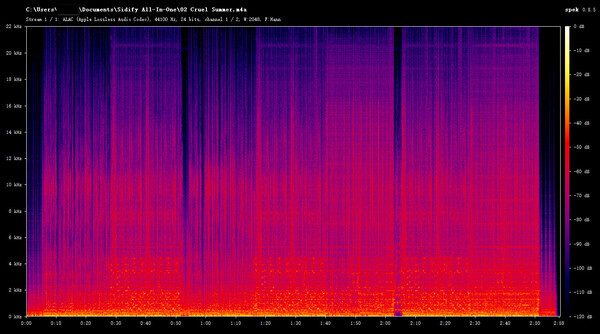
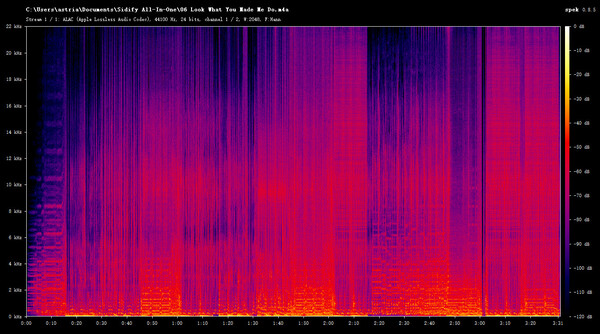
Generally speaking, lossy compression utilizes Auditory masking effect of humans, cutting off frequencies above 16 kHz–20 kHz, which the human ear is insensitive to. On a spectrogram, this leaves an obvious, rigid cut-off that appears as a perfectly flat, straight horizontal line.
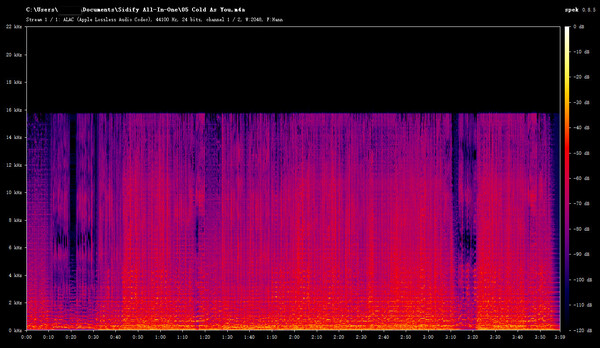 Lossy Audio Example: Audio spectrum analysis showing high-frequency cutoff in lossy audio.
On the other hand, true lossless audio, such as 24-bit/48 kHz or 24-bit/192 kHz, fully preserves high-frequency signals, which is up to 22 kHz or even 96 kHz. In a spectrum, the high-frequency edge usually appears more natural, with an irregular and gradual fading pattern rather than a flat cutoff line.
Using this principle, we can easily test whether Apple Music is real lossless or not.
Test Result
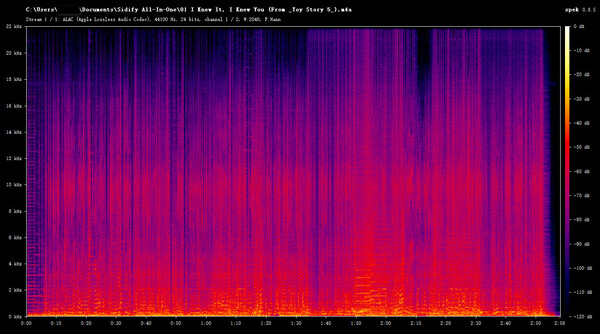
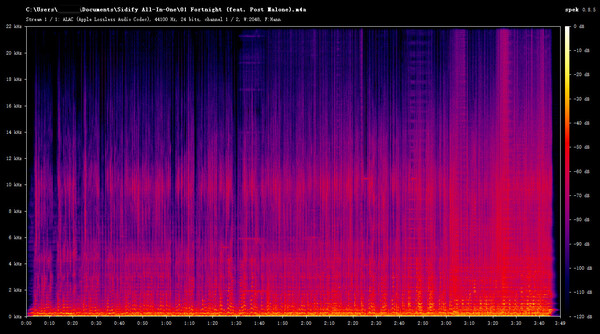
I used a lossless converter called Sidify Apple Music Converter to preserve several popular Taylor Swift songs on my local device, and then imported them into Spek for analysis. To ensure accurate test results, I selected songs from different periods of Taylor Swift's career, ranging from older to newer releases and from less popular to widely known tracks: I Knew It, I Knew You (2026), Fortnight (2024), Cruel Summer (2019), and Look What You Made Me Do (2017). The detailed testing results are shown below.
| Song | Release Year | Frequency Range | Lossless | Testing Result Screenshot |
|---|---|---|---|---|
| I Knew It, I Knew You | 2026 | ~22.05 kHz | √ |
|
| Fortnight | 2024 | ~22.05 kHz | √ |
|
| Cruel Summer | 2019 | ~22.05 kHz | √ |
|
| Look What You Made Me Do | 2017 | ~22.05 kHz | √ |
|
According to the test results, you can see that there are no artificial steep cut-offs at 16 kHz or 18 kHz, indicating that no lossy AAC/MP3 compression was applied. Therefore, we can conclude that Apple Music is truly lossless.
Part 2: Apple Music High Quality vs Lossless vs Hi-Res Lossless
In the Apple Music settings, audio quality is typically divided into three distinct levels: High Quality, Lossless, and Hi-Res Lossless. So what are the differences between these three audio quality levels? In the table below, we've compared these three audio quality levels in detail based on key specs, hardware requirements, and data consumption.
| Aspect | High Quality | Lossless | Hi-Res Lossless |
|---|---|---|---|
| Codec | AAC | ALAC | ALAC |
| Max Specs | 256 kbps | 24-bit / 48 kHz | 24-bit / 192 kHz |
| Transmission | Bluetooth & Wired | Wired Only |
Wired Only (requires an external USB DAC) |
| Hardware Needed | Any headphones | Wired headphones or speakers | USB DAC + high-end wired headphones |
| Data Usage | ~6 MB/song | ~36 MB/song | ~145 MB/song |
From the table, we can see that Apple Music High Quality offers lower audio quality than Lossless, but it has smaller file sizes and requires less powerful devices and headphones. Therefore, it is a suitable choice for most users' daily listening. Meanwhile, Lossless Apple Music is a better option for users who have professional audio equipment and want to enjoy higher-quality sound.
Part 3: Apple Music Lossless vs Dolby Atmos: What's the Difference?
Many Apple Music users confuse Lossless and Dolby Atmos because both are described as premium audio features. However, they improve different aspects of music playback.
Lossless focuses on preserving audio details. It restores every detail of the original master recording, allowing you to hear music that is as authentic and true to the original as possible.
Dolby Atmos, on the other hand, creates a 3D soundscape where sounds come from all directions — front, back, left, and right — making you feel as if you're right there at a live concert.
| Feature | Lossless Audio (ALAC) | Dolby Atmos (Spatial Audio) |
|---|---|---|
| Core Goal | Pure Sound Quality (Fidelity) | 3D Surround Experience (Space) |
| Audio Channel Layout | Standard 2.0 Stereo | Multi-channel / Object-based |
| Bit-for-Bit Bitrate | ~1411 kbps to 9216 kbps | ~768 kbps via Dolby Digital Plus |
| Preserves 100% Studio Data | ✅ | ❌ |
| 3D Sound | ❌ | ✅ |
| Works with Bluetooth / AirPods | ❌ | ✅ |
| Best For | Acoustic, Vocal & Classic Hits | Live Shows, Movies & EDM |
Can Apple Music Use Lossless and Dolby Atmos at the Same Time?
No. They are mutually exclusive formats on Apple Music. When a song supports both, Apple Music defaults to Dolby Atmos. If you want to listen to lossless Apple Music, you must manually turn Dolby Atmos OFF in your device settings.
Learn how to enjoy Dolby Atmos music on Amazon Music, find compatible tracks, and listen offline with the right tools for a better immersive audio experience.
Learn More →Which One Should You Choose?
| User Type | Recommended Setting |
|---|---|
| Casual listeners | Dolby Atmos |
| AirPods users | Dolby Atmos |
| Wired headphone users | Lossless |
| Audiophiles | Hi-Res Lossless |
| Classical / Jazz listeners | Lossless |
| Live albums / Pop music | Dolby Atmos |
Part 4: Lossless Apple Music Supported Devices
Apple Music Lossless can be played on many devices, but the specifications and audio quality vary significantly across different devices. Here are the mainstream devices that support Lossless:
| Device Type | Support Status | Maximum Specification | Notes |
|---|---|---|---|
| iPhone | ✅ | Up to 24-bit/48kHz | Hi-Res (192kHz) requires an external DAC |
| iPad | ✅ | Up to 24-bit/48kHz | Hi-Res (192kHz) requires an external DAC |
| Mac | ✅ | Some models support up to 96kHz | An external DAC is required for 192kHz playback |
| Windows PC | ✅ | Up to 24-bit/192kHz | Requires an external DAC |
| Android Phone | ✅ | Up to 24-bit/192kHz | Requires an external DAC + wired headphones |
| HomePod / HomePod mini | ✅ | Up to 24-bit/48kHz | Does not support Hi-Res audio |
| Apple TV 4K | ✅ | Up to 24-bit/48kHz | Does not support Hi-Res audio |
Note: To achieve lossless music playback, you'll need to connect the AirPods Max via a USB-C cable or use wired headphones with an external DAC. To listen to Hi-Res Lossless (192 kHz) audio, you'll need an external USB DAC, wired headphones or speakers, and a playback device that supports 192 kHz.
For most users, listening to lossless audio with a smartphone and wired headphones already provides excellent sound quality.
Part 5: How to Listen to Apple Music lossless on Android & iPhone
If you want to listen to Apple Music Lossless on Android or iPhone, make sure you have the supported devices and wired headphones mentioned above, then follow these steps.
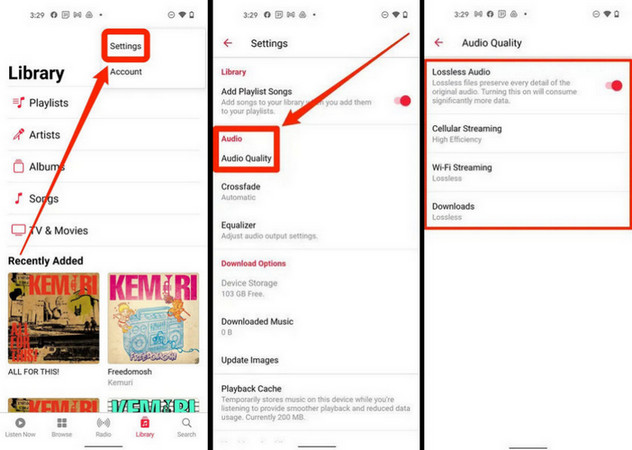
Listen to Apple Music Lossless on Android
Step 1 Open the Apple Music app on your mobile phone.
Step 2 Tap the More button and select Settings.
Step 3 Tap Audio Quality, then turn on Lossless Audio to start your lossless music journey.
Listen to Apple Music Lossless on iPhone
Step 1 Open the Apple Music app on your iPhone.
Step 2 Head to Settings > Apps, and tap Music > Audio Quality.
Step 3 In the new page, tap Lossless Audio to turn it on. Now, you can freely enjoy the lossless Apple Music on your iPhone.
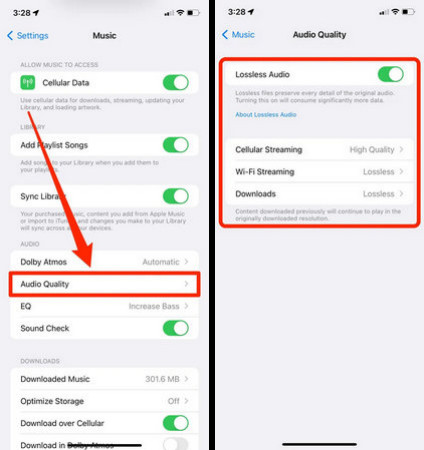
For more instructions on listening to lossless Apple Music on other devices, you can check Apple Music's official guide.
Part 6: Can You Download Apple Music Lossless Songs and Keep Them Forever?
You can download lossless songs for offline listening within the Apple Music app, but once your Apple Music subscription expires or is canceled, these downloaded lossless audio files will immediately become inaccessible. So, is there a way to download Apple Music losslessly and save them forever? Yes, but you need to utilize a third-party tool like Sidify Apple Music Converter.
Sidify Apple Music Converter is a safe and professional tool that allows users to convert Apple Music songs, albums, and playlists to multiple formats like MP3, AAC, ALAC, AIFF, WAV, etc., losslessly (see the test result in Part 1). In addition, it even supports downloading Apple Music playlists and multiple songs at once, so you won't have to choose songs one by one and wait for a long time.
Once successfully converted, those music files can be preserved permanently on your Windows or Mac, even if your Apple Music subscription ends.
Sidify Apple Music Converter
- Convert Apple Music to MP3, AAC, ALAC, AIFF, WAV, and FLAC.
- Convert MP3 songs, playlists, albums, and podcasts from Apple Music.
- Download Apple Music 320kbps MP3 and LOSSLESS ALAC files.
- Keep Apple Music HD artworks, lyrics and ID3 tags.
- Compatible with Windows and macOS.
Check out Sidify Apple Music Converter Review — Speed, Quality & Legality Tested

How to Download Lossless Apple Music with Sidify
Step 1 Install Sidify Apple Music Converter
Install Sidify Apple Music Converter on your laptop and launch it. On the homepage, select Apple Music as your website and log in to your Apple Music account.
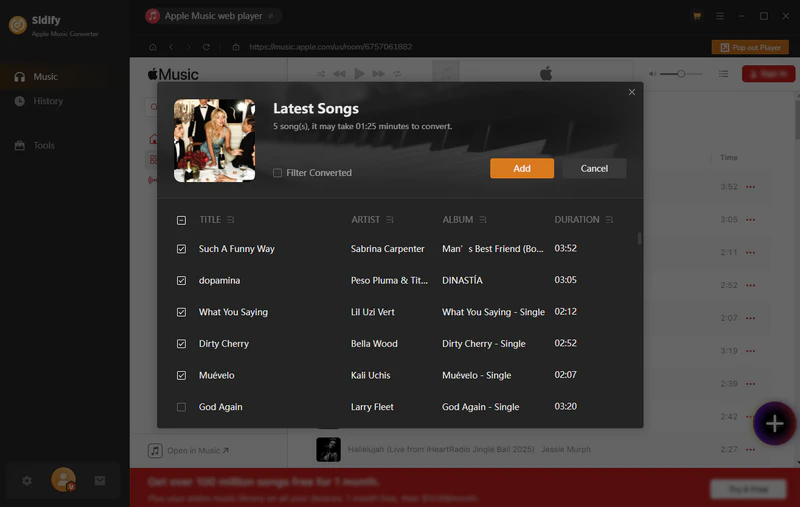
Step 2 Select Apple Music Lossless Songs
Within the built-in browser, you can freely browse and choose the lossless music you want to convert. You can open your desired Apple Music playlist and click the Add button in the bottom-right corner. Then, you can choose the music you want to add for lossless conversion.
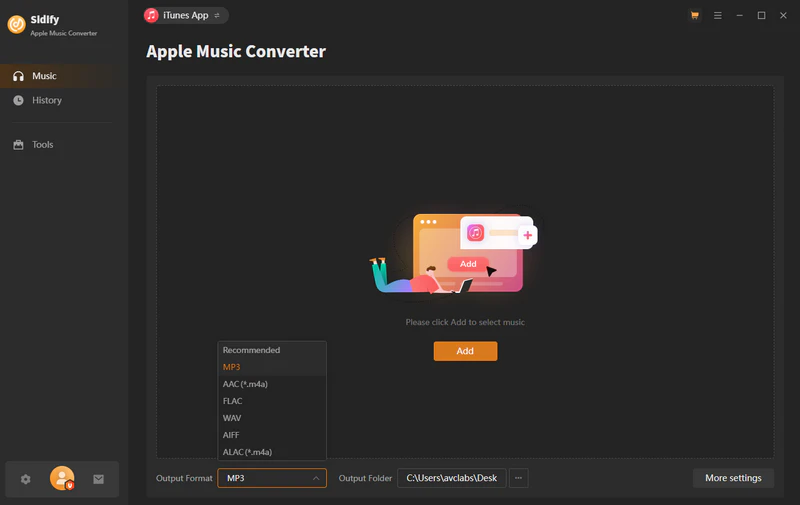
Step 3 Set Up Apple Music Lossless Output Format
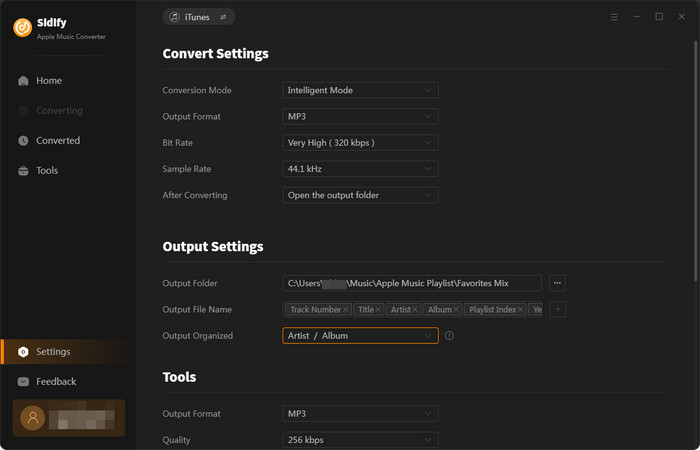
Click Settings, choose ALAC in the Output Format bar, and select the Bit Depth and Rate you want.
Step 4 Start Apple Music Playlist Conversion
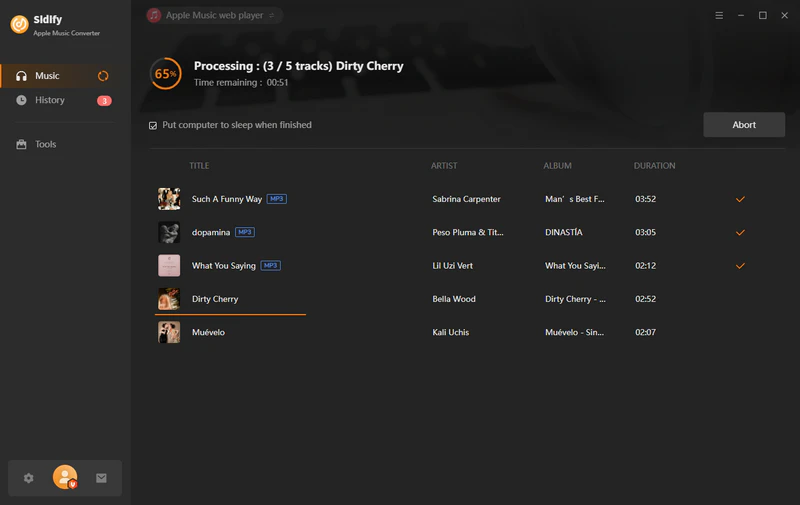
Click the Convert button to start the lossless conversion.
Step 5 Locate the Downloaded Lossless Music Files
Once finished, head to the History tab to check all downloads. Here, you can click the folder icon to open the local folder of your files.

Part 7: Apple Music Lossless vs Spotify – Which Is Better?
Apple Music and Spotify are both popular music apps that support lossless audio, but there are still differences between them in terms of sound quality, features, and user experience.
| Feature | Apple Music | Spotify | Who Wins? |
|---|---|---|---|
| Maximum Lossless Quality | Hi-Res Lossless (up to 24-bit / 192kHz) | Lossless (up to 24-bit / 44.1kHz) | Apple Music |
| Audio Format | ALAC (Lossless) | FLAC (Lossless) | Tie |
| Spatial Audio | ✅ | ❌ | Apple Music |
| Music Library Size | Around 100 million songs | Around 100 million songs | Tie |
| Price | $11.99/month | $12.99/month | Apple Music |
| Windows Support | ✅ | ✅ | Tie |
| Mac Support | ✅ | ✅ | Tie |
| Android Support | ✅ | ✅ | Tie |
| iPhone Support | ✅ | ✅ | Tie |
| Offline Downloads | ✅ Lossless | ✅ Lossless | Tie |
In terms of sound quality and price, Apple Music offers better sound quality (Hi-Res Lossless) and is $1 cheaper than Spotify. However, Spotify remains widely popular due to its precise recommendation algorithm and seamless cross-device switching.
As for whether Apple Music or Spotify is better, I personally think it really depends on your own needs.
This guide dives into Apple Music vs Amazon Music 2026, exploring Amazon Music Unlimited vs Apple Music comparison, sound quality, and price differences.
Learn More →Frequently Asked Questions
I previously downloaded songs in AAC. Will they automatically update to Lossless after enabling the setting?
No. If you've previously downloaded that song from Apple Music, the system will still retain the old AAC file. You must manually delete the old download, then go to Settings to make sure Lossless Downloads is enabled, and redownload the song to get the ALAC lossless file.
Can I listen to Apple Music Lossless via Apple CarPlay in my car?
Wired CarPlay supports lossless playback at 16-bit/44.1 kHz or 24-bit/48 kHz. However, wireless CarPlay or Bluetooth audio in the car is forced to be compressed into lossy AAC for transmission.
Conclusion
Is Apple Music Really Lossless? Yes! In 2026, Apple Music Lossless is no longer just a marketing concept. It is a real technological advancement that enhances the reproduction of details and sound quality from the original master recordings.
For the average user, an Android or iPhone device and a pair of wired headphones are all it takes to enjoy high-quality, lossless Apple Music. If you want to preserve this lossless Apple Music and listen to it offline, you might want to consider Sidify Apple Music Converter.
 Sidify Apple Music Converter
Save Apple Music Dolby Atmos and HD/Ultra HD audio with ID3 tags at 10X speed.











