


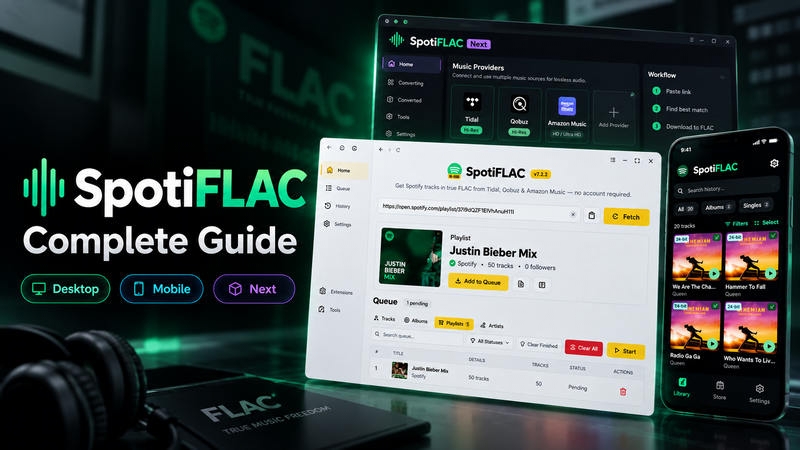
SpotiFLAC is a popular Spotify to FLAC downloader. It has three main versions: SpotiFLAC Desktop, SpotiFLAC Mobile, and SpotiFLAC Next. This guide explains how to use SpotiFLAC, whether it is safe, and how to fix common issues. You will also find the best SpotiFLAC alternative for easier Spotify Lossless FLAC audio downloads.
Quick Verdict
- What does SpotiFLAC do?
- SpotiFLAC uses Spotify links to find and download matching music in FLAC format.
- Does SpotiFLAC work?
- In our October 2026 test, Windows and Android versions successfully recognized Spotify tracks, but the download process was not completed in our testing environment. Results may vary by version, provider, and network conditions.
- Which version should you use?
- Use Desktop for Windows, macOS, or Linux. Use Mobile for Android or iPhone. Choose SpotiFLAC Next for a different workflow and provider setup.
- Is SpotiFLAC safe?
- Download it from a verified project page or GitHub repository. Check installation files before opening them.
What Is SpotiFLAC and How Does It Work?
SpotiFLAC is a family of tools for finding lossless music from Spotify links. The standard Desktop version is free and open source, while Mobile and Next are separate projects. Many users treat it as a Spotify to FLAC downloader, but it does not simply convert Spotify audio into FLAC.
How Does SpotiFLAC Work?
Why Use SpotiFLAC?
- Download Spotify tracks, albums, and playlists to FLAC for free
- Save full Spotify albums and playlists in batches
- Keep metadata, lyrics, and cover art when available
- Download music for offline playback without Spotify Premium
- Find music from multiple sources
- Use extensions on mobile for more provider options
- Get more workflow controls with SpotiFLAC Next
Does SpotiFLAC Actually Work? Our 2026 Test
September 2026: 50-Track Download Test
We tested all three SpotiFLAC versions on September 9, 2026, using the same public 50-track Spotify playlist under the same test conditions.
| Version Tested | Test Device |
|---|---|
| SpotiFLAC Desktop v7.2.2 | Windows 11 PC |
| SpotiFLAC Mobile v4.9.6 | Google Pixel 8, Android 16 |
| SpotiFLAC Next v1.5.4 | Windows 11 PC |
Test playlist: Justin Bieber Mix — 50 tracks
We counted a match as correct only when the artist, track title, release type, clean/explicit version, and ISRC (when available) matched the Spotify entry.
In our test, all three versions completed the playlist, but Next had the best release-matching accuracy at 98%.
| Test Result | Desktop | Mobile | Next |
|---|---|---|---|
| Download completion | 50/50 | 50/50 | 50/50 |
| Correct release matched | 48/50 | 47/50 | 49/50 |
| Match accuracy | 96% | 94% | 98% |
| Setup difficulty | Easy | Moderate | Moderate |
| Main limitation | Server cooldown / provider retries | Extension setup | Supporter access |
| Setup Guide | View Steps → | View Steps → | View Steps → |
October 2026 Update: Download Failures on Windows & Android
In our October 2026 retest, both SpotiFLAC Desktop and Mobile recognized Spotify tracks, but neither successfully downloaded the tested songs.
| Test | Windows Desktop | Android Mobile |
|---|---|---|
| Track Recognition | Passed | Passed |
| Music Playback | Not Tested | Passed |
| Music Download | Failed | Failed |
| Issue Encountered | FFmpeg setup and verification failures | Song Not Found |
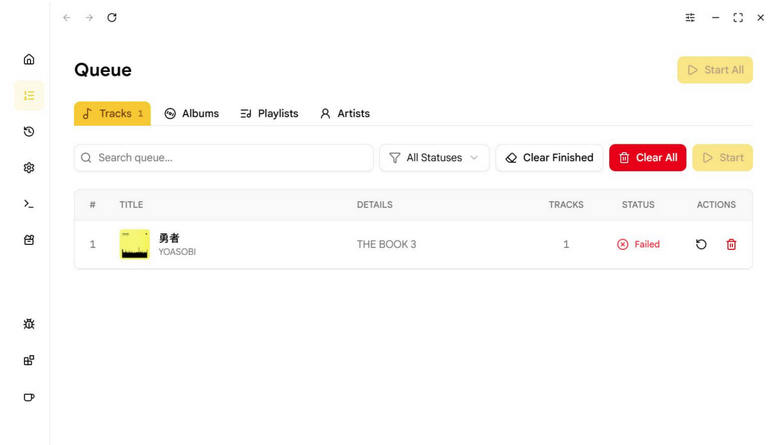
Results reflect our October 2026 tests and may vary by app version, music source, and network conditions.
Is SpotiFLAC Safe and Legal to Use?
Is SpotiFLAC Safe?
Desktop and Mobile are easier to verify because their source code is public. SpotiFLAC Next is less transparent because its app is closed source.
A Reddit user also reported that Windows Defender flagged SpotiFLAC Next after extraction. Community replies suggested UPX compression may cause a false positive, but this does not prove the file is safe.
What We Found: SpotiFLAC is not proven to be malware, but it should not be treated as completely risk-free. Use official downloads and scan the exact file before opening it.
| Safety Check | Desktop | Mobile | Next |
|---|---|---|---|
| Source code | Public | Public | Closed |
| Download source | GitHub Releases | GitHub Releases | Supporter access |
| Extra components | Providers | Extensions | Providers / BYOA |
| VirusTotal | 4/70 flagged | 0/67 flagged | 1/95 URL flagged |

Is SpotiFLAC Legal?
Legal note: Only download music you have the right to keep.
| Question | Answer |
|---|---|
| Is SpotiFLAC itself illegal? | Not necessarily. It depends on local law and how it is used. |
| Can it violate Spotify's rules? | Yes. Spotify restricts unauthorized copying and ripping. |
| Is personal use always legal? | No. Copyright rules vary by country. |
| Can downloaded music be shared or sold? | Usually not without permission. |
SpotiFLAC Desktop vs Mobile vs Next
SpotiFLAC Desktop, Mobile, and Next are separate projects. They use different source systems and installation methods. Mobile is not simply the phone version of Desktop. Next is also not a normal free upgrade.
| Feature | SpotiFLAC Desktop | SpotiFLAC Mobile | SpotiFLAC Next |
|---|---|---|---|
| Official Links | GitHub Downloads | GitHub Downloads | GitHub & Supporter Access |
| Platform | Windows, macOS, Linux | Android, iOS | Windows, macOS, Linux |
| Access | Free | Free | Paid supporter access |
| Source code | Open source | Open source | Closed source |
| Accepted links | Spotify | Spotify and extension-supported links | Spotify, Tidal, Qobuz, Amazon Music, Deezer |
| Music sources | Tidal, Qobuz, Amazon Music | Depends on installed extensions | Tidal, Qobuz, Amazon Music, Deezer |
| Source setup | Built-in downloaders | Installable extensions | Integrated provider workflow |
| Best for | Simple desktop use | Mobile users who can manage extensions | Users who want more sources and workflow options |
Is There a SpotiFLAC Web Version?
SpotiFLAC does not have an official browser-based version. Community-built SpotiFLAC web interfaces exist, but they are separate projects and may require self-hosting.
The “Spotify Web” extension for Mobile is a provider extension. It is not a web version of SpotiFLAC.
How to Use SpotiFLAC Desktop
SpotiFLAC Desktop is a free Spotify to FLAC downloader for PC. It does not require a Spotify account or Premium subscription.
Step 1 Download SpotiFLAC for Windows, macOS, or Linux
Download the latest release from the official GitHub page:
https://github.com/spotbye/SpotiFLAC/releases/latest
Choose the correct file for your system: EXE for Windows, DMG for macOS, or AppImage for Linux. Open the downloaded file to launch or install SpotiFLAC.
Step 2 Check the Download Settings
Choose your preferred music source and download folder. If a track is not found, try another available source.
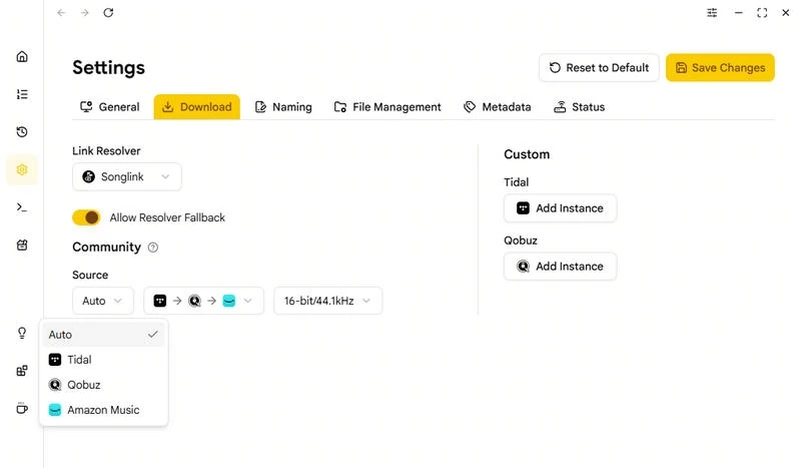
SpotiFLAC Desktop Download Options
- Music Source: Tidal, Qobuz, or Amazon Music
- Audio: Lossless FLAC by default
- Audio Resampling: Adjust sample rate and bit depth automatically
- Dolby Atmos: Available for supported Tidal/Amazon Music tracks
- Metadata: Embed title, artist, album, cover art, lyrics, and other available tags
- Download Folder: Choose where downloaded music is saved
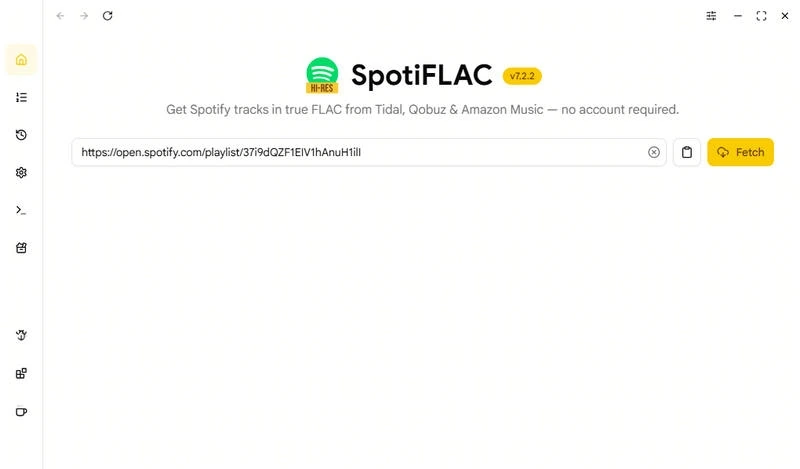
Step 3 Paste a Spotify Link into SpotiFLAC
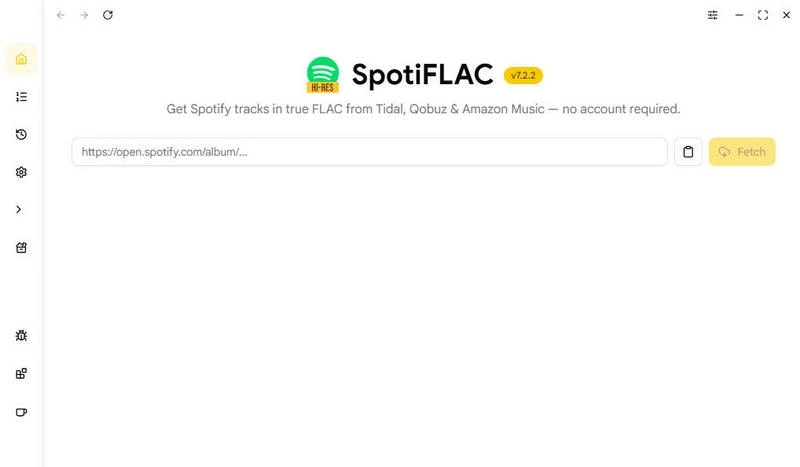
Copy a Spotify track, album, or playlist link and paste it into SpotiFLAC. Click Fetch. The app will identify the music and search supported sources for a match.
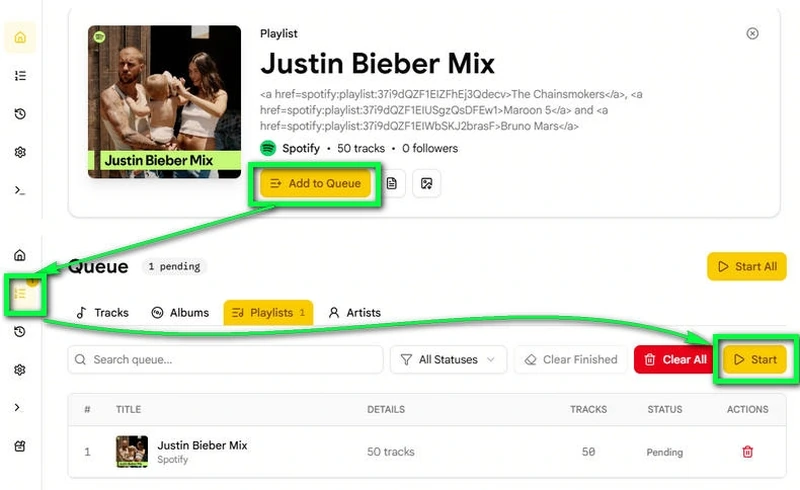
Step 4 Download Spotify to FLAC
Review the matched tracks and click Add to Queue. Open Queue and click Start to begin downloading.
Tip: If you see “Song not found” or another download error, see the SpotiFLAC Not Working section or use SpotiFLAC alternative below.
How to Use SpotiFLAC Mobile and Extensions
SpotiFLAC Mobile works differently from Desktop. It uses an extension system, so available music sources and features depend on the extensions you install.
It works on Android and iOS. SpotiFLAC Mobile is also not limited to FLAC. Depending on the provider and workflow, MP3 and other format options may also be available.
Step 1 Download the SpotiFLAC Mobile APK or IPA
Open the official GitHub Releases page:
https://github.com/spotiflacapp/SpotiFLAC-Mobile/releases/latest
Android: Download the correct APK for your device and install it.
iPhone: Download the unsigned IPA and sideload it with AltStore, Sideloadly, or a similar tool.
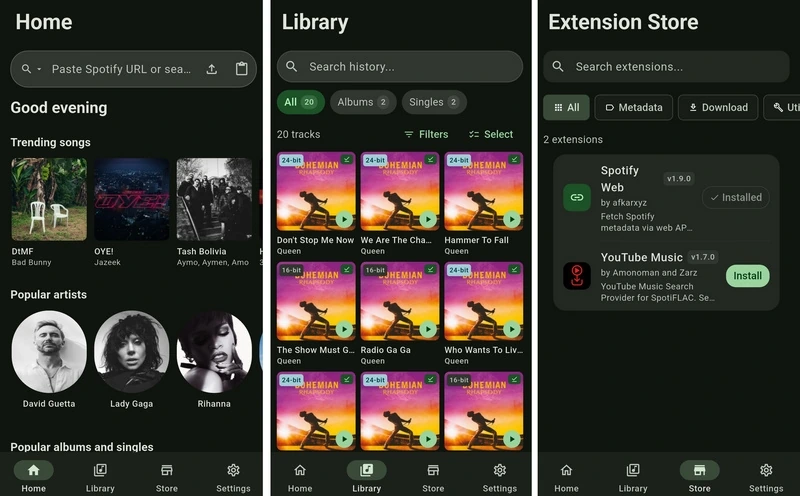
Step 2 Install SpotiFLAC Mobile Extensions
Open the Store tab and add a trusted extension repository when prompted. Then install the extensions you need. You can find the project-maintained extensions in the SpotiFLAC Extension repository.
Manage installed extensions under Settings > Extensions. If you have several download providers, use Provider Priority to choose which source SpotiFLAC should try first.
Step 3 Add a Music Link
Paste a supported music link into SpotiFLAC Mobile. Spotify tracks, albums, and playlists are supported. Other services such as Deezer, Tidal, and YouTube Music may also work depending on the link and installed extensions.
SpotiFLAC Mobile Download Options
- Quality: Lossless, Hi-Res, Hi-Res Max
- Formats: FLAC, MP3, Opus; some workflows also offer WAV, AIFF, or AAC
- Provider Priority: Choose which music source is tried first
- Metadata Editing: Edit title, artist, album, genre, ISRC, and cover art
- Lyrics: Save or embed lyrics
- Local Library: Scan and manage downloaded music
Step 4 Download Spotify Music to FLAC
Choose the matched tracks and your download folder, then start the download.
Tip: Use trusted extension repositories because extensions can affect music sources, quality, and download reliability. SpotiFLAC Mobile mainly focuses on music. For Spotify podcasts, audiobooks, or radio, you can use Sidify instead.
How to Use SpotiFLAC Next
SpotiFLAC Next gives you more control over music sources and downloads than the standard Desktop version. Unlike Desktop, however, its source code is not publicly available.
Step 1 Get and Install SpotiFLAC Next
Go to the official SpotiFLAC Next GitHub page:
https://github.com/spotbye/SpotiFLAC-Next
SpotiFLAC Next is not available as a free public download. You need to support the project first to access the private download.
Current minimum support options include:
- Patreon: $9
- Gumroad: $9
- LYNK: IDR 129,000
- Crypto: 10 USDT/USDC
After supporting the project, follow the private supporter post or access instructions to download SpotiFLAC Next.
Step 2 Set Up Your Music Sources
Open the provider settings and select the services you want SpotiFLAC Next to use. Available download sources include Tidal, Qobuz, Amazon Music, and Deezer.
Step 3 Paste a Music Link
Paste a supported music link into SpotiFLAC Next. SpotiFLAC Next will look for a matching release from the available sources.
SpotiFLAC Next Download Options
- Music Sources: Tidal, Qobuz, Amazon Music, Deezer
- Supported Links: Spotify, Tidal, Qobuz, Amazon Music, Deezer
- Workflow: Customize how tracks are matched and downloaded
- BYOA: Use your own account with supported services
- Metadata: Choose from more metadata sources
- Lyrics: Get lyrics from multiple sources
- Home Feed: Browse music inside the app
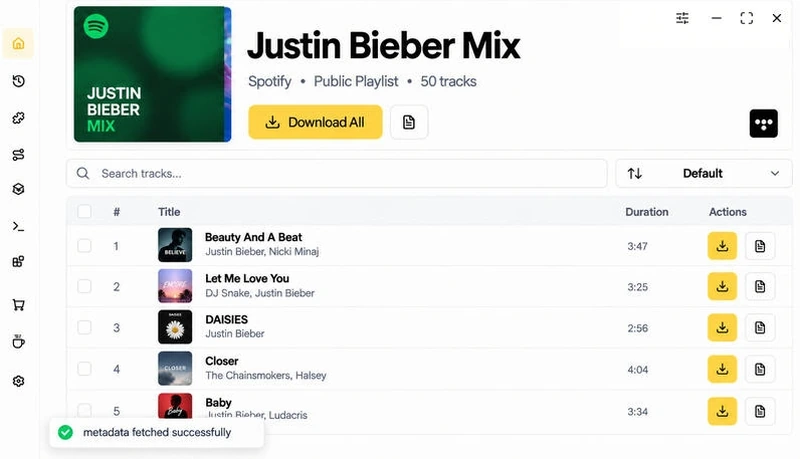
Step 4 Download the Music
Check the matched release, pick your source and download settings, and start the download.
Tip: Next has more options than Desktop, but you may not need them if you only want to paste a Spotify link and download the matching music.
Does SpotiFLAC Download Real Lossless FLAC?
SpotiFLAC can download real lossless FLAC files when a matching lossless source is available. It uses Spotify mainly to identify the track, then finds matching audio from supported providers. The final result depends on the provider, track, and release.
A .flac extension alone does not prove that the audio is lossless. A lossy MP3 can be converted to FLAC without restoring the missing audio data.
How We Checked the FLAC Files
We inspected sample files from each SpotiFLAC version.
| Check | What We Looked For |
|---|---|
| Codec | Whether the file used the FLAC codec |
| Bit depth | 16-bit or 24-bit |
| Sample rate | 44.1 kHz, 48 kHz, or higher |
| Frequency spectrum | Signs of possible lossy compression |
| Track version | Original, remastered, live, clean, or explicit |
| Metadata | Title, artist, album, ISRC, and cover art |
Our FLAC Spectrum Test
On September 9, 2026, we inspected two files downloaded with SpotiFLAC Desktop v7.2.2 using Spek 0.8.2. Checking their frequency spectra helps identify obvious signs of lossy-to-FLAC transcoding that file extensions and bitrate alone cannot reveal.
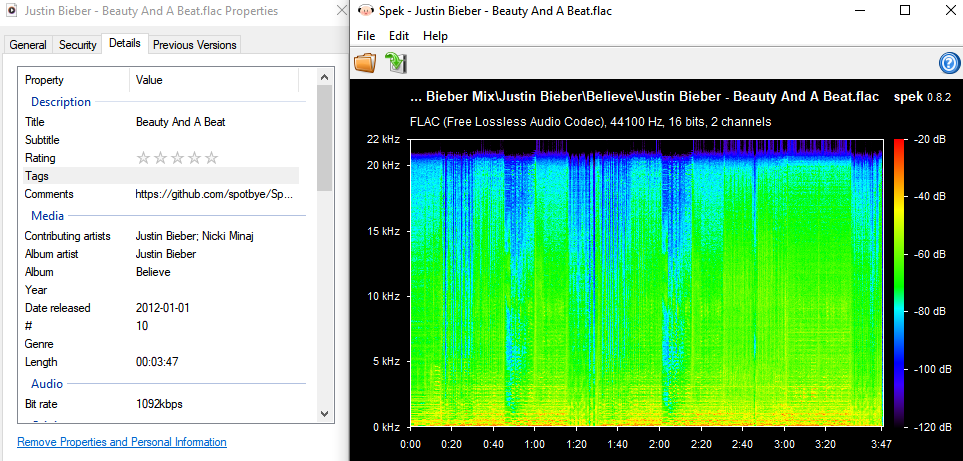
Beauty And A Beat: Our downloaded file was a 16-bit/44.1 kHz FLAC. Spek shows audio information extending to around 20 kHz without an obvious cutoff at substantially lower frequencies.
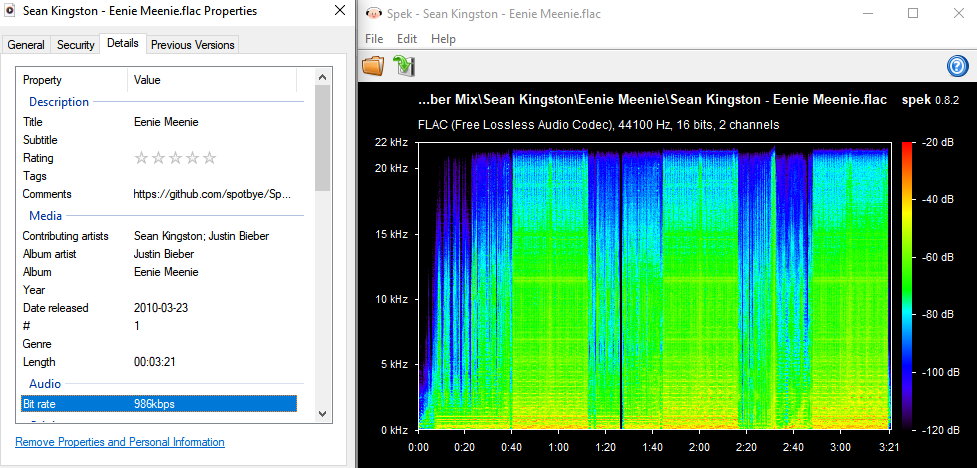
Eenie Meenie: This sample was also a 16-bit/44.1 kHz FLAC. Its spectrum similarly extends into the upper-frequency range rather than showing an obvious early cutoff.
What We Found: Neither sample showed an obvious early high-frequency cutoff in the displayed spectrum. However, spectrum analysis alone cannot prove that a FLAC file has never been transcoded. We therefore use it together with codec, sample rate, bit depth, metadata, and track-version checks.
What Affects SpotiFLAC Audio Quality?
- Music provider: Tidal, Qobuz, Amazon Music, and other sources may offer different quality.
- Available release: The same song may have several masters or editions.
- Provider fallback: SpotiFLAC may switch sources when the preferred provider fails.
- Format conversion: Converting a lossy file to FLAC does not make it lossless.
Important: MediaInfo and spectrum tools can reveal possible quality problems. They cannot always prove where a file originally came from.
SpotiFLAC Not Working: Common Problems and Fixes
SpotiFLAC depends on external music providers and APIs. A download may fail even when the app itself is working.
| Problem | What to Try |
|---|---|
| Song not found | Check the Spotify link and try another provider. |
| 401 error | Update the app or extension. Reconnect the provider if required. |
| 429 / Rate limited | Pause downloads and try again later, or switch providers. |
| All providers failed | Change the provider priority and try another source. |
| Extensions not loading | Update Mobile, reload the trusted extension repository, and update installed extensions. |
| Wrong song or release | Compare the album, ISRC, duration, and clean or explicit version. Then try another provider. |
| Download folder error | Select a writable folder and grant storage access again. |
| Antivirus warning | Confirm that the file came from the official GitHub Release and scan it before opening. |
| Server taking a scheduled short break | Wait for the countdown to finish, then restart the queue. This is a temporary server cooldown rather than a local installation error. |
Tip: Provider errors may be temporary. Check for app, extension, and service updates before reinstalling SpotiFLAC.
Where Can You Get SpotiFLAC Support?
Looking for the SpotiFLAC repo? Each version has a separate GitHub project page. Use SpotiFLAC Desktop, SpotiFLAC Mobile, or SpotiFLAC Next. Mobile extensions are listed in a separate Extension repository.
| Help Channel | Best For | Link |
|---|---|---|
| Desktop GitHub Issues | Known bugs and technical solutions | SpotiFLAC Issues |
| Mobile GitHub Issues | Extension, Android, iOS, and permission problems | Mobile Issues |
| Next GitHub | Releases and current access information | SpotiFLAC Next |
| Telegram Updates | Release and service updates | SpotiFLAC Updates |
| Telegram Discussion | Questions and community help | SpotiFLAC Chat |
| Developer Contact | SpotiFLAC Next access or supporter questions | Telegram or email (hi@afkarxyz.fyi) |
| Reddit Community | User experiences and common fixes | r/SpotiFLAC |
SpotiFLAC does not provide traditional customer service. Help is available through GitHub, Telegram, and community discussions.
GitHub may restrict the creation of new Issues. Search existing reports before trying to submit a new one.
Warning: Reddit and Telegram replies are community advice. Do not download APKs, extensions, or modified builds from unverified links shared by other users.
Best SpotiFLAC Alternatives in 2026
SpotiFLAC is free and flexible, but provider failures, extensions, and version differences can make it harder to use. If you want something simpler, there are two main alternatives.
Best Overall SpotiFLAC Alternative: Sidify Music Converter (Windows, Mac, Android)
| Download Link | https://www.sidify.com/spotify-music-converter/ |
| Best for | Batch downloading Spotify playlists with less setup |
| OS | Windows, macOS, Android |
| Output | MP3, AAC, FLAC, WAV, AIFF, ALAC |
| Audio quality | Up to 24-bit/44.1 kHz Spotify Lossless |
| Speed | Up to 40X, depending on conversion mode |
Sidify works with both Spotify Free and Premium accounts. It can download songs, albums, playlists, podcasts, audiobooks, radio, video podcasts, and music videos, then save them as local files for playback outside Spotify. The converted files can also be moved to phones, MP3 players, USB drives, SD cards, and other devices.
Why Sidify Is a Good SpotiFLAC Alternative
- Works with the Spotify App and Web Player
- Download Spotify audio to MP3 and video to MP4 in batches
- Supports multiple output formats
- Supports Spotify Lossless output and 320kbps high audio quality
- Converts at up to 40X speed
- customize the output folder, file name, and folder structure by artist, album, playlist, and other options.
- Keeps ID3 tags, artwork, playlist order, and lyrics
- Includes extra tools such as an AA/AAX Converter, Format Converter, CD Burner, and Tag Editor.
- Offers technical support and regular updates
How to Use Sidify to Convert Spotify to FLAC
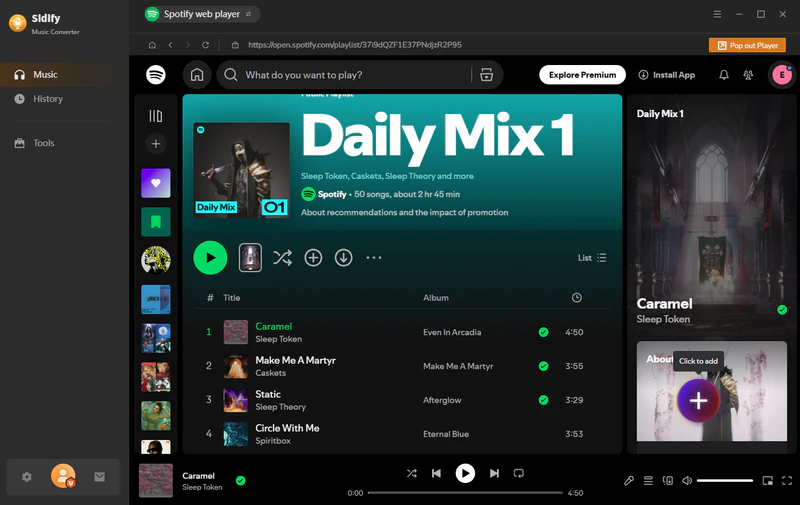
Step 1 Add Spotify Music
Open Sidify and add a song, album, or playlist.
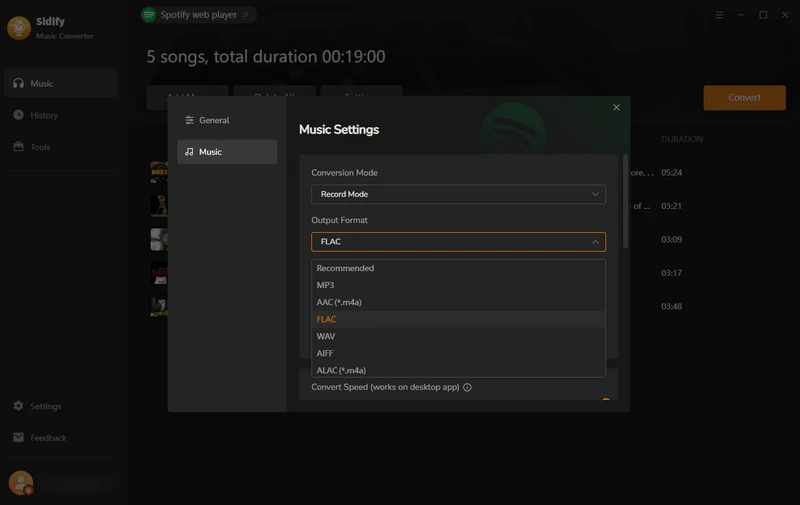
Step 2 Choose FLAC
Open Settings and select FLAC as the output format.
Step 3 Convert Spotify to FLAC
Click Convert to save the Spotify music as FLAC files.
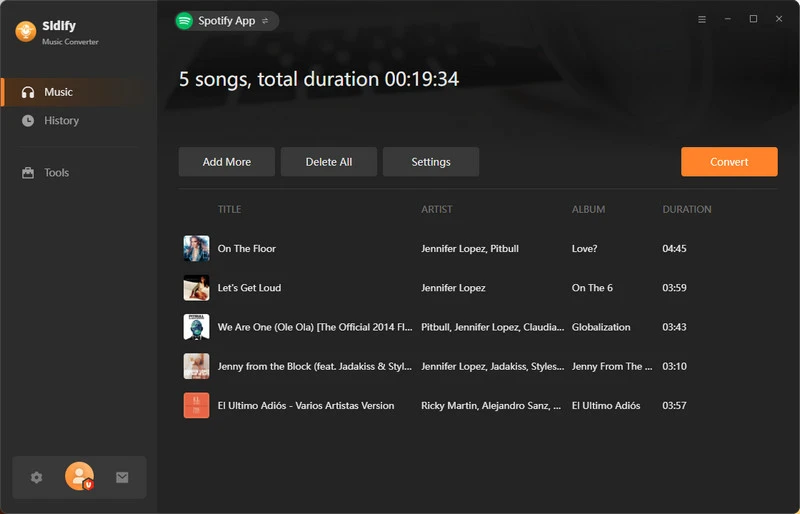
We tested Sidify with the same 50-track Justin Bieber Mix on the same Windows 11 PC.
| Test Result | Sidify |
|---|---|
| Download completion | 50/50 |
| Correct track/version | 50/50 |
| Accuracy | 100% |
| FLAC output verified | 50/50 |
| Setup difficulty | Easy |
| Main limitation | No iOS version/only for Spotify |
What We Found: Sidify works with the Spotify track you selected, so wrong-version downloads are less likely. SpotiFLAC, however, looks for matching songs from other music services and may sometimes return a different release or version.
Tips: Need FLAC downloads from Apple Music, Amazon Music, Tidal, SoundCloud, Deezer, and more? Try Sidify All-In-One Music Converter.
What About Free Online SpotiFLAC Alternatives?
We tested three free online Spotify downloaders that claim to support FLAC.
| Tool | Result | Metadata | Source | FLAC Bitrate |
|---|---|---|---|---|
| SpotiLab | Parsed links, but downloads failed | — | — | — |
| SpotyLoader | One track at a time | No cover art or ID3 tags | Not verified | ~1802 kbps |
| SaveMyTracks | One track at a time | Cover art + ID3 tags | YouTube | ~1802 kbps |
What We Found: None worked well enough to replace SpotiFLAC or Sidify for lossless downloads. SaveMyTracks was the most complete, but YouTube audio is already compressed, so a high-bitrate FLAC file does not mean true lossless audio.
Sidify vs SpotiFLAC vs Online Spotify FLAC Tools
| Feature | Sidify | SpotiFLAC | Free Online FLAC Tools |
|---|---|---|---|
| Audio source | Spotify | Tidal, Qobuz, Amazon Music, etc. | Varies; some use YouTube |
| FLAC | Yes | Yes | Available on some sites |
| Track matching | Uses the selected Spotify track | May match a different release from another provider | Varies |
| Batch download | Yes | Yes | Usually limited |
| Metadata & artwork | Yes | Yes | Inconsistent |
| Other formats | MP3, AAC, WAV, AIFF, ALAC | Depends on version | Usually limited |
| Setup | Straightforward | May require provider or extension setup | No installation |
| Price | Paid | Desktop/Mobile free; Next paid | Free |
FAQs About SpotiFLAC
Is SpotiFLAC free?
SpotiFLAC Desktop and Mobile are free. SpotiFLAC Next requires paid supporter access.
Do you need Spotify Premium to use SpotiFLAC?
No. SpotiFLAC Desktop does not require Spotify Premium or a Spotify login to process Spotify links.
Is SpotiFLAC a virus?
Our VirusTotal scan found 4/70 detections for Desktop v7.2.2 and 0/67 for Mobile v4.9.6. Download only from the official project page and scan the exact file before opening it.
How do you get SpotiFLAC Next?
SpotiFLAC Next is available through paid supporter access. After contributing, use the same account or email to open the private supporter post.
Is SpotiFLAC Next worth it?
It is more useful if you want extra provider controls and workflow options. In our 50-track test, Next had the highest match accuracy at 49/50, but it is paid and closed source.
Final Verdict
SpotiFLAC is worth trying if you mainly want free FLAC downloads. But downloads can sometimes fail. If that starts getting annoying, Sidify Music Converter is easier to use. It can batch download Spotify music to lossless FLAC while keeping ID3 tags and album artwork. Sidify also supports more than songs, albums, and playlists—you can save Spotify podcasts, audiobooks, and radio as well.
 Sidify Music Converter
Batch download Spotify songs, playlists, podcasts, audiobooks, and radio to FLAC, MP3, AAC, WAV, AIFF, or ALAC with metadata and artwork preserved.












