



If you search for a free way to download Spotify music, SpotMate is one of the names that keeps showing up. It runs in the browser, needs no installation, and promises MP3 files at 320 kbps.
But if you care about audio quality, the bigger question is whether those downloaded files really sound as good as the claimed bitrate suggests. You may also wonder what happens when downloading albums or playlists instead of just one song. We tested SpotMate with different types of Spotify content. Let's take a look at this comprehensive SpotMate review.
 Short verdict:
SpotMate can download Spotify tracks as real MP3 files, and single song downloads were fast and reliable in our test. But it doesn't preserve lossless quality, and it doesn't even deliver the 320 kbps quality it promises. The claimed bitrate is misleading, metadata is incomplete on some tracks, there is no batch conversion, and large playlists become unstable. For batch downloads, full ID3 tags and honest quality, Sidify Music Converter is the stronger choice.
Part 1: What Is SpotMate
SpotMate (https://spotmate.online/en1) is an online tool for turning Spotify links into downloadable audio files. You paste a Spotify link for a song, an album or a playlist, and it shows the tracks with download buttons.
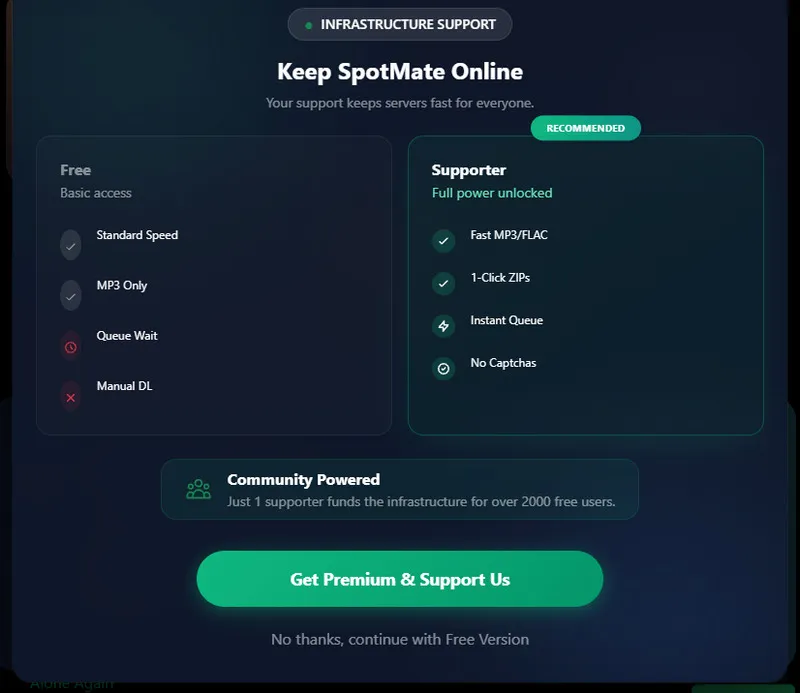
The free option provides MP3 downloads at standard speed, but the download process may include a queue wait and requires you to start the download manually. SpotMate also offers a Supporter option for users who want a faster and more convenient experience. The Supporter plan adds faster MP3 and FLAC processing, instant queue access, one-click ZIP downloads, and removes CAPTCHA checks.
For this review, we focused on the free version because this is the option most important to users who want to try SpotMate without paying.
Part 2: How We Tested SpotMate
We don't have the Premium plan, and to get closer to the most common users, we tested the free version of SpotMate. We downloaded songs, albums, and playlists, then checked the files to see what we actually got. For audio quality, we also used Spek to examine some of the downloaded tracks and look for any obvious high-frequency cutoff.
| Test Item | Details |
|---|---|
| Operating System | Windows 11 Pro |
| Browser | Google Chrome 153.0.8010.50 (64-bit) |
| Spotify Account | Free |
| Internet Speed | 100/100 Mbps |
| SpotMate Version | Free Version |
| Test Content | 10 songs, 2 albums, and 2 playlists |
| Output Format | MP3 |
| Audio Analysis | Spek |
| Test Date | September 2026 |
Part 3: SpotMate Test Results
The results below cover the download process, file quality, and what we found after checking the downloaded files.
Single Song Download Results
| # | Track | File Size | Result | Format | Bitrate | Time | Metadata |
|---|---|---|---|---|---|---|---|
| 1 | Blinding Lights | 7.67 MB | √ | MP3 | 320 kbps | 4.62s | album, year, track number, album artist, title |
| 2 | Shape of You | 9.02 MB | √ | MP3 | 320 kbps | 4.43s | album, year, track number, album artist, title |
| 3 | Sweater Weather | 9.21 MB | √ | MP3 | 320 kbps | 5.53s | album, year, track number, album artist, title |
| 4 | Starboy | 8.83 MB | √ | MP3 | 320 kbps | 5.65s | album, track number, title |
| 5 | As It Was | 6.41 MB | √ | MP3 | 320 kbps | 4.68s | album, year, track number, album artist, title |
| 6 | One Dance | 6.27 MB | √ | MP3 | 320 kbps | 3.97s | album, track number, title |
| 7 | Sunflower | 6.19 MB | √ | MP3 | 320 kbps | 5.09s | album, track number, title |
| 8 | BIRDS OF A FEATHER | 8.05 MB | √ | MP3 | 320 kbps | 5.36s | album, year, track number, album artist, title |
| 9 | Yellow | 10.2 MB | √ | MP3 | 320 kbps | 7.55s | album, year, track number, album artist, title |
| 10 | Die With A Smile | 9.40 MB | √ | MP3 | 320 kbps | 4.34s | album, track number, title |
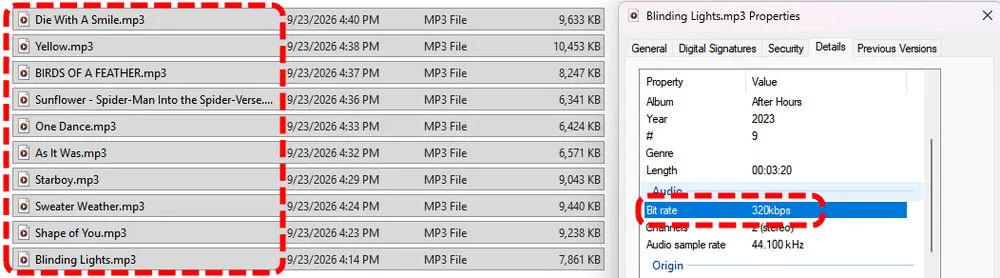
As you can see, all 10 songs downloaded without any problems. Each file was saved as an MP3 and named after the song title. The bitrate shown for every file was 320 kbps.
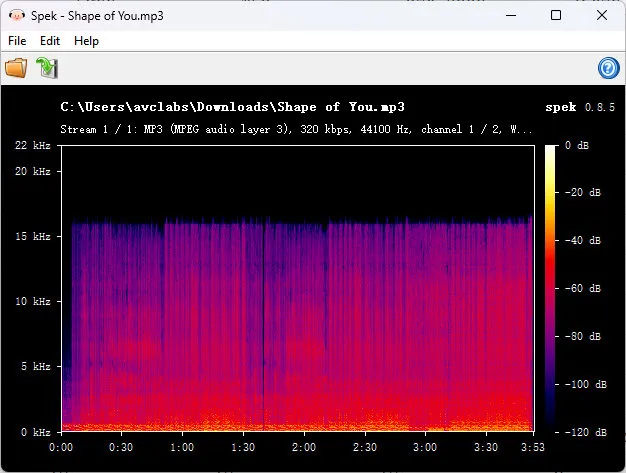
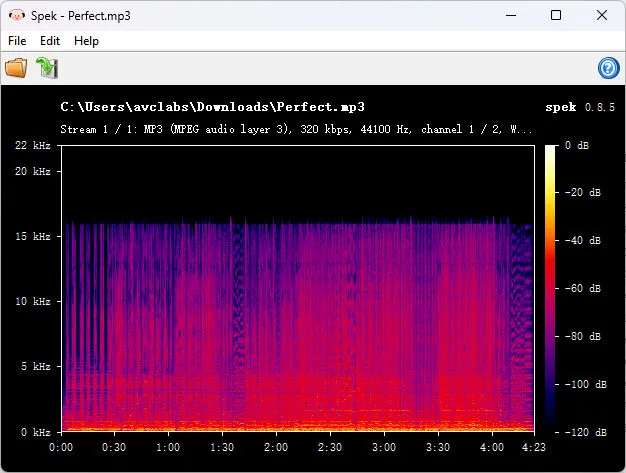
But the bitrate shown by the file was not the whole story. We opened the downloaded tracks in Spek and checked their frequency spectrum. Despite being labeled as 320 kbps, the files showed a sudden cutoff at around 16 kHz, with almost no high-frequency content above that point. This suggests that the audio source was lower quality than a genuine 320 kbps MP3, even though the downloaded files were labeled as 320 kbps.
Album and Playlist Download Results
Album Test
| # | Album | Total | Recognized | Downloaded | Failed | Success Rate | Output Format | Total Time |
|---|---|---|---|---|---|---|---|---|
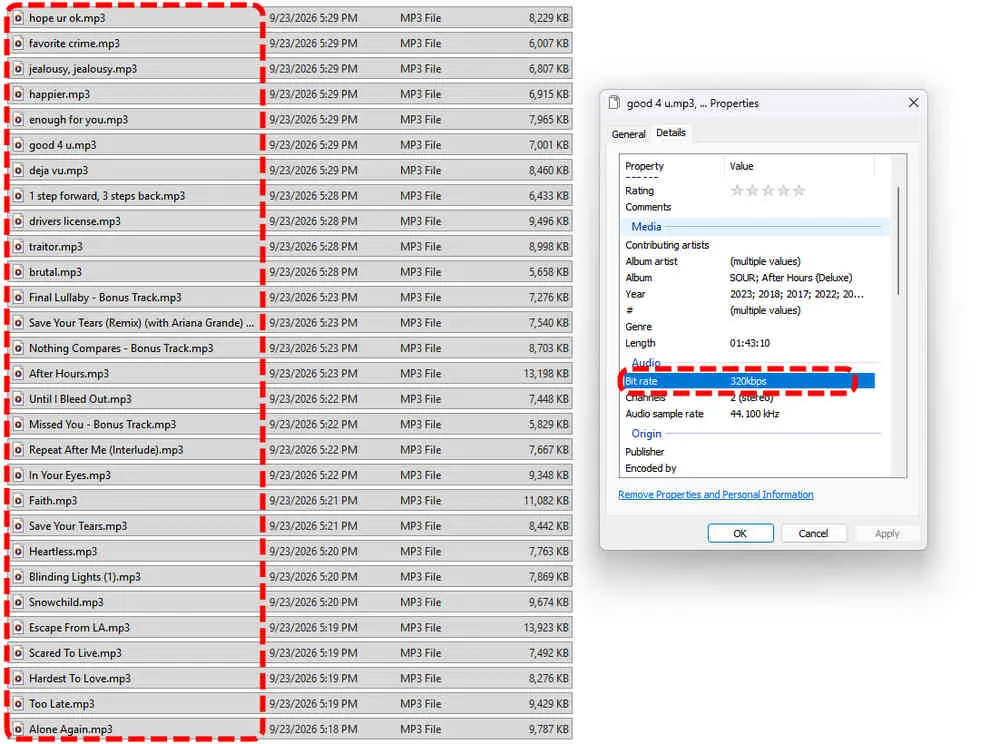
| 1 | After Hours – The Weeknd | 18 | 18 | 18 | 0 | 100% | MP3 | 5min 19s |
| 2 | SOUR – Olivia Rodrigo | 11 | 11 | 11 | 0 | 100% | MP3 | 2min 07s |
SpotMate recognized the entire album, but there was no batch download option, so we had to click Convert and then Download for each track one by one. The process can also take quite a while with a slower connection, since you have to wait for each track to finish converting and downloading before moving on to the next one. A full album can take around 10 minutes, and some tracks also came with incomplete metadata.
Playlist Test
| # | Playlist | Total | Recognized | Downloaded | Failed | Success Rate | Output Format | Total Time |
|---|---|---|---|---|---|---|---|---|
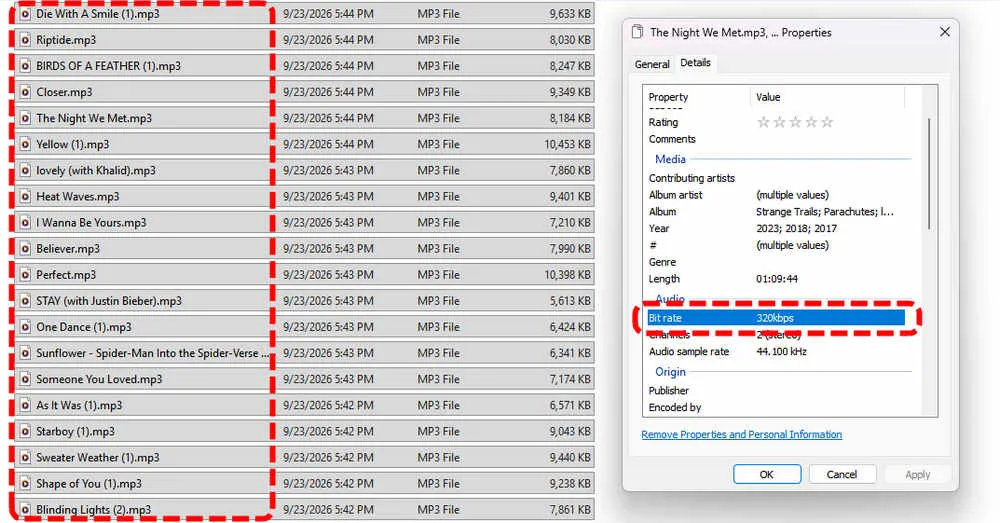
| 1 | Spotify 20 Most Streamed Songs of All Time | 20 | 20 | 20 | 0 | 100% | MP3 | 2min 22s |
| 2 | Today's Top Hits | 50 | 50 | 48 | 2 | 96% | MP3 | / |
Larger playlists were not as smooth as the smaller ones we tested. The 20-track playlist downloaded successfully, while the 50-track playlist needed several refreshes and retries, with 2 tracks failing to download. We did not record the total time for the 50-track playlist because of the repeated refreshes. Based on our test, the more tracks a playlist contains, the more likely you are to run into a conversion error or a failed download, so longer playlists may require some manual retries.
Spek Analysis
Just like the single-song downloads, the album and playlist files were labeled as 320 kbps, but the Spek analysis showed a clear cutoff at around 16 kHz. In other words, the files were labeled as 320 kbps, but the actual audio quality did not match what we would expect from a true 320 kbps MP3.
Part 4: SpotMate Pros and Cons
After using SpotMate to download songs, albums, and playlists, we found that it is easy to use for simple downloads, but there are some limitations when you download larger collections. Here are the main pros and cons we found during the test.
- Free to use for basic MP3 downloads.
- No Spotify login is required.
- Works directly in your browser, so there is nothing to install.
- Single songs download quickly, taking about 4 to 8 seconds in our test.
- Supports downloads from songs, albums, and playlists.
- No batch download option. Albums and playlists have to be downloaded one track at a time.
- Files are labeled as 320 kbps, but Spek showed a clear cutoff at around 16 kHz.
- Some downloaded tracks had incomplete metadata.
- Larger playlists and albums are more likely to run into conversion errors or failed downloads.
- Downloading a full album or playlist can take a while because each track needs to be converted and downloaded separately.
Part 5: How to Convert Spotify to MP3 with SpotMate
As mentioned above, SpotMate's free version only provides MP3 downloads, while FLAC downloads are available with the Supporter plan. The basic process is simple, but albums and playlists require more manual work because each track needs to be converted and downloaded separately.
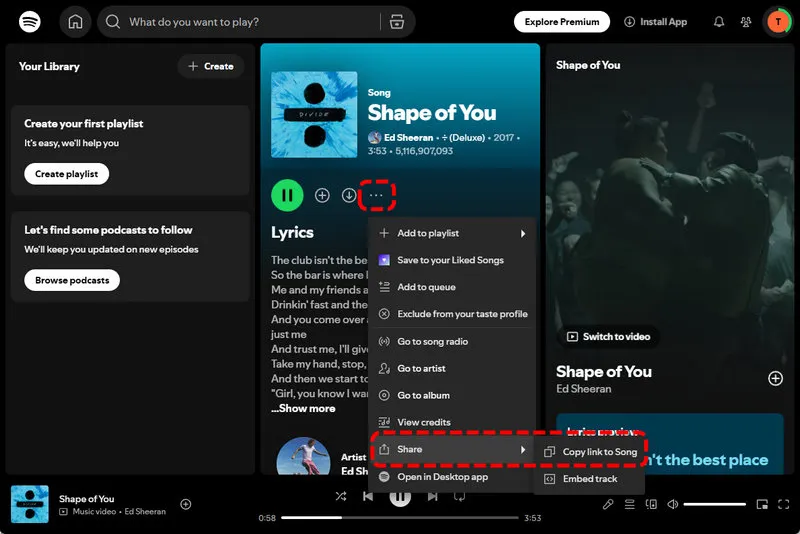
Step 1 Open Spotify and find the song, album, or playlist you want to download. Click Share > Copy Link to copy its Spotify URL.
Step 2 Open the SpotMate website in your browser and paste the link into the input box. Start the process and wait for SpotMate to load the available tracks.
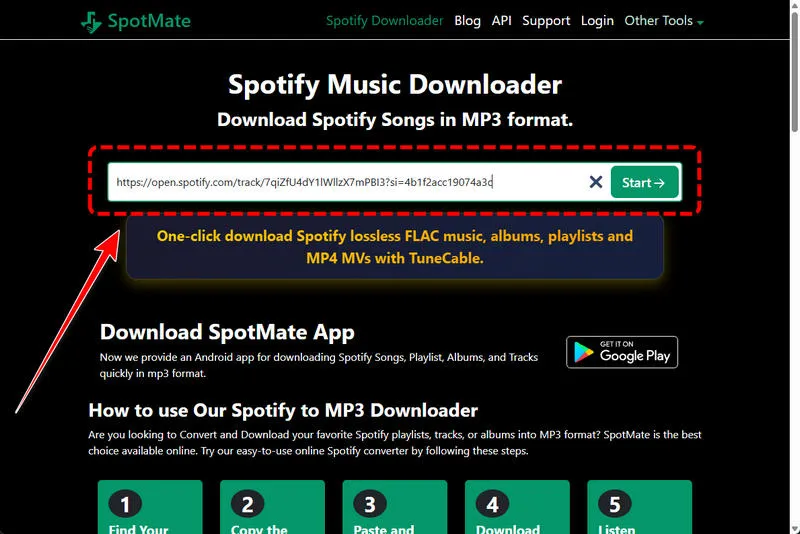
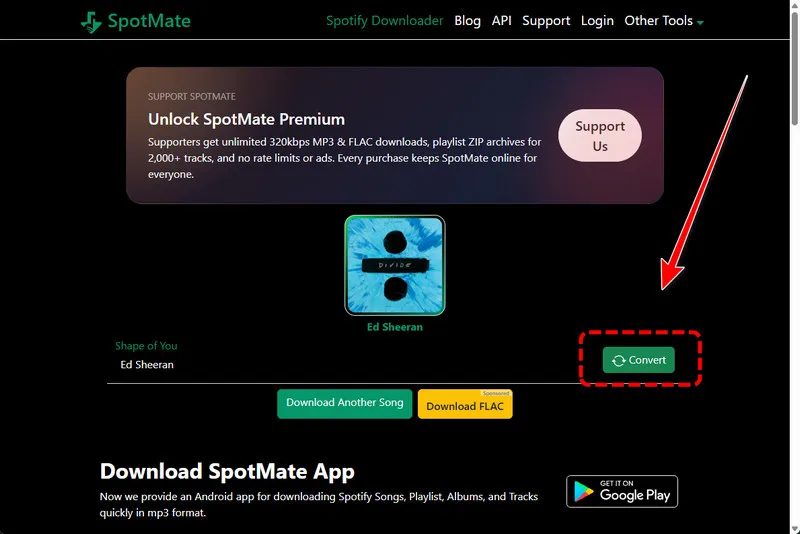
Step 3 Click Convert next to the track you want and wait for the conversion to finish.
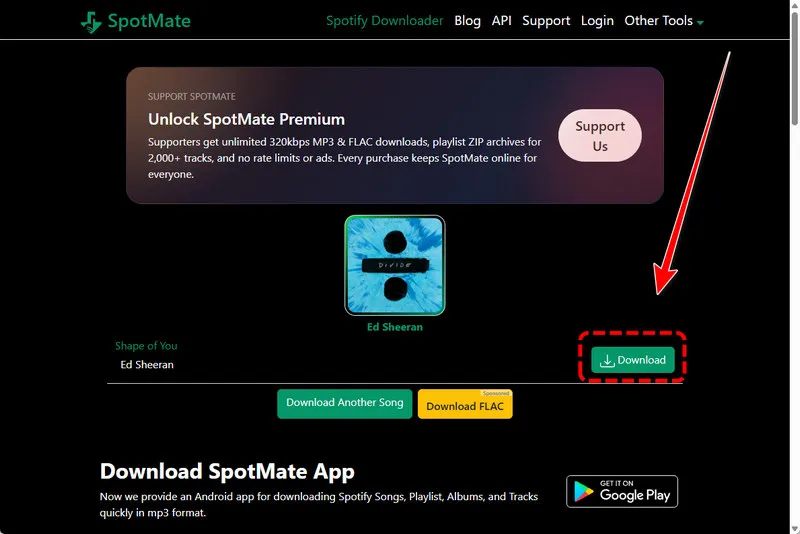
Step 4 Then you can click Download to save the MP3 file to your computer.
Step 5 For albums and playlists, repeat the Convert and Download steps for each track.
Note:That last step is the part most people find tiring. There is no Convert All button, you have to process tracks one by one. If the list is long, some Convert clicks may fail and you will need to retry those tracks. If you want to download an entire album or playlist with less manual work, see the Sidify section below.

Part 6: SpotMate vs. Spotify Premium
No doubt that most people use online Spotify to MP3 converter is for downloads. Spotify Premium keeps your music in the Spotify app, while SpotMate gives you MP3 files you can save locally.
| Feature | Spotify Premium | SpotMate Free |
|---|---|---|
| Download type | Offline listening in the Spotify app | MP3 files saved to your device |
| Service type | Official Spotify service | Third-party service |
| Audio quality | Up to 24-bit/44.1 kHz Lossless | Labeled as 320 kbps, but our Spek test showed a 16 kHz cutoff |
| Lossless audio | Yes, on supported Premium accounts and devices | No, MP3 only in the free version |
| MP3 files | No | Yes |
| Ads | No ads | Ads observed in our test |
Part 7: Best SpotMate Alternative - Sidify Music Converter
If you are downloading just a few Spotify songs, SpotMate is enough for you. But for album and playlist downloads, it can be tedious.
This is where Sidify Music Converter can save you a lot of time. Instead of processing songs one by one, you can batch convert Spotify albums and playlists with 40x conversion speed.
Besides, SpotMate only gives you MP3 files, while Sidify lets you choose from MP3, AAC, WAV, FLAC, AIFF, and ALAC. It also keeps full ID3 tags such as the title, artist, album, track number and more.
Sidify Music Converter
- Convert Spotify music to MP3, AAC, WAV, FLAC, AIFF, or ALAC.
- Preserve original audio quality and metadata.
- Download Spotify songs, albums, playlists, podcasts, music videos, audiobooks.
- Batch convert multiple tracks at high speed.
- Support Spotify Free and Premium.

 Security verified. 2,568,912 people have downloaded it.
How to Batch Convert Spotify with Sidify
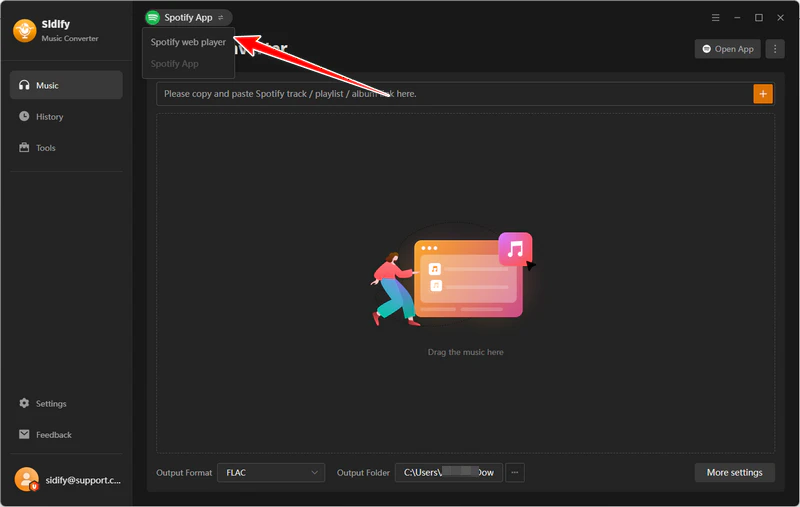
Step 1 Launch Sidify Music Converter
Download and install Sidify Music Converter. Launch it and choose the "Spotify Web Player" mode.
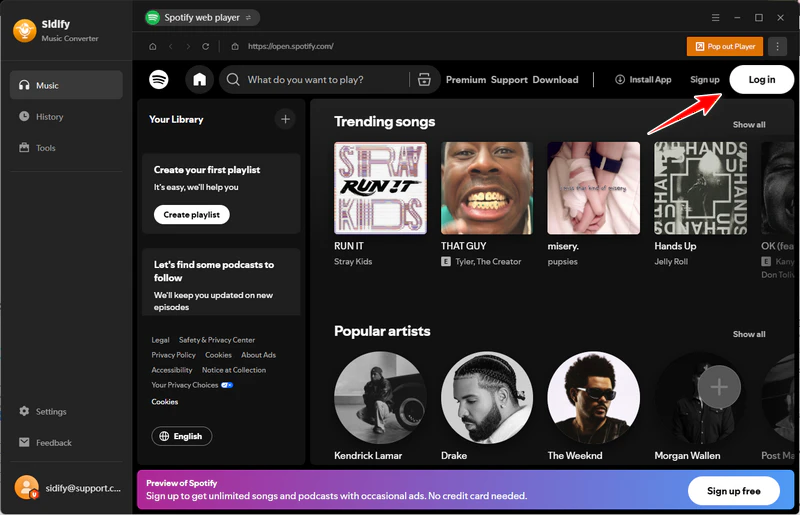
Step 2 Log in to Spotify
Then you need to log in to your Spotify account on the built-in website.
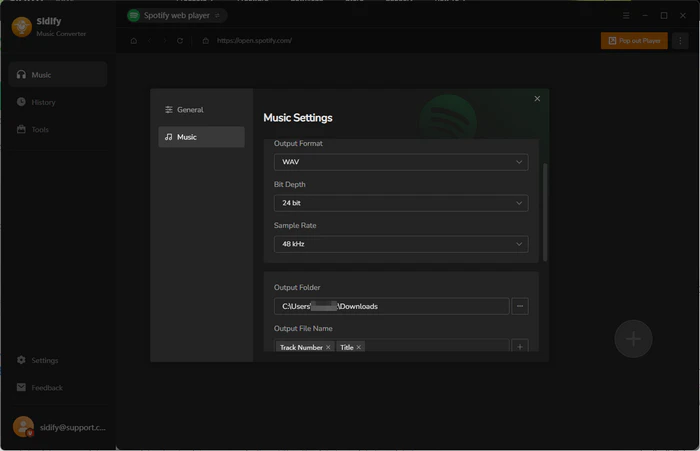
Step 3 Set Output Settings
Before the conversion, click "Menu" > "Settings" and set the output format (MP3, AAC, WAV, FLAC, AIFF, and ALAC), audio quality, output path and more.
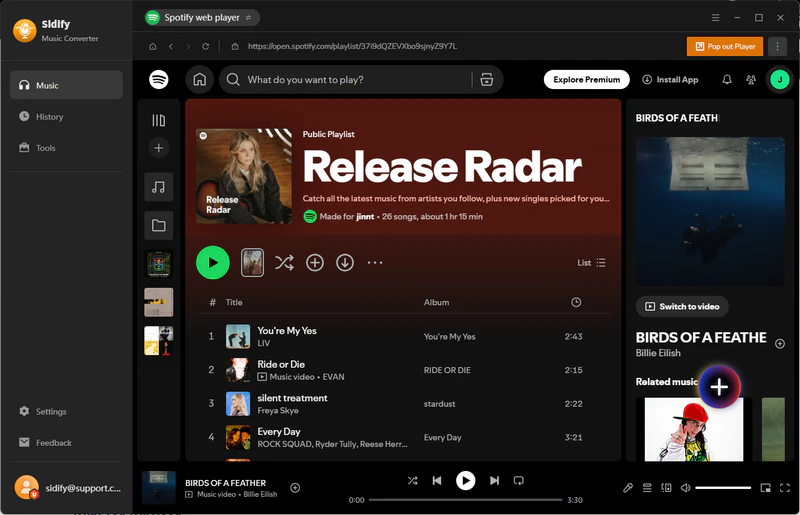
Step 4 Add Spotify Songs
Then you can simply click the "Add" button to select the songs, albums, or playlists you want to download.
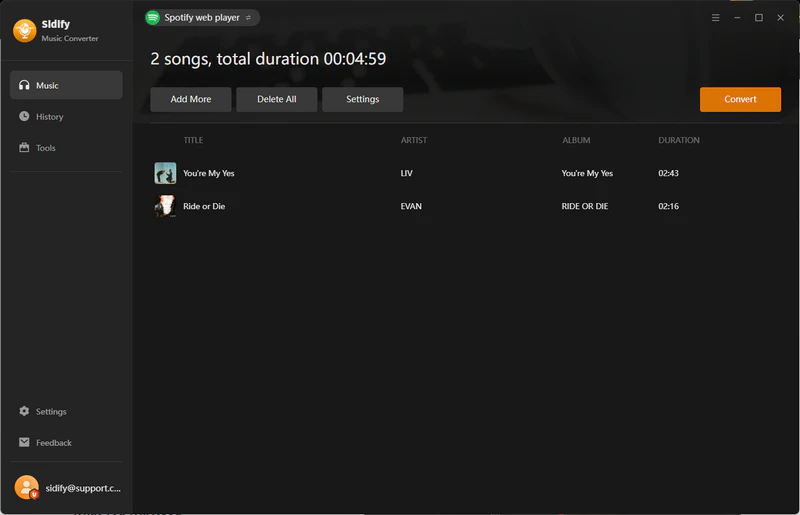
Step 5 Start Conversion
When you finish, click the "Convert" button to start converting the music files.
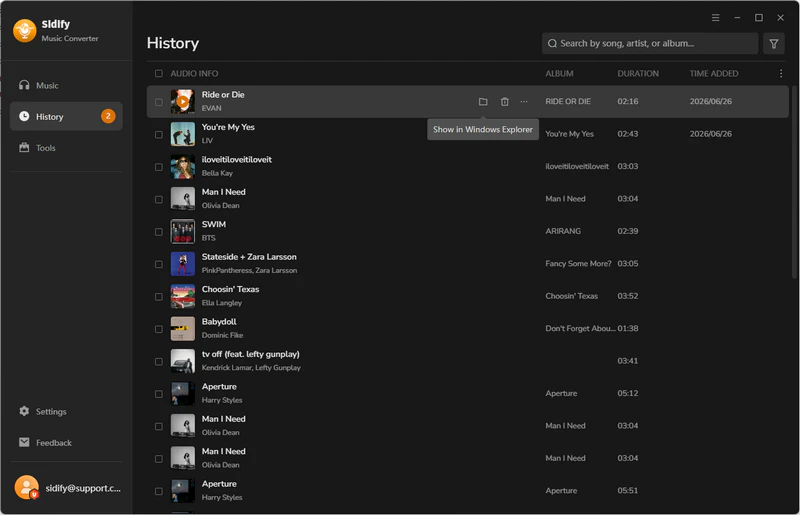
Step 6 View Converted Files
After it is complete, go to the "History" tab to view the converted music files. Or you can click the file folder icon to access them on your local computer.
SpotMate vs. Sidify Music Converter
We tried both tools to see how they handle Spotify downloads. Here is a quick comparison of SpotMate and Sidify Music Converter.
| Feature | SpotMate Free | Sidify Music Converter |
|---|---|---|
| Installation | Browser based, nothing to install | Desktop software for Windows and macOS |
| Output formats | MP3 only | MP3, AAC, WAV, FLAC, AIFF and ALAC |
| Batch conversion | No, tracks must be processed one by one | Yes, with no limit on the number of tracks | Highest quality | 320 kbps MP3 (labeled), 16 kHz cutoff in our test | Up to lossless quality |
| Metadata | Some tracks had incomplete metadata | Preserves full ID3 tags |
| Large playlists | 50-track test had 2 failed downloads | Batch conversion for full playlists |
| Conversion speed | Manual processing for each track | Up to 40x speed |
| Price | Free version available | Free trial, paid license for full use |
FAQs About SpotMate
1. Is SpotMate free?
Yes. SpotMate has a free version that lets you convert and download Spotify tracks as MP3 files. Our whole test ran without paying anything. The free version requires you to download tracks manually. SpotMate also offers a Supporter option with faster downloads, FLAC output, and one-click ZIP downloads.
2. Is SpotMate safe to use?
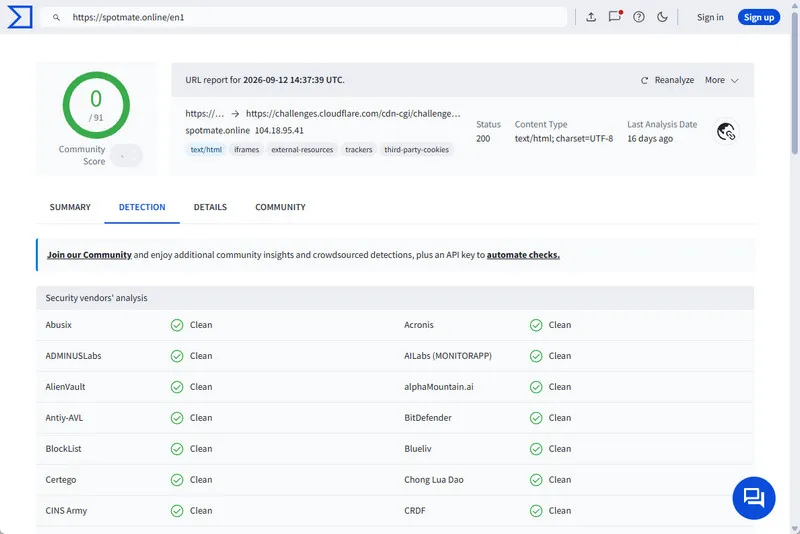
In our test, the site worked normally on Windows 11, and a VirusTotal scan did not flag the website. We also did not see any obvious pop-up ads while using the site. You do not need to log in to your Spotify account to use SpotMate, and there is nothing to install.
 However, we cannot guarantee how any third-party service handles your data. Downloading Spotify music with tools like this should always avoid entering your Spotify password or other sensitive information.
3. Does SpotMate download actual MP3 files?
Yes. In our test, SpotMate downloaded playable MP3 files with normal file sizes. However, the 320 kbps shown in the file may not be true. When we checked the files with Spek, the frequency spectrum showed a clear cutoff at around 16 kHz. This suggests the audio came from a lower-quality source or was re-encoded, despite being labeled as 320 kbps. The files are real MP3 files, but their actual audio quality did not match what we would expect from a genuine 320 kbps MP3.
Conclusion
Does SpotMate preserve lossless audio quality? No. Although the files were labeled as 320 kbps, our Spek test showed a clear cutoff at around 16 kHz, suggesting lower actual audio quality.
SpotMate works well for downloading individual songs, but albums and playlists are less convenient because there is no batch download option and some tracks may fail. If you often download full playlists or albums, Sidify Music Converter offers batch conversion, complete metadata, and lossless formats such as FLAC and ALAC.
 Sidify Spotify Music Converter
Batch download Spotify Music to multiple formats for offline listening on any device.












