


If you're looking for a Spotify to MP3 converter, you must have heard of Sidify. This Sidify review article explains what it does, how its speed and quality compare with its claims, what it costs, what real users say, and more. Read this before using and buying Sidify.
You may also like 👉: Any Audio Converter Review | Best Apple Music DRM Removal Review
Part 1. What's Sidify Music Converter?
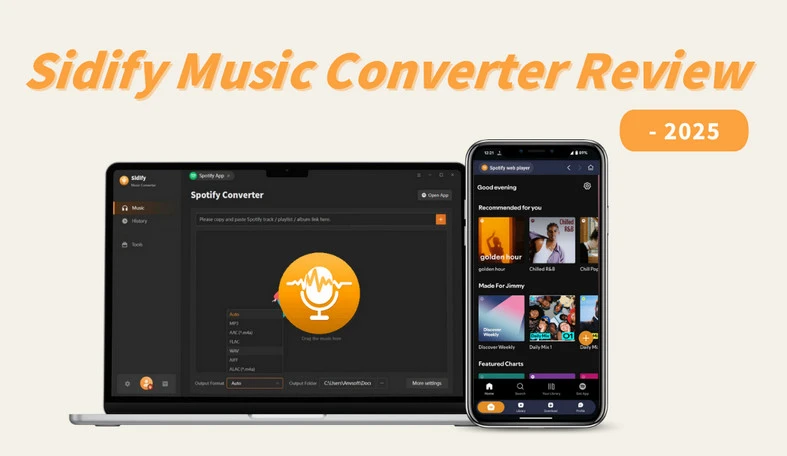
Sidify Music Converter, also called Sidify Spotify Music Converter, is a popular Spotify converter for Windows, macOS and Android. You can use this tool to download any Spotify content and save as MP3, AAC, WAV, FLAC, AIFF, & ALAC music formats, and MP4 video format. It works with Spotify Free or Premium plan.
Part 2. Main Features of Sidify Music Converter
✅ Available for Spotify Free & Spotify Premium
Sidify Music Converter supports both Spotify Free and Premium accounts, allowing users to convert and download Spotify songs, albums, playlists, podcasts, radio, audiobooks, music videos, and video podcasts for offline listening.
✅ Support 7 Output Format
Sidify losslessly converts Spotify music to MP3, AAC, WAV, FLAC, AIFF, and ALAC formats, and also downloads music videos & podcast videos to MP4. Now you can easily transfer Spotify to any compatible devices like music players, DJ software, USB flash, etc.
✅ Original Sound Quality Download
Sidify preserves the original sound quality even for Spotify Lossless. After conversion, you can enjoy a high-quality offline listening experience just like you are streaming on Spotify.
✅ ID3 Tags & Lyrics Preservation
The full ID3 tags, including Title, Artist, Album, Artwork, Track number, Disc number, and Year embedded in the original file, will be perfectly preserved. Moreover, you can export the lyrics of songs in text or LRC files after the conversion.
✅ 40X Fast Conversion Speed
Sidify can convert Spotify music at 40 times faster speed. You can just add entire albums or large playlists to Sidify, and in just a few minutes, all tracks will be downloaded in a flash.
✅One-click to Transfer Spotify Playlists to Apple Music
Sidify has an additional feature that can transfer your converted Spotify music to Apple Music with one click, without any tedious operations. This feature allows you to easily synchronize across platforms and seamlessly switch your favorite Spotify songs to Apple Music.
✅Built-In Free Music Tools
Sidify includes a free toolset, including Format Converter, AA/AAX Converter, CD burner, Tag Editor, and Audio Editor. You can easily convert Audible audiobooks to MP3/M4A/M4B and quickly complete audio format conversions and burn Spotify music to CD. Furthermore, customizable music tagging and audio clip editing are supported, meeting individual needs.
Part 3. How We Tested Sidify Music Converter
For this review, we took a close look Sidify's product page, support pages, as well as user feedbacks from the internet. And we found Sidify's users parse for its output quality and download speed. Let's check if it acts the same as it claims.
3.1 Download Speed on Sidify
In our test result, the Sidify Spotify Music Converter's speed depending on which download mode we choose.
With the Spotify Web Player download mode chosen on Sidify, a 4-minute-12-second song converted in about 6 seconds, that's roughly 40X speed. But if we switched to the Spotify App download mode, the same Spotify track took around 25 seconds, which works out to about 10X speed.
A 100-track playlist finished in about 19 minutes using Sidify's Spotify Web Player mode, but took around 75 minutes with Sidify's Spotify App mode. For a 200-track playlist, we would be looking at roughly 38 minutes versus 2 hours and 30 minutes.
Meanwhile, the success rate close to 99%, though our computer's CPU usage may climb when converting larger Spotify playlists.
| Test | Published result |
|---|---|
| One Spotify song | About 6 seconds in Spotify Web Player mode; about 25 seconds in Spotify App mode |
| 100 Spotify tracks | About 19 minutes in Web Player mode; around 75 minutes in App mode; close to 99% success rate |
| 200 Spotify tracks | About 38 minutes in Web Player mode; around 2 hours 30 minutes in App mode; close to 99% success rate |
3.2 Download Quality on Sidify
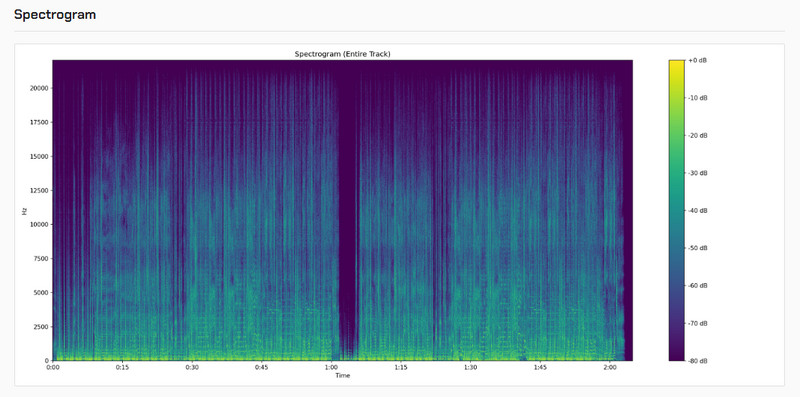
When it comes to download speed and output audio quality, there's a bit of a trade-off on Sidify. We found that if we need truly lossless Spotify Lossless songs, the best bet is to go with the 1X speed setting ("Safety Control" option). By this, we can keep the audio quality at its highest level, so your output files can hold onto that original Spotify Lossless sound.
We also took a closer look at the output files and confirmed they're true lossless. The analysis showed a frequency response of 20.84 kHz, very close to the theoretical limit. Plus, the spectral peak hit 94.5% of the Nyquist frequency, which means the high-frequency details stay intact with impressive accuracy.
Part 4. Who Should Choose Sidify Music Converter?
Sidify Music Converter is designed for anyone who wants full control of their Spotify music.
- You use an MP3 player, USB drive, car stereo, or offline media app.
- You need to integrate Spotify music into third-party tools for mixing, editing, or background use.
- You manage large playlists and want batch work, file names, folders, and tags.
- You want to test both Spotify Free and Premium.
- You need simple tools such as a tag editor, format converter, or CD burner.
Part 5. Is Sidify Free? Any Pricing Plan?
Sidify provides a free Spotify Music Converter. But Sidify Pro we talk about in this article, supports to truely capture songs from Spotify source, and its trial converts only the first 1 minute of each song. The paid version removes that limit.
| Plan | Price | License and updates |
|---|---|---|
| Free trial | $0 | First 1 minute of each song |
| 1-Year | $44.95/year | 1 computer; one year of updates; auto-renews; stated 5-day refund period |
| Lifetime | $89.90 once | 1 computer; lifetime use and updates; stated 30-day refund period |
Part 6. How to Convert Spotify Music with Sidify?
Sidify Music Converter
- Convert Spotify music to MP3, FLAC, AAC, WAV, ALAC, or AIFF
- Keep the original Spotify lossless audio
- Preserve ID3 tags and 40X faster conversion speed
- Supports Spotify Free and Premium
- Free updates and technical support

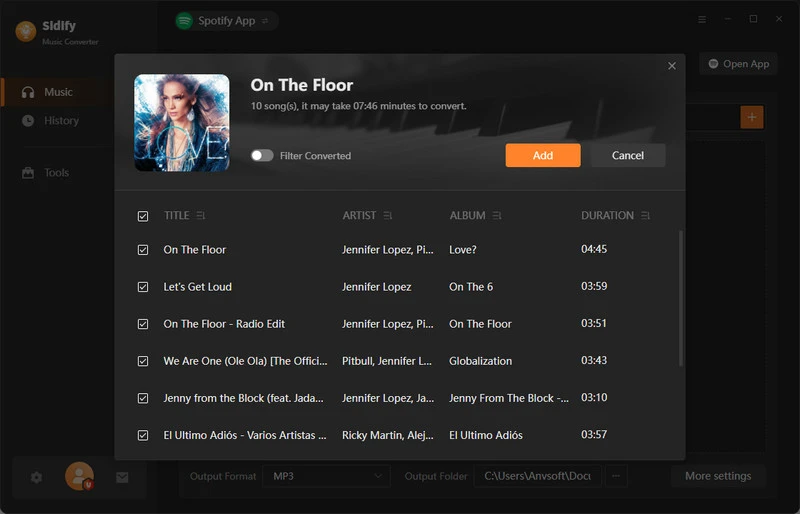
Step 1 Add Spotify Music
Open Sidify and choose the Spotify App download mode for better output quality. Drag and drop playlists from Spotify App to Sidify, then "Add".
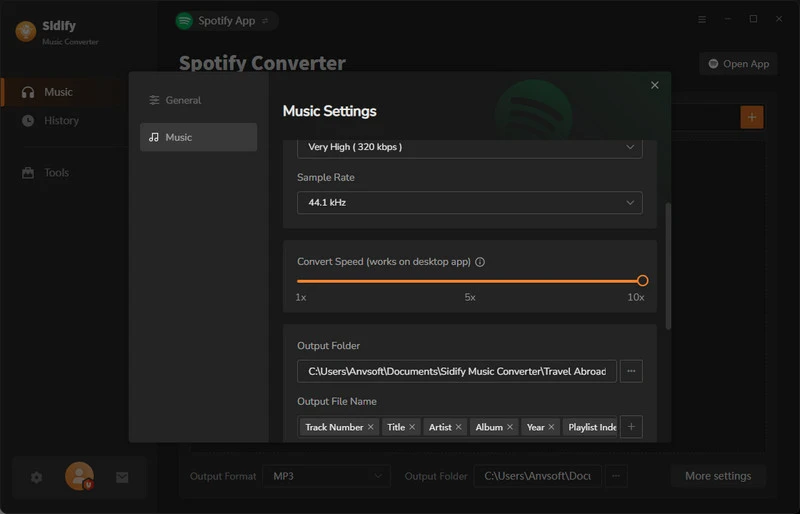
Step 2 Choose Output Settings
Open Settings. Choose a format, quality, folder, file name, and folder order. If unsure, start with MP3.
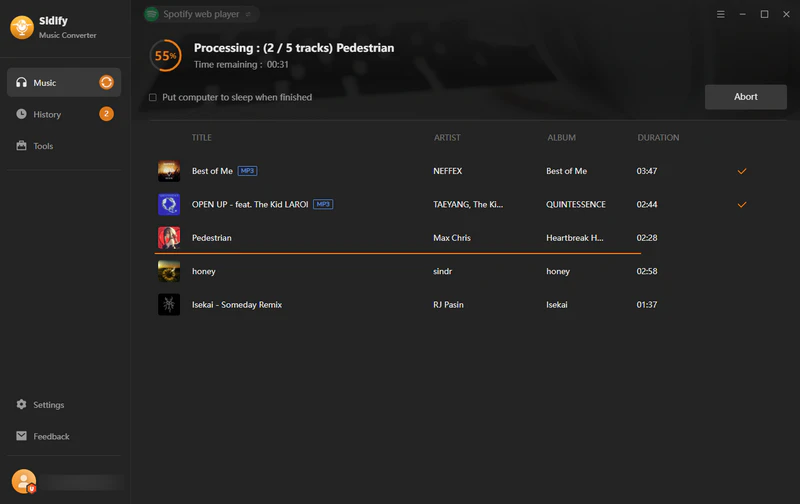
Step 3 Convert and Check Spotify MP3 Files
Click Convert to start. Open History and check sound, tags, cover art, and failed tracks.
Part 7. Is Sidify Music Converter Safe and Legal to Use?
Is Sidify Safe?
Using Sidify Music Converter is safe when downloaded from the official source. During installation, the software runs stably with no bundled ads detected, and the installation package has passed standard security scans, providing a reliable installation experience.
Is Sidify Legal?
Yes, using Sidify Music Converter is legal for personal use. Users should ensure compliance with applicable copyright laws and regulations in their region. It should not be used for commercial distribution or unauthorized sharing.
Part 8. Pros & Cons of Sidify Music Converter
- Convert Spotify music to MP3/AAC/WAV/FLAC/AIFF/ALAC.
- Keep the original audio quality of Spotify.
- Retain full ID3 tags and obtain lyrics.
- Batch conversion with up to 40x faster conversion speed.
- Support the latest Windows & macOS Operating systems.
- Free tools, like format converter, tag editor, CD bunner, etc.
- Requires installation before use.
- Free trial has limitations.
Part 9. Users' Feedback on Sidify Music Converter
Online user reviews of Sidify mostly highlight that this tool has been operating for many years, with many long-term users recommending it. Users also frequently mention that downloading Spotify playlists with Sidify is convenient, straightforward, and easy to use.
A very stable and reliable application, with a very fast support. I am using it for alomst 7 years... (from Trustpilot's Andrei Manescu)
I am using sidify for several years now, and can't be more satisfied. (from Trustpilot's אני)
Sidify Music Converter for Spotify is an absolute lifesaver for music lovers... (from Trustpilot's James F)
Sidify Music Converter is the changer! I have converted my Spotify and Apple Music playlists using it and it is fast and smooth and literally so simple. (from Trustpilot's Olivia Bennett)
It's easy to download playlists from spotify, so I can use them offline in my dj-software. (from Trustpilot's Joris Peeters)
Part 10. Sidify Vs. Other Spotify Music Converters
These products have similar features. This table uses each vendor's public claims, not guaranteed results.
| Fetures | Sidify Music Converter | Other Spotify Music Converters | Free Online Spotify Downloader |
|---|---|---|---|
| Sound quality | Spotify Lossless & 320kbps 👍 | Up to 320kbps | ~ 128kbps, download from YouTube |
| Format Support | MP3/AAC/WAV/FLAC/AIFF/ALAC/M4A | MP3, AAC, FLAC, WAV, some M4A | MP3 Always |
| Download speed | 40X Faster 👍 | 5X ~ 10X | 1X |
| Save ID3 Tags | All ID3 tags saved | Some major tags saved | Only title, artist, album |
| Stability | Timely updates | Slow updates | Unstable |
| Compatibility | Windows, macOS, Android | Windows, macOS | Web-based |
| Additional Features | Free AA/AAX Converter, CD burner, Tag Editor, etc. | Few additional functions | None |
My take: Sidify makes sense when you like its interface and need its tools or Android option. And it's excellent when you need the original quality from even Spotify Lossless - Sidify it's one of the few music downloaders that can preserve 100% of Spotify's lossless audio quality.
FAQ about Sidify Music Converter
What devices and systems does Sidify Music Converter support?
Sidify currently supports Windows, macOS, and Android platforms.
Windows: 8,10,11 (32-bit & 64-bit)
macOS: 11, 12, 13, 14, 15, 26 & Apple Silicon M1/M2 chips
Android: 5-18
Is there a limit on the number of Spotify music downloads using Sidify?
There's no limit on the number of songs you can convert. You can download entire albums, playlists, or individual tracks, and even batch convert thousands of songs. However, to ensure stability, it's recommended that you don't convert too large a library at once.
Is there a free version of Sidify Music Converter?
Sidify offers a free trial version, but it has limitations: you can only convert the first 1 minute of each song. To unlock the full functionality, you need to update to the pro version.
Does Sidify offer customer support?
Sidify provides 24-hour email customer service. If you encounter any issues while using the program, you can contact customer service at support@sidify.com to resolve the problem.
Video Tutorial: How to Use Sidify Music Converter for Spotify | Windows & Mac Tutorial
Conclusion: Is Sidify Still Your Best Choice?
After a full review of Sidify Music Converter’s features, pricing, safety, and usability, Sidify Music Converter still stands out as one of the most reliable and powerful Spotify music converters. It supports both Free and Premium Spotify accounts, preserves original sound quality, and ensures smooth conversion with full ID3 tags. Compared with other converters like ViWizard or TuneFab, Sidify offers a more stable performance, a user-friendly interface, and better long-term value with its flexible pricing plans. If you are looking for a safe, legal, and efficient solution to enjoy Spotify music offline without restrictions, Sidify Music Converter remains a top recommendation.
 Sidify Music Converter
Download Spotify music in common formats for unrestricted offline listening.












