


Spotify, the King in the music streaming world, offers access to a vast music library for a monthly fee of around $10, allowing you to enjoy music online or offline. However, when you download songs from Spotify for offline use, they are saved as cache files, not MP3s. This restricts you from transferring them to other devices for normal playback, for which Viwizard comes in.
Viwizard Spotify Music Converter is a professional tool designed to convert Spotify tracks into MP3 and other popular formats. This functionality enables you to transfer the downloaded Spotify songs to different devices for normal playback, without any limitations. But is Viwizard worth buying? How does it work, and how well does it work? What are the pros and cons? How much does it cost? How's its customer service and user feedback opinions?
This article will give you a comprehensive assessment. I'm Hanna Ellis, a passionate writer with a strong interest in technology, music, and software. I have personally used and thoroughly tested it. Next I will offer you with a comprehensive, honest and detailed review of my findings.
 Quick Verdict:
3.5 out of 5 stars. ViWizard converts fast and keeps ID3 tags intact, but across 50 test tracks the output quality measured 153 kbps against an advertised 320 kbps. Fine for casual listening, harder to justify at $89.95 lifetime.
We build Sidify, a competing converter. We tested ViWizard on 50 tracks and published the raw numbers below. See the performance test
Part 1: What is Viwizard Spotify Music Converter
Viwizard Spotify Music Converter is a professional software tool designed to convert Spotify music tracks into MP3, M4A, M4B, AAC, WAV, and FLAC. It allows users to download and convert songs, playlists, and albums from Spotify to a local Windows PC or Mac for offline playback.
It is perfect for individuals aiming to keep Spotify tracks permanently or enjoy them on various devices. In essence, Viwizard serves as a good option for those in search of an easy-to-use Spotify to MP3 downloader.
Part 2: Key Features of Viwizard
An aspect that sets Viwizard apart from others is its intuitive and well-designed features. Its user-friendly design enables users to quickly grasp its functionality with ease. Also, it gives you a lot of freedom to adjust the quality and settings of the output. Let's check out the main features of Viwizard and see how they can help you.
1. Intuitive Interface
Viwizard offers an intuitive interface that is user-friendly and easy to navigate. Whether you are a beginner or a seasoned user, you can quickly familiarize yourself with the software's features and functionalities.
Note:If you like a brighter theme, you can refer to Part 7 - Alternatives to Viwizard, in which you can switch between dark and light modes.
2. Supported Input
Viwizard Spotify Music Converter is specially designed for converting Spotify music tracks to MP3.
3. Output Formats
Viwizard provides a range of output formats including MP3, M4A, M4B, AAC, WAV, and FLAC. This flexibility enables you to choose the format that best suits your needs and preferences for your downloaded Spotify music.
4. Audio Quality
Maintaining high audio quality is essential, and Viwizard ensures that your converted Spotify tracks retain high sound integrity.
If you want lossless quality audio output (up to 320kbps), take a look at Section 7 - Alternatives to Viwizard for potential solutions.
5. ID3 Tags
Viwizard retains important metadata like title, artist, album, and art cover through ID3 tags. This feature organizes your music library efficiently and ensures that all relevant information is preserved.
6. Conversion Speed
With Viwizard, you can convert Spotify music at a rapid pace without compromising on quality. The efficient conversion speed saves you time and allows you to enjoy your offline music collection sooner.
7. Compatibility
Viwizard is available on both Windows and Mac operating systems. It's compatible with Windows: XP, Vista, 7, 8, 10, 11 (32-bit & 64-bit) and macOS 10.8 - macOS 14 Sonoma.
8. Supported Languages
Viwizard supports multiple languages, offering a localized experience for users worldwide. Whether you prefer English, German, French or Spanish, Viwizard caters to a diverse audience with its language options.
Note:If your preferred language is not included, it is advised to consider exploring the alternatives mentioned in Part 6, as they support a wide range of 49 languages, potentially including the one you're looking for.
Part 3: Performance of Viwizard
One key thing to think about when picking a Spotify downloader is how well it works. You want software that is reliable and performs without any issues or risks. I've put Viwizard through different tests to evaluate its performance, and I'll share my findings with you.
1. Beginner-friendly
Viwizard is simply designed with easy functions. You only need to follow 2 steps to convert your Spotify songs into MP3s. When you open Viwizard, it'll open Spotify too. Here's what you do: 1) Drag and drop a playlist from Spotify to Viwizard. 2) Click "Convert" in the bottom right corner.
Note:Viwizard will give you MP3 files by default. If you want a different format, just click the Menu button in the top right before converting. Then choose 'Preferences'. You can also pick your language here. Switch to the 'Convert' tab and you can select your preferred format.
If you ever need to change where your files are saved, simply adjust the output path at the bottom of the program.
2. Smooth Conversion
The overall conversion is relatively smooth. I converted a list of 50 songs. On average, it took about 20 seconds to convert a 1-minute song, which is about 3X faster speed.
3. Keep Good Audio Quality and ID3 Tags
While Viwizard converts songs at a 320kbps bitrate, the output quality is 153kbps, categorized as lossy. Despite this reduction, the sound still comes out clear and should be good enough for most people. And it keeps important details like song title, artist, and album intact in the converted files.
Part 4: User Feedback of Viwizard
A great method to assess software is by considering the opinions of other users. User reviews and ratings offer valuable insights into the quality, performance, and customer service of the software. I've compiled some of the most pertinent and beneficial user feedback and ratings from Trustpilot to provide you with a comprehensive review.
Positive Experiences:
1. Simple to Use
Easy to use and does the job.
Source from: https://uk.trustpilot.com/reviews/6a1b8e43f0b024071100516c
2. Keep ID3 Tags
I was able to download my favorite playlists quickly and convert them to MP3 with no loss in quality. The interface is clean and easy to use, even for beginners. I also love that it keeps the ID3 tags and lets you choose from multiple formats.
Source from: https://uk.trustpilot.com/reviews/6881937ca665d388525d695b
3. Timely Updates
Just got the latest update which is a lot faster. The customer care is excellent with a fast response. Very happy
Source from: https://uk.trustpilot.com/reviews/6954847d607a97f30b7da7f5
Negative Experiences:
1. Spotify Account Suspension
Spotify banned the account I've had for 10+ years in less than 24 hours after logging into my account using the application.
DO NOT USE THIS SERVICE WITH YOUR PERSONAL SPOTIFY ACCOUNT, YOU WILL LOSE ACCESS.
Source from: https://www.trustpilot.com/reviews/69f3c4b6f0b6d787a95c69e8
2. Slow Conversion
Somebody paid to have these positive reviews written. This product is extremely slow and not very intuitive. Not worth the money at even a tenth of the current cost. You should be ashamed of yourselves.
Source from: https://www.trustpilot.com/reviews/67de15f5ff0cc9767f4026ba
3. No Money-Back Guarantee
Complete scam. This "software" will get your beloved Spotify account blocked. They miss-sell this product as a legal way to download your playlists. It's utter rubbish. Using this software to download music from Spotify contravenes the policy that you agreed to when you signed up. They'll block you and good luck getting that lifted! The "5 Day Full Refund Policy" is a joke too. "Oh there are loads of conditions and unfortunately you don't qualify for a refund". No surprise I guess. These people are crooks selling snake oil. Save your money, go and have a few pints instead, you'll feel much better than being scammed like me. Pffffft.
EDIT: I did reach out to their customer service team and they said a refund would be possible once I removed this review. I opened a PayPal case and recently received the refund.
Source from: https://www.trustpilot.com/reviews/66eaf394406f89501eb16fd0
Part 5: ViWizard Pricing
ViWizard has changed its pricing structure since our previous review. The quarterly plan has been removed, and all available tiers are now priced higher. For a single Windows PC, the current individual plans are $19.95/month, $49.95/year, and $89.95 for a lifetime license.
There are also two plans that were not covered in our earlier review: the Family plan, which supports up to 3 PCs ($29.95/month and $69.95/year), and the Spotify Music Converter+ bundle, which includes 1 PC and 1 Mac ($25.95/month or $99.95 lifetime).
At $89.95, ViWizard lifetime license is one of the more expensive options among single-platform Spotify converters. However, the high price is hard to defend when our testing in Part 3 revealed an average bitrate of just 153 kbps, raising questions about whether the actual output quality matches the cost.
Part 6: FAQs about Viwizard
1. Will ViWizard Spotify Converter get Spotify account banned?
Yes. ViWizard is not an official Spotify tool. Its recording feature may trigger Spotify abnormal activity detection, which could result in account suspension. Many users have reported that their accounts were permanently banned after using ViWizard. If your account is banned, you can submit an appeal to Spotify Support via email.
2. Is using ViWizard Spotify Converter legal?
Under U.S. copyright law, making personal backups of content may not always be considered copyright infringement. However, Spotify Terms of Service prohibit unauthorized downloading or extracting of content. ViWizard is not an officially authorized Spotify tool, using it may violate Spotify terms and could result in account suspension. Users should follow applicable copyright laws or only use converted files for personal purposes.
3. How much does ViWizard Spotify Converter cost?
ViWizard offers both a free trial and paid plans. The free trial version only converts the first 30 seconds of each song. The available licenses include monthly, yearly, and lifetime options for one computer. The current pricing is around $19.95/month, $49.95/year, and $89.95 for a lifetime license.
4. What audio formats does ViWizard Spotify Converter support?
ViWizard can convert Spotify songs, albums, and playlists into several popular audio formats, including MP3, AAC, WAV, FLAC, M4A, and M4B. It also preserves ID3 tags and other metadata after conversion.
Part 7: Alternatives to Viwizard
As previously mentioned, the top player in this field is actually Sidify. Sidify pioneered the Spotify Music Converter and has influenced other brands in the market. Updates and innovations by Sidify often set the standard for the entire industry, leading to its higher pricing compared to others in the sector.
Sidify offers three alternatives to Viwizard Spotify Music Converter: Sidify Music Converter, Sidify Music Converter Free, and Sidify All-In-One.
Sidify Music Converter stands out as the primary choice among Spotify Music Converters, while Sidify Music Converter Free is the only free option available. Sidify All-In-One represents the industry's ultimate solution capable of converting a wide range of streaming songs to MP3 format, unrivaled by any other product currently on the market.
1. Sidify Music Converter
Sidify Music Converter is a professional tool that can convert Spotify songs to MP3, AAC, WAV, FLAC, AIFF, ALAC. Literally, it can download Spotify songs, albums, playlists, radio, podcasts, and audiobooks - all the audio you can play on Spotify, to your local computer. This tool utilizes cutting-edge technology, offers multi-speed conversion, and ensures that the converted tracks preserve lossless audio quality without losing any metadata tags.
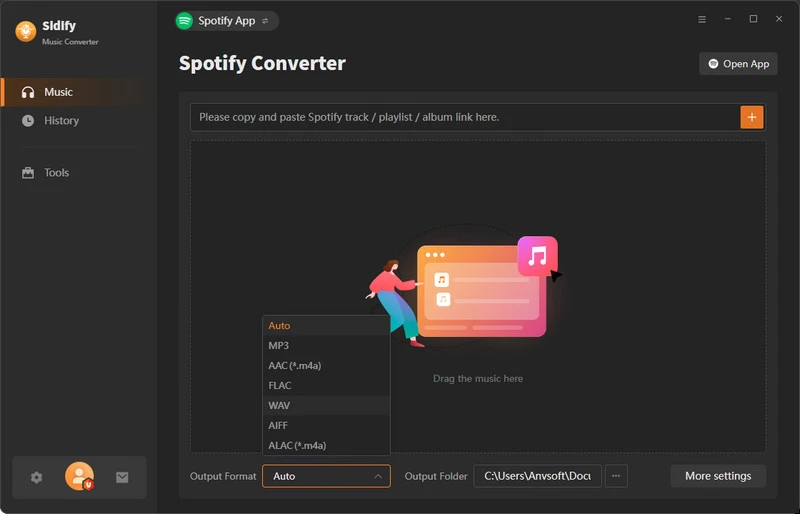
Its leading position in the industry can be saw through the detailed settings within the program. Beyond simply converting Spotify to MP3, it also offers a wide array of customizable functions and extra tools. For example:
Why Sidify Stands Out:
- Sidify offers users the option to select between 2 conversion modes: recording songs from the Spotify App or capturing songs from the Spotify web player, guaranteeing nearly a 100% success rate in conversions.
- Users can choose between 1x speed or multiplex speed on Sidify based on their network conditions, with speeds reaching up to 10x.
- Sidify enables users to specify whether to put their computer into sleep mode after completing the song conversion process.
- Users of Sidify can opt for either light or dark mode for their interface.
- Sidify leads the industry by supporting 49 languages, setting a new standard for multilingual support.
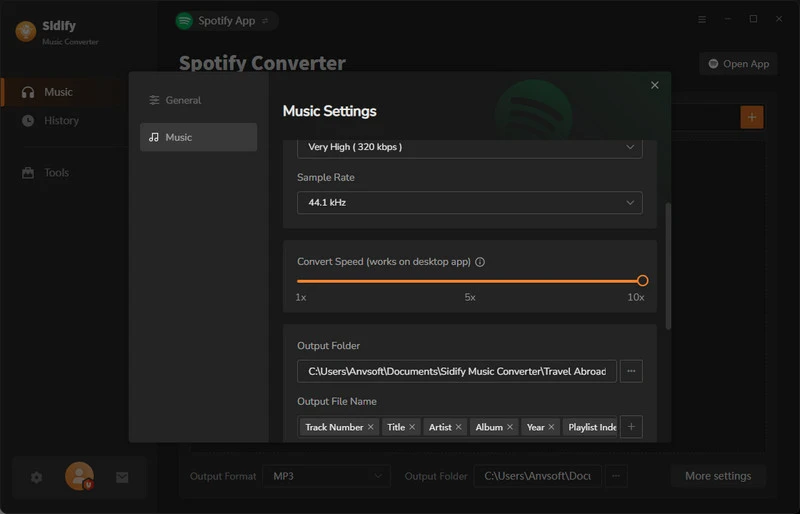
In addition to the mentioned customization options, Sidify offers a range of additional features such as personalized output file naming and file organization preferences.
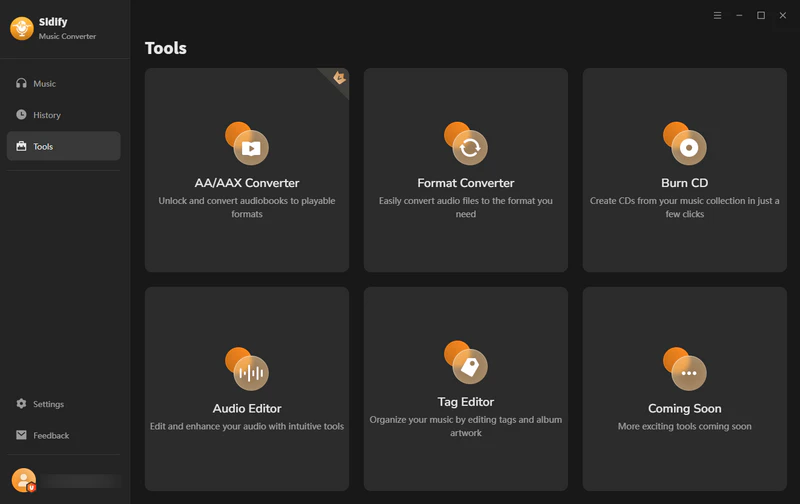
Moreover, users can access the following extra tools within the Tools section of Sidify:
Additional Tools:
- AA/AAX Converter
- Format Converter
- CD Burner
- ID3 Tag Editor
2. Sidify Music Converter Free
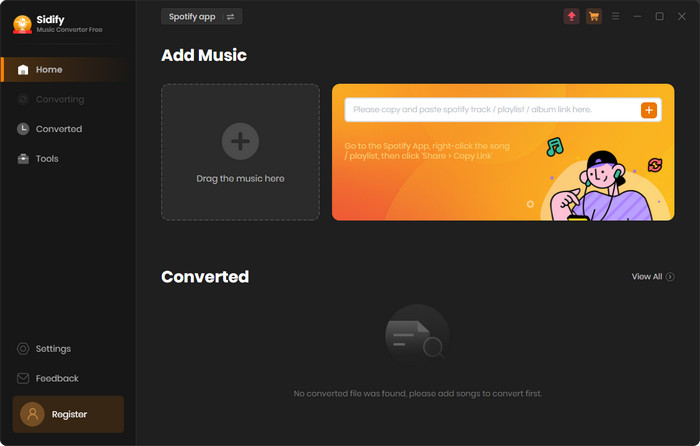
Sidify Music Converter Free allows users to convert Spotify songs to MP3 format at no cost. While the free version doesn't offer lossless sound quality like its paid counterparts and has slightly less comprehensive retained ID3 tags, it serves as a practical solution for those who only require occasional Spotify song conversions. To explore a detailed comparison between the free and pro versions, you can visit Free vs Pro Comparison.


3. Sidify All-In-One
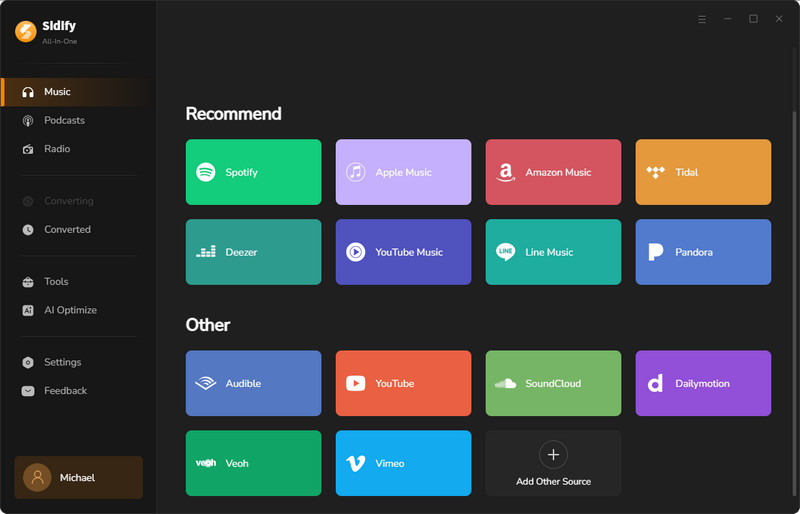
Sidify All-In-One, the ultimate product released by Sidify, goes above and beyond. It not only lets you convert Spotify songs to MP3 but also allows you to convert tracks from various platforms like Apple Music, Amazon Prime Music, Amazon Music Unlimited, Tidal, Deezer, YouTube Music, Pandora, Line Music, Audible AA/AAX audiobooks, YouTube, SoundCloud, Dailymotion, Vimeo, and more to formats like MP3, AAC, WAV, FLAC, AIFF, and ALAC. It keeps the original sound quality and full ID3 tags intact for a seamless user experience.

Part 8: Conclusion
Viwizard is a good product overall, which can quickly convert Spotify to MP3 format. If you are considering a replacement for Viwizard, consider Sidify, a big player in the field. While Sidify may come at a slightly higher price point, it offers unmatched quality and service. In particular, Sidify's All-In-One product not only seamlessly replaces all Viwizard functionalities but also consolidates nearly all features found in other streaming media converters available today. This makes it a supreme and unrivaled choice for your conversion needs.
 Sidify Spotify Music Converter
Batch download Spotify Music to multiple formats for offline listening on any device.












