


As a well-known online Spotify music converter, SpotiDown claims to offer a free and fast way to download Spotify songs, playlists, and albums as 320kbps MP3s with no account required. But is SpotiDown really free without any hidden fees? Is SpotiDown safe and free of malware? Does SpotiDown actually work in 2026?
In this comprehensive SpotiDown Spotify Downloader review for 2026, we will walk you through SpotiDown's core features, security, audio quality, and more. Keep reading to discover whether SpotiDown is worth using and find more reliable alternatives to SpotiDown.
You may also like 👉: KigoSoft Music One Review | SpotiSaver Tested Review 2026
Part 1: What Is SpotiDown Spotify Downloader?
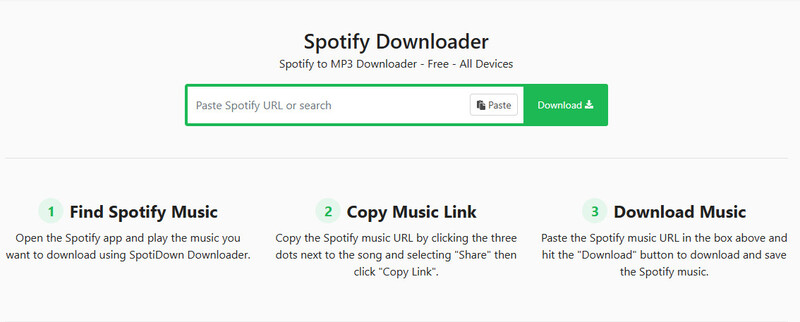
SpotiDown is an online music converter that allows you to convert Spotify songs, playlists, or albums to MP3 files for free, in up to 320kbps. You don't need to register or log in; simply copy and paste the link into the box, and you can download the tracks you want from Spotify.
Key Features of SpotiDown:
- Download any Spotify songs as 320kbps MP3.
- Download Spotify playlists & albums with one click.
- Keep all the metadata of Spotify songs: cover art, year, artists, album, etc.
- Download any Spotify tracks without limits.
- No login or Spotify account required.
- Completely free to use.
It is worth noting that SpotiDown doesn't have an official domain. Below is a quick comparison of the most common SpotiDown domains currently online:
| Domain | Free to Use | Audio Quality Claim | Output Formats | No Login Required | Download Playlists | Ad-Free | Languages | Limits |
|---|---|---|---|---|---|---|---|---|
| spotidown.app | √ | No Claim | MP3; ZIP for playlists/albums | √ | √ (Premium Feature) | × redirect ads | Multiple languages | Limited to 2 tracks per album/playlist in the free version |
| spotidown.com | √ | 320kbps | MP3; ZIP for playlists/albums | √ | √ | √ | English Only | Download button may not respond |
| spotidown.co | √ | 320kbps | MP3; ZIP for playlists/albums | √ | √ | √ | English Only | Limited download speed in the free version |
| spotidown.me | √ | No Claim | MP3 | √ | √ (Premium Feature) | √ | English Only | Playlist downloads unavailable in the free version |
| spotidown.net | √ | 320kbps | MP3; ZIP for playlists/albums | √ | √ (one-by-one click) | √ | Multiple languages | Playlist and single-track downloads are separated |
Our advice: Currently, spotidown.app is the most commonly used and relatively stable version. Other domains may look similar but often have higher security risks. Regardless of which one you use, we recommend considering them unofficial Spotify online download tools. Never enter your Spotify password, never install additional apps, and be wary of any buttons that open unrelated pages.
Part 2: How to Use SpotiDown to Download Spotify Music to MP3?
The advantage of online tools is that you don't need to log in or install any software — you can simply copy and paste the link to a Spotify song or playlist to convert it right away. Below is a step-by-step guide on how to convert Spotify to MP3 using spotidown.app as an example.
Step 1 Open spotidown.app through a browser on your device, such as Google Chrome or Safari.
Step 2 Copy and paste the URLs of Spotify's songs, playlists, or albums into the box on the webpage.
Step 3 Click "Download" or "Convert" to start the process and wait for it to finish.
Part 3: Is SpotiDown Worth Using? Hands-on Review
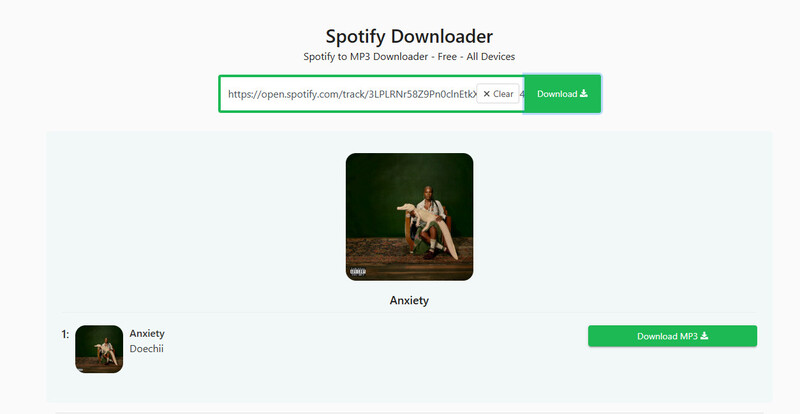
We tested SpotiDown in 2026 using the Google browser on Windows. We tried to download 5 different Spotify songs through spotidown.app and spotidown.co. The following are the details of our testing results.
| Content Type | Name | Songs | File Size | Download Time | Actual Quality | Domain | Success Rate |
|---|---|---|---|---|---|---|---|
| Playlist | Pop Mix | 50 | 406.07 MB | >22 min | 192 kbps | spotidown.co | -/50 |
| Album | The Life of a Showgirl | 12 | 100.23 MB | 17 min | 192 kbps | spotidown.co | 12/12 |
| Album | Justice | 16 | 109.25 MB | 10 min | 192 kbps | spotidown.co | 16/16 |
| Single Track | APT. | 1 | 6.58 MB | 20 sec | 320 kbps | spotidown.app | 1/1 |
| Single Track | Opalite | 1 | 9.15 MB | 32 sec | 320 kbps | spotidown.app | 1/1 |
| Single Track | Deserve You | 1 | 7.30 MB | 5 sec | 320 kbps | spotidown.app | 1/1 |
After trying out a few playlists and individual tracks, I found that Spotidown is fairly reliable for downloading individual tracks. However, when downloading playlists or albums, download speeds can be very slow, or you may be prompted to upgrade to a paid membership.
In terms of sound quality, the downloaded files are typically between 192 kbps and 320 kbps, and most are re-encoded rather than the original Spotify files, so the sound quality is fairly average.
- Basic features are almost completely free.
- No Spotify account login required .
- Simple operation — just copy and paste the link .
- Average audio quality; mostly re-encoded rather than using original Spotify files.
- Many limitations in the free version, such as download speed and playlist downloads.
- Occasional redirect ads.
- Unstable when downloading large playlists.
- Multiple domains with the same name, making it easy to visit the wrong site.
Part 4: Is SpotiDown Spotify Downloader Safe and Legal to Use?
Is SpotiDown Safe?
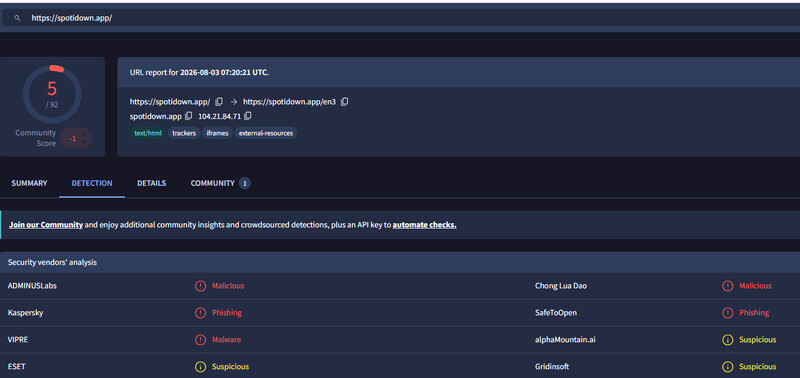
SpotiDown is not an official tool, and using it carries certain security risks. To help you gain a more professional and objective understanding of whether SpotiDown is safe, we used the professional scanning tool VirusTotal to scan SpotiDown's common domains.
| Domain | VirusTotal Detection | Main Flags | Risk Level |
|---|---|---|---|
| spotidown.app | 5 / 92 | Malicious, Phishing, Suspicious | Medium |
| spotidown.co | 0 / 92 | - | Low |
| spotidown.com | 0 / 92 | 1 Suspicious | Low |
| spotidown.me | 0 / 92 | - | Low |
| spotidown.net | 0 / 92 | - | Low |
Aside from spotidown.app, which was flagged by five security engines, the other four domains (.co, .com, .me, and .net) are almost entirely clean on VirusTotal. Among these domains, spotidown.app carries the highest relative risk. It was flagged as "Malicious," "Phishing," and "Suspicious." Although the proportion is low (5 out of 92), this still indicates a certain security risk.
Notably, VirusTotal primarily detects malware and phishing, but it cannot detect forced redirects or unauthorized data collection. We recommend avoiding clicking on suspicious pop-ups while using the service and promptly re-enabling your ad blocker once the download is complete. In the long term, we recommend using safer and more reliable desktop SpotiDown alternatives.
Is SpotiDown Legal?
Please note that music on Spotify is protected by copyright. If you download music for commercial use or distribute it without permission, you may be violating Spotify's Terms of Service and applicable copyright laws in your region. However, if you download music solely for personal offline listening, the risk is generally lower. Nevertheless, please use such tools responsibly and respect the copyrights of the original creators.
Part 5: 6 SpotiDown Spotify Downloader Alternatives in 2026
If you feel that SpotIDown doesn't meet your needs, we've found some alternatives to SpotIDown for you, including both desktop and online tools.
| Tool | Type | Key Advantage | Rating |
|---|---|---|---|
| Sidify Spotify Music Converter | Desktop | Multiple output formats; batch conversion; lossless music | 4.9/5 |
| SpotDown | Online | Free; No login required |
4.7/5 |
| SpotifyMate | Online | Download cover art separately Easy to use |
4.0/5 |
| SpotMate | Online | No account login required | 4.0/5 |
| MusicFab | Online | Multi-platform support | 4.5/5 |
| SpotiSaver | Online | Clean user interface | 4.2/5 |
Part 6: Best Desktop Spotify Downloader Alternative to SpotiDown in 2026
While SpotiDown can work for occasional single-track downloads, it still falls short in several key areas: limited playlist support, average audio quality, slow speeds, ads, and reliability issues. If you are looking for a faster, safer, and more reliable tool, a dedicated desktop software like Sidify Spotify Music Converter is a better choice in 2026.
With Sidify, you can easily download your favorite Spotify songs, albums, playlists, podcasts, or audiobooks, and convert them to multiple formats including, MP3, AAC, WAV, FLAC, AIFF, or ALAC, without compression.
Sidify Spotify Music Converter
- Download and convert Spotify tracks in MP3, AAC, WAV, FLAC, AIFF, or ALAC
- Supports lossless conversion while preserving original audio quality and full metadata
- Download Spotify songs, albums, playlists, podcasts, music videos, audiobooks
- Offers fast batch conversion, allowing multiple songs to be converted at once
- Works for both Spotify Free and premium account

How to Download Spotify Songs with Sidify
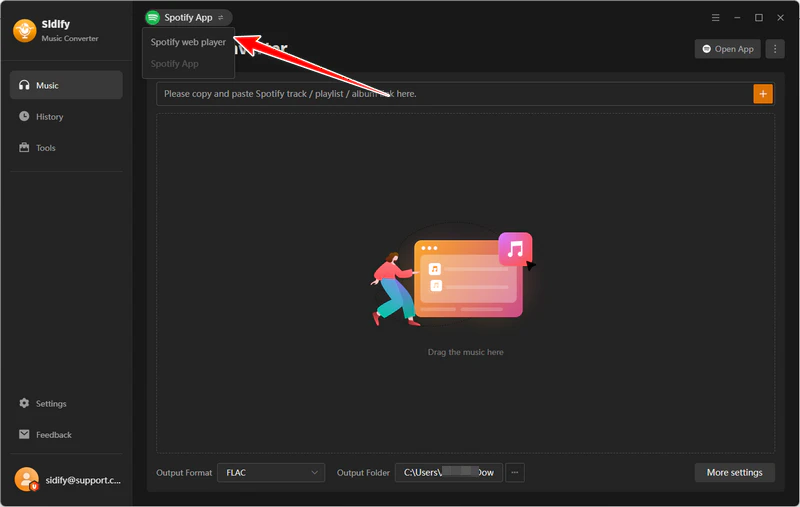
Step 1 Install Sidify Spotify Music Converter
Install Sidify Spotify Music Converter on your Windows or macOS and launch it.
Step 2 Sign in to Spotify
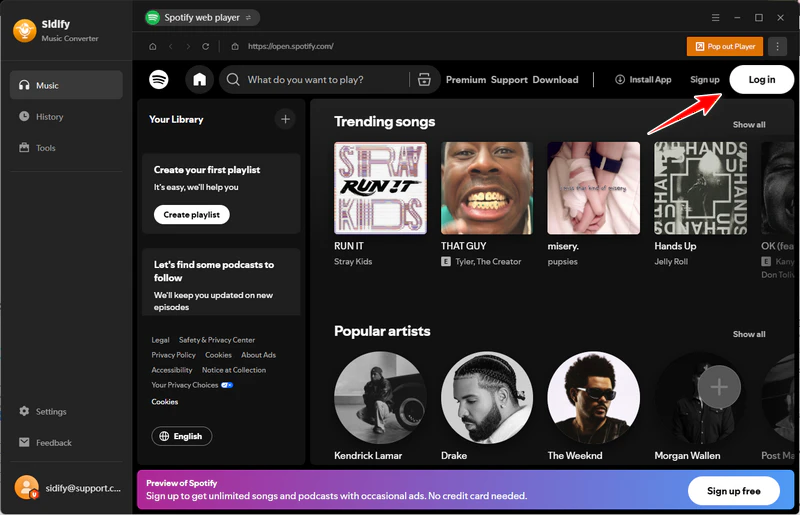
Log in with your Spotify account within the built-in Web Player, and then browse and search for the playlists or albums you desire.
Step 3 Choose Output Format
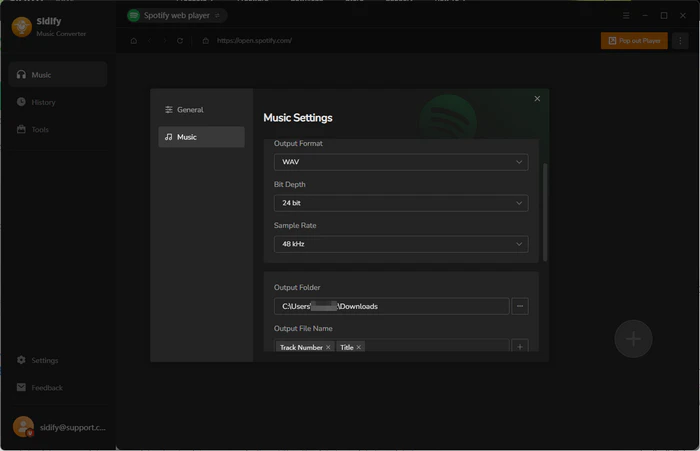
Click Menu > Settings in the top-right corner, and choose the output format, adjust the audio quality and output folder if needed.
Step 4 Add Spotify Songs
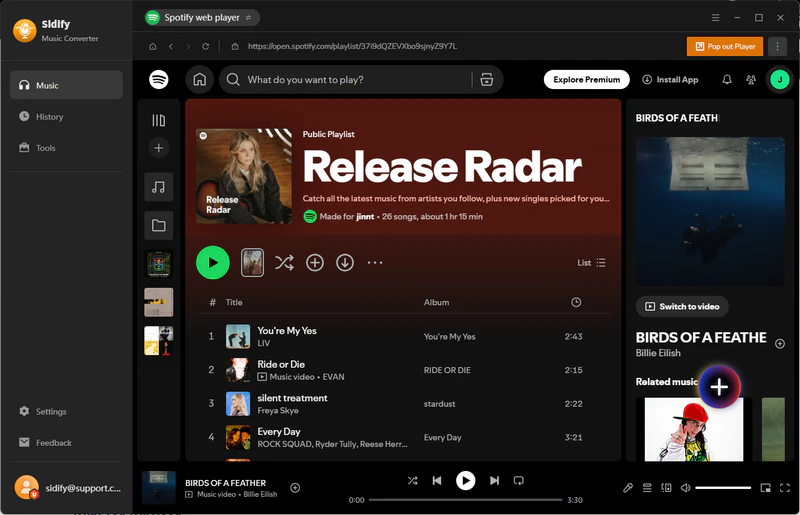
Click the "+" button in the bottom-right corner to add the tracks to the conversion list.
Step 5 Start Conversion
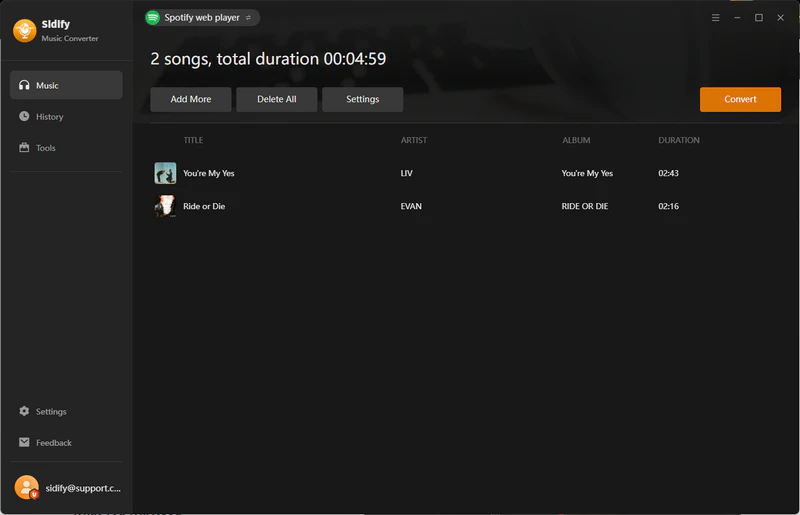
Click Convert to begin processing. Sidify will finish converting at 10X faster speed.
Step 6 Locate Converted Files
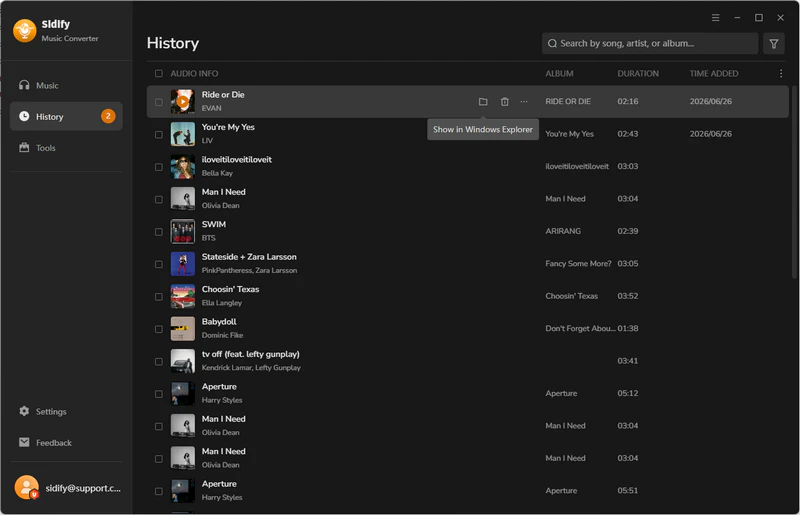
All finished files will be saved in the History tab. Here, you can click the output folder icon to access the folder where the converted files are saved.
Part 7: Sidify vs SpotiDown: Which Spotify Downloader Is Better?
To help you find out which tool best suits your needs, we've summarized the key differences between Sidify Spotify Music Converter and SpotiDown in the table below, including audio quality, conversion speed, playlist support, and more.
| Feature | Sidify Spotify Music Converter (Desktop) | SpotiDown (Online) |
|---|---|---|
| Audio Quality | Lossless Music | Up to 320 kbps |
| Conversion Speed | 10X Faster | 1X |
| Output Formats | MP3, AAC, WAV, FLAC, AIFF, ALAC | MP3 only |
| Batch Download | √ | × Limited |
| Download Playlist | √ | Limited |
| Download Podcast | √ | × |
| ID3 Tags & Artwork | Preserves Title, Artist, Album, Cover, Year, etc. | Partial |
| Pricing | Free Trial / Paid License | Free / Premium |
FAQs about SpotiDown Spotify Downloader
Is SpotiDown really free?
Yes! The basic feature: converting Spotify songs to MP3 files is free. However, please note that if you want to convert Spotify playlists or speed up the conversion process, some domains will require you to upgrade to Premium.
Why is SpotiDown not working?
A common cause is interference from browser ad blockers. Please disable your browser's ad blocker when using online tools such as SpotiDown. In addition, please confirm whether the link you copied is for a single track, a playlist, or an album, as some tools only support single-track links.
Conclusion
SpotiDown is undoubtedly a quick and convenient free online tool if you just need to download a few single Spotify tracks without installing any software. However, its output audio quality, playlist download support, and reliability are poorer compared to a desktop tool.
If you pursue lossless song preservation and batch downloads of playlists, albums, or podcasts, a stable tool like Sidify Spotify Music Converter is what you need.
 Sidify Spotify Music Converter
Batch download Spotify Music to multiple formats for offline listening on any device.












