


OnTheSpot is a highly regarded free and open-source music download tool. So, how does it perform in actual use?
In this review, we will test GitHub OnTheSpot, evaluating its download speed, batch processing capabilities, sound quality, and overall usability, to help you determine if OnTheSpot is the right music download tool for you.
Part 1. What is OnTheSpot?
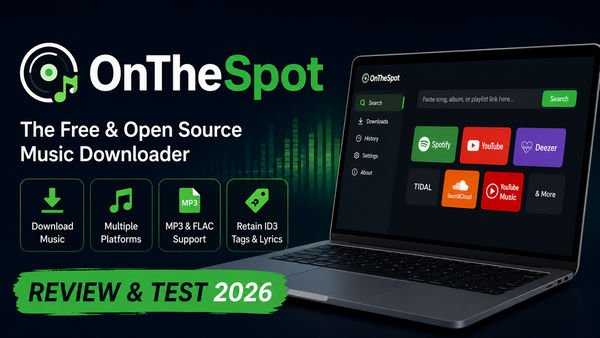
OnTheSpot is a free and open-source music downloader available on GitHub, compatible with Windows, macOS, and Linux. It can directly fetch original audio files and complete metadata (cover art, artist, album, track information) from over 10+ major music platforms, including Spotify, Apple Music, Deezer, Tidal, Qobuz, SoundCloud, and YouTube Music, among others.
Key Features of OnTheSpot:
- Free, cross-platform, and open source music converter.
- Download music from multiple streaming platforms.
- Batch download songs, albums, and playlists.
- Preserve music metadata and album art.
- Support local music library management.
- Offer GUI, CLI, and Web interfaces.

Want a free MP3 downloader or a reliable MP3 download site in 2026? This guide introduces the best All MP3 downloader and 14 best free MP3 download websites.
Learn More →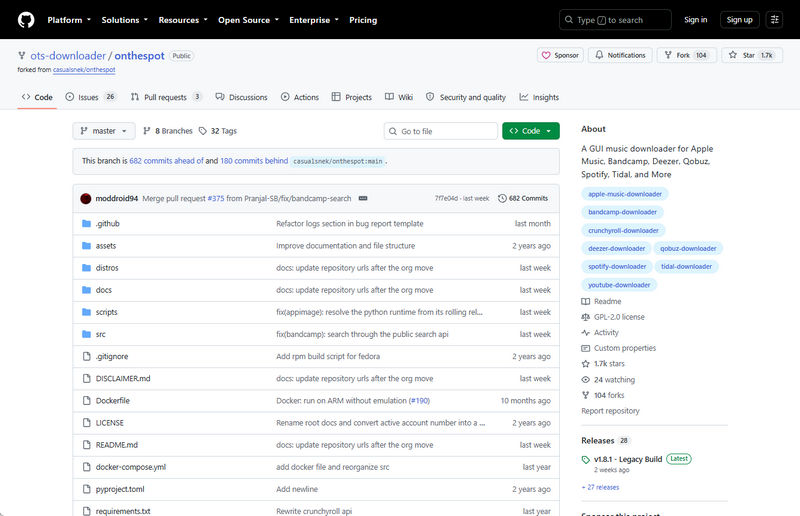
Part 2. How to Use OnTheSpot Music Downloader?
This guide is based on OnTheSpot v1.8.0, which was the stable version used for our hands-on testing.
Step 1 Download OnTheSpot from GitHub
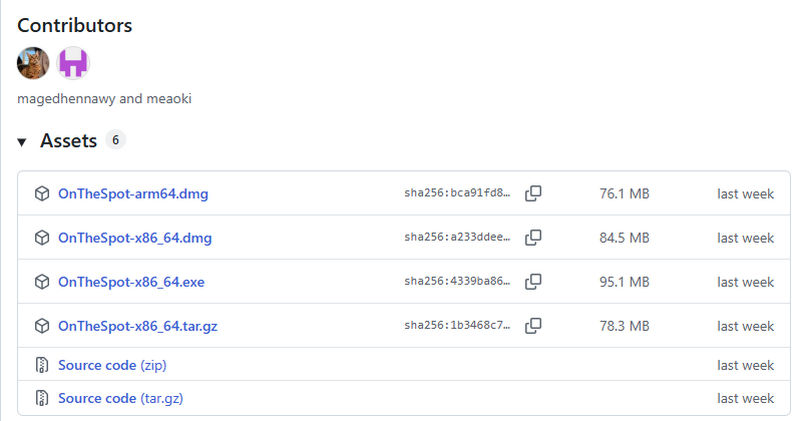
Visit the OnTheSpot GitHub releases page. Select the appropriate installer for your operating system.
Step 2 Launch and Log in
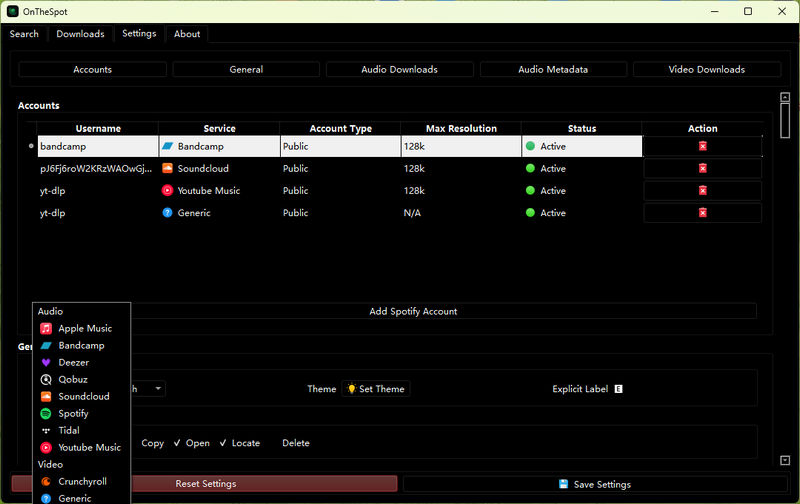
Launch the application. Find the Accounts tab in the Settings section. Select your music streaming service and log in to your account.
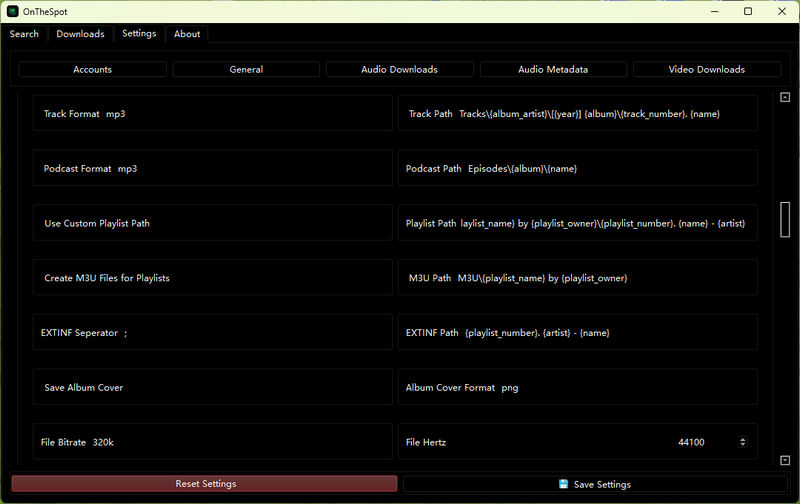
Step 3 Choose Download Settings
Configure your output settings in audio downloads and metadata according to your preferences. It enables users to select audio formats, file naming rules, download paths, playlist organization methods, and to set whether to save album covers, download lyrics, and embed metadata.
Advanced users can also configure bit rate, sampling rate, Spotify metadata acquisition options, and ID3 tag information to better manage their local music library.
Step 4 Search and Download Music
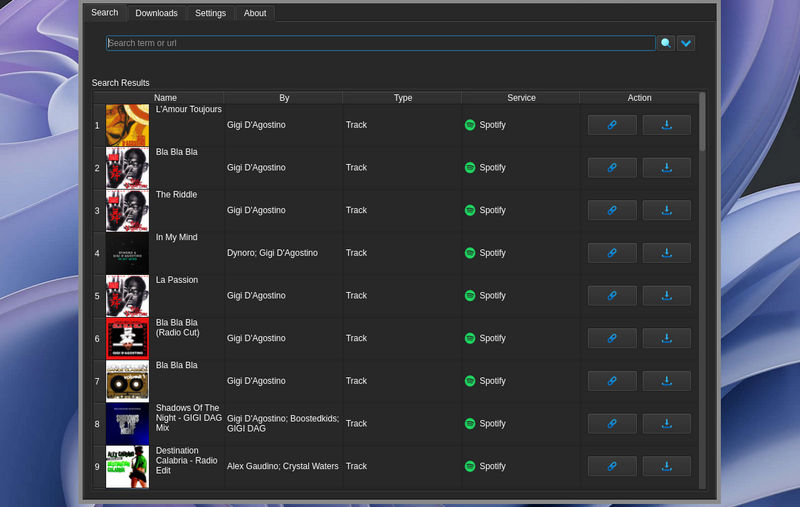
In the Search section, enter keywords to search for tracks, albums, artists, playlists, episodes, podcasts, or audiobooks. You can also paste a URL to directly access specific content.
Click the download button next to the result to start saving the Spotify music.
Part 3. OnTheSpot Review 2026: Hands-on Test Results
In order to evaluate the performance of OnTheSpot in actual use, we tested its 1.8.0 version on a Windows 11 (Ryzen 7 5800H / 32GB RAM) computer, focusing on download speed, audio quality, metadata retention, stability, and overall usability.
3.1 Download Speed Test
We tested the performance of downloading single track from Spotify, Deezer, YouTube Music, and Apple Music. The test results showed that OnTheSpot performed particularly well when downloading single tracks. Among them, Spotify and Deezer had the fastest download speed, with each song completing within just a few seconds. YouTube Music was slightly slower, while Apple Music took significantly longer than the other platforms.
| Platform | Track Length | Download Time | Speed Rating |
|---|---|---|---|
| Spotify | 3:47 | 2.9 seconds | ★★★★★ |
| Deezer | 4:09 | 3.4 seconds | ★★★★★ |
| YouTube Music | 3:25 | 4.7 seconds | ★★★★☆ |
| Apple Music | 4:08 | 6.9 seconds | ★★★☆☆ |
We also tested OnTheSpot using Spotify playlists containing multiple tracks to see whether its download speed remained consistent during bulk downloads.
For small playlists, the download speed remained relatively stable. However, as the number of songs increased, the average download speed gradually decreased. When processing large playlists containing approximately 80 to 100 songs, we encountered occasional download failures and had to retry.
| Test Type | Track Count | Total Size | Total Time | Avg Time / Track |
|---|---|---|---|---|
| Single Track | 1 | 9.8 MB | 2.8 seconds | 2.8 seconds/track |
| Small Playlist | 10 | 105 MB | 45 seconds | 4.5 seconds/track |
| Large Playlist | 80 | 785 MB | 9 min 20 seconds | 7 seconds/track |
⭐ Read More: 10 Best Free Spotify to MP3 Converters in 2026 (Tested & Reviewed)
3.2 Audio Quality Test
We tested a 10-track playlist using Deezer and Spotify, downloading the same tracks in both 320 kbps MP3 and FLAC formats.
Then, we used the MediaInfo and Spek tools to examine the downloaded files to verify their technical parameters and analyze the spectrum. The MP3 files retained a high frequency range of approximately 20.5–22 kHz, and there were no obvious signs indicating that they were simply upsampled from low-bitrate sources. The FLAC files also exhibited characteristics consistent with lossless CD-quality audio.
Note: Selecting 320 kbps in OnTheSpot does not improve the quality of the original audio source. The final audio quality is limited by the quality of the source files provided by the streaming service.
Looking for the best free way to download FLAC lossless music without compromising on quality? Luckily, there are trustworthy sources out there that give you real high-resolution FLAC audio, like streaming music platforms or dedicated FLAC download sites.
Learn More →3.3 Stability Test
During our testing process, OnTheSpot maintained stability throughout both the normal single-track and playlist download processes. No crashes were observed during the half-hour test period.
However, stability is not entirely controlled by the application itself. Since OnTheSpot directly initiates API calls to the streaming server, downloading a large number of tracks (more than 500) in a single session may trigger account security warnings.
Our Verdict: Is OnTheSpot Worth Using in 2026?
OnTheSpot remains one of the most capable free, open-source music downloaders available in 2026. Its biggest strengths are multi‑platform support, fast batch downloading, and excellent metadata handling. However, its setup process and configuration options can be overwhelming for beginners, and long-term stability still depends on how streaming platforms update their APIs. Github OnTheSpot is highly recommended for tech-savvy users who value flexibility and customization.
Best OnTheSpot Alternative in 2026: Sidify All-In-One
Sidify All-In-One is a professional music converter that can download and convert musics from popular platforms such as Spotify, Apple Music, Amazon Music, Tidal, Deezer, YouTube Music, Pandora, Line Music, SoundCloud, Qobuz, etc. It offers multiple output formats including MP3, AAC, FLAC, WAV, AIFF, and ALAC, and supports batch downloading of songs, albums, and playlists. Additionally, this comprehensive music downloader includes practical tools such as format conversion, tag editing, CD burning, and even allows downloading of podcasts and audiobooks.
Sidify All-In-One Converter
- Download songs from different streaming platforms and any music sites.
- Convert music to MP3/AAC/WAV/FLAC/AIFF/ALAC
- Export music, playlists, albums, audiobooks, and podcasts to the computer.
- Preserve the original audio quality and keep the ID3 tags.
- Rip music from the music site and burn music to CD.
- Built-in free podcast and radio to mp3 downloader and vocal remover.

Comparison: OnTheSpot vs Sidify All-In-One
| Feature | OnTheSpot | Sidify All-In-One |
|---|---|---|
| Price | Free & Open Source | Free Trial & Paid |
| Supported Platforms | Multiple streaming platforms | 20+ platforms & services |
| Compatibility | Windows, macOS, Linux | Windows, macOS |
| Audio Format | MP3, FLAC, AAC, M4A | MP3, AAC, WAV, FLAC, AIFF, ALAC |
| Batch Download | Yes | Yes (10× faster) |
| Playlist Download | ✓ | ✓ |
| Max Quality | Original audio quality of the platform | MP3 320 kbps / FLAC / ALAC |
| Desktop App Access | ✓ | ✓ |
| Web Player Access | × | Supported on selected services |
| Ease of Use | Moderate | Beginner-friendly |
| Updates | Community-driven | Regular official updates |
| Technical Support | Community | ✓ |
| Rating | ★★★★☆ | ★★★★★ |
How to Download 320kbps Spotify Music with Sidify All-In-One?
Step 1 Launch Sidify All-In-One
Open Sidify All-In-One on your computer, select the Spotify icon, and choose your preferred mode, web player or Spotify App.
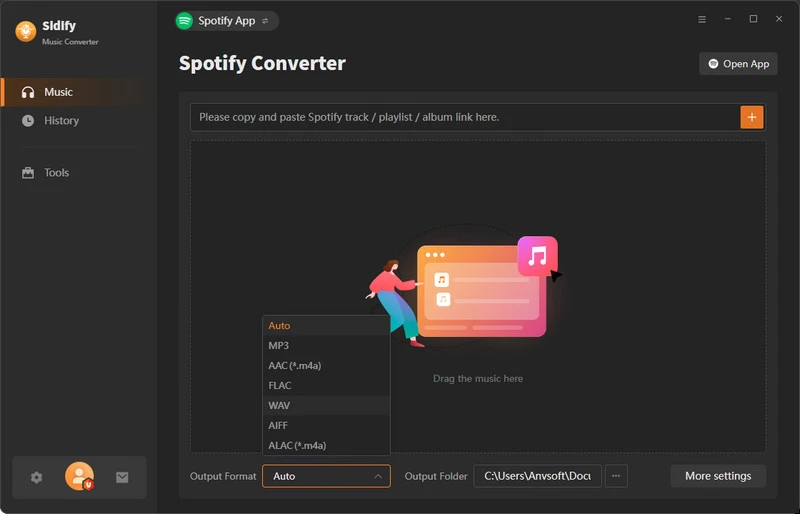
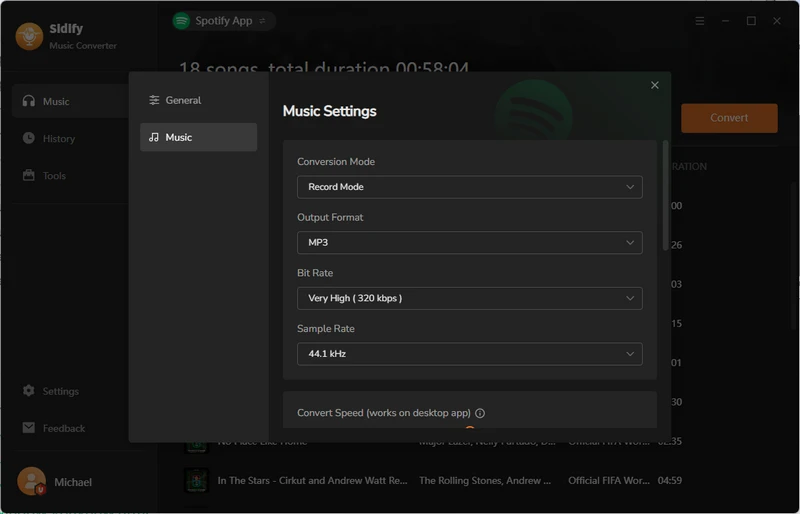
Step 2 Set to 320kbps MP3
Click the Settings icon, set the output format to MP3, select 320kbps audio quality, and set the local save directory.
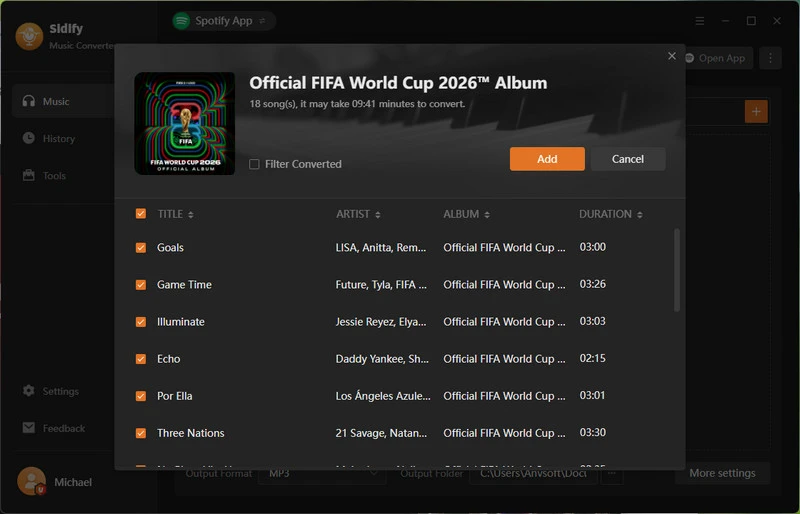
Step 3 Search for Sidify Songs
Copy the link to a Spotify track, album, or playlist and paste it into Sidify All-In-One, or browse your Spotify music library directly within the program to add music. Click the Convert button to start downloading your selected tracks.
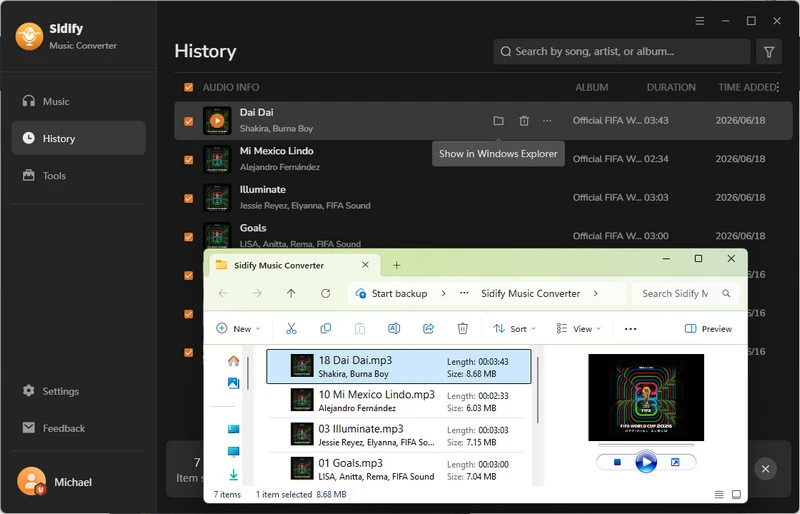
Step 4 Download Spotify 320kbps
Sidify will download your Spotify tracks at up to 10x speed, and save them as 320kbps MP3 files with complete metadata and album covers.
Final Words
OnTheSpot is a powerful and free music converter. However, due to its technical setup requirements and occasional instability issues, it is not suitable for beginners. If you desire a better experience with professional technical support, Sidify All-In-One can be a superior alternative to OnTheSpot. It not only offers faster and more stable performance, but also supports the output of 320kbps high-quality audio.
Frequently Asked Questions
Is OnTheSpot safe?
Yes. OnTheSpot downloader is an open-source project, and its source code is publicly available on GitHub. It contains no bundled malware and is clean and safe. Please note that since it interacts directly with the streaming API, there may be risks such as rate limits or account restrictions. One user reported that their Spotify account was locked.
Is there a local application similar to OnTheSpot that allows me to rip songs from Spotify?
Yes. Local desktop applications like Sidify All-In-One offer a more stable user experience. It has a more user-friendly interface for beginners, supports batch downloading of Spotify music, and provides multiple output formats, including MP3, FLAC, WAV, AIFF and ALAC. You can also consider SpotiFLAC if you prefer a provider-matching workflow. Our SpotiFLAC Desktop, Mobile, and Next guide explains the differences and setup steps.
What's the best music server that can download and search songs from YouTube, Spotify, and SoundCloud?
OnTheSpot is one of the best music server if you want a free, open-source solution with multi-platform support. Please note that the new version V2.0.0 Alpha1 of OnTheSpot has temporarily removed the built-in search function, so users may need to provide a direct link for downloading.
If you prefer a local desktop software that supports multi-platform downloads (covering Spotify, YouTube Music and SoundCloud), Sidify All-In-One is one of the most reliable and user-friendly choices. It offers advantages such as fast conversion, stable updates and high-quality batch downloads.
 Sidify All-in-one Music Converter
Download and convert music from all major streaming services in one place. Get MP3 or other popular formats in source audio quality, save songs offline on Windows or Mac, and enjoy up to 10X faster downloads with ID3 tags and lyrics preserved.












