


Converting SoundCloud to MP4 allows you to share your favorite music on platforms like YouTube, TikTok, and Instagram Reels, which require video formats instead of pure audio files. However, is it possible to download SoundCloud to MP4 directly? No. SoundCloud doesn't support converting or downloading tracks into MP4 format.
No worries! In this guide, I will share 3 free online SoundCloud to MP4 converters and an easy way to download music from SoundCloud in high quality. Keep reading!
📍 Also Read: 7 Best SoundCloud Alternatives in 2026
Part 1: How to Download SoundCloud to MP4 [Batch Download & High Quality]
Although online SoundCloud to MP4 converters are quick, they usually require you to paste links one by one, and the sound quality often degrades after double compression. If you want to convert an entire playlist at once, or if you demand uncompromised audio quality, you’ll need a more powerful and professional tool.
I want to recommend a tool I used for a long time - Sidify SoundCloud Music Converter, which allows you to convert music from SoundCloud to multiple formats, including MP3, ALAC, FLAC, WAV, and AIFF, all in high quality. In addition, it supports batch download, so you can download SoundCloud playlist or multiple songs at one time.
Once converted, you can save SoundCloud songs permanently, and even transfer them to any device.
Sidify SoundCloud Music Converter
- Convert SoundCloud Music to MP3, AAC, ALAC, AIFF, WAV, and FLAC.
- Convert MP3 songs, playlists, albums, and podcasts from SoundCloud Music.
- Download SoundCloud Music 320kbps MP3 and LOSSLESS ALAC files.
- Keep SoundCloud Music HD artworks, lyrics and ID3 tags.
- Compatible with Windows and macOS.

How to Download SoundCloud to MP4 on Laptops
Step 1 Install Sidify SoundCloud Music Converter
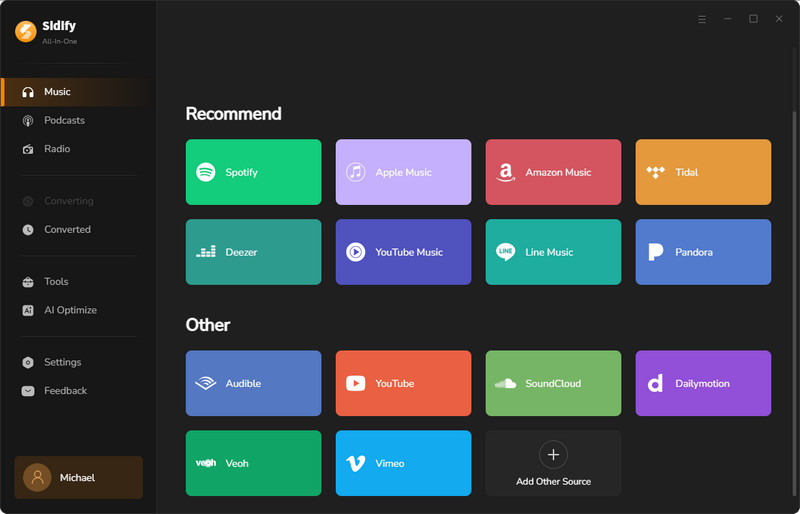
To download SoundCloud songs first, you’ll need to install Sidify SoundCloud Music Converter. Next, launch the program and choose SoundCloud as your music source.
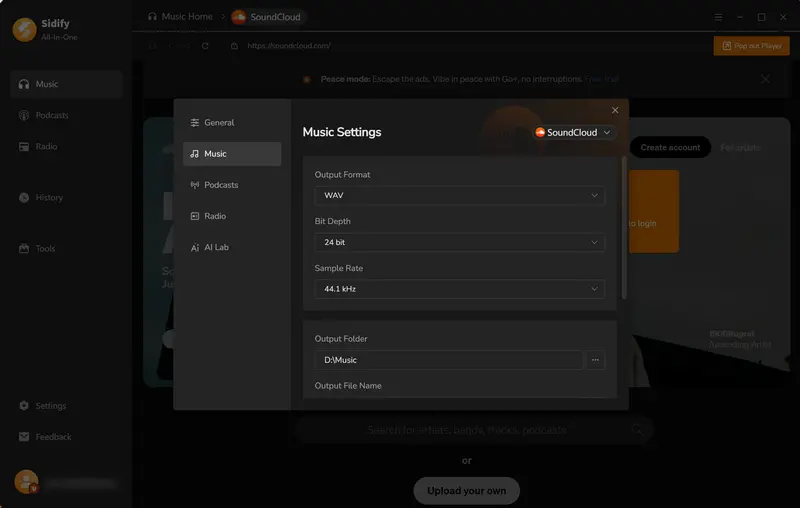
Step 2 Set Output Format
Before downloading, you can click Menu > Settings to choose your desired output format.
Step 3 Add Music to Sidify
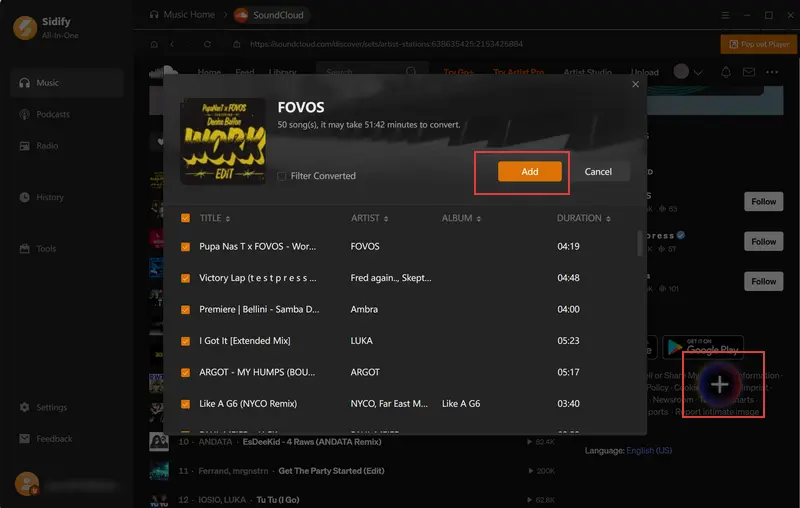
Sidify SoundCloud Music Converter has a built-in browser, so you can freely browse your favorite playlists or songs. Once you find your preferred playlist, click into it and click the "+" button in the bottom-right corner. Next, add the songs you want to download, or just check the whole playlist.
Step 4 Start Converting SoundCloud
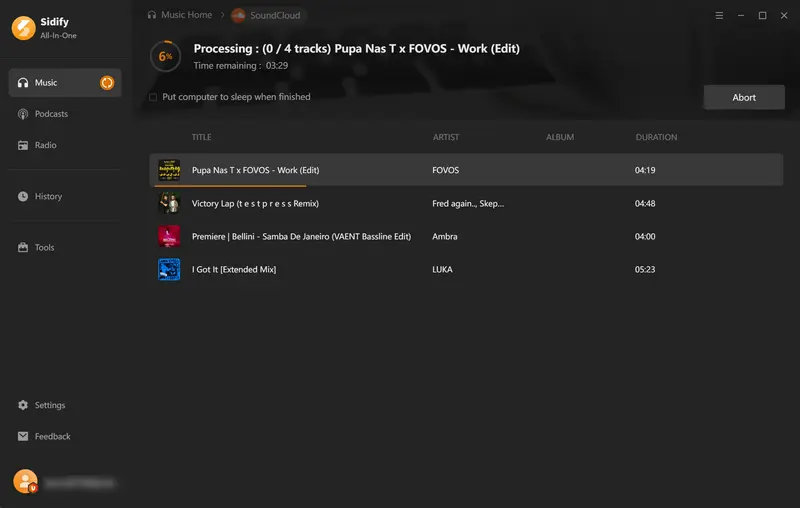
Click the "Convert" button to start the process. Sidify will finish it at 10x faster speed.
Step 5 Locate Your Converted SoundCloud Songs
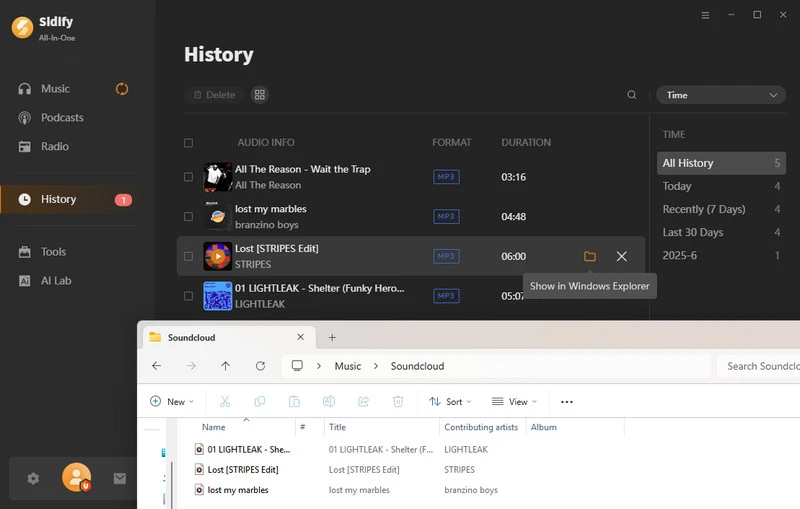
Once the conversion is complete, you can access your downloaded files by clicking the folder icon. Alternatively, you can find all converted tracks in the History section.
Step 6 Convert SoundCloud to MP4
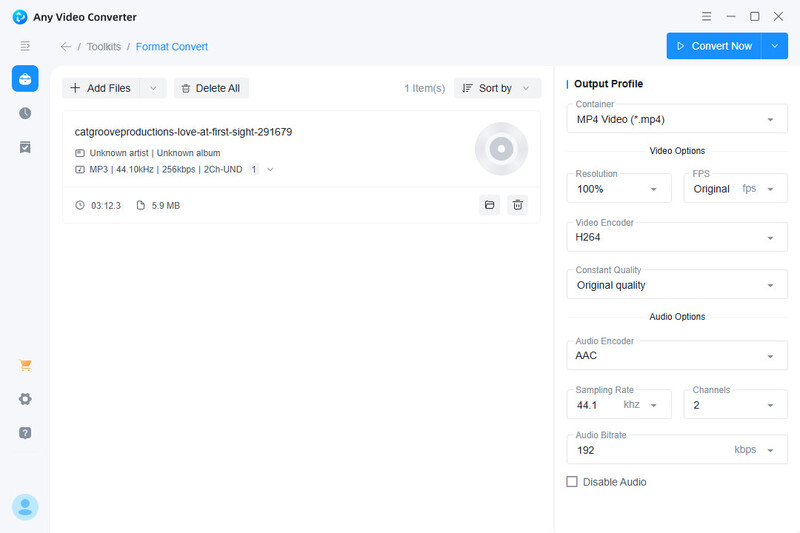
Install the free tool Any Video Converter, import the downloaded SoundCloud audio file, and convert it to an MP4 file.
Part 2: 3 Free Online SoundCloud to MP4 Converters
2.1 Bolta.AI
Rating: ⭐⭐⭐⭐
Website: https://bolta.ai/public-apps/video-downloader/soundcloud
Bolta.AI is my top recommendation for an online tool to convert SoundCloud to MP4. It’s incredibly easy to use. Simply copy the SoundCloud link, paste it into Bolta.AI, and you’ll get an MP4 video. You can upload the converted files directly to YouTube, TikTok, Instagram Reels, and more. Best of all, these core download features are completely free.
If you upgrade to their premium plan, Bolta.AI’s AI agents can automatically repurpose your downloaded SoundCloud clips into tailored posts and publish them directly to LinkedIn, X (Twitter), Instagram, and Threads.
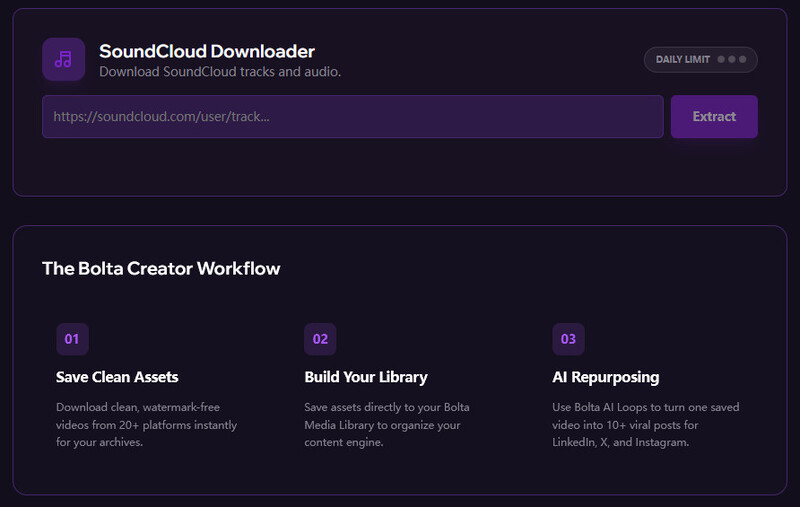
How to Convert SoundCloud to MP4 with Bolta.AI
Step 1 Copy the link of your favorite track from SoundCloud.
Step 2 Go to Bolta.AI's SoundCloud Downloader page and paste the link into the input box.
Step 3 Click the "Extract" button to process the link.
- No registration required. You can convert SoundCloud to MP4 directly without logging in.
- The downloaded files are clean, with no watermarks, logos, or extra tags added.
- Works directly in your browser—no software or plugins needed—and is compatible with both computers and mobile devices.
- Free and ad-free.
- Does not support one-click downloading of entire playlists. You can only process individual song links one at a time.
- Supports only public tracks; cannot extract private or protected SoundCloud audio.
Looking for a SoundCloud downloader extension? Compare 10 top options for Chrome, Firefox, Edge, Opera and more.
View Guide →2.2 SCtoMP3
Rating: ⭐⭐⭐⭐
Website: https://www.sctomp3.org/soundcloud-to-mp4/
SCtoMP3 is another fast and handy tool for converting SoundCloud tracks into MP4. Similar to Bolta.AI, all you need to do is copy and paste the SoundCloud link to generate a WebM video file. While it’s WebM instead of a standard MP4, it offers the exact same quality and functionality, making it just as easy to upload to major video-sharing platforms.
SCtoMP3 is also completely free and free of ads. One standout feature is the ability to choose a custom image to display in your final video before converting. If you don't upload your own image, the tool will automatically default to the original track's cover art.
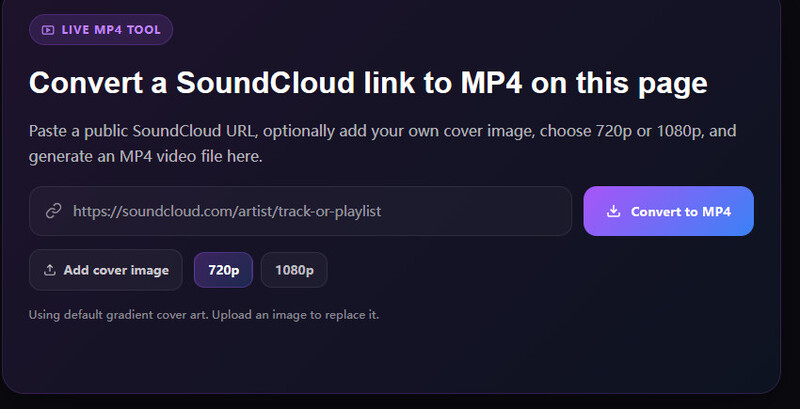
How to Convert SoundCloud to MP4 with SCtoMP3
Step 1 Copy the SoundCloud track URL you want to convert.
Step 2 Paste the link into SCtoMP3's conversion box.
Step 3 Upload a custom background image, or let it automatically use the original track cover.
Step 4 Click the "Convert to MP4" button and download your video file.
- Completely free with no pop-up ads.
- Simply open a web page, paste your content, and start using it—no account registration required.
- Runs directly in your browser; no need to download a client or install plugins.
- You can upload your own favorite images as video backgrounds before conversion.
- The exported file format is WebM rather than standard MP4.
- Does not support one-click batch downloads or playlist downloads.
2.3 MyTools
Rating: ⭐⭐⭐
Website: https://mytools.com/audio/mp3-to-mp4
MyTools is a free SoundCloud to MP4 converter, but unlike the first two tools, It cannot directly convert SoundCloud links you've copied. Instead, MyTools converts your local audio files. Therefore, you'll need to use another program to download the files to your computer first, and then convert them to MP4 via MyTools.
However, on the conversion page you can choose to upload images, change the background color, and customize how images are displayed. Generally speaking, it’s a fairly convenient SoundCloud to MP4 converter.
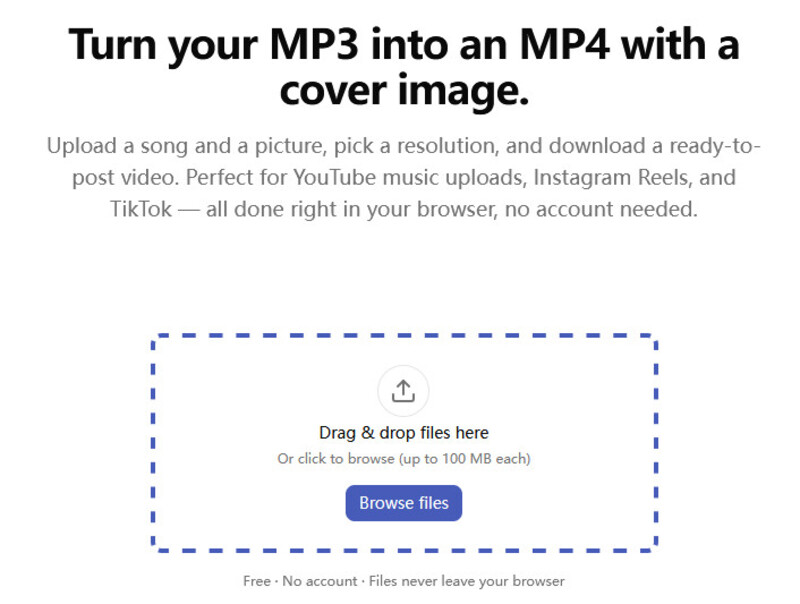
How to Convert SoundCloud Audio to MP4 with MyTools
Step 1 Download SoundCloud song to your local computer using a Sidify Music One first.
Step 2 Go to MyTools MP3 to MP4 Converter and upload your downloaded audio file.
Step 3 Upload a image, and customize the resolution and background color.
Step 4 Click "Convert to MP4" to process the file locally and download your ready-to-share MP4 video.
- Supports freely adjusting video resolution and aspect ratio, as well as customizing background colors and image fill methods.
- It's free to use, and the converted and exported MP4 videos have no watermarks.
- Requires downloading SoundCloud audio first instead of converting directly from a URL.
- Only supports converting one audio file at a time. No batch import or playlist conversion.
Part 3: Common Issues When Converting SoundCloud to MP4
Issue 1: Why is the converted video completely black or static?
Since SoundCloud is a music platform, online converters can usually only automatically add static cover art or a default black screen. If you want cool dynamic waveforms or other video effects, you'll need to use professional video editing software.
Issue 2: Conversion Failed or "Invalid URL" Error
This may be because the track has been set to “Private” by the creator, or because it is subject to geo-restrictions or copyright protection, preventing online web tools from accessing it. You can use Sidify SoundCloud Converter to download these private tracks and then use another tool to convert them to MP4 files.
Issue 3: Audio and Video Out of Sync or Quality Loss
Many free online tools apply additional lossy compression when converting MP3 files to MP4, which may reduce audio quality. For truly lossless audio output, try Sidify SoundCloud Converter.
Issue 4: The converted WebM file cannot be edited in software
WebM is a video format specifically designed for web browsers and online playback. Its advantages include small file size and fast page loading. However, most professional video editing software remains most compatible with the universal MP4 format. Therefore, when you try to drag a WebM file into editing software, you may encounter errors or be unable to import it.
Part 4: Which One Should You Choose? SoundCloud to MP4 Tools Comparison
With so many SoundCloud to MP4 converters available, finding the right one comes down to what matters most to you — speed, convenience, or custom features. Below is a quick comparison table helping you to figure out which one suits you best.
| Feature | Bolta.AI | SCtoMP3 | MyTools | Sidify (Recommended) |
|---|---|---|---|---|
| Tool Type | Online | Online | Online | Desktop App |
| Convert via Link / URL | ✅ | ✅ | ❌ | ✅ |
| Batch Download (Playlist/Album) | ❌ | ❌ | ❌ | ✅ |
| Download Speed | 1x | 1x | 1x | 10X Faster |
| Audio Quality Preservation | Compressed | Compressed | Compressed | 100% Original Quality |
| Output Formats | MP4 | WebM | MP4 | MP3, AAC, WAV, FLAC, ALAC |
| Free to Use | ✅ (Paid for AI Feature) | ✅ | ✅ | Free Trial / Paid |
| ID3 Tag Preservation | ❌ | ❌ | ❌ | ✅ |
| Ad-Free | ✅ | ✅ | ✅ | ✅ |
FAQs about Converting SoundCloud to MP4
Is It Legal to Convert SoundCloud to MP4?
If you download and convert SoundCould music only for personal offline listening, this generally falls within the scope of fair use. However, uploading it to YouTube for profit or using it in commercial videos may constitute copyright infringement. We recommend using it only for personal study or entertainment, and respecting the copyright of the original creators.
Can I convert SoundCloud to MP4 on iPhone or Android?
Yes. You can easily use online converters like Bolta.AI or SCtoMP3 to convert SoundVloud to MP4 on iPhone or Android.
What is the video resolution of the converted MP4 files?
Most online SoundCloud to MP4 converters output videos at a default resolution of 720P, up to 1080P. This video standard meets the viewing needs of most people and allows for easy uploading to social media.
Conclusion
It is not difficult to convert SoundCloud to MP4. The key is to choose the tool that best suits your needs. If you're looking for a quick and temporary way to convert 1–2 songs, we recommend using online converters like Bolta.AI, SCtoMP3, or MyTools.
If you're looking for high efficiency, lossless audio quality, or batch conversion of playlists, we recommend using professional desktop software like Sidify SoundCloud Music Converter, saving your time and effort.
 Sidify SoundCloud Music Converter
Download and convert music from SoundCloud and other major streaming services in one place. Get MP3 or other popular formats in source audio quality, save songs offline on Windows or Mac, and enjoy up to 10X faster downloads with ID3 tags and lyrics preserved.












