For users who enjoy collecting independent music, Bandcamp is an indispensable platform. However, in practice, many people find that not all music can be downloaded directly, or the downloaded format and sound quality don't meet their needs. If you want to download Bandcamp music as high-quality 320kbps MP3s for use on your phone, in your car, or with DJ software, this guide will teach you the correct method step by step.
Part 1: Can You Download MP3 from Bandcamp Directly?
Bandcamp allows you to download purchased music to your local device in multiple audio formats, typically including MP3. After your purchase, you can select your preferred format on the download page to download the music or album, and then play the music offline on most music players and devices.
Although Bandcamp allows direct MP3 downloads, this can only be done track by track after purchase, and there are no options to customize audio quality. If you want to more easily save Bandcamp music as high-quality 320kbps MP3s and manage your local audio files uniformly, using a professional Bandcamp music downloader will be more efficient.
Part 2: Best Bandcamp Downloader: Sidify All-in-One Converter
Sidify All-in-One Converter is a comprehensive music downloader that supports downloading music from all major music streaming platforms, including Bandcamp, in MP3/AAC/WAV/FLAC/AIFF/ALAC formats. With Sidify, you can download Bandcamp songs, albums, and playlists in 320 kbps high-quality MP3 files, while preserving essential ID3 tags for easy organization, making it ideal for offline listening and long-term music collection.
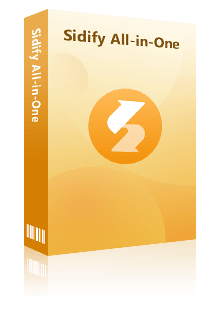
Sidify All-in-One Converter
- Download music from all major streaming platforms including Bandcamp.
- Convert Bandcamp songs in MP3/AAC/WAV/FLAC/AIFF/ALAC
- Preserve the original audio quality and keep the ID3 tags.
- Rip music from Bandcamp and burn music to CD.
- Built-in free podcast and radio to mp3 downloader and vocal remover.


Part 3: How to Download Bandcamp to MP3 with Sidify (Step-by-Step)
Sidify has an intuitive and easy-to-use interface, making it simple even for novice users. With just four simple steps, you can easily download and save Bandcamp music to high-quality 320 kbps MP3 files.
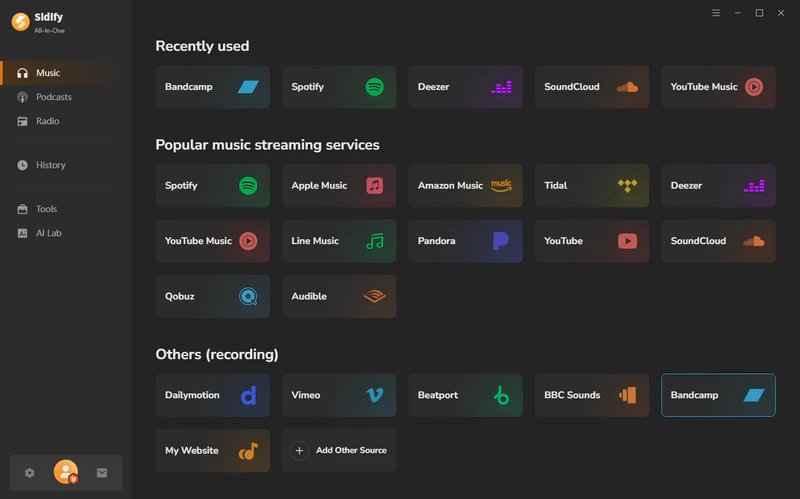
Step 1 Launch Sidify All-in-One Music Converter
Install and launch Sidify All-in-One Music Converter on your computer, then select Bandcamp from the music list.
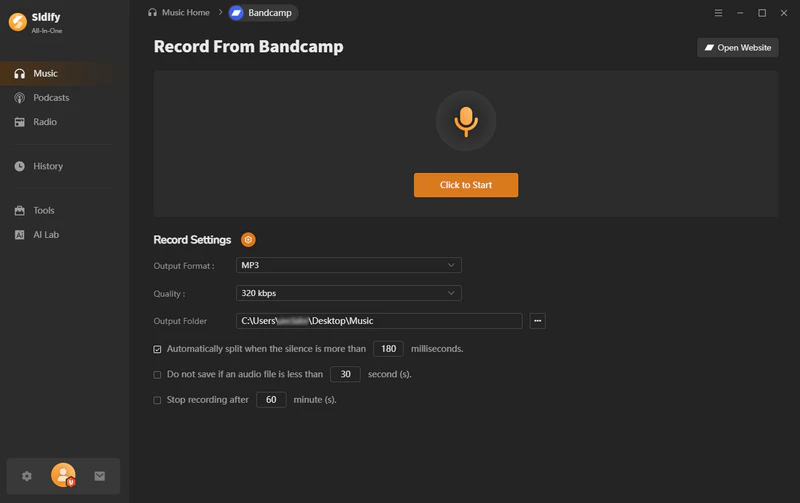
Step 2 Custom Output Settings
Select MP3 as the output format, 320kbps quality and the output folder.
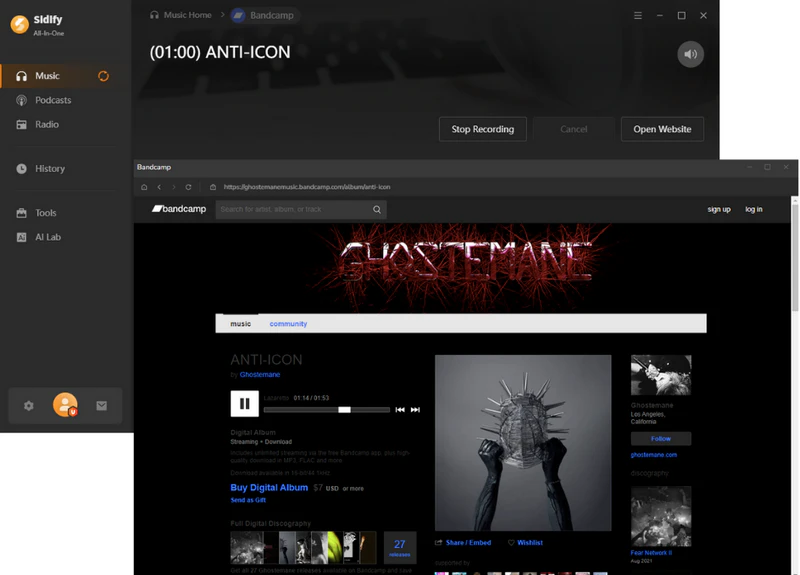
Step 3 Start Recording and Download Bandcamp Music
Click the "Click to Start" button and open the Bandcamp website. Find the music you want to save and start playing it. Sidify will automatically begin recording the track and will split the recording once the song finishes. When the recording is complete, click "Stop Recording".
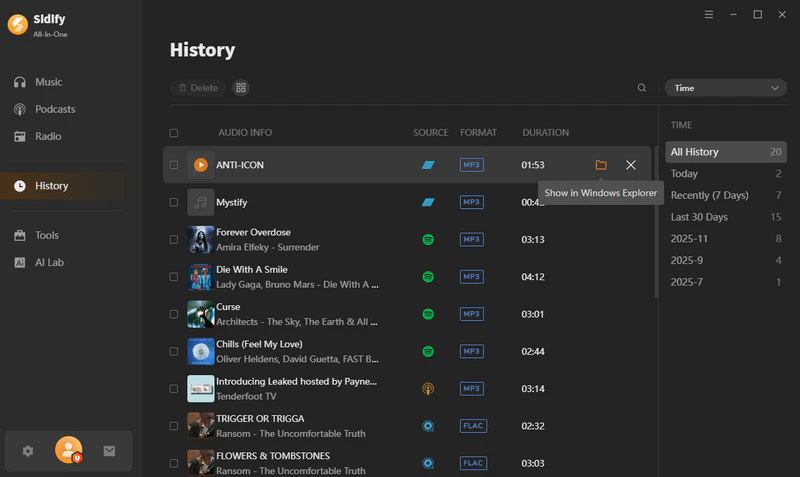
Step 4 View the Downloaded Bandcamp music files
After the recording is complete, go to the "History" page to view the Bandcamp MP3 files you have downloaded. You can also click the file icon next to the song to locate the file on your computer.
 Note:
Note:The trial version of Sidify All-In-One Converter enables you to convert the first minute of each audio file for sample testing. You can purchase the full version to unlock the time limitation.
Part 4: Sidify vs Online Bandcamp Downloaders – Which is Better?
Besides using desktop downloaders, some users also turn to online Bandcamp downloaders to get MP3 files. However, these online tools often differ greatly in terms of sound quality, stability, and overall reliability. The table below provides a direct comparison for you:
| Features | Sidify All-In-One Converter | Online Bandcamp Downloaders |
|---|---|---|
| Format Support | MP3, AAC, WAV, FLAC, AIFF, ALAC | MP3 only |
| Compatibility | Windows, Mac | web |
| Sound Quality | 320kbps | 128-256kbps |
| Tags Preservation | ✅ | ✅ |
| Ad-free | ✅ 100% Ad-free | ❌ Most contain redirect and banner ads |
| Stability & Updates | ✅ Stability & Regular update | ❌ Unstable, frequently crashes |
| Additional Features | AA/AAX Converter, Format Converter, CD Burner, Tag Editor | ❌ |
FAQs about Downloading Bandcamp to MP3
1. Is it safe to use Sidify?
Yes. Sidify is safe to use. Sidify runs locally on your computer and does not contain intrusive ads or pop-ups, making it more secure and stable than many online Bandcamp MP3 downloaders.
2. Can I directly download Bandcamp music to MP3 for free?
If a musician has enabled the free download option, you can save their music as MP3 files for free on Bandcamp. However, most music on Bandcamp requires purchase before you can download the MP3 files.
3. Can I keep the downloaded Bandcamp MP3s permanently?
Yes. The MP3 files downloaded using Sidify are permanently saved to your local device and are not affected by online playback or account status. So you can transfer the Bandcamp music to any device you like at any time.
End Words
Downloading Bandcamp music to MP3 is a convenient way to listen offline. While Bandcamp supports MP3 downloads after purchase, there are still some limitations. In contrast, Sidify All-in-One Converter provides a simple and intuitive user experience, enabling you to download and convert Bandcamp music to high-quality MP3s for easy playback and management on various devices. Choosing the appropriate method based on your needs will allow you to better enjoy Bandcamp's music content.