


Tired of ads interrupting your music? Popular apps like Spotify and YouTube Music let you listen for free, but ads and playback limits can be frustrating. Luckily, there are free music apps without ads in 2026.
In this guide, we'll look at 10 of the best free music apps without ads for Android, iPhone, and PC. From free streaming to offline listening, we'll compare their features, song selection, and playback limits to help you find the right one.
Find the Best Free Music App Without Ads for You
Choose your device and how you want to listen to find your best match.
Have access to a Windows or Mac computer?
Convert supported streaming songs on Windows or Mac, then play the audio files offline on your computer or transfer them to your phone.
Important: Free trial converts only the first minute of each track. Full-length conversion requires a paid license.
Best Free Music Apps Without Ads at a Glance
Compare these 10 music apps to see which ones are ad-free, free, and support offline listening.
| App | Music Type | 100% Free? | No Ads? | Pick Any Song? | Unlimited Skips? | Offline? | Devices | Best For |
|---|---|---|---|---|---|---|---|---|
| Sidify | Music Downloader | No — Free trial; full conversion paid | Yes (Saved Files) | For Conversion | Yes (Saved Files) | Yes (After Conversion) | Windows, Mac, Mobile Playback | Download Streaming Songs to MP3 |
| Audius | Music Streaming | Free Basic | Yes | Within Catalog | Yes (On-Demand) | Yes (Mobile App) | Android, iPhone, Web | Free Music Streaming |
| Musicolet | Local Music Player | Free Core | Yes | Own Files Only | Yes | Yes | Android | Offline Android Music |
| VLC | Local Music Player | Yes | Yes | Own Files Only | Yes | Yes | Android, iPhone, Windows, Mac | Cross-Platform Playback |
| Audiophile.fm | Internet Radio | Yes | Varies | No | Varies | No | Android, iPhone, Web | Lossless Internet Radio |
| Freegal Music | Library Music | With Library Card | Yes | Library Catalog | Depends on Library | Limited Downloads | Android, iPhone, Web | Free Music Downloads |
| Radio Paradise | Internet Radio | Yes | Yes | No | Skip Available | In-App Cache | Android, iPhone, Web | Ad-Free Radio |
| Euphony | Unofficial Streaming | Free App | Developer Claims No Ads | Catalog-Dependent | Unverified | Varies | Android | YouTube Music-Style Listening |
| foobar2000 | Local Music Player | Yes | Yes | Own Files Only | Yes | Yes | Android, iPhone, Windows, Mac | Large Music Libraries |
| Tuneo | Local Music Player | Free Core; Paid Pro | Yes | Own Files Only | Yes | Yes | iPhone, iPad (iOS 26+) | Offline iPhone Music |
Note: Features and free access vary by app. See the full reviews below for details.
We checked current official product documentation, app-store information, and recent user feedback for free access, advertising, song choice, skip limits, offline listening, and device support. We did not hands-on test every app, so product-specific claims below are based on cited/current documentation unless otherwise noted.
10 Best Free Music Apps Without Ads - Full Reviews
1. Sidify — Best for Downloading Music for Ad-Free Offline Listening
| Music Type | Streaming Music Downloader / Converter |
| Free Access | Free Trial; Full Songs Require a Paid License |
| Ads | Ad-Free Playback of Saved Music |
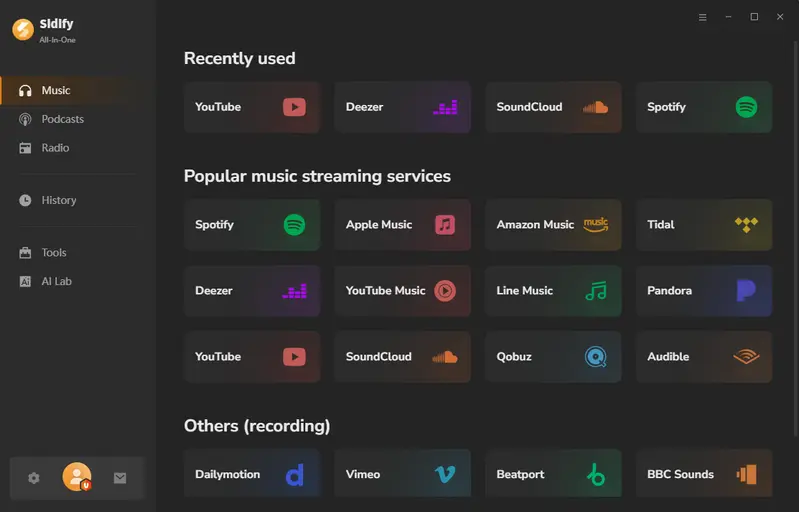
| Music Source | Spotify, Apple Music, YouTube Music, SoundCloud, and More |
| Offline Listening | Yes, After Conversion |
| Platforms | Windows & Mac; Mobile Playback via File Transfer |
| Key Highlights | 320kbps MP3 & Lossless FLAC · Up to 10× Speed · Batch Downloads · ID3 Tags |
Overview
Ad-free music players like VLC and Musicolet don’t come with popular songs. That's where Sidify comes in. Sidify All-In-One Music Converter lets you download songs, albums, and playlists in batches as MP3 files from Spotify, Apple Music, YouTube Music, and other supported services. Once saved, you can listen offline, skip as often as you like, and enjoy music without streaming ads.
Play your saved songs in Sidify's built-in player or transfer them to your phone, MP3 player, or car stereo. You won't need Wi-Fi or a streaming app for playback, and your converted music remains playable after your subscriptions end. It's a practical way to build a music library for different devices.
Pros & Cons
- MP3, AAC, FLAC, ALAC, and AIFF output for different music players.
- Batch playlist downloads at up to 10× speed.
- High-quality audio, including Lossless and HIFI
- Keep song details, album artwork, playlist order, and available lyrics.
- Ad-free desktop software instead of ad-filled online converters.
- Free podcast and radio-to-MP3 downloader, plus a built-in music player.
- Free trial limited to one minute per song
- Windows or Mac required for music conversion.
- Convert supported songs from Spotify, Apple Music, YouTube Music, SoundCloud, and more.
- Save music as MP3, AAC, FLAC, ALAC, or AIFF with ID3 tags.
- Play saved audio offline on a computer or transfer compatible files to mobile devices.
The free trial converts only the first minute of each track. Full-length conversion requires a paid license.
2. Audius — Best Free Ad-Free Music Streaming App
| Music Type | Online Music Streaming |
| Free Access | Free Basic Listening; Some Paid Artist Content |
| Ads | No Ads |
| Music Source | Independent Artists, Remixes, and Original Tracks |
| Offline Listening | Yes, in the Mobile App |
| Platforms | Android, iPhone, Web |
| Key Highlights | 320kbps Streaming · Curated Playlists · Artist Discovery |
| Official Website | https://audius.co/ |
Overview
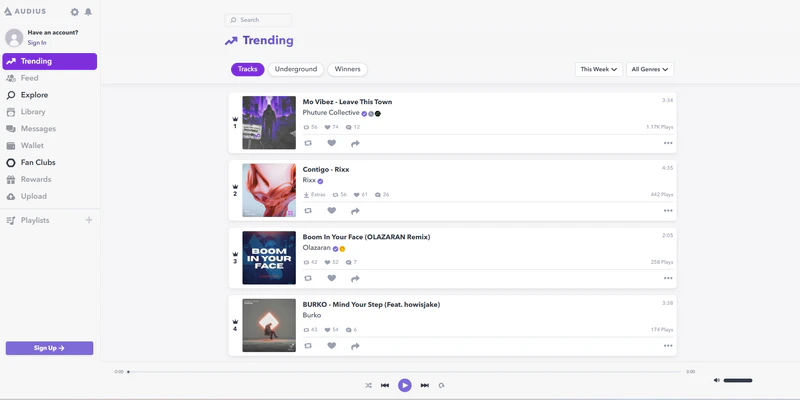
Audius offers free music streaming without ads, with a catalog focused on independent artists, remixes, and original tracks. You can search for songs, create playlists, and stream available music at up to 320kbps.
The mobile app also lets you save favorites for offline listening. Just don't confuse that with downloading MP3 files you can move anywhere. Artists control which tracks are available as separate downloads.
You'll find plenty of independent releases and remixes, but fewer current chart hits than on Spotify or Apple Music.
Pros & Cons
- Free, ad-free streaming with unlimited skips.
- Discover independent artists, remixes, and new releases.
- Stream music at up to 320kbps.
- Save favorites for offline listening in the mobile app.
- Download some tracks when artists allow it.
- Many mainstream hits may be missing.
- Offline listening doesn't give you regular MP3 files.
- Some tracks require payment; some Android users have reported playback glitches (Reddit discussion, Dec 2025).
3. Musicolet — Best Free Music App Without Ads for Android
| Music Type | Local Music Player |
| Free Access | Free Core Playback; Paid Extras |
| Ads | No Ads |
| Music Source | Your Own Music Files |
| Offline Listening | Yes |
| Platforms | Android |
| Key Highlights | Multiple Queues · Folder Browsing · Equalizer · Android Auto |
| Official Website | https://krosbits.in/musicolet/ |
Overview
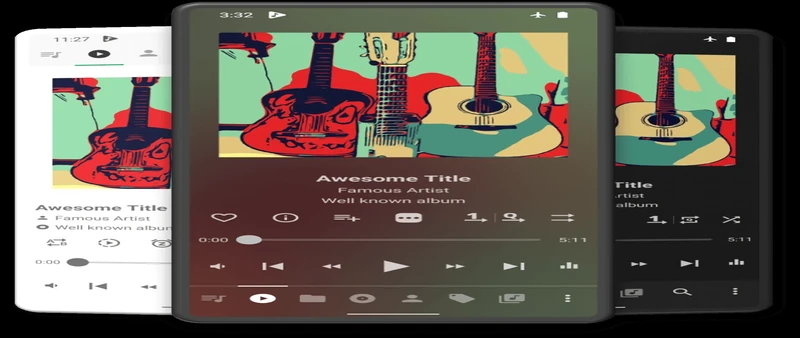
Already have MP3, FLAC, or other music files on your Android phone? Musicolet plays them without ads, subscriptions, or skip limits. It doesn't even request internet access, so you can enjoy your music completely offline.
What makes Musicolet special is its multiple playback queues. You can keep separate queues for different albums, moods, or activities and switch between them without losing your place. Musicolet also offers folder browsing, an equalizer, and Android Auto support. It's an excellent choice if you already have music files, but it can't stream or download new songs for you.
Pros & Cons
- No ads, internet permission, or subscription for basic playback.
- Switch between multiple playback queues.
- Organize songs by folder and edit music tags.
- Equalizer, lyrics support, and Android Auto compatibility.
- No built-in music catalog or online downloads.
- Android only; no native iPhone app.
- Some users have reported problems finding scanned songs in the library (Reddit discussion, Sep 2026).
4. VLC — Best for Playing Your Own Music Across Devices
| Music Type | Local Music Player |
| Free Access | 100% Free |
| Ads | No Ads |
| Music Source | Your Own Music Files |
| Offline Listening | Yes |
| Platforms | Android, iPhone, Windows, Mac, Linux |
| Key Highlights | Wide Audio Format Support · Wi-Fi File Transfer · Cloud & Network Playback |
| Official Website | https://www.videolan.org/vlc/ |
Overview
You probably know VLC Media Player for watching videos, but it's also a handy free music player. It handles MP3, FLAC, AAC, and many other audio formats on phones and computers, without ads or paid upgrades.
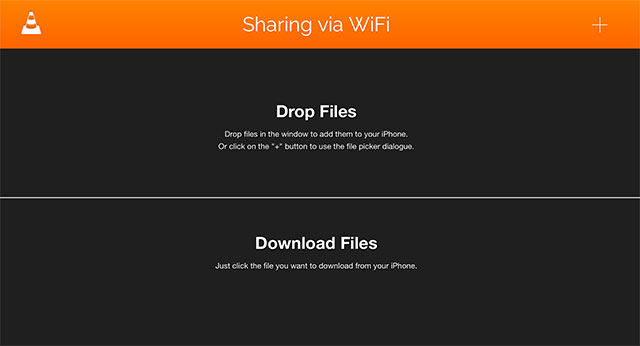
On iPhone, VLC makes it easier to play your own songs without adding them to Apple Music. You can transfer files from a computer over Wi-Fi or open music stored on supported cloud services and network drives.
VLC isn't as strong at organizing large music collections as dedicated audio players. But for playing files across different devices, it's hard to beat for free.
Pros & Cons
- 100% free, with no ads or paid upgrades.
- Plays most audio formats without extra codecs.
- Easy to add music to your iPhone without iTunes.
- No built-in music catalog or streaming service.
- Fewer music library features than dedicated audio players.
5. Audiophile.fm — Best for Free Lossless Internet Radio
| Music Type | Internet Radio |
| Free Access | 100% Free |
| Ads | No In-App Ads; Station Ads May Vary |
| Music Source | Curated Internet Radio Stations |
| Offline Listening | No |
| Platforms | Android, iPhone (iOS 26+), Web |
| Key Highlights | Lossless FLAC Radio · CD-Quality & Hi-Res Streams · Live Song Information |
| Official Website | https://audiophile.fm/ |
Overview
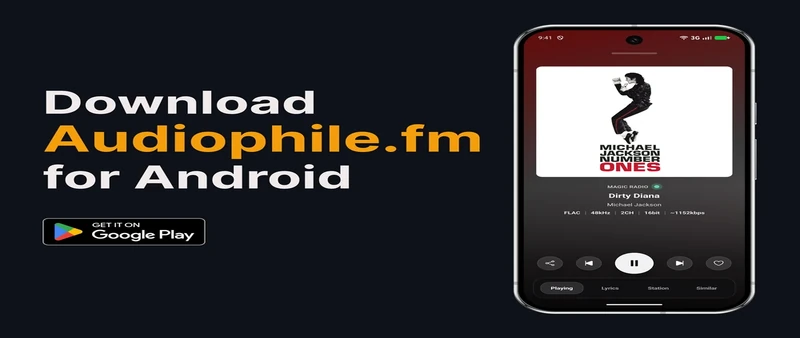
If sound quality matters to you, Audiophile.fm offers a different way to enjoy free music. It brings together internet radio stations streaming in lossless FLAC, including CD-quality and Hi-Res options.
Instead of searching for individual songs, you can explore stations covering jazz, classical, rock, electronic music, and more. The player shows each station's audio quality and what's currently playing. You can also save your favorite stations for later.
There's no subscription needed, but you'll have to stay online. You can't choose individual songs, and some third-party stations may include their own ads.
Pros & Cons
- Free access to curated lossless radio stations.
- Shows live song details, album artwork, and available lyrics.
- Save favorite stations for quick access.
- Background playback on mobile, even with the screen locked.
- No on-demand songs or unlimited skips.
- Some third-party stations may play ads.
- No offline listening; lossless streams use more mobile data.
6. Freegal Music — Best for Free MP3 Downloads With a Library Card
| Music Type | Library Music Streaming & Downloads |
| Free Access | Free With a Participating Library Card |
| Ads | No Ads |
| Music Source | Licensed Music Catalog |
| Offline Listening | Yes, With Downloads |
| Platforms | Android, iPhone, Web |
| Key Highlights | DRM-Free MP3 Downloads · Songs to Keep · Popular Artists |
| Official Website | https://www.freegalmusic.com/ |
Overview
Your public library card might be worth more than you think. If your library offers Freegal Music, you can stream music and download MP3 songs for free. The catalog includes mainstream artists, older favorites, and plenty of different genres.
Unlike temporary downloads in most streaming apps, Freegal's DRM-free MP3 files are yours to keep. You can play them offline or move them to another compatible device.
Availability depends on your library, and download limits aren't the same everywhere. Some libraries allow three songs a week, while others offer five. It's worth checking your library's website before signing up.
Pros & Cons
- Free, ad-free streaming with a participating library card.
- Download DRM-free MP3 files to keep and play offline.
- Discover mainstream artists, classic hits, and curated playlists.
- Requires a library card from a participating library.
- Weekly download and streaming limits vary by library.
- Not every song or album is available.

Looking for more ways to download music? Compare free MP3 download sites and tools, including their features, limitations, and safety considerations.
Learn More →7. Radio Paradise — Best Free Ad-Free Internet Radio
| Music Type | Internet Radio |
| Free Access | 100% Free; Listener-Supported |
| Ads | No Commercial Ads |
| Music Source | Human-Curated Radio Channels |
| Offline Listening | Yes, With Mobile Caching |
| Platforms | Android, iPhone, Web |
| Key Highlights | Human-Curated Mixes · FLAC Streaming · Song Skipping |
| Official Website | https://radioparadise.com/ |
Overview
Radio Paradise takes the work out of choosing what to play next. Its music is selected by real people, with a mix of rock, pop, jazz, electronic, and other genres. There are no commercial breaks, and you can skip songs that don't suit your mood.
The mobile app has another useful trick: it can cache hours of music for offline listening. That makes it handy for flights, road trips, or places with unreliable internet. FLAC streaming is also available when you're online.
You can't choose any song on demand or keep permanent MP3 downloads. Instead, Radio Paradise is built around discovering music through carefully selected radio mixes.
Pros & Cons
- Free, listener-supported radio with no commercial breaks.
- Skip songs and switch between curated music channels.
- Cache hours of music for offline listening.
- High-quality FLAC streaming on supported devices.
- No on-demand songs or custom Spotify-style playlists.
- Offline cache isn't a permanent MP3 download.
- Users reported caching and skipping issues in certain Android versions (Radio Paradise forum, 2025).
8. Euphony — Best Free Unofficial YouTube Music App for Android
| Music Type | Unofficial Music Streaming |
| Free Access | 100% Free; Open Source |
| Ads | No Ads (Developer Claim) |
| Music Source | YouTube Music |
| Offline Listening | Yes, With Downloads |
| Platforms | Android 7.0+; Desktop Versions Also Available |
| Key Highlights | Background Playback · Offline Downloads · Lyrics & Playlists |
| Official Website | https://f-droid.org/packages/com.mhdni.euphony/ |
Overview
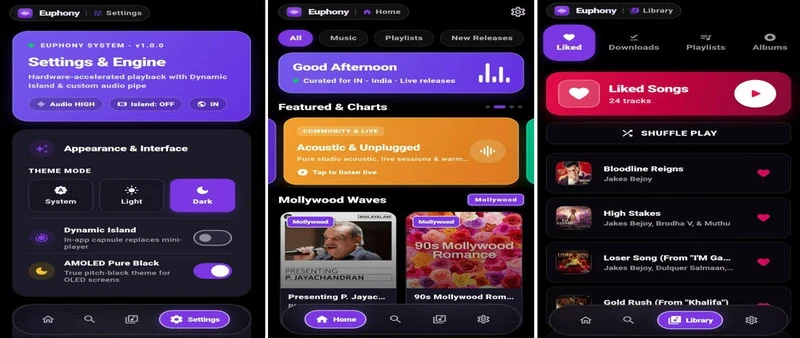
Euphony brings YouTube Music-style streaming to Android without requiring a Premium subscription. This free, open-source app lets you search for songs, play music in the background, and download supported tracks for offline listening. It also includes playlists, lyrics, and local music playback.
There's an important difference from the official YouTube Music app, though: Euphony is an unofficial client. It isn't supported by YouTube, and streaming or downloads may stop working when the underlying service changes.
You'll also need to get it from F-Droid or the developer's releases rather than Google Play. If you're comfortable installing apps outside Google Play and accepting occasional compatibility problems, Euphony may be worth trying.
Pros & Cons
- Free streaming without ads or a subscription.
- Background playback and offline downloads.
- Lyrics, playlists, and local music support.
- Open-source, with desktop versions available.
- Unofficial client; YouTube changes may break playback or downloads.
- Requires installation outside Google Play.
9. foobar2000 — Best for Managing Large Music Libraries
| Music Type | Local Music Player |
| Free Access | 100% Free |
| Ads | No Ads |
| Music Source | Your Own Music Files |
| Offline Listening | Yes |
| Platforms | Windows, Mac, Android, iPhone |
| Key Highlights | Gapless Playback · ReplayGain · Customizable Music Library |
| Official Website | https://www.foobar2000.org/ |
Overview
A large music collection can be difficult to manage, especially when songs come from different sources. foobar2000 gives you more control over both your music library and how everything sounds.
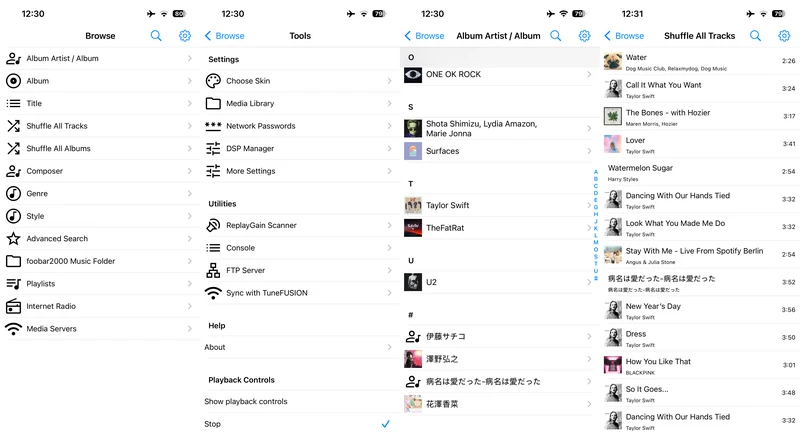
Gapless playback keeps live albums and DJ mixes running without unwanted pauses. ReplayGain helps balance volume between tracks, so you don't have to keep reaching for the volume control. The desktop versions also offer detailed library management and interface customization.
foobar2000 is free and works on phones and computers, though some advanced features are desktop-only. It doesn't include a streaming catalog, so you'll need your own music files. For simpler playback, VLC may be easier to use.
Pros & Cons
- Free playback without ads or subscriptions.
- Plays lossless FLAC, ALAC, and other audio formats.
- Advanced tagging, playlists, and library management.
- Customizable desktop layouts and optional plugins.
- No built-in catalog of popular songs or music downloads.
- Advanced settings can take time to learn.
- Some desktop features aren't available on mobile.
10. Tuneo — Best Free Ad-Free Music App for iPhone
| Music Type | Local Music Player |
| Free Access | Free Core Playback; Paid Pro Features |
| Ads | No Ads |
| Music Source | Your Own Music Files |
| Offline Listening | Yes |
| Platforms | iPhone (iOS 26+), iPad (iPadOS 26+) |
| Key Highlights | Files App Import · Playlist Management · Synced Lyrics |
| Official Website | https://apps.apple.com/us/app/tuneo-offline-music-player/id6748915689 |
Overview
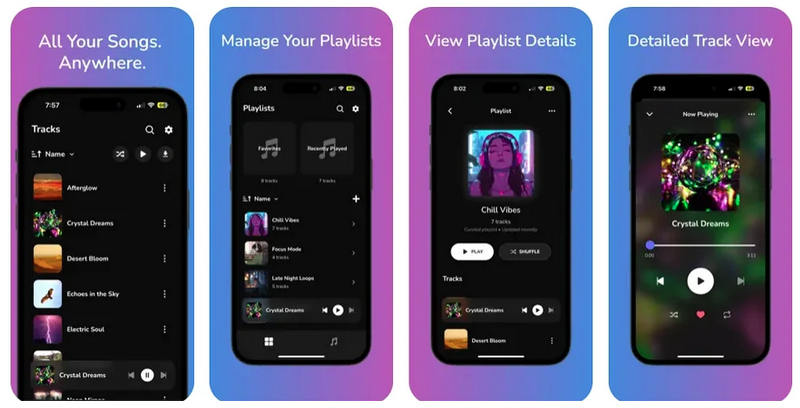
Tuneo gives iPhone users a simple way to play their own music without ads or a subscription. Import MP3, FLAC, AAC, and other audio files through the Files app, organize them into playlists, and listen offline while using other apps.
The interface feels familiar if you're used to Apple Music, but Tuneo works with files you add yourself. You don't need an account or an internet connection for local playback.
It doesn't provide a streaming catalog or free song downloads, and some extras require Tuneo Pro. There's also a compatibility limit: Tuneo needs iOS 26 or later. If your iPhone runs an older version, VLC is a practical alternative.
Pros & Cons
- Easy music imports through the iPhone Files app.
- Supports MP3, FLAC, AAC, WAV, and other formats.
- Create playlists, edit song details, and view synced lyrics.
- Private offline listening with no account required.
- No built-in music catalog or song downloads.
- Requires iOS 26 or later.
- Advanced EQ, crossfade, and CarPlay require Tuneo Pro.
Need more offline playback options for your iPhone or iPad? Compare music player apps, supported formats, and device compatibility.
Learn More →How to Choose a Free Music App Without Ads
Not sure which app to pick? Here's what matters most:
| What to Check | What You Should Know |
|---|---|
| Streaming or Local Player? | Streaming apps provide music. Local players need your own files. |
| Song Choice & Skips | Picking any song isn't the same as skipping tracks freely. |
| Offline & Downloads | Offline caches usually stay inside the app. MP3 downloads can be played elsewhere. |
| Official or Unofficial? | Unofficial apps may stop working when streaming services change. |
 Sidify All-In-One Music Converter — Save Music for Ad-Free Offline Listening
Want to listen to your favorite streaming songs without ads? Sidify All-In-One Music Converter helps you convert supported songs, albums, and playlists into MP3, FLAC, and other audio formats for offline playback on your computer, phone, or car stereo. The free trial converts the first minute of each track; full-length conversion requires a paid license.
FAQs About Free Music Apps Without Ads
1. What is the best free music app without ads?
It depends on how you listen. Audius is good for free streaming, Musicolet for offline Android music, and VLC for playing your own files across devices. If you enjoy radio, try Radio Paradise.
2. What music app is 100% free?
VLC, foobar2000, and Radio Paradise are free without paid subscriptions. VLC and foobar2000 play your own music files, while Radio Paradise offers free internet radio. Audius also provides free basic streaming, though some artist content costs extra.
3. What are the best free alternatives to Spotify without ads?
Audius offers free streaming with independent music and remixes. Radio Paradise provides ad-free radio, while Freegal Music offers songs through participating libraries. None offers everything Spotify Premium does for free.
4. Which music apps have no ads and unlimited skips?
VLC, Musicolet, foobar2000, and Tuneo let you skip freely through your own music files. Audius lets you choose songs and skip tracks within its catalog, while Radio Paradise allows skipping without letting you choose every song.
5. What is the best free music app without ads for iPhone or Android?
For Android, Musicolet is a good offline player, while Audius works for streaming. On iPhone, VLC is a free option for local music, and Tuneo offers a dedicated music player for iOS 26 or later.
6. Can you listen to Spotify without ads for free?
Not through Spotify's official free plan. Spotify Free includes ads, while Premium offers ad-free music. If you want a free alternative, try Audius or Radio Paradise. Sidify can also convert supported Spotify songs into local files for ad-free playback, but full-length conversion requires a paid license.
7. Can you use YouTube Music without ads for free?
The official YouTube Music free version includes ads. Unofficial apps like Euphony may offer ad-free playback, but they aren't supported by YouTube and may stop working after service updates.
8. What free music apps let you download songs?
Freegal Music offers MP3 downloads through participating libraries. Some Audius artists also allow individual song downloads. Radio Paradise provides offline caching rather than MP3 files. Sidify supports music conversion, but full-length songs require a paid license.
Conclusion: Which Free Music App Without Ads Should You Choose?
There's no single best free music app without ads. Audius is worth trying for free streaming, VLC and Musicolet work well for your own music files, and Radio Paradise is great for ad-free radio.
But what if you want to save popular songs from Spotify, Apple Music, or YouTube Music as MP3 files? Sidify All-In-One Music Converter helps you build an offline music library you can play on your phone, computer, or car stereo without streaming ads.
Try Sidify Free to see how it works. The trial converts the first minute of each song; full-length conversion requires a paid license.
 Note:
Note:The free trial converts only the first minute of each track. Full-length conversion requires a paid license.












