



Downloading music from YouTube to Mac is possible, but YouTube itself does not offer audio export in formats like MP3 or AAC. YouTube Premium supports offline playback in its app and in some supported desktop browsers, but it does not let you export standalone MP3 files. To get YouTube audio files for Apple Music, MP3 players, USB drives, or other devices, you need dedicated downloaders.
When choosing a YouTube music downloader for Mac, consider more than just MP3 conversion. Support for playlist downloads, audio quality, download speed, Mac compatibility, and security all affect your experience. In this guide, we cover 5 methods using 9 tools, including desktop apps, online converters, and open-source options, to help you find the best way to download YouTube audio to your Mac.
📍 Also Read: Best MP3 Downloaders for Mac
Can You Download Music from YouTube to Mac?
Yes, but it depends on whether you want to listen offline or save music as audio files on your Mac.
Option 1: Download for Offline Playback with YouTube Premium
YouTube Premium lets you download videos, including music videos, for offline viewing on Mac through supported browsers.
- Open YouTube in Chrome, Edge, Firefox, or Opera.
- Sign in to your YouTube Premium account.
- Open the music video you want to save.
- Click Download below the video.
You can access the downloaded video through YouTube, but you cannot export it as an MP3 file. YouTube Music Premium's song-download feature is primarily intended for mobile devices.
Option 2: Save Music as MP3 Files on Mac
If you want standalone MP3 or other audio files for local playback, you'll need a different approach. Third-party downloaders can help save content you're authorized to download.
Below, we'll cover five methods, including Sidify, online downloaders, desktop apps, yt-dlp, and Telegram bots.
Quick Comparison Table: 5 Ways to Download Music from YouTube to Mac
| Method | Tools | Best For | Installation | Price |
|---|---|---|---|---|
| 1. Sidify | Sidify All-in-One | Batch downloads, playlists, and music management | Required | Paid / Trial |
| 2. Online Downloaders | Y2Mate, TurnMp3 | Quick MP3 downloads without installing software | Not required | Free |
| 3. Desktop Apps | Downie, 4K Video Downloader Plus, MediaHuman, PullTube | Mac users who prefer desktop downloaders | Required | Free / Paid |
| 4. Command-Line Tool | yt-dlp | Advanced users who want more control | Required | Free |
| 5. Telegram Bots | Telegram Bots | Occasional downloads through messaging | Telegram required | Usually Free |
Method 1. Download Music from YouTube to Mac with Sidify
Best for: Mac users who regularly download YouTube songs or playlists without losing original quality.
Sidify All-In-One is our top choice for downloading music from YouTube to Mac in 2026. Sidify All-In-One excels at ripping audio from YouTube videos, playlists, and channels. Downloaded MP3 and M4A files can be added to Apple Music/iTunes with one click, playable across Mac, iPhone, iPad, and other Apple devices. Files also work on MP3 players, USB drives, and other media devices.
Beyond YouTube, Sidify also supports other platforms including YouTube Music, Spotify, Apple Music, Amazon Music, and more.
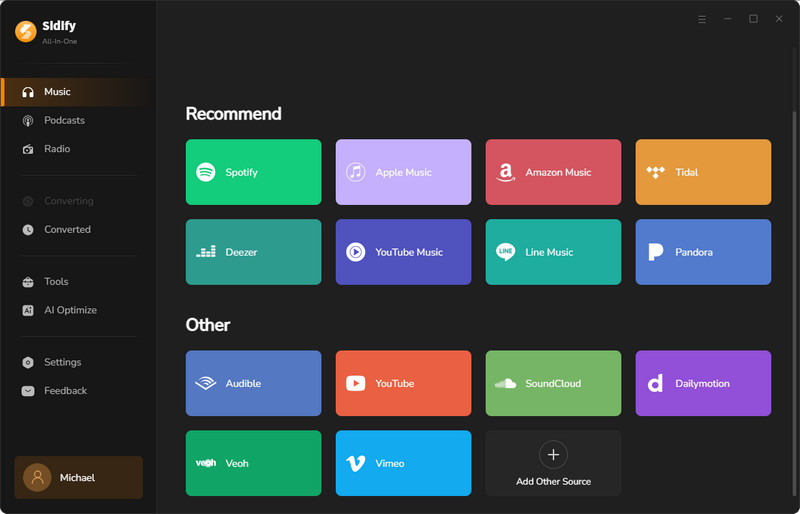
How to Download YouTube Playlist to MP3 with Sidify
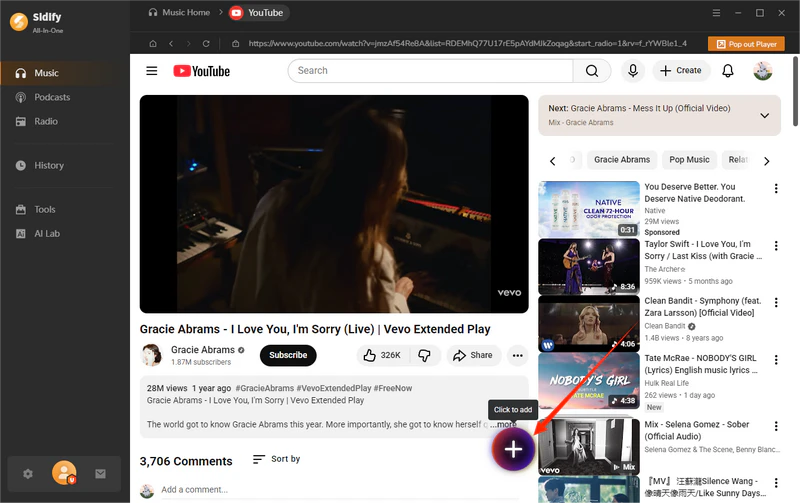
Step 1 Add a YouTube playlist
Open Sidify All-In-One, select YouTube, and add the playlist or videos you want to download.
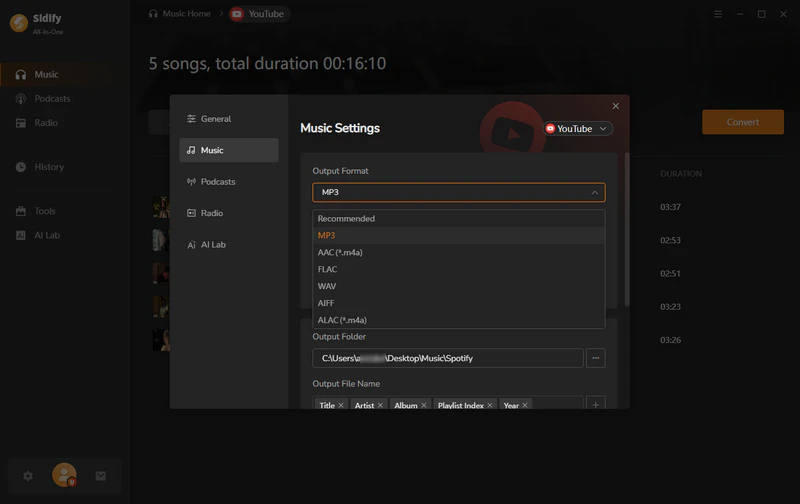
Step 2 Choose MP3 as the output format
Select MP3 (or another format such as FLAC/AAC) from the output settings.
Step 3 Start downloading YouTube audio
Click the Convert button to download the playlist and save the audio files to your Mac. Once the download is complete, the output folder will pop up, so you can find your MP3 or other audio files on your Mac.
Tips: To add downloaded MP3 files to Apple Music on Mac, go to History in Sidify, pick the songs you want, then clik "upload to Music".
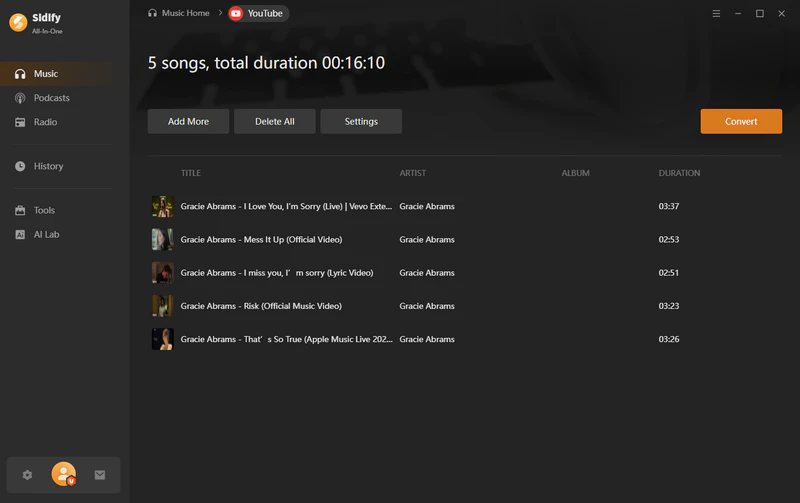
Key Features of Sidify All-in-One
- Batch download audio from YouTube videos, playlists, shorts, channels, and podcasts
- Preserve ID3 tags, album artwork, and song information
- Lightning-fast MP3 conversion at 320 kbps.
- One-click export to Apple Music/iTunes
- Support Apple Silicon and Intel-based Macs
- Support for YouTube Free or Premium users
- No ads, user-friendly interface
- Preserves original playlist order
- Burn downloaded music to CDs
- Transfer YouTube music to MP3 players, USB drives, and other devices
- Receive updates and technical support for newer macOS versions
- Limitations: Requires desktop installation
| Platform | macOS & Windows |
|---|---|
| macOS Support | macOS 11 and later |
| Apple Silicon | Supports ARM-based Macs (M1/M2/M3/M4 series) |
| Intel Mac | Supported |
| Installer | DMG app installer |
| Playlist Batch Download | Yes |
| Output Formats | MP3, AAC, FLAC, WAV, AIFF, ALAC (M4A) |
| Audio Quality Test | Spek verified up to 256kbps AAC source; MP3 output option up to 320kbps |
| Security Test | VirusTotal: 0/70+ detections |
| Download Speed | ~8 sec |
Method 2. Download YouTube Music to Mac with Free Online Downloaders
Free online YouTube downloaders let you save audio to your Mac without installing desktop software. They are convenient for downloading individual songs, but usually offer limited playlist support and fewer music management features.
Y2Mate — Best Free Online YouTube to MP3 Converter
Best for: Quickly converting individual YouTube videos to MP3 without installing software.
Y2Mate is mainly a quick YouTube-to-MP3 converter rather than a full music downloader. It offers MP3 output options up to 320kbps, though actual audio quality still depends on the original YouTube source, and it does not preserve metadata like artist or album info. Beware of fake Y2Mate sites and intrusive ads.
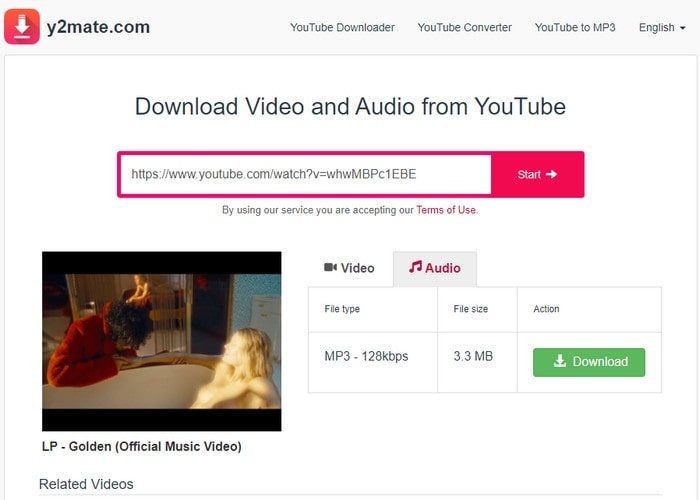
How to Convert a YouTube Video to MP3 with Y2Mate
Step 1 Copy the YouTube video URL you want to convert.
Step 2 Open Y2Mate and paste the link into the search box. Wait for the website to analyze the video.
Step 3 Choose MP3 as the output format and select the available quality option.
Step 4 Click the download button and save the converted audio file to your device.
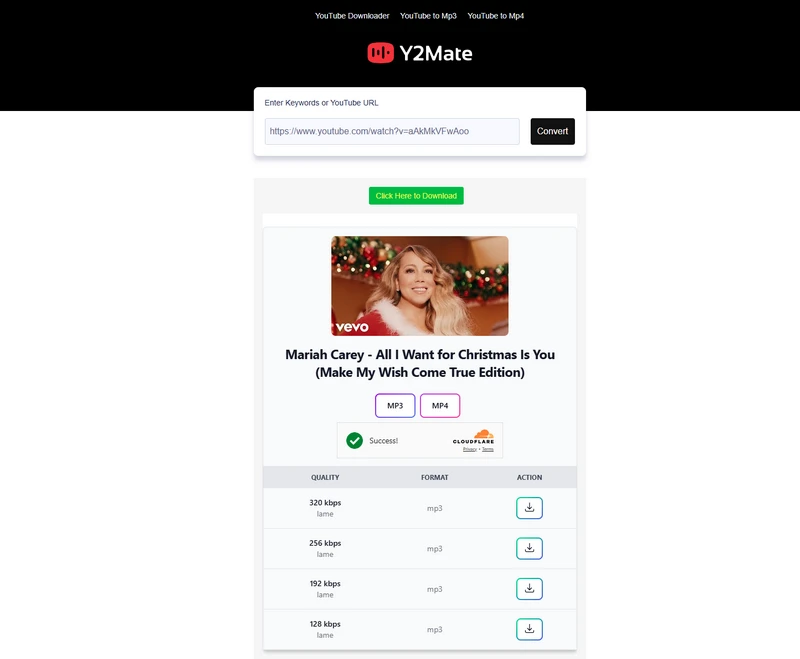
Tip: Insert "sos" before the word "youtube" in the link to download videos and mp3 files from YouTube as a faster way.
- Convert YouTube videos to MP3 or MP4 directly in a browser
- Fast, no registration or software required
- Support common YouTube video and audio downloads
- Work across desktop and mobile browsers
- Simple link-based conversion workflow
- No playlist or batch downloads
- A 320kbps MP3 option does not increase the quality of the original YouTube audio source
- Does not preserve metadata such as artist, album, or track information
- Ads and pop-ups common
- Not suitable for organizing a local music library
| Website Tested | https://v38.www-y2mate.com/ |
|---|---|
| Platform | Browser-based |
| Installation | No installation required |
| YouTube Download | Yes |
| Playlist Download | No |
| Output Formats | MP3, MP4 |
| Audio Quality Test | Up to 320kbps MP3 |
| Video Quality | Up to 1080p |
| Metadata | Few |
| Security Test | 0/90 |
| Download Speed | ~25 sec |
| Price | Free |
TurnMp3 — Best Clean Online YouTube MP3 Converter
Best for: Users who want a simple, ad-free online YouTube to MP3 converter.
TurnMp3 offers a straightforward way to download single YouTube songs without ads or pop-ups. It lacks playlist support and metadata features, focusing on quick individual downloads.
How to Download YouTube Audio Online with TurnMp3
Step 1 Copy the YouTube video URL you want to download.
Step 2 Open TurnMp3 and paste the YouTube link into the search box. Wait for the available download options to appear.
Step 3 Choose the preferred audio option and download the MP3 file to your device.
- Download YouTube audio as MP3 files online without ads
- Preview available download options before saving
- Choose available MP3 quality options ( 128–320kbps)
- No account registration required
- Works directly from a browser without installing software
- Single-song only, no batch downloads
- No metadata preservation
- No Apple Music or iTunes integration
- Audio quality depends on YouTube source
| Official Website | https://www.turnmp3.com/ |
|---|---|
| Platform | Browser-based |
| Installation | No installation required |
| Account Required | No |
| YouTube Download | Yes |
| Playlist Download | No |
| Output Formats | MP3, MP4 |
| Audio Quality Test | 128 kbps |
| Security Test | 0/90 |
| Download Speed | ~12s |
| Metadata | File name only |
| Price | Free |
Method 3. Download Music from YouTube to Mac with Desktop Apps
Desktop YouTube downloaders offer another way to save music and videos directly to your Mac. Tools like Downie, 4K Video Downloader Plus, MediaHuman, and PullTube provide different options for downloading individual videos, playlists, and audio files.
Downie — Best Native Mac YouTube Downloader
Best for: Mac users who want a simple, native macOS app for downloading videos and audio from YouTube and other websites.
Downie supports over 1,000 websites, allowing downloads by pasting URLs, dragging links, or using its built-in search. It’s a clean alternative for occasional downloads but offers limited playlist support and lacks subscription streaming platform support.
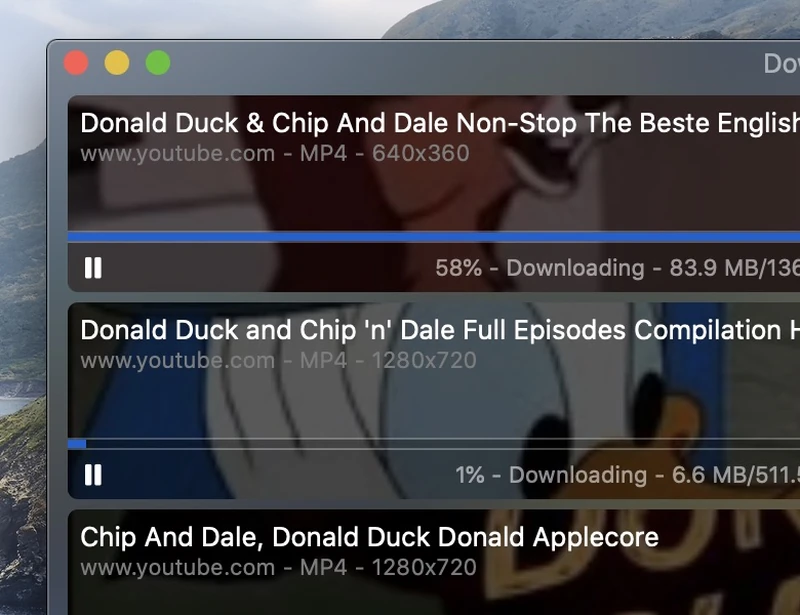
How to Download YouTube Videos and Extract Audio on Mac with Downie
Step 1 Download Downie from the official website and install the app on your Mac.
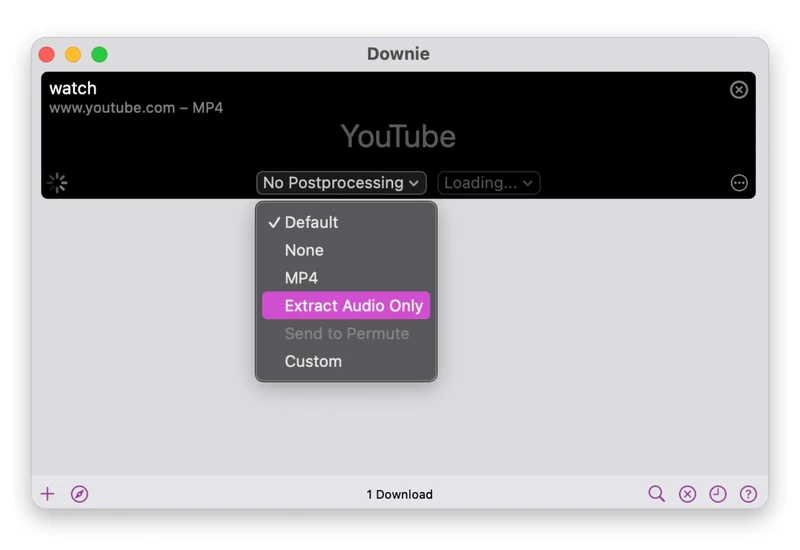
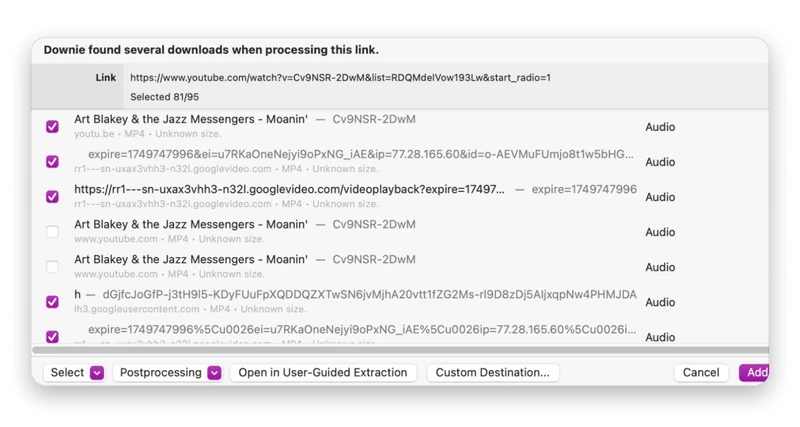
Step 2 Open YouTube or another supported website and copy the video URL from your browser. Launch Downie and paste the link into the app to analyze the available download options.
Step 3 Choose MP3 or other preferred download format and quality, then click the download button to save the video or audio file to your Mac.
- Download videos and audio from YouTube and 1,000+ sites
- Keep up to 4k video and original audio quality
- Native macOS app with Apple Silicon support
- macOS only — no Windows version
- Not designed for large playlist music conversion
- Does not support subscription streaming platforms such as Netflix, Prime Video, or Disney+
| Official Website | https://software.charliemonroe.net/downie.php |
|---|---|
| Platform | macOS only |
| macOS Support | macOS 13 and later (legacy build available for macOS 11–12) |
| Apple Silicon | Supports ARM-based Macs (M1/M2/M3/M4) |
| Intel Mac | Supported |
| Installer | DMG app installer |
| Playlist Download | Limited |
| Output Formats | MP4, MOV, MP3, M4A, and other video/audio formats |
| Security Test | 0 / 70+ |
4K Video Downloader Plus — Best YouTube Playlist Downloader for Mac
Best for: Users who want to download YouTube playlists, channels, and multiple videos in batches on Mac.
4K Video Downloader Plus supports downloading YouTube playlists, channels, videos, audio, and subtitles from platforms including YouTube, Vimeo, TikTok, and Twitch. Its Smart Mode lets users preset format and quality settings, making repeated downloads faster. In our testing, it handled playlist downloads smoothly with a simple copy-and-paste workflow. Download speeds were average compared with similar tools, and output quality depended on the available YouTube source.
How to Download YouTube Playlist to MP3 with 4K Video Downloader
Step 1 Copy the YouTube playlist URL you want to download.
Step 2 Open 4K Video Downloader Plus and paste the playlist link into the app. The software will analyze the available download options.
Step 3 Choose MP3 as the output format, select the preferred quality, and start downloading the playlist.
- Download YouTube playlists, channels, videos, and audio in batches
- Support subtitles and audio downloads from supported platforms
- Smart Mode automatically applies preset format and quality settings
- Download content from YouTube, Vimeo, TikTok, Twitch, and other supported sites
- Organize downloaded content by videos, audio, playlists, and channels
- More focused on video and playlist downloading than music library management
- Free version has download limitations and fewer advanced features
- Audio features are more basic compared with dedicated YouTube music downloaders
| Official Website | https://www.4kdownload.com/products/videodownloader-42 |
|---|---|
| Platform | macOS, Windows, Linux |
| Apple Silicon | Supported |
| Intel Mac | Supported |
| Installer | DMG app installer |
| Playlist Download | Yes |
| Channel Download | Yes |
| Output Formats | MP3, M4A, OGG (audio); MP4, MKV (video) |
| Security Test | 0/61 |
| Download Speed | 32 seconds |
| Price | Free / Paid |
MediaHuman YouTube Downloader — Best Desktop YouTube Audio Downloader
Best for: Desktop users who want a simple way to download YouTube audio and manage local music files.
MediaHuman YouTube Downloader enables downloading YouTube videos and playlists, extracting audio on Mac, and exporting completed downloads to Music.app/iTunes. It suits users who prefer managing files locally, while transfers to iPhone or iPad still depend on the usual Apple Music/Finder sync workflow.
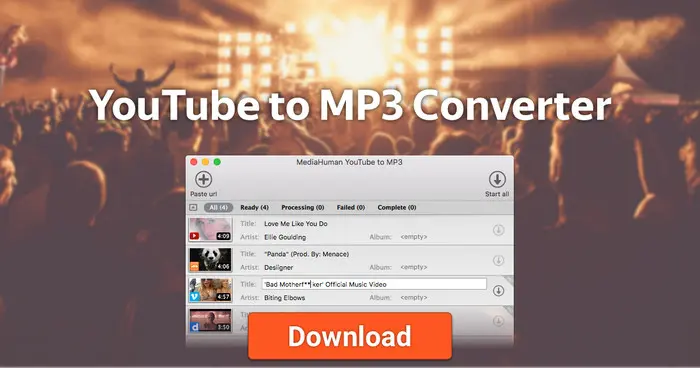
How to Download YouTube Playlists as MP3 with MediaHuman
Step 1 Copy the YouTube playlist URL you want to download.
Step 2 Open MediaHuman YouTube Downloader and paste the playlist link into the app. MediaHuman will load the videos in the playlist and add them to the download list.
Step 3 Choose MP3 as the output format and start the download. MediaHuman can extract audio from YouTube videos and save it as MP3.
- Download YouTube videos and extract audio
- Download playlists and multiple YouTube files
- Offers specialized tools for conversion and music management
- Good for users managing local libraries
- Paid license required for full use
- Manual steps needed to move music to iPhone/iPad
- YouTube may temporarily limit heavy downloading
- Free version has usage limitations
| Official Website | https://www.mediahuman.com/youtube-downloader/ |
|---|---|
| Platform | macOS, Windows, Linux |
| Apple Silicon | Supported |
| Intel Mac | Supported |
| Installer | DMG app installer |
| YouTube Download | Yes |
| Playlist Download | Yes |
| Output Formats | MP3, M4A, OGG, WAV |
| Audio Quality Test | 192 |
| Security Test | 0/70 |
| Price | Free / Paid options |
PullTube — Best Lightweight Mac YouTube Downloader
Best for: Mac users who want a simple desktop app for downloading YouTube videos and audio.
PullTube focuses on making YouTube downloads simple on Mac with a clean native app experience. It supports video and audio downloads, including playlists, and fits users who prefer a lightweight Mac app. However, it does not provide the advanced music features found in dedicated downloaders, such as Apple Music/iTunes integration or detailed audio management.
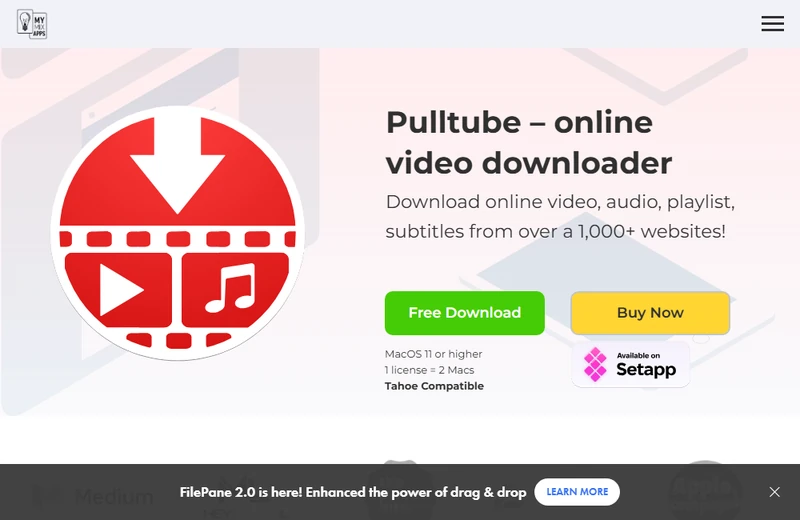
How to Download YouTube Audio with PullTube on Mac
Step 1 Copy the YouTube video or playlist URL.
Step 2 Open PullTube and paste the link into the app.
Step 3 Choose the audio format and quality, then start downloading the file.
- Download YouTube videos and audio on Mac
- Simple drag-and-drop download workflow
- Support playlists and multiple videos
- Convert videos to common formats
- Native macOS app design
- Available only for Mac users
- Fewer audio-focused features than music downloaders like Sidify
- No direct Apple Music/iTunes music library workflow
- Limited advanced settings compared with yt-dlp
| Official Website | https://mymixapps.com/pulltube |
|---|---|
| Platform | macOS |
| Installation | DMG app installer |
| Apple Silicon | Supported |
| Intel Mac | Supported |
| YouTube Download | Yes |
| Playlist Download | Yes |
| Audio Download | Yes |
| Output Formats | MP3, M4A, MP4, WebM |
| Security Test | 0/89 |
| Price | Paid |
Method 4. Download YouTube Audio on Mac with yt-dlp
Best for: Users comfortable with command-line tools seeking full control over downloads.
yt-dlp downloads videos, playlists, and channels from YouTube and many other sites. It supports flexible output formats and quality settings but requires command-line skills and external tools like FFmpeg for some conversions.
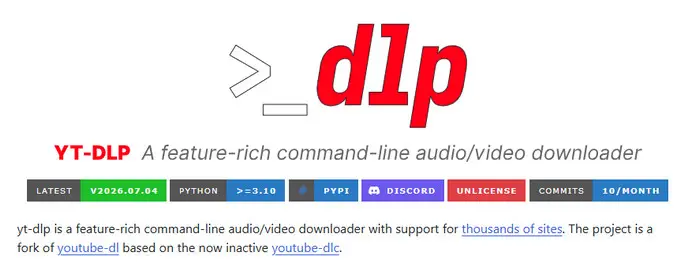
How to Download YouTube Playlists with yt-dlp
Step 1 Install yt-dlp and FFmpeg on Mac.
Open Terminal on your Mac. If Homebrew is already installed, run:
brew install yt-dlp ffmpegIf Homebrew is not installed, install it first by following the instructions on the official Homebrew website. FFmpeg is used by yt-dlp to extract and convert audio.
Step 2 Copy the YouTube video or playlist URL you want to download.
Step 3 Download YouTube audio as MP3.
For a single video, run:
yt-dlp -x --audio-format mp3 "VIDEO_URL"For a playlist, run:
yt-dlp -x --audio-format mp3 "PLAYLIST_URL"
Replace "VIDEO_URL" or
"PLAYLIST_URL" with the actual link. For a regular
media download that is not specifically converted to MP3, run:
yt-dlp "PLAYLIST_URL"Step 4 Find your downloaded files.
If you do not specify a save path, files are usually saved in the current working directory where you run the command. To save a playlist directly to your Downloads folder, run:
yt-dlp -x --audio-format mp3 -P ~/Downloads "PLAYLIST_URL"- Download YouTube videos, playlists, and channels
- Extract YouTube audio and convert to different formats
- Customize quality, format, and download settings
- Support many websites beyond YouTube
- Free and open-source with active development
- Requires command-line knowledge
- Not beginner-friendly compared with desktop apps
- Requires extra tools such as FFmpeg for some conversions
- No built-in music library or Apple Music integration
| Official Website | https://github.com/yt-dlp/yt-dlp |
|---|---|
| Platform | macOS, Windows, Linux |
| Installation | Command line / package manager |
| Apple Silicon | Supported |
| Intel Mac | Supported |
| YouTube Download | Yes |
| Playlist Download | Yes |
| Output Formats | MP3, M4A, WAV, FLAC, Opus, and more |
| Security Test | 0/90 |
| Price | Free |
Method 5. Download YouTube Audio on Mac Using Telegram Bots
Telegram bots offer another way to download YouTube audio on Mac without installing a dedicated YouTube downloader. You can send a video link through Telegram and save the returned audio file to your device.
@YtbDownBot — Best Telegram YouTube Downloader Bot for Quick Audio Downloads
Best for: Users who want to download YouTube videos and audio quickly within Telegram without installing software.
@YtbDownBot lets Telegram users download YouTube videos and audio by simply sending a link in a chat. It’s convenient but offers limited control over quality and file management.
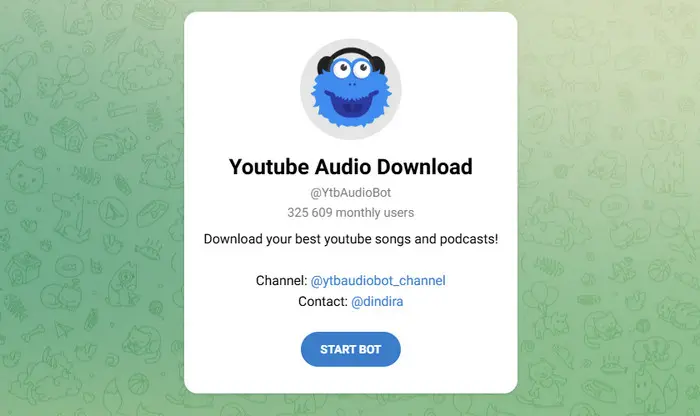
How to Download YouTube Audio with Telegram Bots
Step 1 Open Telegram and search for @YtbDownBot.
Step 2 Send the YouTube video or playlist link to the bot.
Step 3 Choose the audio download option and save the file from Telegram.
- Download YouTube videos and audio directly in Telegram
- Support playlist and audio downloads
- No desktop software required
- Works across devices with Telegram installed
- Simple link-based downloads
- Limited control over audio quality and output formats
- Not designed for organizing a music collection
- Requires trust in third-party bot
- Large files may be limited by Telegram or bot restrictions
| Bot | https://t.me/YtbDownBot |
|---|---|
| Platform | Telegram |
| Installation | No app installation required |
| YouTube Download | Yes |
| Playlist Download | Yes |
| Audio Download | Yes |
| Output Formats | Audio files / video files |
| Audio Quality Test | Up to 320kbps |
| Security Test | 0/96 |
| Download Speed | ~12sec |
| Price | Free |
Safety Tips Before Downloading Music from YouTube
- Download software only from official websites to avoid bundled malware.
- Be cautious with free online converters due to pop-ups, redirects, and fake download buttons.
- Beware of “320kbps MP3” claims; YouTube audio quality limits actual output.
- Ensure the downloader supports common formats like MP3, AAC, FLAC, or WAV for broader device compatibility.
Online YouTube Converters vs Desktop Downloaders: Which One Should You Choose?
Many users start with free online YouTube converters because they are quick and do not require installation. However, these sites can change domains frequently, show more ads or pop-ups, and usually provide fewer download options.
Desktop downloaders require installation, but they usually offer a more stable experience, better support for playlists and batch downloads, and more control over downloaded audio files.
| Feature | Online YouTube Converters | Desktop Downloaders |
|---|---|---|
| Examples | Y2Mate, TurnMp3 | Sidify All-In-One, Downie, 4K Video Downloader Plus, MediaHuman YouTube Downloader, PullTube |
| Best for | Downloading a few songs quickly | Downloading playlists, albums, and many songs |
| Installation | No installation required | Install a Mac app |
| Playlist download | Limited or unavailable | Usually supported |
| Audio quality | Usually basic MP3 options | More formats and quality settings |
| Song information | Usually not saved | Better support for titles, artists, and album details |
| Safety | Depends on the website; ads, pop-ups, and fake download buttons can be common | Usually safer when downloaded from the official developer website |
| Stability | Websites may change domains or stop working | Desktop apps are generally more stable and receive updates |
| Apple Music/iTunes | Manual transfer required | Some tools support easier music transfer |
Note: Among Mac desktop downloaders, Sidify is more focused on music workflows, including batch downloads, higher-quality audio formats, and adding downloaded songs to Apple Music/iTunes.
How We Test YouTube Music Downloaders for Mac
Device: MacBook Pro M4
OS: macOS Tahoe (September 2026)
Internet: 100 Mbps
Test video Duration: 4:13
Test video: Lady Gaga, Bruno Mars - Die With A Smile (Official Music Video)
Criteria: Mac compatibility, playlist support, audio formats, ease of use, security, and music management.
How to Choose the Best YouTube Music Downloader for Mac?
Before choosing a YouTube downloader, check what you actually need:
| If you want to... | Look for... | Recommended tools |
|---|---|---|
| Download one or two songs quickly | Online converter with no installation | Y2Mate, TurnMp3 |
| Download playlists or albums | Batch playlist download support | Sidify, 4K Video Downloader Plus, MediaHuman |
| Keep better audio quality | Support for AAC, FLAC, WAV, or lossless formats | Sidify |
| Add downloaded songs to Apple Music/iTunes | Music library integration | Sidify |
| Download videos and audio from many websites | Multi-site downloader | Downie, 4K Video Downloader Plus |
| Customize formats, file names, and download settings | Advanced controls | yt-dlp |
| Use a simple Mac app | Native macOS interface | Downie, PullTube |
FAQs About Downloading YouTube Music on Mac
Can I download YouTube playlists as MP3 on Mac?
Yes. Many Mac downloaders like Sidify All-In-One, 4K Video Downloader Plus, and MediaHuman handle playlist downloads, letting you save multiple songs at once.
Can I download YouTube music without Premium?
Yes. YouTube Premium supports offline playback in its app and in some supported desktop browsers, but it does not let you export standalone audio files like MP3, AAC, FLAC, or WAV.
What is the highest audio quality I can get from YouTube downloads?
It depends on the original YouTube audio source. Downloaders can't improve source quality, but Sidify supports MP3, AAC, FLAC, and WAV, giving you more format options.
Can I add downloaded YouTube songs to Apple Music or iPhone?
Yes. Compatible audio files can be manually added. Sidify All-In-One offers one-click import to Apple Music/iTunes for easier management.
Are free YouTube MP3 converters safe?
Free converters are convenient but watch for ads, pop-ups, fake buttons, and copycat sites. For desktop apps, always download from official websites.
Why does my downloaded MP3 not show the correct song information?
Some online converters only save the audio file and do not keep details such as artist, album, or cover art. If you want organized music files, choose a downloader that supports song information.
Can I play downloaded YouTube music on an MP3 player?
Yes. As long as the file format is compatible, you can transfer music to MP3 players, USB drives, or other devices.
Can YouTube downloaders really provide 320kbps MP3?
Not always. Some tools list 320kbps as an option, but true quality depends on the original audio and encoding.
Is downloading YouTube music legal?
It depends on content rights and usage. Only download content you own, have permission for, or that is legally available for download.
Where Does Downloaded YouTube Music Go on Mac?
Files downloaded through a browser usually appear in the Downloads folder in Finder. Desktop software may use its own default folder or a custom output directory selected in the app's settings.
Conclusion
If you only need a few MP3 files on Mac, online YouTube to MP3 converters can be convenient. However, desktop downloaders are usually a safer option for users who regularly download music from YouTube on Mac, with fewer ads and more control over audio quality.
Sidify All-In-One is a good fit for Mac users who want high-quality YouTube music downloads, support for formats like MP3, AAC, FLAC, and WAV, and an easy way to add downloaded songs to Apple Music/iTunes.
 Download YouTube Music on Mac with Sidify All-In-One
Download YouTube videos and playlists as MP3, AAC, FLAC, WAV, AIFF, or ALAC files, then add them to Apple Music/iTunes.












