


YouTube Music offers millions of hit songs and music videos, but how is YouTube Music audio quality in 2026? How does YouTube Music Premium audio quality compare with the Free account? YouTube Music quality vs Spotify—which one is better?
In this guide, we'll explain everything about YouTube Music's audio quality, including its bitrate, codec, sample rate, Premium vs Free quality differences, and how to download YouTube Music in original quality.
Part 1: What Is YouTube Music Audio Quality?
According to YouTube Music official help center, YouTube Music audio quality typically ranges from 128 kbps to 256 kbps, using AAC or Opus codecs depending on the device and streaming conditions. While the quality is good enough for most listeners, factors such as codec efficiency, bitrate, and playback devices can affect the listening experience. This chapter explains the differences between AAC and Opus, YouTube Music's sample rates and bitrate limits, and whether it supports lossless audio.
1.1 What Codec Does YouTube Music Use?
YouTube Music primarily uses two audio codecs in 2026: AAC and Opus. Both deliver good sound quality, but they have some differences.
- AAC offers better compatibility and is commonly used across more mobile devices.
- Opus provides more efficient encoding and preserves more audio detail at the same bitrate. It is especially well-suited for online streaming.
Does YouTube Music Use MP3?
No. YouTube Music doesn't use MP3, since MP3 is an older format, while AAC and Opus are more modern and efficient codecs that can deliver better sound quality while using less data.
In this guide, you will learn about the best tools in 2026, how to convert YouTube Music to MP3 step by step, and the difference between free and paid solutions.
Learn More →1.2 What Frequency (kHz) Does YouTube Music Use?
YouTube Music primarily uses sample rates of 44.1 kHz or 48 kHz in 2026:
- 44.1 kHz is the standard sampling rate for CDs and most AAC streams.
- 48 kHz is the standard audio sampling rate for video and film commonly used in Opus streams.
Basically, the higher the sampling rate, the more audio detail can be reproduced. However, the difference between 44.1 kHz and 48 kHz is virtually inaudible for most people. And that's why YouTube Music currently doesn't plan to offer higher frequencies to 192kHz, which often requires high-end wired headphones or a good DAC.
1.3 Does YouTube Music Have 320kbps Audio?
YouTube Musix doesn't have 320kbps audio in 2026. Currently, YouTube Music offers a maximum bitrate of 256 kbps, which is available only to Premium users. Free users are limited to a maximum of 128 kbps. (How to Download YouTube Music without Premium >>)
However, because AAC and Opus are more efficient than MP3, 256 kbps AAC/Opus tracks often sound comparable to — or even better than — 320 kbps MP3s.
1.4 Does YouTube Music Support Lossless Audio?
YouTube Music currently doesn't have any lossless or Hi-Res audio in 2026. It only support lossy compression, with a maximum of 256kbps AAC/Opus. For most people using Bluetooth headphones or regular speakers, the difference between lossless and 256kbps is actually pretty small. You only really notice the difference with wired high-quality headphones and good playback equipment.
For comparison, here are some major streaming services that do offer lossless audio:
| Service | Lossless Support | Max Quality |
|---|---|---|
| Apple Music | ✅ (included) | Up to 24-bit/192 kHz |
| Amazon Music | ✅ (Unlimited plan) | Up to 24-bit/192 kHz (Ultra HD) |
| Tidal | ✅ | Up to 24-bit/192 kHz |
| Qobuz | ✅ | Up to 24-bit/192 kHz |
| Spotify | ✅ (in supported regions) | Up to 24-bit/44.1 kHz |
| YouTube Music | ❌ | 256 kbps (AAC/Opus) |
Is Apple Music Lossless real? Learn about sound quality, devices, and how to download lossless songs.
Learn More →Part 2: YouTube Music Premium vs Free Audio Quality
The biggest difference in YouTube Music audio quality between Free and Premium accounts is the bitrate. A free YouTube Music account is limited to Normal quality (128 kbps) and may drop to lower quality, such as 48 kbps, when the internet connection is weak. In contrast, Premium users can access the highest audio quality setting of up to 256 kbps, without the impact of network conditions.
Here's a clear comparison:
| Feature | YouTube Music Free | YouTube Music Premium |
|---|---|---|
| Max Bitrate | 128 kbps | 256 kbps |
| Codecs Used | AAC / Opus | AAC / Opus |
| Audio Settings Control | Low / Normal | Low / Normal / High / Always High |
| Offline Downloads | ❌ | ✅ |
| Background Playback | ❌ | ✅ |
| Ad-Free | ❌ | ✅ |

Three workabe methods are introduced on how to block ads on YouTube Music and the best way to remove ads from YouTube music without premium.
Learn More →Part 3: How to Get the Best Audio Quality on YouTube Music
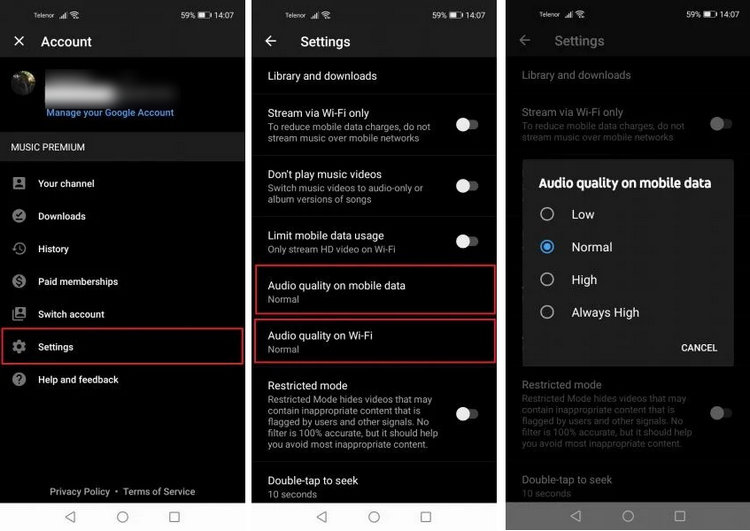
Even if you are a YouTube Premium subscriber, you might not be getting the highest sound quality. That's because YouTube Music is set to 128 kbps quality by default. To get the best audio quality on YouTube, you need to manually change the settings to High or Always High.
How to Change Audio Quality to the Highest in YouTube Music
Step 1 Open the YouTube Music app.
Step 2 Tap your profile picture in the top-right corner and select Settings > Playback.
Step 3 Then choose "Audio quality on mobile data" or "Audio quality on Wi-Fi".
Step 4 Next, Select the Audio Quality to Always High.
⚠️ Note: "Streaming audio quality" and "download audio quality" are set separately. If you want to download YouTube Music songs in high quality, please follow the steps below:
Step 1 Head to Settings > Downloads & storage.
Step 2 Tap Audio quality, then select High (256 kbps).
⚠️Note: Changing your download settings will not automatically improve the audio quality of songs you've already downloaded. You must delete the old offline songs and redownload them for the 256 kbps quality to take effect.
This article introduces you to download and store YouTube Music directly to your Android-powered phone without a Premium subscription.
Learn More →Part 4: Why Does YouTube Music Sound Bad & How to Fix It
Reason 1: Low Default Bitrate
In the default "Auto/Normal" mode, YouTube Music automatically reduces the audio quality to 128 kbps or even 48 kbps when the network connection is poor.
🔧 How to Fix: You need to change YouTube Music's audio quality settings to "Always High" (follow the steps in Part 3).
Reason 2: You Are Listening to User-Uploaded Videos (Not Official Songs)
One of YouTube Music's key features is that it includes audio from regular YouTube videos, such as live performances, covers, and fan uploads. Normally, these unofficial audio tracks are heavily compressed and have poor sound quality.
🔧 How to Fix:
- Open the YouTube Music app.
- Tap the profile picture in the top-right corner.
- Go to Settings and tap Data saving.
- Turn on the "Don't play music videos" toggle.
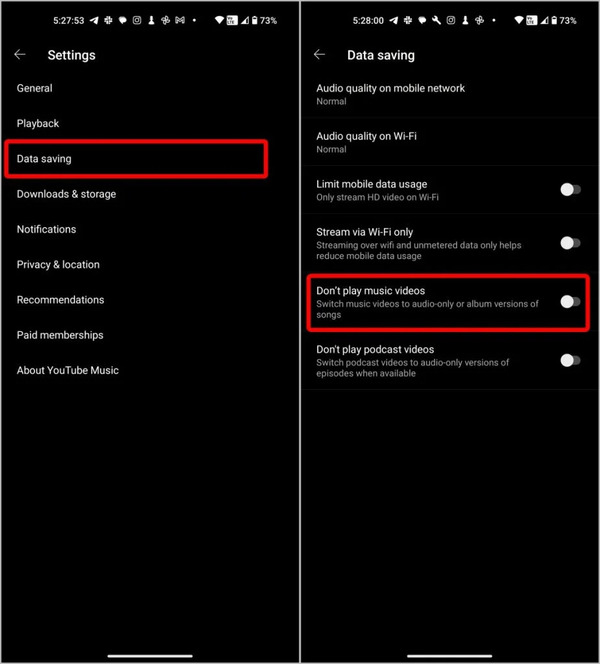
This method can help you avoid music videos with poor audio quality. In addition, when playing a song, try to choose versions with official album covers from record labels, or access a song directly from an artist's official profile page.

Is Apple Music Lossless real? Learn about sound quality, devices, and how to download lossless songs.
Learn More →Reason 3: Outdated Downloads
Many users find that even after adjusting the settings to the highest audio quality, the sound quality when listening to music offline is still poor.
🔧 How to Fix: Please note that changing the download settings does not automatically refresh the songs you have already downloaded. You need to delete the existing download files and then redownload them at the highest quality.
Reason 4: Streaming on Smart TVs or Web Browsers Without Proper Codec Support
On TVs or certain browsers, YouTube Music's audio quality is often capped at 128 kbps, resulting in muffled sound.
🔧 How to Fix: We recommend using the native app for playback or checking the audio output settings on your browser or device.
Part 5: How to Download YouTube Music in High Quality
Want to listen to your favorite YouTube Music songs offline on any device in 2026? While YouTube Music allows you to download songs for offline playback, those downloads are encrypted and locked within the YouTube Music app only.
To safely and freely download YouTube Music, you might need a third-party tool like Sidify YouTube Music Converter. This music converter enables you to convert any YouTube Music song into multiple formats, including MP3, AAC, FLAC, AIFF, ALAC, and WAV, while preserving the original quality and song metadata (e.g., artist, album, and track name).
What's more, with Sidify, you can even convert an entire YouTube Music playlist and multiple songs with one click. Once done, you can freely enjoy high-quality YouTube Music on any device.

Sidify YouTube Music Converter
- Convert YouTube Music to MP3, AAC, ALAC, AIFF, WAV, and FLAC.
- Convert MP3 songs, playlists, albums, and podcasts from YouTube Music.
- Download YouTube Music in high quality.
- Keep YouTube Music HD artworks, lyrics and ID3 tags.
- Compatible with Windows and macOS.

How to Download YouTube Music in Original Quality with Sidify
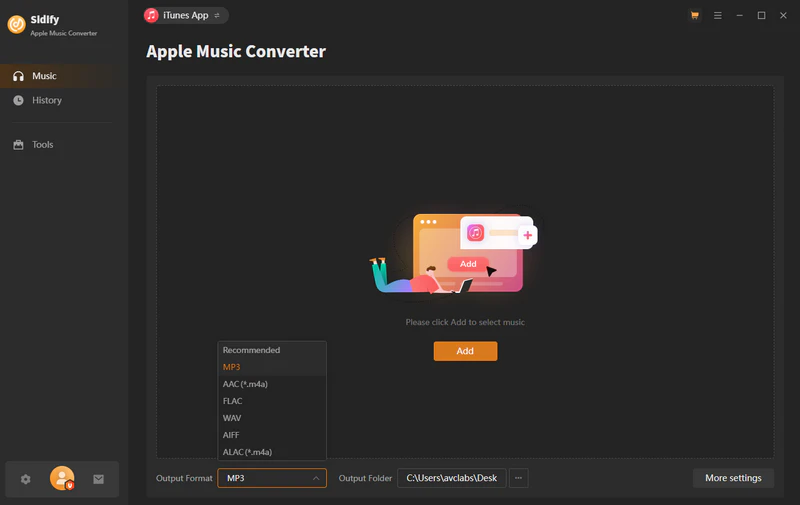
Step 1 Install Sidify YouTube Music Converter
Install Sidify YouTube Music Converter and launch it. Then, select YouTube Music and log in to your YouTube Music account.
Step 2 Search YouTube Music Songs
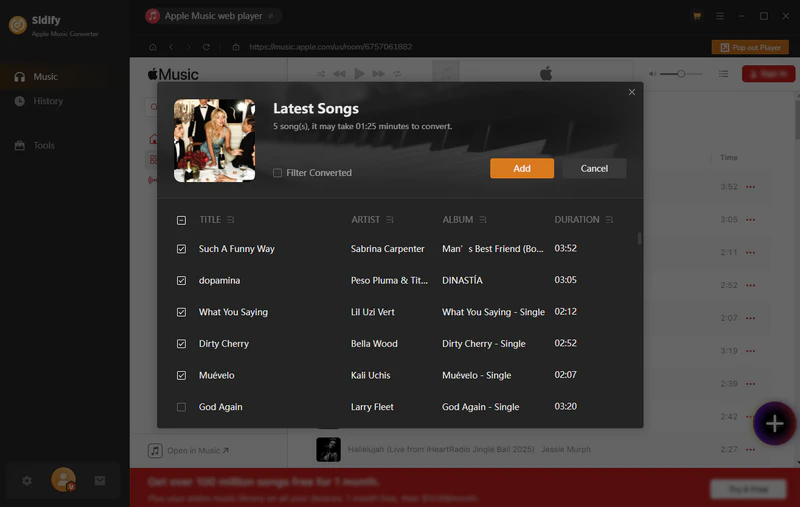
Browse and choose the music you want to convert using the built-in browser. Open your desired YouTube Music playlist and click the Add button in the bottom-right corner. Next, select the songs you want to add, or download all songs with one click.
Step 3 Set Up YouTube Music Output Format
Click Settings and select the output format, bit depth, and sample rate you want.
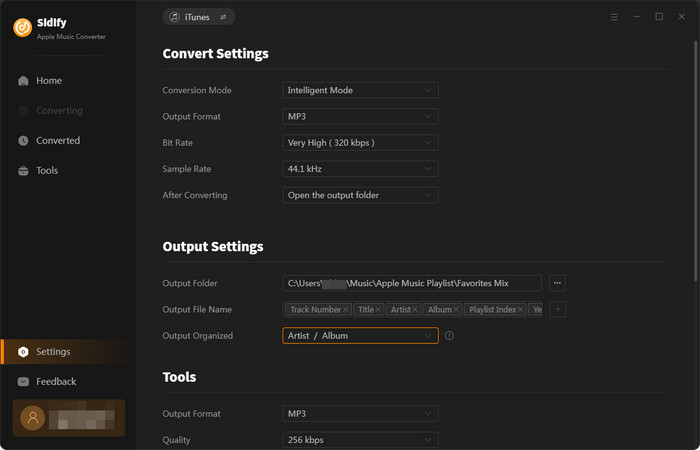
Step 4 Start YouTube Music Playlist Conversion
Click the Convert button to start converting your selected YouTube Music playlists to MP3, AAC, FLAC, or AIFF format.
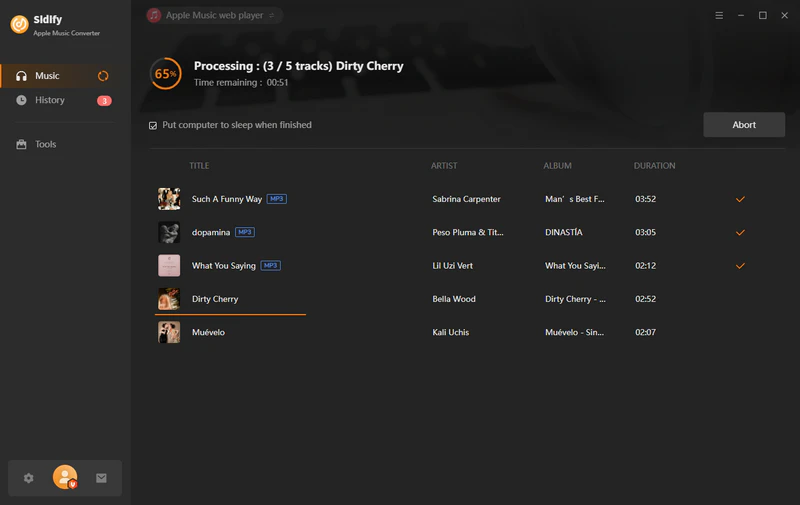
Step 5 Locate the Downloaded YouTube Music
The conversion process will be completed at 10X faster speed. Once finished, you can find all converted files in the History tab.

Part 6: YouTube Music Audio Quality vs Spotify vs Apple Music
Who has better audio quality, Spotify or YouTube Music? To answer this question, I summarized a table comparing YouTube Music, Spotify, and Apple Music in terms of bitrate, codec, and lossless audio support.
| Feature | YouTube Music | Spotify | Apple Music |
|---|---|---|---|
| Pricing | $11.99/month | $12.99/month | $11.99/month |
| Max Bitrate (Paid) | 256 kbps | Up to 24-bit/44.1 kHz | Up to 9216 kbps (24-bit/192 kHz) |
| Free Tier Quality | Up to 128 kbps | Up to 160 kbps | ❌ No Free Tier |
| Audio Codec | AAC / Opus | Ogg Vorbis / AAC | ALAC / AAC |
| Lossless / Hi-Res Audio? | ❌ | ❌ | ✅ |
| Dolby Atmos / Spatial Audio | ❌ | ❌ | ✅ |
| Best Used With | Bluetooth Headphones / Everyday Listening | Bluetooth Headphones / Everyday Listening | Wired Audiophile Headphones / DACs |
| Best For | YouTube lovers, cover & live version fans | Users who love personalized recommendations | Audiophiles with high-end headphones |
Here we'll delve into an in-depth comparison of Tidal and YouTube Music, examining content, music discovery, sound quality, pricing and other essential aspects to help you make an informed decision on which streaming music aligns better with your music streaming preferences and requirements.
Learn More →Both Spotify and Apple Music offer better audio quality than YouTube Music. Spotify has one of the best recommendation systems, making it great for discovering new music, while Apple Music is a better choice for listeners who want lossless and Hi-Res audio.
So, in my opinion, YouTube Music is not the best option if you mainly care about sound quality and music recommendations.
Frequently Asked Questions
Does YouTube Music Have Higher Quality Audio?
No. Currently, the maximum audio quality of YouTube Music is 256 kbps. But it is enough for most normal users for daily listening, because the AAC and Opus coding are more efficient than MP3.
Why won't my YouTube Music audio quality settings save?
This may happen because the change does not take effect immediately after adjusting the setting. We recommend that you first set the audio quality to "Low," then immediately change it back to "Always High," and then switch to the next song. If that still doesn't work, try closing the app completely and reopening it.
Is YouTube Music's audio quality better than Spotify's?
In terms of bitrate, Spotify Premium (up to 24-bit/44.1 kHz) offers better sound quality than YouTube Music (up to 256 kbps). However, in terms of actual listening experience, unless you're using professional audio equipment, the human ear can hardly tell the difference.
Is YouTube Music better than Apple Music in sound quality?
No. Apple Music offers better audio quality overall. Apple Music supports lossless audio, Hi-Res Lossless, and Dolby Atmos. YouTube Music only offers lossy audio at up to 256 kbps. However, lossless audio places higher demands on your device. If you're just a casual listener, YouTube Music's sound quality is more than sufficient.
Conclusion
YouTube Music audio quality goes up to 256 kbps using AAC or Opus codecs, and it does not offer lossless music. While this is sufficient for most everyday listeners, audiophiles may find it lacking compared with lossless music services.
If you want to download YouTube Music songs in original quality and save them permanently, you can consider using Sidify YouTube Music Converter.
 Sidify YouTube Music Converter
Save YouTube Music Dolby Atmos and HD/Ultra HD audio with ID3 tags at 10X speed.











