


YouTube Music ReVanced continues to be a favorite among Android users who want to enjoy YouTube Music Premium features for free, including ad-free listening, background playback, and various customization options. However, ReVanced can stop working after updates to YouTube Music or its patches. Additionally, downloading pre-patched APKs from unofficial sources may pose security risks.
This guide covers how to download and install YouTube Music ReVanced with the official ReVanced Manager, whether it’s safe to use in 2026, how to fix common issues if YouTube Music ReVanced stops working, and some best alternatives for those who want an easier way to get YouTube Music without Premium.
YouTube Music ReVanced at a Glance
What Is YouTube Music ReVanced?
YouTube Music ReVanced is a modified version of the YouTube Music app for Android, using community-made ReVanced patches to tweak and improve the app’s features. It’s not an official YouTube Music Premium subscription, and it doesn’t unlock every paid feature. Although it is often described online as a YouTube Music mod APK, the official ReVanced method is to patch a supported YouTube Music app rather than download a ready-made modded APK.
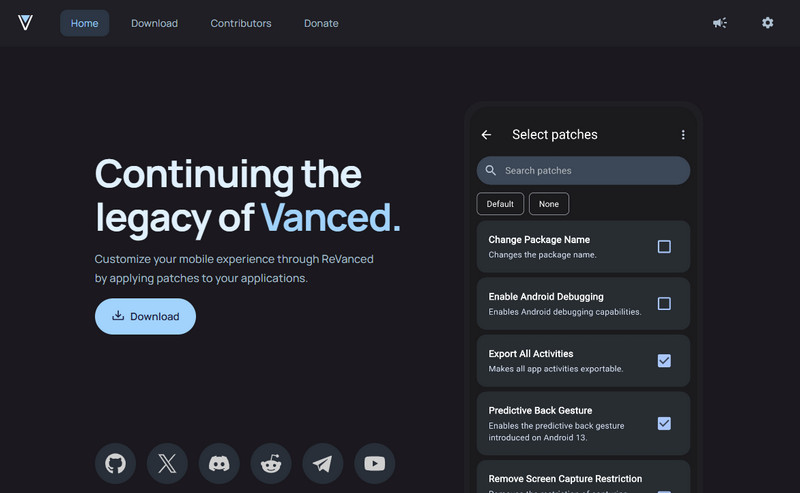
YouTube Music Free vs ReVanced vs Premium
| Feature | YouTube Music Free | ReVanced | YouTube Music Premium |
|---|---|---|---|
| Cost | Free | Free | Paid |
| Ads | Yes | Can be removed with supported patches | No |
| Background playback | Limited | Available with supported patches | Yes |
| Customization | Limited | Extensive | Limited |
| Official offline downloads | No | Not the same as Premium downloads | Yes |
| Save MP3/FLAC files | No | No | No |
| Official YouTube support | Yes | No | Yes |
ReVanced vs Vanced vs ReVanced Extended
| Project | What It Is | Status |
|---|---|---|
| YouTube Vanced | Older modified YouTube project | Discontinued |
| ReVanced | Open-source patching project | Actively maintained |
| ReVanced Extended | Community-developed derivative of ReVanced | Separate from the official ReVanced project |
If you're looking for YouTube Music ReVanced in 2026, the official ReVanced project is the safest place to go. Vanced is discontinued, while ReVanced Extended is a separate community project and should not be confused with official ReVanced.
What Changed in YouTube Music ReVanced in 2026?
ReVanced Manager v2 updated the YouTube Music patching process in a few key ways:
- Automatic APK sourcing: Manager can find a compatible app source in supported cases, so you may no longer need to manually search for a YouTube Music APK.
- APK downloader plugins: Manager can use supported downloader plugins to obtain the required APK.
- More flexible app sources: It can work with an installed app, an existing APK, a downloader source, or a local APK file.
- Updated patching support: ReVanced continues to update patches as YouTube Music changes.
Check ReVanced Manager first before manually downloading an APK from a third-party site.
 Want to Download YouTube Music to MP3 or FLAC?
YouTube Music ReVanced modifies the Android app experience, but it isn't designed to save songs as standard local audio files. Sidify YouTube Music Converter lets you save YouTube Music to MP3, then you can transfer to MP3 player, USB drive, etc.
- MP3, AAC, FLAC, WAV, AIFF & ALAC
- Keeps original audio quality, ID3 tags and cover art
- No APK patching required
Is YouTube Music ReVanced Safe in 2026?
Using the official YouTube Music ReVanced tools is generally safer than installing a pre-patched APK from an unknown website. The main risk usually comes from untrusted pre-patched downloads, although modified apps still carry some risk.
Safer Options
- Download ReVanced Manager from the official ReVanced website or GitHub
- Patch YouTube Music yourself
- Keep ReVanced Manager, patches, and GmsCore updated
- Review the permissions requested during installation
What to Avoid
- Unknown YouTube Music ReVanced APK download sites
- “YouTube Music Premium Mod APK” files from unverified sources
- APKs that ask for unrelated or excessive permissions
- Old guides telling you to disable Android security protections unnecessarily
Where to Download YouTube Music ReVanced Safely
ReVanced officially provides ReVanced Manager, not a pre-patched YouTube Music ReVanced APK. Version numbers change quickly, so an older tutorial may already be out of date.
Official download sources
Latest ReVanced Manager
| Website | Latest stable version | Manager requirement | Last checked |
|---|---|---|---|
| ReVanced Official Website | v2.6.0 | Android 8.0 or later | August 19, 2026 |
Safety Tips:Avoid websites offering pre-patched “YouTube Music ReVanced APK” or “YouTube Music Premium Mod APK” files.
How to Install YouTube Music ReVanced in 2026
In supported cases, Manager can source a compatible YouTube Music app automatically, so you may not need to download an APK manually first.
Step 1 Open ReVanced Manager
Install the latest ReVanced Manager from the official source, then launch it on your Android device.
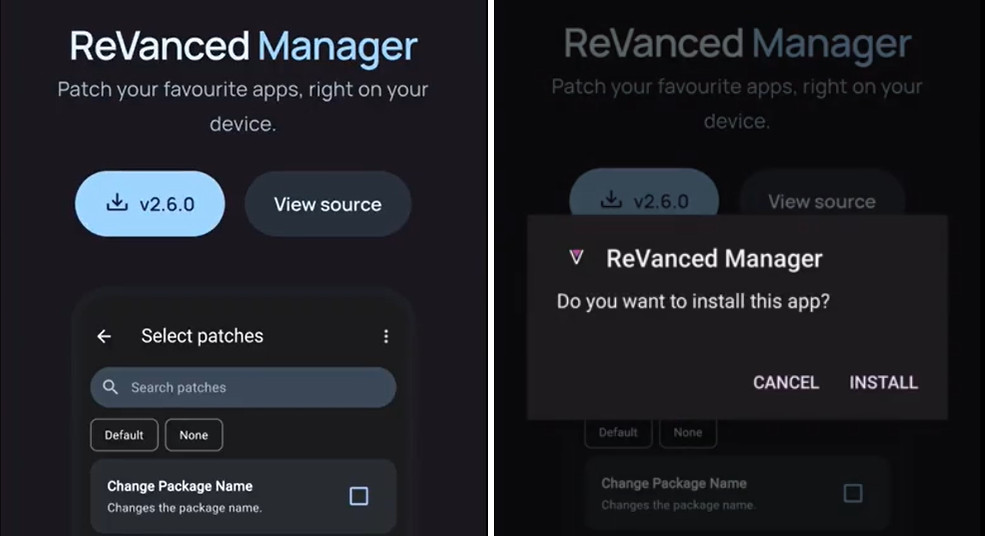
Step 2 Select YouTube Music
Find YouTube Music in ReVanced Manager and select it for patching.
If Manager recommends a specific YouTube Music version, follow that recommendation. Using an unsupported version may cause patches to fail.
2026 Tip:ReVanced Manager v2 supports automatic APK sourcing in many cases. Check Manager first before manually downloading a YouTube Music APK from a third-party site.
Step 3 Choose ReVanced Patches
Review the available YouTube Music patches and select the features you want.
For most users, the recommended patch selection is the better choice; old patch lists can become outdated.
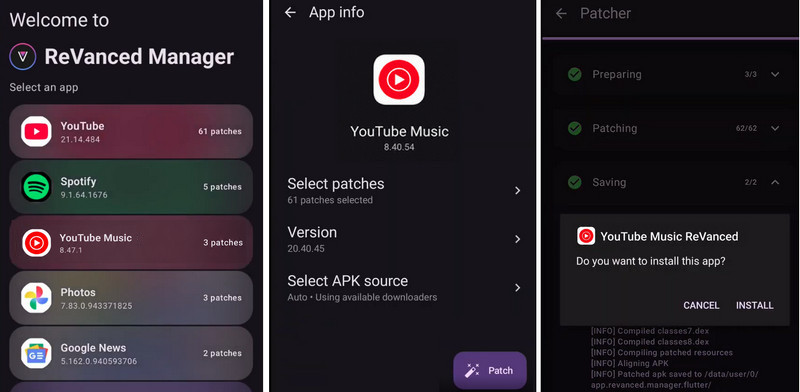
Step 4 Patch and Install YouTube Music
Start the patching process and wait for ReVanced Manager to build the modified app.
Once patching is complete, install the patched YouTube Music app on your device.
If patching fails, check that:
- ReVanced Manager and patches are up to date.
- You are using a supported YouTube Music version.
- The selected app package is compatible.
For more fixes, see YouTube Music ReVanced Not Working below.
Step 5 Install ReVanced GmsCore If Required
“Do I Need GmsCore for YouTube Music ReVanced?”
On some non-root setups, ReVanced GmsCore is required for Google account login and related Google services. It is based on microG and provides Google-service compatibility for certain patched apps.
Older guides may refer to microG, Vanced microG, or ReVanced microG, but these should not automatically be treated as interchangeable. Use the GmsCore version recommended by your current ReVanced setup.
After installation, open YouTube Music ReVanced and test playback, background listening, Google login, playlists, Bluetooth, and Android Auto if you use it.
We Tested YouTube Music ReVanced in 2026: What Actually Works?
We also ran a hands-on test using the current stable ReVanced setup.
Our Test Setup
| Test date | Device | Android version | ReVanced Manager | YouTube Music version | Installation type | Account | GmsCore |
|---|---|---|---|---|---|---|---|
| August 19, 2026 | Google Pixel 8 | Android 15 | v2.6.0 | v8.40.54 | Non-root | YouTube Music Free | v0.3.13.2.250932 |
| Feature | Result | Notes |
|---|---|---|
| Installation | ✅ | Successfully patched and installed YouTube Music v8.40.54 with ReVanced Manager without root access. |
| Google account login | ✅ | Login worked after installing GmsCore. Playlists, liked songs, and library data synced successfully. |
| Music playback | ✅ | Songs played normally over both Wi-Fi and mobile data. |
| Ad-free listening | ✅ | No audio ads appeared during our test sessions. |
| Background playback | ✅ | Music continued playing after switching to other apps. |
| Screen-off playback | ✅ | Playback continued with the screen locked, and lock-screen controls worked normally. |
| Playlist & library sync | ✅ | Personal playlists, liked songs, and saved albums synced successfully. |
| Bluetooth playback | ✅ | Bluetooth earbuds and car audio worked normally, including play/pause and skip controls. |
| Android Auto | ⚠️ Not tested | Not tested during this review. Bluetooth car audio was tested separately and worked normally. |
| 30-minute continuous playback | ✅ | Music played continuously for 30 minutes without crashes, interruptions, or noticeable buffering. |
Our test result: On this Pixel 8 setup, the core features we tested worked without major issues.
Can YouTube Music ReVanced Download Songs?
No. ReVanced doesn't unlock Premium's offline downloads or export songs as MP3/FLAC files. For standard local files, you'll need dedicated tools such as Sidify YouTube Music Converter.
| Feature / Goal | YouTube Music ReVanced | Sidify | YouTube Music Premium |
|---|---|---|---|
| Best for | Android app customization | Local audio files | Official Premium experience |
| Ad-free & background playback | Yes, with supported patches | Local playback after conversion | Yes |
| Official offline downloads | No | No — saves local files instead | Yes |
| Export MP3/AAC/FLAC/WAV | No | Yes | No |
| Keep track metadata | — | Yes | Inside YouTube Music |
| Transfer to USB / MP3 player | No | Yes | No |
| Platform | Android | Windows, macOS; local files can be transferred to other devices | Android, iOS, Web |
Best YouTube Music ReVanced Alternatives - Safe & Free MP3 Downloads
ReVanced gives you more freedom inside the app—but MP3 downloads give you freedom outside it. Here are the best safe and free alternatives for saving YouTube Music as MP3.
| Alternative | Type | Best For | Output Formats | Audio Quality | ID3 Tags | Ads | Platform |
|---|---|---|---|---|---|---|---|
| Sidify YouTube Music Converter | Desktop YouTube Music converter | Playlists, albums & easy batch download | MP3, AAC, FLAC, WAV, AIFF, ALAC | Up to 320 kbps output; | ✅ Yes | No ads | Windows, macOS (Intel & Apple Silicon) |
| NewPipe | Open-source YouTube client | Simple free Android downloads | M4A, WebM, Opus audio; MP4/WebM video | Original available YouTube stream | ⚠️ Partial | No ads | Android |
| Palladium | yt-dlp-based iOS downloader | Direct downloads on iPhone/iPad | MP3, AAC, ALAC, FLAC, M4A, Opus, OGG, WAV | Source-dependent; FFmpeg processing | ⚠️ Partial | No ads | iOS, iPadOS |
| yt-dlp | Open-source command-line downloader | Advanced users, batch downloads & automation | MP3, AAC, ALAC, FLAC, M4A, Opus, OGG, WAV | Best available source; configurable conversion | ✅ Yes, with metadata embedding options | No ads | Windows, macOS, Linux |
1. Sidify YouTube Music Converter — Best Safe YouTube Music Playlist Downloader
Sidify stands out as the best YouTube Music ReVanced alternative for MP3 downloads. It lets you download YouTube Music songs, albums, playlists, and podcasts to MP3, FLAC, M4A, and other standard audio files, so you can keep, organize, transfer, and play them anywhere.
Why Choose Sidify over ReVanced YouTube Music?
- Easy to use - No APK patching, GmsCore, or command-line setup
- Support YouTube Music Free and Premium
- Download entire YouTube Music playlists and albums with ID3 tags
- Save as 320 kbps MP3, FLAC,AAC, WAV, AIFF, or ALAC
- Batch conversion at up to 10x speed
- Transfer songs to any music player, devices.
- Download YouTube music videos in up to 4K quality.
- Built in free tools: CD burner, format converter, etc
- Safe and regular update.
Trade-off:
- Requires Windows or macOS.
How to download YouTube Music to MP3 with Sidify
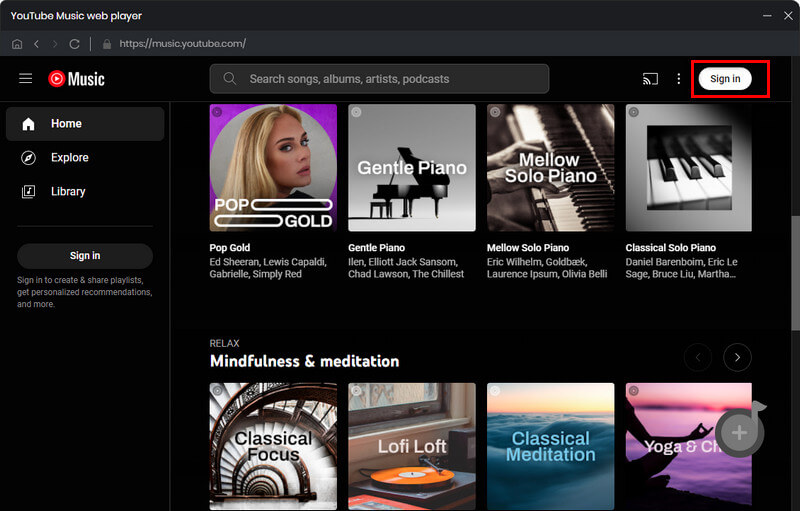
Step 1 Launch Sidify YouTube Music Converter and open its YouTube Music web player.
Sign in to access your library, playlists, and albums.
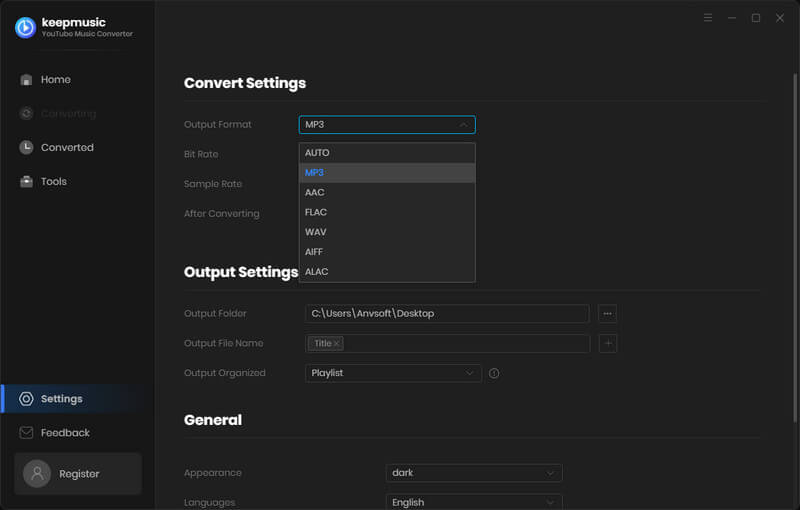
Step 2 Choose MP3 and the quality you actually want.
Open Settings → Output Format → MP3, then select the bitrate and file organization options you want.
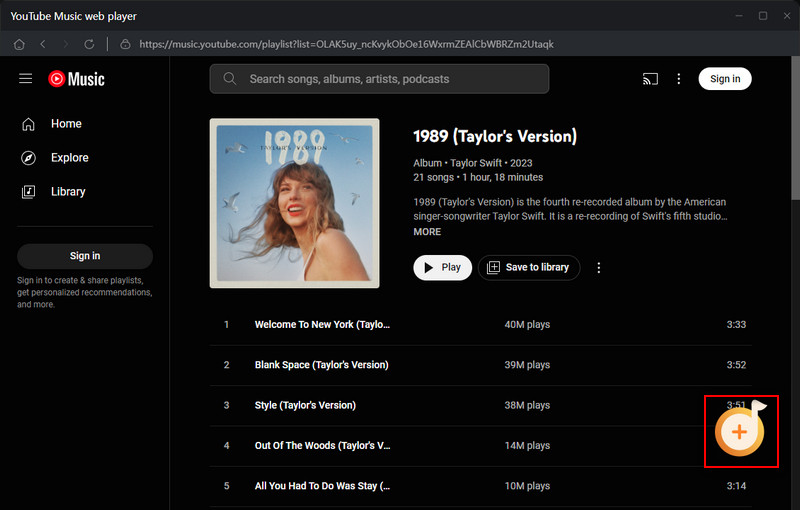
Step 3 Add the song, album, or playlist from YouTube Music
Open the content you want to save and click Add. For playlists and albums, select all tracks or remove any you don't need.
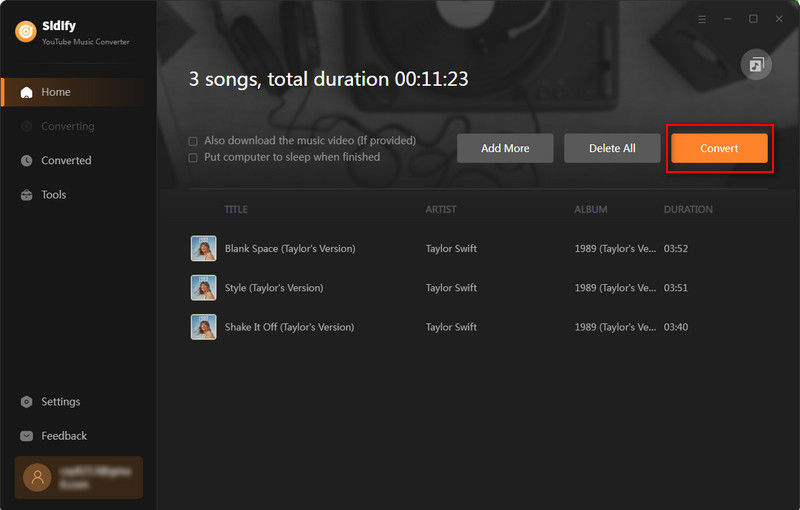
Step 4 Convert YouTube Music to MP3.
Click Convert. Once the conversion finishes, go to History to open the output folder. Instead of an in-app offline download, you should now see YouTube Music as standard .mp3 files stored on your computer. Sidify also preserves metadata such as the track title, artist, album, and track number.
2. NewPipe — Best Free Android Alternative
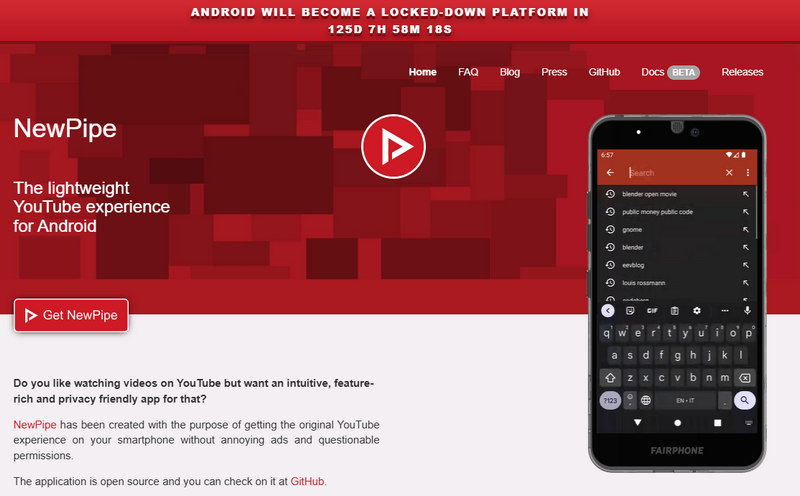
NewPipe is a strong choice if you want to download music directly on an Android phone without using ReVanced or signing into a Google account.
It is a free, open-source YouTube client with background playback and local downloads. NewPipe saves available audio streams such as M4A, WebM, and Opus rather than converting everything directly to MP3.
Why Choose NewPipe over ReVanced YouTube Music?
- Free and open source
- Download audio directly on Android
- Ad-free playback
- Background playback
- No Google login required
Trade-off:
- No standard MP3 output
- No normal YouTube Music library sync
- Metadata support varies by format
How to use NewPipe:
Step 1 Install NewPipe from its official source.
Step 2 Find the song or video you want.
Step 3 Tap Download and select an available audio format.
Step 4 Save the file locally on your Android device.
3. Palladium — Best iPhone & iPad Alternative
For users who specifically need an on-device option for iPhone or iPad, Palladium takes a different approach from ReVanced. It is built around yt-dlp and FFmpeg and can process supported media directly on iOS or iPadOS.
Depending on the source and configuration, output formats can include MP3, AAC, ALAC, FLAC, M4A, Opus, OGG, and WAV.
See also: How to Download YouTube Music on iPhone
Why Choose Palladium over ReVanced YouTube Music?
- Works on iPhone and iPad
- Multiple audio formats
- Files are stored locally
- FFmpeg-based audio processing
- Useful for users without a desktop computer
Trade-off:
- Setup is less straightforward
- Output options depend on the source and current configuration
- Not integrated with your YouTube Music library like Sidify
How to use Palladium:
Step 1 Install Palladium on your iPhone or iPad from its official download page.
Step 2 Copy the YouTube or YouTube Music link you want to save, open Palladium, and paste the link into the app.
Step 3 Choose what you want to save and select the available audio preset or format. You can also adjust options such as thumbnails or custom arguments when needed.
Step 4 Start the download. When it finishes, save or share the downloaded file from Palladium to your preferred location.
4. yt-dlp — Top YouTube Music ReVanced for Advanced Users
If you are comfortable with the command line, yt-dlp gives you the most control.
It can download individual tracks, playlists, and other supported media, while FFmpeg can extract or convert YouTube Music or YouTube audio to MP3, AAC, ALAC, FLAC, M4A, Opus, OGG, and WAV. You can also automate filenames, metadata, thumbnails, playlists, and batch jobs.
Why Choose yt-dlp over ReVanced YouTube Music?
- Free and open source
- Powerful playlist and batch downloading
- Wide range of audio formats with FFmpeg
- Metadata and thumbnail embedding
- Highly customizable and scriptable
Trade-off:
- Command-line interface
- FFmpeg may need to be installed separately
- More setup and maintenance than a dedicated music converter
How to download YouTube audio with yt-dlp:
Step 1 Install yt-dlp and FFmpeg on your Windows, macOS, or Linux computer.
Step 2 Open Terminal or Command Prompt and copy the YouTube or YouTube Music URL you want to save.
Step 3 Run yt-dlp -x --audio-format mp3 "YouTube URL" to extract the audio and convert it to MP3 with FFmpeg.
Step 4 Press Enter and wait for the download and conversion to finish. The completed audio file is saved to the current output folder.
Which ReVanced Alternative Should You Choose?
- For YouTube Music playlists, MP3/FLAC output, and an easier desktop workflow, choose Sidify.
- For free Android downloads, choose NewPipe.
- For direct downloads on iPhone/iPad, consider Palladium.
- For advanced command-line control and automation, choose yt-dlp.
YouTube Music ReVanced Not Working? Common Fixes in 2026
If YouTube Music ReVanced is not working, the problem is often caused by an outdated patch, an unsupported YouTube Music version, or GmsCore. You usually don't need to reinstall everything—start with the symptom below.
| Problem | Try This First |
|---|---|
| Songs won't play / keep buffering | Update ReVanced Manager and repatch with Spoof video streams |
| Can't sign in / No internet connection | Update GmsCore and repatch with GmsCore support |
| App crashes after an update | Update Manager and repatch a currently supported YouTube Music version |
| Ads return / background play stops | Repatch with the latest recommended patches |
| Patching fails | Update Manager and let it source a compatible APK |
| Installed app won't open | Remove the old patched build and install the newly patched version |
1. YouTube Music ReVanced Not Playing or Buffering
YouTube changes can temporarily break playback in patched apps. ReVanced confirmed YouTube Music playback issues in March and June 2026, and fixed them through updated Spoof video streams patches.
Fix:
- Update ReVanced Manager.
- Select YouTube Music.
- Use the latest recommended patches, including Spoof video streams.
- Repatch and reinstall.
- Test playback again.
2026 Tip:Don't follow older fixes telling you to use Spoof client for this YouTube Music playback issue. The current ReVanced fix is Spoof video streams.
2. Can't Sign In or See “No Internet Connection”
This usually points to GmsCore rather than YouTube Music itself.
Google changes disrupted GmsCore login in February 2026. ReVanced updated both GmsCore and the GmsCore support patch to address the problem.
Fix:
- Update ReVanced Manager.
- Update ReVanced GmsCore.
- Repatch YouTube Music with GmsCore support enabled.
- Sign in again through GmsCore.
If the problem continues, reinstall the latest GmsCore and try again.
3. ReVanced Manager Can't Patch YouTube Music
With ReVanced Manager v2, you usually don't need to manually hunt for a YouTube Music APK first. Manager can automatically choose an installed app, an existing APK, a downloader source, or a local APK depending on what's available.
If patching fails:
- Update ReVanced Manager.
- Retry with the recommended patches.
- Let Manager find a compatible app version where available.
- Don't reuse an old already-patched APK.
- Check the announcements inside ReVanced Manager for current issues.
4. Ads Are Back or Background Playback Stopped
If a feature worked before and suddenly disappeared, the relevant patch may be outdated or may not have been included in the latest build.
Fix: Update Manager, select the latest recommended patches, and repatch YouTube Music. ReVanced itself recommends updating Manager and repatching when patch-related functionality breaks.
Quick rule:Before trying anything complicated, use this order:
Update ReVanced Manager → Update GmsCore → Repatch YouTube Music → Reinstall the patched app
If YouTube Music itself has just changed, check the official ReVanced announcements before changing random Android settings.
📌 Still not working? Check the Official ReVanced Support
- Announcements: ReVanced official website
- Reddit: r/revancedapp
- GitHub: ReVanced repositories
FAQs on YouTube Music ReVanced
1. Is YouTube Music ReVanced Still Working in 2026?
Yes. YouTube Music ReVanced is still working in 2026, although compatibility can change after YouTube Music updates.
2. Is YouTube Music ReVanced Free?
Yes. ReVanced is free and open source, including its official patches. If a website asks you to pay for an “official ReVanced APK,” be cautious.
3. Does YouTube Music ReVanced Require Root?
No. ReVanced supports both rooted and non-rooted Android devices. Non-root setups may use ReVanced GmsCore for Google account functionality.
4. Does YouTube Music ReVanced Work on iPhone?
No. ReVanced is designed for Android apps and is not available for iOS. Be skeptical of websites claiming to offer an official YouTube Music ReVanced APK for iPhone.
5. Is YouTube Music ReVanced the Same as YouTube Music Premium?
No. YouTube Music Premium is Google's official paid subscription, while ReVanced is an independent patching project. ReVanced can provide some Premium-like features, but it does not turn your account into an official Premium subscription.
6. Can YouTube Music ReVanced Download MP3 Files?
Not directly. YouTube Music ReVanced is mainly designed to modify the app experience, not export playlists as standard MP3 files. For MP3, FLAC, WAV, or other local audio files, a dedicated YouTube Music converter such as Sidify is a better fit.
7. Is YouTube Music ReVanced Safe for My Google Account?
There is no guarantee of zero account risk when using a modified app. For a safer setup, use the official ReVanced tools, avoid pre-patched APKs from unknown sites, and keep ReVanced Manager and GmsCore updated. ReVanced itself warns users against unofficial websites and pre-made APKs.
Conclusion
YouTube Music ReVanced is a great choice if you enjoy ad-free YouTube Music on Android without Premium. But if you’re tired of patching, updating, and fixing the app, Sidify offers a much simpler way to enjoy YouTube Music beyond the app. You can download songs, albums, and playlists as local MP3 files without a YouTube Music Premium subscription, then play them whenever and wherever you want.
 Sidify YouTube Music Converter
Download YouTube Music songs, albums, and playlists to MP3 with 100% original quality.











