


If you're looking for a free way to download YouTube to MP3, you've probably come across CnvMP3. But is CnvMP3 safe to use in 2026? Can you really download 320 kbps MP3s, and what happens when CnvMP3 is not working?
In this CnvMP3 review, we test how well it converts YouTube videos to MP3, including download speed, audio quality, and longer videos. We'll also cover common CnvMP3 errors, how to fix download problems, and the best CnvMP3 alternatives if you're looking for a more reliable YouTube to MP3 downloader.
What Is CnvMP3?
You can access CnvMP3 through its official website, cnvmp3.com, which currently redirects to cnvmp3.com/v55. The service is free to use, requires no registration or software installation, and ad-free.
Key Features of CnvMP3:
- YouTube to MP3/MP4: Convert YouTube videos and Shorts into MP3 audio or MP4 video files.
- MP3 Bitrate Options: Choose from 96, 128, 256, and 320 kbps for YouTube audio downloads.
- MP4 Quality Options: Download YouTube videos in resolutions ranging from 144p to 1080p.
- Other Supported Platforms: TikTok videos, Instagram Reels, Facebook videos, Reddit videos and GIFs, X (Twitter) videos, and Twitch clips.
- Easy to Use: Just paste a video link and download.
Is CnvMP3 Safe to Use?
CnvMP3 appears relatively safe to use based on our checks and user feedback. We scanned both the website and one downloaded MP3 file, and checked for unwanted behavior during a test conversion.
Our finding: Neither the website URL nor the downloaded MP3 sample was flagged by the security engines that scanned it. We also encountered no suspicious redirects, pop-up ads, or unexpected downloads during our test.
Our VirusTotal results
0 of 93 vendors flagged the website URL.
Source: VirusTotal URL report
0 of 59 vendors flagged the MP3 file.
Source: VirusTotal file report
What do other users say?
More than 1,800 reviews; many users mention the simple, ad-free experience.
Users discuss real-world experiences, including download failures and connection errors.
Before you download: simple safety checks
Online downloaders can change their URLs or behavior. Double-check the domain each time you visit. If you expect an MP3 but get an .exe, .dmg, or other installer, do not open it. Close unexpected tabs, reject browser-extension requests, and never disable security warnings to finish a download.
How to Convert YouTube to MP3 with CnvMP3
You can use CnvMP3 to convert YouTube videos to MP3 in just a few steps:
Step 1. Copy and Paste the YouTube URL
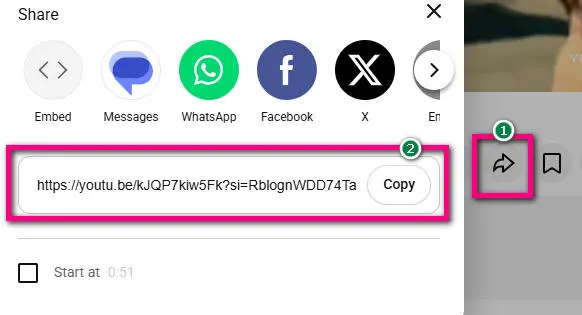
Find a YouTube video you want to download, copy its link, and paste it into the URL box at cnvmp3.com.
Step 2. Select MP3 Quality and Convert
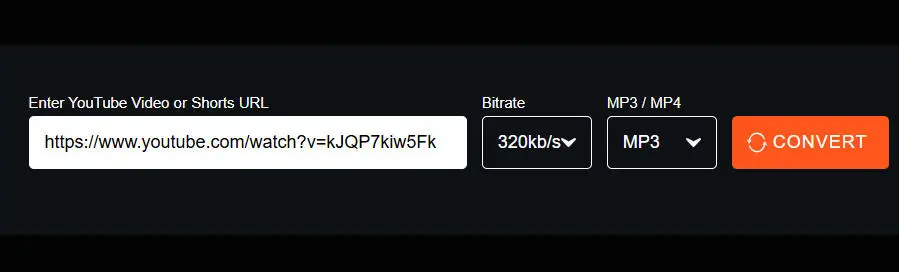
Choose MP3 as the output format, select your preferred bitrate, and click Convert.
Step 3. Download and Find Your MP3 File
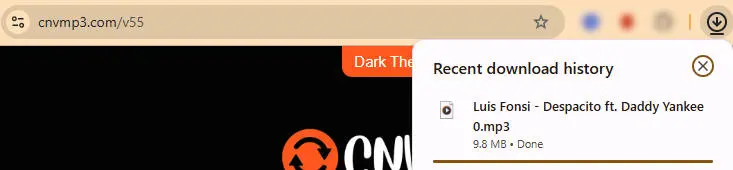
Wait for the conversion to finish and save the MP3 to your device. You can find it in your browser's Downloads folder or press Ctrl + J to check your download history.
CnvMP3 Review: Download Performance & Audio Quality
We tested CnvMP3 in the US on November 4, 2026, using Windows 11 Pro, Google Chrome 153.0.8010.50 (64-bit), and a 100/100 Mbps internet connection. Windows file properties were our primary reference, with MediaInfo and Mp3tag used to check audio details and ID3 tags.
Overall Test Results
The 5 consecutive downloads are part of the 13 MP3 results; the MP4 test is separate.
How We Selected the 13 MP3 Tests
The 13 downloads covered three areas: four bitrate comparisons using the same Despacito video, four video-length tests (including a separate Despacito retest), and five consecutive music downloads. The playlist and MP4 tests were recorded separately.
1. Does CnvMP3 Download MP3s Quickly and Reliably?
We tested three video lengths and five consecutive music downloads. The recorded times are shown below.
| Sample | Result | Processing / download time |
|---|---|---|
| Short clip (0:15) | Successful | 5 seconds to process |
| Medium video (14:56) | Successful | 4 seconds to process |
| Long video (88:14) | Successful | 79 seconds to process + 29 seconds to download |
| Five consecutive music videos | 5/5 successful | 3–6 seconds to process each |
Shorter MP3 files downloaded almost immediately after processing, so we didn't record their download times separately. We recorded a separate download time for the 88-minute video.
Takeaway
All tested individual links worked, including the
88-minute source. The 33-video playlist did not:
CnvMP3 returned
Failed to extract title from videoPrimaryInfoRenderer,
although links to individual tracks worked.
In practice, you can convert tracks one by one,
but not the whole playlist in a single batch.
If you need to download playlists, consider
Sidify All-In-One
as an alternative.
View all 13 individual MP3 test results
The 13 entries are numbered in test order. Click each video or sample name to open its YouTube source. Repeated titles indicate separate downloads for different bitrate or video-length tests.
| No. | Test group | Video / sample | Selected bitrate | Result | Recorded time | Actual bitrate | File size |
|---|---|---|---|---|---|---|---|
| 01 | Bitrate | Luis Fonsi – Despacito | 96 kbps | Success | 10 sec processing | 152 kbps VBR | 6.41 MB |
| 02 | Bitrate | Luis Fonsi – Despacito | 128 kbps | Success | 3 sec processing | 152 kbps VBR | 6.41 MB |
| 03 | Bitrate | Luis Fonsi – Despacito | 256 kbps | Success | 4 sec processing | About 222 kbps VBR | 8.72 MB |
| 04 | Bitrate | Luis Fonsi – Despacito | 320 kbps | Success | 5 sec processing | About 253 kbps VBR | 9.77 MB |
| 05 | Length | Instrumental Background Music for Videos (15 sec) | 320 kbps | Success | 5 sec processing | 232 kbps VBR | 1.16 MB |
| 06 | Length retest | Luis Fonsi – Despacito (about 4:42) | 320 kbps | Success | 5 sec processing | About 253 kbps VBR | 9.77 MB |
| 07 | Length | Taylor Swift – All Too Well: The Short Film (14:56) | 320 kbps | Success | 4 sec processing | About 222 kbps VBR | 24.1 MB |
| 08 | Length | Justin Bieber – LIVE FROM COACHELLA Weekend I (88:14) | 320 kbps | Success | 79 sec processing + 29 sec download | About 250 kbps VBR | 158 MB |
| 09 | Consecutive | Ed Sheeran – Shape of You | 320 kbps | Success | 4 sec processing | About 246 kbps VBR | 8.06 MB |
| 10 | Consecutive | Wiz Khalifa – See You Again | 320 kbps | Success | 6 sec processing | About 236 kbps VBR | 7.06 MB |
| 11 | Consecutive | PSY – Gangnam Style | 320 kbps | Success | 3 sec processing | About 240 kbps VBR | 8.27 MB |
| 12 | Consecutive | Mark Ronson – Uptown Funk | 320 kbps | Success | 3 sec processing | About 264 kbps VBR | 9.36 MB |
| 13 | Consecutive | OneRepublic – Counting Stars | 320 kbps | Success | 4 sec processing | About 257 kbps VBR | 9.03 MB |
2. Does CnvMP3 Really Download YouTube Videos as 320 kbps MP3s?
To check whether the quality menu reflects the resulting file, we downloaded Despacito at each of the four available settings and inspected the output with MediaInfo.
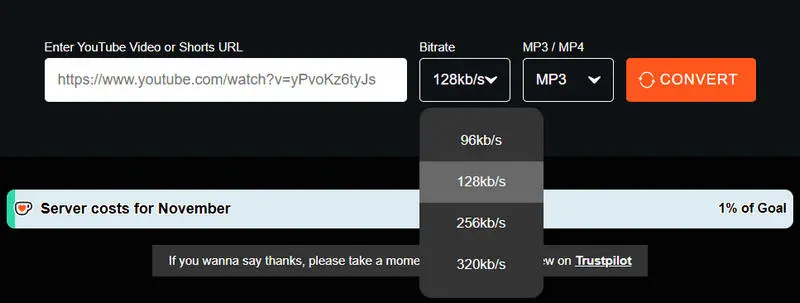
| Selected bitrate | Actual average bitrate | File size |
|---|---|---|
| 96 kbps | 152 kbps (VBR) | 6.41 MB |
| 128 kbps | 152 kbps (VBR) | 6.41 MB |
| 256 kbps | About 222 kbps (VBR) | 8.72 MB |
| 320 kbps | About 253 kbps (VBR) | 9.77 MB |
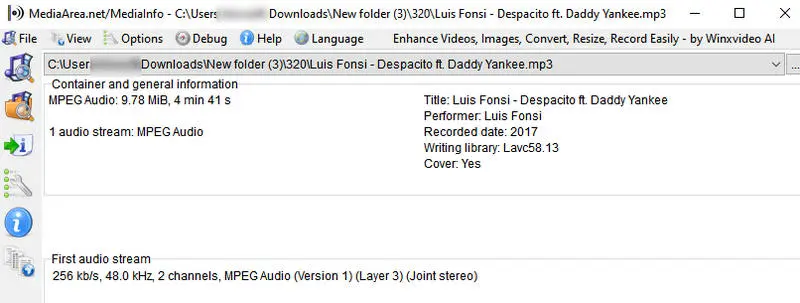
Takeaway
The 96 and 128 kbps options produced identical files, confirmed by matching SHA-256 hashes. The outputs were encoded as VBR, so their average bitrates varied rather than matching the menu values exactly. In our test, the 320 kbps setting produced an average of about 253 kbps. YouTube's published upload guidance lists AAC-LC and Opus among its audio codecs, not MP3; a converter's 320 kbps option is therefore an MP3 output-encoding setting, not proof that YouTube supplied 320 kbps MP3 audio. Check the downloaded file's properties, and remember that re-encoding cannot restore detail missing from the source.
3. Does CnvMP3 Keep MP3 Tags and Cover Art?
We checked all 13 MP3 files in Mp3tag. The table shows which metadata fields were present.
| ID3 field | Files with information |
|---|---|
| Title | 13/13 |
| Artist | 13/13 |
| Album | 0/13 |
| Year | 13/13 |
| Genre | 2/13 |
| Embedded cover art | 13/13 |
| Track number | Not reliably verified |
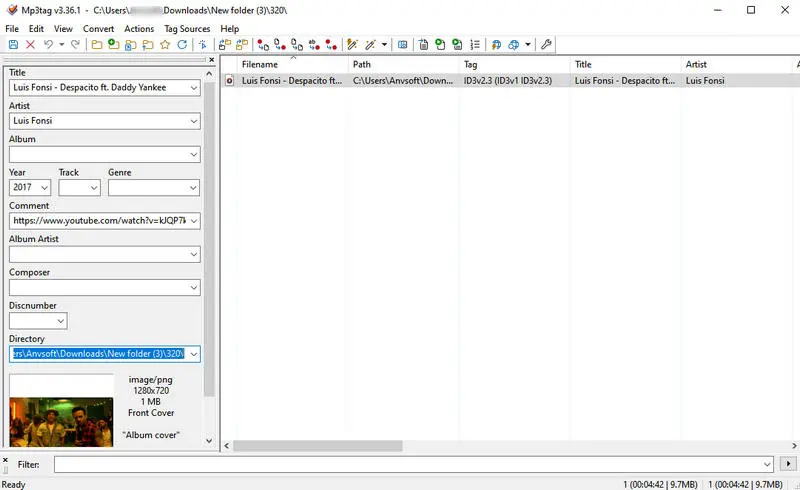
Takeaway
Cover art and basic tags were present, but the metadata was not ready for a neatly organized music library: every file lacked Album information, Genre appeared in only two, and some Artist fields used YouTube channel names (such as officialpsy) instead of artist names. Expect to correct tags manually.
4. CnvMP3 Pros and Cons
- Free online YouTube to MP3 converter without ads.
- No software installation required.
- Supports MP3 and MP4 downloads.
- Supports downloading audio from multiple platforms.
- No batch downloads.
- Lossy audio quality.
- Incomplete ID3 tags.
CnvMP3 Error or Not Working? Causes and Fixes
Having trouble downloading a YouTube video with CnvMP3? You're not alone. Some users have reported problems such as failed downloads, connection errors, and conversions that never finish. Others have trouble downloading music at higher MP3 quality settings.
If CnvMP3 isn't working for you, don't keep trying the same thing. First, find the problem you're experiencing and see what you can do about it.
If you don't want to spend time troubleshooting, Sidify All-In-One offers a simpler way to download YouTube and YouTube Music tracks in high-quality MP3 format, including batch downloads.
Common CnvMP3 Problems and How to Fix Them
| What You See | Why It Might Happen | What You Can Try |
|---|---|---|
| CnvMP3 Shows "Failed to Download" | The link may be incorrect, the video may have been removed, or CnvMP3 may be having trouble downloading it. | Check the YouTube link and try downloading the same video again. If it still fails, try another video. |
| Nothing Happens After You Paste a YouTube Link | CnvMP3 may be having trouble loading the video. | Paste the link again, refresh the page, or try another YouTube video. |
| You Can't Connect to CnvMP3 | Your internet connection may be unstable, or the website may be temporarily unavailable. | Check your internet connection, close and reopen your browser, or try again later. Don't ignore browser security warnings. |
| The Conversion Progress Doesn't Move | CnvMP3 may have stopped converting the video. | Wait a little longer. If nothing changes, try a shorter video or come back later. |
| You Click Download but Can't Find the MP3 File | Your browser may not have saved the file, or it may be waiting for you to confirm the download. | Check Chrome's download history and your Downloads folder. Also look for any download prompts. |
| The 320 kbps Option Doesn't Work | CnvMP3 may be having trouble converting that video at the selected MP3 quality. | Try the same YouTube link with 256 or 128 kbps and see whether the download works. |
The suggestions above are troubleshooting steps to try, not guaranteed fixes. Results may vary depending on the video, browser, internet connection, and current website behavior.
How to Fix CnvMP3 Download Problems Step by Step
If the quick fixes above didn't help, these checks can help narrow down the cause:
-
Check whether your browser blocked the file
Open your browser's Downloads panel (Ctrl + J in Chrome or Edge) and look for a blocked, canceled, or unfinished download. Only keep a file if you trust its source; don't bypass a security warning just to complete the download.
-
Find out whether the issue affects one video or every video
Compare the failing link with a short, public YouTube video. If only one link fails, the issue may be specific to that video. If both fail, try a different browser to check for a browser-related problem.
-
Check whether CnvMP3 itself is unavailable
If the website doesn't load in more than one browser while other websites work, it may be temporarily down. Try again later or use the official Contact page to report the issue.
What If CnvMP3 Still Doesn't Work?
If you've tried all the steps above and still can't download your music, you can contact the CnvMP3 team through its official Contact page to report the problem.
Looking for another way to download music? Try Sidify, a desktop solution for downloading and managing music when online converters don't meet your needs. Explore Sidify
Looking for another way to download music?
Try Sidify All-In-One , a desktop solution for downloading and managing music when online converters don't meet your needs.
Best CnvMP3 Alternatives
While CnvMP3 is convenient for converting individual YouTube videos online, it may not meet everyone's needs. If you want to download entire playlists, choose different audio formats, or simply try another online converter, these CnvMP3 alternatives are worth considering.
CnvMP3 Alternatives: Quick Comparison
| Tool | Best For | Platform | Output Formats | Batch Downloads | Free Version |
|---|---|---|---|---|---|
| CnvMP3 | Quick, individual conversions | Online | MP3, MP4 | No | Free |
| Sidify All-In-One | Batch YouTube to MP3 downloads | Windows / Mac | MP3, AAC, FLAC, WAV, AIFF, ALAC | Yes | First minute of each track |
| yt-dlp | Advanced users and batch downloads | Windows / Mac / Linux | MP3, AAC, FLAC, WAV, M4A, Opus, and more | Yes | Completely free |
| YTMP3 | Simple, individual conversions | Online | MP3, MP4 | No playlist support confirmed | Free, with daily limits |
1. Sidify All-In-One – Best Overall CnvMP3 Alternative

Sidify All-in-One is an MP3 music downloader and converter that supports YouTube videos, playlists, and channels, as well as music from YouTube Music, Spotify and other popular streaming platforms. It lets you batch download multiple tracks to high quality MP3, and preserve ID3 tags and album artwork.
- No video length restrictions when downloading YouTube videos.
- Supports multiple streaming platforms, including Spotify, Apple Music, Amazon Music, and Tidal.
- Batch Downloading YouTube videos and shorts to MP3/AAC/ALAC/WAV/FLAC/AIFF
- Download YouTube Music videos to MP4
- Preserves original audio quality (Up to 320kbps MP3 / Lossless FLAC).
- Up to 10X faster conversion speed, with stable performance and a high success rate.
- Easy-to-use interface and ad-free experience.
- Compatible with both Windows and macOS.
- Regular software updates and customer support.
- Requires desktop installation.
Learn how to download YouTube Music tracks and playlists, choose MP3 output settings, batch convert songs, and save music to your computer with Sidify All-In-One.
View Tutorial →2. yt-dlp – Best Free YouTube Playlist to MP3 Downloader
yt-dlp (https://github.com/yt-dlp/yt-dlp) is a free, open-source YouTube downloader for Windows, macOS, and Linux. Unlike CnvMP3, it runs through a command-line interface, giving you more control over how videos and audio are saved. It's particularly useful as a YouTube playlist downloader without paying for a subscription.
- Completely free and open-source.
- Supports YouTube videos, Shorts, channels, and playlists.
- Converts audio to MP3, AAC, FLAC, WAV, and more with FFmpeg.
- Supports hundreds of websites.
- Customizable audio quality and file settings.
- Supports metadata and thumbnails.
- Regular updates.
- No built-in graphical interface.
- Requires FFmpeg for MP3 conversion.
- Occasional errors after YouTube updates.
3. YTMP3 – Best Free Online YouTube to MP3 Converter
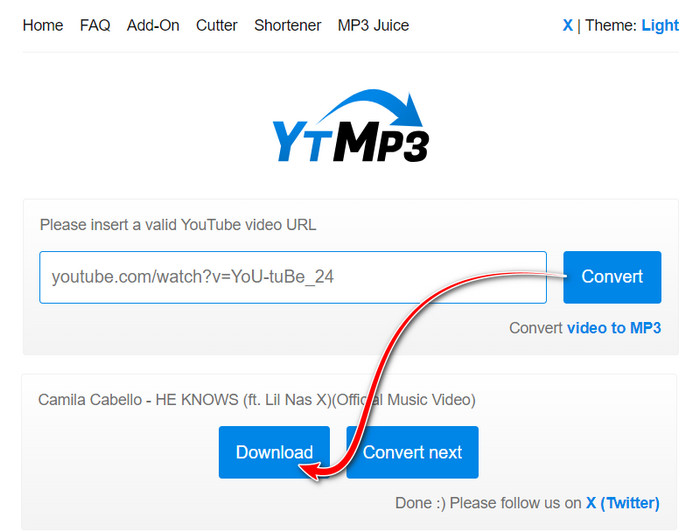
YTMP3 is a free browser-based YouTube converter for downloading audio and video without installing software. Like CnvMP3, it works by pasting a YouTube URL and choosing a download format. It's a convenient option for occasional downloads on a computer or mobile device.
- Free to use, with no registration.
- Converts YouTube videos and Shorts.
- Supports MP3 and MP4 downloads.
- Works on desktop and mobile browsers.
- Supports MP3 conversions up to 240 minutes.
- MP3 quality is fixed at 192 kbps.
- No batch playlist downloads.
- Daily download limits apply.
- MP4 downloads are limited to 360p.
FAQs About CnvMP3
1. Is CnvMP3 legal to use?
Using CnvMP3 isn't necessarily illegal, but downloading copyrighted YouTube videos without permission may violate copyright laws or YouTube's Terms of Service. To avoid potential issues, only download content you own, have permission to use, or that is legally available for download.
2. Can I use CnvMP3 on iPhone or Android?
CnvMP3 runs in a web browser, so you can access it on mobile devices. However, downloads may behave differently depending on your phone and browser. Our hands-on tests were conducted on Windows 11, not mobile.
3. Does CnvMP3 have a video length limit?
Yes. CnvMP3 limits MP3 downloads to 90 minutes and MP4 downloads to 60 minutes. Our tests confirmed the MP3 limit. If your video exceeds the allowed length, CnvMP3 displays the message: "You can't download MP4 longer than 1 hour and MP3 longer than 1 hour and 30 minutes!" Try a shorter video to continue or use Sidify.
4. What is the best CnvMP3 alternative?
Sidify All-In-One is a good choice for users who want batch YouTube-to-MP3 downloads through a desktop interface. For a completely free option, yt-dlp supports playlists but requires command-line knowledge
Final Verdict: Is CnvMP3 Worth Using in 2026?
Overall, CnvMP3 is a free online YouTube to MP3 converter that's easy to use and requires no installation. It's a good option for downloading individual YouTube videos as MP3 files, but has limitations with audio quality, long videos, and playlist downloads.
If you're looking for a reliable CnvMP3 alternative, Sidify All-in-One is worth trying. It supports YouTube to MP3 downloads at up to 320kbps, batch playlist downloads, and longer YouTube videos, with a stable, ad-free experience.
 Sidify Music One
Download YouTube videos, playlists, and music from popular streaming platforms in one desktop app.