Mixcloud lets you listen to DJ mixes and radio shows online, but its official offline downloads stay inside the app. If you want to save a show as an MP3 file, you'll need another way. We tested the best 6 Mixcloud downloaders to see how well they handle a full-length DJ mix, checking whether they save the complete audio, how the MP3 output sounds, and how long the downloads take. Here's how the tools performed and what to know before using them.
Can You Download Mixcloud Shows Directly?
Mixcloud allows Premium and Creator Subscription subscribers to download shows for offline listening through its iOS and Android app. However, these downloads are not standalone audio files, which means that you cannot permanently export a show or track as an MP3 to your computer or another device. This also applies to your own uploads. So Mixcloud recommends keeping local copies of your content before uploading it to the platform.
That's why you searched "Mixcloud Downloader". We have everything covered!
Quick Comparison of the Best Mixcloud Downloaders
Before looking at each Mixcloud downloader in detail, here is a quick comparison table for you.
| Mixcloud Downloaders | Type | Free | Best For | Main Limitation |
|---|---|---|---|---|
| Sidify All-In-One | Desktop | Free Trial | High-quality 320 kbps MP3s, long mixes, and batch downloads | Requires software installation |
| MixcloudDownloader.net | Online | Yes | Quick downloads without installing software | Audio quality is very low |
| SaveLink.info | Online | Yes | Saving individual tracks or shows from multiple sites | No batch download |
| A2Z Tools | Online | Yes | Choosing from several output formats | Many ads and no batch download |
| AnyDownloader | Online | Yes | Fast downloads of music and video | No format selection |
| Sipsip.ai | Online | 1 free conversion daily | Downloading longer Mixcloud shows after signing in | Free use is limited |
Mixcloud Downloader Testing Environment
Wonder how we tested the best Mixcloud downloaders? Don't worry. To compare the 6 tools fairly, we used the same Mixcloud mix and kept the testing conditions consistent.
| Details | |
|---|---|
| Test Date | November 26, 2026 |
| Operating System | Windows 11 Pro |
| Browser | Google Chrome Version 158.0.8127.89 (Official Build) (64-bit) |
| Network | 100/100 Mbps |
| Mixcloud Account | Free Account |
| Output Format | MP3 |
| Audio Analysis Tool | Spek |
| Test Mix | Transitions with John Digweed and Mateo Balsa (2 hours) |
No. 1 Sidify All-In-One for Desktop Mixcloud Batch Downloads
Have you ever found a DJ set on Mixcloud that you wanted to keep, only to realize you couldn't save it as a regular audio file? That's where Sidify All-In-One Music Converter comes in.
Sidify allows you to save Mixcloud audio as MP3 at up to 320kbps, or choose formats such as WAV, FLAC, AAC, AIFF, and ALAC. It also retains full ID3 tags such as the title, artist, cover art and more, so your downloaded mixes are easier to identify and organize. If you have several shows saved in your Mixcloud favorites or a long list of sets you want to keep, the batch queue lets you add multiple downloads and process them together instead of handling each one separately.
For anyone looking for the best Mixcloud downloader that can save long DJ mixes as local audio files, Sidify is the most practical choice.
Sidify All-In-One Converter
- Download songs from different streaming platforms and any music sites.
- Convert music to MP3/AAC/WAV/FLAC/AIFF/ALAC
- Export music, playlists, albums, audiobooks, and podcasts to the computer.
- Preserve the original audio quality and keep the ID3 tags.
- Rip music from the music site and burn music to CD.
- Built-in free podcast and radio to mp3 downloader and vocal remover.

How to Batch Download Mixcloud to MP3
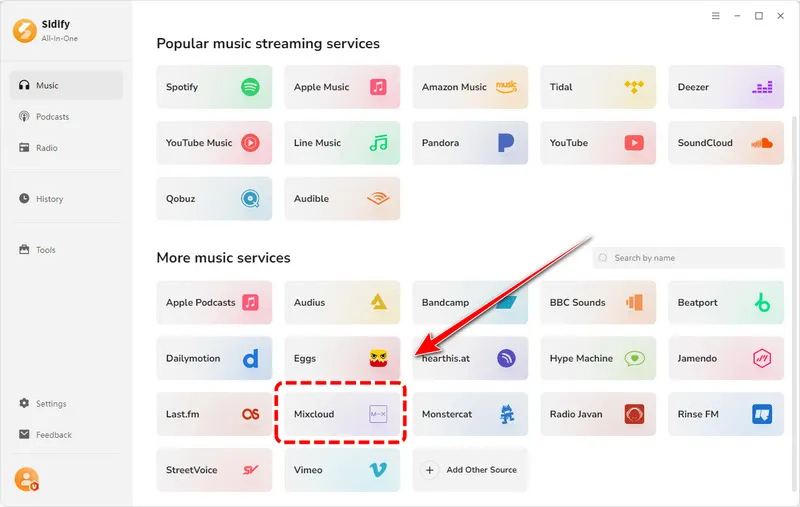
Step 1 Select Mixcloud as the Download Site
Sidify All-In-One Music Converter supports multiple music sites, including Spotify, SoundCloud, Audible and more. To save a local MP3 file from Mixcloud, select it as your target site.
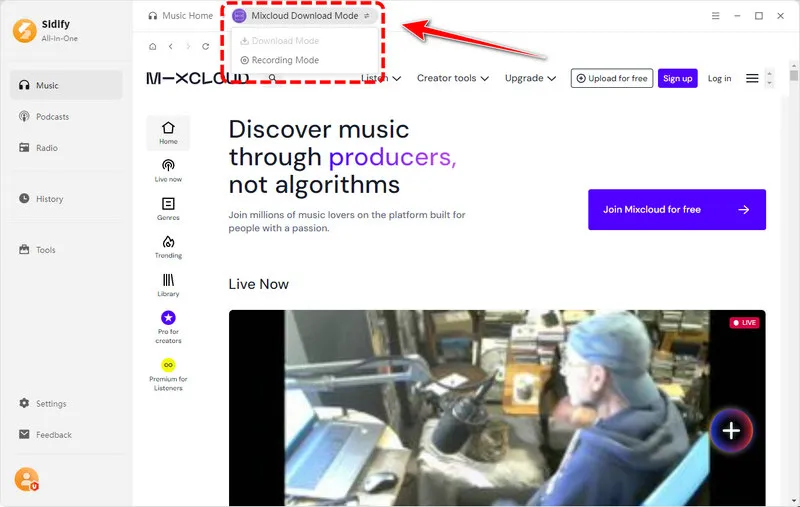
Step 2 Choose the Download Mode
On the built-in Mixcloud website, you can choose either Download Mode or Record Mode. Download Mode is highly recommended for long DJ mixes.
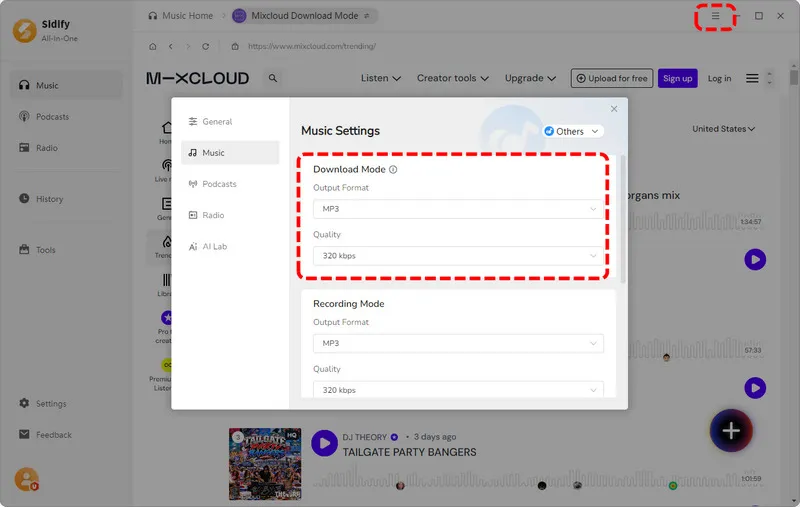
Step 3 Set Output Settings
Then, you can click the "Menu" button in the upper-right corner to set your Mixcloud output format, output quality or the output path. Let's set it to MP3 at 320kbps.
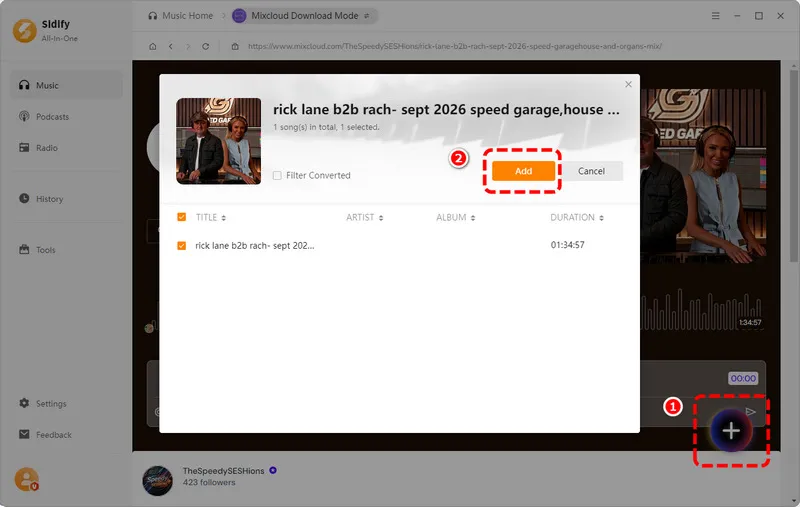
Step 4 Add Mixcloud Shows
Search for your preferred Mixcloud music, podcasts or shows. Then click the "+" icon to add it to the conversion queue. Add more shows, and click the "Convert" button if you are ready.
Step 5 Batch Download Mixcloud to MP3
The added tracks will be converted quickly into MP3 files, so wait patiently.
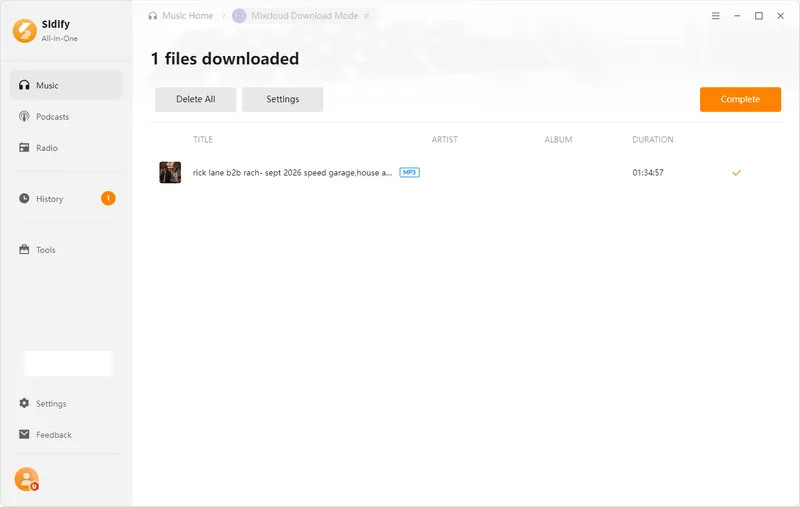
Step 6 Listen to Mixcloud Shows Anywhere
Finally, you can locate the downloaded MP3 files either in the program or in Windows Explorer. You can enjoy them or transfer them to your preferred devices now.
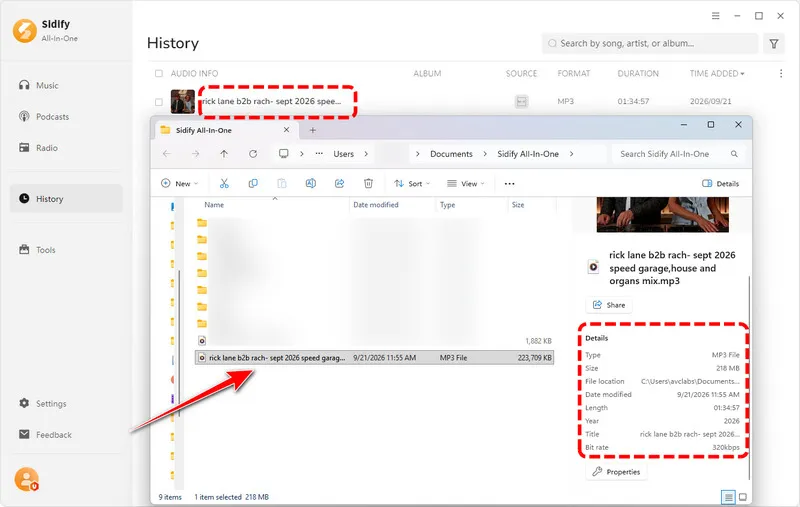
Our Test Result
Sidify successfully downloaded the full 2-hour Mixcloud show used in our test. And the downloaded file played normally in a media player, with no playback issues.
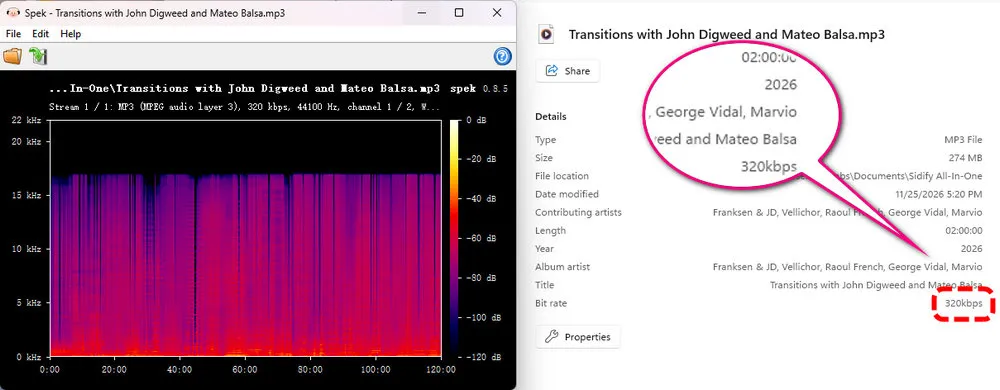
- Downloads long DJ mixes as standalone audio files.
- Queues multiple Mixcloud shows for batch downloading.
- Saves MP3 at up to 320kbps or in five other formats.
- Keeps show titles, artist names, and more.
- Trial downloads are limited to the first minute of each show.
- Requires installation on Windows or Mac.
No. 2 MixcloudDownloader.net for Occasional Online Mixcloud Downloads
Website: https://mixclouddownloader.net/
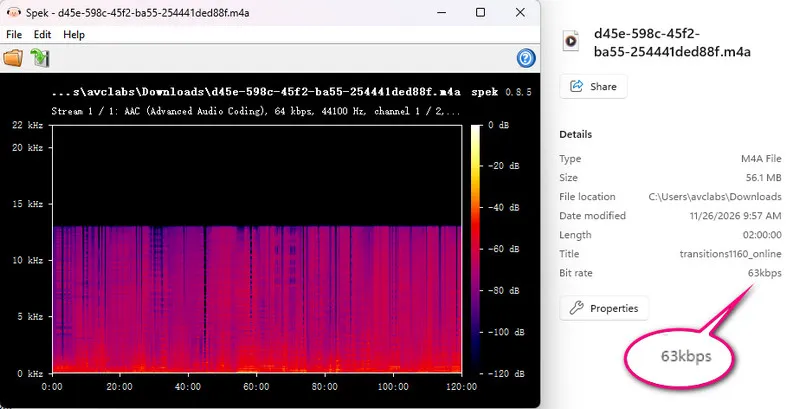
MixcloudDownloader.net is one of the best free online Mixcloud downloaders for saving individual Mixcloud shows as MP3 or M4A files. You don't need to create an account to use it. The download process takes a few clicks, but it includes redirects and pop-up ads. If you only need to save one mix, it can get the job done. However, the audio quality may be a problem, as our test found a bitrate of just 63 kbps.
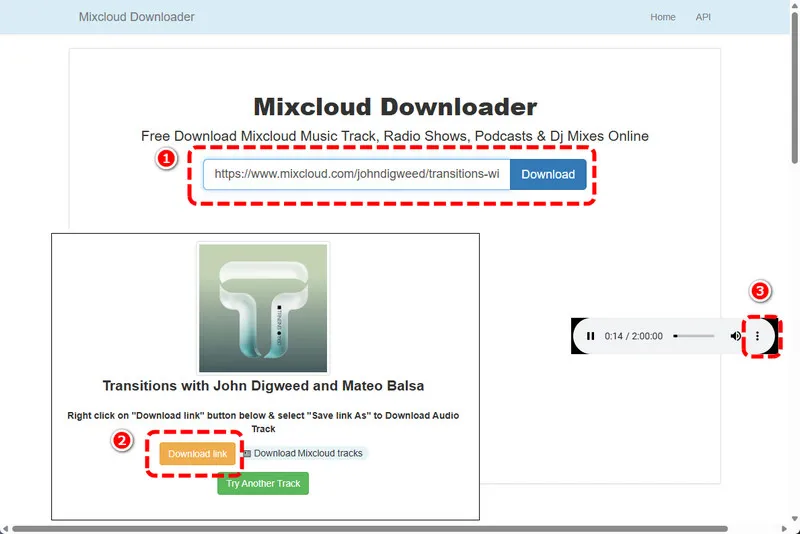
Step 1 Copy the Mixcloud show URL and paste it into the download box. Click Download.
Step 2 On the next page, click Download Link.
Step 3 It redirects you to another page with an audio player. Click the three-dot menu on the player and select Download.
Our Test Result
We downloaded the selected Mixcloud track and played the saved file in the Windows Media Player. It played normally, but its bitrate was only 63 kbps, resulting in low audio quality. This makes the tool less suitable for listeners who want to keep DJ mixes for better-quality playback.
- Free to use.
- No account required.
- Supports MP3 and M4A downloads.
- Pop-up ads appear during the download process.
- Our tested file had a low bitrate of 63 kbps.
- No batch download option.
No. 3 SaveLink.info for Single-track Music Downloads
Website: https://www.savelink.info/sites/mixcloud1
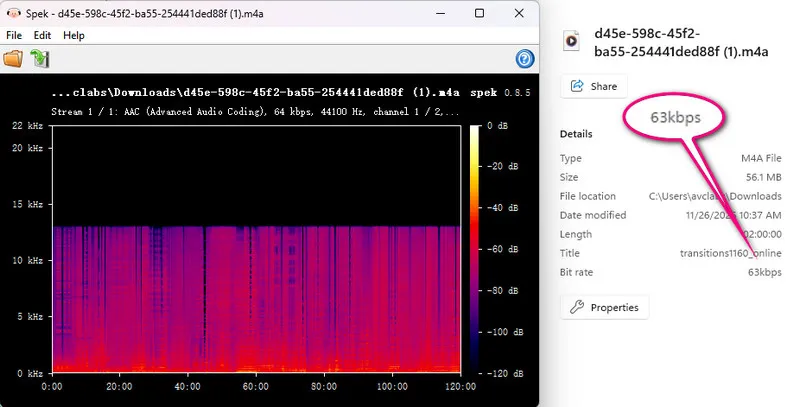
SaveLink.info is a free online downloader that supports Mixcloud, SoundCloud, Bandcamp, YouTube, and other sites. For Mixcloud, it provides a way to save an individual show as an audio file in MP3 and M4A formats. However, the tool does not offer a batch download. In our test, the show played normally, but its audio quality was low.
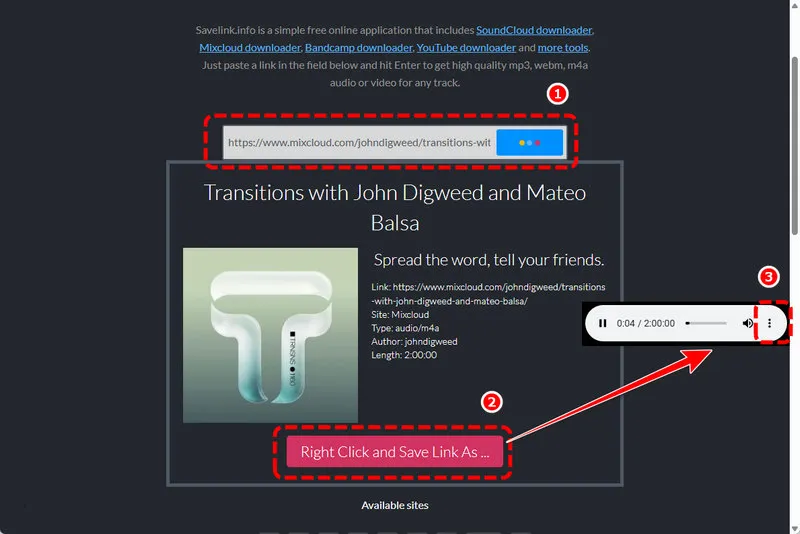
Step 1 Copy the link of your preferred Mixcloud show you want to download and paste the URL into the download box. Click the three dots beside the box to parse the link.
Step 2 Next, you can click Right Click and Save Links As.
Step 3 You will be redirected to another webpage, then you can click the three-dot menu there and select Download to save the file.
Our Test Result
We downloaded the selected Mixcloud track and played the saved file in the Windows Media Player. The file played normally, but its bitrate was only 63 kbps, resulting in low audio quality. This makes the tool less suitable for listeners who want to keep DJ mixes for better-quality playback.
- Free to use without an account.
- Supports MP3 and M4A downloads.
- Supports other sites, including SoundCloud and Bandcamp.
- No batch download option.
- No bitrate or audio quality settings.
No. 4 A2Z Tools for Mixcloud MP3 Downloads with Format Options
Website: https://a2z.tools/mixcloud-audio-downloader
A2Z Tools can be the best Mixcloud downloader because it lets you choose the audio format before saving a show. You can select MP3, M4A, Opus, WAV, or Source Format, depending on how you want to keep the audio. Its website has quite a few ads, and in our test, preparing the audio took longer than downloading the file itself.
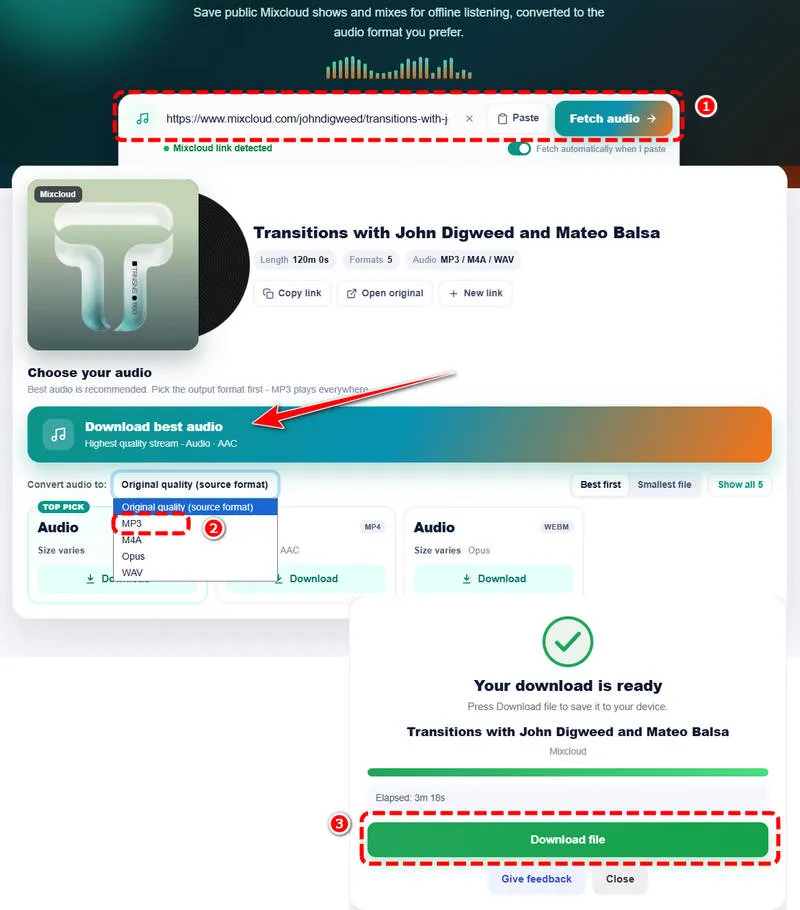
Step 1 Copy and paste the URL of the Mixcloud show. If Fetch automatically when I parse is enabled, it will start checking the link automatically. Otherwise, click Fetch Audio to begin.
Step 2 Once the audio is detected, it will scroll down to the download section.
Step 3 Choose your preferred output format (MP3 as an example), then click Download Best Audio.
Step 4 Wait for the audio to be processed. This step took about three minutes during our test.
Step 5 When the Download File button appears, click it to save the audio. The actual file download took one minute or so.
Our Test Result
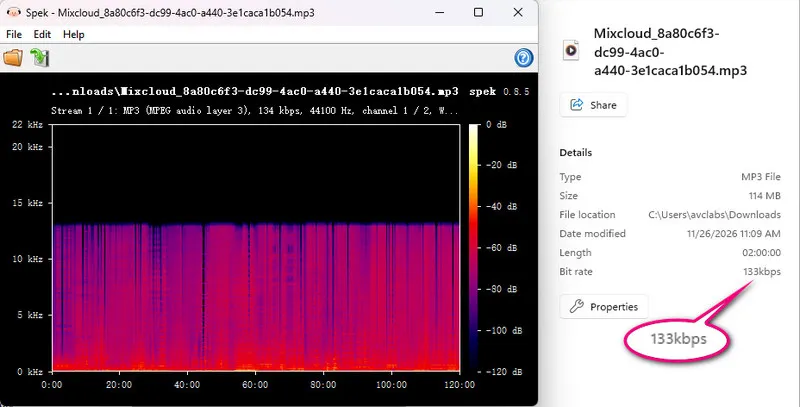
A2Z Tools detected our test Mixcloud show and let us choose the output format. The audio processing took around three minutes, while the file itself downloaded in about one minute. The saved file had a bitrate of 133 kbps.
- Offers MP3, M4A, Opus, WAV, and Source Format options.
- Lets you choose the output format before downloading.
- Low audio quality.
- No batch download.
No. 5 AnyDownloader for Quick Music & Video Downloads
Website: https://anydownloader.com/en/mixcloud-music-downloader/
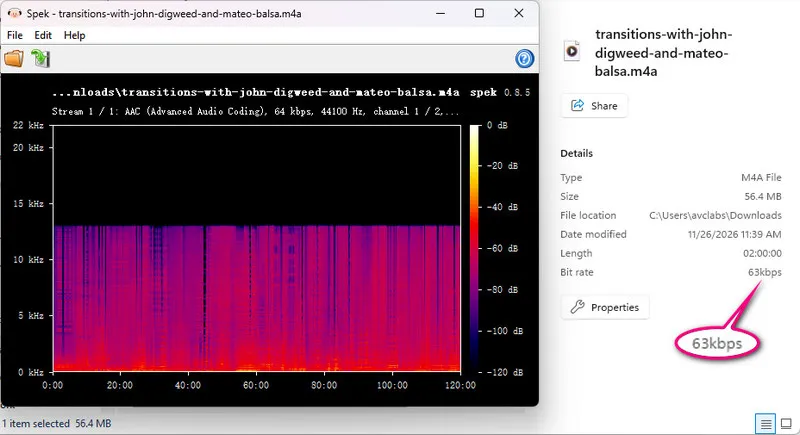
AnyDownloader is a free online tool for downloading audio from Mixcloud. It is easy to use and does not require an account. The site also supports many other platforms, including video-sharing sites, and lets you download thumbnails separately. However, it does not offer a format selection menu or batch downloads. In our test, the download speed was very fast, but the saved audio had a bitrate of only 63 kbps. Besides, it also displayed quite a few ads.
Step 1 Open Mixcloud and copy the URL of the show or track you want to save.
Step 2 Visit AnyDownloader and paste the copied link into the input box. Click Download.
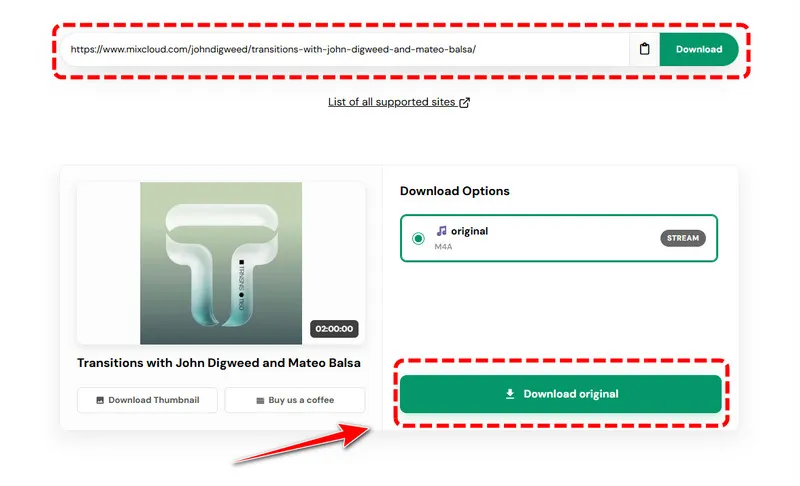
Step 3 Wait for the audio to load. When the download option appears, click Download Original to save the file.
Our Test Result
In our test, AnyDownloader processed the Mixcloud link quickly and the file downloaded in a very short time. However, the audio's bitrate was only 63 kbps.
- Simple download process with only a few steps.
- Very fast download speed during our test.
- Supports many other websites, which can be browsed alphabetically.
- Allows separate thumbnail downloads.
- Many ads can be distracting.
- No batch download.
- The actual bitrate is only 63 kbps.
No. 6 Sipsip.ai for Downloading Longer Mixcloud Shows
Website: https://sipsip.ai/tools/mixcloud-downloader
Sipsip.ai is an online Mixcloud downloader that lets you save shows as MP3 files. The site offers a free daily conversion, but without signing in, the download is limited to the first 10 minutes. A free account is required to download longer shows, with up to 4 hours per show. We did not create an account for testing, so the downloaded show was incomplete.
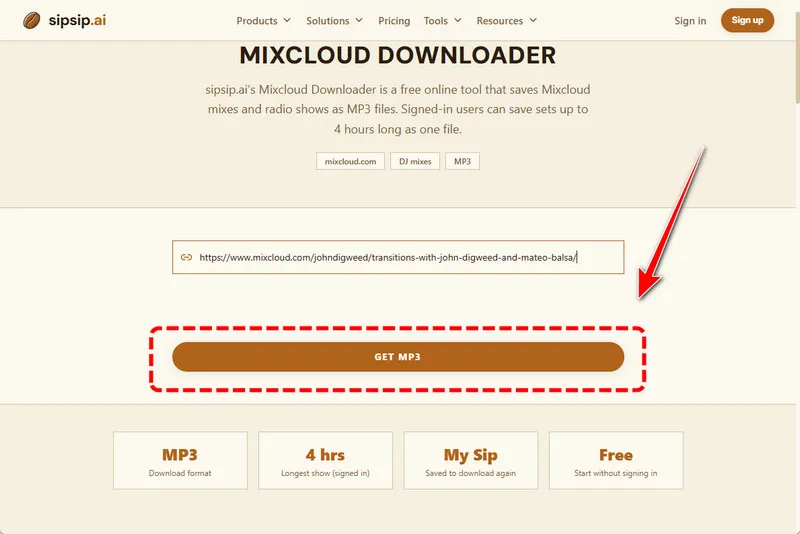
Step 1 Copy and paste your favorite Mixcloud show into the search box.
Step 2 Click Get MP3 and wait for the download to be prepared.
Step 3 If you are not signed in, the free download is limited to the first 10 minutes. Sign in with a free account before converting if you want to download a longer show.
Step 4 Download the MP3 file and play it to check the result.
- Signed-in users can download shows up to 4 hours long.
- Saves a Mixcloud show as one MP3 file.
- Offers one free conversion per day.
- Without signing in, only the first 10 minutes can be downloaded.
- A free account is required to download longer shows.
Overall Mixcloud Downloader Test Results
Check the following comparison table and choose your best method to convert Mixcloud to MP3.
| Testing Criteria | Sidify | mixclouddownloader.net | SaveLink.info | A2Z Tools | AnyDownloader | Sipsip.ai |
|---|---|---|---|---|---|---|
| Download Result | Complete | Complete | Complete | Complete | Complete | Incomplete |
| Download Time | 5m 26.9s | 7m 13.27s | 7m 26.33s | 4m 47.57s | 1m 3.01s | — |
| Output Format | MP3 / AAC / WAV / FLAC / AIFF / ALAC | MP3 / M4A | MP3 / M4A | MP3 / M4A / Opus / WAV | Original source format | MP3 |
| Actual Bitrate | 320 kbps | 63 kbps | 63 kbps | 113 kbps | 63 kbps | — |
| File Name | Transitions with John Digweed and Mateo Balsa.mp3 |
d45e-598c-45f2-ba55-254441ded88f.m4a |
d45e-598c-45f2-ba55-254441ded88f.m4a |
Mixcloud_8a80c6f3-dc99-4ac0-a440-3e1caca1b054.mp3 |
transitions-with-john-digweed-and-mateo-balsa.m4a |
— |
| Ads | No | Yes | No | Yes | Yes | No |
FAQs About MixCloud Downloader
1. Is It Safe to Use a Mixcloud Downloader?
Yes. The listed Mixcloud downloaders in this test generally work by asking you to paste a Mixcloud link, so you should not need to enter your Mixcloud password. If a third-party site asks for your login details, do not provide them.
Also be careful with pop-up ads and download buttons. Make sure you are downloading the audio file you requested, not an unrelated program or extension.
2. What Is the Best Mixcloud Downloader?
Sidify All-In-One Music Converter is highly recommended as the best Mixcloud downloader. It supports direct MP3 output up to 320 kbps and can handle long mixes with full ID3 tags kept. Additionally, the batch download feature saves you a lot of time while you copy & paste the links using online tools.
However, if you only need to download a mix occasionally, A2Z Tools may be more convenient.
3. Can I Download Mixcloud Shows Without a Premium Subscription?
Yes. Both our tested desktop converter and the online tools allow you to download Mixcloud shows without a Premium subscription. You can choose the right tool that fits your actual situation by referring to our test results.
4. Why Is My Mixcloud Downloader Only Downloading a Sample Instead of the Full Mix?
There are several possible reasons:
1. Trial limits: Sipsip.ai's free trial converts only the first 10 minutes of each track. You need to sign up to convert the entire track.
2. Download interruptions: A long mix may fail to download completely if the connection is interrupted or the downloader encounters a processing error.
Final Words
Mixcloud makes it easy to stream DJ mixes, but saving them for offline use is not always straightforward. In this article, we tested 6 Mixcloud downloaders and hope to help you find your best solution to enjoy Mixcloud mixes anywhere.
Sidify All-In-One is a good option for saving long DJ mixes in 320kbps higher-quality audio and downloading multiple tracks. If you only need to save a show occasionally, an online downloader may be enough, but check the output quality before using it.
 Sidify All-In-One Music Converter
Download and convert music from all major streaming services in one place. Get MP3 or other popular formats in source audio quality, save songs offline on Windows or Mac, and enjoy up to 10X faster downloads with ID3 tags and lyrics preserved.