


Choosing between SoundCloud and Spotify can be confusing. Both let you stream music, but they offer different things.
Spotify is better known for popular songs, albums, playlists, and personalized recommendations, while SoundCloud stands out for remixes, DJ sets, independent artists, demos, and other tracks you may not find on Spotify.
Which one is better? Which one should I choose? SoundCloud or Spotify? Let's compare them side by side across their music libraries, discovery features, sound quality, listening experience, pricing, and offline downloads, then you will know which one is right for you.

Part 1. SoundCloud vs Spotify: Quick Comparison
Before diving into details, here is a quick look at how SoundCloud and Spotify compare.
| Category | Spotify | SoundCloud |
|---|---|---|
| Monthly Active Users | ~777 million+ | ~175 million+ |
| Track Count | ~100 million (licensed catalog) | ~400 million (includes user uploads) |
| Max Audio Quality | 24-bit/44.1 kHz lossless FLAC (Premium) | 256 kbps AAC (Go+) |
| Free Plan | Ad-supported | Ad-supported |
| Individual Paid Plan | $12.99/month | $11.99/month (Go+) |
| Family Plan | $21.99/month (6 accounts) | Not offered |
| Student Plan | $6.99/month (includes Hulu) | 50% off Go+ |
| Offline Downloads | Up to 10,000 tracks per device (5 devices) | Available on Go and Go+ |
| Lossless Streaming | Yes, with Premium | Not available as a standard streaming option |
| Direct Artist Uploads | No (requires a distributor) | Yes (any user can upload) |
| Best For | Mainstream music, curated playlists, personalized discovery | Remixes, DJ sets, underground sounds, independent artists |
 Which Gives You More Value? What If You Want to Use Both?
If you regularly use both Spotify and SoundCloud, it does not matter. Even with a free account, you can use Sidify All-In-One Music Downloader to save high-quality music from 30+ platforms in MP3, AAC, WAV, FLAC, AIFF, ALAC, and other formats. Manage your music in one place, without switching between apps.
Part 2. SoundCloud vs Spotify: What's the Difference
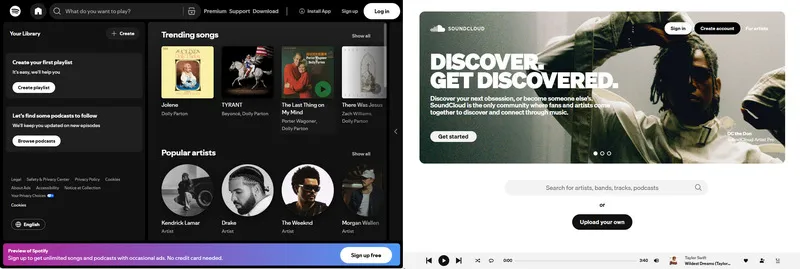
Spotify operates like a traditional record store moved online. Labels and distributors deliver mastered, official releases, and Spotify organizes them into playlists, radio stations, and algorithmic recommendations. The experience is curated and consistent. When you press play on a Spotify track, you know you are getting the final, artist-approved version.
SoundCloud behaves more like a public archive mixed with a social network. Anyone can upload audio. That means you will find official singles sitting next to bedroom demos, unreleased leaks, hour-long DJ mixes, and fan-made remixes that never cleared rights for commercial streaming. So the audio quality varies by upload and some tracks are unavailable in certain regions.
Both SoundCloud and Spotify have value, but they serve different moods.
Part 3. SoundCloud vs Spotify: Music Library
Actually, track count alone tells you very little. A service can host millions of files and still miss the exact song you want. So what matters is what kind of music lives in each library and how reliably you can access it.
Mainstream and Official Releases
If you mainly listen to popular artists and official albums, Spotify is the easier choice. It has a broad catalog of major-label and independent releases, making it easy to find new albums, singles, and chart hits in one place.
SoundCloud also offers official music, but its real strength is creator-uploaded content such as remixes, demos, DJ sets, and alternative versions. If you mostly listen to artists like Taylor Swift, Drake, or Bad Bunny, Spotify will likely fit your listening habits better.
Our Take:For official releases or mainstream music, start with Spotify.
Remixes, DJ Sets, Demos, and Underground Music
This is where SoundCloud stands out. You can find a wide range of remixes, DJ sets, demos, mashups, and underground tracks uploaded by artists and creators. Many of these tracks and versions are difficult to find on mainstream streaming services.
Our Take:If remixes, DJ sets, and underground music are a big part of your listening, keep SoundCloud in your music lineup.
Independent and Emerging Artists
SoundCloud is especially strong for discovering independent and emerging artists. Because artists can upload their music directly, the platform has a large selection of new and lesser-known tracks that may not be available on mainstream streaming services.
Spotify also features independent artists, with personalized playlists helping listeners discover new music. However, SoundCloud offers a more creator-focused experience, making it a good choice if you enjoy finding new artists before they become widely known.
Our Take:If you enjoy discovering emerging artists, SoundCloud is worth exploring alongside Spotify.
| Music Library | Spotify | SoundCloud |
|---|---|---|
| Official Major Label Releases | Comprehensive, including new releases | Available, but coverage can vary |
| Remixes and Bootlegs | Limited | Abundant |
| DJ Sets and Mixes | Limited | Core strength |
| Demos and Unreleased Material | Limited | Common |
| Independent Artist Access | Via distributors | Direct uploads available |
| Total Track Count | 100 million+ licensed tracks | 400 million+ tracks, including user uploads |
Part 4. SoundCloud vs Spotify: Music Discovery
Discovery is where these two platforms feel most different. Spotify treats discovery as a science, while SoundCloud treats it as a community activity.
Spotify Discovery
Spotify is a good choice if you want new music to come to you. Discover Weekly, Release Radar, and Daily Mixes recommend songs based on what you already listen to. You can also use Blend to create a shared playlist that combines your music taste with friends or other people.
This makes Spotify especially convenient when you simply want to press play and let the music run, whether you are commuting, working, exercising, or relaxing.
SoundCloud Discovery
SoundCloud is better suited to active exploration. Instead of simply following recommendations, you can discover music through artists you follow, reposts, charts, related tracks, and creator uploads. This makes it easier to find emerging artists, remixes, DJ sets, and music outside the mainstream.
Tips:In short:
"What should I listen to right now?" Use Spotify.
"What is out there that I do not know about yet?" Use SoundCloud.
Think about how you usually find music. If you want personalized recommendations with little effort, Spotify is the easier choice. If you enjoy searching, exploring, and finding tracks you didn't know existed, SoundCloud offers more room to discover.
Part 5. SoundCloud vs Spotify: Audio Quality
If sound quality matters to you, Spotify has the advantage. But for many people, the difference between the two services may be hard to notice, especially when listening on basic earbuds, Bluetooth headphones, or phone speakers.
Spotify Lossless
Spotify Premium now includes lossless audio at up to 24-bit/44.1 kHz FLAC at no extra cost. You can use it on desktop and mobile devices, although you need to turn it on in Audio Quality settings. If you don't use lossless, Spotify's highest standard quality is 320 kbps Ogg Vorbis. Free users get lower quality, with up to 160 kbps on desktop and 96 kbps on mobile.
Lossless does not automatically mean you'll hear a dramatic difference. With basic earbuds or laptop speakers, the improvement can be difficult to notice. With good wired headphones or speakers, you may hear more detail and a more open sound.
SoundCloud Quality
SoundCloud's quality depends more on the original upload and your subscription. Free listening uses lower-quality streams, while Go+ offers High Quality streaming at up to 256 kbps AAC. It does not offer a standard lossless streaming option. Even when an artist uploads a WAV, FLAC, or AIFF file, the stream is still compressed.
👉 Want to download SoundCloud music with lossless quality? Try Sidify All-In-One Music Converter.
Which One Sounds Better
If you have good headphones or speakers and care about getting the best available streaming quality, Spotify is the better choice because of its lossless option.
If you mainly listen through phone speakers, basic earbuds, or Bluetooth headphones, the difference may be much less noticeable. In that case, your choice between SoundCloud and Spotify will probably come down more to the music and features you prefer than sound quality alone.
| Quality Setting | Spotify | SoundCloud |
|---|---|---|
| Free Tier (Mobile) | ~96 kbps | ~64 kbps Opus |
| Free Tier (Desktop/Web) | ~160 kbps | ~128 kbps MP3 |
| Highest Lossy Quality | 320 kbps Ogg Vorbis | 256 kbps AAC (Go+) |
| Lossless | 24-bit/44.1 kHz FLAC (Premium) | Not available |
| Consistency | Consistent across tracks | Varies by upload quality |
Part 6. SoundCloud vs Spotify: Features and Listening Experience
Spotify offers features such as cross-device playback, collaborative playlists, and Blend, while SoundCloud focuses more on creator interaction through reposts, comments, and direct uploads.
| Feature | Spotify | SoundCloud |
|---|---|---|
| Personalized Playlists | Discover Weekly, Release Radar, Daily Mixes | The Upload, personalized mixes |
| AI DJ | Yes | No |
| Collaborative Playlists | Yes | Yes |
| Social Listening (Jam) | Yes, real-time group sessions | No |
| Blend | Yes, shared taste playlists | No |
| Lyrics | Yes, synced lyrics | Limited |
| Canvas | Yes, looping video clips | No |
| Timed Comments | No | Yes |
| Reposts / Feed Shares | No | Yes |
| Direct Messaging | No | Yes |
| Audiobooks | Yes, availability varies by market | No |
| Podcasts | Extensive library | Available, but not a main focus |
| Smart Speaker Support | Broad | Limited |
| Car Integration | Android Auto, Apple CarPlay, Car View | Android Auto, Apple CarPlay |
| Offline Downloads | Up to 10,000 tracks per device, 5 devices | Available on Go/Go+ |
For most listeners, Spotify has more features for everyday listening, while SoundCloud offers more ways to interact with creators and individual tracks.
Part 7. SoundCloud vs Spotify: Pricing
Pricing works differently on the two platforms. Spotify offers individual, family, and student plans, while SoundCloud has separate plans for listeners (Go and Go+) and creators (Artist and Artist Pro). So the better value depends on how you use the service.
Listener Plans:
| Plan | Spotify | SoundCloud |
|---|---|---|
| Free | $0 (ad-supported) | $0 (ad-supported) |
| Main Listener Plan | Premium Individual: $12.99/month | Go: $4.99/month |
| Higher Listener Plan | Premium Individual: $12.99/month | Go+: $11.99/month |
| Duo | $18.99/month (2 Premium accounts) | Not offered |
| Family | $21.99/month (up to 6 Premium accounts) | Not offered |
| Student | $6.99/month (includes Hulu with Ads) | $5.49/month for Go+ (50% off) |
Creator Plans (SoundCloud Only):
| Creator Plan | Price | Upload Limit | Key Features |
|---|---|---|---|
| Artist | $3.25/month ($39/year) | Up to 3 hours | Limited distribution and monetization, including 2 tracks per month |
| Artist Pro | $8.25/month ($99/year) | Unlimited | Full distribution, advanced analytics, and monetization |
Note: Prices shown are for the U.S. dollar and may vary by country, billing method, or promotional offer.
Part 8. SoundCloud vs Spotify: Offline Listening and Downloads
Both Spotify and SoundCloud offer offline listening with paid plans, which is useful when you are traveling, flying, commuting underground, or simply have a poor internet connection.
Spotify Offline
Spotify Premium lets you download playlists, albums, and individual tracks for offline listening. You can download up to 10,000 tracks per device on up to 5 devices. It also lets you choose a separate download quality from your streaming quality, which means you can use a lower quality for downloads to save storage space, even if you normally stream at higher quality.
SoundCloud Offline
SoundCloud Go and Go+ also support offline listening. You can download music directly from the app and listen without an internet connection. Unlike Spotify, it does not specify a fixed track limit for offline downloads. The amount you can save can therefore depend on factors such as available storage and the content you want to download.
Can You Keep the Downloaded Music
No. Downloads from both Spotify and SoundCloud are designed for offline playback inside their respective apps. They are not regular MP3 files that you can move to another music player, USB drive, or device. Access to the downloads also depends on keeping your subscription active.
If you want to save supported music as regular audio files and manage it in your own local library, Sidify All-In-One Music Converter can be useful.
Sidify All-In-One Music Converter supports both Spotify and SoundCloud, along with other major streaming platforms, including Apple Music, Amazon Music, Tidal, Deezer and more. You can convert supported music to MP3, AAC, WAV, FLAC, AIFF, or ALAC and save the files locally for personal offline playback.
Besides, Sidify allows you to preserve ID3 tags. Whether you have a paid subscription or not, you can use this tool to download your preferred music as you like. It is a complement that gives you ownership and portability over the music you care about most.
Sidify All-In-One Converter
- Download songs from different streaming platforms and any music sites.
- Convert music to MP3/AAC/WAV/FLAC/AIFF/ALAC
- Export music, playlists, albums, audiobooks, and podcasts to the computer.
- Preserve the original audio quality and keep the ID3 tags.
- Rip music from the music site and burn music to CD.
- Built-in free podcast and radio to mp3 downloader and vocal remover.

How to Convert Spotify or SoundCloud Music to Any Format
Step 1 Launch Sidify All-In-One Music Converter
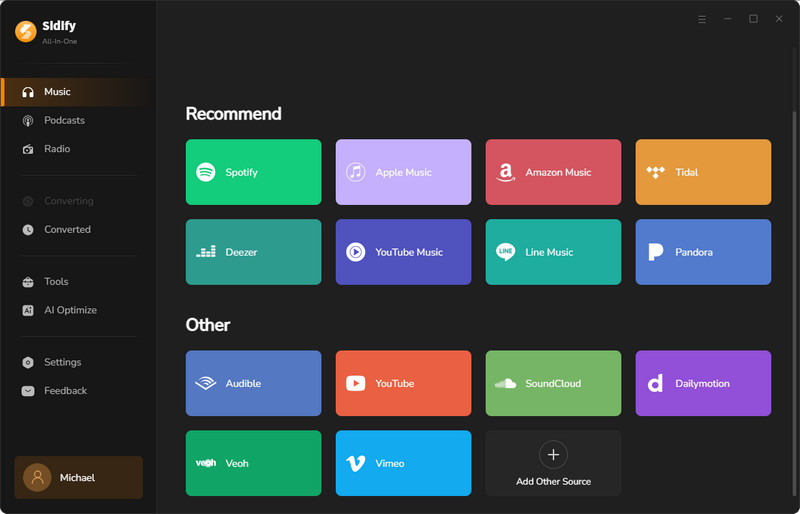
Sidify supports multiple music platforms, including Spotify and SoundCloud. Launch Sidify and select one platform from the main interface. Let's take Spotify as an example.
Step 2 Set Output Settings
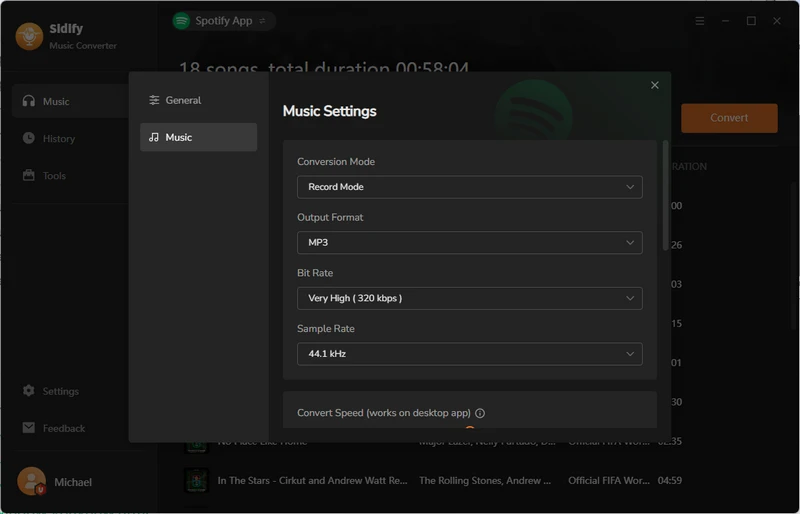
After you select the platform, you can click the "menu" button to customize the output settings. Choose your output format, output folder, and more.
Step 3 Convert Spotify or SoundCloud Music
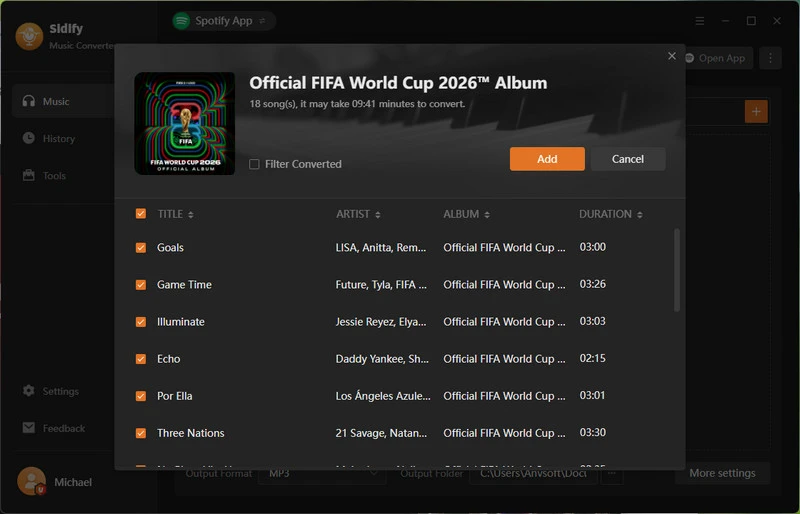
Sidify automatically detects all the available tracks. Click the "Add" button to add songs, albums, playlists, podcasts, and more to prepare for conversion.
Step 4 View Downloaded Music
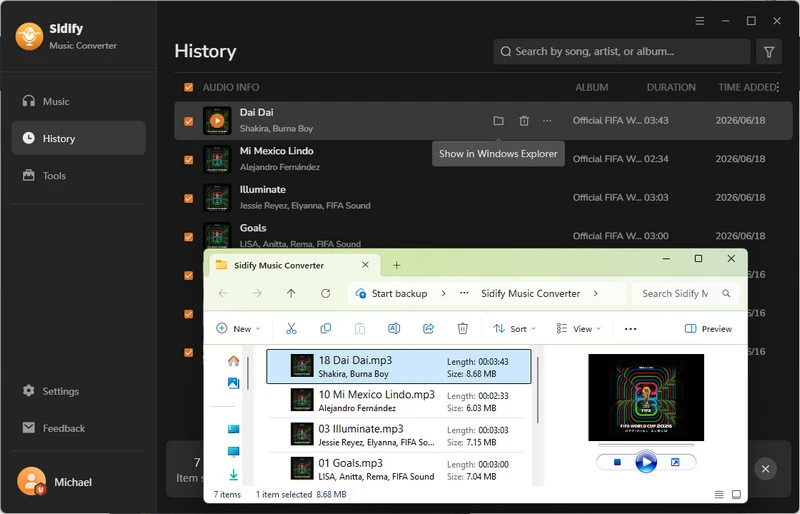
After the conversion, you can go to the "History" tab to check all the music files. Meanwhile, you can click the "File" icon to view them in Explorer. They are now permanently saved on your computer. You can transfer these files to any device for offline listening.
Part 9. SoundCloud vs Spotify for Artists
If you are an artist, you can use both platforms, but they play different roles in getting your music out and building an audience.
Uploading and Releasing Music
Getting music onto Spotify usually starts with a distributor. Once your music is live, Spotify for Artists gives you tools to manage your artist profile, track your audience, and pitch eligible releases for playlists.
SoundCloud is more direct. You can upload music to SoundCloud yourself, and its Artist and Artist Pro plans add distribution and monetization tools. Artist currently includes up to 3 hours of uploads and distribution for up to 2 tracks per month, while Artist Pro offers unlimited uploads and distribution.
Reaching and Engaging Fans
The two platforms also give artists different ways to connect with listeners. Spotify for Artists focuses more on audience data, profile management, and playlist opportunities. SoundCloud puts more of the listening and creator interaction in the same place, with features such as comments, reposts, and creator uploads.
Tips:For an artist, SoundCloud can be a place to upload and interact with your audience, while Spotify can help you reach listeners through the wider streaming ecosystem.
Part 10. SoundCloud vs Spotify: Which One Should You Choose
Spotify or SoundCloud? In fact, there is no single answer. The right choice depends on what you listen to, how you listen, and how much you want to engage with the music community.
| Your Priority | Better Fit | Why |
|---|---|---|
| Mainstream releases and popular artists | Spotify | A more complete and consistent choice for official releases |
| Personalized playlists and recommendations | Spotify | More tools for discovering music based on your listening habits |
| The best available streaming quality | Spotify | Premium includes lossless audio |
| A plan for two or more people | Spotify | Duo and Family plans are available |
| Remixes, DJ sets, demos, and underground music | SoundCloud | Much more creator-uploaded and niche content |
| New and emerging artists | SoundCloud | More direct uploads and community-driven discovery |
| A cheaper paid plan | SoundCloud | Go starts at $4.99/month in the U.S. |
| Comments, reposts, and creator interaction | SoundCloud | More ways to interact around individual tracks |
If you want to keep music from supported platforms as regular audio files rather than downloads that only work inside a streaming app, Sidify All-In-One Music Converter is another option to consider. It supports music from multiple platforms and can convert supported content to formats such as MP3, FLAC, and WAV for use in a local music library.
FAQs About SoundCloud vs Spotify
1. Which is better, SoundCloud or Spotify?
It depends on what you want. Spotify is better for mainstream music, polished features, personalized playlists, family plans, and audio quality. SoundCloud is better for remixes, DJ, independent music, and direct artist engagement. Most casual listeners are better served by Spotify. Music enthusiasts, producers, and fans of niche genres may need SoundCloud or both. You can look at the above table to choose the right music platform.
2. What is cheaper, Spotify or SoundCloud?
SoundCloud's Go plan is cheaper at $4.99 per month, but it limits audio quality to 128 kbps AAC and does not unlock the full catalog. SoundCloud Go+ costs $11.99 per month, which is $1 less than Spotify Premium Individual at $12.99 per month. However, Spotify offers a Family plan ($21.99 for up to 6 people) and a Student plan ($6.99 with Hulu), which can make it cheaper per person in households. Check more prices here.
3. Is SoundCloud better quality than Spotify?
No. Spotify offers lossless audio at up to 24-bit/44.1 kHz FLAC for Premium subscribers (enabled in settings), and a default Very High setting at 320 kbps Ogg Vorbis. SoundCloud's maximum quality is 256 kbps AAC for Go+ subscribers, with no lossless option.
Besides, SoundCloud's quality also varies by upload, since tracks are re-encoded from whatever file the artist submitted. On cheap earbuds or phone speakers, the difference may not be noticeable. On decent wired headphones or speakers, Spotify sounds better.
4. Does SoundCloud have more music than Spotify?
By raw track count, yes. SoundCloud hosts 400 million+ tracks because it allows any user to upload audio, including demos, remixes, and unofficial material, while Spotify has roughly 100 million licensed tracks.
Final Words
Spotify vs SoundCloud: which one is better and which one to choose? This is never a single question. We recommend Spotify for everyday listening, and SoundCloud when you want to dig deeper.
And if you want to use both if that better matches the way you listen, Sidify All-In-One Music Converter helps you save all your favorite music as MP3 or other formats in a local library. In one place and one panel, you don't have to open different apps just to search for a certain song.
 Sidify All-in-one Music Converter
Download and convert music from all major streaming services in one place. Get MP3 or other popular formats in source audio quality, save songs offline on Windows or Mac, and enjoy up to 10X faster downloads with ID3 tags and lyrics preserved.












