


Have you ever experienced this: when using SoundCloud for free, there are often ads disturbing your listening experience. It is annoying, right? Although SoundCloud has offered SoundCloud Go / Go+ subscriptions to avoid ads, not everyone wants to pay for them.
If you are looking for a free and easy way to block ads when listening to SoundCloud, you are in the right place! In this guide, we tested and summarized 9 SoundCloud ad blockers on the market to help you find a tool that suits you best. Let's have a look.
📍 Also Read: 7 Best SoundCloud Alternatives in 2026

Part 1. Quick Comparison: Which SoundCloud Ad Blocker is Best for You?
 How We Tested These SoundCloud Ad Blockers:
We evaluated these tools based on their ad-blocking effectiveness, ease of use, platform compatibility, and overall listening experience. We also considered whether they are free or require a subscription.
| Tool | Platform & Form | Price | Block Audio Ads | Block Other Ads | Background Play | Offline Download |
|---|---|---|---|---|---|---|
| Sidify Music Converter | Win / Mac (Desktop App) | Free Trial / Paid | ✅ | ✅ | N/A | ✅ |
| AdLock | Win / Mac / Mobile / Extension | Freemium | ✅ | ✅ | ✅ | ❌ |
| AdGuard | Win / Mac / Mobile / Extension | Freemium | ✅ | ✅ | ✅ | ❌ |
| Brave | iOS / Android / Desktop (Browser) | 100% Free | ✅ | ✅ | ✅ | ❌ |
| AdGuard DNS | iOS / Android (System Profile) | 100% Free | ⚠️* | ✅ | ✅ | ❌ |
| Soundbound | Android (Mobile App) | 100% Free | ✅ | ✅ | ✅ | ❌ |
| NewPipe | Android (Mobile App) | 100% Free | ✅ | ✅ | ✅ | ✅ |
| AdAway | Android (Mobile App) | 100% Free | ⚠️* | ✅ | ✅ | ❌ |
Part 2. 3 Best SoundCloud Ad Blockers on Windows & Mac
2.1 Sidify SoundCloud Music Converter
Rating: ⭐⭐⭐⭐⭐
Compatibility:Windows 11/10/8/7, macOS 10.15 - macOS 15 (Sequoia)
Traditional browser ad blockers sometimes stop working when SoundCloud updates its anti-cheating algorithm. Sidify SoundCloud Music Converter offers a simpler and more direct solution: it can skip SoundCloud ads and download only the music content, even if you don't have a SoundCloud Go / Go+ plan.
As a professional music converter, Sidify also lets you download your favorite SoundCloud tracks, playlists, and albums directly to your computer in formats like MP3, AAC, FLAC, or WAV. Once downloaded, you can enjoy a truly ad-free and permanent offline listening experience.
Sidify SoundCloud Music Converter
- Convert SoundCloud Music to MP3, AAC, ALAC, AIFF, WAV, and FLAC.
- Convert MP3 songs, playlists, albums, and podcasts from SoundCloud Music.
- Download SoundCloud Music 320kbps MP3 and LOSSLESS ALAC files.
- Keep SoundCloud Music HD artworks, lyrics and ID3 tags.
- Compatible with Windows and macOS.

How to Download SoundCloud Without Ads
Step 1 Install Sidify SoundCloud Music Converter
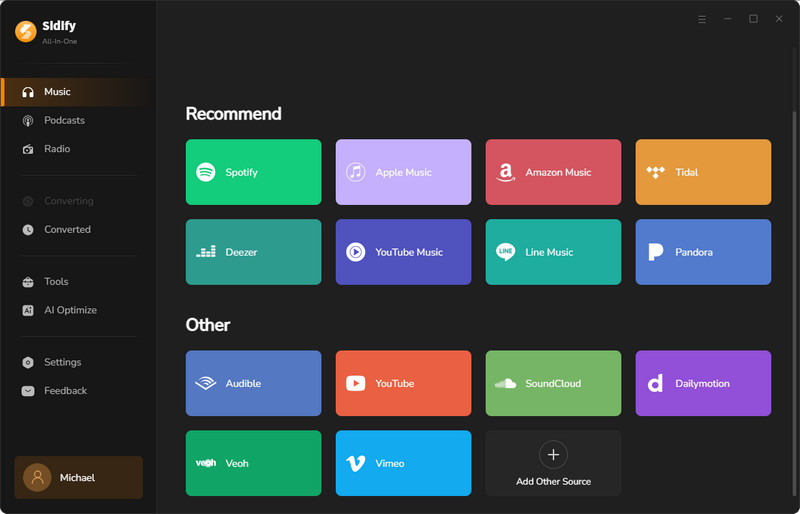
To download SoundCloud songs without ads, install Sidify SoundCloud Music Converter first. Then, launch Sidify and choose SoundCloud.
Step 2 Set Output Format
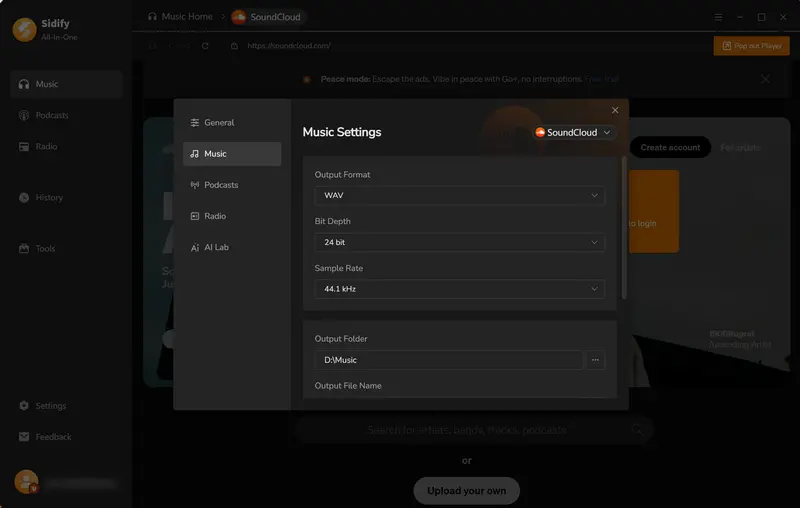
Click Menu > Settings. Here, you can personalize the output formats, name, output path, and more.
Step 3 Add Music to Sidify
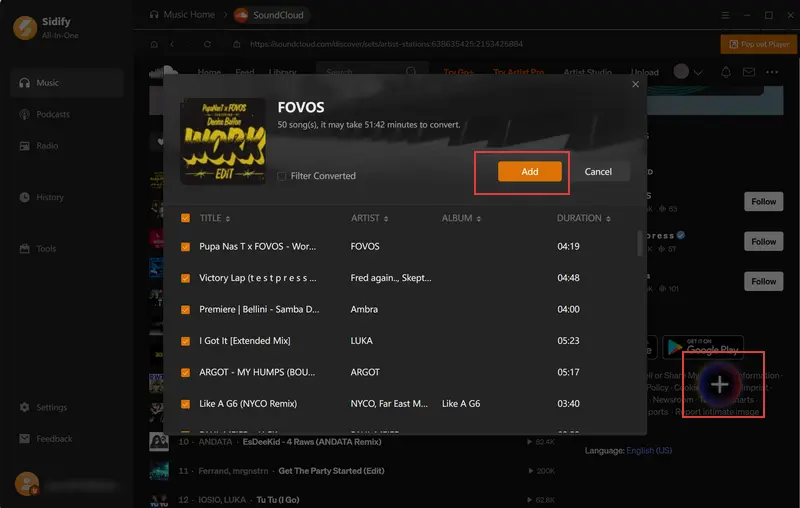
Freely browse SoundCloud playlists or songs within the built-in browser. Click into the playlist you want to download and click the "+" button in the bottom-right corner to add the songs. Or, you can just check the whole playlist.
Step 4 Start Converting SoundCloud
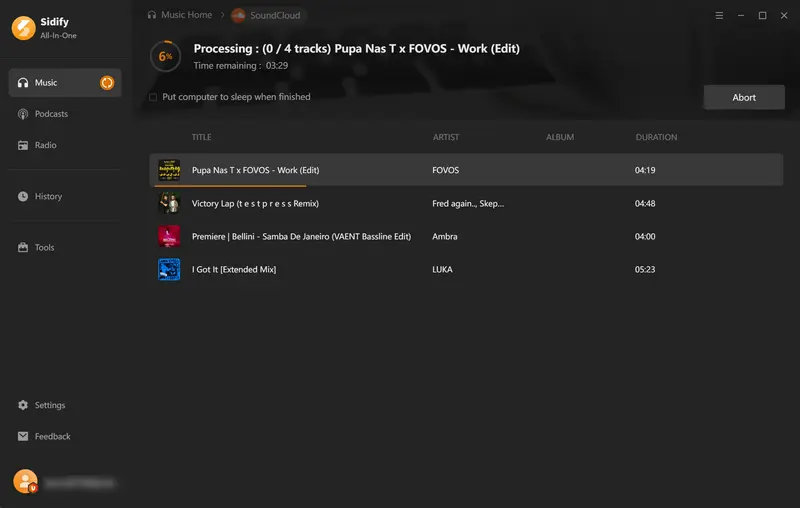
Once finished with the previous steps, click the "Convert" button to start the process. Sidify will get rid of ads and only download the music part.
Step 5 Find Your Converted SoundCloud Songs
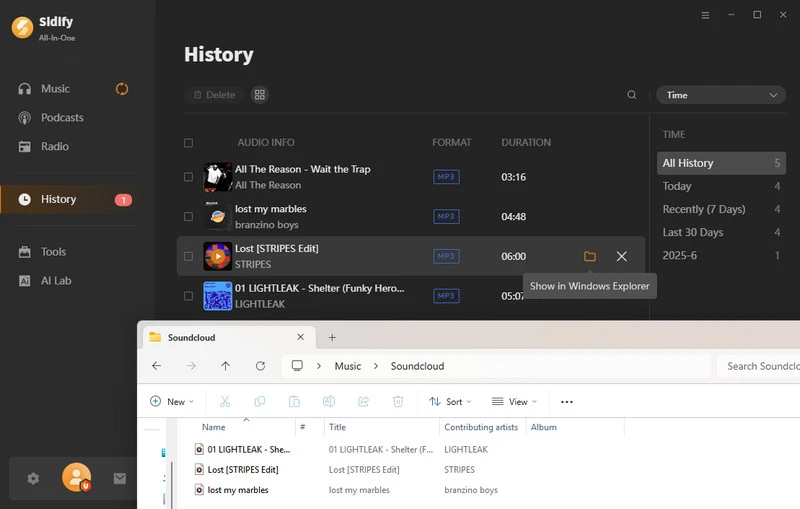
Once done, head to the History section to locate all your converted songs. Or, you can access your downloaded files by clicking the folder icon.
2.2 AdLock
Rating: ⭐⭐⭐⭐
Compatibility:
- Platforms: Windows, macOS, Android, iOS
- Browsers: Google Chrome, Mozilla Firefox, Microsoft Edge, Safari, Opera
As one of the best SoundCloud ad blockers, AdLock can work as a browser extension, as well as a standalone desktop tool. That means, whether you're listening to SoundCloud through a web browser like Chrome or Safari, or through the SoundCloud desktop app, AdLock can accurately filter out audio ads, banner ads, pop-ups, and video ads, providing you with an uninterrupted listening experience.
How to Block SoundCloud Ads with AdLock
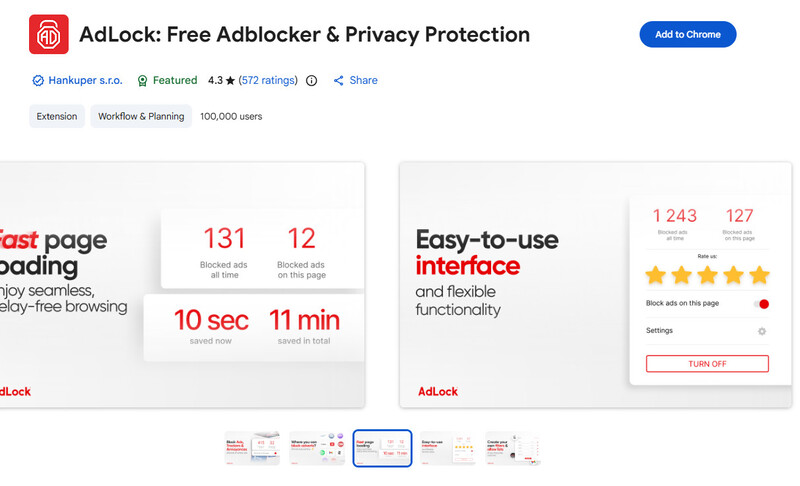
Step 1 Search for and add AdLock to your browser, such as Chrome or Firefox.
Step 2 Click the AdLock icon in the top-right corner of your browser and make sure the ad blocker is turned on.
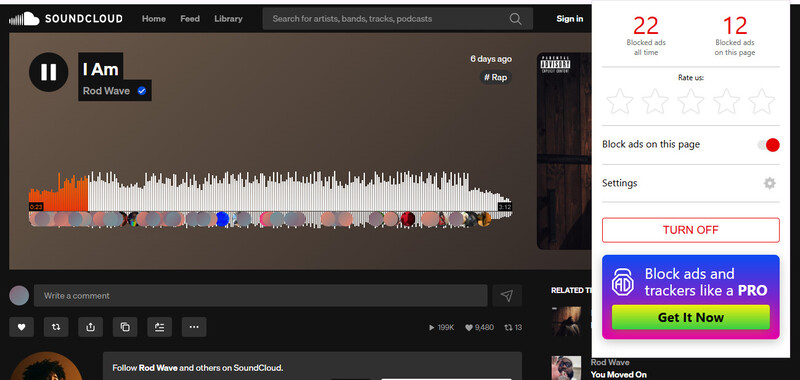
Step 3 Visit soundcloud.com and start listening without ads.
Pros and Cons of AdLock
- It can skip audio ads inserted during music playback.
- It’s available as a browser extension, desktop app, and mobile app.
- It blocks ads on both SoundCloud’s app and web player.
- A paid subscription is required for long-term use of the desktop AdLock.
- The browser extension version is free, but its features are relatively limited.
2.3 AdGuard
Rating: ⭐⭐⭐⭐
Compatibility:
- Platforms: Windows, macOS, Android, iOS, Linux, Android TV
- Browsers: Google Chrome, Mozilla Firefox, Microsoft Edge, Safari, Opera, Yandex
Similar to AdLock, AdGuard is also a professional SoundCloud ad blocker that works as both a browser extension and a desktop client. It can block ads in your browser, and once you install the desktop version, it can even block ads in other software on your computer.
How to Block SoundCloud Ads with AdGuard
Step 1 Search for AdGuard in your browser’s extension store and click “Add.”
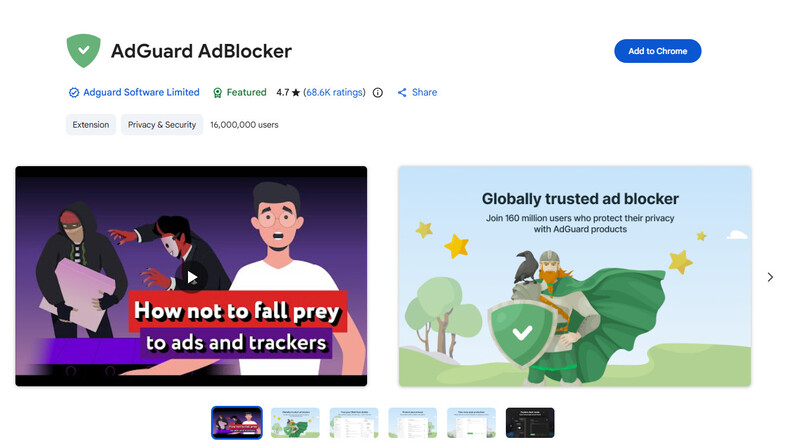
Step 2 Click the AdGuard icon in the upper-right corner of your browser and make sure the main toggle is set to “Enabled.”
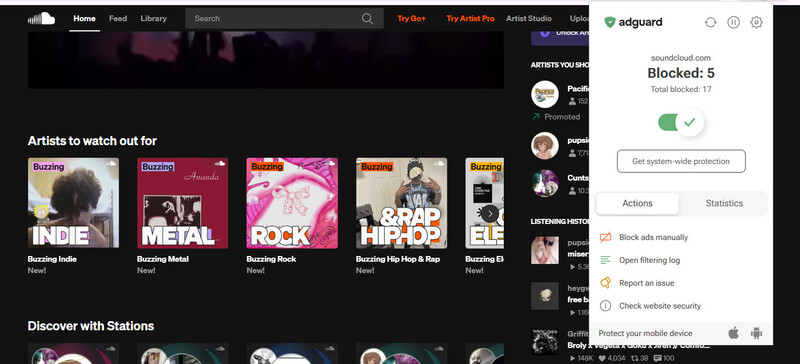
Step 3 Open the SoundCloud website, and then AdGuard will automatically block pop-ups and audio ads.
Pros and Cons of AdGuard
- Blocks both banner and pop-up ads, as well as audio and video ads on SoundCloud and ads from other software.
- Supports multiple platforms (Windows, Mac, Android, iOS, and browsers).
- Provides strong privacy protection.
- Ad filter rules can be customized.
- Complete functionality requires a subscription.
- Complicated settings may be difficult for beginners.
- Sometimes legitimate content may be mistakenly blocked.
- Some features are limited on iOS.
Part 3. 2 Best SoundCloud Ad Blockers on iPhone (iOS)
Due to the closed nature of iOS, it is very hard to directly block SoundCloud's ads in the official app. For iPhone and other iOS users, we recommend using the following tools.
3.1 Brave Browser
Rating: ⭐⭐⭐⭐
Compatibility: iOS 16.0 or later, Android, Windows, macOS, Linux
If you want to listen to SoundCloud music without ads on your iPhone, we recommend using Brave Browser to visit soundcloud.com. The built-in Brave Shields can automatically skip audio ads and block pop-ups. What's more, it supports background play, making the listening experience similar to, and even better than, the SoundCloud app on iPhone. This makes Brave Browser a powerful SoundCloud ad blocker.
How to Listen to SoundCloud Without Ads on Brave Browser
Step 1 Search for and download Brave Private Web Browser from the App Store.
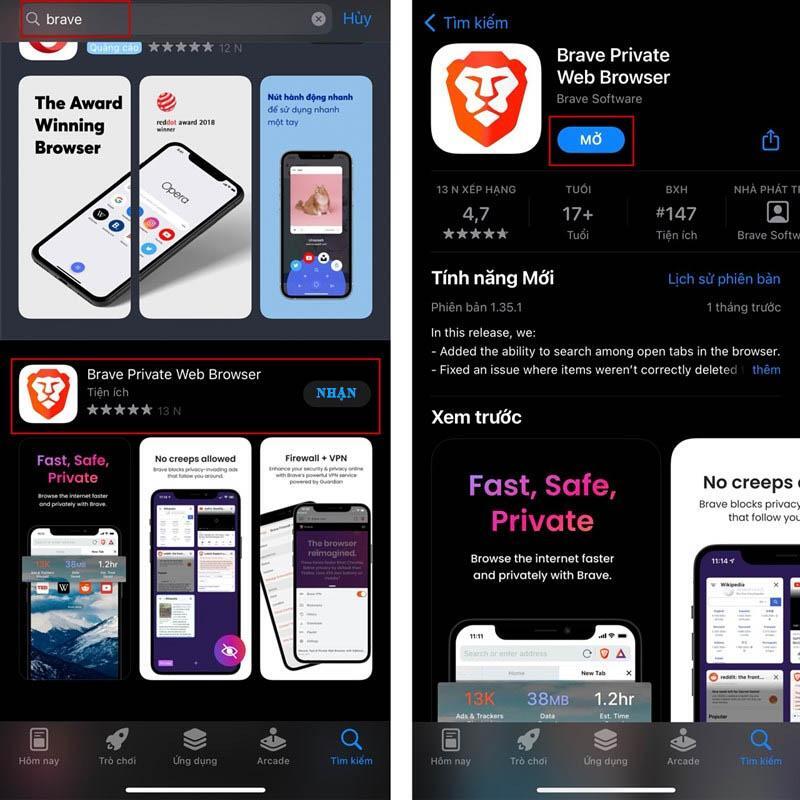
Step 2 Launch Brave Browser, type soundcloud.com in the search bar, and log in with your account.
Step 3 Check the Brave Shields settings and make sure they are turned on.
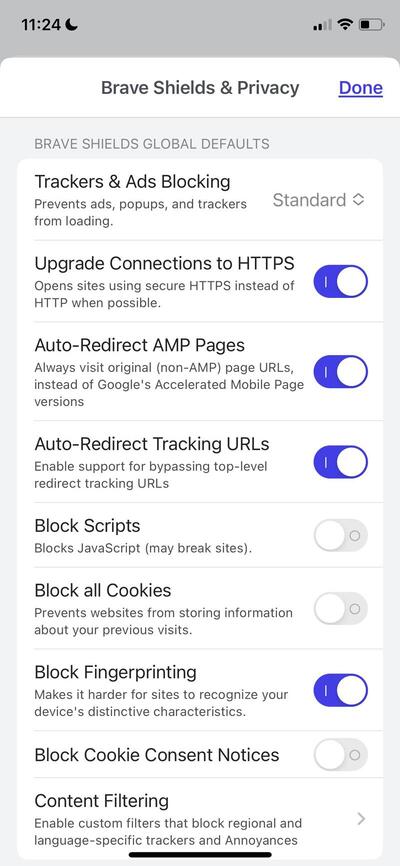
Step 4 Start playing any track on SoundCloud, and Brave will block audio ads in the background.
Pros and Cons of Brave Browser
- Built-in powerful ad-blocking engine.
- Music keeps playing without interruption even when you switch to another app or lock your phone screen.
- No hidden fees or feature limitations.
- Works only within Brave Browser and cannot directly block ads in the official SoundCloud app.
- Requires getting used to listening to music through a browser instead of opening the app directly.
3.2 AdGuard DNS
Rating: ⭐⭐⭐⭐
Compatibility: iOS 14.0 or later, iPadOS, macOS, Android, Windows, Routers
AdGuard DNS is a free public DNS filtering service. You don't need to download any app — simply change the DNS address in your iPhone's network settings, and it will filter ad and tracker requests system-wide, including some ads inside apps like SoundCloud.
How to Block SoundCloud Ads with AdGuard DNS
Step 1 Visit the AdGuard DNS official website, select the configuration profile for iOS, and click Download.
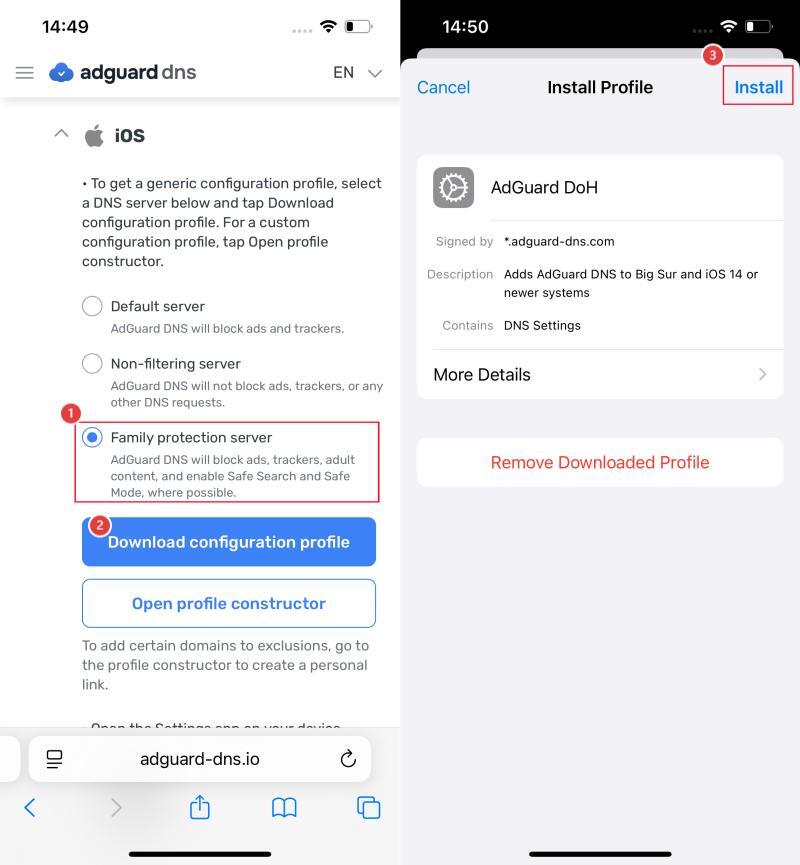
Step 2 Allow the download when prompted on your iPhone.
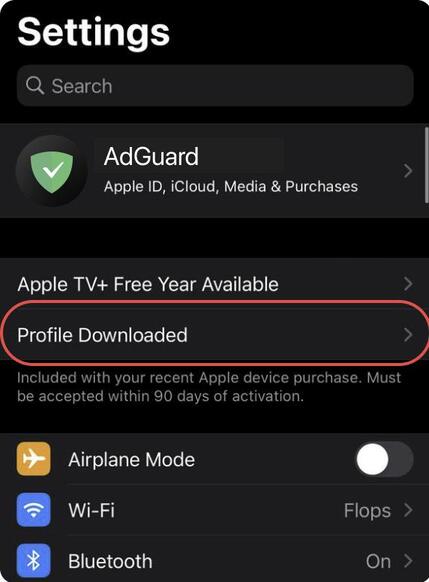
Step 3 In Settings, tap Profile Downloaded near the top, then tap Install in the top-right corner. (If you don't find the downloaded configuration profile, go to General > VPN & Device Management.)
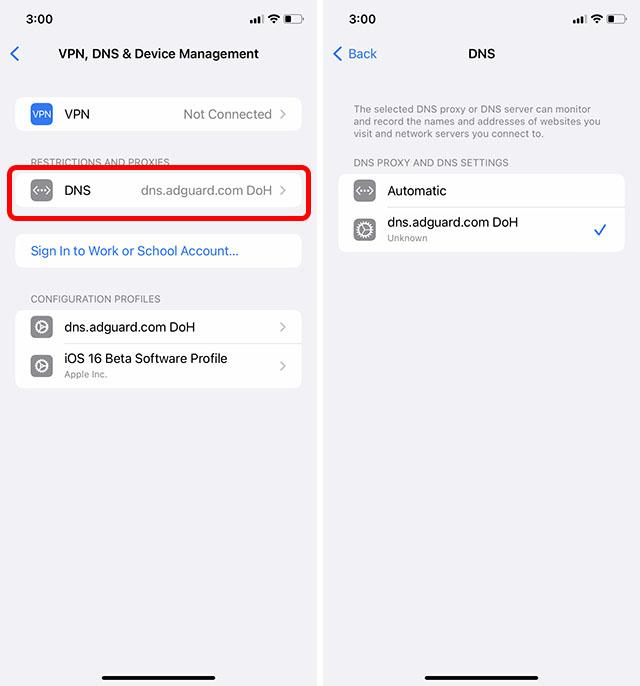
Step 4 Go to Settings > General > VPN & Device Management > DNS, and switch the setting from Automatic to AdGuard DNS.
Step 5 Relaunch the SoundCloud app, and now you can listen to SoundCloud without ads.
Pros and Cons of AdGuard DNS
- Blocks ads at the DNS level across browsers and some apps.
- Uses iOS's built-in DNS system and has little impact on battery or memory.
- Once the configuration profile is installed, it can work quietly in the background.
- Some SoundCloud ads may not be blocked if they use the same domain as regular music.
- Setup can be a bit complicated.
Pro Tip: If you want alternative options, other public DNS services like NextDNS or Control D work similarly using iOS configuration profiles.
Part 4. 3 Best SoundCloud Ad Blockers on Android
4.1 Soundbound
Rating: ⭐⭐⭐⭐
Compatibility: Android 7.0 and up
Soundbound is a lightweight music player specifically designed for Android users. It is a clean player with zero built-in ads. After installing the app, you simply need to add a SoundCloud plugin to freely enjoy your favorite tracks without interruptions.
Since the playback and loading processes are completely handled within Soundbound, SoundCloud's pop-up and audio ads have no chance to load. This makes it an effective SoundCloud ad blocker that seamlessly supports background playback and lock-screen listening.
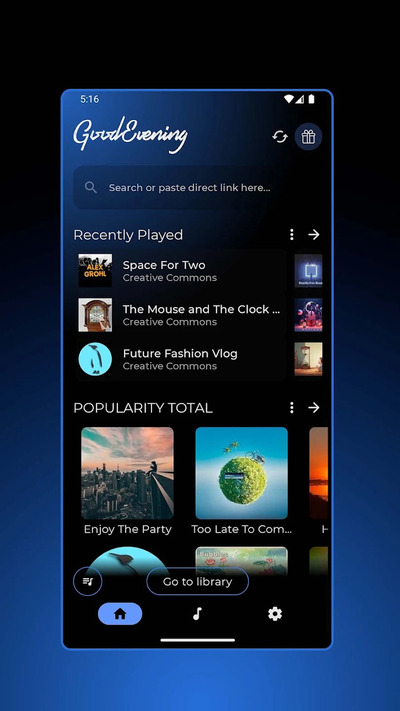
How to Use Soundbound to Listen to SoundCloud Without Ads
Step 1 Install the Soundbound app from the Google Play Store or Soundbound’s official website.
Step 2 Open Soundbound, go to the Plugins section, search for SoundCloud, and tap to install it.
Step 3 Search for your favorite tracks or playlists, and start listening completely ad-free.
Pros and Cons of Soundbound
- Completely blocks both audio and pop-up ads.
- Supports background playback and lock-screen listening.
- Clean, customizable user interface.
- Requires a brief extra step to install the plugin.
- Lacks official SoundCloud social features (like commenting and liking).
4.2 NewPipe
Rating: ⭐⭐⭐⭐
Compatibility: Android 5.0 and up
As an effective SoundCloud ad blocker, NewPipe was initially famous for watching YouTube without ads. But many people don't know that it also has built-in support for SoundCloud. You don't need to install any extra plugins — simply switch to SoundCloud mode, and you can directly search and play SoundCloud music completely ad-free. In addition, it also supports downloading, so you can save music to your phone at the same time.
How to Block SoundCloud Ads with NewPipe
Step 1 Visit the official NewPipe website to download the APK file, then install it on your Android device.
Step 2 Open NewPipe, tap the menu icon in the top-left corner, and select SoundCloud as your active service.
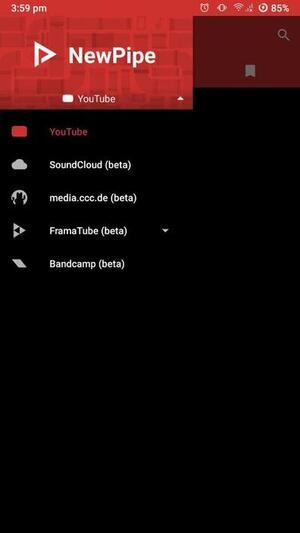
Step 3 Search for your favorite tracks or playlists, and tap to play.
Pros and Cons of NewPipe
- Completely free and open-source, with no ads or pop-ups.
- Allows you to save SoundCloud songs as MP3 files on your phone.
- Supports background playback.
- Not available on the Google Play Store.
- The interface is more like a video player than a traditional music app.
4.3 AdAway
Rating: ⭐⭐⭐⭐
Compatibility: Android 8.0 and up
AdAway is a well-established and completely free and open-source SoundCloud ad blocker designed for Android. Unlike a browser extension, it redirects ad server domain names directly to localhost to prevent ads from loading at the source of the network request.
For SoundCloud users, as long as the ad domain is included in the ad-blocking rule database, ads within the app can be blocked at the system level.
How to Block SoundCloud Ads with AdAway
Step 1 Download the AdAway APK file from its official website, then install it on your Android device.
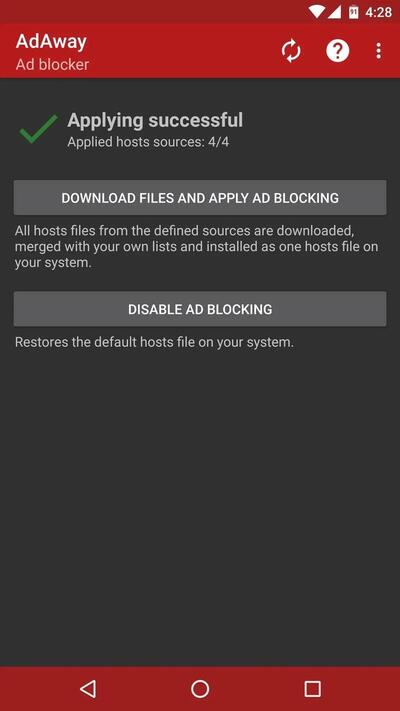
Step 2 Launch AdAway and choose between Root mode (grant Root access if prompted) or VPN mode (for non-rooted phones).
Step 3 Tap Download Files and Apply Ad Blocking to update the latest filter lists, then restart your device.
Pros and Cons of AdAway
- Free, open-source, and ad-free.
- Blocks ads across browsers and supported applications.
- Consumes few background resources in Root mode.
- Non-rooted devices need to run a local VPN.
- Cannot filter ads if they share the same domain as the music stream.
FAQs About SoundCloud Ad Blockers
Is It Legal to Block Ads on SoundCloud?
Yes. Using SoundCloud ad blockers for personal listening is generally legal, though it may violate SoundCloud's Terms of Service. We recommend using ad blockers only for personal listening and respecting SoundCloud's terms and policies.
Will Using These Ad Blockers Get My SoundCloud Account Banned?
No. Tools like Brave, AdGuard DNS, Soundbound, and NewPipe process network requests or stream publicly available media without modifying your SoundCloud account credentials.
Why Do Some Audio Ads Still Play Occasionally?
SoundCloud sometimes serves audio ads directly from the same media servers as regular songs. Domain-level blockers, such as DNS-based ad blockers, may not be able to block these ads. If you want a more reliable ad-free listening experience, consider using a dedicated converter like Sidify SoundCloud Music Converter or alternative clients like NewPipe and Soundbound.
Conclusion
Choosing a SoundCloud ad blocker actually depends on your device and habits when listening to music. If you want to block ads directly when playing on a web page, AdLock and AdGuard are the most hassle-free options. If you are a mobile user, tools like Brave Browser, NewPipe, and Soundbound are very practical.
However, if you want a 100% ad-free way to listen to SoundCloud offline, Sidify can help you get rid of ads and internet restrictions, and save SoundCloud music to your local device permanently.
 Sidify SoundCloud Music Converter
Download and convert music from SoundCloud and other major streaming services in one place. Get MP3 or other popular formats in source audio quality, save songs offline on Windows or Mac, and enjoy up to 10X faster downloads with ID3 tags and lyrics preserved.












