


Unlike giant Spotify and Apple Music focusing mainly on streaming, Qobuz devotes itself to offering diverse high-resolution audio quality downloading options including Hi-Fi, Hi-Res, and CD-quality audio, which appeal to most audiophiles. Besides, Qobuz listeners can selectively purchase and download albums or songs for permanent offline listening. Even though Qobuz has a smaller library than some competitors, it still has over 250,000 Hi-Res albums across every genre and over 100 million tracks in Lossless CD quality.
However, Qobuz doesn’t integrate uploaded music like Apple Music does. As a result, you can't use downloaded Qobuz songs in various ways, such as creating personalized playlists for special events or incorporating them into video projects. This need leads to exploring other methods for exporting Qobuz songs.
In this article, we will explore various ways to losslessly download music from Qobuz, so then you can enjoy your music wherever and however you like.
Method 1: Download Qobuz Streaming Songs with Active Subscription Plan
If you have an active Qobuz subscription, downloading songs is straightforward. This method allows you to enjoy your favorite tracks from Qobuz for offline playback without any additional tools. The downloaded tracks are easily accessible through the Qobuz app.
Note: You must have either an active Qobuz Premier or Sublime subscription. Both membership tiers provide access to all audio quality levels, including Hi-Res FLAC 24-bit music with sample rates up to 192 kHz. The Studio Sublime tier, which is the more expensive option, offers substantial discounts on music purchases from the Qobuz store.
Step 1 Launch the Qobuz app on your mobile or PC device.
Step 2 With your Qobuz account logged, search for the album, track, or playlist you want to download.
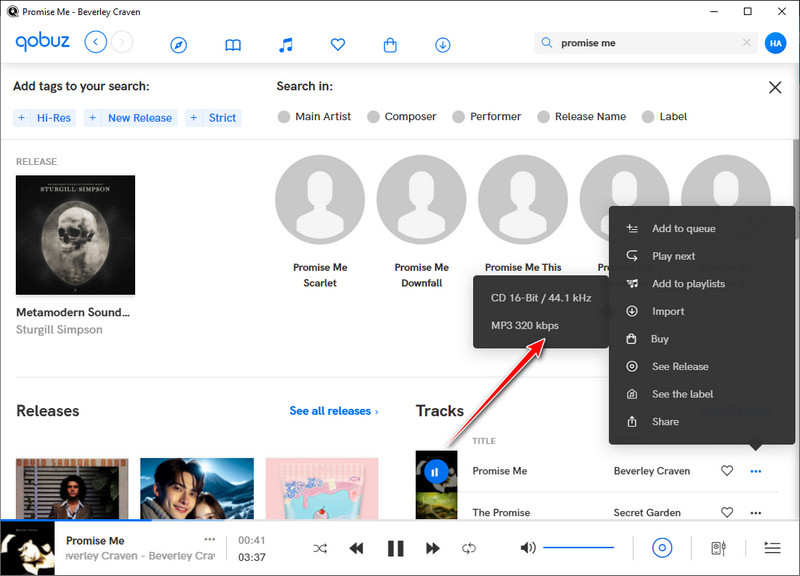
Step 3 Click the 3 dots icon after the song and find the Import button which further comes along with different sound quality options. You then just your preferred quality to download with the song.
Step 4 The process will start after your selection. The music downloads are only playable with the Qobuz.
Method 2: Download Purchased Music from Qobuz
Similar to Apple Music, Qobuz enables listeners to buy songs individually if they don't want to maintain a paid subscription. This approach allows for greater flexibility and ownership of specific tracks without ongoing costs.
Note: The sound quality is determined when you purchase the songs.
Step 1 Launch the Qobuz app or web player on your mobile device or computer.
Step 2 Log in to your Qobuz account, then search for the album, track, or playlist you want to download.
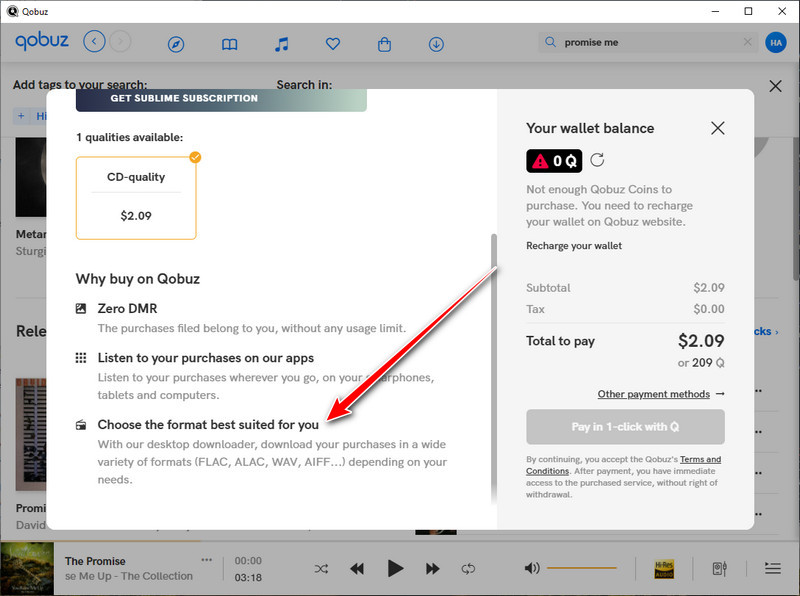
Step 3 Open the album or track page, click the purchase button, and complete the payment process to get access to the music.
Step 4 Before downloading, open the Format menu to select your preferred audio format and quality options.
Step 5 Choose Qobuz Downloader or the Qobuz desktop app for Mac/PC to download your purchased music. The download will start automatically after selection.
Method 3: Export Music Downloads from Qobuz with Audio Recorder
While the two methods we discussed above are the official ways to download music from the Qobuz app, we understand that many people want to explore a more flexible way to download and export songs for Qobuz tracks for various offline uses. That's where the audio recorder comes in. This kind of tool allows you to access music on Qobuz and record songs directly, then save them as independent audio files.
Tool 1: Sidify All-In-One Music Converter
Sidify All-In-One Converter is a professional music recorder, so you don’t need to worry about losing sound quality during the process. To be more specific, the program lets you save recorded audio in various formats. This means you can easily use your Qobuz music on different devices.
Sidify All-In-One Converter
- Download music from different streaming platforms including SoundCloud and Qobuz.
- Convert Qobuz songs in MP3/AAC/WAV/FLAC/AIFF/ALAC
- Losslessly download Qobuz music to the computer.
- Rip music from Qobuz and burn music to CD.
- Rip music from the music site and burn music to CD.
- Built-in free podcast and radio to mp3 downloader and vocal remover.

Step 1 Launch Sidify All-In-One on your computer. Under the Music section, select Qobuz to enter the Qobuz Music Converter interface.
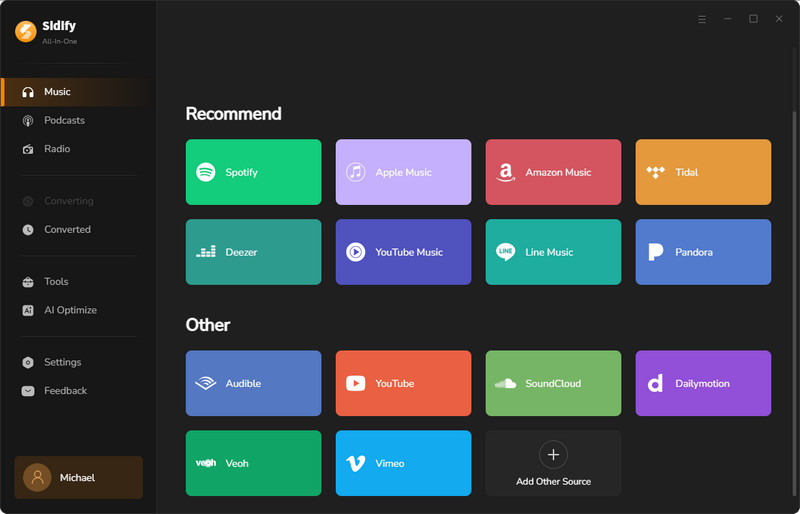
Step 2 Customize your Qobuz download settings, including the output format, audio quality, and other preferences. You can also click the "More Settings" button to adjust file naming and organization options.

Step 3 Log in to your Qobuz account through the built-in web player to access your music library.

Open the playlist, album, or track you want to download. When the Add button appears in the bottom-right corner, click it to add songs to the converter panel. You can select individual tracks or add multiple songs for batch downloading.

Step 4 Click the "Convert" button to start downloading Qobuz songs and save them locally on your computer.


Step 5 Once the conversion is complete, click the folder icon to locate your downloaded Qobuz songs, or check them in the "Converted" section.
Tips: For a more convenient way to browse and play your downloaded music, Sonikr Media Hub brings tracks from your local folders into one searchable library.

Tool 2: Audacity
If you are familiar with Audacity, a free and open-source audio recording and editing software, you can use it to record the audio playing from Qobuz on your computer. However, the recording quality may depend on your computer's audio setup and recording source.
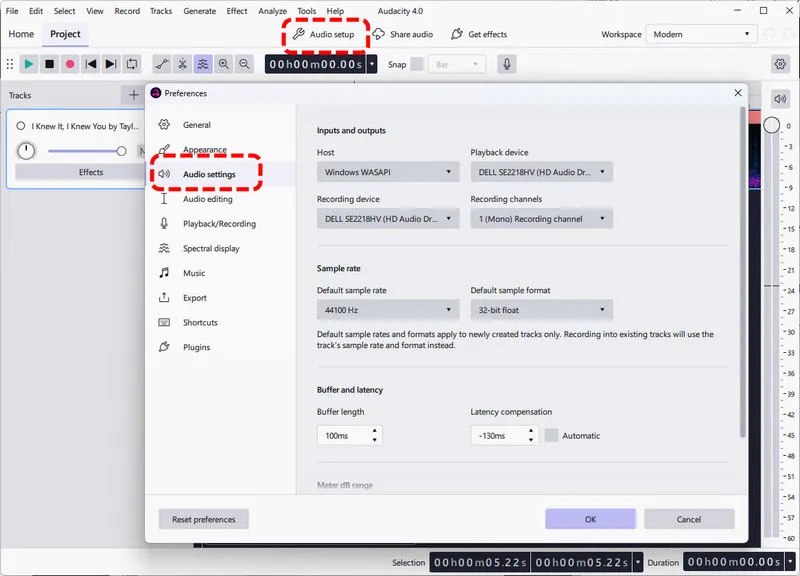
Step 1 Run Audacity on your computer and click Audio Setup in the top toolbar.
Step 2 Under Host, select Windows WASAPI. Then, under Recording Device, select the (loopback) option for the same playback device you use to listen to Qobuz, such as your speakers or headphones.
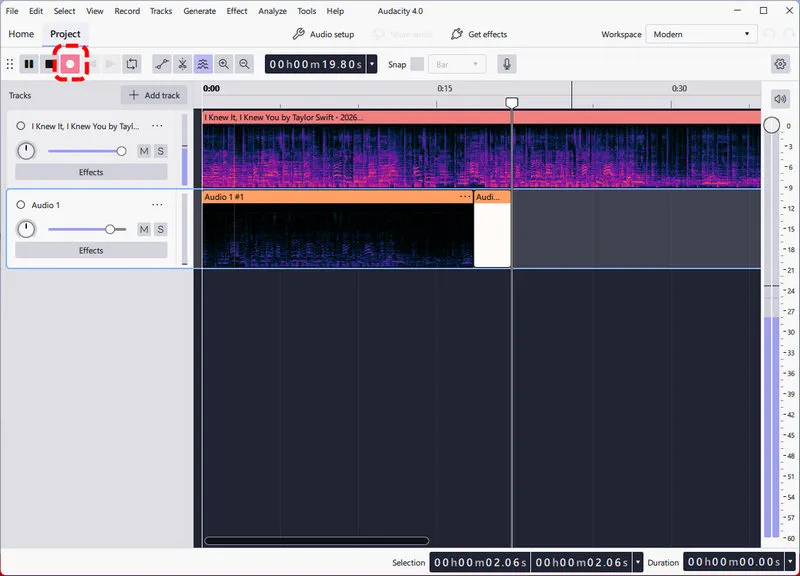
Step 3 Start playing music on Qobuz, then click the red Record button in Audacity to capture the audio. When the playback is finished, click the square Stop button.
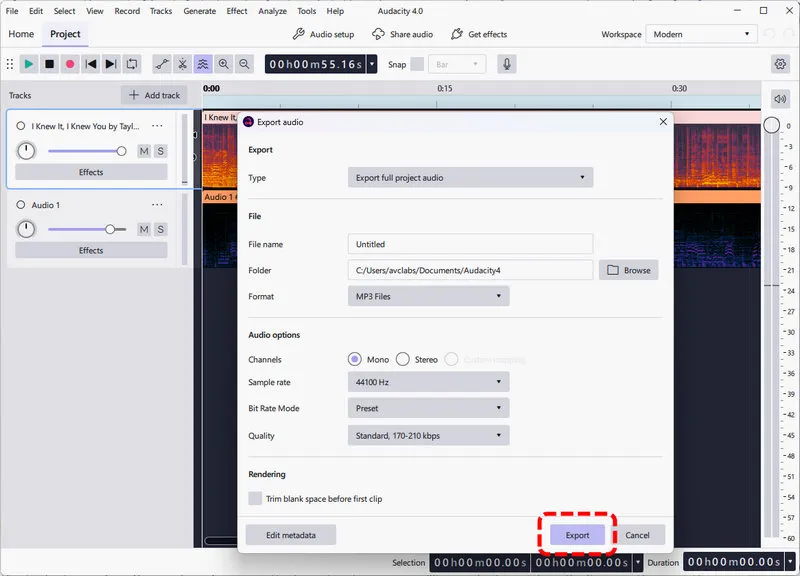
Step 4 To save the recording, go to File > Export Audio. Choose a file name, select the output folder, and choose the desired audio format and other available settings before exporting.
Method 4: Download FLAC and MP3 files from Qobuz by Command-Line Solution
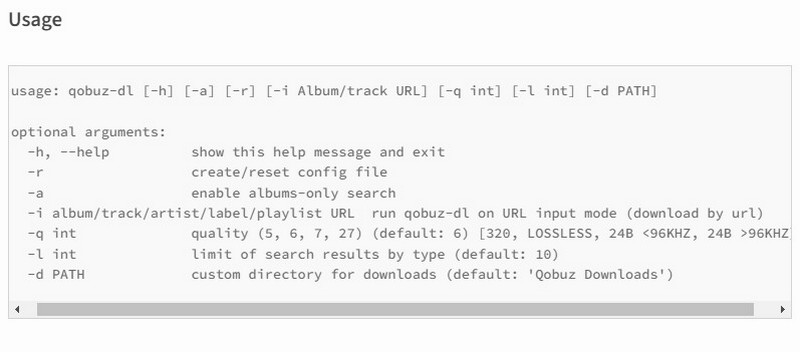
Qobuz-dl is an open-source tool available on GitHub that allows you to download FLAC and MP3 files from Qobuz for free. It downloads Qobuz albums, tracks, artists, playlists, and labels with download mode.
Step 1 Download and install Python 3. During installation on Windows, make sure to check the option to "Add Python to PATH."
Step 2 Open your command line interface and enter the following command based on your operating system (Linux / MAC OS / Windows):pip3 install --upgrade qobuz-dl.
Step 3 To start the tool, type qobuz-dl.exe if you're using Windows. For Linux or macOS, simply type qobuz-dl. You can then use the following command format to download music:
Conclusion
For high-quality downloads, the best method is to use an active subscription with Qobuz, as it allows you to download tracks in lossless formats like FLAC. This ensures you get the best audio quality available. Sidify Audio Recorder can be a good option for capturing music from Qobuz without significant quality loss. If you prefer using qobuz-dl, it can also be good for downloading streams directly from the Qobuz service.
 Sidify All-in-one Music Converter
Download and convert music from all major streaming services in one place. Get MP3 or other popular formats in source audio quality, save songs offline on Windows or Mac, and enjoy up to 10X faster downloads with ID3 tags and lyrics preserved.












