
Since Tidal introduced the HiRes FLAC format (up to 24-bit/192 kHz), it has become a favorite high-fidelity platform among audiophiles. How to correctly enable and download Tidal HiRes FLAC audio has gradually become one of the most frequently asked questions. This article will guide you step-by-step through understanding how to download Tidal HiRes FLAC audio, allowing you to enjoy high-resolution music offline on different devices.
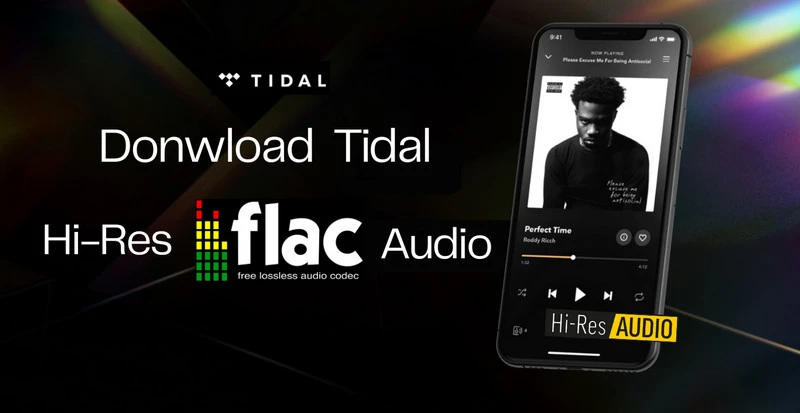
HiRes FLAC (up to 24-bit/192 kHz) is the highest quality audio format currently offered by Tidal. Compared to traditional lossless audio, HiRes FLAC boasts higher bit depth and sampling rate, providing a wider dynamic range and more delicate sonic details. Currently, Tidal officially divides sound quality into three levels: Low, High, and Max, to meet the different needs of users from ordinary people to professional listeners.
| Level | Low | High | Max |
| Format | AAC | FLAC | HiRes FLAC |
| Bitrate | Up to 320 kbps | Up to 16-bit, 44.1 kHz | Up to 24-bit/192 kHz |
| File size | Small | Medium | Large |
| Playback Compatibility | Playable on all devices | All devices that support lossless playback. | Hi-Res equipment or an external DAC. |
| Features | The clarity is average, suitable for everyday music listening. | The sound is more natural and the details are more complete, standard CD quality. | Wider dynamic range, richer sound layers, and closest to the master recording. |
As the table above shows, Tidal's three sound quality options cater to all needs from everyday listening to audiophile-grade experiences. Low offers typical compressed sound quality, resulting in small file sizes and strong compatibility; High provides standard CD-quality lossless FLAC, allowing most users to experience a more natural and complete sound; While Max is geared towards users seeking ultimate sound quality, achieving a wider dynamic range and richer sonic details through 24-bit high-resolution HiRes FLAC.
Simply put, if you're just listening to music casually, Low or High is sufficient; But if you want sound quality closest to the studio master, Max's HiRes FLAC is the best choice.
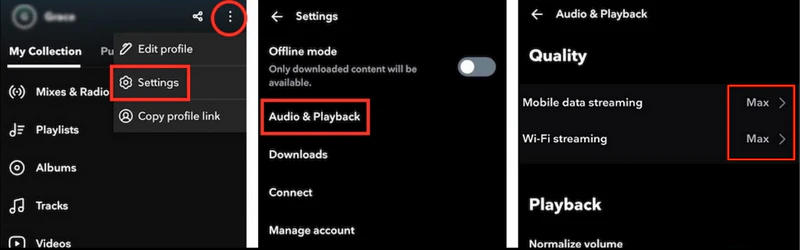
To achieve the best sound quality on your mobile phone, Tidal offers three ways to enable or confirm Hi-Res FLAC playback. These include streaming online using mobile data/Wi-Fi, playing downloaded content offline, and directly switching the audio quality on the playback screen.
1. When using Mobile data/Wi-Fi
Step 1Open the Tidal app on your phone and tap the three dots next to your profile.
Step 2Navigate to Settings, find Audio & Playback.
Step 3Adjust the audio quality options for both Wi-Fi streaming and Mobile data streaming to Max.
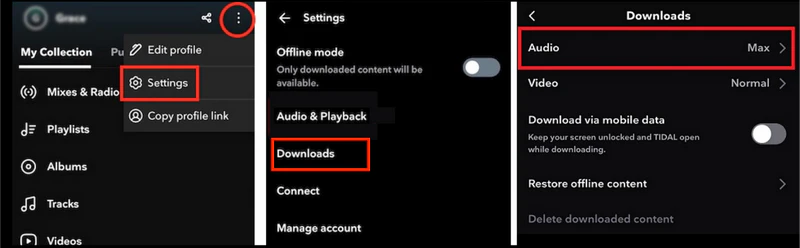
2. When playing downloaded content offline
Step 1Open the Tidal app on your phone and select the three-dot menu beside your profile.
Step 2Open Settings, then tap on Downloads.
Step 3Click Audio and choose Max to get the best quality.
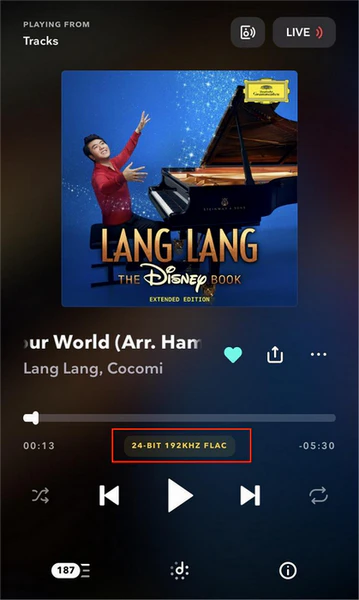
3. You can also find the audio quality icon below the progress bar on the playback page and select FLAC.
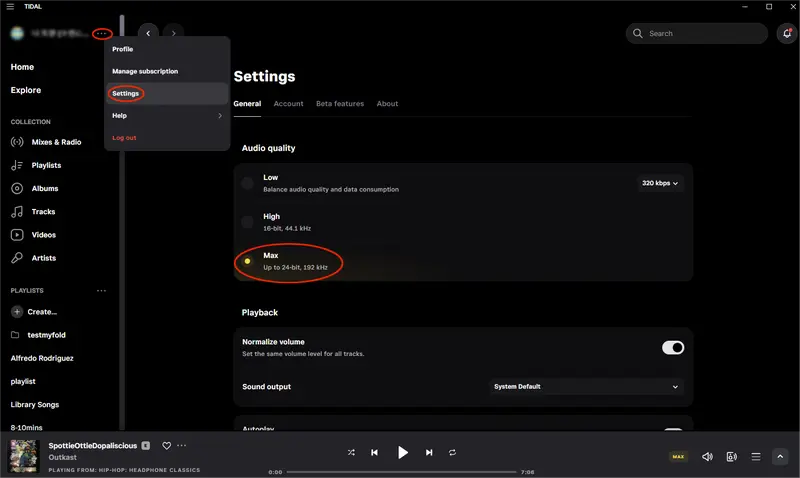
Step 1Open the Tidal desktop app or Tidal web player, and click the three dots to the right of your profile.
Step 2Click Settings to enter the general settings page.
Step 3Find Audio Quality and set the option to Max.
You can also click the "Now Playing" bar at the bottom, click the audio quality icon, and then select the "Max" option.
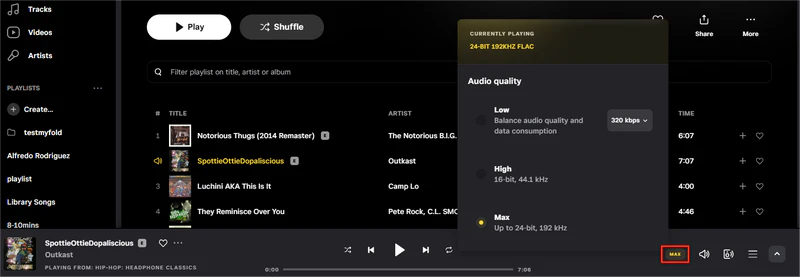
Note: For desktop playback of HiRes FLAC, your computer's sound card or external DAC needs to support high-resolution output; Otherwise, Tidal will automatically downgrade to standard FLAC.
To play HiRes FLAC on Tidal, you need to meet three conditions: 1. Ensure you have a Tidal subscription; 2. Set the audio quality to Max; 3. Use a device that supports 24-bit output or an external DAC. With these requirements met, you can now enjoy Max (HiRes FLAC) audio on both mobile and desktop.
While Tidal offers offline playback, downloaded music can only be used within the app and cannot be exported to computers, media players, car systems, or other devices. If you want to truly save Tidal HiRes FLAC audios as local files and freely transfer them to other devices for offline playback, you'll need to use third-party tools.
Among the many tools available, Sidify Tidal Music Converter is one of the most widely used and stable solutions. It supports batch downloading Tidal tracks, albums, and playlists in MP3/AAC/WAV/FLAC/AIFF/ALAC formats, preserving 100% original sound quality and complete ID3 tags at 10X speed. Whether you are a free or premium Tidal user, Sidify can easily save Tidal audio to your local computer, allowing you to enjoy high-quality music offline on any device.
Sidify Tidal Music Converter
 Download Tidal music in Lossless Audio Quality. Convert Tidal tracks to MP3/AAC/WAV/FLAC/AIFF/ALAC format. Support batch downloading Tidal music at 10X speed. Keep full ID3 tags and export the lyrics after conversion. Free updates & technical support.
If you are looking for a tool to convert any streaming music (such as Spotify, Apple Music, Amazon Music, Tidal, Deezer, YouTube, YouTube Music, SoundCloud, DailyMotion …) to MP3, Sidify All-In-One is the go-to choice.
Step 1Launch Tidal Music Converter
Install and launch Tidal Music Converter on your computer. You will enter the Tidal web player page, and you need to log in to your Tidal Account.
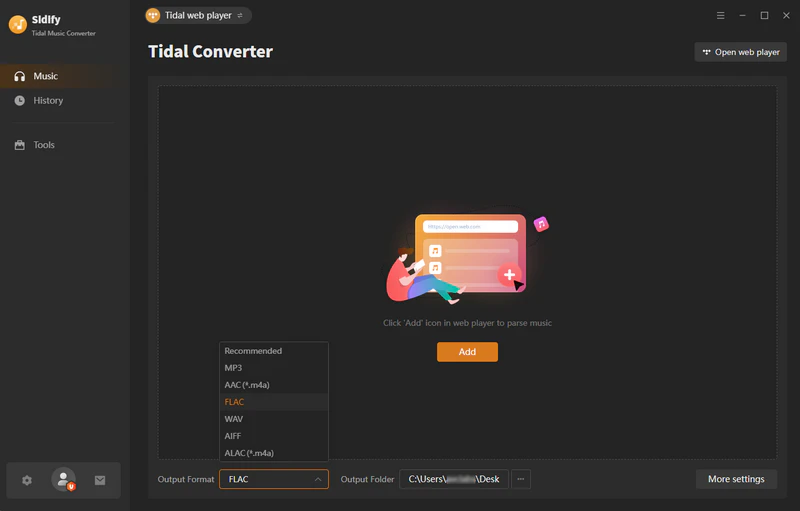
Step 2Add Tidal HiRes Music into Sidify
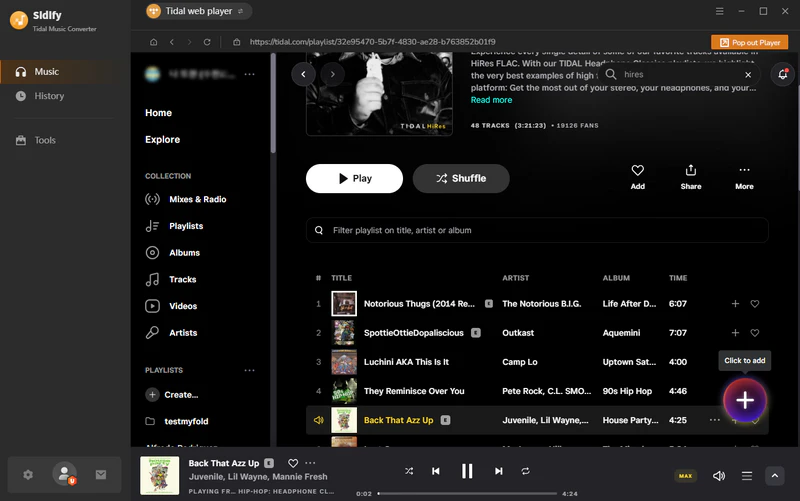
Find your favorite HiRes music and click the Floating "+" button to add HiRes audio to Sidify. Sidify supports batch processing, so you can import multiple songs, albums, or even full playlists in a single step.
Step 3 Set FLAC as the Output Format
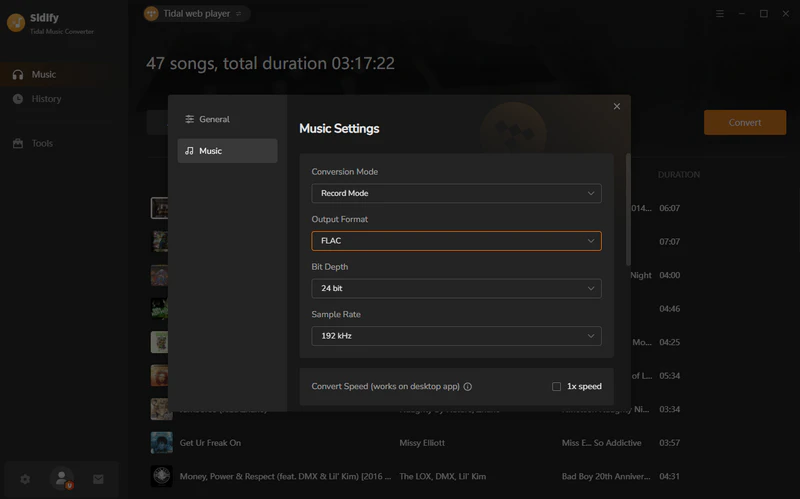
Go to the music settings page, select FLAC as the output format, bit depth as 24 bits, and sampling rate as 192kHz. You can also customize your output filename by Artist, Album, or Playlist, etc.
Step 4Start Downloading Tidal HiRes FLAC Audio
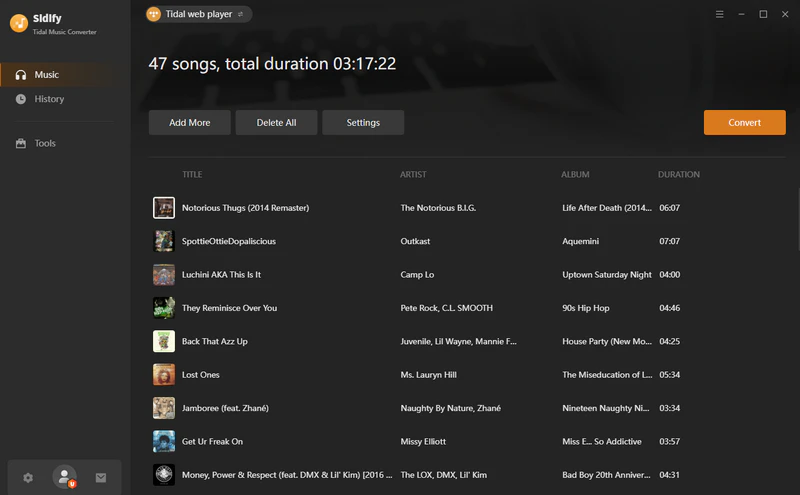
Click the "Convert" button to start downloading the Tidal songs you added. Sidify will automatically process each song in sequence, and the conversion is complete when the progress bar reaches 100%.
Step 5Locate the Downloaded Tidal Audio Files
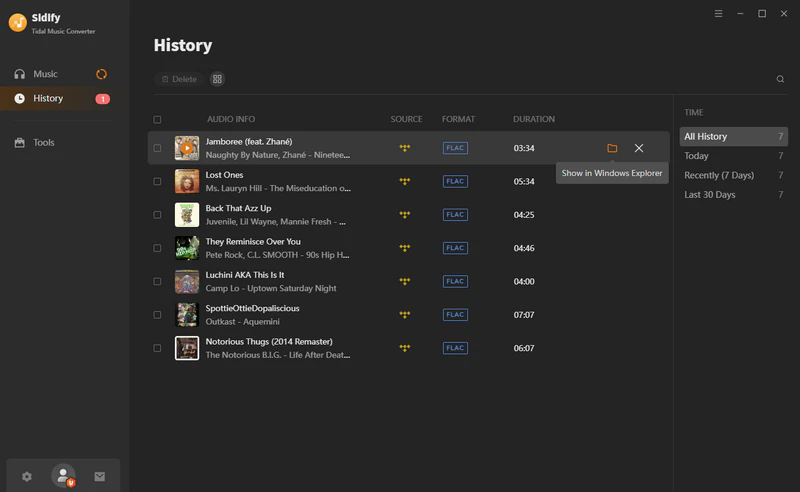
After the conversion is complete, go to the "History" page and click the file icon to find the downloaded Tidal FLAC file in your local files.
By following these steps, you can easily extract and save Tidal's HiRes FLAC songs as true local lossless files. No longer restricted by the platform, and without worrying about membership expiration or cache issues, you now permanently own these Tidal FLAC audio files and can freely play and back them up on any player and device.
Unlocking Tidal HiRes FLAC is just the first step. To truly experience the advantages of "high-resolution" audio, your equipment, player settings, and output method must all meet Hi-Res standards. Here are some practical tips to help you ensure that every HiRes FLAC track delivers the sound quality it's meant to.
Not all devices are capable of fully outputting 24-bit/96–192kHz audio, so you need to check if your phone, computer, or audio system has Hi-Res capabilities.
If you want to fully utilize 24-bit/96–192kHz output, an external DAC is the most effective way. Many USB DACs on the market (such as the FiiO KA5, iBasso DC04Pro, and Moondrop DAWN) support 32-bit/384kHz, which can fully leverage the advantages of Hi-Res FLAC.
Although some Bluetooth codecs support high bitrates (such as LDAC and LHDC), they still cannot fully replicate the original Hi-Res audio. While convenient, Bluetooth compresses some of the data.
Hi-Res FLAC files are large (typically tens to hundreds of MB per track), so it is recommended to use Wi-Fi 6 or a fiber optic network to prevent stuttering and playback degradation.
No. Only certain high-resolution masters supplied by record companies are available in HiRes FLAC format. You can easily identify them by the “Max” badge shown on individual tracks or the “Tidal HiRes” label displayed on the album page.
Even if you set the audio quality to Max (HiRes FLAC) in Tidal, it doesn't mean all songs will play in HiRes. There are several possible reasons for this:
①This song is not available in a HiRes version.
②Your current device or network does not support HiRes playback.
③Some songs may display as HiRes when streamed, but may be downgraded to standard FLAC when downloaded due to copyright, regional, or device restrictions.
No, although Tidal supports premium users downloading Tidal content for offline listening, the downloaded content is encrypted and cached, and cannot be exported, and can only be played within the Tidal app. To obtain true HiRes FLAC files on your local device, you will need to use a third-party tool such as Sidify.
No, Sidify Tidal Music Converter is a professional Tidal downloader. With the correct settings, Sidify can download Tidal music in 24-bit/196 kHz lossless FLAC format, allowing you to enjoy high-quality, studio-grade sound.
Technically, it's playable, but to achieve the full Hi-Res effect, the following equipment is required: Your computer or mobile phone needs to support 24-bit output; Bluetooth headphones usually do not support Hi-Res FLAC (it will be compressed). To experience the full sound quality, it is recommended to use a Hi-Res player, USB DAC, or wired headphones.
Tidal HiRes FLAC provides users who want to experience studio-quality sound in the most direct and convenient way. Simply enable Max sound quality, and you can enjoy more detailed, realistic, and layered sound anytime. If you want to play Tidal HiRes files offline on different devices, Sidify Tidal Music Converter is your best solution, allowing you to save Tidal's HiRes FLAC files locally without losing sound quality.


 650,000+ Downloads


