


Many users hope to convert Amazon Music to MP3 so they can freely transfer songs to other devices and listen to them anytime, anywhere. However, Amazon's download feature is very limited.
So, is there a way to convert Amazon Music to MP3? This guide will introduce 3 effective ways, including downloading purchased music from Amazon officially, using a desktop tool, and trying 3 free online Amazon Music converters. We will compare the benefits and drawbacks of these 3 methods, helping you choose the one that best suits your needs.
Can You Download Amazon Music to MP3 Directly?
Short answer: Not directly. Amazon Music Prime and Amazon Music Unlimited songs are encrypted in a special format, and can only be downloaded for offline listening within the Amazon Music app. Only purchased digital music can be downloaded directly as MP3 files.
Understanding Amazon Music's Three Types and Download Limits
Before downloading or converting Amazon Music tracks, it's important to understand the differences between purchased music, Amazon Music Prime, and Amazon Music Unlimited, as each offers different download options.
Three Types:
- Amazon Music Prime: Included with a Prime membership, but song selection is limited, and songs cannot be downloaded as local files.
- Amazon Music Unlimited: A paid service with a large music library and higher sound quality, but songs still cannot be exported as MP3 files.
- Purchased digital music: Can be downloaded from Amazon's official website or through the Amazon Music app, and can be downloaded in MP3 format.
Although Prime and Unlimited users can listen to songs offline, the downloaded files are protected and cannot be exported or played on other devices. If you previously purchased digital music from Amazon, you have more freedom and can get MP3 files directly.
If you want to save Amazon Music Prime or Unlimited songs as local MP3 files — for example, to play them on an MP3 player, transfer to USB, or use in a car stereo — you'll need a dedicated Amazon Music converter to export the tracks in a universal format.
| Method | MP3 Output | Works with Prime/Unlimited | Keep After Cancellation |
|---|---|---|---|
| Amazon Music App (offline mode) | ❌ | ✅ | ❌ |
| Purchased Digital Music | ✅ | ❌ | ✅ |
| Amazon Music Converter (e.g. Sidify) | ✅ | ✅ | ✅ |
If you subscribe to Amazon Music Prime or Unlimited and need true MP3 files, a converter tool is your most reliable solution to download Amazon Music songs to your device, even after you cancel your subscription.
Method 1: Download Purchased Amazon Music as MP3 Officially
 Note:
Note:This method only applies to Amazon digital music that you have purchased.
If you purchased digital music from Amazon, you can try downloading these tracks through Amazon's official channels. This method doesn't require third-party converters, making it a simpler option.
How to Download Purchased Amazon Music as MP3 Officially
Step 1 Open the Amazon Music website and log in to the account you used to purchase the music.
Step 2 Click Library > Music, then select the Purchased filter to list all the music you have purchased.
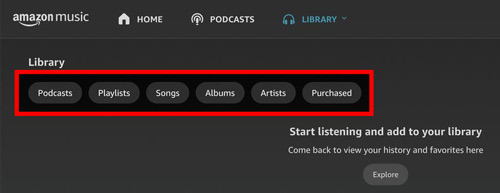
Step 3 Find the song you want to download, click the Download button next to it.
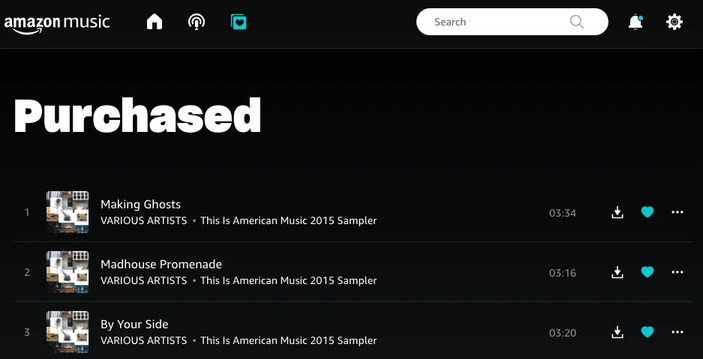
Step 4 Once the download is complete, open your laptop's default Downloads folder and check the downloaded files.
Method 2: Use Desktop Amazon to MP3 Converter
If you want to convert Amazon Music tracks into MP3 files rather than just download purchased music, a desktop converter may be a good option
Sidify Amazon Music Converter is such a desktop tool for Windows and macOS that helps users convert Amazon Music songs, playlists, albums, and into MP3, AAC, WAV, FLAC, AIFF, ALAC, EAC3, and AC4 files while preserving the original audio quality and ID3 tags. Once converted, you can play those MP3 files to other devices and listen to your songs anytime, anywhere.
Sidify Amazon Music Converter
- Download Amazon Music to the computer.
- Convert Amazon Music to MP3, AAC, WAV, FLAC, AIFF, ALAC, EAC3, AC4.
- Keep original audio quality and ID3 tags after conversion.
- Support the latest Windows 11 & macOS Tahoe 26.
- Free updates & technical support.
Check out Sidify Amazon Music Converter Review >>
 Tips:
Tips:If you want a tool to convert any streaming music (including Spotify, Apple Music, Amazon Music, Tidal, Deezer, YouTube Music) to MP3, Sidify All-In-One is the go-to choice.
How to Download Amazon Music to MP3 with Sidify?
Sidify Amazon Music Converter, a beginner-friendly tool with powerful features, giving you the possibility to keep your Amazon Music collection playable offline forever, on any device you choose. Without further ado, let's explore how it works with detailed steps.
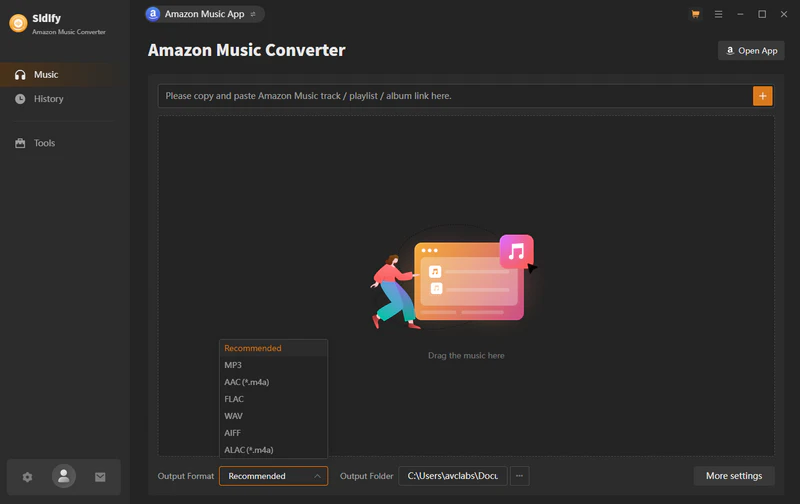
Step 1 Launch Sidify Amazon Music Converter
Launch Sidify Amazon Music Converter to open the program's main interface.
Step 2 Add Amazon Music to Sidify.
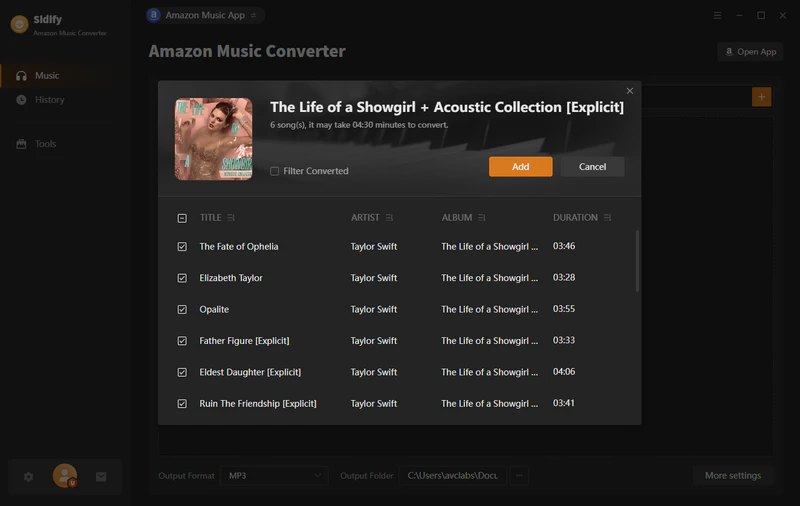
Drag and drop tracks or playlists from Amazon Music into Sidify. Sidify will automatically recognize and list them. Select the music you want to save to your computer as MP3 files, then click the Add button.
Step 3 Choose MP3 as the Output Format
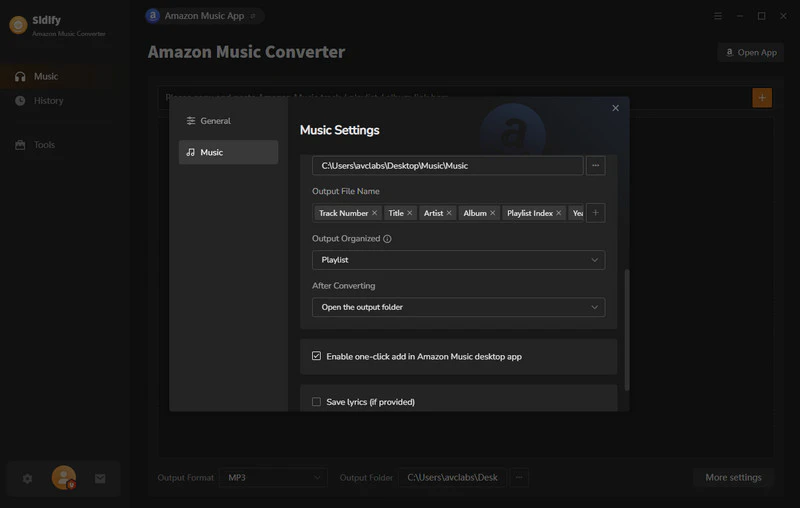
Click the Settings button on the left panel to customize the output settings, including Output Format (MP3/AAC/FLAC/WAV/AIFF/ALAC/EAC3/AC4), audio quality (320kbps, 256kbps, 192kbps, 128kbps) and output path.
Step 4 Download Amazon Music as MP3 Files
Click the Convert button to start downloading the Amazon songs as MP3 files. Once the conversion is done, you can click the History tab to find the converted files in MP3 format on your local computer.
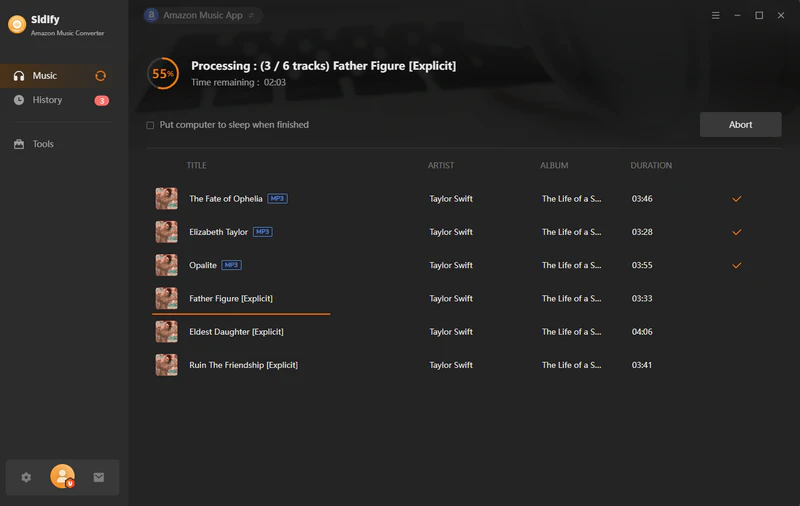
Now you've downloaded songs from Amazon Prime / Amazon Music Unlimited as MP3 files with Amazon Music Downloader, you can play them offline, transfer them to a USB drive, sync them to other devices, etc. Just take the time and enjoy your Amazon Music freely.
Method 3: Use Free Online Amazon Music to MP3 Converter (3 Tools)
1. Lucida.to
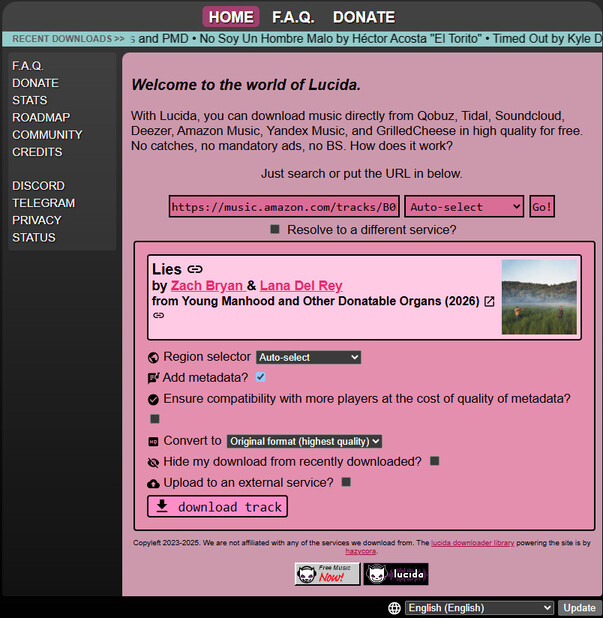
Lucida.to is one of the best free online Amazon Music to MP3 converters on the market. Although Lucida.to seems to be an unofficial and small website, its conversion features and format support are comprehensive. It allows you to convert Amazon Music songs and playlists to MP3, M4A, and AAC files, as well as tracks from Qobuz, Tidal, SoundCloud, Deezer, Yandex Music, and GrilledCheese. Before converting, you can even customize the audio format, bitrate, and whether to preserve metadata.
How to Convert Amazon Music to MP3 with Lucida.to
Step 1 Open Lucida.to in your browser.
Step 2 Copy the link to the Amazon Music song or playlist you want to convert and paste it into the input box.
Step 3 Click Go next to the input bar, then choose your preferred output format, bitrate, and whether to preserve metadata.
Step 4 Once you've finished adjusting the settings, click Download Track or Download the Full Playlist to start the conversion.
- Free to use.
- Freedom to customize audio formats, bitrate, and more.
- Support up to 320kbp/s.
- Slow to download Amazon Music playlist.
- Interface is simple.
2. Amazon Music Downloader
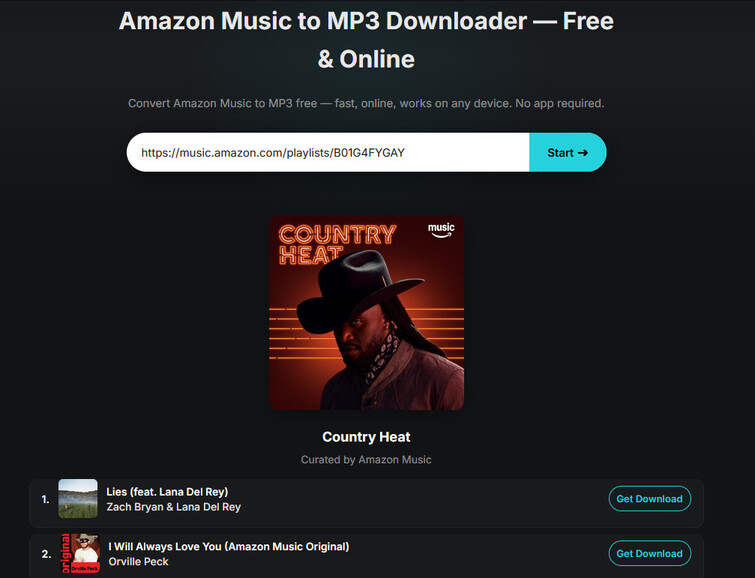
Amazon Music Downloader is a common online tool for converting Amazon Music to MP3. During our testing, we found that it often failed to process shared links to individual tracks, although it could load playlists and albums. However, it does not offer a batch download option for entire playlists, so you have to click the Download button for each song individually.
How to Convert Amazon Music to MP3 with Amazon Music Downloader
Step 1 Visit Amazon Music Downloader in your browser.
Step 2 Copy the link to an Amazon Music album or playlist and paste it into the input box.
Step 3 Click Start to load the link and check the available songs.
Step 4 Click the Get Download button next to each song you want to save.
- Supports loading playlists and albums.
- Free to use online without installing software.
- Often fails to process shared links to individual tracks.
- No batch download option for entire playlists; songs must be downloaded one by one.
3. DoubleDouble
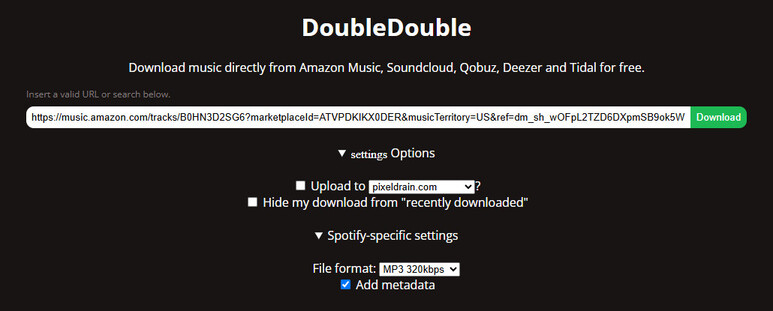
DoubleDouble is another good free online Amazon Music to MP3 converter. It supports MP3 files at up to 320 kbps, as well as FLAC files, making it suitable for users who prefer lossless audio. Before converting, you can choose the output format, whether to preserve metadata, and whether to hide download information. However, when downloading playlists, we encountered failed downloads or tasks that remained stuck on “Processing.”
How to Convert Amazon Music to MP3 with DoubleDouble
Step 1 Open DoubleDouble in your browser.
Step 2 Paste the Amazon Music song or playlist link into the input field.
Step 3 Select MP3 as the output format and metadata preservation as needed.
Step 4 Click Download to start the conversion.
- Free and easy to use
- Supports MP3 and FLAC formats, with MP3 downloads at up to 320 kbps
- Playlist downloads often fail or are unstable
- The website interface is too basic
Which is the Best Way to Convert Amazon Music?
We introduced 3 different ways to convert Amazon Music to MP3, but which one is the best? Which tool converts Amazon Music the fastest while maintaining the highest audio quality? The table below compares the supported formats, download speed, and batch conversion capabilities of the official method, Sidify, and three free online converters to help you find the most suitable option.
| Feature | Official Ways | Sidify Amazon Music Converter | Lucida.to | Amazon Music Downloader (Online) | DoubleDouble |
|---|---|---|---|---|---|
| Pricing | Free | Free Trial/Premium ($44.95/year) | Free | Free | Free |
| Download Single Tracks | √ | √ | √ | × (unstable) | √ |
| Download Playlists | √ | √ | √ | √ | × (unstable) |
| Formats Support | MP3 (Purchased Amazon Music Only) | MP3, AAC, WAV, FLAC, AIFF, ALAC, EAC3, AC4 | MP3, M4A, AAC | MP3 | MP3, FLAC |
| Download Speed | Normal | Hardware Acceleration | Normal | Normal | Normal |
| Batch Conversion | × | √ | √ | × | × |
| Customizable Output Settings | × | √ | √ | × | √ |
| Maximum MP3 Bitrate | 256kbps | 24-bit | 320kbps | 320kbps | 320kbps |
| Preserve Metadata | √ | √ | √ | √ | √ |
| Ads-free | √ | √ | √ | √ | √ |
FAQs
Can you convert Amazon Music to MP3 for free?
Yes. You can convert Amazon Music to MP3 for free through official downloads or online converters. However, please note that free methods cannot guarantee that every track can be converted successfully, with high quality and stability.
How do I download Amazon Music to MP3 without a subscription?
You can download songs directly within Amazon Music, but they can only be played within the app. If you need more freedom, consider using Sidify Amazon Music Converter to download tracks to your local devices and keep them permanently.
Is it legal to use Amazon Music converters?
It depends on what you use the converted files for. If you only use these files for personal offline listening, this might be considered acceptable. However, if you use the converted files for commercial purposes, you might violate the laws in your local area.
Where are Amazon Music offline downloads stored?
Offline downloads are stored within the Amazon Music app's private, protected storage and are not accessible as regular files through your device's file manager.
Will converted Amazon Music MP3 files still play after I cancel my subscription?
Yes. Once songs are converted to standard MP3 files using a tool like Sidify, they are saved locally on your computer and remain playable even after your Amazon Music subscription ends.
Conclusion
We introduced three methods to convert Amazon Music to MP3, including the official method, a desktop tool, and three free online converters. If you want a faster and easier free way to convert Amazon Music, the official method and online music converters may be more suitable for you.
In contrast, if you need a more stable, higher-quality way to save Amazon Music tracks, we recommend Sidify Amazon Music Converter.
 Sidify Amazon Music Converter
Convert and download Amazon Music Prime & Unlimited tracks to MP3 at 10X speed with original high quality.











