
When will Spotify Wrapped be available? How can you access it? As we approach the end of November, Spotify Wrapped is the hot topic, with its release just around the corner. This annual tradition, which began in 2016, gives us a chance to reflect on our listening habits from the past year. The data is presented in a visually appealing and easy-to-understand format, helping us quickly discover our musical preferences over the past 300+ days. Ready for your Spotify Wrapped? This article will guide you on how to find, download and share your Spotify Wrapped and cover detailed info about the Wrapped.

Spotify Wrapped is a personalized annual listening report based on Spotify streaming data, presented as a clear, data-driven analysis, enhanced by a highly engaging, visually rich, and interactive design that makes complex listening data easy and enjoyable to explore. The report tracks listening activity from January 1 to approximately mid-November each year. A stream is counted once a track is played for more than 30 seconds, and offline listening is included.
The Spotify annual listening report includes key personal listening metrics such as top artists, playlists, songs, and genre distribution, along with unique insights like Listening Age, a fun estimate that matches your listening to the era of music you resonate with most. Overall, Spotify Wrapped provides a structured recap of individual streaming activity, including:
⭐Top Artists: The five artists you listened to most often throughout the year.
⭐Artist Message: A short thank-you message from one of your top artists.
⭐Top Songs and Playlists: The most-played songs, showcasing the tracks you couldn't stop streaming.
⭐Top Podcasts: Five most-listened podcasts of the year.
⭐Top Genres: An overview of the music genres you gravitated toward the most.
⭐Total Listening Time: A summary of how many hours of music you have listened to in total.
⭐Deep Dive Recap: A more detailed look at your listening habits.
In year 2026, Sidify added new data analysis to your Spotify Wrapped records, like:
⭐⭐Listening Archive: 5 AI-powered snapshots of your most memorable listening days.
⭐⭐Top Albums: The albums you kept coming back to.
⭐⭐Top Audiobook Genre:The most-listened audiobook genre and the top title from it.
⭐⭐Audiobook Author Clip: Brief messages from the authors behind the audiobooks you love.
⭐⭐Podcaster Clip: Favorite podcast hosts appear with brief messages.
⭐⭐Artist Sprint: A month-by-month view of your top five artists and their ranking shifts.
⭐⭐Fan Leaderboard: Your global ranking among listeners, based on total minutes played.
⭐⭐Top Song Quiz: An interactive quiz to reveal your most-played song of the year.
⭐⭐Listening Age: A look at your top tracks’ release years compared to listeners in your age group.
⭐⭐Clubs: See which of six listening style Clubs fits you and your role in it.
⭐⭐Listening Age: Compare your music tastes with people your age based on when the songs were released.
⭐⭐⭐Wrapped Party: A new interactive feature to experience your Wrapped year together with friends.
Spotify Wrapped can be shared directly on social media, with a unique, shareable "Wrapped" summary that invites you to celebrate your musical journey and compare it with friends, adding a community aspect to the experience.
👉 You May Also Like: Spotify Blend: How to Use and Make it [2026 Latest]
Spotify Wrapped is typically released between November and December. Last year, it was released on Wednesday, December 3. Here are the release dates for Wrapped over the past few years:
As with previous years, you can expect Wrapped to drop within this timeframe, but be sure to stay tuned for an official announcement from Spotify.
Once Spotify Wrapped 2026 is released, you'll be able to find it easily in both the mobile and desktop apps. Spotify typically makes it highly visible by placing it front and center on the app's homepage. This means when you open the app, your Wrapped will be featured prominently across the front pages, often with pop-up notifications to draw attention to it.
Additionally, Spotify usually sends out an email notification to let you know that Wrapped is live, so you'll be alerted as soon as it's available. However, it’s also very likely that you'll hear about Wrapped from friends or social media, as many users share their results online. This will likely prompt you to check out your own Wrapped and see how your listening habits compare.
To sum up, Spotify goes all out to make sure Wrapped is hard to miss, with easy access through the app and plenty of reminders.
If you're looking to revisit your old Spotify Wrapped stories, unfortunately, they are only available for a limited time after the release. However, you can still access your Wrapped playlists from previous years through Spotify. Here's how:
You can always find your "Top Songs" from past years in the "Made for You" section of your library. Spotify saves these curated playlists for easy access.
If you're looking for a particular year's Wrapped playlist, you can search for it by typing spotify:app:genre:2026 (replace "2026" with the year you want) into the search bar. This will take you directly to the corresponding playlist.
Important: Spotify does not automatically create Wrapped playlists for you. Instead, you need to go through the Wrapped experience (viewing your Wrapped stats in the app) in order for the playlists to be saved. If you can’t find a Wrapped playlist for a specific year, it’s likely that you didn’t complete the process or engage with Wrapped that year.
If you'd like to keep your Spotify Wrapped playlists for future listening or download them to your local device, here are two effective methods:
To ensure you can always access your Spotify Wrapped playlists for year-round streaming, simply add them to your Spotify library:
Open the Spotify Wrapped playlist you want to save. Click the “add” button (represented by a plus sign) next to the playlist. When added, you’ll see a green checkmark confirming that it’s now in your library.
Alternatively, on some platforms or in certain years, instead of the plus sign, you may see a heart icon. Click this to add your Wrapped playlist to your library. Once it’s saved, you can easily access it anytime from your personal Spotify library.
If you want to keep your Spotify Wrapped playlists permanently and listen to them offline, you can use a Spotify Playlist MP3 downloader like Sidify Music Converter. This software allows you to download songs, albums, or playlists from Spotify to your local computer in MP3 format (or other popular formats), so you can enjoy your Wrapped songs even without an internet connection.
Sidify Music Converter
 Convert Spotify music to MP3, AAC, WAV, FLAC, AIFF or ALAC.Download Spotify songs, albums, playlists, podcasts, audiobooks, radios to computer.Keep original audio quality and ID3 tags.Support 10X faster conversion speed.Free updates and technical support.
Step 1Launch Sidify Music Converter
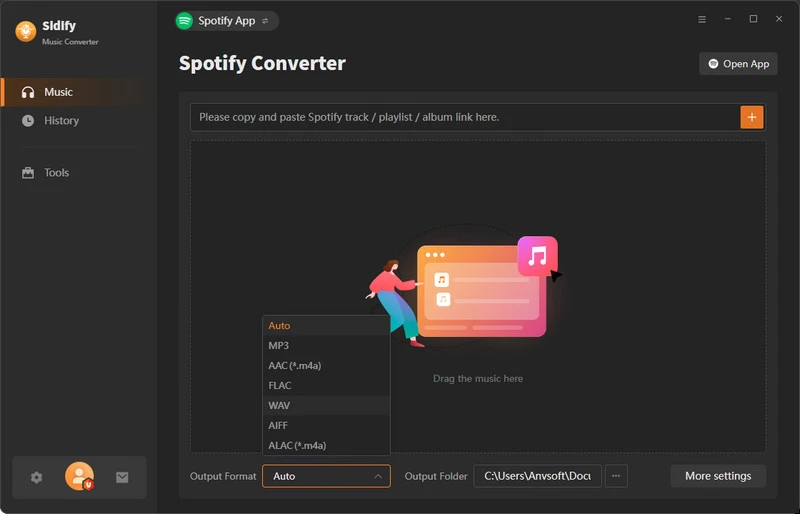
Download Sidify Music Converter, install it on the computer, and launch the program to see the main interface.
Step 2Add Songs from Spotify to Sidify
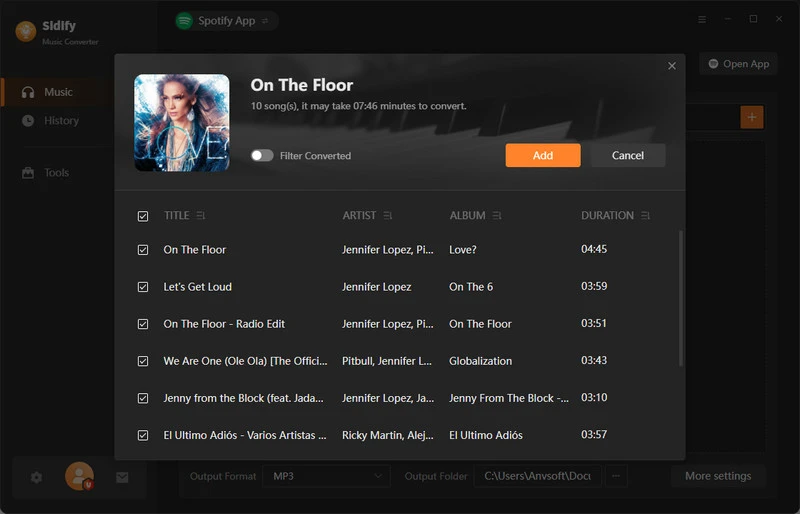
You can opt to directly drag songs from Spotify to the Converter. Or you can copy the Spotify Wrapped playlist link and paste it to the converter. Then select the playlist songs that you like to download as MP3s。
Step 3Customize Spotify Songs Download Settings
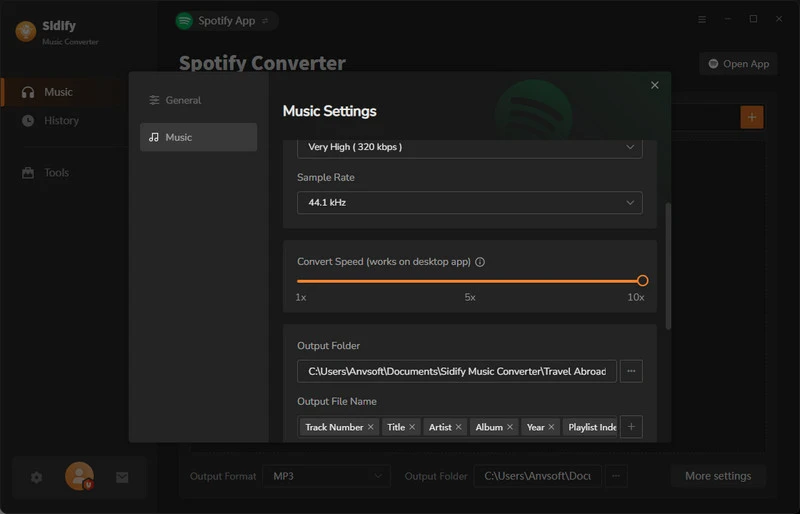
Open the converter settings, and customize the Spotify download format and quality. Optionally, you can adjust the download speed to help save the download time.
Step 4 Start to Download Spotify MP3 Music Files
Tap the Convert button and start the download process.
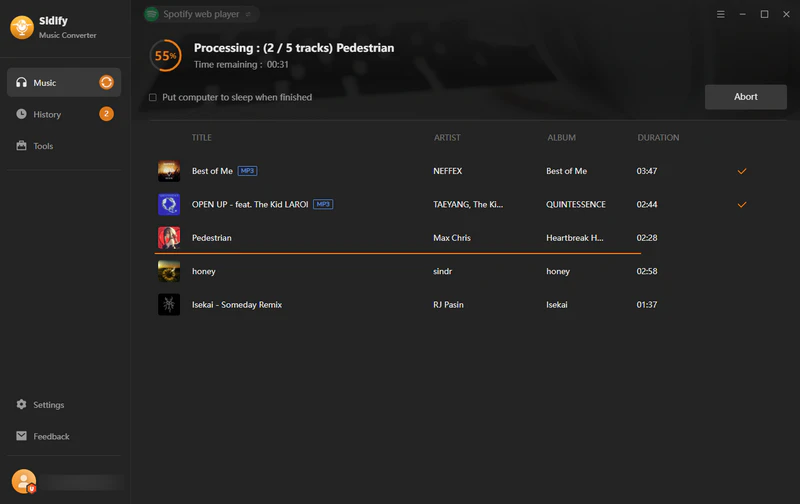
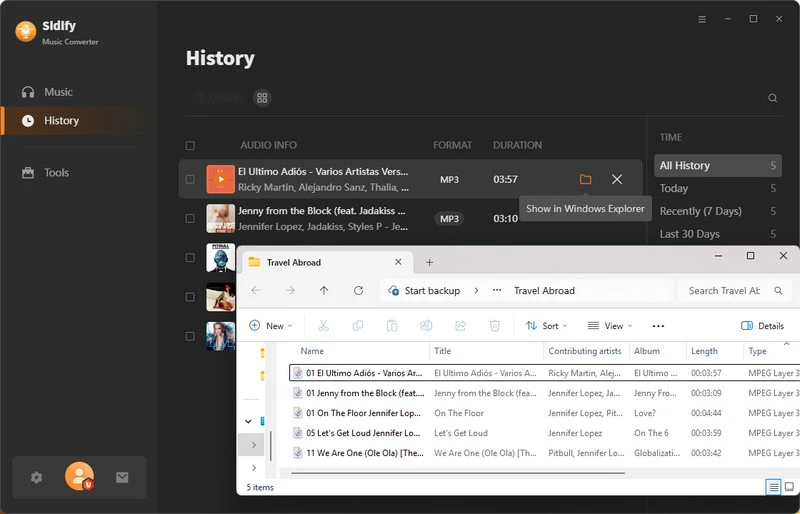
Step 5 View Spotify Downloads in Local Storage
When the download process is finished, go to the History section and view all the Spotify MP3 downloads.

If you want a tool to convert any streaming music (including Spotify, Apple Music, Amazon Music, Tidal, Deezer, YouTube, YouTube Music, SoundCloud, DailyMotion …) to MP3, Sidify All-In-One is the go-to choice.
Year-end music recaps turn your listening habits into digital memories. Even Spotify Wrapped, though official, has stats that aren’t always accurate. Favorite songs, artists, or play counts sometimes don't match reality. The article 18+ Best Spotify Listening Stats Websites lists a dozen Spotify Wrapped alternatives in detail. Here, we highlight a few you can try in the new year. When the new Spotify Wrapped arrives, you can see which report best reflects your actual listening.
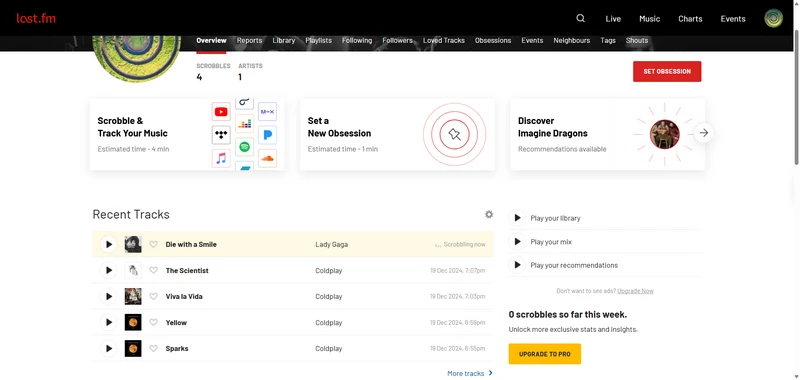
Last.fm tracks Spotify listening in real time through its scrobbling system, recording each track you play along with the timestamp. It provides detailed stats on top artists, songs, albums, and listening trends over days, weeks, months, or years. More powerful than Spotify Wrapped, Last.fm updates continuously, you can see your habits as streaming happens rather than waiting for a year-end summary. A major merit is the depth of historical data, you can compare your 2026 listening even earlier, which Wrapped doesn’t allow.
Step 1 Go to Last.fm website online and create an account if you don't have one.
Step 2 Log in and go to your Settings → Applications → Spotify Scrobbling.
Step 3 Connect your Spotify account by clicking Connect and authorize access.
Step 4 Enable scrobbling, every track you play on Spotify will now be logged automatically.
Step 5 Access your stats anytime on Last.fm, filtering by weekly, monthly, or yearly periods.
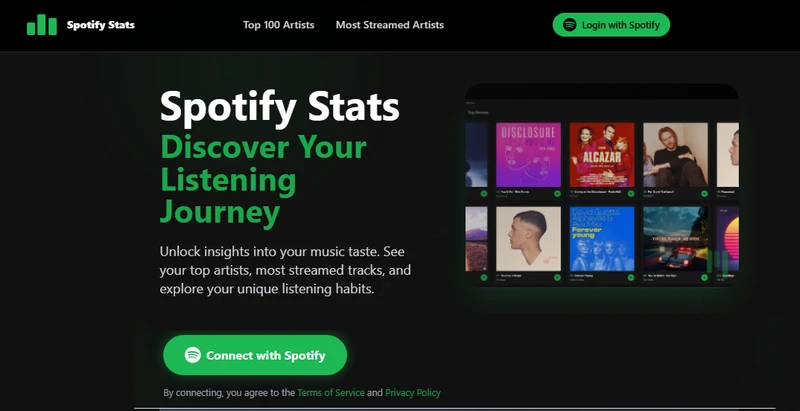
SpotifyStats focuses on generating charts and insights directly from your Spotify account, recording data such as top artists, tracks, and genres over customizable time periods (last month, last 6 months, or all time). Compared with Spotify Wrapped, it’s more flexible because you can pull stats anytime rather than waiting for late November or early December.
Step 1 Visit SpotifyStats and log in with a Spotify account
Step 2 Grant permission to access Spotify listening history.
Step 3 Select the time range: last month, last 6 months, or all time.
Step 4 Charts for top artists, tracks, and genres are generated immediately.
Step 5 Export or screenshot the report for record keeping or trend comparison.
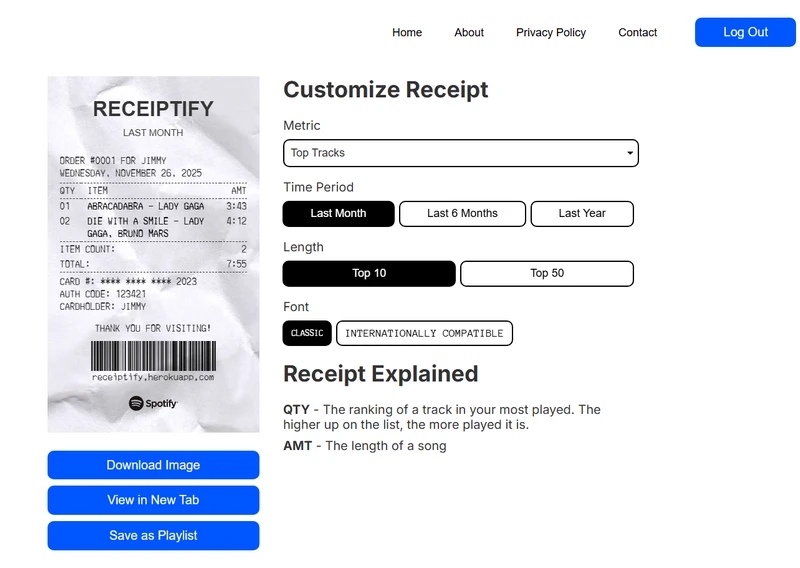
Receiptify turns your top tracks into a “shopping receipt” style visual, capturing your listening habits over the last 4, 9, or 12 weeks. While Wrapped focuses on the full year, Receiptify is great for short-term snapshots and weekly/monthly comparisons.
Step 1 Go to Receiptify and click Get Started.
Step 2 Log in with a Spotify account and authorize data access.
Step 3 Select the time frame: last 4 weeks, last 9 weeks, or last 12 weeks.
Step 4 A receipt-style list of top tracks is generated instantly.
Step 5 Save, download, or share the receipt; repeat at any interval to track changes.
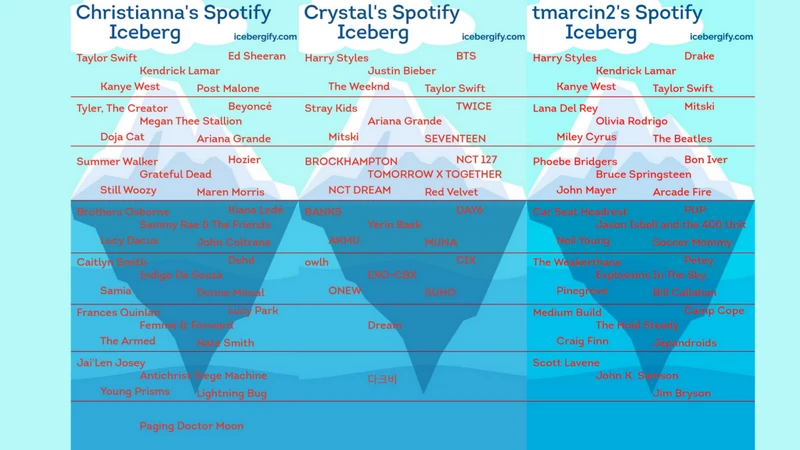
Icebergify creates a "listening iceberg" chart, showing your most-played tracks at the tip and your broader listening habits beneath, typically based on the last 6–12 months of Spotify data. Unlike Wrapped, which highlights only your top songs and artists, Icebergify gives a fuller picture of your entire listening spectrum, including the deep cuts you play less often.
Step 1 Navigate to Icebergify and log in via Spotify.
Step 2 Authorize access to Spotify listening history (typically 6–12 months).
Step 3 Wait as the iceberg chart is generated.
Step 4 The tip shows top-played tracks, the middle shows medium-played tracks, and the base shows less-played tracks.
Step 5 Download or screenshot the chart for comparison with Spotify Wrapped or trend analysis.
Spotify Wrapped is a feature accessible to all Spotify users, regardless of whether you are using the free, version or the premium subscription.
Spotify Wrapped does count offline listening, but it only gets recorded after it syncs when you go online.
When you listen offline, your activity is tracked, but it won't appear in your Wrapped until the app reconnects to the internet. For the app to sync your offline listening, you must go online at least once every 30 days to verify your subscription and update your data.
So, even if you listen mostly offline, your tracks will be included in your Wrapped stats as long as you sync with Spotify regularly.
To make sure you get your personalized Spotify Wrapped at the end of the year, you’ll need an active Spotify account and a bit of time spent enjoying the music and podcasts you love. Wrapped is based on your listening activity, so the more songs and podcasts you engage with over the year, the more data Spotify has to create a unique summary of your musical journey.
When Spotify Wrapped is released, it is typically featured prominently on the Spotify App. However, there may be occasions when it doesn't appear in your account. If this happens, here are some common reasons why:
• Network, Spotify Version, or Device Compatibility Issues: Ensure your internet connection is stable, and verify that you’re using the latest version of the Spotify App. If necessary, try accessing it from another device.
• Insufficient Listening Data: If you haven't accumulated enough listening time or activity, Spotify Wrapped may not be available. In this case, you can try again next year after listening to more music.
No, Spotify Wrapped is typically released between the end of November or the beginning of December. Thus, it won’t collect data through December.
You may have heard that Spotify Wrapped typically collects data from January 1 to October 31, but in October, Spotify confirmed that data collection for Wrapped continues beyond October 31. While the exact cutoff date is unclear, it's certain that tracking will extend at least beyond October 31, but not till the end of December.


