
At the end of each year, Spotify Wrapped becomes a hot topic among music lovers, and SoundCloud Wrapped also allows you to review your most frequently played songs, artists, and music genres from the past year, providing a complete overview of your annual listening activity. This article will show you how to see your SoundCloud Wrapped on mobile and desktop, and how to download your SoundCloud Wrapped playlists for future reference.
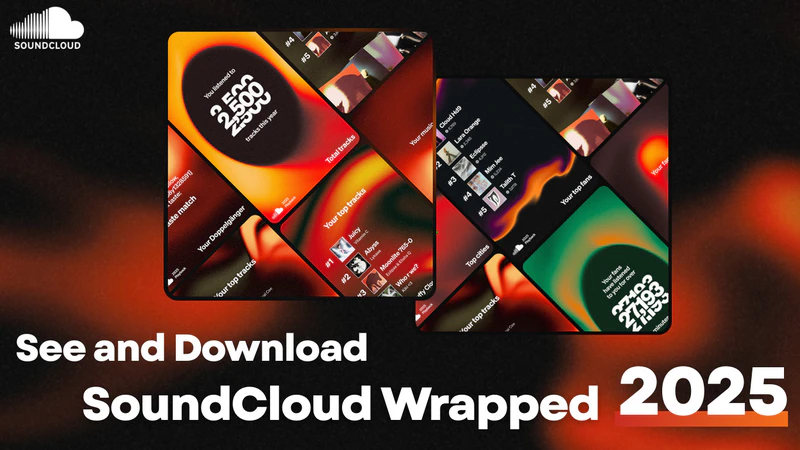
SoundCloud Wrapped is an annual music recap feature launched by SoundCloud at the end of each year, also known as SoundCloud Playback. SoundCloud Playback generates a personalized music recap based on your listening history on SoundCloud, allowing you to review your listening habits over the past year. Typically, it covers the period from January 1st to November 30th of the year.
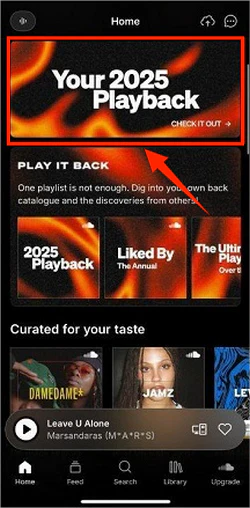
SoundCloud launched the Playback feature. You can easily view it through the SoundCloud app or the SoundCloud website. Follow these steps to quickly get and see your annual playlist.
Step 1 Open the SoundCloud app on your Android or iOS phone and log in to your SoundCloud account.
Step 2 Find and click on the "Your {year} Playback" banner on the homepage.
Step 3 Browse your annual playlists, most frequently listened-to songs, artists, and moods.
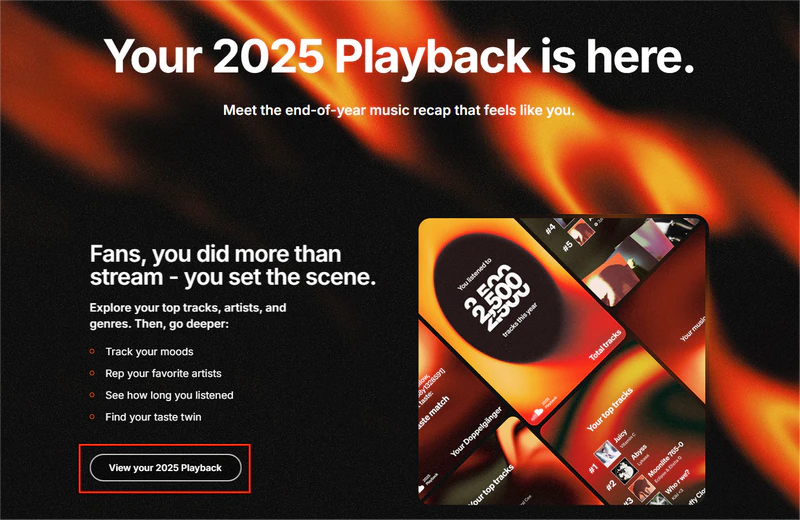
Step 1 Visit the official SoundCloud website on your computer and log in to your SoundCloud account.
Step 2 On the home page, you will see a banner message about "Meet your playback."
Step 3Click on the blue "{202x} playback" text to access the SoundCloud Wrapped page.

Step 4Tap on the "View your {202x} Playback" button to see your {202x} music summaries.
If you can't find SoundCloud Wrapped on SoundCloud, don't worry, this is not uncommon. You can try the following troubleshooting steps:
1. Check your Annual Listening Activity
According to official information, your Year in Review will only be displayed if you have listened to enough Songs, Artists, Moods and Genres to complete each list of 5. Typically, listening to approximately 20 to 50 songs throughout the year is enough to meet the generation criteria.
2. Update the App or Refresh the Webpage
SoundCloud Wrapped is only available on the latest version of the SoundCloud app. Please make sure you are using the latest version of the SoundCloud app. If you are using the SoundCloud web player, try refreshing the page or logging out and logging back in to ensure that the latest features are loaded correctly.
3. Clear cache or Change Network Environment
App cache or network issues may also affect page display. You can try clearing the app cache or switching networks and then checking again.
4. Contact SoundCloud Customer Support
If the above methods still don't resolve the problem, we recommend contacting SoundCloud's official customer support, explaining your account situation and seeking further assistance.
After viewing your SoundCloud Wrapped, you may wonder: Can SoundCloud Wrapped be downloaded? Is it possible to permanently save these annual playlists? Unfortunately, SoundCloud does not officially offer a function to download SoundCloud Wrapped playlists. Even SoundCloud Go and Go+ subscribers can only play or temporarily cache the playlists within the app. You cannot export the playlists as MP3 or other audio files.
If you want to permanently save your SoundCloud Wrapped playlist to your local device, you will need to use a professional SoundCloud downloader. Sidify SoundCloud Downloader is the solution designed for this need.
Sidify SoundCloud Downloader is a professional music downloader that supports all major platforms, including Spotify, SoundCloud, and Apple Music. It helps you easily batch download SoundCloud Wrapped playlists to MP3, AAC, WAV, FLAC, AIFF, and ALAC formats while preserving original audio quality and full ID3 tags. With Sidify, you can permanently save your annual playlists to your local device, allowing you to play them offline anytime or import them to other players without being limited by network or platform restrictions.
 Download music from different streaming platforms including SoundCloud. Convert SoundCloud playlists to MP3/AAC/WAV/FLAC/AIFF/ALACPreserve the original audio quality and keep the ID3 tags.Rip music from SoundCloud and burn music to CD.Built-in free podcast and radio to mp3 downloader and vocal remover.
 Sidify has a simple and intuitive interface, making it easy for even beginners to get started. Here are the specific steps:
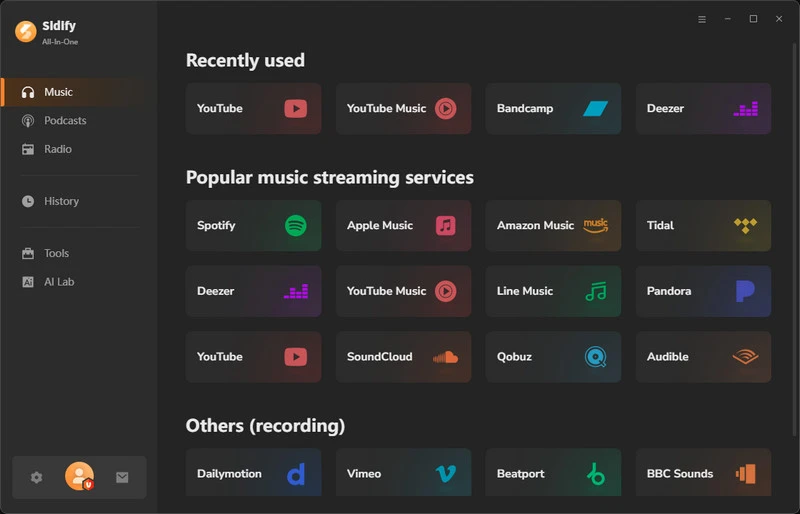
Step 1 Install and launch Sidify on your computer
Install and launch Sidify on your computer, and you will enter the main page, then select SoundCloud among the streaming music list.
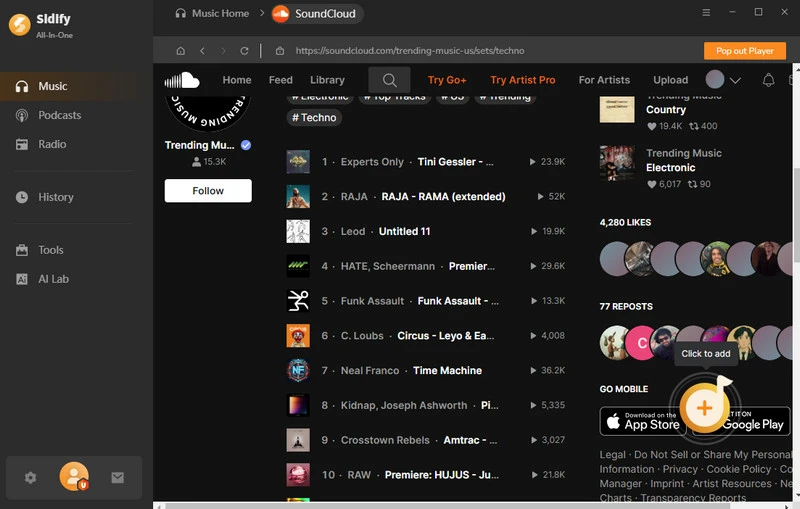
Step 2 Add SoundCloud Wrapped Playlist into Sidify
After accessing the SoundCloud web player page, log in to your SoundCloud account, find your SoundCloud playlists, and click the floating "+" button to add them to Sidify.
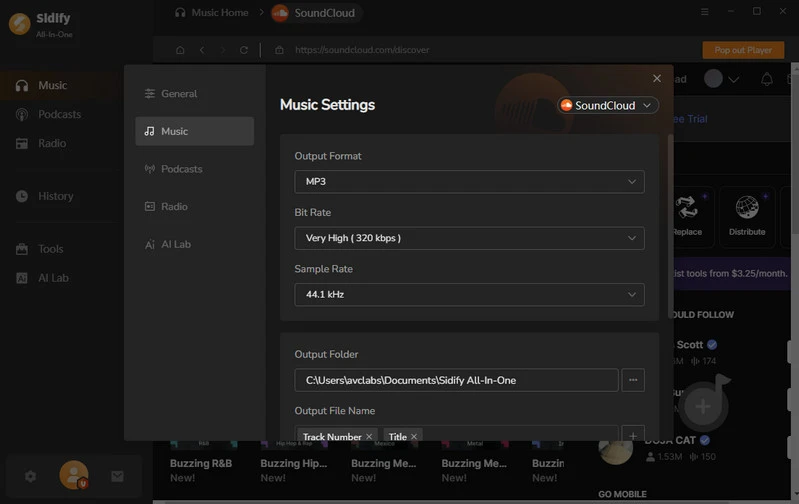
Step 3Customize your music settings
Click on Settings to access the Music Settings page, where you can select your desired output format, including MP3, AAC, FLAC, WAV, AIFF, or ALAC. You can also customize the output filename, for example, by naming files according to song title, year, artist, or album, making it easier to manage and categorize your downloaded music files.
Step 4Starting to download your SoundCloud Playlists.
Click the "Convert" button, and Sidify will automatically start converting and downloading your playlists to your computer. The conversion is complete when the progress bar reaches 100%.


Step 5 Locate your downloaded SoundCloud Files
After the conversion is complete, click to enter the History page. Here you can listen to the tracks you have downloaded, and you can also click the file icon next to the song to directly locate the file on your computer.

Yes, you can share your playback playlists on social media platforms or send them to friends using SoundCloud's sharing function, allowing others to see your annual music recap.
1. On the SoundCloud app: Go to the Your Playback playlists and tap the share button in the upper right corner. Select the social media icon where you want to share it.
2. On the SoundCloud website: Open the Your Playback playlist and click "Share" and select the social media platform.
Yes, you can access your past Playback playlists here:
SoundCloud does not officially offer a function to directly download or save Wrapped playlists. Even with a SoundCloud Go+ subscription, you can only cache playlists offline within the app; you cannot save them locally. However, you can use a professional SoundCloud to MP3 downloader like Sidify SoundCloud Downloader to download the entire playlist with one click, preserving the original sound quality for long-term offline access.
By now, you've learned how to view your SoundCloud Wrapped and access your Playback annual playlist. If you want to keep these Wrapped playlists long-term, you can also download the playlists locally using Sidify SoundCloud Downloader for offline listening. Go ahead and check out your SoundCloud Wrapped, discover your most frequently listened-to songs, favorite artists, and music moods, and save your own annual music recap!


 700,000+ Downloads


